The Road to Delphi

Delphi – Free Pascal – Oxygene


8 Comments

Patching the dock title bar using the Delphi Detours Library

This is the first of a series of articles about how use the Delphi Detours Library . On this entry I will show you how you can patch the title bar of the dock windows used by the RAD Studio IDE (or a VCL application).

The Delphi IDE uses the Vcl.CaptionedDockTree.TDockCaptionDrawer class to draw the title bar of the docked forms. Unfortunately the look and feel of the docked forms doesn’t looks very nice.

OldCaptionedDockTree

So if we want create new and nice title bar we must patch this class, specifically the DrawDockCaption method.

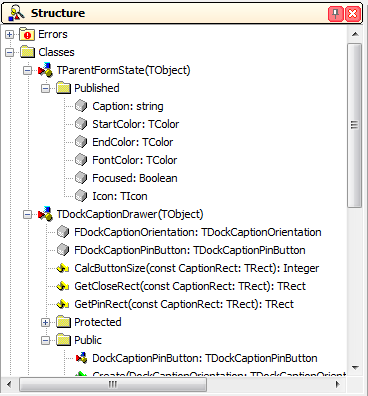
This is the definition of the TDockCaptionDrawer class.

  TDockCaptionDrawer = class(TObject)
  private
    FDockCaptionOrientation: TDockCaptionOrientation;
    FDockCaptionPinButton: TDockCaptionPinButton;
    function GetCloseRect(const CaptionRect: TRect): TRect;
    function GetPinRect(const CaptionRect: TRect): TRect;
    function CalcButtonSize(const CaptionRect: TRect): Integer;
  protected
    property DockCaptionOrientation: TDockCaptionOrientation read FDockCaptionOrientation;
  public
    procedure DrawDockCaption(const Canvas: TCanvas;
      CaptionRect: TRect; State: TParentFormState); virtual;
    function DockCaptionHitTest(const CaptionRect: TRect;
      const MousePos: TPoint): TDockCaptionHitTest; virtual;
    constructor Create(DockCaptionOrientation: TDockCaptionOrientation); virtual;
    property DockCaptionPinButton: TDockCaptionPinButton read FDockCaptionPinButton write FDockCaptionPinButton;
  end;

The first step is create a new Delphi package in order to load the module inside of the Delphi IDE. Then we must define a trampoline with the same signature of the method to patch.

The method DrawDockCaption looks like so

    procedure DrawDockCaption(const Canvas: TCanvas; CaptionRect: TRect; State: TParentFormState); virtual;

And the trampoline definition

type
 TDockCaptionDrawerClass = class(TDockCaptionDrawer);
var
  Trampoline_TDockCaptionDrawer_DrawDockCaption      : function (Self : TDockCaptionDrawerClass;const Canvas: TCanvas; CaptionRect: TRect; State: TParentFormState): TDockCaptionHitTest =nil;

You can note which the first parameter (Self : TDockCaptionDrawerClass) of the trampoline definition include a reference to the object where is contained the original method, you can use a simple TObject as well but is better use the original class, on this case I’m using cracker class to access the protected members inside of the new patched method.

After of define the trampoline , we need create the new function which be draw the caption bar, the signature of this method must be match with the trampoline.

function CustomDrawDockCaption(Self : TDockCaptionDrawerClass;const Canvas: TCanvas; CaptionRect: TRect; State: TParentFormState): TDockCaptionHitTest;

The next step is patch the address of the original method. This is done using the InterceptCreate function of the DDetours unit. This function takes two parameters which are the address of the method to patch and the address of the new method, as result the function returns a pointer to the original function.

  Trampoline_TDockCaptionDrawer_DrawDockCaption  := InterceptCreate(@TDockCaptionDrawer.DrawDockCaption,   @CustomDrawDockCaption);

Remember which you need restore the original address of the patched method (usually when the application is closed or the module is unloaded) this is done using the InterceptRemove function passing the trampoline variable.

  if Assigned(Trampoline_TDockCaptionDrawer_DrawDockCaption) then
    InterceptRemove(@Trampoline_TDockCaptionDrawer_DrawDockCaption);

Now check the implementation of the new drawing method

function CustomDrawDockCaption(Self : TDockCaptionDrawerClass;const Canvas: TCanvas; CaptionRect: TRect; State: TParentFormState): TDockCaptionHitTest;

  procedure DrawIcon;
  var
    FormBitmap: TBitmap;
    DestBitmap: TBitmap;
    ImageSize: Integer;
    X, Y: Integer;
  begin
    if (State.Icon <> nil) and (State.Icon.HandleAllocated) then
    begin
      if Self.DockCaptionOrientation = dcoHorizontal then
      begin
        ImageSize := CaptionRect.Bottom - CaptionRect.Top - 3;
        X := CaptionRect.Left;
        Y := CaptionRect.Top + 2;
      end
      else
      begin
        ImageSize := CaptionRect.Right - CaptionRect.Left - 3;
        X := CaptionRect.Left + 1;
        Y := CaptionRect.Top;
      end;

      FormBitmap := nil;
      DestBitmap := TBitmap.Create;
      try
        FormBitmap := TBitmap.Create;
        DestBitmap.Width :=  ImageSize;
        DestBitmap.Height := ImageSize;
        DestBitmap.Canvas.Brush.Color := clFuchsia;
        DestBitmap.Canvas.FillRect(Rect(0, 0, DestBitmap.Width, DestBitmap.Height));
        FormBitmap.Width := State.Icon.Width;
        FormBitmap.Height := State.Icon.Height;
        FormBitmap.Canvas.Draw(0, 0, State.Icon);
        ScaleImage(FormBitmap, DestBitmap, DestBitmap.Width / FormBitmap.Width);

        DestBitmap.TransparentColor := DestBitmap.Canvas.Pixels[0, DestBitmap.Height - 1];
        DestBitmap.Transparent := True;

        Canvas.Draw(X, Y, DestBitmap);
      finally
        FormBitmap.Free;
        DestBitmap.Free;
      end;

      if Self.DockCaptionOrientation = dcoHorizontal then
        CaptionRect.Left := CaptionRect.Left + 6 + ImageSize
      else
        CaptionRect.Top := CaptionRect.Top + 6 + ImageSize;
    end;
  end;

  function CalcButtonSize(const CaptionRect: TRect): Integer;
  const
    cButtonBuffer = 8;
  begin
    if Self.DockCaptionOrientation = dcoHorizontal then
      Result := CaptionRect.Bottom - CaptionRect.Top - cButtonBuffer
    else
      Result := CaptionRect.Right - CaptionRect.Left - cButtonBuffer;
  end;

  function GetCloseRect(const CaptionRect: TRect): TRect;
  const
    cSideBuffer = 4;
  var
    CloseSize: Integer;
  begin
    CloseSize := CalcButtonSize(CaptionRect);
    if Self.DockCaptionOrientation = dcoHorizontal then
    begin
      Result.Left := CaptionRect.Right - CloseSize - cSideBuffer;
      Result.Top := CaptionRect.Top + ((CaptionRect.Bottom - CaptionRect.Top) - CloseSize) div 2;
    end
    else
    begin
      Result.Left := CaptionRect.Left + ((CaptionRect.Right - CaptionRect.Left) - CloseSize) div 2;
      Result.Top := CaptionRect.Top + 2 * cSideBuffer;
    end;
    Result.Right := Result.Left + CloseSize;
    Result.Bottom := Result.Top + CloseSize;
  end;

  function GetPinRect(const CaptionRect: TRect): TRect;
  const
    cSideBuffer = 4;
  var
    PinSize: Integer;
  begin
    PinSize := CalcButtonSize(CaptionRect);
    if Self.DockCaptionOrientation = dcoHorizontal then
    begin
      Result.Left := CaptionRect.Right - 2*PinSize - 2*cSideBuffer;
      Result.Top := CaptionRect.Top + ((CaptionRect.Bottom - CaptionRect.Top) - PinSize) div 2;
    end
    else
    begin
      Result.Left := CaptionRect.Left + ((CaptionRect.Right - CaptionRect.Left) - PinSize) div 2;
      Result.Top := CaptionRect.Top + 2*cSideBuffer + 2*PinSize;
    end;
    Result.Right := Result.Left + PinSize + 2;
    Result.Bottom := Result.Top + PinSize;
  end;

var
  ShouldDrawClose: Boolean;
  CloseRect, PinRect: TRect;
  LPngImage : TPngImage;
  LStartColor, LEndColor : TColor;
begin
  Canvas.Font.Color :=  DockerFontColor;
   //check the orientation of the dock caption
  if Self.DockCaptionOrientation = dcoHorizontal then
  begin
    Canvas.Pen.Width := 1;
    //set the color for the border of the caption bar
    Canvas.Pen.Color := DockerBorderColor;

    CaptionRect.Top := CaptionRect.Top + 1;
    //set the colors for the captin bar background
    if State.Focused then
    begin
      LStartColor := DockerStartEnabledColor;
      LEndColor   := DockerEndEnabledColor;
    end
    else
    begin
      LStartColor := DockerStartDisabledColor;
      LEndColor   := DockerEndDisabledColor;
    end;

    //draw the caption bar using a gradient
    GradientFillCanvas(Canvas, LStartColor, LEndColor, Rect(CaptionRect.Left + 1, CaptionRect.Top + 1, CaptionRect.Right, CaptionRect.Bottom), gdVertical);

    //draw the border of the caption bar
    Canvas.Pen.Color := DockerBorderColor;
    with CaptionRect do
      Canvas.Polyline([Point(Left + 2, Top), Point(Right - 2, Top), Point(Right, Top + 2),
        Point(Right, Bottom - 2), Point(Right - 2, Bottom), Point(Left + 2, Bottom), Point(Left, Bottom - 2), Point(Left, Top + 2), Point(Left + 3, Top)]);

    //draw the pin buttton
    CloseRect := GetCloseRect(CaptionRect);

    if Self.DockCaptionPinButton <> dcpbNone then
    begin
      PinRect := GetPinRect(CaptionRect);

      LPngImage:=TPNGImage.Create;
      try
        if Self.DockCaptionPinButton = dcpbUp then
         LPngImage.LoadFromResourceName(HInstance, 'pin_dock_left')
        else
         LPngImage.LoadFromResourceName(HInstance, 'pin_dock');

        Canvas.Draw(PinRect.Left, PinRect.Top, LPngImage);
      finally
        LPngImage.free;
      end;

      CaptionRect.Right := PinRect.Right - 2;
    end
    else
      CaptionRect.Right := CloseRect.Right - 2;

    CaptionRect.Left := CaptionRect.Left + 6;
    DrawIcon;
    ShouldDrawClose := CloseRect.Left >= CaptionRect.Left;

  end
  else
  begin
    Canvas.MoveTo(CaptionRect.Left + 1, CaptionRect.Top + 1);
    Canvas.LineTo(CaptionRect.Right - 1, CaptionRect.Top + 1);

    if State.Focused then
    begin
      LStartColor := DockerStartEnabledColor;
      LEndColor   := DockerEndEnabledColor;
    end
    else
    begin
      LStartColor := DockerStartDisabledColor;
      LEndColor   := DockerEndDisabledColor;
    end;

    GradientFillCanvas(Canvas, LStartColor, LEndColor,Rect(CaptionRect.Left, CaptionRect.Top + 2, CaptionRect.Right, CaptionRect.Bottom), gdVertical);

    Canvas.Pen.Color := DockerBorderColor;
    Canvas.MoveTo(CaptionRect.Left + 1, CaptionRect.Bottom);
    Canvas.LineTo(CaptionRect.Right - 1, CaptionRect.Bottom);

    Canvas.Font.Orientation := 900;
    CloseRect := GetCloseRect(CaptionRect);

    if Self.DockCaptionPinButton <> dcpbNone then
    begin
      PinRect := GetPinRect(CaptionRect);
      LPngImage:=TPNGImage.Create;
      try
        if Self.DockCaptionPinButton = dcpbUp then
         LPngImage.LoadFromResourceName(HInstance, 'pin_dock_left')
        else
         LPngImage.LoadFromResourceName(HInstance, 'pin_dock');

        Canvas.Draw(PinRect.Left, PinRect.Top, LPngImage);
      finally
        LPngImage.free;
      end;
      CaptionRect.Top := PinRect.Bottom + 2;
    end
    else
      CaptionRect.Top := CloseRect.Bottom + 2;

    ShouldDrawClose   := CaptionRect.Top < CaptionRect.Bottom;
    CaptionRect.Right := CaptionRect.Left + (CaptionRect.Bottom - CaptionRect.Top - 2);
    CaptionRect.Top   := CaptionRect.Top + Canvas.TextWidth(State.Caption) + 2;

    if CaptionRect.Top > CaptionRect.Bottom then
      CaptionRect.Top := CaptionRect.Bottom;
  end;

  Canvas.Brush.Style := bsClear;
  //draw the text of the caption bar
  if State.Caption <> '' then
  begin
    if State.Focused then
      Canvas.Font.Style := Canvas.Font.Style + [fsBold]
    else
      Canvas.Font.Style := Canvas.Font.Style - [fsBold];

   if ShouldDrawClose then
     CaptionRect.Right := CaptionRect.Right - (CloseRect.Right - CloseRect.Left) - 4;

    Canvas.TextRect(CaptionRect, State.Caption,  [tfEndEllipsis, tfVerticalCenter, tfSingleLine]);
  end;

  //draw the close buttton
  if ShouldDrawClose then
  begin
    LPngImage:=TPNGImage.Create;
    try
      LPngImage.LoadFromResourceName(HInstance, 'close_dock');
      Canvas.Draw(CloseRect.Left, CloseRect.Top, LPngImage);
    finally
      LPngImage.free;
    end;
  end;

  Exit(0);
end;

Now if we install the package on the Delphi IDE the result will be like so

NewDisabledCaptionedDockTree

NewEnabledCaptionedDockTree

If you try the above code in Delphi XE6, the captions will remain with the default IDE Theme. This is because Delphi XE6 introduces a new drawer for the IDE dock forms, this is implemented in the ModernTheme200.bpl package. So in order to make this patch works on XE6 we must patch the DrawDockCaption of this package.

First you must retrieve the signature of the method to patch and then get the address of that method. check the next code.

const
  sModernThemeDrawDockCaption = '@Moderntheme@TModernDockCaptionDrawer@DrawDockCaption$qqrxp20Vcl@Graphics@TCanvasrx18System@Types@TRectrx38Vcl@Captioneddocktree@TParentFormState';

{$IF CompilerVersion>=27}
  ModernThemeModule := LoadLibrary('ModernTheme200.bpl');
  if ModernThemeModule<>0 then
  begin
   pModernThemeDrawDockCaption := GetProcAddress(ModernThemeModule, PChar(sModernThemeDrawDockCaption));
   if Assigned(pModernThemeDrawDockCaption) then
     Trampoline_ModernDockCaptionDrawer_DrawDockCaption:= InterceptCreate(pModernThemeDrawDockCaption, @CustomDrawDockCaption);
  end;
{$ENDIF}

Finally this is the full implementation of the new title bar for the docked forms.


uses
 Types,
 Windows,
 Graphics,
 CaptionedDockTree,
 PngImage,
 GraphUtil,
 Forms,
 DDetours;

{$R Dockimages.RES}

type
 TDockCaptionDrawerClass = class(TDockCaptionDrawer);
var
  Trampoline_TDockCaptionDrawer_DrawDockCaption      : function (Self : TDockCaptionDrawerClass;const Canvas: TCanvas; CaptionRect: TRect; State: TParentFormState): TDockCaptionHitTest =nil;
  {$IF CompilerVersion>=27}
  Trampoline_ModernDockCaptionDrawer_DrawDockCaption : function (Self : TDockCaptionDrawerClass;const Canvas: TCanvas; CaptionRect: TRect; State: TParentFormState): TDockCaptionHitTest =nil;
  {$ENDIF}
  DockerFontColor          : TColor = clBlack;
  DockerBorderColor        : TColor = clBlack;
  DockerStartEnabledColor  : TColor = clWebIvory;
  DockerEndEnabledColor    : TColor = clWebPapayaWhip;
  DockerStartDisabledColor : TColor = clSilver;
  DockerEndDisabledColor   : TColor = clSilver;

{$IF CompilerVersion>=27}
  ModernThemeModule           : HMODULE;
  pModernThemeDrawDockCaption : Pointer;
{$ENDIF}

function CustomDrawDockCaption(Self : TDockCaptionDrawerClass;const Canvas: TCanvas; CaptionRect: TRect; State: TParentFormState): TDockCaptionHitTest;

  procedure DrawIcon;
  var
    FormBitmap: TBitmap;
    DestBitmap: TBitmap;
    ImageSize: Integer;
    X, Y: Integer;
  begin
    if (State.Icon <> nil) and (State.Icon.HandleAllocated) then
    begin
      if Self.DockCaptionOrientation = dcoHorizontal then
      begin
        ImageSize := CaptionRect.Bottom - CaptionRect.Top - 3;
        X := CaptionRect.Left;
        Y := CaptionRect.Top + 2;
      end
      else
      begin
        ImageSize := CaptionRect.Right - CaptionRect.Left - 3;
        X := CaptionRect.Left + 1;
        Y := CaptionRect.Top;
      end;

      FormBitmap := nil;
      DestBitmap := TBitmap.Create;
      try
        FormBitmap := TBitmap.Create;
        DestBitmap.Width :=  ImageSize;
        DestBitmap.Height := ImageSize;
        DestBitmap.Canvas.Brush.Color := clFuchsia;
        DestBitmap.Canvas.FillRect(Rect(0, 0, DestBitmap.Width, DestBitmap.Height));
        FormBitmap.Width := State.Icon.Width;
        FormBitmap.Height := State.Icon.Height;
        FormBitmap.Canvas.Draw(0, 0, State.Icon);
        ScaleImage(FormBitmap, DestBitmap, DestBitmap.Width / FormBitmap.Width);

        DestBitmap.TransparentColor := DestBitmap.Canvas.Pixels[0, DestBitmap.Height - 1];
        DestBitmap.Transparent := True;

        Canvas.Draw(X, Y, DestBitmap);
      finally
        FormBitmap.Free;
        DestBitmap.Free;
      end;

      if Self.DockCaptionOrientation = dcoHorizontal then
        CaptionRect.Left := CaptionRect.Left + 6 + ImageSize
      else
        CaptionRect.Top := CaptionRect.Top + 6 + ImageSize;
    end;
  end;

  function CalcButtonSize(const CaptionRect: TRect): Integer;
  const
    cButtonBuffer = 8;
  begin
    if Self.DockCaptionOrientation = dcoHorizontal then
      Result := CaptionRect.Bottom - CaptionRect.Top - cButtonBuffer
    else
      Result := CaptionRect.Right - CaptionRect.Left - cButtonBuffer;
  end;

  function GetCloseRect(const CaptionRect: TRect): TRect;
  const
    cSideBuffer = 4;
  var
    CloseSize: Integer;
  begin
    CloseSize := CalcButtonSize(CaptionRect);
    if Self.DockCaptionOrientation = dcoHorizontal then
    begin
      Result.Left := CaptionRect.Right - CloseSize - cSideBuffer;
      Result.Top := CaptionRect.Top + ((CaptionRect.Bottom - CaptionRect.Top) - CloseSize) div 2;
    end
    else
    begin
      Result.Left := CaptionRect.Left + ((CaptionRect.Right - CaptionRect.Left) - CloseSize) div 2;
      Result.Top := CaptionRect.Top + 2 * cSideBuffer;
    end;
    Result.Right := Result.Left + CloseSize;
    Result.Bottom := Result.Top + CloseSize;
  end;

  function GetPinRect(const CaptionRect: TRect): TRect;
  const
    cSideBuffer = 4;
  var
    PinSize: Integer;
  begin
    PinSize := CalcButtonSize(CaptionRect);
    if Self.DockCaptionOrientation = dcoHorizontal then
    begin
      Result.Left := CaptionRect.Right - 2*PinSize - 2*cSideBuffer;
      Result.Top := CaptionRect.Top + ((CaptionRect.Bottom - CaptionRect.Top) - PinSize) div 2;
    end
    else
    begin
      Result.Left := CaptionRect.Left + ((CaptionRect.Right - CaptionRect.Left) - PinSize) div 2;
      Result.Top := CaptionRect.Top + 2*cSideBuffer + 2*PinSize;
    end;
    Result.Right := Result.Left + PinSize + 2;
    Result.Bottom := Result.Top + PinSize;
  end;

var
  ShouldDrawClose: Boolean;
  CloseRect, PinRect: TRect;
  LPngImage : TPngImage;
  LStartColor, LEndColor : TColor;
begin
  Canvas.Font.Color :=  DockerFontColor;
   //check the orientation of the dock caption
  if Self.DockCaptionOrientation = dcoHorizontal then
  begin
    Canvas.Pen.Width := 1;
    //set the color for the border of the caption bar
    Canvas.Pen.Color := DockerBorderColor;

    CaptionRect.Top := CaptionRect.Top + 1;
    //set the colors for the captin bar background
    if State.Focused then
    begin
      LStartColor := DockerStartEnabledColor;
      LEndColor   := DockerEndEnabledColor;
    end
    else
    begin
      LStartColor := DockerStartDisabledColor;
      LEndColor   := DockerEndDisabledColor;
    end;

    //draw the caption bar using a gradient
    GradientFillCanvas(Canvas, LStartColor, LEndColor, Rect(CaptionRect.Left + 1, CaptionRect.Top + 1, CaptionRect.Right, CaptionRect.Bottom), gdVertical);

    //draw the border of the caption bar
    Canvas.Pen.Color := DockerBorderColor;
    with CaptionRect do
      Canvas.Polyline([Point(Left + 2, Top), Point(Right - 2, Top), Point(Right, Top + 2),
        Point(Right, Bottom - 2), Point(Right - 2, Bottom), Point(Left + 2, Bottom), Point(Left, Bottom - 2), Point(Left, Top + 2), Point(Left + 3, Top)]);

    //draw the pin buttton
    CloseRect := GetCloseRect(CaptionRect);

    if Self.DockCaptionPinButton <> dcpbNone then
    begin
      PinRect := GetPinRect(CaptionRect);

      LPngImage:=TPNGImage.Create;
      try
        if Self.DockCaptionPinButton = dcpbUp then
         LPngImage.LoadFromResourceName(HInstance, 'pin_dock_left')
        else
         LPngImage.LoadFromResourceName(HInstance, 'pin_dock');

        Canvas.Draw(PinRect.Left, PinRect.Top, LPngImage);
      finally
        LPngImage.free;
      end;

      CaptionRect.Right := PinRect.Right - 2;
    end
    else
      CaptionRect.Right := CloseRect.Right - 2;

    CaptionRect.Left := CaptionRect.Left + 6;
    DrawIcon;
    ShouldDrawClose := CloseRect.Left >= CaptionRect.Left;

  end
  else
  begin
    Canvas.MoveTo(CaptionRect.Left + 1, CaptionRect.Top + 1);
    Canvas.LineTo(CaptionRect.Right - 1, CaptionRect.Top + 1);

    if State.Focused then
    begin
      LStartColor := DockerStartEnabledColor;
      LEndColor   := DockerEndEnabledColor;
    end
    else
    begin
      LStartColor := DockerStartDisabledColor;
      LEndColor   := DockerEndDisabledColor;
    end;

    GradientFillCanvas(Canvas, LStartColor, LEndColor,Rect(CaptionRect.Left, CaptionRect.Top + 2, CaptionRect.Right, CaptionRect.Bottom), gdVertical);

    Canvas.Pen.Color := DockerBorderColor;
    Canvas.MoveTo(CaptionRect.Left + 1, CaptionRect.Bottom);
    Canvas.LineTo(CaptionRect.Right - 1, CaptionRect.Bottom);

    Canvas.Font.Orientation := 900;
    CloseRect := GetCloseRect(CaptionRect);

    if Self.DockCaptionPinButton <> dcpbNone then
    begin
      PinRect := GetPinRect(CaptionRect);
      LPngImage:=TPNGImage.Create;
      try
        if Self.DockCaptionPinButton = dcpbUp then
         LPngImage.LoadFromResourceName(HInstance, 'pin_dock_left')
        else
         LPngImage.LoadFromResourceName(HInstance, 'pin_dock');

        Canvas.Draw(PinRect.Left, PinRect.Top, LPngImage);
      finally
        LPngImage.free;
      end;
      CaptionRect.Top := PinRect.Bottom + 2;
    end
    else
      CaptionRect.Top := CloseRect.Bottom + 2;

    ShouldDrawClose   := CaptionRect.Top < CaptionRect.Bottom;
    CaptionRect.Right := CaptionRect.Left + (CaptionRect.Bottom - CaptionRect.Top - 2);
    CaptionRect.Top   := CaptionRect.Top + Canvas.TextWidth(State.Caption) + 2;

    if CaptionRect.Top > CaptionRect.Bottom then
      CaptionRect.Top := CaptionRect.Bottom;
  end;

  Canvas.Brush.Style := bsClear;
  //draw the text of the caption bar
  if State.Caption <> '' then
  begin
    if State.Focused then
      Canvas.Font.Style := Canvas.Font.Style + [fsBold]
    else
      Canvas.Font.Style := Canvas.Font.Style - [fsBold];

   if ShouldDrawClose then
     CaptionRect.Right := CaptionRect.Right - (CloseRect.Right - CloseRect.Left) - 4;

    Canvas.TextRect(CaptionRect, State.Caption,  [tfEndEllipsis, tfVerticalCenter, tfSingleLine]);
  end;

  //draw the close buttton
  if ShouldDrawClose then
  begin
    LPngImage:=TPNGImage.Create;
    try
      LPngImage.LoadFromResourceName(HInstance, 'close_dock');
      Canvas.Draw(CloseRect.Left, CloseRect.Top, LPngImage);
    finally
      LPngImage.free;
    end;
  end;

  Exit(0);
end;


{$IF CompilerVersion>=27}
const
  sModernThemeDrawDockCaption = '@Moderntheme@TModernDockCaptionDrawer@DrawDockCaption$qqrxp20Vcl@Graphics@TCanvasrx18System@Types@TRectrx38Vcl@Captioneddocktree@TParentFormState';
{$ENDIF}

procedure RefreshForms;
var
  i : Integer;
begin
   for i := 0 to Screen.FormCount-1 do
    Screen.Forms[i].Invalidate;
end;

initialization
  Trampoline_TDockCaptionDrawer_DrawDockCaption  := InterceptCreate(@TDockCaptionDrawer.DrawDockCaption,   @CustomDrawDockCaption);
{$IF CompilerVersion>=27}
  ModernThemeModule := LoadLibrary('ModernTheme200.bpl');
  if ModernThemeModule<>0 then
  begin
   pModernThemeDrawDockCaption := GetProcAddress(ModernThemeModule, PChar(sModernThemeDrawDockCaption));
   if Assigned(pModernThemeDrawDockCaption) then
     Trampoline_ModernDockCaptionDrawer_DrawDockCaption:= InterceptCreate(pModernThemeDrawDockCaption, @CustomDrawDockCaption);
  end;
{$ENDIF}
  RefreshForms();
finalization
  if Assigned(Trampoline_TDockCaptionDrawer_DrawDockCaption) then
    InterceptRemove(@Trampoline_TDockCaptionDrawer_DrawDockCaption);
{$IF CompilerVersion>=27}
  if Assigned(Trampoline_ModernDockCaptionDrawer_DrawDockCaption) then
    InterceptRemove(@Trampoline_ModernDockCaptionDrawer_DrawDockCaption);
{$ENDIF}
  RefreshForms();

end.

You can download the full source code of this package from the project page.


13 Comments

VCL Styles Utils, Embarcadero Agreement and Delphi XE6

Embarcadero Agreement

As probably you know, a small part of the VCL Styles utils project was licensed to Embarcadero, via a non-exclusive proprietary license. This means which they can use, modify and distribute the code as part of the VCL, but the Copyright and the Open Source version of the project still belong us. So you can continue using this library in all the Delphi versions supported (XE2-XE6).

Delphi XE6

The VCL Styles utils was updated to support and avoid conflicts with Delphi XE6. Check the next image which show the Open Dialog styled using the New XE6 style Table Dark

Tabla_Dark_Open

Since now the main difference is that you can use the menu style hook which is included as part of the Delphi XE6 VCL Styles, or continue using the menu hook of the library, this is described in the Vcl.Styles.Utils.Menus unit.

{$DEFINE UseVCLStyleUtilsMenu}
{$IF CompilerVersion >= 27} // Use the XE6 menu syshooks by default
  {$UNDEF UseVCLStyleUtilsMenu} // comment this line if you want to use the VCL Styles Utils Menus Hooks instead
{$IFEND}

About the Styled Dialogs

Using the library is the only way to style the system dialogs, currently we support all the Common Dialog Box Types (Color, Find, Font, Open, Page Setup, Print, Replace, Save As).

Check the Common Dialogs styled using the Premium VCL Style Jet.

Jet

But not just the Common dialogs are styled, in fact any dialog (#32770 Class) which uses the windows common controls is supported (of course if the dialog had a owner draw control this cannot be styled). For an example take a look to the next images.

Prompt DataSource Dialog

output_sWoRA1

Select User Dialog

ObjectSelect_4

Note: Some dialogs cannot be styled, because uses the undocumented DirectUIHWND control, these include the new (introduced in windows Vista) Open and Save As dialog and the Task Dialogs

Rodrigo.


3 Comments

VCL Styles for NSIS

Important Update

The new location of this project is https://code.google.com/p/vcl-styles-plugins/

NSIS

The VCL Styles Utils project, now includes  a plugin (dll) to skin the installers created by NSIS (2.46 and 3.0). The current size of the plugin is about 1.6 mb, but when is included (and compressed) in the script only add ~550 Kb to the final installer.

output_A6NOFn

How to use it

To use the plugin in a NSIS installer you must call the LoadVCLStyle function passing the skin name in the .onInit function.

Function .onInit
  InitPluginsDir
  ;Get the skin file to use
  File /oname=$PLUGINSDIR\Amakrits.vsf "..\Styles\Amakrits.vsf"
  ;Load the skin using the LoadVCLStyle function
  NSISVCLStyles::LoadVCLStyle $PLUGINSDIR\Amakrits.vsf
FunctionEnd

To use the plugin in a NSIS Uninstaller you must call the LoadVCLStyle function passing the skin name in the un.onInit function.

Function un.onInit
  InitPluginsDir
  File /oname=$PLUGINSDIR\Amakrits.vsf "..\Styles\Amakrits.vsf"
  ;Load the skin using the LoadVCLStyle function
  NSISVCLStyles::LoadVCLStyle $PLUGINSDIR\Amakrits.vsf
FunctionEnd

For download and more info check the page of the plugin


26 Comments

VCL Styles Utils and Popup Menus – Major Update

As you probably know the VCL Styles doesn’t support  Popup menus, this means if you apply any VCL Style  to your VCL Application  the popup menus will remain with the Windows native look and feel  (exists some workarounds for this like use a TPopupActionBar  as described here, but this only works partially, and doesn’t support the child menus of a TMainMenu) Since Sometime ago the VCL Styles Utils project can help you to overcome this limitation adding support for VCL Styled Popup Menus.

Now we just uploaded a major update to the VCL Styles Utils project. This new version fix all the issues reported via mail and the issue page related the PopUp menus like support for  the Break property, Checkboxes,  Radio Items,  Default items and so on.

Sample images

TMainMenu with VCL Styles

1

TMainMenu with VCL Styles and VCL Styles Utils

2

Popup Menu with VCL Styles

3

Popup Menu with VCL Styles and VCL Styles Utils

4

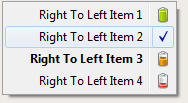
Right to left Popup Menu with VCL Styles

5

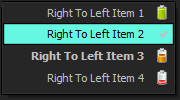
Right to left Popup Menu with VCL Styles and VCL Styles Utils

6

System Menu with VCL Styles

7

System Menu with VCL Styles and VCL Styles Utils

8

To add support for VCL Styled Popup Menus in your Application only you must add these units to your project Vcl.Styles.Utils.Menus, Vcl.Styles.Utils.SysStyleHook and Vcl.Styles.Utils.SysControls.

You can download sample application from here and the source of the Application is here.


49 Comments

VCL Styles for Inno Setup

Introduction

As part of the VCL Styles Utils project, I made a plugin (dll) to skin the installers created by Inno setup. The current size of the plugin is about 1.6 mb, but when is included (and compressed) in the script only add ~490 Kb to the final installer.

output_qkRcra

How to use it

In order to use the plugin you must follow these steps

  1. Add the VclStylesinno.dll file to your inno setup script and the VCL Style file to use.
  2. Import the function LoadVCLStyleW for Unicode versions of Inno setup or the LoadVCLStyleA method for the Ansi version
  3. Import the function UnLoadVCLStyles
  4. In the InitializeSetup function extract the style to use and call the LoadVCLStyle method passing the name of the style file
  5. Finally in the DeinitializeSetup function call the UnLoadVCLStyles method.

Check the next sample script

[Files]
Source: ..\VclStylesinno.dll; DestDir: {app}; Flags: dontcopy
Source: ..\Styles\Amakrits.vsf; DestDir: {app}; Flags: dontcopy

[Code]
// Import the LoadVCLStyle function from VclStylesInno.DLL
procedure LoadVCLStyle(VClStyleFile: String); external 'LoadVCLStyleW@files:VclStylesInno.dll stdcall';
// Import the UnLoadVCLStyles function from VclStylesInno.DLL
procedure UnLoadVCLStyles; external 'UnLoadVCLStyles@files:VclStylesInno.dll stdcall';

function InitializeSetup(): Boolean;
begin
  ExtractTemporaryFile('Amakrits.vsf');
  LoadVCLStyle(ExpandConstant('{tmp}\Amakrits.vsf'));
  Result := True;
end;

procedure DeinitializeSetup();
begin
  UnLoadVCLStyles;
end;

TODO

  • Add support for TFolderTreeView and TStartMenuFolderTreeView components
  • Add support for themed controls in the TNewCheckBoxList component
  • Add support for the npbstMarquee style in the TNewProgressBar component

Source code and Installer

The source code and installer is available on Github.

As always all your comments and feedback is welcome.


17 Comments

VCL Styles Utils Project – New Addition : Patch for System colors.

Introduction

A result of the work in a new sub project of the VCL Styles Utils , many new features as been added to the library, One of my favorites is a patch for the GetSysColor WinApi function. This fix replace the original call to this function by a jump to the StyleServices.GetSystemColor method replacing the original system colors by the current VCL Style colors. One of the advantages of use this fix is which the controls uses the proper VCL Style highlight color.

Screenshots

Check these controls with the VCL Styles

full

Now using the Vcl.Styles.Hooks unit

Full_Fix

TColorBox

ColorBox ColorBox_Fix

Source Code

This is the actual source code of the Vcl.Styles.Hooks unit which includes the patch to the GetSysColor function. To use this unit in your code you must add the KOLDetours unit too.

unit Vcl.Styles.Hooks;

interface

implementation

uses
  KOLDetours,
  WinApi.Windows,
  Vcl.Styles,
  Vcl.Themes;

var
  TrampolineGetSysColor:  function (nIndex: Integer): DWORD; stdcall;
  GetSysColorOrgPointer : Pointer = nil;

function InterceptGetSysColor(nIndex: Integer): DWORD; stdcall;
begin
  if StyleServices.IsSystemStyle then
   Result:= TrampolineGetSysColor(nIndex)
  else
   Result:= StyleServices.GetSystemColor(nIndex or Integer($FF000000));
end;

initialization
 if StyleServices.Available then
 begin
   GetSysColorOrgPointer  := GetProcAddress(GetModuleHandle('user32.dll'), 'GetSysColor');
   @TrampolineGetSysColor := InterceptCreate(GetSysColorOrgPointer, @InterceptGetSysColor);
 end;
finalization
 if GetSysColorOrgPointer<>nil then
  InterceptRemove(@TrampolineGetSysColor, @InterceptGetSysColor);

end.


7 Comments

Using the Windows Firewall with Advanced Security scripting API and Delphi

firewallThese are a set of useful Delphi snippets to handle the Windows Firewall using the Advanced Security scripting.

Note : Some of the below samples requires elevation.

Adding a LAN Rule

{$APPTYPE CONSOLE}

uses
  SysUtils,
  ActiveX,
  ComObj;

//This code adds a LAN rule using the Microsoft Windows Firewall APIs.
Procedure AddLANRule;
Const
 NET_FW_IP_PROTOCOL_TCP = 6;
 NET_FW_ACTION_ALLOW = 1;
var
 CurrentProfiles : OleVariant;
 fwPolicy2       : OleVariant;
 RulesObject     : OleVariant;
 NewRule         : OleVariant;
begin
  // Create the FwPolicy2 object.
  fwPolicy2   := CreateOleObject('HNetCfg.FwPolicy2');
  RulesObject := fwPolicy2.Rules;
  CurrentProfiles := fwPolicy2.CurrentProfileTypes;

  //Create a Rule Object.
  NewRule := CreateOleObject('HNetCfg.FWRule');

  NewRule.Name := 'Per_InterfaceType_Rule';
  NewRule.Description := 'Allow incoming network traffic over port 2400 coming from LAN interface type';
  NewRule.Protocol := NET_FW_IP_PROTOCOL_TCP;
  NewRule.LocalPorts := 2300;
  NewRule.Interfacetypes := 'LAN';
  NewRule.Enabled := True;
  NewRule.Grouping := 'My Group';
  NewRule.Profiles := CurrentProfiles;
  NewRule.Action := NET_FW_ACTION_ALLOW;

  //Add a new rule
  RulesObject.Add(NewRule);
end;

begin
 try
    CoInitialize(nil);
    try
      AddLANRule;
    finally
      CoUninitialize;
    end;
 except
    on E:EOleException do
        Writeln(Format('EOleException %s %x', [E.Message,E.ErrorCode]));
    on E:Exception do
        Writeln(E.Classname, ':', E.Message);
 end;
 Writeln('Press Enter to exit');
 Readln;
end.

Adding a Per Interface Rule

{$APPTYPE CONSOLE}

uses
  SysUtils,
  ActiveX,
  Variants,
  ComObj;

//This code that adds a per interface rule using the Microsoft Windows Firewall APIs.
Procedure AddPerInterfaceRule;
Const
 NET_FW_IP_PROTOCOL_TCP = 6;
 NET_FW_IP_PROTOCOL_UDP = 17;
 NET_FW_ACTION_ALLOW = 1;
var
 CurrentProfiles : OleVariant;
 fwPolicy2       : OleVariant;
 RulesObject     : OleVariant;
 NewRule         : OleVariant;
begin
  // Create the FwPolicy2 object.
  fwPolicy2   := CreateOleObject('HNetCfg.FwPolicy2');
  RulesObject := fwPolicy2.Rules;
  CurrentProfiles := fwPolicy2.CurrentProfileTypes;

  //Create a Rule Object.
  NewRule := CreateOleObject('HNetCfg.FWRule');

  NewRule.Name := 'Per_Interface_Rule';
  NewRule.Description := 'Add a Per Interface Rule';
  NewRule.Protocol := NET_FW_IP_PROTOCOL_TCP;
  NewRule.LocalPorts := 2300;
  NewRule.Interfacetypes := 'LAN';
  NewRule.Enabled := True;
  NewRule.Grouping := 'My Group';
  NewRule.Profiles := CurrentProfiles;
  NewRule.Interfaces := VarArrayOf(['Local Area Connection']);
  NewRule.Action := NET_FW_ACTION_ALLOW;

  //Add a new rule
  RulesObject.Add(NewRule);
end;

begin
 try
    CoInitialize(nil);
    try
      AddPerInterfaceRule;
    finally
      CoUninitialize;
    end;
 except
    on E:EOleException do
        Writeln(Format('EOleException %s %x', [E.Message,E.ErrorCode]));
    on E:Exception do
        Writeln(E.Classname, ':', E.Message);
 end;
 Writeln('Press Enter to exit');
 Readln;
end.

Adding a Protocol Rule

{$APPTYPE CONSOLE}

uses
  SysUtils,
  ActiveX,
  ComObj;

//This code adds a Generic Routing Encapsulation (GRE) protocol rule 
//using the Microsoft Windows Firewall APIs.
Procedure AddProtocolRule;
Const
 NET_FW_ACTION_ALLOW = 1;
var
 CurrentProfiles : OleVariant;
 fwPolicy2       : OleVariant;
 RulesObject     : OleVariant;
 NewRule         : OleVariant;
begin
  // Create the FwPolicy2 object.
  fwPolicy2   := CreateOleObject('HNetCfg.FwPolicy2');
  RulesObject := fwPolicy2.Rules;
  CurrentProfiles := fwPolicy2.CurrentProfileTypes;

  //Create a Rule Object.
  NewRule := CreateOleObject('HNetCfg.FWRule');

  NewRule.Name := 'GRE_RULE';
  NewRule.Description := 'Allow GRE Traffic';
  NewRule.Protocol := 47;
  NewRule.Enabled := True;
  NewRule.Profiles := CurrentProfiles;
  NewRule.Action := NET_FW_ACTION_ALLOW;

  //Add a new rule
  RulesObject.Add(NewRule);
end;

begin
 try
    CoInitialize(nil);
    try
      AddProtocolRule;
    finally
      CoUninitialize;
    end;
 except
    on E:EOleException do
        Writeln(Format('EOleException %s %x', [E.Message,E.ErrorCode]));
    on E:Exception do
        Writeln(E.Classname, ':', E.Message);
 end;
 Writeln('Press Enter to exit');
 Readln;
end.

Adding a Rule with Edge Traversal

{$APPTYPE CONSOLE}

uses
  SysUtils,
  ActiveX,
  ComObj;

//This code adds an application rule with Edge Traversal using the Microsoft Windows Firewall APIs.
Procedure AddRuleEdgeTraversal;
Const
 NET_FW_ACTION_ALLOW = 1;
 NET_FW_IP_PROTOCOL_TCP = 6;
var
 CurrentProfiles : OleVariant;
 fwPolicy2       : OleVariant;
 RulesObject     : OleVariant;
 NewRule         : OleVariant;
begin
  // Create the FwPolicy2 object.
  fwPolicy2   := CreateOleObject('HNetCfg.FwPolicy2');
  RulesObject := fwPolicy2.Rules;
  CurrentProfiles := fwPolicy2.CurrentProfileTypes;

  //Create a Rule Object.
  NewRule := CreateOleObject('HNetCfg.FWRule');

  NewRule.Name := 'My Application Name with Edge Traversal';
  NewRule.Description := 'Allow GRE TrafficAllow my application network traffic with Edge Traversal';
  NewRule.Applicationname := 'MyApplication.exe';
  NewRule.Protocol := NET_FW_IP_PROTOCOL_TCP;
  NewRule.LocalPorts := 5000;
  NewRule.Enabled := True;
  NewRule.Grouping := 'My Group';
  NewRule.Profiles := CurrentProfiles;
  NewRule.Action := NET_FW_ACTION_ALLOW;
  NewRule.EdgeTraversal := True;

  //Add a new rule
  RulesObject.Add(NewRule);
end;

begin
 try
    CoInitialize(nil);
    try
      AddRuleEdgeTraversal;
    finally
      CoUninitialize;
    end;
 except
    on E:EOleException do
        Writeln(Format('EOleException %s %x', [E.Message,E.ErrorCode]));
    on E:Exception do
        Writeln(E.Classname, ':', E.Message);
 end;
 Writeln('Press Enter to exit');
 Readln;
end.

Adding a Service Rule

{$APPTYPE CONSOLE}

uses
  SysUtils,
  ActiveX,
  ComObj;

//This code adds a service rule in the local public store using the Microsoft Windows Firewall APIs.
Procedure AddServiceRule;
Const
 NET_FW_ACTION_ALLOW = 1;
 NET_FW_IP_PROTOCOL_TCP = 6;
var
 CurrentProfiles : OleVariant;
 fwPolicy2       : OleVariant;
 RulesObject     : OleVariant;
 NewRule         : OleVariant;
begin
  // Create the FwPolicy2 object.
  fwPolicy2   := CreateOleObject('HNetCfg.FwPolicy2');
  RulesObject := fwPolicy2.Rules;
  CurrentProfiles := fwPolicy2.CurrentProfileTypes;

  //Create a Rule Object.
  NewRule := CreateOleObject('HNetCfg.FWRule');

  NewRule.Name := 'Service_Rule';
  NewRule.Description := 'Allow incoming network traffic to myservice';
  NewRule.Applicationname := 'MyService.exe';
  NewRule.ServiceName := 'myservicename';
  NewRule.Protocol := NET_FW_IP_PROTOCOL_TCP;
  NewRule.LocalPorts := 135;
  NewRule.Enabled := True;
  NewRule.Grouping := 'My Group';
  NewRule.Profiles := CurrentProfiles;
  NewRule.Action := NET_FW_ACTION_ALLOW;

  //Add a new rule
  RulesObject.Add(NewRule);
end;

begin
 try
    CoInitialize(nil);
    try
      AddServiceRule;
    finally
      CoUninitialize;
    end;
 except
    on E:EOleException do
        Writeln(Format('EOleException %s %x', [E.Message,E.ErrorCode]));
    on E:Exception do
        Writeln(E.Classname, ':', E.Message);
 end;
 Writeln('Press Enter to exit');
 Readln;
end.

Adding an ICMP Rule

{$APPTYPE CONSOLE}

uses
  SysUtils,
  ActiveX,
  ComObj;

//This code adds an ICMP rule using the Microsoft Windows Firewall APIs.
Procedure AddICMPRule;
Const
 NET_FW_ACTION_ALLOW = 1;
 NET_FW_IP_PROTOCOL_ICMPv4 = 1;
 NET_FW_IP_PROTOCOL_ICMPv6 = 58;
var
 CurrentProfiles : OleVariant;
 fwPolicy2       : OleVariant;
 RulesObject     : OleVariant;
 NewRule         : OleVariant;
begin
  // Create the FwPolicy2 object.
  fwPolicy2   := CreateOleObject('HNetCfg.FwPolicy2');
  RulesObject := fwPolicy2.Rules;
  CurrentProfiles := fwPolicy2.CurrentProfileTypes;

  //Create a Rule Object.
  NewRule := CreateOleObject('HNetCfg.FWRule');

  NewRule.Name := 'ICMP_Rule';
  NewRule.Description := 'Allow ICMP network traffic';
  NewRule.Protocol := NET_FW_IP_PROTOCOL_ICMPv4;
  NewRule.IcmpTypesAndCodes := '1:1';
  NewRule.Enabled := True;
  NewRule.Grouping := 'My Group';
  NewRule.Profiles := CurrentProfiles;
  NewRule.Action := NET_FW_ACTION_ALLOW;

  //Add a new rule
  RulesObject.Add(NewRule);
end;

begin
 try
    CoInitialize(nil);
    try
      AddICMPRule;
    finally
      CoUninitialize;
    end;
 except
    on E:EOleException do
        Writeln(Format('EOleException %s %x', [E.Message,E.ErrorCode]));
    on E:Exception do
        Writeln(E.Classname, ':', E.Message);
 end;
 Writeln('Press Enter to exit');
 Readln;
end.

Adding an Application Rule

{$APPTYPE CONSOLE}

uses
  SysUtils,
  ActiveX,
  ComObj;

// This code adds an application rule using the Microsoft Windows Firewall APIs.
Procedure AddApplicationRule;
Const
 NET_FW_ACTION_ALLOW = 1;
 NET_FW_IP_PROTOCOL_TCP = 6;
var
 CurrentProfiles : OleVariant;
 fwPolicy2       : OleVariant;
 RulesObject     : OleVariant;
 NewRule         : OleVariant;
begin
  // Create the FwPolicy2 object.
  fwPolicy2   := CreateOleObject('HNetCfg.FwPolicy2');
  RulesObject := fwPolicy2.Rules;
  CurrentProfiles := fwPolicy2.CurrentProfileTypes;

  //Create a Rule Object.
  NewRule := CreateOleObject('HNetCfg.FWRule');

  NewRule.Name := 'My Application Name';
  NewRule.Description := 'Allow my application network traffic';
  NewRule.Applicationname := 'C:\Foo\MyApplication.exe';
  NewRule.Protocol := NET_FW_IP_PROTOCOL_TCP;
  NewRule.LocalPorts := 4000;
  NewRule.Enabled := True;
  NewRule.Grouping := 'My Group';
  NewRule.Profiles := CurrentProfiles;
  NewRule.Action := NET_FW_ACTION_ALLOW;

  //Add a new rule
  RulesObject.Add(NewRule);
end;

begin
 try
    CoInitialize(nil);
    try
      AddApplicationRule;
    finally
      CoUninitialize;
    end;
 except
    on E:EOleException do
        Writeln(Format('EOleException %s %x', [E.Message,E.ErrorCode]));
    on E:Exception do
        Writeln(E.Classname, ':', E.Message);
 end;
 Writeln('Press Enter to exit');
 Readln;
end.

Adding an Outbound Rule

{$APPTYPE CONSOLE}

uses
  SysUtils,
  ActiveX,
  ComObj;

//This code adds an outbound rule using the Microsoft Windows Firewall APIs.
Procedure AddOutboundRule;
Const
 NET_FW_ACTION_ALLOW = 1;
 NET_FW_IP_PROTOCOL_TCP = 6;
 NET_FW_RULE_DIR_OUT = 2;
var
 CurrentProfiles : OleVariant;
 fwPolicy2       : OleVariant;
 RulesObject     : OleVariant;
 NewRule         : OleVariant;
begin
  // Create the FwPolicy2 object.
  fwPolicy2   := CreateOleObject('HNetCfg.FwPolicy2');
  RulesObject := fwPolicy2.Rules;
  CurrentProfiles := fwPolicy2.CurrentProfileTypes;

  //Create a Rule Object.
  NewRule := CreateOleObject('HNetCfg.FWRule');

  NewRule.Name := 'Outbound_Rule';
  NewRule.Description := 'Allow outbound network traffic from my Application over TCP port 4000';
  NewRule.Applicationname := 'C:\Foo\MyApplication.exe';
  NewRule.Protocol := NET_FW_IP_PROTOCOL_TCP;
  NewRule.LocalPorts := 4000;
  NewRule.Direction := NET_FW_RULE_DIR_OUT;
  NewRule.Enabled := True;
  NewRule.Grouping := 'My Group';
  NewRule.Profiles := CurrentProfiles;
  NewRule.Action := NET_FW_ACTION_ALLOW;

  //Add a new rule
  RulesObject.Add(NewRule);
end;

begin
 try
    CoInitialize(nil);
    try
      AddOutboundRule;
    finally
      CoUninitialize;
    end;
 except
    on E:EOleException do
        Writeln(Format('EOleException %s %x', [E.Message,E.ErrorCode]));
    on E:Exception do
        Writeln(E.Classname, ':', E.Message);
 end;
 Writeln('Press Enter to exit');
 Readln;
end.

Checking if a Rule is Enabled

{$APPTYPE CONSOLE}

uses
  SysUtils,
  ActiveX,
  ComObj;

//This code checks if the rule group is enabled in the current profile using the Microsoft Windows Firewall APIs.
Procedure CheckingRuleEnabled;
Const
 NET_FW_MODIFY_STATE_OK = 0;
 NET_FW_MODIFY_STATE_GP_OVERRIDE = 1;
 NET_FW_MODIFY_STATE_INBOUND_BLOCKED = 2;
var
 fwPolicy2         : OleVariant;
 PolicyModifyState : Integer;
 bIsEnabled : Boolean;
begin
  // Create the FwPolicy2 object.
  fwPolicy2   := CreateOleObject('HNetCfg.FwPolicy2');

  bIsEnabled := fwPolicy2.IsRuleGroupCurrentlyEnabled('File and Printer Sharing');

  if bIsEnabled then
      Writeln('File and Printer Sharing is currently enabled on at least one of the current profiles')
  else
      Writeln('File and Printer Sharing is currently not enabled on any of the current profiles');

   PolicyModifyState := fwPolicy2.LocalPolicyModifyState;

  case PolicyModifyState of
    NET_FW_MODIFY_STATE_OK             : Writeln('Changing or adding a firewall rule (or group) will take effect on at least one of the current profiles.');
    NET_FW_MODIFY_STATE_GP_OVERRIDE    : Writeln('Changing or adding a firewall rule (or group) to the current profiles will not take effect because group policy overrides it on at least one of the current profiles.');
    NET_FW_MODIFY_STATE_INBOUND_BLOCKED: Writeln('Changing or adding an inbound firewall rule (or group) to the current profiles will not take effect because inbound rules are not allowed on at least one of the current profiles.')
    else                                 Writeln('Invalid Modify State returned by LocalPolicyModifyState.');
  End;

end;

begin
 try
    CoInitialize(nil);
    try
      CheckingRuleEnabled;
    finally
      CoUninitialize;
    end;
 except
    on E:EOleException do
        Writeln(Format('EOleException %s %x', [E.Message,E.ErrorCode]));
    on E:Exception do
        Writeln(E.Classname, ':', E.Message);
 end;
 Writeln('Press Enter to exit');
 Readln;
end.

Disabling the Firewall per Interface

{$APPTYPE CONSOLE}

uses
  SysUtils,
  ActiveX,
  Variants,
  ComObj;


//This code disables the firewall on a per interface basis using the Microsoft Windows Firewall APIs.
Procedure DisableFirewallPerInterface;
Const
 NET_FW_PROFILE2_DOMAIN  = 1;
 NET_FW_PROFILE2_PRIVATE = 2;
 NET_FW_PROFILE2_PUBLIC  = 4;
var
 CurrentProfiles : Integer;
 fwPolicy2       : OleVariant;
begin
  // Create the FwPolicy2 object.
  fwPolicy2   := CreateOleObject('HNetCfg.FwPolicy2');
  CurrentProfiles := fwPolicy2.CurrentProfileTypes;

   //Disable Firewall on interface in the Domain profile
   if (CurrentProfiles and NET_FW_PROFILE2_DOMAIN)<>0 then
    begin
      if not fwPolicy2.FirewallEnabled[NET_FW_PROFILE2_DOMAIN]  then
        fwPolicy2.FirewallEnabled[NET_FW_PROFILE2_DOMAIN]:= True;

      fwPolicy2.ExcludedInterfaces(NET_FW_PROFILE2_DOMAIN, VarArrayOf(['Local Area Connection']));
    end;

   //Disable Firewall on interface in the Private profile
   if (CurrentProfiles and NET_FW_PROFILE2_PRIVATE)<>0 then
    begin
      if not fwPolicy2.FirewallEnabled[NET_FW_PROFILE2_PRIVATE]  then
        fwPolicy2.FirewallEnabled[NET_FW_PROFILE2_PRIVATE]:= True;

      fwPolicy2.ExcludedInterfaces(NET_FW_PROFILE2_PRIVATE, VarArrayOf(['Local Area Connection']));
    end;

   //Disable Firewall on interface in the Public profile
   if (CurrentProfiles and NET_FW_PROFILE2_PUBLIC)<>0 then
    begin
      if not fwPolicy2.FirewallEnabled[NET_FW_PROFILE2_PUBLIC]  then
        fwPolicy2.FirewallEnabled[NET_FW_PROFILE2_PUBLIC]:= True;

      fwPolicy2.ExcludedInterfaces(NET_FW_PROFILE2_PUBLIC, VarArrayOf(['Local Area Connection']));
    end;

end;

begin
 try
    CoInitialize(nil);
    try
      DisableFirewallPerInterface;
    finally
      CoUninitialize;
    end;
 except
    on E:EOleException do
        Writeln(Format('EOleException %s %x', [E.Message,E.ErrorCode]));
    on E:Exception do
        Writeln(E.Classname, ':', E.Message);
 end;
 Writeln('Press Enter to exit');
 Readln;
end.

Enabling Rule Groups

{$APPTYPE CONSOLE}

uses
  SysUtils,
  ActiveX,
  ComObj;

//This code enables the Windows Firewall rule groups using the Microsoft Windows Firewall APIs.
Procedure EnableRuleGroups;
var
 CurrentProfiles : Integer;
 fwPolicy2       : OleVariant;
 RulesObject     : OleVariant;
begin
  // Create the FwPolicy2 object.
  fwPolicy2   := CreateOleObject('HNetCfg.FwPolicy2');
  RulesObject := fwPolicy2.Rules;
  CurrentProfiles := fwPolicy2.CurrentProfileTypes;
  fwPolicy2.EnableRuleGroup(CurrentProfiles, 'File and Printer Sharing', True);
end;

begin
 try
    CoInitialize(nil);
    try
      EnableRuleGroups;
    finally
      CoUninitialize;
    end;
 except
    on E:EOleException do
        Writeln(Format('EOleException %s %x', [E.Message,E.ErrorCode]));
    on E:Exception do
        Writeln(E.Classname, ':', E.Message);
 end;
 Writeln('Press Enter to exit');
 Readln;
end.

Enumerating Firewall Rules

{$APPTYPE CONSOLE}

uses
  SysUtils,
  ActiveX,
  Variants,
  ComObj;

//This code enumerates Windows Firewall rules using the Microsoft Windows Firewall APIs.
Procedure EnumerateFirewallRules;
Const
  NET_FW_PROFILE2_DOMAIN  = 1;
  NET_FW_PROFILE2_PRIVATE = 2;
  NET_FW_PROFILE2_PUBLIC  = 4;

  NET_FW_IP_PROTOCOL_TCP = 6;
  NET_FW_IP_PROTOCOL_UDP = 17;
  NET_FW_IP_PROTOCOL_ICMPv4 = 1;
  NET_FW_IP_PROTOCOL_ICMPv6 = 58;

  NET_FW_RULE_DIR_IN = 1;
  NET_FW_RULE_DIR_OUT = 2;

  NET_FW_ACTION_BLOCK = 0;
  NET_FW_ACTION_ALLOW = 1;

var
 CurrentProfiles : Integer;
 fwPolicy2       : OleVariant;
 RulesObject     : OleVariant;
 rule            : OleVariant;
 oEnum           : IEnumvariant;
 iValue          : LongWord;
begin
  // Create the FwPolicy2 object.
  fwPolicy2   := CreateOleObject('HNetCfg.FwPolicy2');
  RulesObject := fwPolicy2.Rules;
  CurrentProfiles := fwPolicy2.CurrentProfileTypes;

  if (CurrentProfiles AND NET_FW_PROFILE2_DOMAIN)<>0 then
     Writeln('Domain Firewall Profile is active');

  if ( CurrentProfiles AND NET_FW_PROFILE2_PRIVATE )<>0 then
      Writeln('Private Firewall Profile is active');

  if ( CurrentProfiles AND NET_FW_PROFILE2_PUBLIC )<>0 then
      Writeln('Public Firewall Profile is active');

  Writeln('Rules:');

  oEnum         := IUnknown(Rulesobject._NewEnum) as IEnumVariant;
  while oEnum.Next(1, rule, iValue) = 0 do
  begin
    if (rule.Profiles And CurrentProfiles)<>0 then
    begin
        Writeln('  Rule Name:          ' + rule.Name);
        Writeln('   ----------------------------------------------');
        Writeln('  Description:        ' + rule.Description);
        Writeln('  Application Name:   ' + rule.ApplicationName);
        Writeln('  Service Name:       ' + rule.ServiceName);

        Case rule.Protocol of
           NET_FW_IP_PROTOCOL_TCP    : Writeln('  IP Protocol:        TCP.');
           NET_FW_IP_PROTOCOL_UDP    : Writeln('  IP Protocol:        UDP.');
           NET_FW_IP_PROTOCOL_ICMPv4 : Writeln('  IP Protocol:        UDP.');
           NET_FW_IP_PROTOCOL_ICMPv6 : Writeln('  IP Protocol:        UDP.');
        Else                           Writeln('  IP Protocol:        ' + VarToStr(rule.Protocol));
        End;


        if (rule.Protocol = NET_FW_IP_PROTOCOL_TCP) or (rule.Protocol = NET_FW_IP_PROTOCOL_UDP) then
        begin
          Writeln('  Local Ports:        ' + rule.LocalPorts);
          Writeln('  Remote Ports:       ' + rule.RemotePorts);
          Writeln('  LocalAddresses:     ' + rule.LocalAddresses);
          Writeln('  RemoteAddresses:    ' + rule.RemoteAddresses);
        end;

        if (rule.Protocol = NET_FW_IP_PROTOCOL_ICMPv4) or (rule.Protocol = NET_FW_IP_PROTOCOL_ICMPv6) then
          Writeln('  ICMP Type and Code: ' + rule.IcmpTypesAndCodes);

        Case rule.Direction of
            NET_FW_RULE_DIR_IN :  Writeln('  Direction:          In');
            NET_FW_RULE_DIR_OUT:  Writeln('  Direction:          Out');
        End;

        Writeln('  Enabled:            ' + VarToStr(rule.Enabled));
        Writeln('  Edge:               ' + VarToStr(rule.EdgeTraversal));

        Case rule.Action of
           NET_FW_ACTION_ALLOW : Writeln('  Action:             Allow');
           NET_FW_ACTION_BLOCk : Writeln('  Action:             Block');
        End;


        Writeln('  Grouping:           ' + rule.Grouping);
        Writeln('  Edge:               ' + VarToStr(rule.EdgeTraversal));
        Writeln('  Interface Types:    ' + rule.InterfaceTypes);

     Writeln;
    end;
    rule:=Unassigned;
  end;


end;

begin
 try
    CoInitialize(nil);
    try
      EnumerateFirewallRules;
    finally
      CoUninitialize;
    end;
 except
    on E:EOleException do
        Writeln(Format('EOleException %s %x', [E.Message,E.ErrorCode]));
    on E:Exception do
        Writeln(E.Classname, ':', E.Message);
 end;
 Writeln('Press Enter to exit');
 Readln;
end.

Enumerating Firewall Rules with a Matching Group String

{$APPTYPE CONSOLE}

uses
  SysUtils,
  ActiveX,
  Variants,
  ComObj;

//This code enumerates  Windows Firewall rules with a matching grouping string 
Procedure EnumerateFirewallRules;
Const
  NET_FW_PROFILE2_DOMAIN  = 1;
  NET_FW_PROFILE2_PRIVATE = 2;
  NET_FW_PROFILE2_PUBLIC  = 4;

  NET_FW_IP_PROTOCOL_TCP = 6;
  NET_FW_IP_PROTOCOL_UDP = 17;
  NET_FW_IP_PROTOCOL_ICMPv4 = 1;
  NET_FW_IP_PROTOCOL_ICMPv6 = 58;

  NET_FW_RULE_DIR_IN = 1;
  NET_FW_RULE_DIR_OUT = 2;

  NET_FW_ACTION_BLOCK = 0;
  NET_FW_ACTION_ALLOW = 1;

var
 CurrentProfiles : Integer;
 fwPolicy2       : OleVariant;
 RulesObject     : OleVariant;
 rule            : OleVariant;
 oEnum           : IEnumvariant;
 iValue          : LongWord;
begin
  // Create the FwPolicy2 object.
  fwPolicy2   := CreateOleObject('HNetCfg.FwPolicy2');
  RulesObject := fwPolicy2.Rules;
  CurrentProfiles := fwPolicy2.CurrentProfileTypes;

  if (CurrentProfiles AND NET_FW_PROFILE2_DOMAIN)<>0 then
     Writeln('Domain Firewall Profile is active');

  if ( CurrentProfiles AND NET_FW_PROFILE2_PRIVATE )<>0 then
      Writeln('Private Firewall Profile is active');

  if ( CurrentProfiles AND NET_FW_PROFILE2_PUBLIC )<>0 then
      Writeln('Public Firewall Profile is active');

  Writeln('Rules:');

  oEnum         := IUnknown(Rulesobject._NewEnum) as IEnumVariant;
  while oEnum.Next(1, rule, iValue) = 0 do
  begin
    if (rule.Grouping = 'My Group') then
    begin
        Writeln('  Rule Name:          ' + rule.Name);
        Writeln('   ----------------------------------------------');
        Writeln('  Description:        ' + rule.Description);
        Writeln('  Application Name:   ' + rule.ApplicationName);
        Writeln('  Service Name:       ' + rule.ServiceName);

        Case rule.Protocol of
           NET_FW_IP_PROTOCOL_TCP    : Writeln('  IP Protocol:        TCP.');
           NET_FW_IP_PROTOCOL_UDP    : Writeln('  IP Protocol:        UDP.');
           NET_FW_IP_PROTOCOL_ICMPv4 : Writeln('  IP Protocol:        UDP.');
           NET_FW_IP_PROTOCOL_ICMPv6 : Writeln('  IP Protocol:        UDP.');
        Else                           Writeln('  IP Protocol:        ' + VarToStr(rule.Protocol));
        End;


        if (rule.Protocol = NET_FW_IP_PROTOCOL_TCP) or (rule.Protocol = NET_FW_IP_PROTOCOL_UDP) then
        begin
          Writeln('  Local Ports:        ' + rule.LocalPorts);
          Writeln('  Remote Ports:       ' + rule.RemotePorts);
          Writeln('  LocalAddresses:     ' + rule.LocalAddresses);
          Writeln('  RemoteAddresses:    ' + rule.RemoteAddresses);
        end;

        if (rule.Protocol = NET_FW_IP_PROTOCOL_ICMPv4) or (rule.Protocol = NET_FW_IP_PROTOCOL_ICMPv6) then
          Writeln('  ICMP Type and Code: ' + rule.IcmpTypesAndCodes);

        Case rule.Direction of
            NET_FW_RULE_DIR_IN :  Writeln('  Direction:          In');
            NET_FW_RULE_DIR_OUT:  Writeln('  Direction:          Out');
        End;

        Writeln('  Enabled:            ' + VarToStr(rule.Enabled));
        Writeln('  Edge:               ' + VarToStr(rule.EdgeTraversal));

        Case rule.Action of
           NET_FW_ACTION_ALLOW : Writeln('  Action:             Allow');
           NET_FW_ACTION_BLOCk : Writeln('  Action:             Block');
        End;


        Writeln('  Grouping:           ' + rule.Grouping);
        Writeln('  Edge:               ' + VarToStr(rule.EdgeTraversal));
        Writeln('  Interface Types:    ' + rule.InterfaceTypes);

     Writeln;
    end;
    rule:=Unassigned;
  end;


end;

begin
 try
    CoInitialize(nil);
    try
      EnumerateFirewallRules;
    finally
      CoUninitialize;
    end;
 except
    on E:EOleException do
        Writeln(Format('EOleException %s %x', [E.Message,E.ErrorCode]));
    on E:Exception do
        Writeln(E.Classname, ':', E.Message);
 end;
 Writeln('Press Enter to exit');
 Readln;
end.

Restricting Service

{$APPTYPE CONSOLE}

uses
  SysUtils,
  ActiveX,
  ComObj;

//This code restricts a service using the Microsoft Windows Firewall APIs.
Procedure RestrictService;
Const
  NET_FW_PROFILE2_DOMAIN  = 1;
  NET_FW_PROFILE2_PRIVATE = 2;
  NET_FW_PROFILE2_PUBLIC  = 4;

  NET_FW_IP_PROTOCOL_TCP = 6;

  NET_FW_RULE_DIR_IN = 1;
  NET_FW_RULE_DIR_OUT = 2;

  NET_FW_ACTION_BLOCK = 0;
  NET_FW_ACTION_ALLOW = 1;

var
 fwPolicy2       : OleVariant;
 RulesObject, wshRules   : OleVariant;
 ServiceRestriction, NewInboundRule, NewOutboundRule : OleVariant;
begin
  // Create the FwPolicy2 object.
  fwPolicy2   := CreateOleObject('HNetCfg.FwPolicy2');
  RulesObject := fwPolicy2.Rules;

  // Get the Service Restriction object for the local firewall policy.
  ServiceRestriction := fwPolicy2.ServiceRestriction;

  // Put in block-all inbound and block-all outbound Windows Service Hardening (WSH) networking rules for the service
  ServiceRestriction.RestrictService('TermService', '%systemDrive%\WINDOWS\system32\svchost.exe', True, False);

  //If the service requires sending/receiving certain type of traffic, then add "allow" WSH rules as follows

  //Get the collection of Windows Service Hardening networking rules
  wshRules := ServiceRestriction.Rules;

  //Add inbound WSH allow rules
  NewInboundRule := CreateOleObject('HNetCfg.FWRule');
  NewInboundRule.Name := 'Allow only TCP 3389 inbound to service';
  NewInboundRule.ApplicationName := '%systemDrive%\WINDOWS\system32\svchost.exe';
  NewInboundRule.ServiceName := 'TermService';
  NewInboundRule.Protocol := NET_FW_IP_PROTOCOL_TCP;
  NewInboundRule.LocalPorts := 3389;

  NewInboundRule.Action := NET_FW_ACTION_ALLOW;
  NewInboundRule.Direction := NET_FW_RULE_DIR_IN;
  NewInboundRule.Enabled := True;

  wshRules.Add(NewInboundRule);

  //Add outbound WSH allow rules
  NewOutboundRule := CreateOleObject('HNetCfg.FWRule');
  NewOutboundRule.Name := 'Allow outbound traffic from service only from TCP 3389';
  NewOutboundRule.ApplicationName := '%systemDrive%\WINDOWS\system32\svchost.exe';
  NewOutboundRule.ServiceName := 'TermService';
  NewOutboundRule.Protocol := NET_FW_IP_PROTOCOL_TCP;
  NewOutboundRule.LocalPorts := 3389;

  NewOutboundRule.Action := NET_FW_ACTION_ALLOW;
  NewOutboundRule.Direction := NET_FW_RULE_DIR_OUT;
  NewOutboundRule.Enabled := True;

  wshRules.Add(NewOutboundRule);
end;

begin
 try
    CoInitialize(nil);
    try
      RestrictService;
    finally
      CoUninitialize;
    end;
 except
    on E:EOleException do
        Writeln(Format('EOleException %s %x', [E.Message,E.ErrorCode]));
    on E:Exception do
        Writeln(E.Classname, ':', E.Message);
 end;
 Writeln('Press Enter to exit');
 Readln;
end.

Retrieving Firewall Settings

{$APPTYPE CONSOLE}

uses
  SysUtils,
  ActiveX,
  ComObj;

//This code reads the Windows Firewall settings per profile using the Microsoft Windows Firewall APIs.
Procedure GetFirewallSettings;
Const
  NET_FW_PROFILE2_DOMAIN  = 1;
  NET_FW_PROFILE2_PRIVATE = 2;
  NET_FW_PROFILE2_PUBLIC  = 4;

var
 CurrentProfiles : Integer;
 fwPolicy2       : OleVariant;
begin
  // Create the FwPolicy2 object.
  fwPolicy2   := CreateOleObject('HNetCfg.FwPolicy2');
  CurrentProfiles := fwPolicy2.CurrentProfileTypes;

  if (CurrentProfiles AND NET_FW_PROFILE2_DOMAIN)<>0 then
     if fwPolicy2.FirewallEnabled[NET_FW_PROFILE2_DOMAIN] then
       Writeln('Firewall is ON on domain profile.')
     else
       Writeln('Firewall is OFF on domain profile.');

  if (CurrentProfiles AND NET_FW_PROFILE2_PRIVATE)<>0 then
     if fwPolicy2.FirewallEnabled[NET_FW_PROFILE2_PRIVATE] then
       Writeln('Firewall is ON on private profile.')
     else
       Writeln('Firewall is OFF on private profile.');

  if (CurrentProfiles AND NET_FW_PROFILE2_PUBLIC)<>0 then
     if fwPolicy2.FirewallEnabled[NET_FW_PROFILE2_PUBLIC] then
       Writeln('Firewall is ON on public profile.')
     else
       Writeln('Firewall is OFF on public profile.');
end;

begin
 try
    CoInitialize(nil);
    try
      GetFirewallSettings;
    finally
      CoUninitialize;
    end;
 except
    on E:EOleException do
        Writeln(Format('EOleException %s %x', [E.Message,E.ErrorCode]));
    on E:Exception do
        Writeln(E.Classname, ':', E.Message);
 end;
 Writeln('Press Enter to exit');
 Readln;
end.

Turning the Firewall Off

{$APPTYPE CONSOLE}

uses
  SysUtils,
  ActiveX,
  ComObj;

//This code that disables the firewall using the Microsoft Windows Firewall APIs.
Procedure SetFirewallOff;
Const
  NET_FW_PROFILE2_DOMAIN  = 1;
  NET_FW_PROFILE2_PRIVATE = 2;
  NET_FW_PROFILE2_PUBLIC  = 4;
var
 fwPolicy2       : OleVariant;
begin
  // Create the FwPolicy2 object.
  fwPolicy2   := CreateOleObject('HNetCfg.FwPolicy2');

  fwPolicy2.FirewallEnabled[NET_FW_PROFILE2_DOMAIN]:= False;
  fwPolicy2.FirewallEnabled[NET_FW_PROFILE2_PRIVATE]:= False;
  fwPolicy2.FirewallEnabled[NET_FW_PROFILE2_PUBLIC]:= False;
end;

begin
 try
    CoInitialize(nil);
    try
      SetFirewallOff;
    finally
      CoUninitialize;
    end;
 except
    on E:EOleException do
        Writeln(Format('EOleException %s %x', [E.Message,E.ErrorCode]));
    on E:Exception do
        Writeln(E.Classname, ':', E.Message);
 end;
 Writeln('Press Enter to exit');
 Readln;
end.

This post is based in the MSDN entry Using Windows Firewall with Advanced Security