
Before to read this post you must be aware which the material exposed make uses of undocumented windows functions, so you must know the risks involved in using them. If you are not comfortably with that please skip this post.
Some days ago reading this article, I found a very nice application called Aura (Written in C#), which calculates average color of the desktop background image or the active window icon and sets it as Aero Glass color.
Check this demo video of Aura
After of that, I check the Desktop Window Manager (DWM) reference to find the functions which allow change the color of the glass in Windows Vista/7, but I can’t found any documented function to do this. Finally digging in the source code of the Aura application I found two undocumented functions called DwmGetColorizationParameters and DwmSetColorizationParameter which makes this task. Then I check the parameters, the call conventions and finally I took the dwmapi.dll file and after of analyze using IDA and the Microsoft public symbol server, I found a lot of undocumented functions.
At this point originally I was going to include the details of the disassembled code, but to avoid legal problems I just going to include the dump of the exported functions
This is the dump of the exported functions of this library (dwmapi.dll) , as you can see exist a lot of undocumented functions.
[sourcecode wraplines=”false” language=”text” highlight=”1,2,4,5,6,7,8,9,10,11,13,14,15,16,19,20,21,22,25,26,27,28,29,30,31,32,33,34,35″]
dwmapi.1; Index 100;undocumented
dwmapi.2; Index 101;undocumented
DwmEnableComposition; Index 102;
dwmapi.4; Index 103;undocumented
dwmapi.5; Index 104;undocumented
dwmapi.6; Index 105;undocumented
dwmapi.7; Index 106;undocumented
dwmapi.8; Index 107;undocumented
dwmapi.9; Index 108;undocumented
dwmapi.10; Index 109;undocumented
dwmapi.11; Index 110;undocumented
DwmAttachMilContent; Index 111;
dwmapi.13; Index 112;undocumented
dwmapi.14; Index 113;undocumented
dwmapi.15; Index 114;undocumented
dwmapi.16; Index 115;undocumented
DwmDefWindowProc; Index 116;
DwmDetachMilContent; Index 117;
dwmapi.19; Index 118;undocumented
dwmapi.20; Index 119;undocumented
dwmapi.21; Index 120;undocumented
dwmapi.22; Index 121;undocumented
DwmEnableBlurBehindWindow; Index 122;
DwmEnableMMCSS; Index 123;
dwmapi.25; Index 124;undocumented
dwmapi.26; Index 125;undocumented
dwmapi.27; Index 126;undocumented
dwmapi.28; Index 127;undocumented
dwmapi.29; Index 128;undocumented
dwmapi.30; Index 129;undocumented
dwmapi.31; Index 130;undocumented
dwmapi.32; Index 131;undocumented
dwmapi.33; Index 132;undocumented
dwmapi.34; Index 133;undocumented
dwmapi.35; Index 134;undocumented
DwmExtendFrameIntoClientArea; Index 135;
DwmFlush; Index 136;
DwmGetColorizationColor; Index 137;
DwmGetCompositionTimingInfo; Index 138;
DwmGetGraphicsStreamClient; Index 139;
DwmGetGraphicsStreamTransformHint; Index 140;
DwmGetTransportAttributes; Index 141;
DwmGetWindowAttribute; Index 142;
DwmInvalidateIconicBitmaps; Index 143;
DwmIsCompositionEnabled; Index 144;
DwmModifyPreviousDxFrameDuration; Index 145;
DwmQueryThumbnailSourceSize; Index 146;
DwmRegisterThumbnail; Index 147;
DwmSetDxFrameDuration; Index 148;
DwmSetIconicLivePreviewBitmap; Index 149;
DwmSetIconicThumbnail; Index 150;
DwmSetPresentParameters; Index 151;
DwmSetWindowAttribute; Index 152;
DwmUnregisterThumbnail; Index 153;
DwmUpdateThumbnailProperties; Index 154;
[/sourcecode]
Now using the Microsoft public symbol server we can obtain the undocumented functions names.
[sourcecode wraplines=”false” language=”text” highlight=”1,2,4,5,6,7,8,9,10,11,13,14,15,16,19,20,21,22,25,26,27,28,29,30,31,32,33,34,35″]
dwmapi.1; Index 100;_DwmpDxGetWindowSharedSurface
dwmapi.2; Index 101;_DwmpDxUpdateWindowSharedSurface
DwmEnableComposition; Index 102;
dwmapi.4; Index 103;_DwmpRestartComposition
dwmapi.5; Index 104;_DwmpSetColorizationColor
dwmapi.6; Index 105;_DwmpStartOrStopFlip3D
dwmapi.7; Index 106;_DwmpIsCompositionCapable
dwmapi.8; Index 107;_DwmpGetGlobalState
dwmapi.9; Index 108;_DwmpEnableRedirection
dwmapi.10; Index 109;_DwmGetGraphicsStreamTransformHint
dwmapi.11; Index 110;_DwmpCloseGraphicsStream
DwmAttachMilContent; Index 111;
dwmapi.13; Index 112;_DwmpSetGraphicsStreamTransformHint
dwmapi.14; Index 113;_DwmpActivateLivePreview
dwmapi.15; Index 114;_DwmpQueryThumbnailType
dwmapi.16; Index 115;_DwmpStartupViaUserInit
DwmDefWindowProc; Index 116;
DwmDetachMilContent; Index 117;
dwmapi.19; Index 118;_DwmpGetAssessment
dwmapi.20; Index 119;_DwmpGetAssessmentUsage
dwmapi.21; Index 120;_DwmpSetAssessmentUsage
dwmapi.22; Index 121;_DwmpIsSessionDWM
DwmEnableBlurBehindWindow; Index 122;
DwmEnableMMCSS; Index 123;
dwmapi.25; Index 124;_DwmpRegisterThumbnail
dwmapi.26; Index 125;_DwmpDxBindSwapChain
dwmapi.27; Index 126;_DwmpDxUnbindSwapChain
dwmapi.28; Index 127;_DwmGetColorizationParameters
dwmapi.29; Index 128;_DwmpDxgiIsThreadDesktopComposited
dwmapi.30; Index 129;_DwmpDxgiDisableRedirection
dwmapi.31; Index 130;_DwmpDxgiEnableRedirection
dwmapi.32; Index 131;_DwmSetColorizationParameters
dwmapi.33; Index 132;_DwmpGetCompositionTimingInfoEx
dwmapi.34; Index 133;_DwmpDxUpdateWindowRedirectionBltSurface
dwmapi.35; Index 134;_DwmpDxSetContentHostingInformation
DwmExtendFrameIntoClientArea; Index 135;
DwmFlush; Index 136;
DwmGetColorizationColor; Index 137;
DwmGetCompositionTimingInfo; Index 138;
DwmGetGraphicsStreamClient; Index 139;
DwmGetGraphicsStreamTransformHint; Index 140;
DwmGetTransportAttributes; Index 141;
DwmGetWindowAttribute; Index 142;
DwmInvalidateIconicBitmaps; Index 143;
DwmIsCompositionEnabled; Index 144;
DwmModifyPreviousDxFrameDuration; Index 145;
DwmQueryThumbnailSourceSize; Index 146;
DwmRegisterThumbnail; Index 147;
DwmSetDxFrameDuration; Index 148;
DwmSetIconicLivePreviewBitmap; Index 149;
DwmSetIconicThumbnail; Index 150;
DwmSetPresentParameters; Index 151;
DwmSetWindowAttribute; Index 152;
DwmUnregisterThumbnail; Index 153;
DwmUpdateThumbnailProperties; Index 154;
[/sourcecode]
In this article only we use the DwmGetColorizationParameters and DwmSetColorizationParameter functions, the declaration of these in Delphi is
[sourcecode wraplines=”false” language=”delphi”]
type
tagCOLORIZATIONPARAMS = record
clrColor : COLORREF; //ColorizationColor
clrAftGlow : COLORREF; //ColorizationAfterglow
nIntensity : UINT; //ColorizationColorBalance -> 0-100
clrAftGlowBal : UINT; //ColorizationAfterglowBalance
clrBlurBal : UINT; //ColorizationBlurBalance
clrGlassReflInt : UINT; //ColorizationGlassReflectionIntensity
fOpaque : BOOL;
end;
COLORIZATIONPARAMS=tagCOLORIZATIONPARAMS;
TColorizationParams=COLORIZATIONPARAMS;
PColorizationParams=^TColorizationParams;
TDwmGetColorizationParameters = procedure(out parameters :TColorizationParams); stdcall;
TDwmSetColorizationParameters = procedure(parameters :PColorizationParams;unknown:BOOL); stdcall;
[/sourcecode]
To check the current values of the tagCOLORIZATIONPARAMS structure used by the DwmGetColorizationParameters and DwmSetColorizationParameters functions, you can see the windows registry key HKEY_CURRENT_USER\Software\Microsoft\Windows\DWM
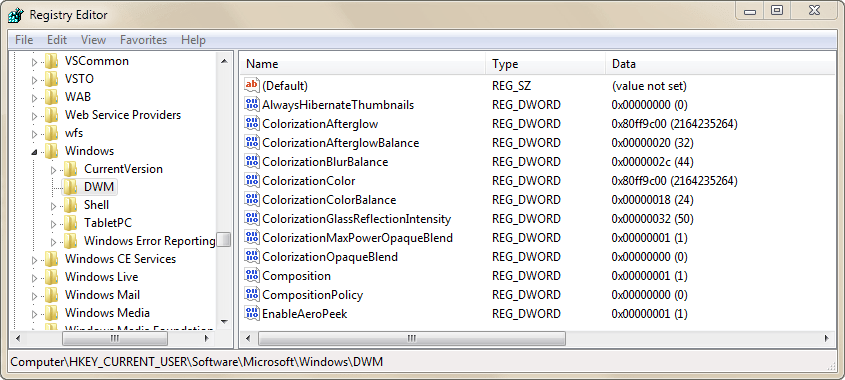
Now in order to change the colorization color of the glass from Delphi you must call these functions in this way
[sourcecode wraplines=”false” language=”delphi”]
Procedure SetCompositionColor(AColor:TColor);
var
Params : TColorizationParams;
begin
//Convert the TColor to a valid color RGB -> BGR
AColor:=RGB(GetBValue(AColor),GetGValue(AColor),GetRValue(AColor));
ZeroMemory(@Params,SizeOf(Params));
//Get the current values
DwmGetColorizationParameters(Params);
//Set the New Color
Params.clrColor :=AColor;
//Call the function to set the new color
DwmSetColorizationParameters(@Params,Bool(0));
end;
[/sourcecode]
Check this delphi console application which change the color of the glass
[sourcecode wraplines=”false” language=”delphi”]
program DwmDelphiDemo;
{$APPTYPE CONSOLE}
//Author : Rodrigo Ruz V.
//2011-05-05
uses
Graphics,
Windows,
SysUtils;
type
tagCOLORIZATIONPARAMS = record
clrColor : COLORREF; //ColorizationColor
clrAftGlow : COLORREF; //ColorizationAfterglow
nIntensity : UINT; //ColorizationColorBalance -> 0-100
clrAftGlowBal : UINT; //ColorizationAfterglowBalance
clrBlurBal : UINT; //ColorizationBlurBalance
clrGlassReflInt : UINT; //ColorizationGlassReflectionIntensity
fOpaque : BOOL;
end;
COLORIZATIONPARAMS=tagCOLORIZATIONPARAMS;
TColorizationParams=COLORIZATIONPARAMS;
PColorizationParams=^TColorizationParams;
TDwmGetColorizationParameters = procedure(out parameters :TColorizationParams); stdcall;
TDwmSetColorizationParameters = procedure(parameters :PColorizationParams;unknown:BOOL); stdcall;
TDwmIsCompositionEnabled = function(out pfEnabled : BOOL): HRESULT; stdcall;
var
DwmGetColorizationParameters : TDwmGetColorizationParameters;
DwmSetColorizationParameters : TDwmSetColorizationParameters;
DwmIsCompositionEnabled : TDwmIsCompositionEnabled;
hdwmapi : Cardinal;
function IsAeroEnabled: Boolean;
var
pfEnabled : BOOL;
begin
Result:=False;
if Assigned(DwmIsCompositionEnabled) and (DwmIsCompositionEnabled(pfEnabled)=S_OK) then
Result:=pfEnabled;
end;
Procedure SetCompositionColor(AColor:TColor);
var
Params : TColorizationParams;
begin
//convert the TColor to a valid color RGB -> BGR
AColor:=RGB(GetBValue(AColor),GetGValue(AColor),GetRValue(AColor));
ZeroMemory(@Params,SizeOf(Params));
//Get the current values
DwmGetColorizationParameters(Params);
//Set the New Color
Params.clrColor :=AColor;
//Call the function to set the new color
DwmSetColorizationParameters(@Params,Bool(0));
//get the colorization parameters and show the details
DwmGetColorizationParameters(Params);
Writeln(format(‘Intensity %d – Colorization Color %.8x – Colorization Afterglow Color 2 %.8x’,[Params.nIntensity,Params.clrColor,Params.clrAftGlow]));
end;
//load the functions to use
function Init_Dwm: Boolean;
begin
Result:=False;
hdwmapi := LoadLibrary(‘dwmapi.dll’);
if (hdwmapi <> 0) then
begin
@DwmIsCompositionEnabled := GetProcAddress(hdwmapi, ‘DwmIsCompositionEnabled’);
//load the DwmGetColorizationParameters function from the 127 index
@DwmGetColorizationParameters := GetProcAddress(hdwmapi, LPCSTR(127));
//load the DwmSetColorizationParameters function from the 131 index
@DwmSetColorizationParameters := GetProcAddress(hdwmapi, LPCSTR(131));
Result:=(Assigned(DwmGetColorizationParameters)) and (Assigned(DwmSetColorizationParameters)) and IsAeroEnabled;
end;
end;
procedure Done_Dwm;
begin
if (hdwmapi <> 0) then
FreeLibrary(hdwmapi);
end;
const
MaxColors =10;
Colors : Array [0..MaxColors-1] of TColor =
(clRed,clBlack,clBlue,clGreen,clYellow,clAqua,clFuchsia,clLime,clPurple,clDkGray);
var
Params : TColorizationParams;
DwmActive : Boolean;
i : Integer;
begin
try
DwmActive:=Init_Dwm;
try
if DwmActive then
begin
//Get the current settings
DwmGetColorizationParameters(Params);
Writeln(‘Current Values’);
Writeln(format(‘Intensity %d – Colorization Color %.8x – Colorization Afterglow Color %.8x %d %d %d’,[Params.nIntensity,Params.clrColor,Params.clrAftGlow,Params.clrAftGlowBal,Params.clrBlurBal,Params.clrGlassReflInt]));
try
for i:= low(Colors) to high(Colors) do
begin
SetCompositionColor(Colors[i]);
Writeln(‘Press enter to continue’);
Readln;
end;
finally
//Restore the original settings
DwmSetColorizationParameters(@Params,Bool(0));
end;
end
else
Writeln(‘Glass is not active’);
finally
Done_Dwm;
end;
except
on E: Exception do
Writeln(E.ClassName, ‘: ‘, E.Message);
end;
Readln;
end.
[/sourcecode]
and this is the result
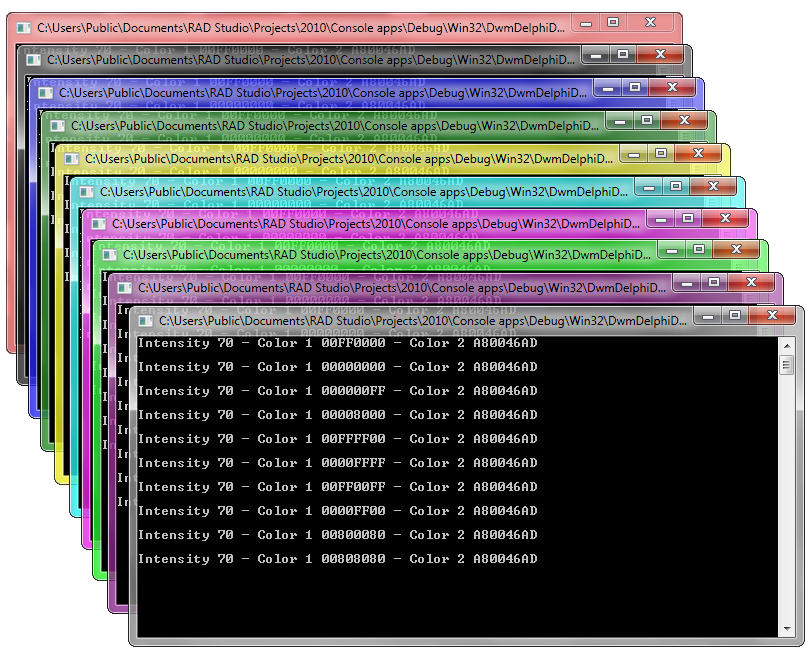
Finally just for fun I wrote a similar application to Aura using delphi (just in 240 lines of code ;P and without Net framework) and this is the result.


