
UPDATE : Visit the new page of the project to check the new features.
The last weekend I was working in a new project called Delphi IDE Theme Editor. this tool allow to change the Delphi (Rad studio) color settings.
the application was written using Delphi XE and the Unicode SynEdit components.
Here some features
- Supports Delphi 7, 2005, BDS/Turbo 2006 and RAD Studio 2007, 2009, 2010, XE
- Can import Visual Studio Themes 2003,2008,2010 (.vssettings)
- You can revert any changes made to the IDE pressing the button “Set default theme values for selected IDE”
- 35 themes are included, ready to use in your Delphi IDE.
Screenshot of the application
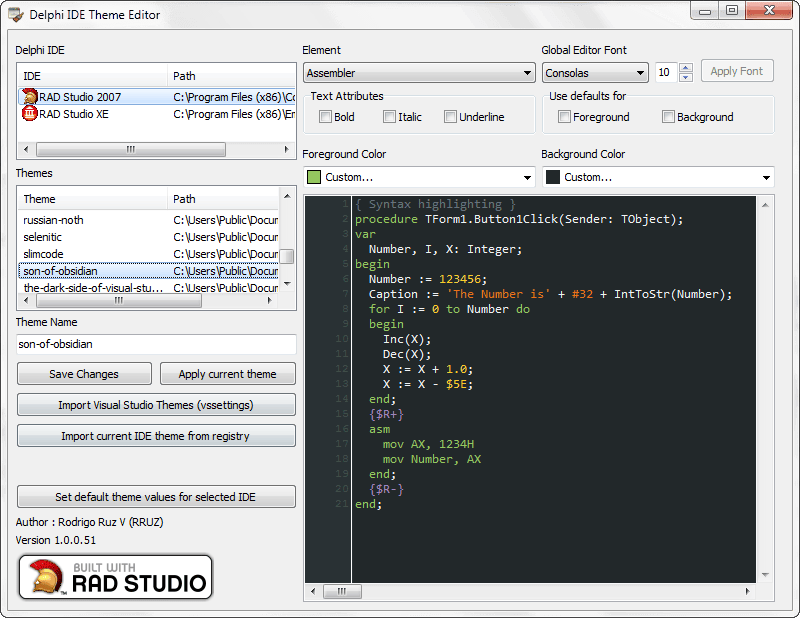
Look the dephi IDE
check this video to see how the application set a new theme to Delphi IDE
See how the tool can import a Visual Studio Theme (.vssettings) and apply this style to Delphi IDE.
some tips
- Check the site studiostyles to get a lot of themes which you can import to the Delphi IDE.
- If your system does not have the Consolas font installed you can download the Consolas Font Pack for Microsoft Visual Studio 2005 or 2008 from here
In the next days I will publish the full the source code and the technical details of the tool, so stay tuned.
Let me know If you have any suggestion or comments to improve the application.


