The Road to Delphi

Delphi – Free Pascal – Oxygene


4 Comments

Compile, Debug and Run your Pascal code online.

Do you want test a short Pascal snippet and you don’t have a compiler? try the site called ideone.

What is ideone?
Ideone is something more than a pastebin; it’s an online compiler and debugging tool which allows
to compile and run code online in more than 40 programming languages.

This site currently supports these two Pascal compilers

fpc (Free Pascal Compiler) 2.2.0 (Target OS: Linux for i386)
gpc (GNU Pascal Compiler) 20070904

for the limitations about the code submitted and others check the FAQ.


8 Comments

search for installed windows updates using Delphi, WMI and WUA

Sometimes we need determine if a particular windows hotfix or update is installed in the system. to do this task you can use two approaches

WMI (Windows Management Instrumentation)

using the Win32_QuickFixEngineering class, you can retrieve a small system-wide update, commonly referred to as a quick-fix engineering (QFE) update.

check this code which list the updates installed in the system

procedure  GetWin32_QuickFixEngineeringInfo;
const
  wbemFlagForwardOnly = $00000020;
var
  FSWbemLocator : OLEVariant;
  FWMIService   : OLEVariant;
  FWbemObjectSet: OLEVariant;
  FWbemObject   : OLEVariant;
  oEnum         : IEnumvariant;
  iValue        : LongWord;
begin;
  FSWbemLocator := CreateOleObject('WbemScripting.SWbemLocator');
  FWMIService   := FSWbemLocator.ConnectServer('localhost', 'root\CIMV2', '', '');
  FWbemObjectSet:= FWMIService.ExecQuery('SELECT * FROM Win32_QuickFixEngineering','WQL',wbemFlagForwardOnly);
  oEnum         := IUnknown(FWbemObjectSet._NewEnum) as IEnumVariant;
  while oEnum.Next(1, FWbemObject, iValue) = 0 do
  begin
    Writeln(Format('Caption                        %s',[FWbemObject.Caption]));// String
    //Writeln(Format('CSName                         %s',[FWbemObject.CSName]));// String
    Writeln(Format('Description                    %s',[FWbemObject.Description]));// String
    Writeln(Format('FixComments                    %s',[FWbemObject.FixComments]));// String
    Writeln(Format('HotFixID                       %s',[FWbemObject.HotFixID]));// String
    Writeln(Format('InstallDate                    %s',[FWbemObject.InstallDate]));// Datetime
    Writeln(Format('InstalledBy                    %s',[FWbemObject.InstalledBy]));// String
    Writeln(Format('InstalledOn                    %s',[FWbemObject.InstalledOn]));// String
    Writeln(Format('Name                           %s',[FWbemObject.Name]));// String
    Writeln(Format('ServicePackInEffect            %s',[FWbemObject.ServicePackInEffect]));// String
    Writeln(Format('Status                         %s',[FWbemObject.Status]));// String
    Writeln('');
    FWbemObject:=Unassigned;
  end;
end;

Now to find if a particular update is installed you can check the HotFixID property value (which is the Unique identifier associated with a particular update) and write a function like this

//use in this way ISHotFixID_Installed('KB982799')
function  ISHotFixID_Installed(const HotFixID : string): Boolean;
const
  wbemFlagForwardOnly = $00000020;
  wbemFlagReturnImmediately = $00000010;
var
  FSWbemLocator : OLEVariant;
  FWMIService   : OLEVariant;
  FWbemObjectSet: OLEVariant;
  FWbemObject   : OLEVariant;
  oEnum         : IEnumvariant;
  iValue        : LongWord;
begin;
  FSWbemLocator := CreateOleObject('WbemScripting.SWbemLocator');
  FWMIService   := FSWbemLocator.ConnectServer('localhost', 'root\CIMV2', '', '');
  FWbemObjectSet:= FWMIService.ExecQuery(Format('SELECT * FROM Win32_QuickFixEngineering Where HotFixID="%s"',[HotFixID]),'WQL',wbemFlagForwardOnly OR wbemFlagReturnImmediately);
  oEnum         := IUnknown(FWbemObjectSet._NewEnum) as IEnumVariant;
  Result:= oEnum.Next(1, FWbemObject, iValue) = 0;
end;

Ok this is fine, but Starting with Windows Vista, the Win32_QuickFixEngineering class returns only the updates supplied by Component Based Servicing (CBS), so some updates are not listed.

WUA (Windows Update Agent)

using the Windows Update Agent API is a best option to retrieve the list of updates, you can access the interfaces and objects from this API from delphi importing the wuapi.dll file or creating a late-binding com object using the Microsoft.Update.Session GUID. the next samples uses the late-binding way.

from the MSDN site :

The Windows Update Agent (WUA) API is a set of COM interfaces that enable system administrators and programmers to access Windows Update and Windows Server Update Services (WSUS). Scripts and programs can be written to examine which updates are currently available for a computer, and then you can install or uninstall updates.

to implement a search of the installed updates we need to use the IUpdateSearcher Interface using the Search method setting the search criteria.

check this sample

  //create the Com object instance
  updateSession:= CreateOleObject('Microsoft.Update.Session');
  updateSearcher    := updateSession.CreateUpdateSearcher;
  //set the search criteria, installed =1 means updates that are installed on the destination computer, Type='Software'  retrieve only applications updates
  updateSearchResult:= updateSearcher.Search(Format('IsInstalled = 1 and Type=%s',[QuotedStr('Software')]));

Now to find if a particular update is installed you can parse the Title property of the IUpdate Interface which contains the name of the update like this Security Update for Windows 7 for x64-based Systems (KB978542)

//use in this way ISHotFixID_Installed('KB982799')
function  ISHotFixID_Installed(const HotFixID : string): Boolean;
var
  updateSession      : OleVariant;
  updateSearcher     : OleVariant;
  updateEntry        : OleVariant;
  updateSearchResult : OleVariant;
  UpdateCollection   : OleVariant;
  oEnum              : IEnumvariant;
  iValue             : LongWord;
begin
 result:=False;
  updateSession:= CreateOleObject('Microsoft.Update.Session');
  updateSearcher    := updateSession.CreateUpdateSearcher;
  //this line improves the performance , the online porperty indicates whether the UpdateSearcher goes online to search for updates. so how we are looking for already installed updates we can set this value to false
  updateSearcher.online:=False;
  updateSearchResult:= updateSearcher.Search(Format('IsInstalled = 1 and Type=%s',[QuotedStr('Software')]));
  UpdateCollection  := updateSearchResult.Updates;
  oEnum         := IUnknown(UpdateCollection._NewEnum) as IEnumVariant;
  while oEnum.Next(1, updateEntry, iValue) = 0 do
  begin
    Result:=Pos(HotFixID,updateEntry.Title)>0;
    updateEntry:=Unassigned;
    if Result then break;
  end;
end;

check these another useful functions

Getting the installed updates list

procedure  GetListInstalledUpdates;
var
  updateSession        : OleVariant;
  updateSearcher       : OleVariant;
  updateSearchResult   : OleVariant;
  updateEntry          : OleVariant;
  UpdateCollection     : OleVariant;
  oEnum                : IEnumvariant;
  iValue               : LongWord;
begin
  updateSession:= CreateOleObject('Microsoft.Update.Session');
  updateSearcher := updateSession.CreateUpdateSearcher;
  Writeln('Searching');
  //IUpdateSearcher::Search Method http://msdn.microsoft.com/en-us/library/aa386526%28v=VS.85%29.aspx
  updateSearcher.online:=False;
  updateSearchResult:= updateSearcher.Search(Format('IsInstalled = 1 and Type=%s',[QuotedStr('Software')]));
  UpdateCollection  := updateSearchResult.Updates;
  oEnum         := IUnknown(UpdateCollection._NewEnum) as IEnumVariant;
  //IUpdate Interface http://msdn.microsoft.com/en-us/library/aa386099%28v=VS.85%29.aspx
  while oEnum.Next(1, updateEntry, iValue) = 0 do
  begin
    Writeln(updateEntry.Title);
    updateEntry:=Unassigned;
  end;
  Writeln('Done');
end;

Getting the not installed updates list (slow because need to check online)

procedure  GetListNotInstalledUpdates;
var
  updateSession        : OleVariant;
  updateSearcher       : OleVariant;
  updateSearchResult   : OleVariant;
  updateEntry          : OleVariant;
  UpdateCollection     : OleVariant;
  oEnum                : IEnumvariant;
  iValue               : LongWord;
begin
  updateSession:= CreateOleObject('Microsoft.Update.Session');
  updateSearcher := updateSession.CreateUpdateSearcher;
  Writeln('Searching');
  updateSearchResult:= updateSearcher.Search(Format('IsInstalled = 0 and Type=%s',[QuotedStr('Software')]));
  UpdateCollection  := updateSearchResult.Updates;
  oEnum         := IUnknown(UpdateCollection._NewEnum) as IEnumVariant;
  while oEnum.Next(1, updateEntry, iValue) = 0 do
  begin
    Writeln(updateEntry.Title);
    updateEntry:=Unassigned;
  end;
  Writeln('Done');
end;

Getting the hidden installed updates list

procedure  GetListInstalledHiddenUpdates;
var
  updateSession        : OleVariant;
  updateSearcher       : OleVariant;
  updateSearchResult   : OleVariant;
  updateEntry          : OleVariant;
  UpdateCollection     : OleVariant;
  oEnum                : IEnumvariant;
  iValue               : LongWord;
begin
  updateSession:= CreateOleObject('Microsoft.Update.Session');
  updateSearcher := updateSession.CreateUpdateSearcher;
  Writeln('Searching');
  updateSearcher.online:=False;
  updateSearchResult:= updateSearcher.Search(Format('IsHidden=1 and IsInstalled = 1 and Type=%s',[QuotedStr('Software')]));
  UpdateCollection  := updateSearchResult.Updates;
  oEnum         := IUnknown(UpdateCollection._NewEnum) as IEnumVariant;
  while oEnum.Next(1, updateEntry, iValue) = 0 do
  begin
    Writeln(updateEntry.Title);
    updateEntry:=Unassigned;
  end;
  Writeln('Done');
end;


1 Comment

Change the drive letter using WMI and Delphi

Today i will show a short snippet to change the letter from a drive (Volume) using the WMI. the key is use the Win32_Volume class and set the value of the DriveLetter property. this property is read/write so we can update directly the value and then call the Put_ method of the SWbemObject object.

Check out this sample project

{$APPTYPE CONSOLE}

uses
  SysUtils,
  ActiveX,
  ComObj;

procedure  ChangeDriveLetter(OldDrive,NewDrive:Char);
var
  FSWbemLocator : OLEVariant;
  FWMIService   : OLEVariant;
  FWbemObjectSet: OLEVariant;
  FWbemObject   : OLEVariant;
  oEnum         : IEnumvariant;
  iValue        : LongWord;
begin;
  FSWbemLocator := CreateOleObject('WbemScripting.SWbemLocator');
  FWMIService   := FSWbemLocator.ConnectServer('localhost', 'root\CIMV2', '', '');
  FWbemObjectSet:= FWMIService.ExecQuery(Format('SELECT * FROM Win32_Volume Where DriveLetter=%s',[QuotedStr(OldDrive+':')]),'WQL',0);
  oEnum         := IUnknown(FWbemObjectSet._NewEnum) as IEnumVariant;
  if oEnum.Next(1, FWbemObject, iValue) = 0 then
  begin
    //Assign the New letter
    FWbemObject.DriveLetter:=NewDrive+':';
    //Apply the changes
    FWbemObject.Put_();
  end;
end;

begin
 try
    CoInitialize(nil);
    try
      //This will change the letter of the drive E to Z
      ChangeDriveLetter('E','Z');
      Readln;
    finally
      CoUninitialize;
    end;
 except
    on E:Exception do
    begin
        Writeln(E.Classname, ':', E.Message);
        Readln;
    end;
  end;
end.


21 Comments

Getting the installed Antivirus, AntiSpyware and Firewall software using Delphi and the WMI

The WMI allow you to get the installed Antivirus, AntiSpyware and Firewall (third party)  software using the root\SecurityCenter or the root\SecurityCenter2 namespaces and the AntiVirusProduct , AntiSpywareProduct, FirewallProduct classes.

First you must know which these classes and namespaces are not documented by Microsoft and only are supported in Windows Desktops editions (Windows XP, Windows Vista and Windows 7).
Now depending of the Windows version the properties retrieved by the the same class can change. this is a summary of the classes and properties availables depending of the windows version

Windows XP

Namespace : SecurityCenter
Classes availables: AntiVirusProduct, FirewallProduct

AntiVirusProduct-Properties

  • companyName
  • displayName
  • enableOnAccessUIMd5Hash
  • enableOnAccessUIParameters
  • instanceGuid
  • onAccessScanningEnabled
  • pathToEnableOnAccessUI
  • pathToUpdateUI
  • productUptoDate
  • updateUIMd5Hash
  • updateUIParameters
  • versionNumber

FirewallProduct-Properties

  • companyName
  • displayName
  • enabled
  • enableUIMd5Hash
  • enableUIParameters
  • instanceGuid
  • pathToEnableUI
  • versionNumber

Windows Vista and Windows 7

Namespace : SecurityCenter2
Classes availables : AntiVirusProduct, AntiSpywareProduct, FirewallProduct

AntiVirusProduct, AntiSpywareProduct, FirewallProduct – Properties

  • displayName
  • instanceGuid
  • pathToSignedProductExe
  • pathToSignedReportingExe
  • productState

This is a sample project which determine the Antivirus, AntiSpyware and Firewall software installed in the system.

program GetSecurityCenterInfo;

{$APPTYPE CONSOLE}

uses
  SysUtils,
  Windows,
  ActiveX,
  ComObj,
  Variants;

type
  TSecurityCenterProduct = (AntiVirusProduct,AntiSpywareProduct,FirewallProduct);
const
  WmiRoot='root';
  WmiClassSCProduct     : array [TSecurityCenterProduct] of string = ('AntiVirusProduct','AntiSpywareProduct','FirewallProduct');
  WmiNamespaceSCProduct : array [Boolean] of string = ('SecurityCenter','SecurityCenter2');

function VerSetConditionMask(dwlConditionMask: int64;dwTypeBitMask: DWORD; dwConditionMask: Byte): int64; stdcall; external kernel32;

{$IFDEF UNICODE}
function VerifyVersionInfo(var LPOSVERSIONINFOEX : OSVERSIONINFOEX;dwTypeMask: DWORD;dwlConditionMask: int64): BOOL; stdcall; external kernel32 name 'VerifyVersionInfoW';
{$ELSE}
function VerifyVersionInfo(var LPOSVERSIONINFOEX : OSVERSIONINFOEX;dwTypeMask: DWORD;dwlConditionMask: int64): BOOL; stdcall; external kernel32 name 'VerifyVersionInfoA';
{$ENDIF}

//verifies that the application is running on Windows 2000 Server or a later server, such as Windows Server 2003 or Windows Server 2008.
function Is_Win_Server : Boolean;
const
   VER_NT_SERVER      = $0000003;
   VER_EQUAL          = 1;
   VER_GREATER_EQUAL  = 3;
var
   osvi             : OSVERSIONINFOEX;
   dwlConditionMask : DWORDLONG;
   op               : Integer;
begin
   dwlConditionMask := 0;
   op:=VER_GREATER_EQUAL;

   ZeroMemory(@osvi, sizeof(OSVERSIONINFOEX));
   osvi.dwOSVersionInfoSize := sizeof(OSVERSIONINFOEX);
   osvi.dwMajorVersion := 5;
   osvi.dwMinorVersion := 0;
   osvi.wServicePackMajor := 0;
   osvi.wServicePackMinor := 0;
   osvi.wProductType := VER_NT_SERVER;

   dwlConditionMask:=VerSetConditionMask( dwlConditionMask, VER_MAJORVERSION, op );
   dwlConditionMask:=VerSetConditionMask( dwlConditionMask, VER_MINORVERSION, op );
   dwlConditionMask:=VerSetConditionMask( dwlConditionMask, VER_SERVICEPACKMAJOR, op );
   dwlConditionMask:=VerSetConditionMask( dwlConditionMask, VER_SERVICEPACKMINOR, op );
   dwlConditionMask:=VerSetConditionMask( dwlConditionMask, VER_PRODUCT_TYPE, VER_EQUAL );

   Result:=VerifyVersionInfo(osvi,VER_MAJORVERSION OR VER_MINORVERSION OR
      VER_SERVICEPACKMAJOR OR VER_SERVICEPACKMINOR OR VER_PRODUCT_TYPE, dwlConditionMask);
end;

procedure  GetSCProductInfo(SCProduct:TSecurityCenterProduct);
var
  FSWbemLocator : OLEVariant;
  FWMIService   : OLEVariant;
  FWbemObjectSet: OLEVariant;
  FWbemObject   : OLEVariant;
  oEnum         : IEnumvariant;
  iValue        : LongWord;
  osVerInfo     : TOSVersionInfo;
begin
  osVerInfo.dwOSVersionInfoSize:=SizeOf(TOSVersionInfo);
  GetVersionEx(osVerInfo);
  if (SCProduct=AntiSpywareProduct) and (osVerInfo.dwMajorVersion<6)  then exit;   FSWbemLocator := CreateOleObject('WbemScripting.SWbemLocator');   FWMIService   := FSWbemLocator.ConnectServer('localhost',Format('%s\%s',[WmiRoot,WmiNamespaceSCProduct[osVerInfo.dwMajorVersion>=6]]), '', '');
  FWbemObjectSet:= FWMIService.ExecQuery(Format('SELECT * FROM %s',[WmiClassSCProduct[SCProduct]]),'WQL',0);
  oEnum         := IUnknown(FWbemObjectSet._NewEnum) as IEnumVariant;
  while oEnum.Next(1, FWbemObject, iValue) = 0 do
  begin
    if osVerInfo.dwMajorVersion>=6 then  //windows vista or newer
    begin
      Writeln(Format('displayName                    %s',[FWbemObject.displayName]));// String
      Writeln(Format('instanceGuid                   %s',[FWbemObject.instanceGuid]));// String
      Writeln(Format('pathToSignedProductExe         %s',[FWbemObject.pathToSignedProductExe]));// String
      Writeln(Format('pathToSignedReportingExe       %s',[FWbemObject.pathToSignedReportingExe]));// String
      Writeln(Format('productState                   %s',[FWbemObject.productState]));// Uint32
    end
    else
    begin
     case SCProduct of

        AntiVirusProduct :
         begin
            Writeln(Format('companyName                    %s',[FWbemObject.companyName]));// String
            Writeln(Format('displayName                    %s',[FWbemObject.displayName]));// String
            Writeln(Format('enableOnAccessUIMd5Hash        %s',[FWbemObject.enableOnAccessUIMd5Hash]));// Uint8
            Writeln(Format('enableOnAccessUIParameters     %s',[FWbemObject.enableOnAccessUIParameters]));// String
            Writeln(Format('instanceGuid                   %s',[FWbemObject.instanceGuid]));// String
            Writeln(Format('onAccessScanningEnabled        %s',[FWbemObject.onAccessScanningEnabled]));// Boolean
            Writeln(Format('pathToEnableOnAccessUI         %s',[FWbemObject.pathToEnableOnAccessUI]));// String
            Writeln(Format('pathToUpdateUI                 %s',[FWbemObject.pathToUpdateUI]));// String
            Writeln(Format('productUptoDate                %s',[FWbemObject.productUptoDate]));// Boolean
            Writeln(Format('updateUIMd5Hash                %s',[FWbemObject.updateUIMd5Hash]));// Uint8
            Writeln(Format('updateUIParameters             %s',[FWbemObject.updateUIParameters]));// String
            Writeln(Format('versionNumber                  %s',[FWbemObject.versionNumber]));// String
         end;

       FirewallProduct  :
         begin
            Writeln(Format('companyName                    %s',[FWbemObject.companyName]));// String
            Writeln(Format('displayName                    %s',[FWbemObject.displayName]));// String
            Writeln(Format('enabled                        %s',[FWbemObject.enabled]));// Boolean
            Writeln(Format('enableUIMd5Hash                %s',[FWbemObject.enableUIMd5Hash]));// Uint8
            Writeln(Format('enableUIParameters             %s',[FWbemObject.enableUIParameters]));// String
            Writeln(Format('instanceGuid                   %s',[FWbemObject.instanceGuid]));// String
            Writeln(Format('pathToEnableUI                 %s',[FWbemObject.pathToEnableUI]));// String
            Writeln(Format('versionNumber                  %s',[FWbemObject.versionNumber]));// String
         end;
     end;
    end;
    Writeln('');
    FWbemObject:=Unassigned;
  end;
end;

begin
 try
    if Is_Win_Server then
    begin
     Writeln('Sorry this app only can run in desktop operating systems.');
     Halt;
    end;

    CoInitialize(nil);
    try
      Writeln('AntiVirus Info');
      Writeln('--------------');
      GetSCProductInfo(AntiVirusProduct);
      Writeln('AntiSpyware Info');
      Writeln('----------------');
      GetSCProductInfo(AntiSpywareProduct);
      Writeln('Firewall Info');
      Writeln('-------------');
      GetSCProductInfo(FirewallProduct);
      Readln;
    finally
      CoUninitialize;
    end;
 except
    on E:Exception do
    begin
        Writeln(E.Classname, ':', E.Message);
        Readln;
    end;
  end;
end.

And here is the result of the app.


3 Comments

Changing Screen Orientation Programmatically using Delphi

On this post I will show you, how you can change the screen orientation using Delphi. To do this task you must use 2 Winapi functions EnumDisplaySettings and ChangeDisplaySettings.

EnumDisplaySettings: this function retrieves information about the graphics modes supported by the display device.

for example to obtain the current display settings we must call this function in this way:

var
  dm      : TDeviceMode;

  ZeroMemory(@dm, sizeof(dm));
  dm.dmSize   := sizeof(dm);
  if EnumDisplaySettings(nil, DWORD(ENUM_CURRENT_SETTINGS), dm) then
  begin
   //some code
  end;

Now , to use the ChangeDisplaySettings function to change the Screen Orientation we need to pass a valid DEVMODE structure, setting the value of the dmDisplayOrientation field, unfortunately the declaration in the Windows.pas for this record does not include this field.

this is the declaration for the DEVMODE structure in the Windows unit.

  _devicemodeA = record
    dmDeviceName: array[0..CCHDEVICENAME - 1] of AnsiChar;
    dmSpecVersion: Word;
    dmDriverVersion: Word;
    dmSize: Word;
    dmDriverExtra: Word;
    dmFields: DWORD;
    dmOrientation: SHORT;
    dmPaperSize: SHORT;
    dmPaperLength: SHORT;
    dmPaperWidth: SHORT;
    dmScale: SHORT;
    dmCopies: SHORT;
    dmDefaultSource: SHORT;
    dmPrintQuality: SHORT;
    dmColor: SHORT;
    dmDuplex: SHORT;
    dmYResolution: SHORT;
    dmTTOption: SHORT;
    dmCollate: SHORT;
    dmFormName: array[0..CCHFORMNAME - 1] of AnsiChar;
    dmLogPixels: Word;
    dmBitsPerPel: DWORD;
    dmPelsWidth: DWORD;
    dmPelsHeight: DWORD;
    dmDisplayFlags: DWORD;
    dmDisplayFrequency: DWORD;
    dmICMMethod: DWORD;
    dmICMIntent: DWORD;
    dmMediaType: DWORD;
    dmDitherType: DWORD;
    dmICCManufacturer: DWORD;
    dmICCModel: DWORD;
    dmPanningWidth: DWORD;
    dmPanningHeight: DWORD;
  end;

and this is the full declaration including the dmDisplayOrientation field

typedef struct _devicemode {
  TCHAR dmDeviceName[CCHDEVICENAME];
  WORD  dmSpecVersion;
  WORD  dmDriverVersion;
  WORD  dmSize;
  WORD  dmDriverExtra;
  DWORD dmFields;
  union {
    struct {
      short dmOrientation;
      short dmPaperSize;
      short dmPaperLength;
      short dmPaperWidth;
      short dmScale;
      short dmCopies;
      short dmDefaultSource;
      short dmPrintQuality;
    };
    struct {
      POINTL dmPosition;
      DWORD  dmDisplayOrientation;
      DWORD  dmDisplayFixedOutput;
    };
  };
  short dmColor;
  short dmDuplex;
  short dmYResolution;
  short dmTTOption;
  short dmCollate;
  TCHAR dmFormName[CCHFORMNAME];
  WORD  dmLogPixels;
  DWORD dmBitsPerPel;
  DWORD dmPelsWidth;
  DWORD dmPelsHeight;
  union {
    DWORD dmDisplayFlags;
    DWORD dmNup;
  };
  DWORD dmDisplayFrequency;
#if (WINVER >= 0x0400)
  DWORD dmICMMethod;
  DWORD dmICMIntent;
  DWORD dmMediaType;
  DWORD dmDitherType;
  DWORD dmReserved1;
  DWORD dmReserved2;
#if (WINVER >= 0x0500) || (_WIN32_WINNT >= 0x0400)
  DWORD dmPanningWidth;
  DWORD dmPanningHeight;
#endif
#endif
} DEVMODE, *PDEVMODE, *LPDEVMODE;

As you can see the missing fields are dmPosition, dmDisplayOrientation and dmDisplayFixedOutput. to handle this situation we can declare a new devicemode record including these fields or another option is determine the offset of the missing fields in the _devicemode record an then use the Move procedure to Get a Set the desired value.

If we choose create a new record including the missing fields, the new devicemode record will look like this.

type
  _devicemode = record
    dmDeviceName: array [0..CCHDEVICENAME - 1] of {$IFDEF UNICODE} WideChar {$ELSE} AnsiChar {$ENDIF};
    dmSpecVersion: WORD;
    dmDriverVersion: WORD;
    dmSize: WORD;
    dmDriverExtra: WORD;
    dmFields: DWORD;
    union1: record
    case Integer of
      0: (
        dmOrientation: Smallint;
        dmPaperSize: Smallint;
        dmPaperLength: Smallint;
        dmPaperWidth: Smallint;
        dmScale: Smallint;
        dmCopies: Smallint;
        dmDefaultSource: Smallint;
        dmPrintQuality: Smallint);
      1: (
        dmPosition: TPointL;
        dmDisplayOrientation: DWORD;
        dmDisplayFixedOutput: DWORD);
    end;
    dmColor: Shortint;
    dmDuplex: Shortint;
    dmYResolution: Shortint;
    dmTTOption: Shortint;
    dmCollate: Shortint;
    dmFormName: array [0..CCHFORMNAME - 1] of {$IFDEF UNICODE} WideChar {$ELSE} AnsiChar {$ENDIF};
    dmLogPixels: WORD;
    dmBitsPerPel: DWORD;
    dmPelsWidth: DWORD;
    dmPelsHeight: DWORD;
    dmDiusplayFlags: DWORD;
    dmDisplayFrequency: DWORD;
    dmICMMethod: DWORD;
    dmICMIntent: DWORD;
    dmMediaType: DWORD;
    dmDitherType: DWORD;
    dmReserved1: DWORD;
    dmReserved2: DWORD;
    dmPanningWidth: DWORD;
    dmPanningHeight: DWORD;
  end;
  devicemode  = _devicemode;
  Pdevicemode = ^devicemode;

Now we can write our function to change the display orientation.

Option 1) using the the new version of the devicemode record.

procedure ChangeOrientation(NewOrientation:DWORD);
type
  _devicemode = record
    dmDeviceName: array [0..CCHDEVICENAME - 1] of {$IFDEF UNICODE} WideChar {$ELSE} AnsiChar {$ENDIF};
    dmSpecVersion: WORD;
    dmDriverVersion: WORD;
    dmSize: WORD;
    dmDriverExtra: WORD;
    dmFields: DWORD;
    union1: record
    case Integer of
      // printer only fields
      0: (
        dmOrientation: Smallint;
        dmPaperSize: Smallint;
        dmPaperLength: Smallint;
        dmPaperWidth: Smallint;
        dmScale: Smallint;
        dmCopies: Smallint;
        dmDefaultSource: Smallint;
        dmPrintQuality: Smallint);
      // display only fields
      1: (
        dmPosition: TPointL;
        dmDisplayOrientation: DWORD;
        dmDisplayFixedOutput: DWORD);
    end;
    dmColor: Shortint;
    dmDuplex: Shortint;
    dmYResolution: Shortint;
    dmTTOption: Shortint;
    dmCollate: Shortint;
    dmFormName: array [0..CCHFORMNAME - 1] of {$IFDEF UNICODE} WideChar {$ELSE} AnsiChar {$ENDIF};
    dmLogPixels: WORD;
    dmBitsPerPel: DWORD;
    dmPelsWidth: DWORD;
    dmPelsHeight: DWORD;
    dmDiusplayFlags: DWORD;
    dmDisplayFrequency: DWORD;
    dmICMMethod: DWORD;
    dmICMIntent: DWORD;
    dmMediaType: DWORD;
    dmDitherType: DWORD;
    dmReserved1: DWORD;
    dmReserved2: DWORD;
    dmPanningWidth: DWORD;
    dmPanningHeight: DWORD;
  end;
  devicemode  = _devicemode;
  Pdevicemode = ^devicemode;
var
  dm       : TDeviceMode;
  dwTemp  : DWORD;
begin
   ZeroMemory(@dm, sizeof(dm));
   dm.dmSize := sizeof(dm);
   //get the current settings
   if EnumDisplaySettings(nil, DWORD(ENUM_CURRENT_SETTINGS), dm) then
   begin
      //Now this part is very important :
      //when we change the orientation also we are changing resolution of the screen
      //example : if the current orientation is 1024x768x0 (0 is the default orientation) and we need set the orientation to 90 degrees we must swap the values of the width and height , so the new
      //resolution will be (768x1024x90)
      //the next lines makes this trick using the values of the current and new orientation
      if Odd(Pdevicemode(@dm)^.union1.dmDisplayOrientation)<>Odd(NewOrientation) then
      begin
       dwTemp := dm.dmPelsHeight;
       dm.dmPelsHeight:= dm.dmPelsWidth;
       dm.dmPelsWidth := dwTemp;
      end;

      //Now casting the Windows.TDeviceMode record with our devicemode record
      if Pdevicemode(@dm)^.union1.dmDisplayOrientation<>NewOrientation then
      begin
        //casting again to set the new orientation
        Pdevicemode(@dm)^.union1.dmDisplayOrientation := NewOrientation;
        //setting the new orientation
        if (ChangeDisplaySettings(dm, 0)<>DISP_CHANGE_SUCCESSFUL) then
         RaiseLastOSError;
      end;
   end;
end;

Option 2) using the offset of the fields of the TDeviceMode record

procedure ChangeOrientation(NewOrientation:DWORD);
var
 dm      : TDeviceMode;
 dwTemp  : DWORD;
 dmDisplayOrientation : DWORD;
begin
 ZeroMemory(@dm, sizeof(dm));
 dm.dmSize   := sizeof(dm);
 if EnumDisplaySettings(nil, DWORD(ENUM_CURRENT_SETTINGS), dm) then
 begin
 //In the TDevMode record the offset of the dmScale field is equal to the position of the dmDisplayOrientation field
 //so using the move procedure we can get the value of the dmDisplayOrientation field
 Move(dm.dmScale,dmDisplayOrientation,SizeOf(dmDisplayOrientation));
 //See the coments in the pprevious method
 // swap width and height
 if Odd(dmDisplayOrientation)<>Odd(NewOrientation) then
 begin
 dwTemp := dm.dmPelsHeight;
 dm.dmPelsHeight:= dm.dmPelsWidth;
 dm.dmPelsWidth := dwTemp;
 end;

 if dmDisplayOrientation<>NewOrientation then
 begin
 //set the value of the   dmDisplayOrientation
 Move(NewOrientation,dm.dmScale,SizeOf(NewOrientation));
 if (ChangeDisplaySettings(dm, 0)<>DISP_CHANGE_SUCCESSFUL) then
 RaiseLastOSError;
 end;
 end;
end;

finally this is a sample console application to test the previous method

this code will only work if your device supports the respective display settings.

program AppChangeOrientation;

{$APPTYPE CONSOLE}

uses
  Windows,
  SysUtils;

const
  DM_DISPLAYORIENTATION = $00800000;
  ENUM_CURRENT_SETTINGS =-1;
  DMDO_DEFAULT : DWORD  = 0;
  DMDO_90      : DWORD  = 1;
  DMDO_180     : DWORD  = 2;
  DMDO_270     : DWORD  = 3;

procedure ChangeOrientation(NewOrientation:DWORD);
var
  dm      : TDeviceMode;
  dwTemp  : DWORD;
  dmDisplayOrientation : DWORD;
begin
   ZeroMemory(@dm, sizeof(dm));
   dm.dmSize   := sizeof(dm);
   if EnumDisplaySettings(nil, DWORD(ENUM_CURRENT_SETTINGS), dm) then
   begin
      Move(dm.dmScale,dmDisplayOrientation,SizeOf(dmDisplayOrientation));
      // swap width and height
      if Odd(dmDisplayOrientation)<>Odd(NewOrientation) then
      begin
       dwTemp := dm.dmPelsHeight;
       dm.dmPelsHeight:= dm.dmPelsWidth;
       dm.dmPelsWidth := dwTemp;
      end;

      if dmDisplayOrientation<>NewOrientation then
      begin
        Move(NewOrientation,dm.dmScale,SizeOf(NewOrientation));
        if (ChangeDisplaySettings(dm, 0)<>DISP_CHANGE_SUCCESSFUL) then
         RaiseLastOSError;
      end;
   end;
end;

begin
  try
    ChangeOrientation(DMDO_180);
    Writeln('Changed to 180');
    Readln;

    ChangeOrientation(DMDO_270);
    Writeln('Changed to 270');
    Readln;

    ChangeOrientation(DMDO_90);
    Writeln('Changed to 90');
    Readln;

    ChangeOrientation(DMDO_DEFAULT);
    Writeln('Default Orientation restored');
    Readln;
  except
    on E: Exception do
      Writeln(E.ClassName, ': ', E.Message);
  end;
     readln;
end.


2 Comments

Determine when Windows is a Desktop or Server edition using Delphi

Sometimes we need determine when a windows version is a server edition (2000, 2003 or 2008) or a Desktop edition. to do this we can use the VerifyVersionInfo function. this function compares a set of operating system version requirements to the corresponding values for the currently running version of the system.

but exist a problem, the version of this function declared in the Windows unit uses a OSVERSIONINFO parameter.

function VerifyVersionInfo(var lpVersionInformation: TOSVersionInfo;
  dwTypeMask: DWORD; dwlConditionMask: DWORDLONG): BOOL; stdcall; 

And in this case we need pass a OSVERSIONINFOEX Structure, so we must re-declare this function in this way.

{$IFDEF UNICODE}
function VerifyVersionInfo(var LPOSVERSIONINFOEX : OSVERSIONINFOEX;dwTypeMask: DWORD;dwlConditionMask: int64): BOOL; stdcall; external kernel32 name 'VerifyVersionInfoW';
{$ELSE}
function VerifyVersionInfo(var LPOSVERSIONINFOEX : OSVERSIONINFOEX;dwTypeMask: DWORD;dwlConditionMask: int64): BOOL; stdcall; external kernel32 name 'VerifyVersionInfoA';
{$ENDIF}

Now to work with the VerifyVersionInfo function we need establish the requirements to check .


   ZeroMemory(@osvi, sizeof(OSVERSIONINFOEX));
   osvi.dwOSVersionInfoSize := sizeof(OSVERSIONINFOEX);
   osvi.dwMajorVersion := 5; //at least windows 2000
   osvi.dwMinorVersion := 0;
   osvi.wServicePackMajor := 0;
   osvi.wServicePackMinor := 0;
   osvi.wProductType := VER_NT_SERVER; // Check windows server edition

then we need set the flags to interrogate the VerifyVersionInfo function using the VerSetConditionMask function

   op:=VER_GREATER_EQUAL;
   dwlConditionMask:=VerSetConditionMask( dwlConditionMask, VER_MAJORVERSION, op );
   dwlConditionMask:=VerSetConditionMask( dwlConditionMask, VER_MINORVERSION, op );
   dwlConditionMask:=VerSetConditionMask( dwlConditionMask, VER_SERVICEPACKMAJOR, op );
   dwlConditionMask:=VerSetConditionMask( dwlConditionMask, VER_SERVICEPACKMINOR, op );
   dwlConditionMask:=VerSetConditionMask( dwlConditionMask, VER_PRODUCT_TYPE, VER_EQUAL );

and finally call the function in this way

   VerifyVersionInfo(osvi,VER_MAJORVERSION OR VER_MINORVERSION OR
      VER_SERVICEPACKMAJOR OR VER_SERVICEPACKMINOR OR VER_PRODUCT_TYPE, dwlConditionMask);

This is the source code of the demo console application.

program ISWindowsServer;

{$APPTYPE CONSOLE}

uses
  Windows,
  SysUtils;

{$IFDEF UNICODE}
function VerifyVersionInfo(var LPOSVERSIONINFOEX : OSVERSIONINFOEX;dwTypeMask: DWORD;dwlConditionMask: int64): BOOL; stdcall; external kernel32 name 'VerifyVersionInfoW';
{$ELSE}
function VerifyVersionInfo(var LPOSVERSIONINFOEX : OSVERSIONINFOEX;dwTypeMask: DWORD;dwlConditionMask: int64): BOOL; stdcall; external kernel32 name 'VerifyVersionInfoA';
{$ENDIF}
function VerSetConditionMask(dwlConditionMask: int64;dwTypeBitMask: DWORD; dwConditionMask: Byte): int64; stdcall; external kernel32;

function IsWinServer : Boolean;
const
   VER_NT_SERVER      = $0000003;
   VER_EQUAL          = 1;
   VER_GREATER_EQUAL  = 3;
var
   osvi             : OSVERSIONINFOEX;
   dwlConditionMask : DWORDLONG;
   op               : Integer;
begin
   dwlConditionMask := 0;
   op:=VER_GREATER_EQUAL;

   ZeroMemory(@osvi, sizeof(OSVERSIONINFOEX));
   osvi.dwOSVersionInfoSize := sizeof(OSVERSIONINFOEX);
   osvi.dwMajorVersion := 5;
   osvi.dwMinorVersion := 0;
   osvi.wServicePackMajor := 0;
   osvi.wServicePackMinor := 0;
   osvi.wProductType := VER_NT_SERVER;

   dwlConditionMask:=VerSetConditionMask( dwlConditionMask, VER_MAJORVERSION, op );
   dwlConditionMask:=VerSetConditionMask( dwlConditionMask, VER_MINORVERSION, op );
   dwlConditionMask:=VerSetConditionMask( dwlConditionMask, VER_SERVICEPACKMAJOR, op );
   dwlConditionMask:=VerSetConditionMask( dwlConditionMask, VER_SERVICEPACKMINOR, op );
   dwlConditionMask:=VerSetConditionMask( dwlConditionMask, VER_PRODUCT_TYPE, VER_EQUAL );

   Result:=VerifyVersionInfo(osvi,VER_MAJORVERSION OR VER_MINORVERSION OR
      VER_SERVICEPACKMAJOR OR VER_SERVICEPACKMINOR OR VER_PRODUCT_TYPE, dwlConditionMask);
end;

const
WindowsEditionStr : array [boolean] of string = ('Desktop','Server');

begin
  try
    Writeln( Format('Running in Windows %s edition',[WindowsEditionStr[IsWinServer]]));
  except
    on E: Exception do
      Writeln(E.ClassName, ': ', E.Message);
  end;
  readln;
end.


8 Comments

Avoiding the memory leak caused by the Delphi intellimouse support

Since the Delphi 2006 version, you can activate the full mouse wheel support (Intellimouse) by adding to the Uses statement the IMouse unit. for example to activate the Intellimouse support to a TMemo component you must set the ScrollBars property to ssHorizontal, ssVertical or ssBoth and add the IMouse unit to your project.

and the result will look like this.

So far all will work ok, but if you add the next line to your project, to report the memory leaks.

 ReportMemoryLeaksOnShutdown:=True;

you will receive a awful message like this

this is due which in the IMouse unit the Mouse.PanningWindow is never released. to avoid this memory leak you must add these lines to your project in the finalization part of your main unit or in the unit where your declare the IMouse unit.

  if Assigned(Mouse.PanningWindow) then
    Mouse.PanningWindow := nil;


36 Comments

Making a PING with Delphi and the WMI

Typically we use the IcmpSendEcho function or a component like TIdIcmpClient to make a ping request from Delphi. Today I will show you another way to do this using the WMI (Windows Management Instrumentation).

The WMI class which allow you to make a ping request is Win32_PingStatus, to use this class you only need to pass the parameter Address value in your WQL sentence , the form of the Address parameter can be either the computer name (ACCOUNT-PC), IPv4 address (192.168.154.102), or IPv6 address (2010:836B:4179::836B:4179).

SELECT * FROM Win32_PingStatus where Address='www.google.com'

Some of the advantages of use this class to make a ping is which supports IPv4 addresses and IPv6 addresses (Starting with Windows Vista) , and you can set the ping parameters in a single WQL sentence.

For example if you want send a Buffer of 64 bytes (instead of the 32 default size) and resolve the address of the host server you only need to write a sentence like this :

SELECT * FROM Win32_PingStatus where Address='192.168.1.221' AND BufferSize=64 AND ResolveAddressNames=TRUE

Now check this sample console application.

program WMIPing;

{$APPTYPE CONSOLE}

uses
  SysUtils,
  ActiveX,
  ComObj,
  Variants;

function GetStatusCodeStr(statusCode:integer) : string;
begin
  case statusCode of
    0     : Result:='Success';
    11001 : Result:='Buffer Too Small';
    11002 : Result:='Destination Net Unreachable';
    11003 : Result:='Destination Host Unreachable';
    11004 : Result:='Destination Protocol Unreachable';
    11005 : Result:='Destination Port Unreachable';
    11006 : Result:='No Resources';
    11007 : Result:='Bad Option';
    11008 : Result:='Hardware Error';
    11009 : Result:='Packet Too Big';
    11010 : Result:='Request Timed Out';
    11011 : Result:='Bad Request';
    11012 : Result:='Bad Route';
    11013 : Result:='TimeToLive Expired Transit';
    11014 : Result:='TimeToLive Expired Reassembly';
    11015 : Result:='Parameter Problem';
    11016 : Result:='Source Quench';
    11017 : Result:='Option Too Big';
    11018 : Result:='Bad Destination';
    11032 : Result:='Negotiating IPSEC';
    11050 : Result:='General Failure'
    else
    result:='Unknow';
  end;
end;


//The form of the Address parameter can be either the computer name (wxyz1234), IPv4 address (192.168.177.124), or IPv6 address (2010:836B:4179::836B:4179).
procedure  Ping(const Address:string;Retries,BufferSize:Word);
var
  FSWbemLocator : OLEVariant;
  FWMIService   : OLEVariant;
  FWbemObjectSet: OLEVariant;
  FWbemObject   : OLEVariant;
  oEnum         : IEnumvariant;
  iValue        : LongWord;
  i             : Integer;

  PacketsReceived : Integer;
  Minimum         : Integer;
  Maximum         : Integer;
  Average         : Integer;
begin;
  PacketsReceived:=0;
  Minimum        :=0;
  Maximum        :=0;
  Average        :=0;
  Writeln('');
  Writeln(Format('Pinging %s with %d bytes of data:',[Address,BufferSize]));
  FSWbemLocator := CreateOleObject('WbemScripting.SWbemLocator');
  FWMIService   := FSWbemLocator.ConnectServer('localhost', 'root\CIMV2', '', '');
  //FWMIService   := FSWbemLocator.ConnectServer('192.168.52.130', 'root\CIMV2', 'user', 'password');
  for i := 0 to Retries-1 do
  begin
    FWbemObjectSet:= FWMIService.ExecQuery(Format('SELECT * FROM Win32_PingStatus where Address=%s AND BufferSize=%d',[QuotedStr(Address),BufferSize]),'WQL',0);
    oEnum         := IUnknown(FWbemObjectSet._NewEnum) as IEnumVariant;
    if oEnum.Next(1, FWbemObject, iValue) = 0 then
    begin
      if FWbemObject.StatusCode=0 then
      begin
        if FWbemObject.ResponseTime>0 then
          Writeln(Format('Reply from %s: bytes=%s time=%sms TTL=%s',[FWbemObject.ProtocolAddress,FWbemObject.ReplySize,FWbemObject.ResponseTime,FWbemObject.TimeToLive]))
        else
          Writeln(Format('Reply from %s: bytes=%s time=<1ms TTL=%s',[FWbemObject.ProtocolAddress,FWbemObject.ReplySize,FWbemObject.TimeToLive]));

        Inc(PacketsReceived);

        if FWbemObject.ResponseTime>Maximum then
        Maximum:=FWbemObject.ResponseTime;

        if Minimum=0 then
        Minimum:=Maximum;

        if FWbemObject.ResponseTime<Minimum then
        Minimum:=FWbemObject.ResponseTime;

        Average:=Average+FWbemObject.ResponseTime;
      end
      else
      if not VarIsNull(FWbemObject.StatusCode) then
        Writeln(Format('Reply from %s: %s',[FWbemObject.ProtocolAddress,GetStatusCodeStr(FWbemObject.StatusCode)]))
      else
        Writeln(Format('Reply from %s: %s',[Address,'Error processing request']));
    end;
    FWbemObject:=Unassigned;
    FWbemObjectSet:=Unassigned;
    //Sleep(500);
  end;

  Writeln('');
  Writeln(Format('Ping statistics for %s:',[Address]));
  Writeln(Format('    Packets: Sent = %d, Received = %d, Lost = %d (%d%% loss),',[Retries,PacketsReceived,Retries-PacketsReceived,Round((Retries-PacketsReceived)*100/Retries)]));
  if PacketsReceived>0 then
  begin
   Writeln('Approximate round trip times in milli-seconds:');
   Writeln(Format('    Minimum = %dms, Maximum = %dms, Average = %dms',[Minimum,Maximum,Round(Average/PacketsReceived)]));
  end;
end;


begin
 try
    CoInitialize(nil);
    try
      //Ping('192.168.52.130',4,32);
      Ping('theroadtodelphi.wordpress.com',4,32);
    finally
      CoUninitialize;
    end;
 except
    on E:Exception do
        Writeln(E.Classname, ':', E.Message);
 end;
 Readln;
end.

And the output


1 Comment

Microsoft SQL Server CLR and Delphi Prism Part 1 : CLR Stored Procedures

This is the first of a series of articles where i will show you how integrate Delphi Prism and the SQL Server CLR support.

SQL Server (Since version 2005) allow you to create database objects using the integration with the .NET Framework common language runtime (CLR). this mean which you can create a .net assembly and then call the methods defined in your class directly from SQL Server like any SQL Object, you can create Scalar-valued user-defined functions (scalar UDFs), Table-valued user-defined functions (TVFs), User-defined procedures (UDPs) and User-defined triggers.

today we will see how to create CLR Stored Procedures from Delphi prism.

Ok, first you need to create a new Delphi prism project of class library type.

Now before to define the code to be accessed from SQL Server you must know the requirements of the CLR stored procedures.

1) In the common language runtime (CLR), stored procedures are implemented as public static methods on a class in a Microsoft .NET Framework assembly.

2) you must include the Microsoft.SqlServer.Server namespace in your uses list.

3) The Parameters passed to a CLR stored procedure can be any of the native SQL Server types that have an equivalent in managed code

4) all the methods must have the [Microsoft.SqlServer.Server.SqlProcedure()] attribute, this attribute tells to Visual Studio compiler that this is a stored procedure for SQL Server.

Check this sample declaration for a Delphi prism class which contains CLR stored procedures.

namespace MyNameSpace;

interface
uses
  System,
  System.Data,
  System.Data.SqlClient,
  Microsoft.SqlServer.Server,
  System.Data.SqlTypes;

type
  MyClass  = public class
  public
    [Microsoft.SqlServer.Server.SqlProcedure()]
    class method GetSqlVersion(out Intvalue: SqlInt32;out Strvalue: SqlString);
    [Microsoft.SqlServer.Server.SqlProcedure()]
    class method Hello;
    [Microsoft.SqlServer.Server.SqlProcedure()]
    class method GetTables;
    [Microsoft.SqlServer.Server.SqlProcedure()]
    class method GetRecordResult;
  end;

The CLR Stored Procedures can return information in several ways. This includes output parameters, tabular results, and messages.

OUTPUT Parameters and CLR Stored Procedures
in this sample method you can see how can return output parameters. this method return the sql version string and the sql version as a integer value. (off course you can obtain directly from SQL Server this information but this is just a sample)

class method MyClass.GetSqlVersion(out Intvalue: SqlInt32;out Strvalue: SqlString); //look the types used, are SQL Server types remember the requirements?
begin
    Intvalue := 0;
    Strvalue := '';    
    var  connection: SqlConnection := new SqlConnection('context connection=true'); //this is cool in this line you are using the current connection instance of the caller client, so you don't need connect to the SQL server.
    connection.Open();
    var command: SqlCommand := new SqlCommand('Select @@VERSION,@@MICROSOFTVERSION', connection); //get the version info
    var reader: SqlDataReader := command.ExecuteReader(); 
      if reader.Read() then begin
        Strvalue := reader.GetSqlString(0); //assign the values
        Intvalue := reader.GetSqlInt32(1);
      end
end;

Returning Messages
one of the overload versions of the SqlContext.Pipe.Send method allow you to send messages directly to the client or current output consumer.

class method MyClass.Hello;
begin
     SqlContext.Pipe.Send('Hello From delphi Prism'); //send the message to client
end;

Returning Tabular Results directly to the client
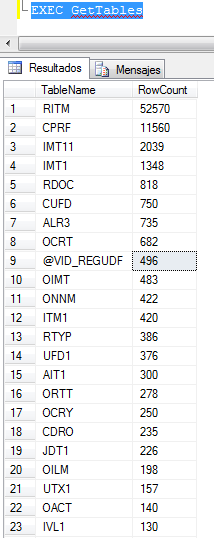
You can return directly to the client a result set. this sample method returns a list of the tables and rows in the current database.

class method MyClass.GetTables;
begin 
    var  connection: SqlConnection := new SqlConnection('context connection=true');
    connection.Open();
    var command: SqlCommand := new SqlCommand(
    'SELECT  so.name [TableName],MAX(si.rows) [RowCount] '+
    'FROM '+ 
    'sysobjects so, '+ 
    'sysindexes si '+ 
    'WHERE '+ 
    'so.xtype = ''U'' '+ 
    'AND '+ 
    'si.id = OBJECT_ID(so.name) '+ 
    'GROUP BY '+ 
    'so.name '+ 
    'ORDER BY '+ 
    '2 DESC', connection);
     // send the result set to the client directly.
     SqlContext.Pipe.ExecuteAndSend(command);   
end;

Creating a dynamic result set and send them to the client
You can also create a result set on the fly and return to the client the results. this sample method create a record with 4 columns(fields).

class method MyClass.GetRecordResult;
begin
      // Create a record object with 4 columns that represents an individual row, including it's metadata.
      var ARecord : SqlDataRecord  := new SqlDataRecord(new SqlMetaData('Col1', SqlDbType.NVarChar, 100),
                                                        new SqlMetaData('Col2', SqlDbType.Int),
                                                        new SqlMetaData('Col3', SqlDbType.Float),
                                                        new SqlMetaData('Col4', SqlDbType.DateTime)
      );    
      // Populate the record.
      ARecord.SetString(0, 'Delphi Prism is cool');      
      ARecord.SetInt32 (1, 1024*1024);      
      ARecord.SetDouble(2, Math.PI);      
      ARecord.SetDateTime(3, DateTime.Now);    
      // Send the record to the client.
      SqlContext.Pipe.Send(ARecord);
end;

Ok, now we have our code, we need deploy in the SQL Server.

first you must activate CLR support in the SQL server, because is disabled by default. execute this sentence to activate the CLR support.

sp_configure 'clr enabled', 1
GO
RECONFIGURE
GO

Now we need register our assembly using the CREATE ASSEMBLY sentence.
this is the syntax

CREATE ASSEMBLY assembly_name
[ AUTHORIZATION owner_name ]
FROM { <client_assembly_specifier> | <assembly_bits> [ ,...n ] }
[ WITH PERMISSION_SET = { SAFE | EXTERNAL_ACCESS | UNSAFE } ]
[ ; ]
<client_assembly_specifier> :: ='[\\computer_name\]share_name\[path\]manifest_file_name'
  | '[local_path\]manifest_file_name'<assembly_bits> :: =
{ varbinary_literal | varbinary_expression }

in this case the sentence will look like this

CREATE ASSEMBLY MyDelphiPrismAssembly1 from 'C:\Prism Projects\Delphi Prism SqlCLR\MyPrismClr\bin\Release\MyPrismClr.dll' 
WITH PERMISSION_SET = SAFE
GO

if all it’s ok you must can view the registered assembly under the assemblies folder of your SQL Management Studio.

next we need create and register every procedure of our assembly. see this sample, in this sentence we are creating a SQL Server stored procedure called hello where the implementation is defined in our assembly.

CREATE PROCEDURE Hello
AS
EXTERNAL NAME MyDelphiPrismAssembly1.[MyNameSpace.MyClass].Hello

now you can execute this stored procedure in this way

 EXEC Hello

and the result will be

Now the same steps to register our GetTables method

CREATE PROCEDURE GetTables
AS
EXTERNAL NAME MyDelphiPrismAssembly1.[MyNameSpace.MyClass].GetTables

and when you execute this stored procedure the result will be something like this.

now creating the GetRecordResult stored procedure

CREATE PROCEDURE GetRecordResult
AS
EXTERNAL NAME MyDelphiPrismAssembly1.[MyNameSpace.MyClass].GetRecordResult

and the output

finally this is how you must register a stored procedure with output parameters.

CREATE PROCEDURE  GetSqlVersion(@Intvalue int OUTPUT, @Strvalue NVARCHAR(255) OUTPUT)
AS
EXTERNAL NAME MyDelphiPrismAssembly1.[MyNameSpace.MyClass].GetSqlVersion

and to see the results

DECLARE @Intvalue int
DECLARE @Strvalue NVARCHAR(255)
EXECUTE  GetSqlVersion @Intvalue OUTPUT , @Strvalue OUTPUT
SELECT @Intvalue Version_Number,@Strvalue Version_Str

This is the full source-code of the Delphi prism class used in this article.

namespace MyNameSpace;

interface
uses
  System,
  System.Data,
  System.Data.SqlClient,
  Microsoft.SqlServer.Server,
  System.Data.SqlTypes;

type
  MyClass  = public class
  public
    //OUTPUT Parameters and CLR Stored Procedures
    [Microsoft.SqlServer.Server.SqlProcedure()]
    class method GetSqlVersion(out Intvalue: SqlInt32;out Strvalue: SqlString);
    //Returning Messages
    [Microsoft.SqlServer.Server.SqlProcedure()]
    class method Hello;
    //Returning Tabular Results directly to the client
    [Microsoft.SqlServer.Server.SqlProcedure()]
    class method GetTables;
    //Creating a dynamic result set and send them to the client
    [Microsoft.SqlServer.Server.SqlProcedure()]
    class method GetRecordResult;
  end;
  
implementation

//OUTPUT Parameters and CLR Stored Procedures
class method MyClass.GetSqlVersion(out Intvalue: SqlInt32;out Strvalue: SqlString);
begin
    Intvalue := 0;
    Strvalue := '';    
    var  connection: SqlConnection := new SqlConnection('context connection=true');
    connection.Open();
    var command: SqlCommand := new SqlCommand('Select @@VERSION,@@MICROSOFTVERSION', connection);
    var reader: SqlDataReader := command.ExecuteReader();
      if reader.Read() then begin
        Strvalue := reader.GetSqlString(0);
        Intvalue := reader.GetSqlInt32(1);
      end
end;

//Returning Messages
class method MyClass.Hello;
begin
     SqlContext.Pipe.Send('Hello From delphi Prism');
end;

//Returning Tabular Results directly to the client
class method MyClass.GetTables;
begin 
    var  connection: SqlConnection := new SqlConnection('context connection=true');
    connection.Open();
    var command: SqlCommand := new SqlCommand(
    'SELECT  so.name [TableName],MAX(si.rows) [RowCount] '+
    'FROM '+ 
    'sysobjects so, '+ 
    'sysindexes si '+ 
    'WHERE '+ 
    'so.xtype = ''U'' '+ 
    'AND '+ 
    'si.id = OBJECT_ID(so.name) '+ 
    'GROUP BY '+ 
    'so.name '+ 
    'ORDER BY '+ 
    '2 DESC', connection);
     // send the result set to the client directly.
     SqlContext.Pipe.ExecuteAndSend(command);   
end;

class method MyClass.GetRecordResult;
begin
      // Create a record object that represents an individual row, including it's metadata.
      var ARecord : SqlDataRecord  := new SqlDataRecord(new SqlMetaData('Col1', SqlDbType.NVarChar, 100),
                                                        new SqlMetaData('Col2', SqlDbType.Int),
                                                        new SqlMetaData('Col3', SqlDbType.Float),
                                                        new SqlMetaData('Col4', SqlDbType.DateTime)
      );    
      // Populate the record.
      ARecord.SetString(0, 'Delphi Prism is cool');      
      ARecord.SetInt32 (1, 1024*1024);      
      ARecord.SetDouble(2, Math.PI);      
      ARecord.SetDateTime(3, DateTime.Now);      
      // Send the record to the client.
      SqlContext.Pipe.Send(ARecord);
end;


end.

the samples showed in this article are very simple, and just pretend show the basic functionalities, you can find many ways to apply this to your own project. personally I use SQL CLR in real life applications to calculate hashes, encrypt data and make complex calculations.

See you.


14 Comments

A New project – Delphi (Object Pascal) WMI class code generator

The lasts weeks I’ve been working in a new project, called Delphi WMI class code generator. let me tell you about it.

The WMI (Windows Management Instrumentation) is formed by many classes, this classes exposes properties and methods. Also each class, property and method have qualifiers which are something like attributes, these qualifiers include descriptions about the classes, method, parameters or properties, types and many more useful information.

Now to access the properties of a wmi class from object pascal code is a very easy task, as was shown in this post, but by the other side to access the methods is little more complicated, because you need to known if the method is static or dynamic. also you must deal in some cases with complicated parameters which must be variants arrays, objects or datetime (in UTC format). and finally some of these parameters can be optional. so if you are only an occasional user of the WMI you must figure out a lot of thinks before to use it.

Because that and to the experience gained when I wrote the WMI Delphi Code Creator application, I decided to go a couple of steps forward and create tool which facilitate the access to the properties and methods exposed by the WMI classes from Object Pascal code.

The result was a code generator which parse the very rich meta-data of the wmi classes and extract the properties and methods and convert into a Object pascal class.

Now Let me show a sample code generated by the tool for the Win32_Share Wmi class.

/// <summary>
/// Unit generated using the Delphi Wmi class generator tool, Copyright Rodrigo Ruz V. 2010
/// Application version 0.1.0.120
/// WMI version 7600.16385
/// Creation Date 24-12-2010 09:38:11
/// Namespace root\CIMV2 Class Win32_Share
/// MSDN info about this class http://msdn2.microsoft.com/library/default.asp?url=/library/en-us/wmisdk/wmi/Win32_Share.asp
/// </summary>

{$IFDEF FPC}
 {$MODE DELPHI} {$H+}
 {$DEFINE OLD_DELPHI}
{$ENDIF}

unit uWin32_Share;

interface

uses
 Classes,
 Activex,
 Variants,
 ComObj,
 uWmiDelphiClass;

type
{$IFDEF FPC}
 Cardinal=Longint;
 Int64=Integer;
 Word=Longint;
{$ENDIF}
{$IFNDEF FPC}
 {$IF CompilerVersion <= 15}
 {$DEFINE OLD_DELPHI}
 {$IFEND}
{$ENDIF}
 {$IFDEF UNDEF}{$REGION 'Documentation'}{$ENDIF}
 /// <summary>
 /// The Win32_Share class represents a shared resource on a Win32 system. This may be a disk drive, printer, interprocess communication, or other shareable device.
 /// Example: C:\PUBLIC.
 /// </summary>
 {$IFDEF UNDEF}{$ENDREGION}{$ENDIF}
 TWin32_Share=class(TWmiClass)
 private
 FAccessMask                         : Cardinal;
 FAllowMaximum                       : Boolean;
 FCaption                            : String;
 FDescription                        : String;
 FInstallDate                        : TDateTime;
 FMaximumAllowed                     : Cardinal;
 FName                               : String;
 FPath                               : String;
 FStatus                             : String;
 FType                               : Cardinal;
 public
 constructor Create(LoadWmiData : boolean=True); overload;
 destructor Destroy;Override;
 {$IFDEF UNDEF}{$REGION 'Documentation'}{$ENDIF}
 /// <summary>
 /// This property has been deprecated in favour of the GetAccessMask method of this
 /// class due to the expense of calling GetEffectiveRightsFromAcl. The value will
 /// be set to NULL
 /// </summary>
 {$IFDEF UNDEF}{$ENDREGION}{$ENDIF}
 property AccessMask : Cardinal read FAccessMask;
 {$IFDEF UNDEF}{$REGION 'Documentation'}{$ENDIF}
 /// <summary>
 /// The AllowMaximum property indicates whether the number of concurrent users for this resource has been limited.
 /// Values: TRUE or FALSE. A value of TRUE indicates the number of concurrent users of this resource has not been limited and the value in the MaximumAllowed property is ignored.
 /// </summary>
 {$IFDEF UNDEF}{$ENDREGION}{$ENDIF}
 property AllowMaximum : Boolean read FAllowMaximum;
 {$IFDEF UNDEF}{$REGION 'Documentation'}{$ENDIF}
 /// <summary>
 /// The Caption property is a short textual description (one-line string) of the
 /// object.
 /// </summary>
 {$IFDEF UNDEF}{$ENDREGION}{$ENDIF}
 property Caption : String read FCaption;
 {$IFDEF UNDEF}{$REGION 'Documentation'}{$ENDIF}
 /// <summary>
 /// The Description property provides a textual description of the object.
 /// </summary>
 {$IFDEF UNDEF}{$ENDREGION}{$ENDIF}
 property Description : String read FDescription;
 {$IFDEF UNDEF}{$REGION 'Documentation'}{$ENDIF}
 /// <summary>
 /// The InstallDate property is datetime value indicating when the object was
 /// installed. A lack of a value does not indicate that the object is not installed.
 /// </summary>
 {$IFDEF UNDEF}{$ENDREGION}{$ENDIF}
 property InstallDate : TDateTime read FInstallDate;
 {$IFDEF UNDEF}{$REGION 'Documentation'}{$ENDIF}
 /// <summary>
 /// The MaximumAllowed property indicates the limit on the maximum number of users allowed to use this resource concurrently. The value is only valid if the AllowMaximum member set to FALSE
 /// Example: 10.
 /// </summary>
 {$IFDEF UNDEF}{$ENDREGION}{$ENDIF}
 property MaximumAllowed : Cardinal read FMaximumAllowed;
 {$IFDEF UNDEF}{$REGION 'Documentation'}{$ENDIF}
 /// <summary>
 /// The Name property indicates the alias given to a path set up as a share on a  Win32 system.
 /// Example: public.
 /// </summary>
 {$IFDEF UNDEF}{$ENDREGION}{$ENDIF}
 property Name : String read FName;
 {$IFDEF UNDEF}{$REGION 'Documentation'}{$ENDIF}
 /// <summary>
 /// The Path property indicates the local path of the Win32 share.
 /// Example: C:\Program Files
 /// </summary>
 {$IFDEF UNDEF}{$ENDREGION}{$ENDIF}
 property Path : String read FPath;
 {$IFDEF UNDEF}{$REGION 'Documentation'}{$ENDIF}
 /// <summary>
 /// The Status property is a string indicating the current status of the object.
 /// Various operational and non-operational statuses can be defined. Operational
 /// statuses are "OK", "Degraded" and "Pred Fail". "Pred Fail" indicates that an
 /// element may be functioning properly but predicting a failure in the near
 /// future. An example is a SMART-enabled hard drive. Non-operational statuses can
 /// also be specified. These are "Error", "Starting", "Stopping" and "Service". The
 /// latter, "Service", could apply during mirror-resilvering of a disk, reload of a
 /// user permissions list, or other administrative work. Not all such work is on-
 /// line, yet the managed element is neither "OK" nor in one of the other states.
 /// </summary>
 {$IFDEF UNDEF}{$ENDREGION}{$ENDIF}
 property Status : String read FStatus;
 {$IFDEF UNDEF}{$REGION 'Documentation'}{$ENDIF}
 /// <summary>
 /// The Type property specifies the type of resource being shared. Types include
 /// disk drives, print queues, interprocess communications (IPC), and general
 /// devices.
 /// </summary>
 {$IFDEF UNDEF}{$ENDREGION}{$ENDIF}
 property {$IFDEF OLD_DELPHI}_Type{$ELSE}&Type{$ENDIF} : Cardinal read FType;
 function Create(const Access : OleVariant;const Description : String;const MaximumAllowed : Cardinal;const Name : String;const Password : String;const Path : String;const {$IFDEF OLD_DELPHI}_Type{$ELSE}&Type{$ENDIF} : Cardinal): Integer;overload;
 function SetShareInfo(const Access : OleVariant;const Description : String;const MaximumAllowed : Cardinal): Integer;
 function GetAccessMask: Integer;
 function Delete: Integer;
 procedure SetCollectionIndex(Index : Integer); override;
 end;

 {$IFDEF UNDEF}{$REGION 'Documentation'}{$ENDIF}
 /// <summary>
 /// Return the description for the value of the property TWin32_Share.Type
 /// </summary>
 {$IFDEF UNDEF}{$ENDREGION}{$ENDIF}
 function GetTypeAsString(const APropValue:Cardinal) : string;

implementation

function GetTypeAsString(const APropValue:Cardinal) : string;
begin
Result:='';
 case APropValue of
 0 : Result:='Disk Drive';
 1 : Result:='Print Queue';
 2 : Result:='Device';
 3 : Result:='IPC';
 2147483648 : Result:='Disk Drive Admin';
 2147483649 : Result:='Print Queue Admin';
 2147483650 : Result:='Device Admin';
 2147483651 : Result:='IPC Admin';
 end;
end;

{TWin32_Share}

constructor TWin32_Share.Create(LoadWmiData : boolean=True);
begin
 inherited Create(LoadWmiData,'root\CIMV2','Win32_Share');
end;

destructor TWin32_Share.Destroy;
begin
 inherited;
end;

procedure TWin32_Share.SetCollectionIndex(Index : Integer);
begin
 if (Index>=0) and (Index<=FWmiCollection.Count-1) and (FWmiCollectionIndex<>Index) then
 begin
 FWmiCollectionIndex:=Index;
 FAccessMask          := VarCardinalNull(inherited Value['AccessMask']);
 FAllowMaximum        := VarBoolNull(inherited Value['AllowMaximum']);
 FCaption             := VarStrNull(inherited Value['Caption']);
 FDescription         := VarStrNull(inherited Value['Description']);
 FInstallDate         := VarDateTimeNull(inherited Value['InstallDate']);
 FMaximumAllowed      := VarCardinalNull(inherited Value['MaximumAllowed']);
 FName                := VarStrNull(inherited Value['Name']);
 FPath                := VarStrNull(inherited Value['Path']);
 FStatus              := VarStrNull(inherited Value['Status']);
 FType                := VarCardinalNull(inherited Value['Type']);
 end;
end;

//static, OutParams=1, InParams>0
function TWin32_Share.Create(const Access : OleVariant;const Description : String;const MaximumAllowed : Cardinal;const Name : String;const Password : String;const Path : String;const {$IFDEF OLD_DELPHI}_Type{$ELSE}&Type{$ENDIF} : Cardinal): Integer;
var
 objInParams                : OleVariant;
 objOutParams               : OleVariant;
begin
 objInParams                 := GetInstanceOf.Methods_.Item('Create').InParameters.SpawnInstance_();
 objInParams.Properties_.Item('Access').Value  := Access;
 objInParams.Properties_.Item('Description').Value  := Description;
 objInParams.Properties_.Item('MaximumAllowed').Value  := MaximumAllowed;
 objInParams.Properties_.Item('Name').Value  := Name;
 objInParams.Properties_.Item('Password').Value  := Password;
 objInParams.Properties_.Item('Path').Value  := Path;
 objInParams.Properties_.Item('Type').Value  := {$IFDEF OLD_DELPHI}_Type{$ELSE}&Type{$ENDIF};
 objOutParams                := WMIService.ExecMethod(WmiClass, 'Create', objInParams, 0, GetNullValue);
 Result := VarIntegerNull(objOutParams.ReturnValue);
end;

//not static, OutParams=1, InParams>0
function TWin32_Share.SetShareInfo(const Access : OleVariant;const Description : String;const MaximumAllowed : Cardinal): Integer;
var
 ReturnValue : OleVariant;
begin
 ReturnValue := GetInstanceOf.SetShareInfo(Access,Description,MaximumAllowed);
 Result      := VarIntegerNull(ReturnValue);
end;

//not static, OutParams=1, InParams=0
function TWin32_Share.GetAccessMask: integer;
var
 ReturnValue : OleVariant;
begin
 ReturnValue := GetInstanceOf.GetAccessMask;
 Result      := VarIntegerNull(ReturnValue);
end;

//not static, OutParams=1, InParams=0
function TWin32_Share.Delete: integer;
var
 ReturnValue : OleVariant;
begin
 ReturnValue := GetInstanceOf.Delete;
 Result      := VarIntegerNull(ReturnValue);
end;
end.

as you can see the generated code is a full documented class compatible with the delphi help insight feature, available since Delphi 2005.

check this screen-shot which show the help insight for the Getowner method of the Win32_Process class.

This tool not only facilitate the access to the wmi, also give you information about every single WMI class, method and property.

here some features of the application

  • The code generated is compatible Delphi 7, 2005, BDS/Turbo 2006 and RAD Studio 2007, 2009, 2010, XE and the Free Pascal Compiler 2.2.4 (win32)
  • Create full documented classes compatible with the help insight feature, available since Delphi 2005.
    Note : the language of the description of the methods, parameters and properties depends on of the language of the windows where you generate the units.
  • Create additional helper functions to retrieve the description of the returned values for the properties and functions.
  • Support access to the WMI of the remote computers.

Now see this sample application which uses a class generated by the tool to access the BIOS information of a Remote PC.

program TestRemote;

{$APPTYPE CONSOLE}

uses
  SysUtils,
  uWmiDelphiClass in '..\..\uWmiDelphiClass.pas', //the base class must be always included
  uWin32_BIOS in '..\..\root_CIMV2\uWin32_BIOS.pas'; //the class with the BIOs information

var
  RemoteBiosInfo : TWin32_BIOS;
  i              : integer;
begin
   try
     RemoteBiosInfo:=TWin32_BIOS.Create(False); //Create a instance of the TWin32_BIOS, the false value indicate which not load the Values when calls the constructor.
     try

       RemoteBiosInfo.WmiServer:='192.168.217.128'; //the remote pc name or IP
       RemoteBiosInfo.WmiUser  :='Administrator'; //the user used to establish the connection
       RemoteBiosInfo.WmiPass  :='password'; //the password
       RemoteBiosInfo.LoadWmiData; //now load the the data of the class

       if RemoteBiosInfo.WmiConnected then  //check if the connection was established
       begin
         Writeln('Serial Number       '+RemoteBiosInfo.SerialNumber);
         Writeln('BuildNumber         '+RemoteBiosInfo.BuildNumber);
         if RemoteBiosInfo.BIOSVersion.Count>0 then
         Writeln('Version             '+RemoteBiosInfo.BIOSVersion[0]);
         Writeln('Identification Code '+RemoteBiosInfo.IdentificationCode);
         Writeln('Manufacturer        '+RemoteBiosInfo.Manufacturer);
         Writeln('SoftwareElementID   '+RemoteBiosInfo.SoftwareElementID);
         Writeln('Release Date        '+DateToStr(RemoteBiosInfo.ReleaseDate));
         Writeln('Install Date        '+DateToStr(RemoteBiosInfo.InstallDate));
         Writeln('Target S.O          '+GetTargetOperatingSystemAsString(RemoteBiosInfo.TargetOperatingSystem));
         Writeln('Soft. element state '+GetSoftwareElementStateAsString(RemoteBiosInfo.SoftwareElementState));

         Writeln('');
         Writeln('Bios Characteristics');
         Writeln('--------------------');
         for i:=Low(RemoteBiosInfo.BiosCharacteristics)  to High(RemoteBiosInfo.BiosCharacteristics) do
          Writeln(GetBiosCharacteristicsAsString(RemoteBiosInfo.BiosCharacteristics[i]));
       end
       else
       Writeln('No connected');
     finally
      RemoteBiosInfo.Free;
     end;
   except
    on E:Exception do
     Writeln(E.Classname, ': ', E.Message);
   end;

 Readln;
end.

You can found more information about the internals, the full source code, demos and samples of this tool in the google code project page.

See you, and happy new year.