Skip to content
The Road to Delphi — Delphi, VCL, VCL Styles, UxTheme and WinAPI

Making a PING with Delphi and the WMI

, ,

Typically we use the IcmpSendEcho function or a component like TIdIcmpClient to make a ping request from Delphi. Today I will show you another way to do this using the WMI (Windows Management Instrumentation).

The WMI class which allow you to make a ping request is Win32_PingStatus, to use this class you only need to pass the parameter Address value in your WQL sentence , the form of the Address parameter can be either the computer name (ACCOUNT-PC), IPv4 address (192.168.154.102), or IPv6 address (2010:836B:4179::836B:4179).

[sourcecode wraplines=”false” language=”text”]
SELECT * FROM Win32_PingStatus where Address=’www.google.com’
[/sourcecode]

Some of the advantages of use this class to make a ping is which supports IPv4 addresses and IPv6 addresses (Starting with Windows Vista) , and you can set the ping parameters in a single WQL sentence.

For example if you want send a Buffer of 64 bytes (instead of the 32 default size) and resolve the address of the host server you only need to write a sentence like this :

[sourcecode wraplines=”false” language=”text”]
SELECT * FROM Win32_PingStatus where Address=’192.168.1.221′ AND BufferSize=64 AND ResolveAddressNames=TRUE
[/sourcecode]

Now check this sample console application.

[sourcecode wraplines=”false” language=”delphi”]
program WMIPing;

{$APPTYPE CONSOLE}

uses
SysUtils,
ActiveX,
ComObj,
Variants;

function GetStatusCodeStr(statusCode:integer) : string;
begin
case statusCode of
0 : Result:=’Success’;
11001 : Result:=’Buffer Too Small’;
11002 : Result:=’Destination Net Unreachable’;
11003 : Result:=’Destination Host Unreachable’;
11004 : Result:=’Destination Protocol Unreachable’;
11005 : Result:=’Destination Port Unreachable’;
11006 : Result:=’No Resources’;
11007 : Result:=’Bad Option’;
11008 : Result:=’Hardware Error’;
11009 : Result:=’Packet Too Big’;
11010 : Result:=’Request Timed Out’;
11011 : Result:=’Bad Request’;
11012 : Result:=’Bad Route’;
11013 : Result:=’TimeToLive Expired Transit’;
11014 : Result:=’TimeToLive Expired Reassembly’;
11015 : Result:=’Parameter Problem’;
11016 : Result:=’Source Quench’;
11017 : Result:=’Option Too Big’;
11018 : Result:=’Bad Destination’;
11032 : Result:=’Negotiating IPSEC’;
11050 : Result:=’General Failure’
else
result:=’Unknow’;
end;
end;

//The form of the Address parameter can be either the computer name (wxyz1234), IPv4 address (192.168.177.124), or IPv6 address (2010:836B:4179::836B:4179).
procedure Ping(const Address:string;Retries,BufferSize:Word);
var
FSWbemLocator : OLEVariant;
FWMIService : OLEVariant;
FWbemObjectSet: OLEVariant;
FWbemObject : OLEVariant;
oEnum : IEnumvariant;
iValue : LongWord;
i : Integer;

PacketsReceived : Integer;
Minimum : Integer;
Maximum : Integer;
Average : Integer;
begin;
PacketsReceived:=0;
Minimum :=0;
Maximum :=0;
Average :=0;
Writeln(”);
Writeln(Format(‘Pinging %s with %d bytes of data:’,[Address,BufferSize]));
FSWbemLocator := CreateOleObject(‘WbemScripting.SWbemLocator’);
FWMIService := FSWbemLocator.ConnectServer(‘localhost’, ‘root\CIMV2’, ”, ”);
//FWMIService := FSWbemLocator.ConnectServer(‘192.168.52.130’, ‘root\CIMV2’, ‘user’, ‘password’);
for i := 0 to Retries-1 do
begin
FWbemObjectSet:= FWMIService.ExecQuery(Format(‘SELECT * FROM Win32_PingStatus where Address=%s AND BufferSize=%d’,[QuotedStr(Address),BufferSize]),’WQL’,0);
oEnum := IUnknown(FWbemObjectSet._NewEnum) as IEnumVariant;
if oEnum.Next(1, FWbemObject, iValue) = 0 then
begin
if FWbemObject.StatusCode=0 then
begin
if FWbemObject.ResponseTime>0 then
Writeln(Format(‘Reply from %s: bytes=%s time=%sms TTL=%s’,[FWbemObject.ProtocolAddress,FWbemObject.ReplySize,FWbemObject.ResponseTime,FWbemObject.TimeToLive]))
else
Writeln(Format(‘Reply from %s: bytes=%s time=<1ms TTL=%s’,[FWbemObject.ProtocolAddress,FWbemObject.ReplySize,FWbemObject.TimeToLive]));

Inc(PacketsReceived);

if FWbemObject.ResponseTime>Maximum then
Maximum:=FWbemObject.ResponseTime;

if Minimum=0 then
Minimum:=Maximum;

if FWbemObject.ResponseTime<Minimum then
Minimum:=FWbemObject.ResponseTime;

Average:=Average+FWbemObject.ResponseTime;
end
else
if not VarIsNull(FWbemObject.StatusCode) then
Writeln(Format(‘Reply from %s: %s’,[FWbemObject.ProtocolAddress,GetStatusCodeStr(FWbemObject.StatusCode)]))
else
Writeln(Format(‘Reply from %s: %s’,[Address,’Error processing request’]));
end;
FWbemObject:=Unassigned;
FWbemObjectSet:=Unassigned;
//Sleep(500);
end;

Writeln(”);
Writeln(Format(‘Ping statistics for %s:’,[Address]));
Writeln(Format(‘ Packets: Sent = %d, Received = %d, Lost = %d (%d%% loss),’,[Retries,PacketsReceived,Retries-PacketsReceived,Round((Retries-PacketsReceived)*100/Retries)]));
if PacketsReceived>0 then
begin
Writeln(‘Approximate round trip times in milli-seconds:’);
Writeln(Format(‘ Minimum = %dms, Maximum = %dms, Average = %dms’,[Minimum,Maximum,Round(Average/PacketsReceived)]));
end;
end;

begin
try
CoInitialize(nil);
try
//Ping(‘192.168.52.130’,4,32);
Ping(‘theroadtodelphi.wordpress.com’,4,32);
finally
CoUninitialize;
end;
except
on E:Exception do
Writeln(E.Classname, ‘:’, E.Message);
end;
Readln;
end.
[/sourcecode]

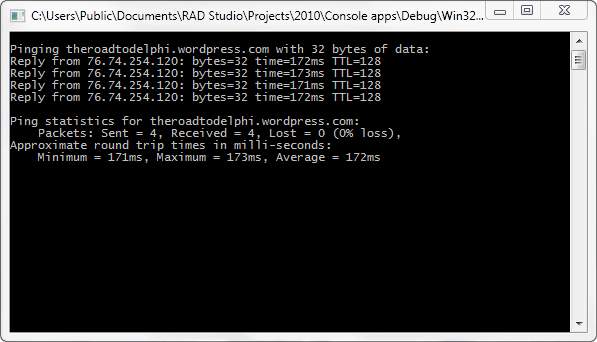
And the output
36 responses

  1. […] WMI (Windows Management Instrumentation). The wmi class which allow you to make a ping request… [full post] Rodrigo The Road to Delphi – a Blog About Delphi Programming (mostly) delphiwmi […]

  2. Nice post, but the code has broken lines.
    Please don’t use tags, use tags, like this :

    [sourcecode language=”delphi”]
    if FWbemObject.ResponseTime>Maximum then
    Maximum:=FWbemObject.ResponseTime;

    [/sourcecode].

    Thanks.

    Thanks.

    1. WanC , which browser are you using? the code looks good in Firefox and IE Explorer.

  3. Hi Rodrigo,

    As usual exceptional examples with very useful information! On this example I could suggest you to change
    “FWMIService := FSWbemLocator.ConnectServer(‘localhost’, ‘root\CIMV2’, ”, ”);” with
    ” FWMIService := FSWbemLocator.ConnectServer(”, ”, ”, ”);”
    due to fact that SWbemLocator.ConnectServer method takes by default the system parameters, if you don’t want to put them explicit. And you have several comments there, even an IP adress :)

    Please keep up the good work, it’s always interesting to read your blog!

    Best regards,
    Radu

    1. Radu, thanks for your comments, about your suggestion is always recommendable pass the namespace and the machine name when you use the ConnectServer function. about the commented line is just for illustrate which you can make a ping from a remote machine using the WMI.

  4. Muy bueno el código !!!

    Gracias

    1. Domingo, gracias por tus comentarios.

  5. Rafael Colucci Avatar
    Rafael Colucci

    Hello

    There is a problem with your code. If you try to ping a invalid address like ‘aaaa’ you get this error message:

    Project WMIPing.exe raised exception class EVariantTypeCastError with message ‘Could not convert variant of type (Null) into type (Integer).

    To reproduce this error, simple change:

    Ping(‘theroadtodelphi.wordpress.com’,4,32);

    for

    Ping(‘aaaaaa’,4,32);

    in this case, FWbemObject.StatusCode is getting NULL instead of the error code.

    1. Rafael the problem is due (as you say) which the StatusCode property return a null value which cannot be translated to a valid status message, the code was modified to handle this issue. try now and let me know the results of your tests.

      1. Rafael Colucci Avatar
        Rafael Colucci

        OK .. the problem is gone now (i had already did what you just did). But it seems to me that the Status code is always null when an address is invalid. This way, you will never get the error status when you use GetStatusCodeStr. Every invalid address i have tried gets a null status code.

        1. Rafael. try checking the value of the PrimaryAddressResolutionStatus property this value always return a valid code (not null) even if the address passed is invalid, you can translate the value to an string using the GetStatusCodeStr function.

          1. Rafael Colucci Avatar
            Rafael Colucci

            OK. Now it works perfect. You should consider changing your source code also.
            Thanks for you help and good job btw.

          2. ok, no problem, glad to help you.

  6. Just had to use this today. (:
    Gold as always.
    Do you know any drawback of using this comparing to usual IcmpSendEcho approach?
    thanks!

    EMB

    1. There is not drawbacks, you can get the same results using the IcmpSendEcho function or the Win32_PingStatus wmi class.

      1. Thanks! (:
        the problem with IcmpSendEcho is that we should not statically link to the library. Instead, call LoadLibrary and then GetProccess, and if fails, try again.
        Sometimes, I just wanna a simpler code that work in all target windows…

  7. […] For a delphi sample code check this article Making a PING with Delphi and the WMI. […]

  8. Abraão Avatar
    Abraão

    Hi Rodrigo, i would like of handle the timeout of the ping request . Could you give me some tips in how implement it using your source code?

    1. Just use the TimeOut property like so

      [sourcecode language=”text”]
      SELECT * FROM Win32_PingStatus where Address=’www.google.com’ and Timeout=100
      [/sourcecode]

      P.D : Sorry for the late response.

  9. Hi Rodrigo
    Thank for good example. The ICMP of Indy on W7 64 not work, and your example work for all target windows.

  10. Muchas gracias por este trabajo!

  11. Hi. thank you from your good example.
    I have a question. How to change the port that is uses to ping via this method?
    Thank you very much.

    1. The Win32_PingStatus WMI Class uses the ICMP protocol to make a echo request, and ICMP does not use ports, so you cannot set a port in a ping request.

      1. Thank you from your answer

  12. Jorge Abel Avatar
    Jorge Abel

    Como usaria este codigo en una aplicacion Win32 usando Delphi XE ???

    1. Hola Jorge, el codigo de ejemplo es de una aplicacion de consola, si deseas usarla en una aplicaicon VCL solo debes adaptar el codigo reemplazando las llamadas al procedimiento Writeln.

  13. This code is really nice. However if the pinged computer is offline it takes ages to get a response. Can this be made quicker? Any suggestions?

    1. Try using the Timeout property if the Win32_PingStatus class.

  14. Beautiful solution… pulled my hair out on making IcmpSendEcho work… basically would return 0 even when I could ping the host via command line. This worked flawlessly… thank you so much Rodrigo… you are a rock star my friend!

  15. Great!really appreciate this, was struggling with the IcmpSendEcho.

  16. dagobert Avatar
    dagobert

    Hello rodrigo, many thanks for this example.
    I use the response time for calculations. With fast local conections the time is 1ms. Also i used more ping bytes. Do you know a easy :-) way to show the response time for example in micro seconds?
    Many many thanks

    1. The ping accuracy of the Win32_PingStatus class is milliseconds. I’m not aware of another class or function which provides a better accuracy.

  17. Arthur Guimarães Avatar
    Arthur Guimarães

    Hi there I tried to use ICMP to ping a device on windows server 2012 and it takes 3 seconds to process Client.Ping; when client is offline. When its done on a windows server 2003 client.Ping; takes less than a second to inform the client is offline.
    Do you know how long does it takes to process a ping through your code WMI if client is offline?
    Thanks

    1. NO, I don’t made that test before, but you can try yourself.

  18. Volker Giese Avatar
    Volker Giese

    Hi Rodrigo,

    your code is the perfect option for my automatic backup system, after I had trouble working with the ICMP approach.
    Thank you

    1. You are welcome.

Leave a Reply

Discover more from

Subscribe now to keep reading and get access to the full archive.

Continue reading