The WMI allow you to get the installed Antivirus, AntiSpyware and Firewall (third party) software using the root\SecurityCenter or the root\SecurityCenter2 namespaces and the AntiVirusProduct , AntiSpywareProduct, FirewallProduct classes.
First you must know which these classes and namespaces are not documented by Microsoft and only are supported in Windows Desktops editions (Windows XP, Windows Vista and Windows 7).
Now depending of the Windows version the properties retrieved by the the same class can change. this is a summary of the classes and properties availables depending of the windows version
Windows XP
Namespace : SecurityCenter
Classes availables: AntiVirusProduct, FirewallProduct
AntiVirusProduct-Properties
- companyName
- displayName
- enableOnAccessUIMd5Hash
- enableOnAccessUIParameters
- instanceGuid
- onAccessScanningEnabled
- pathToEnableOnAccessUI
- pathToUpdateUI
- productUptoDate
- updateUIMd5Hash
- updateUIParameters
- versionNumber
FirewallProduct-Properties
- companyName
- displayName
- enabled
- enableUIMd5Hash
- enableUIParameters
- instanceGuid
- pathToEnableUI
- versionNumber
Windows Vista and Windows 7
Namespace : SecurityCenter2
Classes availables : AntiVirusProduct, AntiSpywareProduct, FirewallProduct
AntiVirusProduct, AntiSpywareProduct, FirewallProduct – Properties
- displayName
- instanceGuid
- pathToSignedProductExe
- pathToSignedReportingExe
- productState
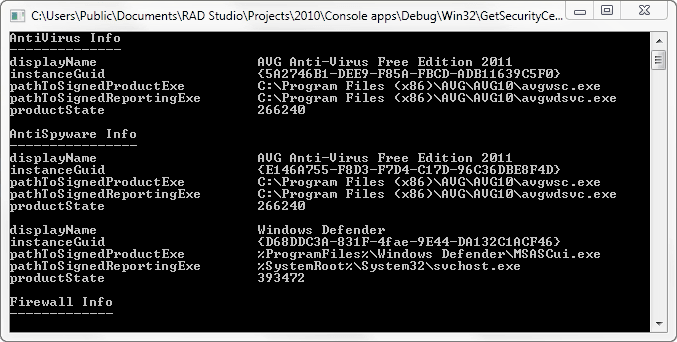
This is a sample project which determine the Antivirus, AntiSpyware and Firewall software installed in the system.
[sourcecode wraplines=”false” language=”delphi”]
program GetSecurityCenterInfo;
{$APPTYPE CONSOLE}
uses
SysUtils,
Windows,
ActiveX,
ComObj,
Variants;
type
TSecurityCenterProduct = (AntiVirusProduct,AntiSpywareProduct,FirewallProduct);
const
WmiRoot=’root’;
WmiClassSCProduct : array [TSecurityCenterProduct] of string = (‘AntiVirusProduct’,’AntiSpywareProduct’,’FirewallProduct’);
WmiNamespaceSCProduct : array [Boolean] of string = (‘SecurityCenter’,’SecurityCenter2′);
function VerSetConditionMask(dwlConditionMask: int64;dwTypeBitMask: DWORD; dwConditionMask: Byte): int64; stdcall; external kernel32;
{$IFDEF UNICODE}
function VerifyVersionInfo(var LPOSVERSIONINFOEX : OSVERSIONINFOEX;dwTypeMask: DWORD;dwlConditionMask: int64): BOOL; stdcall; external kernel32 name ‘VerifyVersionInfoW’;
{$ELSE}
function VerifyVersionInfo(var LPOSVERSIONINFOEX : OSVERSIONINFOEX;dwTypeMask: DWORD;dwlConditionMask: int64): BOOL; stdcall; external kernel32 name ‘VerifyVersionInfoA’;
{$ENDIF}
//verifies that the application is running on Windows 2000 Server or a later server, such as Windows Server 2003 or Windows Server 2008.
function Is_Win_Server : Boolean;
const
VER_NT_SERVER = $0000003;
VER_EQUAL = 1;
VER_GREATER_EQUAL = 3;
var
osvi : OSVERSIONINFOEX;
dwlConditionMask : DWORDLONG;
op : Integer;
begin
dwlConditionMask := 0;
op:=VER_GREATER_EQUAL;
ZeroMemory(@osvi, sizeof(OSVERSIONINFOEX));
osvi.dwOSVersionInfoSize := sizeof(OSVERSIONINFOEX);
osvi.dwMajorVersion := 5;
osvi.dwMinorVersion := 0;
osvi.wServicePackMajor := 0;
osvi.wServicePackMinor := 0;
osvi.wProductType := VER_NT_SERVER;
dwlConditionMask:=VerSetConditionMask( dwlConditionMask, VER_MAJORVERSION, op );
dwlConditionMask:=VerSetConditionMask( dwlConditionMask, VER_MINORVERSION, op );
dwlConditionMask:=VerSetConditionMask( dwlConditionMask, VER_SERVICEPACKMAJOR, op );
dwlConditionMask:=VerSetConditionMask( dwlConditionMask, VER_SERVICEPACKMINOR, op );
dwlConditionMask:=VerSetConditionMask( dwlConditionMask, VER_PRODUCT_TYPE, VER_EQUAL );
Result:=VerifyVersionInfo(osvi,VER_MAJORVERSION OR VER_MINORVERSION OR
VER_SERVICEPACKMAJOR OR VER_SERVICEPACKMINOR OR VER_PRODUCT_TYPE, dwlConditionMask);
end;
procedure GetSCProductInfo(SCProduct:TSecurityCenterProduct);
var
FSWbemLocator : OLEVariant;
FWMIService : OLEVariant;
FWbemObjectSet: OLEVariant;
FWbemObject : OLEVariant;
oEnum : IEnumvariant;
iValue : LongWord;
osVerInfo : TOSVersionInfo;
begin
osVerInfo.dwOSVersionInfoSize:=SizeOf(TOSVersionInfo);
GetVersionEx(osVerInfo);
if (SCProduct=AntiSpywareProduct) and (osVerInfo.dwMajorVersion<6) then exit; FSWbemLocator := CreateOleObject(‘WbemScripting.SWbemLocator’); FWMIService := FSWbemLocator.ConnectServer(‘localhost’,Format(‘%s\%s’,[WmiRoot,WmiNamespaceSCProduct[osVerInfo.dwMajorVersion>=6]]), ”, ”);
FWbemObjectSet:= FWMIService.ExecQuery(Format(‘SELECT * FROM %s’,[WmiClassSCProduct[SCProduct]]),’WQL’,0);
oEnum := IUnknown(FWbemObjectSet._NewEnum) as IEnumVariant;
while oEnum.Next(1, FWbemObject, iValue) = 0 do
begin
if osVerInfo.dwMajorVersion>=6 then //windows vista or newer
begin
Writeln(Format(‘displayName %s’,[FWbemObject.displayName]));// String
Writeln(Format(‘instanceGuid %s’,[FWbemObject.instanceGuid]));// String
Writeln(Format(‘pathToSignedProductExe %s’,[FWbemObject.pathToSignedProductExe]));// String
Writeln(Format(‘pathToSignedReportingExe %s’,[FWbemObject.pathToSignedReportingExe]));// String
Writeln(Format(‘productState %s’,[FWbemObject.productState]));// Uint32
end
else
begin
case SCProduct of
AntiVirusProduct :
begin
Writeln(Format(‘companyName %s’,[FWbemObject.companyName]));// String
Writeln(Format(‘displayName %s’,[FWbemObject.displayName]));// String
Writeln(Format(‘enableOnAccessUIMd5Hash %s’,[FWbemObject.enableOnAccessUIMd5Hash]));// Uint8
Writeln(Format(‘enableOnAccessUIParameters %s’,[FWbemObject.enableOnAccessUIParameters]));// String
Writeln(Format(‘instanceGuid %s’,[FWbemObject.instanceGuid]));// String
Writeln(Format(‘onAccessScanningEnabled %s’,[FWbemObject.onAccessScanningEnabled]));// Boolean
Writeln(Format(‘pathToEnableOnAccessUI %s’,[FWbemObject.pathToEnableOnAccessUI]));// String
Writeln(Format(‘pathToUpdateUI %s’,[FWbemObject.pathToUpdateUI]));// String
Writeln(Format(‘productUptoDate %s’,[FWbemObject.productUptoDate]));// Boolean
Writeln(Format(‘updateUIMd5Hash %s’,[FWbemObject.updateUIMd5Hash]));// Uint8
Writeln(Format(‘updateUIParameters %s’,[FWbemObject.updateUIParameters]));// String
Writeln(Format(‘versionNumber %s’,[FWbemObject.versionNumber]));// String
end;
FirewallProduct :
begin
Writeln(Format(‘companyName %s’,[FWbemObject.companyName]));// String
Writeln(Format(‘displayName %s’,[FWbemObject.displayName]));// String
Writeln(Format(‘enabled %s’,[FWbemObject.enabled]));// Boolean
Writeln(Format(‘enableUIMd5Hash %s’,[FWbemObject.enableUIMd5Hash]));// Uint8
Writeln(Format(‘enableUIParameters %s’,[FWbemObject.enableUIParameters]));// String
Writeln(Format(‘instanceGuid %s’,[FWbemObject.instanceGuid]));// String
Writeln(Format(‘pathToEnableUI %s’,[FWbemObject.pathToEnableUI]));// String
Writeln(Format(‘versionNumber %s’,[FWbemObject.versionNumber]));// String
end;
end;
end;
Writeln(”);
FWbemObject:=Unassigned;
end;
end;
begin
try
if Is_Win_Server then
begin
Writeln(‘Sorry this app only can run in desktop operating systems.’);
Halt;
end;
CoInitialize(nil);
try
Writeln(‘AntiVirus Info’);
Writeln(‘————–‘);
GetSCProductInfo(AntiVirusProduct);
Writeln(‘AntiSpyware Info’);
Writeln(‘—————-‘);
GetSCProductInfo(AntiSpywareProduct);
Writeln(‘Firewall Info’);
Writeln(‘————-‘);
GetSCProductInfo(FirewallProduct);
Readln;
finally
CoUninitialize;
end;
except
on E:Exception do
begin
Writeln(E.Classname, ‘:’, E.Message);
Readln;
end;
end;
end.
[/sourcecode]
And here is the result of the app.