The Code Project Site is running the Survey for the Code Project Reader’s Choice Awards 2012, In the question #18 Installation & Deployment Tools Inno Setup is listed as one of the options, you can show your support for this great tool voting on this survey.
Added border to TTabColorControlStyleHook
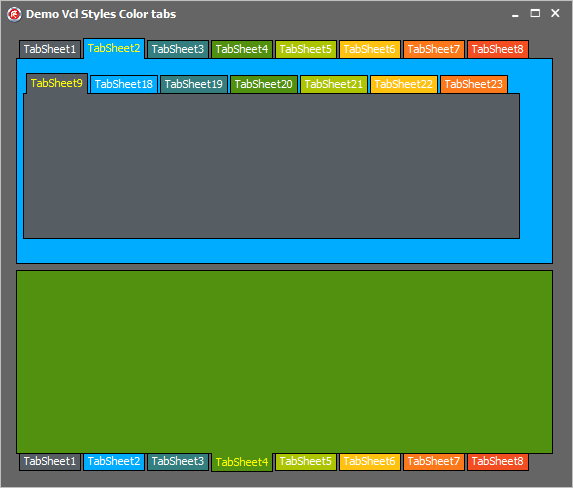
I just added a border support for the TTabColorControlStyleHook style hook (introduced in this post)
without border
with border
Enjoy :)
Creating colorful tabsheets with the VCL Styles
Introduction
Until now if you want change the color of a TTabSheet in a VCL application you must create a new descendant class of the TTabSheet component, then handle the WM_ERASEBKGND message, set the TPageControl to OwnerDraw property to true and finally implement the OnDrawTab event. And after that you will have an awfull and un-themed TPageControl.
In this post I will show you how using the vcl styles you can gain full control over to paint methods with very nice results.
The TTabSheet
To customize the colors of the TabSheets of a TPageControl we need to handle the WM_ERASEBKGND message of the TTabsheet and create a new Vcl Style Hook. For the first part we can use a interposer class like so
type
TTabSheet = class(Vcl.ComCtrls.TTabSheet)
private
procedure WMEraseBkgnd(var Message: TWMEraseBkgnd); message WM_ERASEBKGND;
end;
And then in the implementation of the WMEraseBkgnd method
{ TTabSheet }
procedure TTabSheet.WMEraseBkgnd(var Message: TWMEraseBkgnd);
var
LRect : TRect;
LSize : Integer;
LCanvas: TCanvas;
begin
if (PageControl <> nil) and StyleServices.Enabled and
((PageControl.Style = tsTabs) or TStyleManager.IsCustomStyleActive) then
begin
//Get the bounds of the Tabsheet
GetWindowRect(Handle, LRect);
OffsetRect(LRect, -LRect.Left, -LRect.Top);
//Get the size of the border
LSize := ClientToParent(Point(0, 0)).X;
InflateRect(LRect, LSize, LSize); // remove the border
//create a TCanvas for erase the background, using the DC of the message
LCanvas := TCanvas.Create;
try
LCanvas.Handle := Message.DC;
LCanvas.Brush.Color:=GetColorTab(TabIndex);
LCanvas.FillRect(LRect);
finally
LCanvas.Handle := 0;
LCanvas.Free;
end;
Message.Result := 1;
//the call to this method produces which the Style hook paint the active tabsheet
PageControl.UpdateTab2(PageControl.ActivePage);
end
else
inherited;
end;
In the above code you can note a call to the methods GetColorTab and PageControl.UpdateTab2
The GetColorTab is a simple function which return a color based in the index of the tab (you an modify the colors returned as you want)
function GetColorTab(Index : Integer) : TColor; Const MaxColors =9; //this is a sample palette of colors Colors : Array [0..MaxColors-1] of TColor = (6512214,16755712,8355381,1085522,115885,1098495,1735163,2248434,4987610); begin Result:=Colors[Index mod MaxColors]; end;
The PageControl.UpdateTab2 is part of a helper class to execute the private method TPageControl.UpdateTab and is just a trick used to inform to vcl style that need paint the active tabsheet.
type
TPageControlHelper = class helper for TPageControl
public
procedure UpdateTab2(Page: Vcl.ComCtrls.TTabSheet);
end;
procedure TPageControlHelper.UpdateTab2(Page: Vcl.ComCtrls.TTabSheet);
begin
Self.UpdateTab(Page);
end;
The Vcl style hook
Now the second part is implement the style hook using the existing TTabControlStyleHook as base class, so in this way we only need override 3 methods (PaintBackground, Paint and DrawTab) and handle the WM_ERASEBKGND message again.
Take a look to the declaration of the new vcl style hook
TTabColorControlStyleHook= class(TTabControlStyleHook)
private
procedure WMEraseBkgnd(var Message: TMessage); message WM_ERASEBKGND;
protected
procedure PaintBackground(Canvas: TCanvas); override;
procedure Paint(Canvas: TCanvas); override;
procedure DrawTab(Canvas: TCanvas; Index: Integer); override;
end;
Before we handle the WM_ERASEBKGND message of the TTabsheet, now we need do the same but for the style hook, because the style hook (TStyleHook) has their own messages handle routine.
procedure TTabColorControlStyleHook.WMEraseBkgnd(var Message: TMessage);
var
LCanvas : TCanvas;
begin
if (Message.LParam = 1) and StyleServices.Available then
begin
//create a Local canvas based in the HDC returned in the Message.WParam
LCanvas := TCanvas.Create;
try
LCanvas.Handle := HDC(Message.WParam);
//get the color
LCanvas.Brush.Color:=GetColorTab(TabIndex);
//apply the color
LCanvas.FillRect(Control.ClientRect);
finally
LCanvas.Handle := 0;
LCanvas.Free;
end;
end;
Message.Result := 1;
Handled := True;
end;
Following the implementation of the vcl style hook, this is the implementation of the PaintBackground method.
procedure TTabColorControlStyleHook.PaintBackground(Canvas: TCanvas);
var
LColor : TColor;
begin
if StyleServices.Available then
begin
//get the background color
LColor:=StyleServices.GetSystemColor(clWindowFrame);
Canvas.Brush.Color:=LColor;
Canvas.FillRect(Control.ClientRect);
end;
end;
Now the code for the Paint method, this procedure paint the body of the tabsheet and draw the child controls.
procedure TTabColorControlStyleHook.Paint(Canvas: TCanvas);
var
LRect : TRect;
LIndex : Integer;
SavedDC: Integer;
begin
SavedDC := SaveDC(Canvas.Handle);
try
LRect := DisplayRect;
ExcludeClipRect(Canvas.Handle, LRect.Left, LRect.Top, LRect.Right, LRect.Bottom);
PaintBackground(Canvas);
finally
RestoreDC(Canvas.Handle, SavedDC);
end;
// Update the state of the tabs, except the active
for LIndex := 0 to TabCount - 1 do
begin
if LIndex = TabIndex then
Continue;
DrawTab(Canvas, LIndex);
end;
//modify the bounds of the body to paint, based in the postion of the tab
case TabPosition of
tpTop : InflateRect(LRect, Control.Width - LRect.Right, Control.Height - LRect.Bottom);
tpLeft : InflateRect(LRect, Control.Width - LRect.Right, Control.Height - LRect.Bottom);
tpBottom: InflateRect(LRect, LRect.Left, LRect.Top);
tpRight : InflateRect(LRect, LRect.Left, LRect.Top);
end;
//Paint the body of the tabsheet
if StyleServices.Available then
begin
Canvas.Brush.Color:=GetColorTab(TabIndex);
Canvas.FillRect(LRect);
end;
// Draw the active tab
if TabIndex >= 0 then
DrawTab(Canvas, TabIndex);
// paint the controls of the tab
TWinControlClass(Control).PaintControls(Canvas.Handle, nil);
end;
We’re almost done the job, now we just need to implement the code for draw the Tab. Check the next full commented code
procedure TTabColorControlStyleHook.DrawTab(Canvas: TCanvas; Index: Integer);
var
LDetails : TThemedElementDetails;
LImageIndex : Integer;
LThemedTab : TThemedTab;
LIconRect : TRect;
R, LayoutR : TRect;
LImageW, LImageH, DxImage : Integer;
LTextX, LTextY: Integer;
LTextColor : TColor;
//draw the text in the tab
procedure DrawControlText(const S: string; var R: TRect; Flags: Cardinal);
var
TextFormat: TTextFormatFlags;
begin
Canvas.Font := TWinControlClass(Control).Font; //the TWinControlClass is a just a crack class for the TWinControl to access the protected members
TextFormat := TTextFormatFlags(Flags);
Canvas.Font.Color := LTextColor;
StyleServices.DrawText(Canvas.Handle, LDetails, S, R, TextFormat, Canvas.Font.Color);
end;
begin
//get the size of tab image (icon)
if (Images <> nil) and (Index < Images.Count) then
begin
LImageW := Images.Width;
LImageH := Images.Height;
DxImage := 3;
end
else
begin
LImageW := 0;
LImageH := 0;
DxImage := 0;
end;
R := TabRect[Index];
//check the left position of the tab , because can be hide
if R.Left < 0 then Exit;
//adjust the size of the tab to draw
if TabPosition in [tpTop, tpBottom] then
begin
if Index = TabIndex then
InflateRect(R, 0, 2);
end
else
if Index = TabIndex then
Dec(R.Left, 2)
else
Dec(R.Right, 2);
Canvas.Font.Assign(TCustomTabControlClass(Control).Font);//the TCustomTabControlClass is another crack class to access the protected font property
LayoutR := R;
LThemedTab := ttTabDontCare;
//Get the type of the active tab to draw
case TabPosition of
tpTop:
begin
if Index = TabIndex then
LThemedTab := ttTabItemSelected
else
if (Index = HotTabIndex) and MouseInControl then
LThemedTab := ttTabItemHot
else
LThemedTab := ttTabItemNormal;
end;
tpLeft:
begin
if Index = TabIndex then
LThemedTab := ttTabItemLeftEdgeSelected
else
if (Index = HotTabIndex) and MouseInControl then
LThemedTab := ttTabItemLeftEdgeHot
else
LThemedTab := ttTabItemLeftEdgeNormal;
end;
tpBottom:
begin
if Index = TabIndex then
LThemedTab := ttTabItemBothEdgeSelected
else
if (Index = HotTabIndex) and MouseInControl then
LThemedTab := ttTabItemBothEdgeHot
else
LThemedTab := ttTabItemBothEdgeNormal;
end;
tpRight:
begin
if Index = TabIndex then
LThemedTab := ttTabItemRightEdgeSelected
else
if (Index = HotTabIndex) and MouseInControl then
LThemedTab := ttTabItemRightEdgeHot
else
LThemedTab := ttTabItemRightEdgeNormal;
end;
end;
//draw the tab
if StyleServices.Available then
begin
LDetails := StyleServices.GetElementDetails(LThemedTab);//necesary for DrawControlText and draw the icon
InflateRect(R,-1,0);//adjust the size of the tab creating a blank space between the tabs
Canvas.Brush.Color:=GetColorTab(Index);//get the color
Canvas.FillRect(R);
end;
//get the index of the image (icon)
if Control is TCustomTabControl then
LImageIndex := TCustomTabControlClass(Control).GetImageIndex(Index)
else
LImageIndex := Index;
//draw the image
if (Images <> nil) and (LImageIndex >= 0) and (LImageIndex < Images.Count) then
begin
LIconRect := LayoutR;
case TabPosition of
tpTop, tpBottom:
begin
LIconRect.Left := LIconRect.Left + DxImage;
LIconRect.Right := LIconRect.Left + LImageW;
LayoutR.Left := LIconRect.Right;
LIconRect.Top := LIconRect.Top + (LIconRect.Bottom - LIconRect.Top) div 2 - LImageH div 2;
if (TabPosition = tpTop) and (Index = TabIndex) then
OffsetRect(LIconRect, 0, -1)
else
if (TabPosition = tpBottom) and (Index = TabIndex) then
OffsetRect(LIconRect, 0, 1);
end;
tpLeft:
begin
LIconRect.Bottom := LIconRect.Bottom - DxImage;
LIconRect.Top := LIconRect.Bottom - LImageH;
LayoutR.Bottom := LIconRect.Top;
LIconRect.Left := LIconRect.Left + (LIconRect.Right - LIconRect.Left) div 2 - LImageW div 2;
end;
tpRight:
begin
LIconRect.Top := LIconRect.Top + DxImage;
LIconRect.Bottom := LIconRect.Top + LImageH;
LayoutR.Top := LIconRect.Bottom;
LIconRect.Left := LIconRect.Left + (LIconRect.Right - LIconRect.Left) div 2 - LImageW div 2;
end;
end;
if StyleServices.Available then
StyleServices.DrawIcon(Canvas.Handle, LDetails, LIconRect, Images.Handle, LImageIndex);
end;
//draw the text of the tab
if StyleServices.Available then
begin
LTextColor:=GetColorTextTab(LThemedTab);//this is a helper function which get the text color of the tab based in his current state (normal, select, hot).
if (TabPosition = tpTop) and (Index = TabIndex) then
OffsetRect(LayoutR, 0, -1)
else
if (TabPosition = tpBottom) and (Index = TabIndex) then
OffsetRect(LayoutR, 0, 1);
if TabPosition = tpLeft then
begin
LTextX := LayoutR.Left + (LayoutR.Right - LayoutR.Left) div 2 - Canvas.TextHeight(Tabs[Index]) div 2;
LTextY := LayoutR.Top + (LayoutR.Bottom - LayoutR.Top) div 2 + Canvas.TextWidth(Tabs[Index]) div 2;
Canvas.Font.Color := LTextColor;
AngleTextOut2(Canvas, 90, LTextX, LTextY, Tabs[Index]);
end
else
if TabPosition = tpRight then
begin
LTextX := LayoutR.Left + (LayoutR.Right - LayoutR.Left) div 2 + Canvas.TextHeight(Tabs[Index]) div 2;
LTextY := LayoutR.Top + (LayoutR.Bottom - LayoutR.Top) div 2 - Canvas.TextWidth(Tabs[Index]) div 2;
Canvas.Font.Color := LTextColor;
AngleTextOut2(Canvas, -90, LTextX, LTextY, Tabs[Index]);
end
else
DrawControlText(Tabs[Index], LayoutR, DT_VCENTER or DT_CENTER or DT_SINGLELINE or DT_NOCLIP);
end;
end;
The final result
Ok, that was a lot of code, now this is the final result
To use this style hook you must include the Vcl.Styles.ColorTabs unit in your uses class after of the Vcl.ComCtrls unit and then register the hook in this way.
TCustomStyleEngine.RegisterStyleHook(TCustomTabControl, TTabColorControlStyleHook); TCustomStyleEngine.RegisterStyleHook(TTabControl, TTabColorControlStyleHook);
The full source code of this style hook is located in the vcl style utils repository.
How obtain the source of the WMI Data
We normally use the WMI to either return information about software and hardware installed, but you probably ever wondered from where this data is obtained?. Well the answer is, this data is obtained from many sources like the WinApi, the Windows Registry, the SMBIOS or custom functions embedded inside of the MOF definition.
WMI Metadata
All the WMI classes have a very rich set of metadata which defines the properties names, data types, descriptions and also each class and property have a special type of attribute called qualifiers which contain addtional metadata information about the WMI element ,within these qualifiers there is one called MappingStrings.
The MSDN documentation about this qualifier states
MappingStrings : Set of values that indicate a path to a location where you can find more information about the origin of a property, class, association, indication, or reference. The mapping string can be a directory path, a URL, a registry key, an include file, reference to a CIM class, or some other format.
This means that by analyzing the content of the MappingStrings qualifier you can determine the source of the data or obtain extra information about this property. Let me explain with a sample. The Win32_DiskDrive WMI class provides information about the physical disks present in the system like Bytes Per Sector, Firmware Revision, Interface Type (SCSI, IDE, USB) and so on. Now if you analize the MappingStrings qualifier of these properties you can determine where is located the information of the disks in the system.
The Code
Check the next function to access the MappingStrings qualifier (if exist) from any WMI class.
{$APPTYPE CONSOLE}
uses
SysUtils,
ActiveX,
ComObj,
Variants;
procedure GetWmiPropsSources(Const NameSpace, ClassName: string);
const
wbemFlagUseAmendedQualifiers = $00020000;
Var
Properties : OleVariant;
Qualifiers : OleVariant;
rgvarProp : OleVariant;
rgvarQualif : OleVariant;
objSWbemLocator : OleVariant;
objSWbemObjectSet : OleVariant;
objWMIService : OleVariant;
EnumProps : IEnumVariant;
EnumQualif : IEnumVariant;
pceltFetched : Cardinal;
Lindex : Integer;
begin
//create the WMI Scripting object
objSWbemLocator := CreateOleObject('WbemScripting.SWbemLocator');
//connect to the WMi service on the local mahicne
objWMIService := objSWbemLocator.ConnectServer('localhost', NameSpace, '', '');
//get the metadata of the WMI class
objSWbemObjectSet:= objWMIService.Get(ClassName, wbemFlagUseAmendedQualifiers);
//get a pointer to the properties
Properties := objSWbemObjectSet.Properties_;
//get an enumerator to the properties
EnumProps := IUnknown(Properties._NewEnum) as IEnumVariant;
//iterate over the properties
while EnumProps.Next(1, rgvarProp, pceltFetched) = 0 do
begin
//get a pointer to the qualifiers of the current property
Qualifiers := rgvarProp.Qualifiers_;
//get an enumerator to the qualifiers
EnumQualif := IUnknown(Qualifiers._NewEnum) as IEnumVariant;
//iterate over the qualifiers
while EnumQualif.Next(1, rgvarQualif, pceltFetched) = 0 do
begin
//check the name of the qualifier
if SameText('MappingStrings',rgvarQualif.Name) then
begin
Writeln(rgvarProp.Name);
//write the value of the qualifier
if not VarIsNull(rgvarQualif.Value) and VarIsArray(rgvarQualif.Value) then
for Lindex := VarArrayLowBound(rgvarQualif.Value, 1) to VarArrayHighBound(rgvarQualif.Value, 1) do
Writeln(Format(' %s',[String(rgvarQualif.Value[Lindex])]));
end;
rgvarQualif:=Unassigned;
end;
rgvarProp:=Unassigned;
end;
end;
begin
try
CoInitialize(nil);
try
GetWmiPropsSources('root\cimv2', 'Win32_DiskDrive');
finally
CoUninitialize;
end;
except
on E:EOleException do
Writeln(Format('EOleException %s %x', [E.Message,E.ErrorCode]));
on E:Exception do
Writeln(E.Classname, ':', E.Message);
end;
Writeln('Press Enter to exit');
Readln;
end.
After of execute the above code you will get a result like this
Availability MIF.DMTF|Operational State|003.5 MIB.IETF|HOST-RESOURCES-MIB.hrDeviceStatus BytesPerSector Win32API|Device Input and Output Structures|DISK_GEOMETRY|BytesPerSector Capabilities MIF.DMTF|Storage Devices|001.9 MIF.DMTF|Storage Devices|001.11 MIF.DMTF|Storage Devices|001.12 MIF.DMTF|Disks|003.7 DeviceID WMI FirmwareRevision Win32API|Device Input and Output Structures|STORAGE_DEVICE_DESCRIPTOR|ProductRevisionOffset Index Win32API|Windows 95/98 Functions|DRIVE_MAP_INFObtInt13Unit InstallDate MIF.DMTF|ComponentID|001.5 InterfaceType Win32API|Device Input and Output Functions|DeviceIoControl Manufacturer Win32Registry|HKEY_LOCAL_MACHINE\HARDWARE\DEVICEMAP\Scsi\Scsi Port\Scsi Bus\Target Id\Logical Unit Id\Identifier Win32Registry|Manufacturer MaxMediaSize MIF.DMTF|Sequential Access Devices|001.2 MediaLoaded Win32API|Device Input and Output Structures|DISK_GEOMETRY|MediaType|FixedMedia MediaType Win32API|Device Input and Output Structures|DISK_GEOMETRY|MediaType Model Win32Registry|HKEY_LOCAL_MACHINE\HARDWARE\DEVICEMAP\Scsi\Scsi Port\Scsi Bus\Target Id\Logical Unit Id\Identifier Win32Registry|ProductId Partitions Win32API|Device Input and Output Structures|PARTITION_INFORMATION|RecognizedPartition SCSIBus Win32API|Device Input and Output Structures|SCSI_ADDRESS|PathId SCSILogicalUnit Win32API|Device Input and Output Structures|SCSI_ADDRESS|Lun SCSIPort Win32API|Device Input and Output Structures|SCSI_ADDRESS|PortNumber SCSITargetId Win32API|Device Input and Output Structures|SCSI_ADDRESS|TargetId SectorsPerTrack Win32API|Device Input and Output Structures|DISK_GEOMETRY|SectorsPerTrack SerialNumber Win32API|Device Input and Output Structures|STORAGE_DEVICE_DESCRIPTOR|SerialNumberOffset Signature Win32API|Device Input and Output Structures|DRIVE_LAYOUT_INFORMATION|Signature Size Win32API|Device Input and Output Structures|DISK_GEOMETRY StatusInfo MIF.DMTF|Operational State|003.3 TotalCylinders Win32API|Device Input and Output Structures|DISK_GEOMETRY|Cylinders TotalHeads Win32API|Device Input and Output Structures|DISK_GEOMETRY|TracksPerCylinder TotalSectors Win32API|Device Input and Output Structures|DISK_GEOMETRY|SectorsPerTrack TotalTracks Win32API|Device Input and Output Structures|DISK_GEOMETRY|TracksPerCylinder TracksPerCylinder Win32API|Device Input and Output Structures|DISK_GEOMETRY|TracksPerCylinder
As you can see most of the properties of this class have a MappingStrings qualifier which shows the source (Win32API, Win32Registry, MIF.DMTF) of the data.
Finally if you are interested on this topic take a look to the WMI Delphi Code Creator which includes this feature.
Using the Bing search API from Delphi
The Bing Search API 2.0 now is available in the Windows Azure Marketplace, check the updated article here.
The Bing Search API provides a very flexible set of methods to submit queries and retrieve results from the Bing Engine. In this article I will show how you can use this API from Delphi.
Getting Started
Before to start read the terms of use of the Bing API which states “…The API is intended to deliver relevant results (collectively, “Bing results”) for queries submitted to Microsoft’s Bing service and other related Microsoft services (collectively, “Bing services”) for rendering within a customer-facing or end-user-facing website (“Website”) or application“..(So it’s ok use this API from a desktop application)
To use the Bing API you must get an Application ID from the Bing Developer Center and include this AppId in the API calls.
You can send a request to the Bing Search API and get the response in one of these protocols JSON (JavaScript Object Notation), XML (Extended Markup Language) or SOAP (Simple Object Access Protocol).
The protocol is identified in the used URI, check these samples URLs
- JSON http://api.bing.net/json.aspx?AppId= YOUR_APPID &Version=2.2&Market=en-US&Query=testign&Sources=web+spell&Web.Count=1
- XML http://api.bing.net/xml.aspx?AppId= YOUR_APPID &Version=2.2&Market=en-US&Query=testign&Sources=web+spell&Web.Count=1
- SOAP http://api.bing.net/search.wsdl?AppID=YourAppId&Version=2.2
Before to choose the appropriate response protocol you must evaluate the kind of application which are you developing, in this article I choose the XML protocol due that can be implemented im most of the delphi versions without use third party libraries (Note : the only limitation using the XML response is which the length of the requested URL is limited by the maximum URL length.)
Building the URL
When you uses the Bing XML interface, you must make a HTTP GET using a URL like this
http://api.bing.net/xml.aspx?AppId= YOUR_APPID &Version=2.2&Market=en-US&Query=testign&Sources=web+spell&Web.Count=1&xmltype=elementbased
- Appid : is the Application ID
- Version : Version of the API to use (recommended is 2.2)
- Market : prefered language of the search results
- Query : the sentence to search
- Web.Count : the number of results to get
- xmltype : this field control control the flavor of XML interface. If ElementBased enumeration is specified, each field will be rendered as a separated tag. If AttributeBased enumeration is specified, all simple type fields will be rendered as attributes instead of elements. The default value is ElementBased.
- Sources : indicate the types of data to retrieve (see Working with SourceTypes) (you can use multiple values in this files separated by an +)
the values of this field can be
- Image (Bing, Version 2.0)
- News (Bing, Version 2.0)
- Phonebook (Bing, Version 2.0)
- RelatedSearch(Bing, Version 2.0)
- Spell(Bing, Version 2.0)
- Translation (Bing, Version 2.2)
- Video (Bing, Version 2.x)
- Web (Bing, Version 2)
Depending of how you construct your URL the XML returned can vary (see Using XML (Bing, Version2) for a sample output XML).
The code
After of build the URL you must make a GET request to access the Bing API. you can use your favorite component like WinInet, Indy and so on. In my case I choose the IXMLHTTPRequest interface to make GET request because I can use the same object to parse the XML result.
Check the next snippets using the AttributeBased and elementbased values in the xmltype field and how the parse procedure changes depending of this value.
{$APPTYPE CONSOLE}
uses
MSXML,
SysUtils,
ActiveX,
ComObj,
Variants;
//Demo of Attribute Based XML request
procedure GetBingInfoXML(const SearchKey : string;NumberOfResults:integer=1);
const
//this AppId if for demo only please be nice and use your own , it's easy get one from here http://msdn.microsoft.com/en-us/library/ff512386.aspx
ApplicationID= '73C8F474CA4D1202AD60747126813B731199ECEA';
URI='http://api.bing.net/xml.aspx?AppId=%s&Version=2.2&Market=en-US&Query=%s&Sources=web&web.count=%d&xmltype=AttributeBased';
COMPLETED=4;
OK =200;
var
XMLHTTPRequest : IXMLHTTPRequest;
XMLDOMDocument : IXMLDOMDocument;
XMLDOMNode : IXMLDOMNode;
XMLDOMNodeList : IXMLDOMNodeList;
LIndex : Integer;
begin
XMLHTTPRequest := CreateOleObject('MSXML2.XMLHTTP') As IXMLHTTPRequest;
try
XMLHTTPRequest.open('GET', Format(URI,[ApplicationID, SearchKey, NumberOfResults]), False, EmptyParam, EmptyParam);
XMLHTTPRequest.send('');
if (XMLHTTPRequest.readyState = COMPLETED) and (XMLHTTPRequest.status = OK) then
begin
XMLDOMDocument := XMLHTTPRequest.responseXML As IXMLDOMDocument2;
XMLDOMNode := XMLDOMDocument.selectSingleNode('//web:Web');
Writeln(Format('Total found %s',[String(XMLDOMNode.attributes.getNamedItem('Total').Text)]));
Writeln;
XMLDOMNodeList := XMLDOMNode.selectNodes('//web:WebResult');
for LIndex:=0 to XMLDOMNodeList.length-1 do
begin
XMLDOMNode:=XMLDOMNodeList.item[LIndex];
Writeln(Format('Title %s',[String(XMLDOMNode.attributes.getNamedItem('Title').Text)]));
Writeln(Format('Description %s',[String(XMLDOMNode.attributes.getNamedItem('Description').Text)]));
Writeln(Format('Url %s',[String(XMLDOMNode.attributes.getNamedItem('Url').Text)]));
Writeln(Format('CacheUrl %s',[String(XMLDOMNode.attributes.getNamedItem('CacheUrl').Text)]));
Writeln(Format('DisplayUrl %s',[String(XMLDOMNode.attributes.getNamedItem('DisplayUrl').Text)]));
Writeln(Format('DateTime %s',[String(XMLDOMNode.attributes.getNamedItem('DateTime').Text)]));
Writeln;
end;
end;
finally
XMLHTTPRequest := nil;
end;
end;
begin
try
CoInitialize(nil);
try
GetBingInfoXML('delphi programming blogs', 5);
finally
CoUninitialize;
end;
except
on E:EOleException do
Writeln(Format('EOleException %s %x', [E.Message,E.ErrorCode]));
on E:Exception do
Writeln(E.Classname, ':', E.Message);
end;
Writeln('Press Enter to exit');
Readln;
end.
{$APPTYPE CONSOLE}
uses
MSXML,
SysUtils,
ActiveX,
ComObj,
Variants;
//Demo of element based XML request
procedure GetBingInfoXML(const SearchKey : string;NumberOfResults:integer=1);
const
//this AppId if for demo only please be nice and use your own , it's easy get one from here http://msdn.microsoft.com/en-us/library/ff512386.aspx
ApplicationID= '73C8F474CA4D1202AD60747126813B731199ECEA';
URI='http://api.bing.net/xml.aspx?AppId=%s&Version=2.2&Market=en-US&Query=%s&Sources=web&web.count=%d&xmltype=elementbased';
COMPLETED=4;
OK =200;
var
XMLHTTPRequest : IXMLHTTPRequest;
XMLDOMDocument : IXMLDOMDocument;
XMLDOMNode : IXMLDOMNode;
XMLDOMNodeList : IXMLDOMNodeList;
LIndex : Integer;
begin
XMLHTTPRequest := CreateOleObject('MSXML2.XMLHTTP') As IXMLHTTPRequest;
try
XMLHTTPRequest.open('GET', Format(URI,[ApplicationID, SearchKey, NumberOfResults]), False, EmptyParam, EmptyParam);
XMLHTTPRequest.send('');
if (XMLHTTPRequest.readyState = COMPLETED) and (XMLHTTPRequest.status = OK) then
begin
XMLDOMDocument := XMLHTTPRequest.responseXML As IXMLDOMDocument2;
XMLDOMNode := XMLDOMDocument.selectSingleNode('//web:Total');
Writeln(Format('Total found %s',[String(XMLDOMNode.text)]));
Writeln;
XMLDOMNodeList := XMLDOMNode.selectNodes('//web:WebResult');
for LIndex:=0 to XMLDOMNodeList.length-1 do
begin
XMLDOMNode:=XMLDOMNodeList.item[LIndex];
Writeln(Format('Title %s',[String(XMLDOMNode.selectSingleNode('./web:Title').Text)]));
Writeln(Format('Description %s',[String(XMLDOMNode.selectSingleNode('./web:Description').Text)]));
Writeln(Format('Url %s',[String(XMLDOMNode.selectSingleNode('./web:Url').Text)]));
Writeln(Format('CacheUrl %s',[String(XMLDOMNode.selectSingleNode('./web:CacheUrl').Text)]));
Writeln(Format('DisplayUrl %s',[String(XMLDOMNode.selectSingleNode('./web:DisplayUrl').Text)]));
Writeln(Format('DateTime %s',[String(XMLDOMNode.selectSingleNode('./web:DateTime').Text)]));
Writeln;
end;
end;
finally
XMLHTTPRequest := nil;
end;
end;
begin
try
CoInitialize(nil);
try
GetBingInfoXML('delphi programming blogs', 5);
finally
CoUninitialize;
end;
except
on E:EOleException do
Writeln(Format('EOleException %s %x', [E.Message,E.ErrorCode]));
on E:Exception do
Writeln(E.Classname, ':', E.Message);
end;
Writeln('Press Enter to exit');
Readln;
end.
And calling any of these methods in this way
GetBingInfoXML('delphi programming blogs', 5);
Will produce this output
Total found 7190000 Title DelphiFeeds.com - All Delphi blogs in one place - Delphi community ... Description Andy's Blog - I get some reports about problems with IDE Fix Pack 4.7. Those ... About Delphi Programming - in TTreeView :: Say you want to display customer-order-item data ... Url http://www.delphifeeds.com/ CacheUrl http://cc.bingj.com/cache.aspx?q=delphi+programming+blogs&d=46646399 49310488&mkt=en-US&w=c537195d,718a1a7b DisplayUrl www.delphifeeds.com DateTime 2012-03-30T13:36:00Z Title Delphi Programming Blog Description Recently TMS Software released a FTP Uploader which I tried and liked because of its simplicity, but I was not satisfied with it because it did not reset itself to ... Url http://williamwmiller.wordpress.com/ CacheUrl http://cc.bingj.com/cache.aspx?q=delphi+programming+blogs&d=4754451987498697&mkt=en-US&w=368ed92b,7b91d282 DisplayUrl williamwmiller.wordpress.com DateTime 2011-12-29T03:45:00Z Title RTTI « The Road to Delphi - a Blog about programming Description Here 's a sample code of how you can dump the declaration of a TRttiType using the Rtti. Supports classes, records and interfaces. Delphi //Author ... Url https://theroadtodelphi.wordpress.com/category/delphi/rtti/ CacheUrl http://cc.bingj.com/cache.aspx?q=delphi+programming+blogs&d=4925950032087641&mkt=en-US&w=c2546964,98458a DisplayUrl theroadtodelphi.wordpress.com/category/delphi/rtti DateTime 2012-02-22T11:03:00Z Title 2011 September « The Road to Delphi - a Blog about programming Description Maybe you've seen articles about how use the FireMonkey Styles, and how you can set almost every aspect of a visual control, today I will go a step... Url https://theroadtodelphi.wordpress.com/2011/09/ CacheUrl http://cc.bingj.com/cache.aspx?q=delphi+programming+blogs&d=5062478449739337&mkt=en-US&w=d5622f5e,eeaafc08 DisplayUrl theroadtodelphi.wordpress.com/2011/09 DateTime 2012-03-05T17:17:00Z Title Delphi Programming Blog Description Here's how to place a check box into a DBGrid. Create visually moreattractive user interfaces for editing boolean fields inside a DBGrid. ... Url http://delphi4all.blogfa.com/ CacheUrl http://cc.bingj.com/cache.aspx?q=delphi+programming+blogs&d=4525654810627103&mkt=en-US&w=63fcb281,3d45a160 DisplayUrl delphi4all.blogfa.com DateTime 2012-03-25T01:10:00Z
As you probably note , the above source code only parses the result when the response includes a web search result, so now we are to expand this code to support and parse any result returned by the Bing API (Web search, Images, Videos, etc.)
Check the next full sample
{$APPTYPE CONSOLE}
{$R *.res}
uses
MSXML,
SysUtils,
ActiveX,
ComObj,
Variants;
type
TBingApiSearchSource=(Image, News, RelatedSearch, Spell, Video, Web);
TBingApiSearchSources = Set of TBingApiSearchSource;
const
BingApiSearchSourcesStr : Array [TBingApiSearchSource] of string = ('Image','News','RelatedSearch','spell','Video','Web');
procedure GetBingInfoExtXML(const SearchKey : string;const NumberOfResults:integer=1;Source : TBingApiSearchSources=[Web]);
const
//this AppId if for demo only please be nice and use your own , it's easy get one from here http://msdn.microsoft.com/en-us/library/ff512386.aspx
ApplicationID= '73C8F474CA4D1202AD60747126813B731199ECEA';
URI='http://api.bing.net/xml.aspx?AppId=%s&Version=2.2&Market=en-US&Query=%s&Sources=%s&web.count=%d&xmltype=AttributeBased';
COMPLETED=4;
OK =200;
var
XMLHTTPRequest : IXMLHTTPRequest;
XMLDOMDocument : IXMLDOMDocument;
XMLDOMNode : IXMLDOMNode;
XMLDOMNodeList : IXMLDOMNodeList;
LIndex : Integer;
LSource : TBingApiSearchSource;
Sources : string;
begin
XMLHTTPRequest := CreateOleObject('MSXML2.XMLHTTP') As IXMLHTTPRequest;
try
Sources:='';
for LSource in Source do
Sources:=Sources+BingApiSearchSourcesStr[LSource]+'+';
Delete(Sources,Length(Sources),1);
XMLHTTPRequest.open('GET', Format(URI,[ApplicationID, SearchKey, Sources, NumberOfResults]), False, EmptyParam, EmptyParam);
XMLHTTPRequest.send('');
if (XMLHTTPRequest.readyState = COMPLETED) and (XMLHTTPRequest.status = OK) then
begin
XMLDOMDocument := XMLHTTPRequest.responseXML As IXMLDOMDocument2;
if Web in Source then
begin
XMLDOMNode := XMLDOMDocument.selectSingleNode('//web:Web');
Writeln(Format('WebSearch results total found %s',[String(XMLDOMNode.attributes.getNamedItem('Total').Text)]));
Writeln;
XMLDOMNodeList := XMLDOMNode.selectNodes('//web:WebResult');
for LIndex:=0 to XMLDOMNodeList.length-1 do
begin
XMLDOMNode:=XMLDOMNodeList.item[LIndex];
Writeln(Format('Title %s',[String(XMLDOMNode.attributes.getNamedItem('Title').Text)]));
Writeln(Format('Description %s',[String(XMLDOMNode.attributes.getNamedItem('Description').Text)]));
Writeln(Format('Url %s',[String(XMLDOMNode.attributes.getNamedItem('Url').Text)]));
Writeln(Format('CacheUrl %s',[String(XMLDOMNode.attributes.getNamedItem('CacheUrl').Text)]));
Writeln(Format('DisplayUrl %s',[String(XMLDOMNode.attributes.getNamedItem('DisplayUrl').Text)]));
Writeln(Format('DateTime %s',[String(XMLDOMNode.attributes.getNamedItem('DateTime').Text)]));
Writeln;
end;
end;
if Image in Source then
begin
XMLDOMNode := XMLDOMDocument.selectSingleNode('//mms:Image');
Writeln(Format('Images results total found %s',[String(XMLDOMNode.attributes.getNamedItem('Total').Text)]));
Writeln;
XMLDOMNodeList := XMLDOMNode.selectNodes('//mms:ImageResult');
for LIndex:=0 to XMLDOMNodeList.length-1 do
begin
XMLDOMNode:=XMLDOMNodeList.item[LIndex];
Writeln(Format('Title %s',[String(XMLDOMNode.attributes.getNamedItem('Title').Text)]));
Writeln(Format('MediaUrl %s',[String(XMLDOMNode.attributes.getNamedItem('MediaUrl').Text)]));
Writeln(Format('Url %s',[String(XMLDOMNode.attributes.getNamedItem('Url').Text)]));
Writeln(Format('DisplayUrl %s',[String(XMLDOMNode.attributes.getNamedItem('DisplayUrl').Text)]));
Writeln(Format('Width %s',[String(XMLDOMNode.attributes.getNamedItem('Width').Text)]));
Writeln(Format('Height %s',[String(XMLDOMNode.attributes.getNamedItem('Height').Text)]));
Writeln(Format('FileSize %s',[String(XMLDOMNode.attributes.getNamedItem('FileSize').Text)]));
Writeln(Format('ContentType %s',[String(XMLDOMNode.attributes.getNamedItem('ContentType').Text)]));
XMLDOMNode:=XMLDOMNode.selectSingleNode('//mms:Thumbnail');
if XMLDOMNode<>nil then
begin
Writeln(' Thumbnail Info');
Writeln(Format(' Url %s',[String(XMLDOMNode.attributes.getNamedItem('Url').Text)]));
Writeln(Format(' ContentType %s',[String(XMLDOMNode.attributes.getNamedItem('ContentType').Text)]));
Writeln(Format(' Width %s',[String(XMLDOMNode.attributes.getNamedItem('Width').Text)]));
Writeln(Format(' Height %s',[String(XMLDOMNode.attributes.getNamedItem('Height').Text)]));
Writeln(Format(' FileSize %s',[String(XMLDOMNode.attributes.getNamedItem('FileSize').Text)]));
end;
Writeln;
end;
end;
if Video in Source then
begin
XMLDOMNode := XMLDOMDocument.selectSingleNode('//mms:Video');
Writeln(Format('Video results total found %s',[String(XMLDOMNode.attributes.getNamedItem('Total').Text)]));
Writeln;
XMLDOMNodeList := XMLDOMNode.selectNodes('//mms:VideoResult');
for LIndex:=0 to XMLDOMNodeList.length-1 do
begin
XMLDOMNode:=XMLDOMNodeList.item[LIndex];
Writeln(Format('Title %s',[String(XMLDOMNode.attributes.getNamedItem('Title').Text)]));
Writeln(Format('PlayUrl %s',[String(XMLDOMNode.attributes.getNamedItem('PlayUrl').Text)]));
Writeln(Format('SourceTitle %s',[String(XMLDOMNode.attributes.getNamedItem('SourceTitle').Text)]));
Writeln(Format('RunTime %s',[String(XMLDOMNode.attributes.getNamedItem('RunTime').Text)]));
Writeln(Format('Click Through Page Url %s',[String(XMLDOMNode.attributes.getNamedItem('ClickThroughPageUrl').Text)]));
XMLDOMNode:=XMLDOMNode.selectSingleNode('//mms:StaticThumbnail');
if XMLDOMNode<>nil then
begin
Writeln(' Static Thumbnail Info');
Writeln(Format(' Url %s',[String(XMLDOMNode.attributes.getNamedItem('Url').Text)]));
Writeln(Format(' ContentType %s',[String(XMLDOMNode.attributes.getNamedItem('ContentType').Text)]));
Writeln(Format(' Width %s',[String(XMLDOMNode.attributes.getNamedItem('Width').Text)]));
Writeln(Format(' Height %s',[String(XMLDOMNode.attributes.getNamedItem('Height').Text)]));
Writeln(Format(' FileSize %s',[String(XMLDOMNode.attributes.getNamedItem('FileSize').Text)]));
end;
Writeln;
end;
end;
if RelatedSearch in Source then
begin
Writeln('Related Searchs');
Writeln;
XMLDOMNodeList := XMLDOMDocument.selectNodes('//rs:RelatedSearchResult');
for LIndex:=0 to XMLDOMNodeList.length-1 do
begin
XMLDOMNode:=XMLDOMNodeList.item[LIndex];
Writeln(Format('Title %s',[String(XMLDOMNode.attributes.getNamedItem('Title').Text)]));
Writeln(Format('Url %s',[String(XMLDOMNode.attributes.getNamedItem('Url').Text)]));
end;
end;
if News in Source then
begin
XMLDOMNode := XMLDOMDocument.selectSingleNode('//news:News');
Writeln(Format('News results total found %s',[String(XMLDOMNode.attributes.getNamedItem('Total').Text)]));
Writeln;
XMLDOMNodeList := XMLDOMNode.selectNodes('//news:NewsResult');
for LIndex:=0 to XMLDOMNodeList.length-1 do
begin
XMLDOMNode:=XMLDOMNodeList.item[LIndex];
Writeln(Format('Title %s',[String(XMLDOMNode.attributes.getNamedItem('Title').Text)]));
Writeln(Format('Url %s',[String(XMLDOMNode.attributes.getNamedItem('Url').Text)]));
Writeln(Format('Source %s',[String(XMLDOMNode.attributes.getNamedItem('Source').Text)]));
Writeln(Format('Snippet %s',[String(XMLDOMNode.attributes.getNamedItem('Snippet').Text)]));
Writeln(Format('Date %s',[String(XMLDOMNode.attributes.getNamedItem('Date').Text)]));
Writeln(Format('BreakingNews %s',[String(XMLDOMNode.attributes.getNamedItem('BreakingNews').Text)]));
Writeln;
end;
end;
if Spell in Source then
begin
XMLDOMNode := XMLDOMDocument.selectSingleNode('//spl:Spell');
Writeln(Format('Spell results total found %s',[String(XMLDOMNode.attributes.getNamedItem('Total').Text)]));
Writeln;
XMLDOMNodeList := XMLDOMNode.selectNodes('//spl:SpellResult');
for LIndex:=0 to XMLDOMNodeList.length-1 do
begin
XMLDOMNode:=XMLDOMNodeList.item[LIndex];
Writeln(Format('Value %s',[String(XMLDOMNode.attributes.getNamedItem('Value').Text)]));
Writeln;
end;
end;
end;
finally
XMLHTTPRequest := nil;
end;
end;
begin
try
CoInitialize(nil);
try
GetBingInfoExtXML('Delphi programming', 1, [Web, Video, Image]);
finally
CoUninitialize;
end;
except
on E:EOleException do
Writeln(Format('EOleException %s %x', [E.Message,E.ErrorCode]));
on E:Exception do
Writeln(E.Classname, ':', E.Message);
end;
Writeln('Press Enter to exit');
Readln;
end.
VCL Styles – Adding background images and colors to Delphi forms
Adding a background image to a delphi form is a topic very well covered by many articles, but most of them doesn’t work or another produces a lot of flicker when the vcl styles are enabled. The common techniques to set a background image in a form includes :
- Use a TImage component with the align property set to alClient
- Use the OnPaint event of the Form and handle the WM_ERASEBKGND message
- use the Canvas.Brush.Bitmap property of the form to assign a bitmap
- and so on.
Since the introduction of the vcl styles, now you can use the style hooks to handle the paint operations of the TWinControl descendant, the main advantage about the styles hookz is which you can override the core paint methods directly, avoiding the flicker and in most cases you do not even need to handle the windows messages. So now I will how you how you can create a style hook to add a custom background image or color to a form including the non client area.
The first step is create a new Style hook descendant of the TFormStyleHook class and override the PaintNC and PaintBackground methods.
So the class definition will look like this
type
TFormStyleHookBackround=class(TFormStyleHook)
strict private
type
TSettings = class
strict private
FColor: TColor;
FImageLocation: string;
FBitmap: TBitmap;
FUseColor: Boolean;
FUseImage: Boolean;
FEnabled: Boolean;
procedure SetColor(const Value: TColor);
procedure SetImageLocation(const Value: string);
procedure SetUseColor(const Value: Boolean);
procedure SetUseImage(const Value: Boolean);
public
property UseImage : Boolean read FUseImage write SetUseImage;
property UseColor : Boolean read FUseColor write SetUseColor;
property Color : TColor read FColor write SetColor;
property ImageLocation : string read FImageLocation write SetImageLocation;
property Bitmap : TBitmap read FBitmap;
property Enabled : Boolean read FEnabled write FEnabled;
constructor Create;
destructor Destroy;override;
end;
class var FNCSettings: TSettings;
class var FBackGroundSettings: TSettings;
class var FMergeImages: boolean;
protected
procedure PaintNC(Canvas: TCanvas); override;
procedure PaintBackground(Canvas: TCanvas); override;
class constructor Create;
class destructor Destroy;
public
class property MergeImages: boolean read FMergeImages write FMergeImages;
class property NCSettings : TSettings read FNCSettings;
class property BackGroundSettings : TSettings read FBackGroundSettings;
end;
Note: the above class definition includes some additional elements to store the settings of the style hook like Bitmaps and Colors used.
Painting the background
The PaintBackground method, paints the background of the form filling the control area with the current vcl style background color, in this case we are use a bitmap or a custom color depnding of the setting of the hook.
procedure TFormStyleHookBackround.PaintBackground(Canvas: TCanvas);
var
LRect : TRect;
RBitmap : TRect;
L,H : Integer;
begin
//if the option is not enabled use the default inherited PaintBackground method
if not BackGroundSettings.Enabled then
inherited
else
begin
//get he bounds of the control (form)
LRect := Rect(0, 0, Control.ClientWidth, Control.ClientHeight);
//use a custom color for the background?
if BackGroundSettings.UseColor then
begin
Canvas.Brush.Color:=BackGroundSettings.Color;
Canvas.FillRect(LRect);
end
else
//use a bitmap
begin
//check the size of the bitmap against the control bounds to detrine how the bitmap is drawn
if (BackGroundSettings.Bitmap.Width<LRect.Width) or (BackGroundSettings.Bitmap.Height<LRect.Height) then
begin
Canvas.Brush.Bitmap := BackGroundSettings.BitMap;
Canvas.FillRect(LRect);
end
else
begin
//check if the the background bitmap must be merged with non client area bitmap
if not FMergeImages then
Canvas.CopyRect(LRect,BackGroundSettings.Bitmap.Canvas,LRect)
else
begin
RBitmap:=LRect;
H:=_GetBorderSize.Top;
L:=_GetBorderSize.Left;
RBitmap.SetLocation(L, H);
Canvas.CopyRect(LRect,BackGroundSettings.Bitmap.Canvas,RBitmap);
end;
end;
end;
end;
end;
The above code will produce results like these
Using a custom color background
Using a custom image background
Painting the Non client area
To handle the paint operations over the non client area in the old versions of windows (before to windows vista) you must handle the WM_NCPAINT windows message or since Windows Vista using the DWM API you can accomplish this task. But if you uses the vcl styles only you must need override the PaintNC method.
This is the implementation of the PaintNC method to use a custom color or image in the non client area.
procedure TFormStyleHookBackround.PaintNC(Canvas: TCanvas);
var
LDetail: TThemedWindow;
LDetails,
CaptionDetails,
IconDetails : TThemedElementDetails;
R, R1, DrawRect, ButtonRect, TextRect: TRect;
CaptionBuffer: TBitmap;
FButtonState: TThemedWindow;
TextFormat: TTextFormat;
LText: string;
SrcBackRect : TRect;
begin
//if the setting is not enabled use the original PaintNC method
if not NCSettings.Enabled then
begin
inherited ;
exit;
end;
//check the border style of the form
if Form.BorderStyle = bsNone then
begin
MainMenuBarHookPaint(Canvas);
Exit;
end;
{init some parameters}
_FCloseButtonRect := Rect(0, 0, 0, 0);
_FMaxButtonRect := Rect(0, 0, 0, 0);
_FMinButtonRect := Rect(0, 0, 0, 0);
_FHelpButtonRect := Rect(0, 0, 0, 0);
_FSysMenuButtonRect := Rect(0, 0, 0, 0);
_FCaptionRect := Rect(0, 0, 0, 0);
if not StyleServices.Available then
Exit;
R := _GetBorderSize;
{draw caption}
if (Form.BorderStyle <> bsToolWindow) and
(Form.BorderStyle <> bsSizeToolWin) then
begin
if _FFormActive then
LDetail := twCaptionActive
else
LDetail := twCaptionInActive
end
else
begin
if _FFormActive then
LDetail := twSmallCaptionActive
else
LDetail := twSmallCaptionInActive
end;
CaptionBuffer := TBitmap.Create;
CaptionBuffer.SetSize(_FWidth, R.Top);
{draw caption border}
DrawRect := Rect(0, 0, CaptionBuffer.Width, CaptionBuffer.Height);
LDetails := StyleServices.GetElementDetails(LDetail); //used for draw text in the caption
//check if a must use a custom color or a bitmap
if FNCSettings.UseColor then
begin
//use the select color to fill the background of the canvas
CaptionBuffer.Canvas.Brush.Color:=FNCSettings.Color;
CaptionBuffer.Canvas.FillRect(DrawRect);
end
else
begin
//use the bitmap to fill the canvas
SrcBackRect.Left:=0;
SrcBackRect.Top:=0;
SrcBackRect.Width:=DrawRect.Width;
SrcBackRect.Height:=DrawRect.Height;
//SrcBackRect.SetLocation(FNCSettings.Bitmap.Width-DrawRect.Width, 0);
//SrcBackRect.SetLocation(_GetBorderSize.Width, 0);
CaptionBuffer.Canvas.CopyRect(DrawRect, FNCSettings.Bitmap.Canvas,SrcBackRect);
end;
TextRect := DrawRect;
CaptionDetails := LDetails;
{draw icon}
if (biSystemMenu in TCustomFormHack(Form).BorderIcons) and
(Form.BorderStyle <> bsDialog) and
(Form.BorderStyle <> bsToolWindow) and
(Form.BorderStyle <> bsSizeToolWin) then
begin
IconDetails := StyleServices.GetElementDetails(twSysButtonNormal);
if not StyleServices.GetElementContentRect(0, IconDetails, DrawRect, ButtonRect) then
ButtonRect := Rect(0, 0, 0, 0);
R1 := Rect(0, 0, GetSystemMetrics(SM_CXSMICON), GetSystemMetrics(SM_CYSMICON));
RectVCenter(R1, ButtonRect);
if ButtonRect.Width > 0 then
DrawIconEx(CaptionBuffer.Canvas.Handle, R1.Left, R1.Top, _GetIconFast.Handle, 0, 0, 0, 0, DI_NORMAL);
Inc(TextRect.Left, ButtonRect.Width + 5);
_FSysMenuButtonRect := ButtonRect;
end
else
Inc(TextRect.Left, R.Left);
{draw buttons}
if (biSystemMenu in TCustomFormHack(Form).BorderIcons) then
begin
if (Form.BorderStyle <> bsToolWindow) and
(Form.BorderStyle <> bsSizeToolWin) then
begin
if (_FPressedButton = HTCLOSE) and (_FHotButton = HTCLOSE) then
FButtonState := twCloseButtonPushed
else if _FHotButton = HTCLOSE then
FButtonState := twCloseButtonHot
else
if _FFormActive then
FButtonState := twCloseButtonNormal
else
FButtonState := twCloseButtonDisabled;
end
else
begin
if (_FPressedButton = HTCLOSE) and (_FHotButton = HTCLOSE) then
FButtonState := twSmallCloseButtonPushed
else if _FHotButton = HTCLOSE then
FButtonState := twSmallCloseButtonHot
else
if _FFormActive then
FButtonState := twSmallCloseButtonNormal
else
FButtonState := twSmallCloseButtonDisabled;
end;
LDetails := StyleServices.GetElementDetails(FButtonState);
if not StyleServices.GetElementContentRect(0, LDetails, DrawRect, ButtonRect) then
ButtonRect := Rect(0, 0, 0, 0);
StyleServices.DrawElement(CaptionBuffer.Canvas.Handle, LDetails, ButtonRect);
if ButtonRect.Left > 0 then
TextRect.Right := ButtonRect.Left;
_FCloseButtonRect := ButtonRect;
end;
if (biMaximize in TCustomFormHack(Form).BorderIcons) and
(biSystemMenu in TCustomFormHack(Form).BorderIcons) and
(Form.BorderStyle <> bsDialog) and
(Form.BorderStyle <> bsToolWindow) and
(Form.BorderStyle <> bsSizeToolWin) then
begin
if Form.WindowState = wsMaximized then
begin
if (_FPressedButton = HTMAXBUTTON) and (_FHotButton = HTMAXBUTTON) then
FButtonState := twRestoreButtonPushed
else if _FHotButton = HTMAXBUTTON then
FButtonState := twRestoreButtonHot
else
if _FFormActive then
FButtonState := twRestoreButtonNormal
else
FButtonState := twRestoreButtonDisabled;
end
else
begin
if (_FPressedButton = HTMAXBUTTON) and (_FHotButton = HTMAXBUTTON) then
FButtonState := twMaxButtonPushed
else if _FHotButton = HTMAXBUTTON then
FButtonState := twMaxButtonHot
else
if _FFormActive then
FButtonState := twMaxButtonNormal
else
FButtonState := twMaxButtonDisabled;
end;
LDetails := StyleServices.GetElementDetails(FButtonState);
if not StyleServices.GetElementContentRect(0, LDetails, DrawRect, ButtonRect) then
ButtonRect := Rect(0, 0, 0, 0);
if ButtonRect.Width > 0 then
StyleServices.DrawElement(CaptionBuffer.Canvas.Handle, LDetails, ButtonRect);
if ButtonRect.Left > 0 then
TextRect.Right := ButtonRect.Left;
_FMaxButtonRect := ButtonRect;
end;
if (biMinimize in TCustomFormHack(Form).BorderIcons) and
(biSystemMenu in TCustomFormHack(Form).BorderIcons) and
(Form.BorderStyle <> bsDialog) and
(Form.BorderStyle <> bsToolWindow) and
(Form.BorderStyle <> bsSizeToolWin) then
begin
if (_FPressedButton = HTMINBUTTON) and (_FHotButton = HTMINBUTTON) then
FButtonState := twMinButtonPushed
else if _FHotButton = HTMINBUTTON then
FButtonState := twMinButtonHot
else
if _FFormActive then
FButtonState := twMinButtonNormal
else
FButtonState := twMinButtonDisabled;
LDetails := StyleServices.GetElementDetails(FButtonState);
if not StyleServices.GetElementContentRect(0, LDetails, DrawRect, ButtonRect) then
ButtonRect := Rect(0, 0, 0, 0);
if ButtonRect.Width > 0 then
StyleServices.DrawElement(CaptionBuffer.Canvas.Handle, LDetails, ButtonRect);
if ButtonRect.Left > 0 then TextRect.Right := ButtonRect.Left;
_FMinButtonRect := ButtonRect;
end;
if (biHelp in TCustomFormHack(Form).BorderIcons) and (biSystemMenu in TCustomFormHack(Form).BorderIcons) and
((not (biMaximize in TCustomFormHack(Form).BorderIcons) and
not (biMinimize in TCustomFormHack(Form).BorderIcons)) or (Form.BorderStyle = bsDialog))
then
begin
if (_FPressedButton = HTHELP) and (_FHotButton = HTHELP) then
FButtonState := twHelpButtonPushed
else if _FHotButton = HTHELP then
FButtonState := twHelpButtonHot
else
if _FFormActive then
FButtonState := twHelpButtonNormal
else
FButtonState := twHelpButtonDisabled;
LDetails := StyleServices.GetElementDetails(FButtonState);
if not StyleServices.GetElementContentRect(0, LDetails, DrawRect, ButtonRect) then
ButtonRect := Rect(0, 0, 0, 0);
if ButtonRect.Width > 0 then
StyleServices.DrawElement(CaptionBuffer.Canvas.Handle, LDetails, ButtonRect);
if ButtonRect.Left > 0 then
TextRect.Right := ButtonRect.Left;
_FHelpButtonRect := ButtonRect;
end;
{draw text}
TextFormat := [tfLeft, tfSingleLine, tfVerticalCenter];
if Control.UseRightToLeftReading then
Include(TextFormat, tfRtlReading);
LText := Text;
StyleServices.DrawText(CaptionBuffer.Canvas.Handle, CaptionDetails, LText, TextRect, TextFormat);
_FCaptionRect := TextRect;
{draw caption buffer}
Canvas.Draw(0, 0, CaptionBuffer);
CaptionBuffer.Free;
{draw menubar}
MainMenuBarHookPaint(Canvas);
{draw left border}
DrawRect := Rect(0, R.Top, R.Left, _FHeight - R.Bottom);
if DrawRect.Bottom - DrawRect.Top > 0 then
//use a color?
if FNCSettings.UseColor then
begin
Canvas.Brush.Color:=FNCSettings.Color;
Canvas.FillRect(DrawRect);
end
else
begin
if (DrawRect.Height<=FNCSettings.BitMap.Height) and (DrawRect.Width<=FNCSettings.BitMap.Width) then
Canvas.CopyRect(DrawRect,FNCSettings.Bitmap.Canvas,DrawRect)
else
Canvas.StretchDraw(DrawRect, FNCSettings.BitMap);
end;
{draw right border}
DrawRect := Rect(_FWidth - R.Right, R.Top, _FWidth, _FHeight - R.Bottom);
if DrawRect.Bottom - DrawRect.Top > 0 then
//use a color?
if FNCSettings.UseColor then
begin
Canvas.Brush.Color:=FNCSettings.Color;
Canvas.FillRect(DrawRect);
end
else
begin
if (DrawRect.Height<=FNCSettings.BitMap.Height) and (Control.Width<=FNCSettings.BitMap.Width) then
Canvas.CopyRect(DrawRect,FNCSettings.Bitmap.Canvas,DrawRect)
else
Canvas.StretchDraw(DrawRect, FNCSettings.BitMap);
end;
{draw Bottom border}
DrawRect := Rect(0, _FHeight - R.Bottom, _FWidth, _FHeight);
if DrawRect.Bottom - DrawRect.Top > 0 then
//use a color?
if FNCSettings.UseColor then
begin
Canvas.Brush.Color:=FNCSettings.Color;
Canvas.FillRect(DrawRect);
end
else
begin
if (DrawRect.Height<=FNCSettings.BitMap.Height) and (Control.Width<=FNCSettings.BitMap.Width) then
Canvas.CopyRect(DrawRect,FNCSettings.Bitmap.Canvas,DrawRect)
else
begin
SrcBackRect.Left:=0;
SrcBackRect.Top:=0;
SrcBackRect.Width:=DrawRect.Width;
SrcBackRect.Height:=DrawRect.Height;
SrcBackRect.SetLocation(FNCSettings.BitMap.Width-DrawRect.Width, 0);
Canvas.CopyRect(DrawRect, FNCSettings.BitMap.Canvas,SrcBackRect);
end;
end;
end;
And the result is
Using a custom color in the non client area
Using a custom image in the non client area
Putting it all together
Finally if you mix both methods (the background and the non client area) you can get very nice results
Using the class
The full source code of the TFormStyleHookBackround class is available here and is part of the vcl style utils project. to use it just include a reference to the Vcl.Styles.FormStyleHooks unit in your project and register the style hook like so.
TStyleManager.Engine.RegisterStyleHook(TFrmMain, TFormStyleHookBackround);
To modify the background image of the form, use this code
TFormStyleHookBackround.BackGroundSettings.UseImage := True; TFormStyleHookBackround.BackGroundSettings.ImageLocation := 'image.png'; //set the location of the image
To modify the background color of the form, use this code
TFormStyleHookBackround.BackGroundSettings.UseColor := True; TFormStyleHookBackround.BackGroundSettings.Color := clRed;//set the colot
After of modify background color or image you must repaint the form sending the WM_PAINT message
Check this sample
Var
LIndex: Integer;
begin
for LIndex := 0 to ComponentCount - 1 do
if Components[LIndex] is TWinControl then
begin
TWinControl(Components[LIndex]).Invalidate;
TWinControl(Components[LIndex]).Perform(WM_PAINT, 0, 0);
end;
Self.Invalidate;
Self.Perform(WM_PAINT, 0, 0);
end;
To customize the color of the non client area of the form use this code
TFormStyleHookBackround.NCSettings.UseColor:= True; TFormStyleHookBackround.NCSettings.Color:= clGreen; //set the color
To assign an image to the non client area of the form use this code
TFormStyleHookBackround.NCSettings.UseImage := True; TFormStyleHookBackround.NCSettings.ImageLocation := 'image.png'; //set the location of the image
After of modify color or image of the non client area you must repaint the NC using the WM_NCPAINT message
SendMessage(Handle, WM_NCPAINT, 0, 0);
Download the demo application (binaries) from here.
Delphi VCL Styles and TWebBrowser, source code released.
First I want to thank you, for the great feedback of my last post, all your comments and issue reports were very useful.
Motivation
While I was working on my favorite personal project And I realized which the TWebBrowser embedded in one of my forms doesn’t look very nice when the VCL Styles are enabled. So I decide write a fix.
My main goal was skin the scrollbars of the TWebBrowser component which by default uses the native windows look and feel.
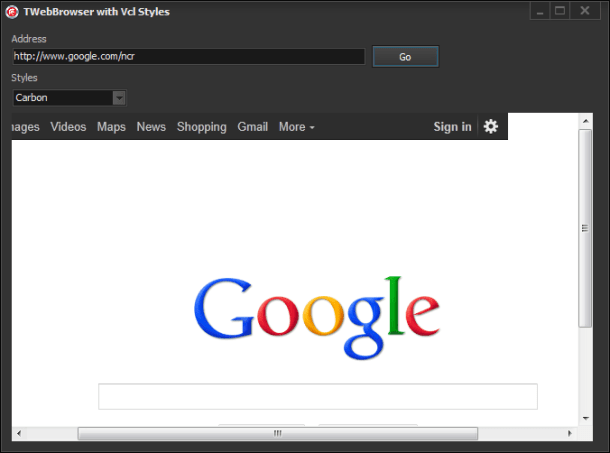
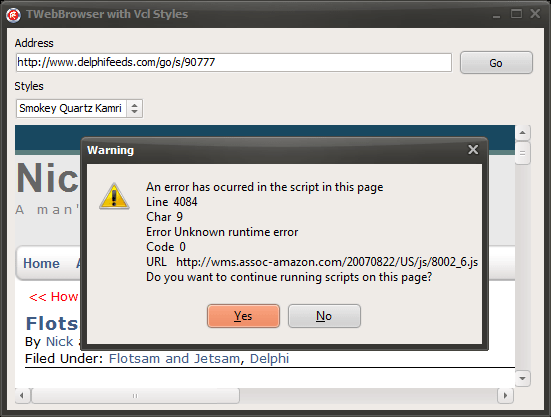
This task involve many challenges like determine which WebBrowser events modify the position and visibility of the scrollbars, get the bounds of the original scrollbars, paint the skinned scrollbars, scroll the WebBrowser control, and so on. So I will try to explain briefly how was done.
The work begin
The first task was hook the TWebBrowser component to check which events and windows messages of the TWebBrowser modify the scrollbars visibility and position. So after of write a little helper application to do this, was determined that the events are :
- OnDocumentComplete
- OnNavigateComplete2
- OnBeforeNavigate2
- OnCommandStateChange
- OnProgressChange
And also the WMSIZE message.
The events
In order to intercept these TWebbrowser events we can’t assign a event handler directly because these will not be fired if the same events are assigned by the user. So the solution was override the InvokeEvent method which is part of the TOleControl control (and which is the parent class of the TWebbrowser component).
Here’s how it looks the overridden InvokeEvent method
procedure TVclStylesWebBrowser.InvokeEvent(DispID: TDispID; var Params: TDispParams);
var
ArgCount : Integer;
LVarArray : Array of OleVariant;
LIndex : Integer;
begin
inherited; //call the original implementation of InvokeEvent
ArgCount := Params.cArgs;
SetLength(LVarArray, ArgCount);
//store the paramaters in an variant array for an more easy access to the values
for LIndex := Low(LVarArray) to High(LVarArray) do
LVarArray[High(LVarArray)-LIndex] := OleVariant(TDispParams(Params).rgvarg^[LIndex]);
//call the private impkemenation of each event
case DispID of
252: DoNavigateComplete2(Self,
LVarArray[0] {const IDispatch},
LVarArray[1] {const OleVariant});
259: DoDocumentComplete(Self,
LVarArray[0] {const IDispatch},
LVarArray[1] {const OleVariant});
250: DoBeforeNavigate2(Self,
LVarArray[0] {const IDispatch},
LVarArray[1] {const OleVariant},
LVarArray[2] {const OleVariant},
LVarArray[3] {const OleVariant},
LVarArray[4] {const OleVariant},
LVarArray[5] {const OleVariant},
WordBool((TVarData(LVarArray[6]).VPointer)^) {var WordBool});
105:DoCommandStateChange(Self,
LVarArray[0] {Integer},
LVarArray[1] {WordBool});
108:DoProgressChange(Self,
LVarArray[0] {Integer},
LVarArray[1] {Integer});
end;
SetLength(LVarArray, 0);
end;
Additionally each local event implementation call the ResizeScrollBars method to change the visibility of the scrollbars and calculate the current position
procedure TVclStylesWebBrowser.DoBeforeNavigate2(Sender: TObject; const pDisp: IDispatch; const URL, Flags, TargetFrameName, PostData, Headers: OleVariant; var Cancel: WordBool); begin ResizeScrollBars; end; procedure TVclStylesWebBrowser.DoProgressChange(Sender: TObject; Progress,ProgressMax: Integer); begin ResizeScrollBars; end; procedure TVclStylesWebBrowser.DoDocumentComplete(Sender: TObject;const pDisp: IDispatch; const URL: OleVariant); begin ResizeScrollBars; end; procedure TVclStylesWebBrowser.DoNavigateComplete2(Sender: TObject;const pDisp:IDispatch;const URL: OleVariant); begin ResizeScrollBars; end;
Also we need to call the same method when the WM_SIZE message arrives.
procedure TVclStylesWebBrowser.WMSIZE(var Message: TWMSIZE); begin inherited; ResizeScrollBars; end;
The Scrollbars
After of that we need to paint the new Scrollbars using two TScrollBar components (Horizontal and Vertical), these controls are not draw directly over the Twebbrowser canvas rather, they are painted over a TWinControl which is a container for these controls, this container overlaps the original (native) scrollbars, also we need implement WMEraseBkgnd message to use the vcl styles color to fill the background of the container.
This is the definition of the private TWinContainer class.
TVclStylesWebBrowser = class(SHDocVw.TWebBrowser, IDocHostUIHandler, IDocHostShowUI, IOleCommandTarget)
strict private
type
TWinContainer = class(TWinControl)
procedure WMEraseBkgnd(var Msg: TWMEraseBkgnd); message WM_ERASEBKGND;
end;
This is the implementation of the WMEraseBkgnd message
procedure TVclStylesWebBrowser.TWinContainer.WMEraseBkgnd(var Msg: TWMEraseBkgnd);
var
Details: TThemedElementDetails;
LCanvas: TCanvas;
begin
LCanvas := TCanvas.Create;
try
LCanvas.Handle := Msg.DC;
Details.Element := teWindow;
Details.Part := 0;
StyleServices.DrawElement(LCanvas.Handle, Details, ClientRect);
finally
LCanvas.Free;
end;
end;
And this is the code of how the TScrollBar components are created
constructor TVclStylesWebBrowser.Create(AOwner: TComponent); begin inherited; //Get the scrollbars sizes LSM_CXHTHUMB:=GetSystemMetrics(SM_CXHTHUMB); LSM_CYVTHUMB:=GetSystemMetrics(SM_CYVTHUMB); //set the containers to nil VScrollBarContainer := nil; HScrollBarContainer := nil; //create the containers ScrollCornerContainer := TWinContainer.Create(Self); ScrollCornerContainer.Visible := False; //create the vertical scroll bar VScrollBarContainer := TWinContainer.Create(Self); VScrollBarContainer.Visible := True; VScrollBar := TScrollBar.Create(Self); VScrollBar.Parent := VScrollBarContainer; VScrollBar.Kind := sbVertical; VScrollBar.Visible := True; VScrollBar.Align := alClient; VScrollBar.OnChange := VScrollChange; VScrollBar.Enabled := False; //create the horizontal scroll bar HScrollBarContainer := TWinContainer.Create(Self); HScrollBarContainer.Visible := False; HScrollBar := TScrollBar.Create(Self); HScrollBar.Parent := HScrollBarContainer; HScrollBar.Visible := True; HScrollBar.Align := alClient; HScrollBar.OnChange := HScrollChange; end;
As final step of this stage we need handle CM_VISIBLECHANGED message to hide or show the new scrollbars.
procedure TVclStylesWebBrowser.CMVisibleChanged(var MSg: TMessage); begin inherited ; VScrollBarContainer.Visible := Self.Visible; HScrollBarContainer.Visible := Self.Visible; ScrollCornerContainer.Visible := Self.Visible; end;
The ResizeScrollBars method
As you see in some of the above code a call to the ResizeScrollBars method is made, well this is one of the key points of the TVclStylesWebBrowser class, this method change the visibility , recalculate the sizes of the scrollbars and scroll the TWebBrowser.
Take a look to the method implementation
procedure TVclStylesWebBrowser.ResizeScrollBars;
var
StateVisible : Boolean;
DocClientWidth : Integer;
ScrollWidth : Integer;
ScrollHeight : Integer;
HPageSize : Integer;
VPageSize : Integer;
LRect : TRect;
IEHWND : WinApi.Windows.HWND;
begin
IEHWND:=GetIEHandle;
//some safety checks before to continue
if (IEHWND=0) or (VScrollBarContainer = nil) or (HScrollBarContainer = nil) then Exit;
if not VScrollBarContainer.Visible then
VScrollBarContainer.Visible := True;
//the loaded page has body?
if (Document <> nil) and (IHtmldocument2(Document).Body <> nil) then
begin
//get the client width
DocClientWidth := OleVariant(Document).documentElement.ClientWidth;
//if the docuemnt has a width larger than 0
if (DocClientWidth > 0) then
begin
//Get the Scroll Width
ScrollWidth:=OleVariant(Document).DocumentElement.scrollWidth;
if (HScrollBar.Max<>ScrollWidth) and (ScrollWidth>=HScrollBar.PageSize) and (ScrollWidth>=HScrollBar.Min) then
HScrollBar.Max := ScrollWidth;
//Get the Scroll Height
ScrollHeight:=OleVariant(Document).DocumentElement.scrollHeight;
if (VScrollBar.Max<>ScrollHeight) and (ScrollHeight>=VScrollBar.PageSize) and (ScrollHeight>=VScrollBar.Min) then
VScrollBar.Max := ScrollHeight;
end
else
//use the body values
begin
//Get the Scroll Width
ScrollWidth := IHtmldocument2(Document).Body.getAttribute('ScrollWidth', 0);
if (HScrollBar.Max<>ScrollWidth) and (ScrollWidth>=HScrollBar.PageSize) and (ScrollWidth>=HScrollBar.Min) then
HScrollBar.Max := ScrollWidth;
//Get the Scroll Height
ScrollHeight:=IHtmldocument2(Document).Body.getAttribute('ScrollHeight', 0);
if (VScrollBar.Max<>ScrollHeight) and (ScrollHeight>=VScrollBar.PageSize) and (ScrollHeight>=VScrollBar.Min) then
VScrollBar.Max := ScrollHeight;
end;
//Get the height of the page
if (HScrollBar.Max > Self.Width - LSM_CXHTHUMB) and(HScrollBar.Max > 0) and (HScrollBar.Max <> Self.Width) then
VPageSize := Self.Height - LSM_CYVTHUMB
else
VPageSize := Self.Height;
//Set the position of the vertical scrollbar
VScrollBar.PageSize:=VPageSize;
VScrollBar.SetParams(VScrollBar.Position, 0, VScrollBar.Max);
VScrollBar.LargeChange := VScrollBar.PageSize;
//Set the position of the horizontal scrollbar
HPageSize := Self.Width - LSM_CXHTHUMB;
HScrollBar.PageSize:=HPageSize;
HScrollBar.SetParams(HScrollBar.Position, 0, HScrollBar.Max);
HScrollBar.LargeChange := HScrollBar.PageSize;
VScrollBar.Enabled := (VPageSize < VScrollBar.Max) and(VScrollBar.PageSize > 0) and (VScrollBar.Max > 0) and (VScrollBar.Max <> Self.Height);
StateVisible := HScrollBarContainer.Visible;
//set the visibility of the containers
if IsWindow(HScrollBarContainer.Handle) then
HScrollBarContainer.Visible := (HPageSize < HScrollBar.Max) and (HScrollBar.PageSize < HScrollBar.Max) and (HScrollBar.Max > 0) and (HScrollBar.Max <> Self.Width);
if not StateVisible and HScrollBarContainer.Visible then
HScrollBarContainer.BringToFront;
end;
UpdateContainers;
end;
Additional elements
Besides of the scrollbars we need to make small changes to the aspect of the TWebBrowser , for example remove the 3D border, this is made via the IDocHostUIHandler interface and the GetHostInfo function.
function TVclStylesWebBrowser.GetHostInfo(var pInfo: TDocHostUIInfo): HRESULT;
var
BodyCss : string;
ColorHtml : string;
LColor : TColor;
begin
LColor:=StyleServices.GetSystemColor(clWindow);
ColorHtml:= Format('#%.2x%.2x%.2x',[GetRValue(LColor), GetGValue(LColor), GetBValue(LColor)]) ;
BodyCss:=Format('BODY {background-color:%s}',[ColorHtml]);
pInfo.cbSize := SizeOf(pInfo);
pInfo.dwFlags := 0;
pInfo.dwFlags := pInfo.dwFlags or DOCHOSTUIFLAG_NO3DBORDER;//disable 3d border
pInfo.dwFlags := pInfo.dwFlags or DOCHOSTUIFLAG_THEME;//use themes
if FUseVClStyleBackGroundColor then
pInfo.pchHostCss :=PWideChar(BodyCss); //use the vcl styles color as background color (this optional and disabled by default)
Result := S_OK;
ResizeScrollBars;
end;
A Final touch
While I was wrote this class I decide add two new options to customize the way how the JScript alert messages and Javascript errors are shown, using the IOleCommandTarget and IDocHostShowUI interfaces.
Implementing the IDocHostShowUI.ShowMessage function you can replace the Windows Internet Explorer message box (which is used for Microsoft JScript alerts among other things).
function TVclStylesWebBrowser.ShowMessage(hwnd: THandle; lpstrText,
lpstrCaption: POLESTR; dwType: Integer; lpstrHelpFile: POLESTR;
dwHelpContext: Integer; var plResult: LRESULT): HRESULT;
var
DlgType: TMsgDlgType;
Buttons: TMsgDlgButtons;
begin
Result := E_NOTIMPL;
if not FCustomizeStdDialogs then exit;
DlgType:=mtInformation;
if ((dwType and MB_ICONMASK)=MB_ICONHAND) or ((dwType and MB_ICONMASK)=MB_USERICON) then
DlgType:=mtCustom
else
if (dwType and MB_ICONMASK)=MB_ICONWARNING then
DlgType:=mtWarning
else
if (dwType and MB_ICONMASK)=MB_ICONQUESTION then
DlgType:=mtConfirmation
else
if (dwType and MB_ICONMASK)=MB_ICONEXCLAMATION then
DlgType:=mtInformation;
case dwType and MB_TYPEMASK of
MB_OK:Buttons:=[mbOK];
MB_OKCANCEL:Buttons:=[mbOK,mbCancel];
MB_ABORTRETRYIGNORE:Buttons:=[mbAbort,mbRetry,mbIgnore];
MB_YESNOCANCEL:Buttons:=[mbYes,mbNo,mbCancel];
MB_YESNO:Buttons:=[mbYes,mbNo];
MB_RETRYCANCEL:Buttons:=[mbRetry,mbCancel];
else
Buttons:=[mbOK];
end;
//use the vcl MessageDlg function to show an skinned message box.
plResult:= MessageDlg(lpstrText, DlgType, Buttons, dwHelpContext);
Result := S_OK;
end;
Now to customize the message box which shows the javascript errors we must implement the IOleCommandTarget.Exec function (check this article for more info How to handle script errors as a WebBrowser control host)
function TVclStylesWebBrowser.Exec(CmdGroup: PGUID; nCmdID, nCmdexecopt: DWORD;
const vaIn: OleVariant; var vaOut: OleVariant): HResult;
const
CGID_DocHostCommandHandler: TGUID = (D1: $F38BC242; D2: $B950; D3: $11D1; D4: ($89, $18, $00, $C0, $4F, $C2, $C8, $36));
var
LHTMLEventObj : IHTMLEventObj;
LHTMLWindow2 : IHTMLWindow2;
LHTMLDocument2: IHTMLDocument2;
LUnknown : IUnknown;
Msg : string;
function GetPropertyValue(const PropName: WideString): OleVariant;
var
LParams : TDispParams;
LDispIDs : Integer;
Status : Integer;
ExcepInfo : TExcepInfo;
LName : PWideChar;
begin
ZeroMemory(@LParams, SizeOf(LParams));
LName := PWideChar(PropName);
Status := LHTMLEventObj.GetIDsOfNames(GUID_NULL, @LName, 1, LOCALE_SYSTEM_DEFAULT, @LDispIDs);
if Status = 0 then
begin
Status := LHTMLEventObj.Invoke(LDispIDs, GUID_NULL, LOCALE_SYSTEM_DEFAULT, DISPATCH_PROPERTYGET, LParams, @Result, @ExcepInfo, nil);
if Status <> 0 then DispatchInvokeError(Status, ExcepInfo);
end
else
if Status = DISP_E_UNKNOWNNAME then raise EOleError.CreateFmt('Property "%s" is not supported.', [PropName])
else
OleCheck(Status);
end;
begin
Result:=S_OK;
if (CmdGroup <> nil) and IsEqualGuid(CmdGroup^, CGID_DocHostCommandHandler) then
case nCmdID of
//intercept the JScript error messages
OLECMDID_SHOWSCRIPTERROR:
begin
if not FCustomizeJSErrorDialog then exit;
LUnknown := IUnknown(TVarData(vaIn).VUnknown);
//get an interface to the document which raise the message
if Succeeded(LUnknown.QueryInterface(IID_IHTMLDocument2, LHTMLDocument2)) then
begin
LHTMLWindow2 := LHTMLDocument2.Get_parentWindow;
if LHTMLWindow2<>nil then
begin
LHTMLEventObj := LHTMLWindow2.Get_event;
if LHTMLEventObj <> nil then
begin
//buil the message to show
Msg:='An error has ocurred in the script in this page'+sLineBreak+
'Line %s'+sLineBreak+
'Char %s'+sLineBreak+
'Error %s'+sLineBreak+
'Code %s'+sLineBreak+
'URL %s'+sLineBreak+
'Do you want to continue running scripts on this page?';
Msg:=Format(Msg,[GetPropertyValue('errorline'), GetPropertyValue('errorCharacter'), GetPropertyValue('errorMessage'), GetPropertyValue('errorCode'), GetPropertyValue('errorUrl')]);
if MessageDlg(Msg,mtWarning,[mbYes, mbNo],0) =mrYes then
vaOut := True
else
vaOut := False;
Result:=S_OK;
end;
end;
end;
end;
else
Result:=OLECMDERR_E_NOTSUPPORTED;
end
else
Result:=OLECMDERR_E_UNKNOWNGROUP;
end;
Note : In the end of this entry you can find a very useful collection of resources to customize a WebBrowser control.
How it works?
First the class introduced in this article is not a Vcl Style Hook, because exist some technical limitations to accomplish this, among them is the fact that the TWebBrowser control must implement additional interfaces (IDocHostUIHandler, IDocHostShowUI, IOleCommandTarget), so is necesary modify the original TWebBrowser component.
The recommended way to use the TVclStylesWebBrowser class is add the Vcl.Styles.WebBrowser unit to the uses clause is some point after of the SHDocVw unit and then use an interposer class like so :
TWebBrowser=class(TVclStylesWebBrowser);
Finally, How it looks?
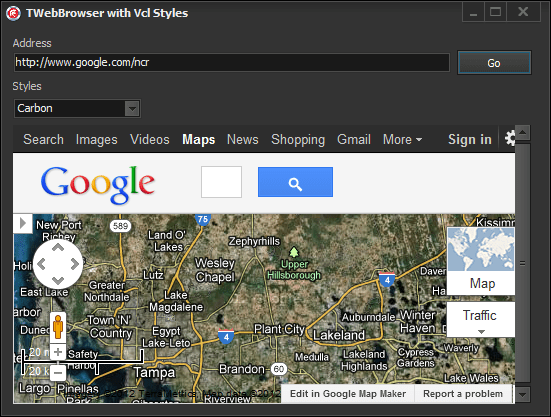
Source Code
The full source code of this article is part of the VCL Styles Utils project, you can check the Vcl.Styles.WebBrowser unit here
Recommended resources about WebBrowser Customization
- MSDN WebBrowser Customization Part 1
- MSDN WebBrowser Customization Part 2
- How to customize the TWebBrowser user interface
- TEmbeddedWB
- MSDN About Scroll Bars (no related to webbrowser but very useful)
A final words
This is part of an open source project, so feel free to post any issue in the issue page of the project, as well if you want participate improving the code or adding new features, let me now.
VCL Styles and TWebBrowser, Your help is need.
How you probably know the TWebBrowser doesn’t supports the vcl styles, so two days ago I started to write a fix for the TWebBrowser and the VCL styles
So far i’m getting very good results
But I need to do some additional tests in order to release the code, so your help is need it to try the demo app included in this post. Please let me know about any issue which you can find.
Download the demo application from here.
You can send me your feedback to rodrigo dot ruz dot v at gmail dot com
VCL Styles and Owner Draw
UPDATE
A Updated and improved version of the code shown on this article can be found in the Vcl.Styles.OwnerDrawFix unit which is part of the Vcl Styles Utils.
The Issue
When you uses the Vcl Styles, you expect which at least all the standard (and common) controls (TListBox, TEditBox, TListView, TMemo, Treeview, and so on) are skinned according to the style selected, but maybe you are observed some minor issues in controls like TListBox, TListView and TTreeView.
Check the next image, which had a form with a TListBox and a TListView
As you can see the highlight color and the checkboxes doesn’t use the Vcl Styles elements.
The Explanation
So why this happen? is a Vcl Style bug? well let me answer both questions :
First exist basically two ways how the vcl styles skin a control, if the control doesn’t have a windows handle (like the TLabel), the control is draw (usually) in the paint method using the properties and procedures of the StyleServices (TCustomStyleServices) class, otherwise if the control is a TWinControl descendent then use the Style Hooks , the styles hooks handles the windows messages of the controls wrapped by the VCL and use Windows messages and WinApi calls to draw directly over the Canvas of the control or set the properties of the controls (when is possible) like the background or foreground color using the SendMessage function.
In this point the windows messages are the key, some Windows controls doesn’t fire some messages at least which the control was in an owner draw (or Custom Draw) mode.
for example if you want to change the highlight color of a listview
1) You must receive the WM_NOTIFY message
2) then check the NM_CUSTOMDRAW notification code
3) after check for the current drawing stage (CDDS_ITEMPREPAINT in this case)
4) to finally pass a NMLVCUSTOMDRAW record with the new colors to use.
So in this case if the list view has the OwnerDraw property set to false these messages never will sent to our application. Because that is not possible implement a Style hook as there are not windows messages to process.
Note : Is technically possible write a Style hook for receive such owner draw messages, but that will implies create a style hook which need modify the ownerdraw property and then full draw the control.
The Fix
So how the style hooks are discarded, in this case we can owner draw the contols using the Vcl Styles classes and functions. (I don’t spend much time writing these routines , so can be incomplete)
OnDrawItem implementation for a TListbox
procedure TFrmMain.ListBox1DrawItem(Control: TWinControl; Index: Integer; Rect: TRect; State: TOwnerDrawState);
Var
LListBox : TListBox;
LStyles : TCustomStyleServices;
LDetails : TThemedElementDetails;
begin
LListBox :=TListBox(Control);
LStyles :=StyleServices;
//check the state
if odSelected in State then
LListBox.Brush.Color := LStyles.GetSystemColor(clHighlight);
//get the details (states and parts) to use
LDetails := StyleServices.GetElementDetails(tlListItemNormal);
LListBox.Canvas.FillRect(Rect);
Rect.Left:=Rect.Left+2;
//draw the text
LStyles.DrawText(LListBox.Canvas.Handle, LDetails, LListBox.Items[Index], Rect, [tfLeft, tfSingleLine, tfVerticalCenter]);
//draw the Highlight rect using the vcl styles colors
if odFocused In State then
begin
LListBox.Canvas.Brush.Color := LStyles.GetSystemColor(clHighlight);
LListBox.Canvas.DrawFocusRect(Rect);
end;
end;
OnDrawItem implementation for a TListView
procedure TFrmMain.ListView1DrawItem(Sender: TCustomListView; Item: TListItem;
Rect: TRect; State: TOwnerDrawState);
var
r : TRect;
rc : TRect;
ColIdx : Integer;
s : string;
LDetails : TThemedElementDetails;
LStyles : TCustomStyleServices;
BoxSize : TSize;
Spacing : Integer;
LColor : TColor;
begin
Spacing:=4;
LStyles:=StyleServices;
//get the color text of the items
if not LStyles.GetElementColor(LStyles.GetElementDetails(ttItemNormal), ecTextColor, LColor) or (LColor = clNone) then
LColor := LStyles.GetSystemColor(clWindowText);
//get and set the backgroun color
Sender.Canvas.Brush.Color := LStyles.GetStyleColor(scListView);
//set the font color
Sender.Canvas.Font.Color := LColor;
Sender.Canvas.FillRect(Rect);
r := Rect;
inc(r.Left, Spacing);
//iterate over the columns
for ColIdx := 0 to TListView(Sender).Columns.Count - 1 do
begin
r.Right := r.Left + Sender.Column[ColIdx].Width;
if ColIdx > 0 then
s := Item.SubItems[ColIdx - 1]
else
begin
BoxSize.cx := GetSystemMetrics(SM_CXMENUCHECK);
BoxSize.cy := GetSystemMetrics(SM_CYMENUCHECK);
s := Item.Caption;
if TListView(Sender).Checkboxes then
r.Left:=r.Left+BoxSize.cx+3;
end;
if ColIdx = 0 then
begin
if not IsWindowVisible(ListView_GetEditControl(Sender.Handle)) and ([odSelected, odHotLight] * State <> []) then
begin
if ([odSelected, odHotLight] * State <> []) then
begin
rc:=Rect;
if TListView(Sender).Checkboxes then
rc.Left:=rc.Left+BoxSize.cx+Spacing;
if not TListView(Sender).RowSelect then
rc.Right:=Sender.Column[0].Width;
Sender.Canvas.Brush.Color := LStyles.GetSystemColor(clHighlight);
//draw the highlight rect using the current the vcl styles colors
Sender.Canvas.FillRect(rc);
end;
end;
end;
if TListView(Sender).RowSelect then
Sender.Canvas.Brush.Color := LStyles.GetSystemColor(clHighlight);
//draw the text of the item
LDetails := StyleServices.GetElementDetails(tlListItemNormal);
Sender.Canvas.Brush.Style := bsClear;
LStyles.DrawText(Sender.Canvas.Handle, LDetails, s, r, [tfLeft, tfSingleLine, tfVerticalCenter, tfEndEllipsis]);
//draw the check box
if (ColIdx=0) and TListView(Sender).Checkboxes then
begin
rc := Rect;
rc.Top := Rect.Top + (Rect.Bottom - Rect.Top - BoxSize.cy) div 2;
rc.Bottom := rc.Top + BoxSize.cy;
rc.Left := rc.Left + Spacing;
rc.Right := rc.Left + BoxSize.cx;
if Item.Checked then
LDetails := StyleServices.GetElementDetails(tbCheckBoxUncheckedNormal)
else
LDetails := StyleServices.GetElementDetails(tbCheckBoxcheckedNormal);
LStyles.DrawElement(Sender.Canvas.Handle, LDetails, Rc);
end;
if ColIdx=0 then
r.Left:=Sender.Column[ColIdx].Width + Spacing
else
inc(r.Left, Sender.Column[ColIdx].Width);
end;
end;
After of apply the above code , this is the result
Check the source of the demo project on Github.
Adding VCL Styles support to a TPopupMenu in 2 lines of code.
UPDATE
This is an old article if you are looking how add vcl styles support to the Menus, dialogs and more try the VCL Styles Utils project.
The TPopupMenu component has not support for Vcl Styles directly, so if you use this control in a form with Vcl Styles enabled you will get a result like this.
To fix this you have 2 ways :
- Write a style hook for a TPopUpMenu (The hard way)
- Or use the TPopupActionBar component (the easy way)
In this post I will show you how use the option 2, taking advantage of two facts
- The TPopupActionBar component has full support for Vcl Styles
- Descends directly from the TPopupMenu component.
So adding the Vcl.ActnPopup unit to your project and using a interposer class (before of the form declaration which contains the PopupMenu), you can add vcl styles to the TPopupMenu component.
uses Vcl.ActnPopup; type TPopupMenu=class(Vcl.ActnPopup.TPopupActionBar);
This is the result after of add the 2 above lines of code.