The Road to Delphi

Delphi – Free Pascal – Oxygene


Leave a comment

Added support for Delphi 5 and 6 in the Delphi IDE Theme Editor

Some fellows coders ask me (and request) about add support to the delphi 5 and delphi 6 IDEs. these versions was not originally supported by the  Delphi IDE Theme Editor because these IDEs gives you a 16 fixed colors palette. So this causes  limitations to manage the themes.

Check this image for the IDE editor options in Delphi 5 which shows the 16 colors available

the option to assign any color to the Highlight elements was added in the Delphi 7 version

The first thing I thought to manage the 16 palette colors was use specific themes with contains combinations of colors using these 16 colors. But quickly discarded this solution because would be necessary handle specific themes for specific versions of the delphi IDEs.  So finally I decide convert the colors themes to the 16 color palette using some algorithm to find the closest color to the palette. the algorithm chosen was the Euclidean distance where  closest color is determined by the distance between the two corresponding points in three-dimensional space.  for example to find the distance of two colors  (r1,g1,b1) and (r2,g2,b2)  the formula look like this

Now the dephi implementation of the algorithm to find the “straight-line distance” or “nearest color” using the Euclidean distance:


const
  DelphiOldColorsCount =16;
  //this is the 16 colors palette used by delphi 5 and delphi 6 IDEs (BGR format)
  DelphiOldColorsList: array[0..DelphiOldColorsCount-1] of TColor =
  (
    $000000,$000080,$008000,$008080,
    $800000,$800080,$808000,$C0C0C0,
    $808080,$0000FF,$00FF00,$00FFFF,
    $FF0000,$FF00FF,$FFFF00,$FFFFFF
  )

function GetIndexClosestColor(AColor:TColor) : Integer;
var
  SqrDist,SmallSqrDist  : Double;
  i,R1,G1,B1,R2,G2,B2   : Integer;
begin
  Result:=0;
  //set the max distance possible
  SmallSqrDist := Sqrt(SQR(255)*3);
  //get the RGB components of the original color
  R1 := GetRValue(AColor);
  G1 := GetGValue(AColor);
  B1 := GetBValue(AColor);

    for i := 0 to DelphiOldColorsCount-1 do
    begin
      //get the RGB components of the palette color
      R2 := GetRValue(DelphiOldColorsList[i]);
      G2 := GetGValue(DelphiOldColorsList[i]);
      B2 := GetBValue(DelphiOldColorsList[i]);
      //calculate the euclidean distance
      SqrDist := Sqrt(SQR(R1 - R2) + SQR(G1 - G2) + SQR(B1 - B2));
      if SqrDist < SmallSqrDist then
      begin
       Result := i;
       SmallSqrDist := SqrDist;
      end
    end
end;

Applying the above function the results are

Aqua Theme Original (Delphi 7 and Above)

Aqua Theme Modified (Delphi 5 and Delphi 6)


NightFall Theme Original (Delphi 7 and Above)

NightFall Theme Modified (Delphi 5 and Delphi 6)

I think which the final result is acceptable (remember the palette is 16 colors only) . Now you can download the updated version of the Delphi IDE Theme Editor from here.


16 Comments

Accesing the WMI from Delphi and Free Pascal via COM (without late binding or WbemScripting_TLB)

A fellow Delphi programmer,  ask me how they can access the WMI using the  COM API for WMI ,  so I decide write this article to show how.

First you must to know which this API was designed primarily for low level access to the WMI from C++ and for create WMI providers, compile mof files and so on.

In the past articles always I show samples to use the WMI using late binding or importing the Microsoft WMIScripting Library. in both cases you are using the same layer to access the WMI (WMIScripting).

In the next diagram you can see the layers to access the WMI, you can note how the WMIScripting finally access the WMI using the WMI COM API. In the next sample you will learn how avoid this additional layer.

The interfaces of the COM API for WMI are very similar to the Microsoft WMIScripting Library because the last is just a wrapper for the COM object.

Note : the code showed in this article was tested in Delphi 2007, Delphi XE and FPC 2.4.2 and uses the WBEM Client interface Unit for Object Pascal which is an translation of the headers of the WbemCli.h file. this unit called JwaWbemCli is part of the JEDI API Library

Accessing the WMI using the COM Interface


Initialize COM

Microsoft recommends use the CoInitializeEx function with the COINIT_MULTITHREADED flag
the code will looks like so

  if Succeeded(CoInitializeEx(nil, COINIT_MULTITHREADED)) then
  try
    //Execute your WMI code here
  finally
    CoUninitialize();
  end;

Set the general COM security level

Now In order to set the general COM security level you must perform a call to the CoInitializeSecurity function.

CoInitializeSecurity(nil, -1, nil, nil, RPC_C_AUTHN_LEVEL_DEFAULT, RPC_C_IMP_LEVEL_IMPERSONATE, nil, EOAC_NONE, nil);

Create a connection to a WMI namespace.

FWbemLocator.ConnectServer(strNetworkResource, strUser, strPassword, strLocale,  WBEM_FLAG_CONNECT_USE_MAX_WAIT, strAuthority, nil, FWbemServices)

Set the security levels on the WMI connection.

By definition, WMI runs in a different process than your application. Therefore, you must create a connection between your application and WMI and you must set the impersonation and authentication levels for your application. this must be done using the CoSetProxyBlanket and CoCreateInstance functions.

 CoSetProxyBlanket(FWbemServices, RPC_C_AUTHN_WINNT, RPC_C_AUTHZ_NONE, nil, RPC_C_AUTHN_LEVEL_CALL, RPC_C_IMP_LEVEL_IMPERSONATE, nil, EOAC_NONE);
 CoCreateInstance(CLSID_UnsecuredApartment, nil, CLSCTX_LOCAL_SERVER, IID_IUnsecuredApartment, FUnsecuredApartment);

Implement your application (make the WMI query)

        Succeed := FWbemServices.ExecQuery('WQL', WQL, WBEM_FLAG_FORWARD_ONLY, nil, ppEnum);
        if Succeeded(Succeed) then
        begin
           // Get the data from the query
           while (ppEnum.Next(WBEM_INFINITE, 1, apObjects, puReturned)=0) do
           begin
             apObjects.Get('Caption', 0, pVal, pType, plFlavor);
             Writeln(pVal);
             VarClear(pVal);
           end;
        end
        else
        Writeln(Format('Error executing WQL sentence %x',[Succeed]));

Finally Cleanup and shut down your application.

After you complete your queries to WMI, you should destroy all COM pointers to shut down your application correctly. this is made setting the interface to nil to calling the varclear function.

Now a basic sample to make WMI query using the COM interface.


{$IFDEF FPC}
 {$MODE DELPHI} {$H+}
{$ENDIF}

{$APPTYPE CONSOLE}

uses
  Windows,
  Variants,
  SysUtils,
  ActiveX,
  JwaWbemCli;

const
  RPC_C_AUTHN_LEVEL_DEFAULT = 0;
  RPC_C_IMP_LEVEL_IMPERSONATE = 3;
  RPC_C_AUTHN_WINNT = 10;
  RPC_C_AUTHZ_NONE = 0;
  RPC_C_AUTHN_LEVEL_CALL = 3;
  EOAC_NONE = 0;

procedure Test_IWbemServices_ExecQuery;
const
  strLocale    = '';
  strUser      = '';
  strPassword  = '';
  strNetworkResource = 'root\cimv2';
  strAuthority       = '';
  WQL                = 'SELECT * FROM Win32_Volume';
var
  FWbemLocator         : IWbemLocator;
  FWbemServices        : IWbemServices;
  FUnsecuredApartment  : IUnsecuredApartment;
  ppEnum               : IEnumWbemClassObject;
  apObjects            : IWbemClassObject;
  puReturned           : ULONG;
  pVal                 : OleVariant;
  pType                : Integer;
  plFlavor             : Integer;
  Succeed              : HRESULT;
begin
  // Set general COM security levels --------------------------
  // Note: If you are using Windows 2000, you need to specify -
  // the default authentication credentials for a user by using
  // a SOLE_AUTHENTICATION_LIST structure in the pAuthList ----
  // parameter of CoInitializeSecurity ------------------------
  if Failed(CoInitializeSecurity(nil, -1, nil, nil, RPC_C_AUTHN_LEVEL_DEFAULT, RPC_C_IMP_LEVEL_IMPERSONATE, nil, EOAC_NONE, nil)) then Exit;
  // Obtain the initial locator to WMI -------------------------
  if Succeeded(CoCreateInstance(CLSID_WbemLocator, nil, CLSCTX_INPROC_SERVER, IID_IWbemLocator, FWbemLocator)) then
  try
    // Connect to WMI through the IWbemLocator::ConnectServer method
    if Succeeded(FWbemLocator.ConnectServer(strNetworkResource, strUser, strPassword, strLocale,  WBEM_FLAG_CONNECT_USE_MAX_WAIT, strAuthority, nil, FWbemServices)) then
    try
      // Set security levels on the proxy -------------------------
      if Failed(CoSetProxyBlanket(FWbemServices, RPC_C_AUTHN_WINNT, RPC_C_AUTHZ_NONE, nil, RPC_C_AUTHN_LEVEL_CALL, RPC_C_IMP_LEVEL_IMPERSONATE, nil, EOAC_NONE)) then Exit;
      if Succeeded(CoCreateInstance(CLSID_UnsecuredApartment, nil, CLSCTX_LOCAL_SERVER, IID_IUnsecuredApartment, FUnsecuredApartment)) then
      try
        // Use the IWbemServices pointer to make requests of WMI
        //Succeed := FWbemServices.ExecQuery('WQL', WQL, WBEM_FLAG_FORWARD_ONLY OR WBEM_FLAG_RETURN_IMMEDIATELY, nil, ppEnum);
        Succeed := FWbemServices.ExecQuery('WQL', WQL, WBEM_FLAG_FORWARD_ONLY, nil, ppEnum);
        if Succeeded(Succeed) then
        begin
          Writeln('Running Wmi Query..Press Enter to exit');
           // Get the data from the query
           while (ppEnum.Next(WBEM_INFINITE, 1, apObjects, puReturned)=0) do
           begin
             apObjects.Get('Caption', 0, pVal, pType, plFlavor);
             Writeln(pVal);
             VarClear(pVal);
           end;
        end
        else
        Writeln(Format('Error executing WQL sentence %x',[Succeed]));
      finally
        FUnsecuredApartment := nil;
      end;
    finally
      FWbemServices := nil;
    end;
  finally
    FWbemLocator := nil;
  end;
end;

begin
  // Initialize COM. ------------------------------------------
  if Succeeded(CoInitializeEx(nil, COINIT_MULTITHREADED)) then
  try
    Test_IWbemServices_ExecQuery;
  finally
    CoUninitialize();
  end;
  Readln;
end.

And what about the Wmi events?

Ok here i leave the code to manage an async event using the COM WMI API.

Implement the Sink  definition to receive the event

Create a new class which descends from the TInterfacedObject class and the IWbemObjectSink interface, you must implement the Indicate and SetStatus functions.

type
  TWmiEventSink = class(TInterfacedObject, IWbemObjectSink)
  public
    function Indicate(lObjectCount: Longint;  var apObjArray: IWbemClassObject): HRESULT; stdcall;
    function SetStatus(lFlags: Longint; hResult: HRESULT; strParam: WideString; pObjParam: IWbemClassObject): HRESULT; stdcall;
  end;

Initilizate the Sink

Create a instance to the class TWmiEventSink which will handle the received events and use the IUnsecuredApartment.CreateObjectStub function to create a object forwarder sink.

FWmiEventSink := TWmiEventSink.Create;
FUnsecuredApartment.CreateObjectStub(FWmiEventSink, ppStub);

Execute the event

Call the ExecNotificationQueryAsync function passing the sink instance to begin listening the events.

FWbemServices.ExecNotificationQueryAsync('WQL', WQL, WBEM_FLAG_SEND_STATUS, nil, StubSink)

CleanUp

Finally use the CancelAsyncCall function to stop the Event receiver.

FWbemServices.CancelAsyncCall(StubSink);

And this is the full source code to receive the WMI async event


{$IFDEF FPC}
 {$MODE DELPHI} {$H+}
{$ENDIF}

{$APPTYPE CONSOLE}

uses
  Windows,
  Variants,
  SysUtils,
  ActiveX,
  JwaWbemCli;

const
  RPC_C_AUTHN_LEVEL_DEFAULT = 0;
  RPC_C_IMP_LEVEL_IMPERSONATE = 3;
  RPC_C_AUTHN_WINNT = 10;
  RPC_C_AUTHZ_NONE = 0;
  RPC_C_AUTHN_LEVEL_CALL = 3;
  EOAC_NONE = 0;

type
  TWmiEventSink = class(TInterfacedObject, IWbemObjectSink)
  public
    function Indicate(lObjectCount: Longint;  var apObjArray: IWbemClassObject): HRESULT; stdcall;
    function SetStatus(lFlags: Longint; hResult: HRESULT; strParam: WideString; pObjParam: IWbemClassObject): HRESULT; stdcall;
  end;

function TWmiEventSink.Indicate(lObjectCount: Longint; var apObjArray: IWbemClassObject): HRESULT; stdcall;
var
  Instance      : IWbemClassObject;
  wszName       : LPCWSTR;
  pVal          : OleVariant;
  pType         : Integer;
  plFlavor      : Integer;
  lFlags        : Longint;
  Caption, Pid  : string;
begin
  wszName:='TargetInstance';
  lFlags :=0;
  Result := WBEM_S_NO_ERROR;
  if lObjectCount > 0 then
    if Succeeded(apObjArray.Get(wszName, lFlags, pVal, pType, plFlavor)) then
    begin
      Instance := IUnknown(pVal) as IWbemClassObject;
      try
        Instance.Get('Caption', 0, pVal, pType, plFlavor);
        Caption:=pVal;
        VarClear(pVal);

        Instance.Get('ProcessId', 0, pVal, pType, plFlavor);
        Pid:=pVal;
        VarClear(pVal);

        Writeln(Format('Process %s started Pid  %s',[Caption,Pid]));

      finally
        Instance := nil;
      end;
    end;
end;

function TWmiEventSink.SetStatus(lFlags: Longint; hResult: HRESULT; strParam: WideString; pObjParam: IWbemClassObject): HRESULT; stdcall;
begin
  Result := WBEM_S_NO_ERROR;
end;

//detect when a key was pressed in the console window
function KeyPressed:Boolean;
var
  lpNumberOfEvents     : DWORD;
  lpBuffer             : TInputRecord;
  lpNumberOfEventsRead : DWORD;
  nStdHandle           : THandle;
begin
  Result:=false;
  nStdHandle := GetStdHandle(STD_INPUT_HANDLE);
  lpNumberOfEvents:=0;
  GetNumberOfConsoleInputEvents(nStdHandle,lpNumberOfEvents);
  if lpNumberOfEvents<> 0 then
  begin
    PeekConsoleInput(nStdHandle,lpBuffer,1,lpNumberOfEventsRead);
    if lpNumberOfEventsRead <> 0 then
    begin
      if lpBuffer.EventType = KEY_EVENT then
      begin
        if lpBuffer.Event.KeyEvent.bKeyDown then
          Result:=true
        else
          FlushConsoleInputBuffer(nStdHandle);
      end
      else
      FlushConsoleInputBuffer(nStdHandle);
    end;
  end;
end;

//Wmi async event
procedure Test_IWbemServices_ExecNotificationQueryAsync;
const
  strLocale    = '';
  strUser      = '';
  strPassword  = '';
  strNetworkResource = 'root\cimv2';
  strAuthority       = '';
  WQL                = 'SELECT * FROM __InstanceCreationEvent WITHIN 1 WHERE TargetInstance ISA "Win32_Process"';
var
  FWbemLocator         : IWbemLocator;
  FWbemServices        : IWbemServices;
  FUnsecuredApartment  : IUnsecuredApartment;
  ppStub               : IUnknown;
  FWmiEventSink        : TWmiEventSink;
  StubSink             : IWbemObjectSink;

begin
  // Set general COM security levels --------------------------
  // Note: If you are using Windows 2000, you need to specify -
  // the default authentication credentials for a user by using
  // a SOLE_AUTHENTICATION_LIST structure in the pAuthList ----
  // parameter of CoInitializeSecurity ------------------------
  if Failed(CoInitializeSecurity(nil, -1, nil, nil, RPC_C_AUTHN_LEVEL_DEFAULT, RPC_C_IMP_LEVEL_IMPERSONATE, nil, EOAC_NONE, nil)) then Exit;
  // Obtain the initial locator to WMI -------------------------
  if Succeeded(CoCreateInstance(CLSID_WbemLocator, nil, CLSCTX_INPROC_SERVER, IID_IWbemLocator, FWbemLocator)) then
  try
    // Connect to WMI through the IWbemLocator::ConnectServer method
    if Succeeded(FWbemLocator.ConnectServer(strNetworkResource, strUser, strPassword, strLocale,  WBEM_FLAG_CONNECT_USE_MAX_WAIT, strAuthority, nil, FWbemServices)) then
    try
      // Set security levels on the proxy -------------------------
      if Failed(CoSetProxyBlanket(FWbemServices, RPC_C_AUTHN_WINNT, RPC_C_AUTHZ_NONE, nil, RPC_C_AUTHN_LEVEL_CALL, RPC_C_IMP_LEVEL_IMPERSONATE, nil, EOAC_NONE)) then Exit;
      if Succeeded(CoCreateInstance(CLSID_UnsecuredApartment, nil, CLSCTX_LOCAL_SERVER, IID_IUnsecuredApartment, FUnsecuredApartment)) then
      try
        FWmiEventSink := TWmiEventSink.Create;
        if Succeeded(FUnsecuredApartment.CreateObjectStub(FWmiEventSink, ppStub)) then
        try
          if Succeeded(ppStub.QueryInterface(IID_IWbemObjectSink, StubSink)) then
          try
            if Succeeded(FWbemServices.ExecNotificationQueryAsync('WQL', WQL, WBEM_FLAG_SEND_STATUS, nil, StubSink)) then
            begin
              Writeln('Listening events...Press any key to exit');
               while not KeyPressed do ;
              FWbemServices.CancelAsyncCall(StubSink);
            end;
          finally
            StubSink := nil;
          end;
        finally
          ppStub := nil;
        end;
      finally
        FUnsecuredApartment := nil;
      end;
    finally
      FWbemServices := nil;
    end;
  finally
    FWbemLocator := nil;
  end;
end;

begin
  // Initialize COM
  if Succeeded(CoInitializeEx(nil, COINIT_MULTITHREADED)) then
  try
    Test_IWbemServices_ExecNotificationQueryAsync;
  finally
    CoUninitialize();
  end;
  Readln;
end.

Check the source code of this article on Github.


9 Comments

Delphi and WMI Events

The WMI (Windows Management Instrumentation) is mainly know but retrieve hardware and software information using WQL sentences like Select * from Win32_Printer, but the WMI has much more of that. one of the more exciting features is the capability of inform about any particular change in the system using a Event.

Maybe in the past, in delphi forums you are see questions like : How Can I Be Notified When a Process Begins/Ends? How Can I Determine When a Removable Drive Gets Connected/Disconnected? or even How Can I Be Notified Any Time a Network Cable Gets Unplugged? .  All that questions and more can answered using the WMI events.

Today I will show you, how you can do cool things with the WMI events like

Types of Wmi Events

Before to work with the WMI Events we need a brief introduction. exists two types of WMI events intrinsic events and extrinsic events.

Intrinsic Events

An intrinsic event is an event that occurs in response to a change in the WMI data model (the data model or repository is the location where all the WMI information is stored). Each intrinsic event class represents a specific type of change and occurs when WMI or a provider creates, deletes, or modifies a namespace, class, or class instance. For example, if you attach a new printer to the system, you are modifying the Win32_Printer class adding a new instance (record) to the data model, this action  will be reflected by the __InstanceCreationEvent event.

This is the list of the WMI Intrinsic Events

__ClassCreationEvent Notifies a consumer when a class is created.
__ClassDeletionEvent Notifies a consumer when a class is deleted.
__ClassModificationEvent Notifies a consumer when a class is modified.
__InstanceCreationEvent Notifies a consumer when a class instance is created.
__InstanceOperationEvent Notifies a consumer when any instance event occurs, such as creation, deletion, or modification of the instance. You can use this class in queries to get all types events associated with an instance.
__InstanceDeletionEvent Notifies a consumer when an instance is deleted.
__InstanceModificationEvent Notifies a consumer when an instance is modified.
__NamespaceCreationEvent Notifies a consumer when a namespace is created.
__NamespaceDeletionEvent Notifies a consumer when a namespace is deleted.
__NamespaceModificationEvent Notifies a consumer when a namespace is modified.
__ConsumerFailureEvent Notifies a consumer when some other event is dropped due to a failure on the part of an event consumer.
__EventDroppedEvent Notifies a consumer when some other event is dropped instead of being delivered to the requesting event consumer.
__EventQueueOverflowEvent Notifies a consumer when an event is dropped as a result of a delivery queue overflow.
__MethodInvocationEvent Notifies a consumer when a method call event occurs.

Al least which you are writing a WMI provider or something like that, you will use only  the events related to the Instance class like the

the WQL syntax to make a Event Query is

EVENT-WQL = "SELECT"  "FROM" /

OPTIONAL-WITHIN = ["WITHIN" ]
INTERVAL = 1*MODULOREAL
EVENT-WHERE = ["WHERE" ]

EVENT-EXPR = ( ( "ISA"  ) /
               )
              ["GROUP WITHIN"
                    ( ["BY" [ DOT] ]
                      ["HAVING" ]] )
INSTANCE-STATE = "TARGETINSTANCE" / "PREVIOUSINSTANCE"

Now check this simple WQL sentence.

Select * From __InstanceCreationEvent Within 1 Where TargetInstance ISA "Win32_LogicalDisk"

In this sentence you are querying for the __InstanceCreationEvent Wmi event occurred in the Win32_LogicalDisk class or in simple words “Tell me when a new instance (record) is added to the Win32_LogicalDisk class”, so this will happen when you insert a new drive in your system.

Notes:

The WITHIN keyword is used to specify the polling interval for the events. A polling interval is the interval that WMI uses as the maximum amount of time that can pass before notification of an event must be delivered.

The TargetInstance is used to reference to the instance of the event class to monitor. Note that we did not use “=” operator . The only valid comparison operator when referecing TargetInstance is  the keyword “ISA”.

Now with this query using the __InstanceDeletionEvent you will be notified when the record is removed from the wmi repository, in this particular case this event will be raised when a logical disk is removed from the system.

Select * From __InstanceDeletionEvent Within 1 Where TargetInstance ISA "Win32_LogicalDisk"

You can also detect changes over the instance. in this case you will need write a sentence (using the __InstanceModificationEvent event) like so

Select * From __InstanceModificationEvent Within 1 Where TargetInstance ISA "Win32_LogicalDisk"

this event will be raised when occurs a change in the logical disk instance, for example when the Label of the disk is changed.

Extrinsic Events

The extrinsic events represent events that do not directly link to standard WMI model and are implemented for a particular WMI provider. this events are designed to do specific tasks over a particular provider. examples of this events are

The WQL sentence to access these events is even simpler then the necessary to access the Intrinsic events.

check this sample, in this case using the Win32_ProcessStartTrace class we are monitoring when a new process called notepad.exe is started.

Select * From Win32_ProcessStartTrace Where processName="notepad.exe"

Now to check when the process called notepad.exe is stopped.

Select * From Win32_ProcessStopTrace Where processName="notepad.exe"

Receiving a WMI Event

You can receive the WMI events in two modes semisynchronous or asynchronous. The SWbemServices.ExecNotificationQuery  method receive the events in a semisynchronous way y for asynchronous execution you must use the SWbemServices.ExecNotificationQueryAsync method.

semisynchronous

In order to use the SWbemServices.ExecNotificationQuery  method you must follow these steps

  1. Create a instance to the WMI service
  2. Connect to the WMI service
  3. Execute the event in sync mode
  4. Start a loop to receive the events
  5. Receive the event using the SWbemEventSource.NextEvent Method
  6. Check for error code returned and compare with the wbemErrTimedOut ($80043001) value
  7. process the received event

Note : the next samples use late binding to access the wmi.

Check this console application to receive the intrinsic event __InstanceCreationEvent over the Win32_Process class

{$APPTYPE CONSOLE}

uses
  Windows,
  SysUtils,
  ActiveX,
  ComObj,
  Variants;

//detect when a key was pressed in the console window
function KeyPressed:boolean;
var
lpNumberOfEvents     : DWORD;
lpBuffer             : _INPUT_RECORD;
lpNumberOfEventsRead : DWORD;
nStdHandle           : THandle;
begin
  Result:=false;
  nStdHandle := GetStdHandle(STD_INPUT_HANDLE);
  lpNumberOfEvents:=0;
  GetNumberOfConsoleInputEvents(nStdHandle,lpNumberOfEvents);
  if lpNumberOfEvents<> 0 then
  begin
    PeekConsoleInput(nStdHandle,lpBuffer,1,lpNumberOfEventsRead);
    if lpNumberOfEventsRead <> 0 then
    begin
      if lpBuffer.EventType = KEY_EVENT then
      begin
        if lpBuffer.Event.KeyEvent.bKeyDown then
          Result:=true
        else
          FlushConsoleInputBuffer(nStdHandle);
      end
      else
      FlushConsoleInputBuffer(nStdHandle);
    end;
  end;
end;

Procedure  Monitor_Async_Win32_Process;
const
  WbemUser            ='';
  WbemPassword        ='';
  WbemComputer        ='localhost';
  wbemFlagForwardOnly = $00000020;
  wbemErrTimedout     = $80043001;
var
  FSWbemLocator : OLEVariant;
  FWMIService   : OLEVariant;
  FWbemObjectSet: OLEVariant;
  FEventResult  : OLEVariant;
begin
  //Create the WMI Scripting Instance
  FSWbemLocator := CreateOleObject('WbemScripting.SWbemLocator');
  //Connect to the WMI service
  FWMIService   := FSWbemLocator.ConnectServer(WbemComputer, 'root\CIMV2', WbemUser, WbemPassword);
  //Execute the event in sync way
  FWbemObjectSet:= FWMIService.ExecNotificationQuery('Select * from __InstanceCreationEvent Within 1 Where TargetInstance ISA "Win32_Process"');
  while not KeyPressed do
  begin
    try
     //receive the event , wai until 100 milliseconds.
     FEventResult := FWbemObjectSet.NextEvent(100);
    except
     on E:EOleException do
     //Check for the timeout and ignore
     if EOleException(E).ErrorCode=HRESULT(wbemErrTimedout) then
       FEventResult:=Null
     else
     raise;
    end;

    //process the received event info
    if not VarIsNull(FEventResult) then
    begin
      Writeln(Format('Caption   %s',[FEventResult.TargetInstance.Caption]));
      Writeln(Format('ProcessId %s',[FEventResult.TargetInstance.ProcessId]));
      Writeln('');
    end;

    //clear the olevariant variable
    FEventResult:=Unassigned;
  end;
end;

var
  Success  : HResult;
begin
 try
    Writeln('Press any key to exit');
    Success:=CoInitialize(nil);
    try
      Monitor_Async_Win32_Process;
    finally
      case Success of
        S_OK, S_FALSE: CoUninitialize;
      end;
    end;
 except
    on E:Exception do
        Writeln(E.Classname, ':', E.Message);
 end;
 Readln;
end.

Ok now i want your attention in this part of the code

    //process the received event info
    if not VarIsNull(FEventResult) then
    begin
      Writeln(Format('Caption   %s',[FEventResult.TargetInstance.Caption]));
      Writeln(Format('ProcessId %s',[FEventResult.TargetInstance.ProcessId]));
      Writeln('');
    end;

There you are accessing the properties returned by the SWbemEventSource.NextEvent Method, the main property is the TargetInstance which point to the class used in the WQL sentence  (in this case the Win32_Process). so you can retrieve any property or method exposed by this class.

Check this sample which monitor when the notepad.exe process is started and then kill the process inmediatly.

Procedure  Monitor_Async_Win32_Process;
const
  WbemUser            ='';
  WbemPassword        ='';
  WbemComputer        ='localhost';
  wbemFlagForwardOnly = $00000020;
  wbemErrTimedout     = $80043001;
var
  FSWbemLocator : OLEVariant;
  FWMIService   : OLEVariant;
  FWbemObjectSet: OLEVariant;
  FEventResult  : OLEVariant;
begin
  FSWbemLocator := CreateOleObject('WbemScripting.SWbemLocator');
  FWMIService   := FSWbemLocator.ConnectServer(WbemComputer, 'root\CIMV2', WbemUser, WbemPassword);
  //monitor only the notepad.exe processes
  FWbemObjectSet:= FWMIService.ExecNotificationQuery('Select * from __InstanceCreationEvent Within 1 Where TargetInstance ISA "Win32_Process" and TargetInstance.Caption="notepad.exe"');
  while not KeyPressed do
  begin
    try
     //receive the event , wai until 100 milliseconds.
     FEventResult := FWbemObjectSet.NextEvent(100);
    except
     on E:EOleException do
     //Check for the timeout and ignore
     if EOleException(E).ErrorCode=HRESULT(wbemErrTimedout) then
       FEventResult:=Null
     else
     raise;
    end;

    //process the received event info
    if not VarIsNull(FEventResult) then
    begin
      Writeln(Format('Caption   %s',[FEventResult.TargetInstance.Caption]));
      Writeln(Format('ProcessId %s',[FEventResult.TargetInstance.ProcessId]));
      Writeln('Killing the Process ');
      FEventResult.TargetInstance.Terminate(0);
    end;

    //clear the olevariant variable
    FEventResult:=Unassigned;
  end;
end;

Ok all this works fine, but in real world applications in very few cases you use a console application to do this kind of task. so to use the SWbemServices.ExecNotificationQuery   method from a VCL application you can encapsulate the logic inside a Thread and using a Windows Message or  callback function you can inform to the main thread which the event arrives.

See the next code which declare a thread called TWmiSyncEventThread to receive the WMI events.

unit uWmiEventThread;

interface

uses
 Classes;

type
   TProcWmiEventThreadeCallBack = procedure(const AObject: OleVariant) of object;
   TWmiSyncEventThread    = class(TThread)
   private
     Success      : HResult;
     FSWbemLocator: OleVariant;
     FWMIService  : OleVariant;
     FEventSource : OleVariant;
     FWbemObject  : OleVariant;
     FCallBack    : TProcWmiEventThreadeCallBack;
     FWQL         : string;
     FServer      : string;
     FUser        : string;
     FPassword    : string;
     FNameSpace   : string;
     TimeoutMs    : Integer;
     procedure RunCallBack;
   public
     Constructor Create(CallBack : TProcWmiEventThreadeCallBack;const Server,User,PassWord,NameSpace,WQL:string;iTimeoutMs : Integer); overload;
     destructor Destroy; override;
     procedure Execute; override;
   end;

implementation

uses
 SysUtils,
 ComObj,
 Variants,
 ActiveX;

constructor TWmiSyncEventThread.Create(CallBack : TProcWmiEventThreadeCallBack;const Server,User,PassWord,NameSpace,WQL:string;iTimeoutMs : Integer);
begin
  inherited Create(False);
  FreeOnTerminate := True;
  FCallBack       := CallBack;
  FWQL            := WQL;
  FServer         := Server;
  FUser           := User;
  FPassword       := PassWord;
  FNameSpace      := NameSpace;
  TimeoutMs       := iTimeoutMs;
end;

destructor TWmiSyncEventThread.Destroy;
begin
  FSWbemLocator:=Unassigned;
  FWMIService  :=Unassigned;
  FEventSource :=Unassigned;
  FWbemObject  :=Unassigned;
  inherited;
end;

procedure TWmiSyncEventThread.Execute;
const
  wbemErrTimedout     = $80043001;
//  wbemFlagForwardOnly = $00000020;
begin
  Success := CoInitialize(nil); //CoInitializeEx(nil, COINIT_MULTITHREADED);
  try
    FSWbemLocator := CreateOleObject('WbemScripting.SWbemLocator');
    FWMIService   := FSWbemLocator.ConnectServer(FServer, FNameSpace, FUser, FPassword);
    //FEventSource  := FWMIService.ExecNotificationQuery(FWQL,WideString('WQL'), wbemFlagForwardOnly, null);
    FEventSource  := FWMIService.ExecNotificationQuery(FWQL);
    while not Terminated do
    begin
      try
       FWbemObject := FEventSource.NextEvent(TimeoutMs); //set the max time to wait (ms)
      except
       on E:EOleException do
       if EOleException(E).ErrorCode=HRESULT(wbemErrTimedout) then //Check for the timeout exception   and ignore if exist
        FWbemObject:=Null
       else
       raise;
      end;

      if FindVarData(FWbemObject)^.VType <> varNull then
        Synchronize(RunCallBack);

      FWbemObject:=Unassigned;
    end;
  finally
    case Success of
      S_OK, S_FALSE: CoUninitialize;
    end;
  end;
end;

procedure TWmiSyncEventThread.RunCallBack;
begin
  FCallBack(FWbemObject);
end;

end.

And to use from your own code only you must declare a call back function to receive the result of the event.

  TForm1 = class(TForm)
  private
    WmiThread   : TWmiSyncEventThread;
    procedure  Log(const AObject: OleVariant);
  public
  end;

To begin to receive the event


    WmiThread:=TWmiSyncEventThread.Create(
      Log,
      '.',
      '',
      '',
      'root\CIMV2',
      'Select * From __InstanceCreationEvent Within 1 Where TargetInstance ISA "Win32_Process"',
      100);

and the Log function

procedure TForm1.Log(const AObject: OleVariant);
begin
 //do your stuff here
 Memo1.Lines.Add(AObject.TargetInstance.Caption);
end;

finally to stop and free the resources you must call WmiThread.Terminate;

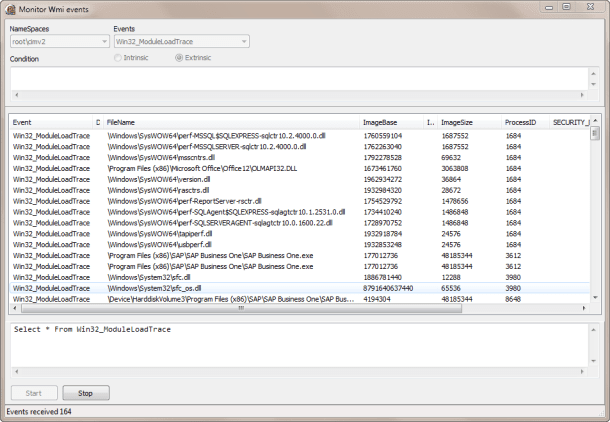
If you wanna play more with this thread check this sample application with source code included.

asynchronous

In order to use the SWbemServices.ExecNotificationQueryAsync  method you must follow these steps

  1. Create an instance to the WMI service
  2. Create an instance to the WMI sink
  3. Assign the event handler for the sink
  4. Connect to the WMI service
  5. Execute the event in async mode
  6. Receive and process the event using the event handler

Note : the next samples uses the WbemScripting_TLB  unit to access the wmi.

Using the WbemScripting_TLB unit (wrapper generated by dephi) for  execute the  ExecNotificationQueryAsync  method is the more affordable way.

Check this short snippet to initializate the WMI service and start to wait for the event in asynchronous mode.


type
TFrmMain = class(TForm)
private
FSink     : TSWbemSink;
FLocator  : ISWbemLocator;
FServices : ISWbemServices;
public
procedure EventReceived(ASender: TObject; const objWbemObject: ISWbemObject; const objWbemAsyncContext: ISWbemNamedValueSet);
end;

procedure TFrmMain.ButtonRunClick(Sender: TObject);
const
 WQL = 'SELECT * FROM __InstanceCreationEvent WITHIN 1 WHERE TargetInstance ISA "Win32_Process"';
begin
  FLocator  := CoSWbemLocator.Create;
  //Connect to the WMI service
  FServices := FLocator.ConnectServer('.', 'root\cimv2', '','', '', '', wbemConnectFlagUseMaxWait, nil);
  //create the sink instance
  FSink     := TSWbemSink.Create(self);
  //assign the event handler
  FSink.OnObjectReady := EventReceived;
  //Run the ExecNotificationQueryAsync
  FServices.ExecNotificationQueryAsync(FSink.DefaultInterface,WQL,'WQL', 0, nil, nil);
end;

//The event handler
procedure TFrmMain.EventReceived(ASender: TObject; const objWbemObject: ISWbemObject;  const objWbemAsyncContext: ISWbemNamedValueSet);
var
  PropVal: OLEVariant;
begin
  PropVal := objWbemObject;
  Memo1.Lines.Add(Format('Caption   : %s ',[PropVal.TargetInstance.Caption]));
  Memo1.Lines.Add(Format('ProcessID : %s ',[PropVal.TargetInstance.ProcessID]));
end;

the same rules applied for the above code about access the properties of the TargetInstance when you uses Intrinsic events. download the sample application with source code from here.

Check this list of samples querys to do specific tasks

Determine when a Removable Drive Gets Connected

using the intrinsic event __InstanceCreationEvent and the Win32_LogicalDisk class located in the root\cimv2 namespace

Select * From __InstanceCreationEvent Within 1 Where TargetInstance ISA 'Win32_LogicalDisk' AND TargetInstance.DriveType=2

using the intrinsic event __InstanceCreationEvent and the Win32_Volume class located in the root\cimv2 namespace

Select * From __InstanceCreationEvent Within 1 Where TargetInstance ISA 'Win32_Volume' AND TargetInstance.DriveType=2

Determine when a Removable Drive Gets Disconnected

using the intrinsic event __InstanceDeletionEvent and the Win32_LogicalDisk class located in the root\cimv2 namespace

Select * From __InstanceDeletionEvent Within 1 Where TargetInstance ISA 'Win32_LogicalDisk' AND TargetInstance.DriveType=2

using the intrinsic event __InstanceDeletionEvent and the Win32_Volume class located in the root\cimv2 namespace

Select * From __InstanceDeletionEvent Within 1 Where TargetInstance ISA 'Win32_Volume' AND TargetInstance.DriveType=2

Detect when a Process start

using the intrinsic event __InstanceCreationEvent and the Win32_Process class located in the root\cimv2 namespace

Select * From __InstanceCreationEvent Within 1 Where TargetInstance ISA 'Win32_Process'

using the extrinsic event Win32_ProcessStartTrace located in the root\cimv2 namespace

Select * From Win32_ProcessStartTrace

Detect when a Process is finished

using the intrinsic event __InstanceDeletionEvent and the Win32_Process class located in the root\cimv2 namespace

Select * From __InstanceDeletionEvent Within 1 Where TargetInstance ISA 'Win32_Process'

using the extrinsic event Win32_ProcessStopTrace located in the root\cimv2 namespace

Select * From Win32_ProcessStopTrace

Detect when a Thread start

using the intrinsic event __InstanceCreationEvent and the Win32_Thread class located in the root\cimv2 namespace

Select * From __InstanceCreationEvent Within 1 Where TargetInstance ISA 'Win32_Thread'

using the extrinsic event Win32_ThreadStartTrace located in the root\cimv2 namespace

Select * From Win32_ThreadStartTrace

Detect when a Thread is finished

using the intrinsic event __InstanceDeletionEvent and the Win32_Thread class located in the root\cimv2 namespace

Select * From __InstanceDeletionEvent Within 1 Where TargetInstance ISA 'Win32_Thread'

using the extrinsic event Win32_ThreadStopTrace located in the root\cimv2 namespace

Select * From Win32_ThreadStopTrace

Detect when a network connection has been lost

using the extrinsic event MSNdis_StatusMediaDisconnect located in the root\wmi namespace

Select * From MSNdis_StatusMediaDisconnect

Detect when a Dll is loaded for an application

using the extrinsic event Win32_ModuleLoadTrace located in the root\cimv2 namespace

Select * From Win32_ModuleLoadTrace

If you want learn more about the WMI events try these articles.


11 Comments

Delphi IDE Theme Editor – New features

New features was added to the Delphi IDE Theme Editor

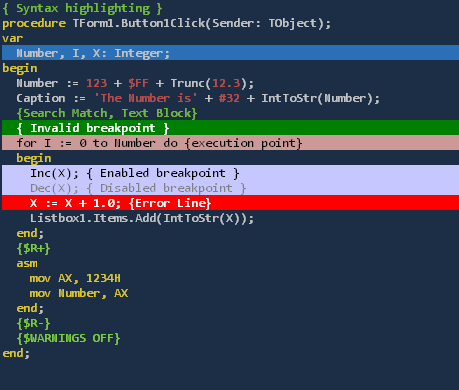
  • The GUI was improved to reflect more elements of the syntax highlighting (Active Line, Enabled break point, Disabled break point, execution point, error line), also when you click in any place in the editor the associated element is shown in the selection list.

  • New option to change the Hue/Saturation of any theme. This functionality allow you create new themes in seconds


  • More Themes added, now you have 50+ themes to personalize you Delphi IDE.
  • Finally an new page was created on my blog to publish the last news and features added to the Delphi IDE Theme Editor.

Download the Delphi IDE Theme Editor from here

And remember your suggestions and comments are very important to improve the application.


58 Comments

Is Your Delphi IDE Hot or Not? – Introducing the Delphi IDE Theme Editor

UPDATE : Visit the new page of the project to check the new features.

The last weekend I was working in a new project called Delphi IDE Theme Editor. this tool allow to change the Delphi (Rad studio) color settings.
the application was written using Delphi XE and the Unicode SynEdit components.

Here some features

  • Supports Delphi 7, 2005, BDS/Turbo 2006 and RAD Studio 2007, 2009, 2010, XE
  • Can import Visual Studio Themes 2003,2008,2010 (.vssettings)
  • You can revert any changes made to the IDE pressing the button “Set default theme values for selected IDE”
  • 35 themes are included, ready to use in your Delphi IDE.

Screenshot of the application

Look the dephi IDE

check this video to see how the application set a new theme to Delphi IDE

See how the tool can import a Visual Studio Theme (.vssettings) and apply this style to Delphi IDE.

some tips

  • Check the site studiostyles to get a lot of themes which you can import to the Delphi IDE.
  • If your system does not have the Consolas font installed you can download the Consolas Font Pack for Microsoft Visual Studio 2005 or 2008 from here

In the next days I will publish the full the source code and the technical details of the tool, so stay tuned.

Let me know If you have any suggestion or comments to improve the application.

Download the application from here


29 Comments

Changing the UA (User Agent) of a TWebBrowser component

The user agent strings identify what a user is using to access a web resource. some websites may deliver (slightly) different content depending upon what browser is being used. For example, if you use a iPhone user agent to browse to a WordPress site like https://theroadtodelphi.wordpress.com the result will see something like this :

As you can see the content is designed to fit with a mobile device. in this post I will show how you can change the user agent of a TWebBrowser component.

to change the UA of TWebBrowser you must call the OnAmbientPropertyChange event of the IOleControl interface with the DISPID_AMBIENT_USERAGENT flag and in the implementation of the Invoke function for the IDispatch interface set the value for the New User Agent String.

check the next source code using a interposer class of the TWebBrowser which declare a new property called UserAgent in the component.

const
  DISPID_AMBIENT_USERAGENT = -5513;

type
  TWebBrowser = class (SHDocVw.TWebbrowser, IDispatch)
  private
    FUserAgent: string;
    procedure SetUserAgent (const Value: string);
    function Invoke(DispID: Integer; const IID: TGUID; LocaleID: Integer; Flags: Word; var Params; VarResult, ExcepInfo, ArgErr: Pointer): HRESULT; stdcall;
  public
    property UserAgent: string read FUserAgent write SetUserAgent;
    constructor Create(AOwner: TComponent); override;
  end;

and the implementation

constructor TWebBrowser.Create(AOwner: TComponent);
begin
  inherited Create(AOwner);
  FUserAgent:='';
end;

function TWebBrowser.Invoke(DispID: Integer; const IID: TGUID; LocaleID: Integer; Flags: Word; var Params; VarResult, ExcepInfo, ArgErr: Pointer): HRESULT;
begin
  //check if the DISPID_AMBIENT_USERAGENT flag is being processed and if the User Agent to set is not empty
  if (FUserAgent <> '') and (Flags and DISPATCH_PROPERTYGET <> 0) and Assigned(VarResult) and (DispId=DISPID_AMBIENT_USERAGENT) then
  begin
    //set the user agent
    POleVariant(VarResult)^:= FUserAgent+#13#10;
    Result := S_OK; //return S_OK
  end
  else
  Result := inherited Invoke(DispID, IID, LocaleID, Flags, Params, VarResult, ExcepInfo, ArgErr); //call the default Invoke method
end;

procedure TWebBrowser.SetUserAgent(const Value: string);
var
  Control: IOleControl;
begin
  FUserAgent := Value;
  //the current interface supports IOleControl?
  if DefaultInterface.QueryInterface(IOleControl, Control) = 0 then
    Control.OnAmbientPropertyChange(DISPID_AMBIENT_USERAGENT); //call the OnAmbientPropertyChange event
end;

Now to use the above code your only need to add a TWebBrowser component to your form, then add the declaration of the New TWebBrowser class to begin of your unit and finally you must add the implementation of the methods show in this article.

Now to set the new user agent, you only must set the UserAgent property.

  WebBrowser1.UserAgent:='Mozilla/5.0 (iPhone; U; CPU like Mac OS X; en) AppleWebKit/420+ (KHTML, like Gecko) Version/3.0 Mobile/1A543a Safari/419.3';
  WebBrowser1.Navigate(EditURL.Text);

check the screen-shots for the demo application

For more info about User Agent strings check these links

Understanding User-Agent Strings
RFC 1945 – 10.15 User-Agent


Check the source code on Github.


4 Comments

Compile, Debug and Run your Pascal code online.

Do you want test a short Pascal snippet and you don’t have a compiler? try the site called ideone.

What is ideone?
Ideone is something more than a pastebin; it’s an online compiler and debugging tool which allows
to compile and run code online in more than 40 programming languages.

This site currently supports these two Pascal compilers

fpc (Free Pascal Compiler) 2.2.0 (Target OS: Linux for i386)
gpc (GNU Pascal Compiler) 20070904

for the limitations about the code submitted and others check the FAQ.


8 Comments

search for installed windows updates using Delphi, WMI and WUA

Sometimes we need determine if a particular windows hotfix or update is installed in the system. to do this task you can use two approaches

WMI (Windows Management Instrumentation)

using the Win32_QuickFixEngineering class, you can retrieve a small system-wide update, commonly referred to as a quick-fix engineering (QFE) update.

check this code which list the updates installed in the system

procedure  GetWin32_QuickFixEngineeringInfo;
const
  wbemFlagForwardOnly = $00000020;
var
  FSWbemLocator : OLEVariant;
  FWMIService   : OLEVariant;
  FWbemObjectSet: OLEVariant;
  FWbemObject   : OLEVariant;
  oEnum         : IEnumvariant;
  iValue        : LongWord;
begin;
  FSWbemLocator := CreateOleObject('WbemScripting.SWbemLocator');
  FWMIService   := FSWbemLocator.ConnectServer('localhost', 'root\CIMV2', '', '');
  FWbemObjectSet:= FWMIService.ExecQuery('SELECT * FROM Win32_QuickFixEngineering','WQL',wbemFlagForwardOnly);
  oEnum         := IUnknown(FWbemObjectSet._NewEnum) as IEnumVariant;
  while oEnum.Next(1, FWbemObject, iValue) = 0 do
  begin
    Writeln(Format('Caption                        %s',[FWbemObject.Caption]));// String
    //Writeln(Format('CSName                         %s',[FWbemObject.CSName]));// String
    Writeln(Format('Description                    %s',[FWbemObject.Description]));// String
    Writeln(Format('FixComments                    %s',[FWbemObject.FixComments]));// String
    Writeln(Format('HotFixID                       %s',[FWbemObject.HotFixID]));// String
    Writeln(Format('InstallDate                    %s',[FWbemObject.InstallDate]));// Datetime
    Writeln(Format('InstalledBy                    %s',[FWbemObject.InstalledBy]));// String
    Writeln(Format('InstalledOn                    %s',[FWbemObject.InstalledOn]));// String
    Writeln(Format('Name                           %s',[FWbemObject.Name]));// String
    Writeln(Format('ServicePackInEffect            %s',[FWbemObject.ServicePackInEffect]));// String
    Writeln(Format('Status                         %s',[FWbemObject.Status]));// String
    Writeln('');
    FWbemObject:=Unassigned;
  end;
end;

Now to find if a particular update is installed you can check the HotFixID property value (which is the Unique identifier associated with a particular update) and write a function like this

//use in this way ISHotFixID_Installed('KB982799')
function  ISHotFixID_Installed(const HotFixID : string): Boolean;
const
  wbemFlagForwardOnly = $00000020;
  wbemFlagReturnImmediately = $00000010;
var
  FSWbemLocator : OLEVariant;
  FWMIService   : OLEVariant;
  FWbemObjectSet: OLEVariant;
  FWbemObject   : OLEVariant;
  oEnum         : IEnumvariant;
  iValue        : LongWord;
begin;
  FSWbemLocator := CreateOleObject('WbemScripting.SWbemLocator');
  FWMIService   := FSWbemLocator.ConnectServer('localhost', 'root\CIMV2', '', '');
  FWbemObjectSet:= FWMIService.ExecQuery(Format('SELECT * FROM Win32_QuickFixEngineering Where HotFixID="%s"',[HotFixID]),'WQL',wbemFlagForwardOnly OR wbemFlagReturnImmediately);
  oEnum         := IUnknown(FWbemObjectSet._NewEnum) as IEnumVariant;
  Result:= oEnum.Next(1, FWbemObject, iValue) = 0;
end;

Ok this is fine, but Starting with Windows Vista, the Win32_QuickFixEngineering class returns only the updates supplied by Component Based Servicing (CBS), so some updates are not listed.

WUA (Windows Update Agent)

using the Windows Update Agent API is a best option to retrieve the list of updates, you can access the interfaces and objects from this API from delphi importing the wuapi.dll file or creating a late-binding com object using the Microsoft.Update.Session GUID. the next samples uses the late-binding way.

from the MSDN site :

The Windows Update Agent (WUA) API is a set of COM interfaces that enable system administrators and programmers to access Windows Update and Windows Server Update Services (WSUS). Scripts and programs can be written to examine which updates are currently available for a computer, and then you can install or uninstall updates.

to implement a search of the installed updates we need to use the IUpdateSearcher Interface using the Search method setting the search criteria.

check this sample

  //create the Com object instance
  updateSession:= CreateOleObject('Microsoft.Update.Session');
  updateSearcher    := updateSession.CreateUpdateSearcher;
  //set the search criteria, installed =1 means updates that are installed on the destination computer, Type='Software'  retrieve only applications updates
  updateSearchResult:= updateSearcher.Search(Format('IsInstalled = 1 and Type=%s',[QuotedStr('Software')]));

Now to find if a particular update is installed you can parse the Title property of the IUpdate Interface which contains the name of the update like this Security Update for Windows 7 for x64-based Systems (KB978542)

//use in this way ISHotFixID_Installed('KB982799')
function  ISHotFixID_Installed(const HotFixID : string): Boolean;
var
  updateSession      : OleVariant;
  updateSearcher     : OleVariant;
  updateEntry        : OleVariant;
  updateSearchResult : OleVariant;
  UpdateCollection   : OleVariant;
  oEnum              : IEnumvariant;
  iValue             : LongWord;
begin
 result:=False;
  updateSession:= CreateOleObject('Microsoft.Update.Session');
  updateSearcher    := updateSession.CreateUpdateSearcher;
  //this line improves the performance , the online porperty indicates whether the UpdateSearcher goes online to search for updates. so how we are looking for already installed updates we can set this value to false
  updateSearcher.online:=False;
  updateSearchResult:= updateSearcher.Search(Format('IsInstalled = 1 and Type=%s',[QuotedStr('Software')]));
  UpdateCollection  := updateSearchResult.Updates;
  oEnum         := IUnknown(UpdateCollection._NewEnum) as IEnumVariant;
  while oEnum.Next(1, updateEntry, iValue) = 0 do
  begin
    Result:=Pos(HotFixID,updateEntry.Title)>0;
    updateEntry:=Unassigned;
    if Result then break;
  end;
end;

check these another useful functions

Getting the installed updates list

procedure  GetListInstalledUpdates;
var
  updateSession        : OleVariant;
  updateSearcher       : OleVariant;
  updateSearchResult   : OleVariant;
  updateEntry          : OleVariant;
  UpdateCollection     : OleVariant;
  oEnum                : IEnumvariant;
  iValue               : LongWord;
begin
  updateSession:= CreateOleObject('Microsoft.Update.Session');
  updateSearcher := updateSession.CreateUpdateSearcher;
  Writeln('Searching');
  //IUpdateSearcher::Search Method http://msdn.microsoft.com/en-us/library/aa386526%28v=VS.85%29.aspx
  updateSearcher.online:=False;
  updateSearchResult:= updateSearcher.Search(Format('IsInstalled = 1 and Type=%s',[QuotedStr('Software')]));
  UpdateCollection  := updateSearchResult.Updates;
  oEnum         := IUnknown(UpdateCollection._NewEnum) as IEnumVariant;
  //IUpdate Interface http://msdn.microsoft.com/en-us/library/aa386099%28v=VS.85%29.aspx
  while oEnum.Next(1, updateEntry, iValue) = 0 do
  begin
    Writeln(updateEntry.Title);
    updateEntry:=Unassigned;
  end;
  Writeln('Done');
end;

Getting the not installed updates list (slow because need to check online)

procedure  GetListNotInstalledUpdates;
var
  updateSession        : OleVariant;
  updateSearcher       : OleVariant;
  updateSearchResult   : OleVariant;
  updateEntry          : OleVariant;
  UpdateCollection     : OleVariant;
  oEnum                : IEnumvariant;
  iValue               : LongWord;
begin
  updateSession:= CreateOleObject('Microsoft.Update.Session');
  updateSearcher := updateSession.CreateUpdateSearcher;
  Writeln('Searching');
  updateSearchResult:= updateSearcher.Search(Format('IsInstalled = 0 and Type=%s',[QuotedStr('Software')]));
  UpdateCollection  := updateSearchResult.Updates;
  oEnum         := IUnknown(UpdateCollection._NewEnum) as IEnumVariant;
  while oEnum.Next(1, updateEntry, iValue) = 0 do
  begin
    Writeln(updateEntry.Title);
    updateEntry:=Unassigned;
  end;
  Writeln('Done');
end;

Getting the hidden installed updates list

procedure  GetListInstalledHiddenUpdates;
var
  updateSession        : OleVariant;
  updateSearcher       : OleVariant;
  updateSearchResult   : OleVariant;
  updateEntry          : OleVariant;
  UpdateCollection     : OleVariant;
  oEnum                : IEnumvariant;
  iValue               : LongWord;
begin
  updateSession:= CreateOleObject('Microsoft.Update.Session');
  updateSearcher := updateSession.CreateUpdateSearcher;
  Writeln('Searching');
  updateSearcher.online:=False;
  updateSearchResult:= updateSearcher.Search(Format('IsHidden=1 and IsInstalled = 1 and Type=%s',[QuotedStr('Software')]));
  UpdateCollection  := updateSearchResult.Updates;
  oEnum         := IUnknown(UpdateCollection._NewEnum) as IEnumVariant;
  while oEnum.Next(1, updateEntry, iValue) = 0 do
  begin
    Writeln(updateEntry.Title);
    updateEntry:=Unassigned;
  end;
  Writeln('Done');
end;


1 Comment

Change the drive letter using WMI and Delphi

Today i will show a short snippet to change the letter from a drive (Volume) using the WMI. the key is use the Win32_Volume class and set the value of the DriveLetter property. this property is read/write so we can update directly the value and then call the Put_ method of the SWbemObject object.

Check out this sample project

{$APPTYPE CONSOLE}

uses
  SysUtils,
  ActiveX,
  ComObj;

procedure  ChangeDriveLetter(OldDrive,NewDrive:Char);
var
  FSWbemLocator : OLEVariant;
  FWMIService   : OLEVariant;
  FWbemObjectSet: OLEVariant;
  FWbemObject   : OLEVariant;
  oEnum         : IEnumvariant;
  iValue        : LongWord;
begin;
  FSWbemLocator := CreateOleObject('WbemScripting.SWbemLocator');
  FWMIService   := FSWbemLocator.ConnectServer('localhost', 'root\CIMV2', '', '');
  FWbemObjectSet:= FWMIService.ExecQuery(Format('SELECT * FROM Win32_Volume Where DriveLetter=%s',[QuotedStr(OldDrive+':')]),'WQL',0);
  oEnum         := IUnknown(FWbemObjectSet._NewEnum) as IEnumVariant;
  if oEnum.Next(1, FWbemObject, iValue) = 0 then
  begin
    //Assign the New letter
    FWbemObject.DriveLetter:=NewDrive+':';
    //Apply the changes
    FWbemObject.Put_();
  end;
end;

begin
 try
    CoInitialize(nil);
    try
      //This will change the letter of the drive E to Z
      ChangeDriveLetter('E','Z');
      Readln;
    finally
      CoUninitialize;
    end;
 except
    on E:Exception do
    begin
        Writeln(E.Classname, ':', E.Message);
        Readln;
    end;
  end;
end.


21 Comments

Getting the installed Antivirus, AntiSpyware and Firewall software using Delphi and the WMI

The WMI allow you to get the installed Antivirus, AntiSpyware and Firewall (third party)  software using the root\SecurityCenter or the root\SecurityCenter2 namespaces and the AntiVirusProduct , AntiSpywareProduct, FirewallProduct classes.

First you must know which these classes and namespaces are not documented by Microsoft and only are supported in Windows Desktops editions (Windows XP, Windows Vista and Windows 7).
Now depending of the Windows version the properties retrieved by the the same class can change. this is a summary of the classes and properties availables depending of the windows version

Windows XP

Namespace : SecurityCenter
Classes availables: AntiVirusProduct, FirewallProduct

AntiVirusProduct-Properties

  • companyName
  • displayName
  • enableOnAccessUIMd5Hash
  • enableOnAccessUIParameters
  • instanceGuid
  • onAccessScanningEnabled
  • pathToEnableOnAccessUI
  • pathToUpdateUI
  • productUptoDate
  • updateUIMd5Hash
  • updateUIParameters
  • versionNumber

FirewallProduct-Properties

  • companyName
  • displayName
  • enabled
  • enableUIMd5Hash
  • enableUIParameters
  • instanceGuid
  • pathToEnableUI
  • versionNumber

Windows Vista and Windows 7

Namespace : SecurityCenter2
Classes availables : AntiVirusProduct, AntiSpywareProduct, FirewallProduct

AntiVirusProduct, AntiSpywareProduct, FirewallProduct – Properties

  • displayName
  • instanceGuid
  • pathToSignedProductExe
  • pathToSignedReportingExe
  • productState

This is a sample project which determine the Antivirus, AntiSpyware and Firewall software installed in the system.

program GetSecurityCenterInfo;

{$APPTYPE CONSOLE}

uses
  SysUtils,
  Windows,
  ActiveX,
  ComObj,
  Variants;

type
  TSecurityCenterProduct = (AntiVirusProduct,AntiSpywareProduct,FirewallProduct);
const
  WmiRoot='root';
  WmiClassSCProduct     : array [TSecurityCenterProduct] of string = ('AntiVirusProduct','AntiSpywareProduct','FirewallProduct');
  WmiNamespaceSCProduct : array [Boolean] of string = ('SecurityCenter','SecurityCenter2');

function VerSetConditionMask(dwlConditionMask: int64;dwTypeBitMask: DWORD; dwConditionMask: Byte): int64; stdcall; external kernel32;

{$IFDEF UNICODE}
function VerifyVersionInfo(var LPOSVERSIONINFOEX : OSVERSIONINFOEX;dwTypeMask: DWORD;dwlConditionMask: int64): BOOL; stdcall; external kernel32 name 'VerifyVersionInfoW';
{$ELSE}
function VerifyVersionInfo(var LPOSVERSIONINFOEX : OSVERSIONINFOEX;dwTypeMask: DWORD;dwlConditionMask: int64): BOOL; stdcall; external kernel32 name 'VerifyVersionInfoA';
{$ENDIF}

//verifies that the application is running on Windows 2000 Server or a later server, such as Windows Server 2003 or Windows Server 2008.
function Is_Win_Server : Boolean;
const
   VER_NT_SERVER      = $0000003;
   VER_EQUAL          = 1;
   VER_GREATER_EQUAL  = 3;
var
   osvi             : OSVERSIONINFOEX;
   dwlConditionMask : DWORDLONG;
   op               : Integer;
begin
   dwlConditionMask := 0;
   op:=VER_GREATER_EQUAL;

   ZeroMemory(@osvi, sizeof(OSVERSIONINFOEX));
   osvi.dwOSVersionInfoSize := sizeof(OSVERSIONINFOEX);
   osvi.dwMajorVersion := 5;
   osvi.dwMinorVersion := 0;
   osvi.wServicePackMajor := 0;
   osvi.wServicePackMinor := 0;
   osvi.wProductType := VER_NT_SERVER;

   dwlConditionMask:=VerSetConditionMask( dwlConditionMask, VER_MAJORVERSION, op );
   dwlConditionMask:=VerSetConditionMask( dwlConditionMask, VER_MINORVERSION, op );
   dwlConditionMask:=VerSetConditionMask( dwlConditionMask, VER_SERVICEPACKMAJOR, op );
   dwlConditionMask:=VerSetConditionMask( dwlConditionMask, VER_SERVICEPACKMINOR, op );
   dwlConditionMask:=VerSetConditionMask( dwlConditionMask, VER_PRODUCT_TYPE, VER_EQUAL );

   Result:=VerifyVersionInfo(osvi,VER_MAJORVERSION OR VER_MINORVERSION OR
      VER_SERVICEPACKMAJOR OR VER_SERVICEPACKMINOR OR VER_PRODUCT_TYPE, dwlConditionMask);
end;

procedure  GetSCProductInfo(SCProduct:TSecurityCenterProduct);
var
  FSWbemLocator : OLEVariant;
  FWMIService   : OLEVariant;
  FWbemObjectSet: OLEVariant;
  FWbemObject   : OLEVariant;
  oEnum         : IEnumvariant;
  iValue        : LongWord;
  osVerInfo     : TOSVersionInfo;
begin
  osVerInfo.dwOSVersionInfoSize:=SizeOf(TOSVersionInfo);
  GetVersionEx(osVerInfo);
  if (SCProduct=AntiSpywareProduct) and (osVerInfo.dwMajorVersion<6)  then exit;   FSWbemLocator := CreateOleObject('WbemScripting.SWbemLocator');   FWMIService   := FSWbemLocator.ConnectServer('localhost',Format('%s\%s',[WmiRoot,WmiNamespaceSCProduct[osVerInfo.dwMajorVersion>=6]]), '', '');
  FWbemObjectSet:= FWMIService.ExecQuery(Format('SELECT * FROM %s',[WmiClassSCProduct[SCProduct]]),'WQL',0);
  oEnum         := IUnknown(FWbemObjectSet._NewEnum) as IEnumVariant;
  while oEnum.Next(1, FWbemObject, iValue) = 0 do
  begin
    if osVerInfo.dwMajorVersion>=6 then  //windows vista or newer
    begin
      Writeln(Format('displayName                    %s',[FWbemObject.displayName]));// String
      Writeln(Format('instanceGuid                   %s',[FWbemObject.instanceGuid]));// String
      Writeln(Format('pathToSignedProductExe         %s',[FWbemObject.pathToSignedProductExe]));// String
      Writeln(Format('pathToSignedReportingExe       %s',[FWbemObject.pathToSignedReportingExe]));// String
      Writeln(Format('productState                   %s',[FWbemObject.productState]));// Uint32
    end
    else
    begin
     case SCProduct of

        AntiVirusProduct :
         begin
            Writeln(Format('companyName                    %s',[FWbemObject.companyName]));// String
            Writeln(Format('displayName                    %s',[FWbemObject.displayName]));// String
            Writeln(Format('enableOnAccessUIMd5Hash        %s',[FWbemObject.enableOnAccessUIMd5Hash]));// Uint8
            Writeln(Format('enableOnAccessUIParameters     %s',[FWbemObject.enableOnAccessUIParameters]));// String
            Writeln(Format('instanceGuid                   %s',[FWbemObject.instanceGuid]));// String
            Writeln(Format('onAccessScanningEnabled        %s',[FWbemObject.onAccessScanningEnabled]));// Boolean
            Writeln(Format('pathToEnableOnAccessUI         %s',[FWbemObject.pathToEnableOnAccessUI]));// String
            Writeln(Format('pathToUpdateUI                 %s',[FWbemObject.pathToUpdateUI]));// String
            Writeln(Format('productUptoDate                %s',[FWbemObject.productUptoDate]));// Boolean
            Writeln(Format('updateUIMd5Hash                %s',[FWbemObject.updateUIMd5Hash]));// Uint8
            Writeln(Format('updateUIParameters             %s',[FWbemObject.updateUIParameters]));// String
            Writeln(Format('versionNumber                  %s',[FWbemObject.versionNumber]));// String
         end;

       FirewallProduct  :
         begin
            Writeln(Format('companyName                    %s',[FWbemObject.companyName]));// String
            Writeln(Format('displayName                    %s',[FWbemObject.displayName]));// String
            Writeln(Format('enabled                        %s',[FWbemObject.enabled]));// Boolean
            Writeln(Format('enableUIMd5Hash                %s',[FWbemObject.enableUIMd5Hash]));// Uint8
            Writeln(Format('enableUIParameters             %s',[FWbemObject.enableUIParameters]));// String
            Writeln(Format('instanceGuid                   %s',[FWbemObject.instanceGuid]));// String
            Writeln(Format('pathToEnableUI                 %s',[FWbemObject.pathToEnableUI]));// String
            Writeln(Format('versionNumber                  %s',[FWbemObject.versionNumber]));// String
         end;
     end;
    end;
    Writeln('');
    FWbemObject:=Unassigned;
  end;
end;

begin
 try
    if Is_Win_Server then
    begin
     Writeln('Sorry this app only can run in desktop operating systems.');
     Halt;
    end;

    CoInitialize(nil);
    try
      Writeln('AntiVirus Info');
      Writeln('--------------');
      GetSCProductInfo(AntiVirusProduct);
      Writeln('AntiSpyware Info');
      Writeln('----------------');
      GetSCProductInfo(AntiSpywareProduct);
      Writeln('Firewall Info');
      Writeln('-------------');
      GetSCProductInfo(FirewallProduct);
      Readln;
    finally
      CoUninitialize;
    end;
 except
    on E:Exception do
    begin
        Writeln(E.Classname, ':', E.Message);
        Readln;
    end;
  end;
end.

And here is the result of the app.