
The Issue
The last weeks I found a couple questions and QC reports(100645, 101822, 102984) regarding to how change the color of a Edit Control (TEdit, TMaskEdit, TMemo and so on) when the VCL Styles are enabled. So today I will show you how you can change the colors of these controls even with the VCL Styles activated.
In a Standard VCL Form application you can change the Color property of Edit controls
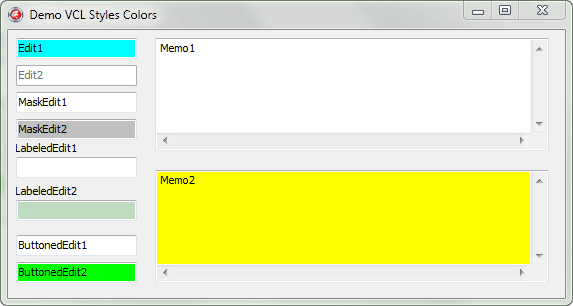
But when the Vcl Styles Are applied these colors are not used, and the controls are painted using the colors of the current VCl Style.
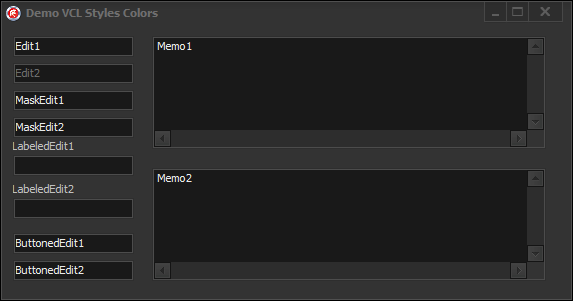
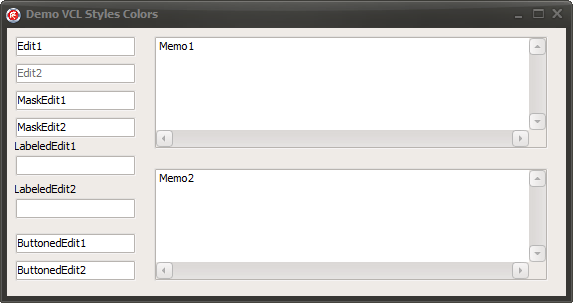
The Solution
So what is the solution? well the answer is : Create a new TStyleHook (read this article to learn more about Style Hooks) . All the TWinControls uses a TStyleHook to paint the control when the vcl styles are actived, so you can modify the TStyleHook of a particular control to modify the way of how the component is painted.
Implementation
Before to implement a Custom Style hook you must be aware which this new TStyleHook will affect to all the controls of the same type used in the RegisterStyleHook method, because the Style hooks are implemented for a particular class type and not for an instance.
First let’s create a style hook for the TCustomEdit descendents, using the TEditStyleHook class, this new style hook can be used with controls like TEdit, TMaskEdit, TLabeledEdit and so on.
Check the next commented code
[sourcecode language=”delphi” wraplines=”false”]
TEditStyleHookColor = class(TEditStyleHook)
private
procedure UpdateColors;
protected
procedure WndProc(var Message: TMessage); override;
public
constructor Create(AControl: TWinControl); override;
end;
uses
Vcl.Styles;
type
TWinControlH= class(TWinControl);
constructor TEditStyleHookColor.Create(AControl: TWinControl);
begin
inherited;
//call the UpdateColors method to use the custom colors
UpdateColors;
end;
//Here you set the colors of the style hook
procedure TEditStyleHookColor.UpdateColors;
var
LStyle: TCustomStyleServices;
begin
if Control.Enabled then
begin
Brush.Color := TWinControlH(Control).Color; //use the Control color
FontColor := TWinControlH(Control).Font.Color;//use the Control font color
end
else
begin
//if the control is disabled use the colors of the style
LStyle := StyleServices;
Brush.Color := LStyle.GetStyleColor(scEditDisabled);
FontColor := LStyle.GetStyleFontColor(sfEditBoxTextDisabled);
end;
end;
//Handle the messages of the control
procedure TEditStyleHookColor.WndProc(var Message: TMessage);
begin
case Message.Msg of
CN_CTLCOLORMSGBOX..CN_CTLCOLORSTATIC:
begin
//Get the colors
UpdateColors;
SetTextColor(Message.WParam, ColorToRGB(FontColor));
SetBkColor(Message.WParam, ColorToRGB(Brush.Color));
Message.Result := LRESULT(Brush.Handle);
Handled := True;
end;
CM_ENABLEDCHANGED:
begin
//Get the colors
UpdateColors;
Handled := False;
end
else
inherited WndProc(Message);
end;
end;
[/sourcecode]
Now a style hook for the TCustomMemo using the TMemoStyleHook class.
[sourcecode language=”delphi” wraplines=”false”]
TMemoStyleHookColor = class(TMemoStyleHook)
private
procedure UpdateColors;
protected
procedure WndProc(var Message: TMessage); override;
public
constructor Create(AControl: TWinControl); override;
end;
constructor TMemoStyleHookColor.Create(AControl: TWinControl);
begin
inherited;
//call the UpdateColors method to use the custom colors
UpdateColors;
end;
//Set the colors to be used by the Style hook
procedure TMemoStyleHookColor.UpdateColors;
var
LStyle: TCustomStyleServices;
begin
if Control.Enabled then
begin
Brush.Color := TWinControlH(Control).Color;
FontColor := TWinControlH(Control).Font.Color;
end
else
begin
//if the control is disabled use the current style colors
LStyle := StyleServices;
Brush.Color := LStyle.GetStyleColor(scEditDisabled);
FontColor := LStyle.GetStyleFontColor(sfEditBoxTextDisabled);
end;
end;
//handle the messages
procedure TMemoStyleHookColor.WndProc(var Message: TMessage);
begin
case Message.Msg of
CN_CTLCOLORMSGBOX..CN_CTLCOLORSTATIC:
begin
//get the colors
UpdateColors;
SetTextColor(Message.WParam, ColorToRGB(FontColor));
SetBkColor(Message.WParam, ColorToRGB(Brush.Color));
Message.Result := LRESULT(Brush.Handle);
Handled := True;
end;
CM_COLORCHANGED,
CM_ENABLEDCHANGED:
begin
//get the colors
UpdateColors;
Handled := False;
end
else
inherited WndProc(Message);
end;
end;
[/sourcecode]
Finally to apply the above code you must call the TStyleManager.Engine.RegisterStyleHook method in this way (ideally in the initialization part of you unit)
[sourcecode language=”delphi” wraplines=”false”]
TStyleManager.Engine.RegisterStyleHook(TEdit, TEditStyleHookColor);
TStyleManager.Engine.RegisterStyleHook(TMaskEdit, TEditStyleHookColor);
TStyleManager.Engine.RegisterStyleHook(TLabeledEdit, TEditStyleHookColor);
TStyleManager.Engine.RegisterStyleHook(TButtonedEdit, TEditStyleHookColor);
TStyleManager.Engine.RegisterStyleHook(TMemo, TMemoStyleHookColor);
[/sourcecode]
Trick : If you only want apply these new hooks to the controls of a particular form, you can use a interposer class in the begining of your unit
[sourcecode language=”delphi” wraplines=”false”]
type
TEdit= Class (Vcl.StdCtrls.TEdit);
TMemo= Class (Vcl.StdCtrls.TMemo);
TButtonedEdit= Class (Vcl.ExtCtrls.TButtonedEdit);
TLabeledEdit= Class (Vcl.ExtCtrls.TLabeledEdit);
[/sourcecode]
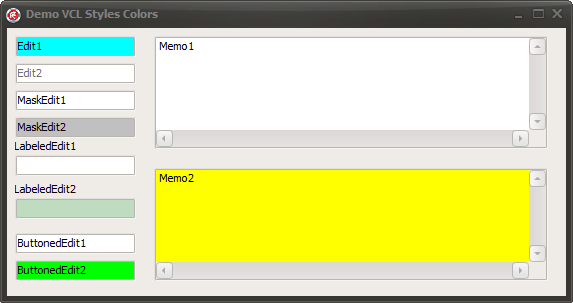
The final result
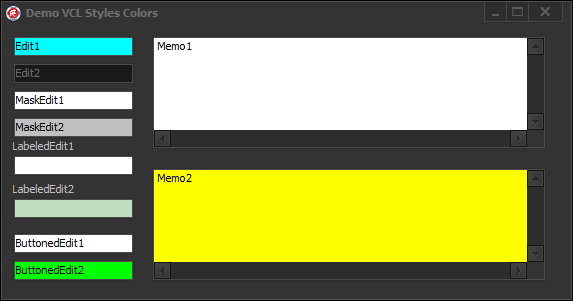
Now look how the forms with the vcl styles can have custom colors in the Edit controls
Check the full source code on Github.


