
Skip to content
The Road to Delphi — Delphi, VCL, VCL Styles, UxTheme and WinAPI

Generating Qr Codes with Delphi

,

 The QR Codes are a  special kind of images that used to represent two-dimensional barcodes. They are also known as hardlinks or physical world hyperlinks.

The QR Codes can store up to 4,296 alphanumeric characters of arbitrary text. The  QR codes can be read by an optical device with the appropriate software. Such devices range from dedicated QR code readers to mobile phones.

On this post I will show you how using the Google Chart Tools / Image Charts (aka Chart API) you can easily generate QR codes.

Using this API is very  straightforward, all you need to do is to generate a QR Code is make a Get request to this URI

http://chart.apis.google.com/chart?chs=200x200&cht=qr&chld=M&chl=Go+Delphi+Go

And how response you will get a png image (you can change the output format to gif adding the chof parameter to the URI  like so : chof=gif).

On the Google Chart Documentation you can find more info about the parameters to generate a QR Code.

Note : If you want encode more of 2000 chars do you need make a post request (this up to you).

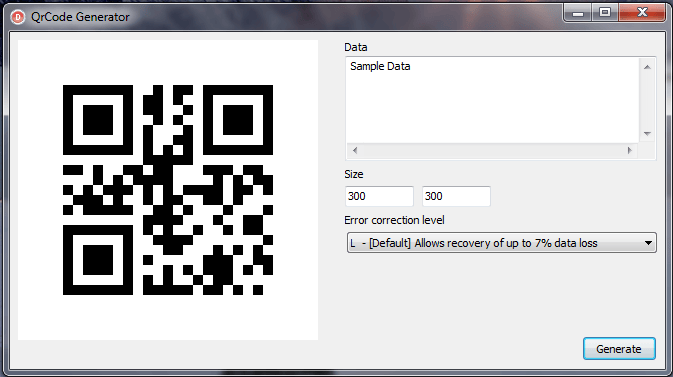
Finally this a sample Delphi source to generate a QR Code.

[sourcecode wraplines=”false” language=”delphi”]

uses
PngImage,
HTTPApp,
WinInet;

type
TQrImage_ErrCorrLevel=(L,M,Q,H);

const
UrlGoogleQrCode=’http://chart.apis.google.com/chart?chs=%dx%d&cht=qr&chld=%s&chl=%s’;
QrImgCorrStr : array [TQrImage_ErrCorrLevel] of string=(‘L’,’M’,’Q’,’H’);

procedure WinInet_HttpGet(const Url: string;Stream:TStream);
const
BuffSize = 1024*1024;
var
hInter : HINTERNET;
UrlHandle: HINTERNET;
BytesRead: DWORD;
Buffer : Pointer;
begin
hInter := InternetOpen(”, INTERNET_OPEN_TYPE_PRECONFIG, nil, nil, 0);
if Assigned(hInter) then
begin
Stream.Seek(0,0);
GetMem(Buffer,BuffSize);
try
UrlHandle := InternetOpenUrl(hInter, PChar(Url), nil, 0, INTERNET_FLAG_RELOAD, 0);
if Assigned(UrlHandle) then
begin
repeat
InternetReadFile(UrlHandle, Buffer, BuffSize, BytesRead);
if BytesRead>0 then
Stream.WriteBuffer(Buffer^,BytesRead);
until BytesRead = 0;
InternetCloseHandle(UrlHandle);
end;
finally
FreeMem(Buffer);
end;
InternetCloseHandle(hInter);
end
end;

//this function return a Stream (PngImage inside) with a Qr code.
procedure GetQrCode(Width,Height:Word;Correction_Level:TQrImage_ErrCorrLevel;const Data:string;StreamImage : TMemoryStream);
Var
EncodedURL : string;
begin
EncodedURL:=Format(UrlGoogleQrCode,[Width,Height,QrImgCorrStr[Correction_Level],HTTPEncode(Data)]);
WinInet_HttpGet(EncodedURL,StreamImage);
end;
[/sourcecode]

Check the source code of the application on Github
25 responses

  1. very good . thanks ;)

  2. Asombroso, excelente.

    ¿Se podrá decodificar la imagen usando una webcam?

    1. Si se puede pero necesitas el algoritmo para decodificar la imagen.

  3. […] They are also known as hardlinks or physical world hyperlinks. The QR Codes store up to… [full post] Rodrigo The Road to Delphi – a Blog About Delphi Programming (mostly) delphigoogle api […]

  4. Excelente,!! ¿Donde puedo encontrar el algoritmo para decodificar la imagen? ¿alguna idea?

    1. en este link puedes encontrar una libreria en C# para crear y decodificar Qr Codes

  5. […] http://theroadtodelphi.wordpress.com/2010/12/06/generating-qr-codes-with-delphi/ in Delphi Barcodes :: A QR code is a specific barcode that gained popularity during the last […]

  6. Super Good!!!

  7. Why use RAR for a Windows App when Windows can’t handle it?

    1. John , sometimes I forgot create a zip file instead of rar. the link was updated in zip format now.

  8. […] 如何在delphi中使用google chart api来显示QRCode Posted on August 16, 2011 by wingfish 这是一个老外写的参考,介绍了如何通过调用google chart api在delphi中显示qrcode二维码,方法还是比较清晰的,但是这样会要求用户电脑一定是联网的,在应用上有一定局限性,给一个链接大家看看。下次有机会再介绍如何用delphi生成原生的本地qrcode方法。 […]

  9. the compilation can´t find the PngImage file!!! where is the file?

    1. Maybe you are using an old version of delphi. The post explain how use the gif format instead which is supported for old versions. else you can use a third party library with png support,

  10. Can I use this for Delphi 7? I get the errormessage “Invalid GIF signature”
    I have tried to change from PngImage to GIFImage, but the same error appears.

    1. Delphi 7 does not support the PNG format directly, you must use a third-party component to load png images. About the gif format should be work in Delphi 7.

  11. I have tried PngImage and GifImage bur running the application shows the same error “Invalid GIF signature”

    1. Which component are you using to load the image? Are you tried downloading the image to a file and check the content with a external viewer?

  12. I have tried with:
    Png:
    http://pngdelphi.sourceforge.net
    Gustavo Huffenbacher Daud (gustavo.daud@terra.com.br)
    and
    Gif:
    Author(s): anme: Anders Melander, anders@melander.dk
    fila: Filip Larsen
    rps: Reinier Sterkenburg

    I’m just using the code, that can be downloaded above on this site.

    1. Check this link (binaries and sources included) for a Delphi 7 project which uses the TGifImage component from Anders Melanders, this demo app download and display a QrImage in gif format.

      Demo Qr Delphi 7

  13. Thanks a lot

  14. There is a small hint for the line 50 of the sourcecode:

    Because the message has to be formated in UTF-8 you shoud call the HTTPEncode method with the UTF-8 coded string, e.g. like that: HTTPEncode(Utf8Encode(Data))

    Otherwise you can get problems with special characters (results in a qr-code with no information inside)

  15. […] I am desperately looking for a QR Code component to generate QR Code. So far the only method I have found is through Google API chart but I need an offline method. http://theroadtodelphi.wordpress.com/2010/12/06/generating-qr-codes-with-delphi/ […]

  16. The company I work for has just released an open source Delphi QR code generator called DelphiZXingQRCode. It’s a Delphi port of a Java barcode image processing library called ZXing.

    http://www.debenu.com/open-source/delphizxingqrcode/

  17. The Internet isn’t reuquired if you use the local library, such as ZXing, 2D Barcode VCL Components from http://www.han-soft.com/barcode2d.php

Leave a Reply