I just added support for Delphi (RAD Studio) XE6 to the Delphi IDE Theme Editor.
Check these screenshots


You can download the installer from here

I just added support for Delphi (RAD Studio) XE6 to the Delphi IDE Theme Editor.
Check these screenshots
You can download the installer from here
I just made some changes to the TVclStylesWebBrowser class which add support for VCL Styles to the TWebBrowser component. Now the TWebBrowser Scrollbars, Menus and dialogs are styled.


You can check the sample application here
As you probably know the VCL Styles doesn’t support Popup menus, this means if you apply any VCL Style to your VCL Application the popup menus will remain with the Windows native look and feel (exists some workarounds for this like use a TPopupActionBar as described here, but this only works partially, and doesn’t support the child menus of a TMainMenu). Since Sometime ago the VCL Styles Utils project can help you to overcome this limitation adding support for VCL Styled Popup Menus.
Now we just uploaded a major update to the VCL Styles Utils project. This new version fix all the issues reported via mail and the issue page related the PopUp menus like support for the Break property, Checkboxes, Radio Items, Default items and so on.
TMainMenu with VCL Styles

TMainMenu with VCL Styles and VCL Styles Utils

Popup Menu with VCL Styles

Popup Menu with VCL Styles and VCL Styles Utils

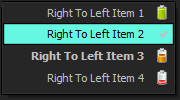
Right to left Popup Menu with VCL Styles
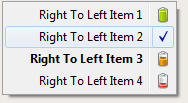
Right to left Popup Menu with VCL Styles and VCL Styles Utils
System Menu with VCL Styles

System Menu with VCL Styles and VCL Styles Utils

To add support for VCL Styled Popup Menus in your Application only you must add these units to your project Vcl.Styles.Utils.Menus, Vcl.Styles.Utils.SysStyleHook and Vcl.Styles.Utils.SysControls.
You can download sample application from here and the source of the Application is here.
A result of the work in a new sub project of the VCL Styles Utils , many new features as been added to the library, One of my favorites is a patch for the GetSysColor WinApi function. This fix replace the original call to this function by a jump to the StyleServices.GetSystemColor method replacing the original system colors by the current VCL Style colors. One of the advantages of use this fix is which the controls uses the proper VCL Style highlight color.
Check these controls with the VCL Styles

Now using the Vcl.Styles.Hooks unit

TColorBox
 |
 |
This is the actual source code of the Vcl.Styles.Hooks unit which includes the patch to the GetSysColor function. To use this unit in your code you must add the KOLDetours unit too.
unit Vcl.Styles.Hooks;

interface

implementation

uses
  KOLDetours,
  WinApi.Windows,
  Vcl.Styles,
  Vcl.Themes;

var
  TrampolineGetSysColor:  function (nIndex: Integer): DWORD; stdcall;
  GetSysColorOrgPointer : Pointer = nil;

function InterceptGetSysColor(nIndex: Integer): DWORD; stdcall;
begin
  if StyleServices.IsSystemStyle then
   Result:= TrampolineGetSysColor(nIndex)
  else
   Result:= StyleServices.GetSystemColor(nIndex or Integer($FF000000));
end;

initialization
 if StyleServices.Available then
 begin
   GetSysColorOrgPointer  := GetProcAddress(GetModuleHandle('user32.dll'), 'GetSysColor');
   @TrampolineGetSysColor := InterceptCreate(GetSysColorOrgPointer, @InterceptGetSysColor);
 end;
finalization
 if GetSysColorOrgPointer<>nil then
  InterceptRemove(@TrampolineGetSysColor, @InterceptGetSysColor);

end.
 These are a set of useful Delphi snippets to handle the Windows Firewall using the Advanced Security scripting.
Note : Some of the below samples requires elevation.
{$APPTYPE CONSOLE}

uses
  SysUtils,
  ActiveX,
  ComObj;

//This code adds a LAN rule using the Microsoft Windows Firewall APIs.
Procedure AddLANRule;
Const
 NET_FW_IP_PROTOCOL_TCP = 6;
 NET_FW_ACTION_ALLOW = 1;
var
 CurrentProfiles : OleVariant;
 fwPolicy2       : OleVariant;
 RulesObject     : OleVariant;
 NewRule         : OleVariant;
begin
  // Create the FwPolicy2 object.
  fwPolicy2   := CreateOleObject('HNetCfg.FwPolicy2');
  RulesObject := fwPolicy2.Rules;
  CurrentProfiles := fwPolicy2.CurrentProfileTypes;

  //Create a Rule Object.
  NewRule := CreateOleObject('HNetCfg.FWRule');

  NewRule.Name := 'Per_InterfaceType_Rule';
  NewRule.Description := 'Allow incoming network traffic over port 2400 coming from LAN interface type';
  NewRule.Protocol := NET_FW_IP_PROTOCOL_TCP;
  NewRule.LocalPorts := 2300;
  NewRule.Interfacetypes := 'LAN';
  NewRule.Enabled := True;
  NewRule.Grouping := 'My Group';
  NewRule.Profiles := CurrentProfiles;
  NewRule.Action := NET_FW_ACTION_ALLOW;

  //Add a new rule
  RulesObject.Add(NewRule);
end;

begin
 try
    CoInitialize(nil);
    try
      AddLANRule;
    finally
      CoUninitialize;
    end;
 except
    on E:EOleException do
        Writeln(Format('EOleException %s %x', [E.Message,E.ErrorCode]));
    on E:Exception do
        Writeln(E.Classname, ':', E.Message);
 end;
 Writeln('Press Enter to exit');
 Readln;
end.
{$APPTYPE CONSOLE}

uses
  SysUtils,
  ActiveX,
  Variants,
  ComObj;

//This code that adds a per interface rule using the Microsoft Windows Firewall APIs.
Procedure AddPerInterfaceRule;
Const
 NET_FW_IP_PROTOCOL_TCP = 6;
 NET_FW_IP_PROTOCOL_UDP = 17;
 NET_FW_ACTION_ALLOW = 1;
var
 CurrentProfiles : OleVariant;
 fwPolicy2       : OleVariant;
 RulesObject     : OleVariant;
 NewRule         : OleVariant;
begin
  // Create the FwPolicy2 object.
  fwPolicy2   := CreateOleObject('HNetCfg.FwPolicy2');
  RulesObject := fwPolicy2.Rules;
  CurrentProfiles := fwPolicy2.CurrentProfileTypes;

  //Create a Rule Object.
  NewRule := CreateOleObject('HNetCfg.FWRule');

  NewRule.Name := 'Per_Interface_Rule';
  NewRule.Description := 'Add a Per Interface Rule';
  NewRule.Protocol := NET_FW_IP_PROTOCOL_TCP;
  NewRule.LocalPorts := 2300;
  NewRule.Interfacetypes := 'LAN';
  NewRule.Enabled := True;
  NewRule.Grouping := 'My Group';
  NewRule.Profiles := CurrentProfiles;
  NewRule.Interfaces := VarArrayOf(['Local Area Connection']);
  NewRule.Action := NET_FW_ACTION_ALLOW;

  //Add a new rule
  RulesObject.Add(NewRule);
end;

begin
 try
    CoInitialize(nil);
    try
      AddPerInterfaceRule;
    finally
      CoUninitialize;
    end;
 except
    on E:EOleException do
        Writeln(Format('EOleException %s %x', [E.Message,E.ErrorCode]));
    on E:Exception do
        Writeln(E.Classname, ':', E.Message);
 end;
 Writeln('Press Enter to exit');
 Readln;
end.
{$APPTYPE CONSOLE}

uses
  SysUtils,
  ActiveX,
  ComObj;

//This code adds a Generic Routing Encapsulation (GRE) protocol rule
//using the Microsoft Windows Firewall APIs.
Procedure AddProtocolRule;
Const
 NET_FW_ACTION_ALLOW = 1;
var
 CurrentProfiles : OleVariant;
 fwPolicy2       : OleVariant;
 RulesObject     : OleVariant;
 NewRule         : OleVariant;
begin
  // Create the FwPolicy2 object.
  fwPolicy2   := CreateOleObject('HNetCfg.FwPolicy2');
  RulesObject := fwPolicy2.Rules;
  CurrentProfiles := fwPolicy2.CurrentProfileTypes;

  //Create a Rule Object.
  NewRule := CreateOleObject('HNetCfg.FWRule');

  NewRule.Name := 'GRE_RULE';
  NewRule.Description := 'Allow GRE Traffic';
  NewRule.Protocol := 47;
  NewRule.Enabled := True;
  NewRule.Profiles := CurrentProfiles;
  NewRule.Action := NET_FW_ACTION_ALLOW;

  //Add a new rule
  RulesObject.Add(NewRule);
end;

begin
 try
    CoInitialize(nil);
    try
      AddProtocolRule;
    finally
      CoUninitialize;
    end;
 except
    on E:EOleException do
        Writeln(Format('EOleException %s %x', [E.Message,E.ErrorCode]));
    on E:Exception do
        Writeln(E.Classname, ':', E.Message);
 end;
 Writeln('Press Enter to exit');
 Readln;
end.
{$APPTYPE CONSOLE}

uses
  SysUtils,
  ActiveX,
  ComObj;

//This code adds an application rule with Edge Traversal using the Microsoft Windows Firewall APIs.
Procedure AddRuleEdgeTraversal;
Const
 NET_FW_ACTION_ALLOW = 1;
 NET_FW_IP_PROTOCOL_TCP = 6;
var
 CurrentProfiles : OleVariant;
 fwPolicy2       : OleVariant;
 RulesObject     : OleVariant;
 NewRule         : OleVariant;
begin
  // Create the FwPolicy2 object.
  fwPolicy2   := CreateOleObject('HNetCfg.FwPolicy2');
  RulesObject := fwPolicy2.Rules;
  CurrentProfiles := fwPolicy2.CurrentProfileTypes;

  //Create a Rule Object.
  NewRule := CreateOleObject('HNetCfg.FWRule');

  NewRule.Name := 'My Application Name with Edge Traversal';
  NewRule.Description := 'Allow GRE TrafficAllow my application network traffic with Edge Traversal';
  NewRule.Applicationname := 'MyApplication.exe';
  NewRule.Protocol := NET_FW_IP_PROTOCOL_TCP;
  NewRule.LocalPorts := 5000;
  NewRule.Enabled := True;
  NewRule.Grouping := 'My Group';
  NewRule.Profiles := CurrentProfiles;
  NewRule.Action := NET_FW_ACTION_ALLOW;
  NewRule.EdgeTraversal := True;

  //Add a new rule
  RulesObject.Add(NewRule);
end;

begin
 try
    CoInitialize(nil);
    try
      AddRuleEdgeTraversal;
    finally
      CoUninitialize;
    end;
 except
    on E:EOleException do
        Writeln(Format('EOleException %s %x', [E.Message,E.ErrorCode]));
    on E:Exception do
        Writeln(E.Classname, ':', E.Message);
 end;
 Writeln('Press Enter to exit');
 Readln;
end.
{$APPTYPE CONSOLE}

uses
  SysUtils,
  ActiveX,
  ComObj;

//This code adds a service rule in the local public store using the Microsoft Windows Firewall APIs.
Procedure AddServiceRule;
Const
 NET_FW_ACTION_ALLOW = 1;
 NET_FW_IP_PROTOCOL_TCP = 6;
var
 CurrentProfiles : OleVariant;
 fwPolicy2       : OleVariant;
 RulesObject     : OleVariant;
 NewRule         : OleVariant;
begin
  // Create the FwPolicy2 object.
  fwPolicy2   := CreateOleObject('HNetCfg.FwPolicy2');
  RulesObject := fwPolicy2.Rules;
  CurrentProfiles := fwPolicy2.CurrentProfileTypes;

  //Create a Rule Object.
  NewRule := CreateOleObject('HNetCfg.FWRule');

  NewRule.Name := 'Service_Rule';
  NewRule.Description := 'Allow incoming network traffic to myservice';
  NewRule.Applicationname := 'MyService.exe';
  NewRule.ServiceName := 'myservicename';
  NewRule.Protocol := NET_FW_IP_PROTOCOL_TCP;
  NewRule.LocalPorts := 135;
  NewRule.Enabled := True;
  NewRule.Grouping := 'My Group';
  NewRule.Profiles := CurrentProfiles;
  NewRule.Action := NET_FW_ACTION_ALLOW;

  //Add a new rule
  RulesObject.Add(NewRule);
end;

begin
 try
    CoInitialize(nil);
    try
      AddServiceRule;
    finally
      CoUninitialize;
    end;
 except
    on E:EOleException do
        Writeln(Format('EOleException %s %x', [E.Message,E.ErrorCode]));
    on E:Exception do
        Writeln(E.Classname, ':', E.Message);
 end;
 Writeln('Press Enter to exit');
 Readln;
end.
{$APPTYPE CONSOLE}

uses
  SysUtils,
  ActiveX,
  ComObj;

//This code adds an ICMP rule using the Microsoft Windows Firewall APIs.
Procedure AddICMPRule;
Const
 NET_FW_ACTION_ALLOW = 1;
 NET_FW_IP_PROTOCOL_ICMPv4 = 1;
 NET_FW_IP_PROTOCOL_ICMPv6 = 58;
var
 CurrentProfiles : OleVariant;
 fwPolicy2       : OleVariant;
 RulesObject     : OleVariant;
 NewRule         : OleVariant;
begin
  // Create the FwPolicy2 object.
  fwPolicy2   := CreateOleObject('HNetCfg.FwPolicy2');
  RulesObject := fwPolicy2.Rules;
  CurrentProfiles := fwPolicy2.CurrentProfileTypes;

  //Create a Rule Object.
  NewRule := CreateOleObject('HNetCfg.FWRule');

  NewRule.Name := 'ICMP_Rule';
  NewRule.Description := 'Allow ICMP network traffic';
  NewRule.Protocol := NET_FW_IP_PROTOCOL_ICMPv4;
  NewRule.IcmpTypesAndCodes := '1:1';
  NewRule.Enabled := True;
  NewRule.Grouping := 'My Group';
  NewRule.Profiles := CurrentProfiles;
  NewRule.Action := NET_FW_ACTION_ALLOW;

  //Add a new rule
  RulesObject.Add(NewRule);
end;

begin
 try
    CoInitialize(nil);
    try
      AddICMPRule;
    finally
      CoUninitialize;
    end;
 except
    on E:EOleException do
        Writeln(Format('EOleException %s %x', [E.Message,E.ErrorCode]));
    on E:Exception do
        Writeln(E.Classname, ':', E.Message);
 end;
 Writeln('Press Enter to exit');
 Readln;
end.
{$APPTYPE CONSOLE}

uses
  SysUtils,
  ActiveX,
  ComObj;

// This code adds an application rule using the Microsoft Windows Firewall APIs.
Procedure AddApplicationRule;
Const
 NET_FW_ACTION_ALLOW = 1;
 NET_FW_IP_PROTOCOL_TCP = 6;
var
 CurrentProfiles : OleVariant;
 fwPolicy2       : OleVariant;
 RulesObject     : OleVariant;
 NewRule         : OleVariant;
begin
  // Create the FwPolicy2 object.
  fwPolicy2   := CreateOleObject('HNetCfg.FwPolicy2');
  RulesObject := fwPolicy2.Rules;
  CurrentProfiles := fwPolicy2.CurrentProfileTypes;

  //Create a Rule Object.
  NewRule := CreateOleObject('HNetCfg.FWRule');

  NewRule.Name := 'My Application Name';
  NewRule.Description := 'Allow my application network traffic';
  NewRule.Applicationname := 'C:\Foo\MyApplication.exe';
  NewRule.Protocol := NET_FW_IP_PROTOCOL_TCP;
  NewRule.LocalPorts := 4000;
  NewRule.Enabled := True;
  NewRule.Grouping := 'My Group';
  NewRule.Profiles := CurrentProfiles;
  NewRule.Action := NET_FW_ACTION_ALLOW;

  //Add a new rule
  RulesObject.Add(NewRule);
end;

begin
 try
    CoInitialize(nil);
    try
      AddApplicationRule;
    finally
      CoUninitialize;
    end;
 except
    on E:EOleException do
        Writeln(Format('EOleException %s %x', [E.Message,E.ErrorCode]));
    on E:Exception do
        Writeln(E.Classname, ':', E.Message);
 end;
 Writeln('Press Enter to exit');
 Readln;
end.
{$APPTYPE CONSOLE}

uses
  SysUtils,
  ActiveX,
  ComObj;

//This code adds an outbound rule using the Microsoft Windows Firewall APIs.
Procedure AddOutboundRule;
Const
 NET_FW_ACTION_ALLOW = 1;
 NET_FW_IP_PROTOCOL_TCP = 6;
 NET_FW_RULE_DIR_OUT = 2;
var
 CurrentProfiles : OleVariant;
 fwPolicy2       : OleVariant;
 RulesObject     : OleVariant;
 NewRule         : OleVariant;
begin
  // Create the FwPolicy2 object.
  fwPolicy2   := CreateOleObject('HNetCfg.FwPolicy2');
  RulesObject := fwPolicy2.Rules;
  CurrentProfiles := fwPolicy2.CurrentProfileTypes;

  //Create a Rule Object.
  NewRule := CreateOleObject('HNetCfg.FWRule');

  NewRule.Name := 'Outbound_Rule';
  NewRule.Description := 'Allow outbound network traffic from my Application over TCP port 4000';
  NewRule.Applicationname := 'C:\Foo\MyApplication.exe';
  NewRule.Protocol := NET_FW_IP_PROTOCOL_TCP;
  NewRule.LocalPorts := 4000;
  NewRule.Direction := NET_FW_RULE_DIR_OUT;
  NewRule.Enabled := True;
  NewRule.Grouping := 'My Group';
  NewRule.Profiles := CurrentProfiles;
  NewRule.Action := NET_FW_ACTION_ALLOW;

  //Add a new rule
  RulesObject.Add(NewRule);
end;

begin
 try
    CoInitialize(nil);
    try
      AddOutboundRule;
    finally
      CoUninitialize;
    end;
 except
    on E:EOleException do
        Writeln(Format('EOleException %s %x', [E.Message,E.ErrorCode]));
    on E:Exception do
        Writeln(E.Classname, ':', E.Message);
 end;
 Writeln('Press Enter to exit');
 Readln;
end.
{$APPTYPE CONSOLE}

uses
  SysUtils,
  ActiveX,
  ComObj;

//This code checks if the rule group is enabled in the current profile using the Microsoft Windows Firewall APIs.
Procedure CheckingRuleEnabled;
Const
 NET_FW_MODIFY_STATE_OK = 0;
 NET_FW_MODIFY_STATE_GP_OVERRIDE = 1;
 NET_FW_MODIFY_STATE_INBOUND_BLOCKED = 2;
var
 fwPolicy2         : OleVariant;
 PolicyModifyState : Integer;
 bIsEnabled : Boolean;
begin
  // Create the FwPolicy2 object.
  fwPolicy2   := CreateOleObject('HNetCfg.FwPolicy2');

  bIsEnabled := fwPolicy2.IsRuleGroupCurrentlyEnabled('File and Printer Sharing');

  if bIsEnabled then
      Writeln('File and Printer Sharing is currently enabled on at least one of the current profiles')
  else
      Writeln('File and Printer Sharing is currently not enabled on any of the current profiles');

   PolicyModifyState := fwPolicy2.LocalPolicyModifyState;

  case PolicyModifyState of
    NET_FW_MODIFY_STATE_OK             : Writeln('Changing or adding a firewall rule (or group) will take effect on at least one of the current profiles.');
    NET_FW_MODIFY_STATE_GP_OVERRIDE    : Writeln('Changing or adding a firewall rule (or group) to the current profiles will not take effect because group policy overrides it on at least one of the current profiles.');
    NET_FW_MODIFY_STATE_INBOUND_BLOCKED: Writeln('Changing or adding an inbound firewall rule (or group) to the current profiles will not take effect because inbound rules are not allowed on at least one of the current profiles.')
    else                                 Writeln('Invalid Modify State returned by LocalPolicyModifyState.');
  End;

end;

begin
 try
    CoInitialize(nil);
    try
      CheckingRuleEnabled;
    finally
      CoUninitialize;
    end;
 except
    on E:EOleException do
        Writeln(Format('EOleException %s %x', [E.Message,E.ErrorCode]));
    on E:Exception do
        Writeln(E.Classname, ':', E.Message);
 end;
 Writeln('Press Enter to exit');
 Readln;
end.
{$APPTYPE CONSOLE}

uses
  SysUtils,
  ActiveX,
  Variants,
  ComObj;


//This code disables the firewall on a per interface basis using the Microsoft Windows Firewall APIs.
Procedure DisableFirewallPerInterface;
Const
 NET_FW_PROFILE2_DOMAIN  = 1;
 NET_FW_PROFILE2_PRIVATE = 2;
 NET_FW_PROFILE2_PUBLIC  = 4;
var
 CurrentProfiles : Integer;
 fwPolicy2       : OleVariant;
begin
  // Create the FwPolicy2 object.
  fwPolicy2   := CreateOleObject('HNetCfg.FwPolicy2');
  CurrentProfiles := fwPolicy2.CurrentProfileTypes;

   //Disable Firewall on interface in the Domain profile
   if (CurrentProfiles and NET_FW_PROFILE2_DOMAIN)<>0 then
    begin
      if not fwPolicy2.FirewallEnabled[NET_FW_PROFILE2_DOMAIN]  then
        fwPolicy2.FirewallEnabled[NET_FW_PROFILE2_DOMAIN]:= True;

      fwPolicy2.ExcludedInterfaces(NET_FW_PROFILE2_DOMAIN, VarArrayOf(['Local Area Connection']));
    end;

   //Disable Firewall on interface in the Private profile
   if (CurrentProfiles and NET_FW_PROFILE2_PRIVATE)<>0 then
    begin
      if not fwPolicy2.FirewallEnabled[NET_FW_PROFILE2_PRIVATE]  then
        fwPolicy2.FirewallEnabled[NET_FW_PROFILE2_PRIVATE]:= True;

      fwPolicy2.ExcludedInterfaces(NET_FW_PROFILE2_PRIVATE, VarArrayOf(['Local Area Connection']));
    end;

   //Disable Firewall on interface in the Public profile
   if (CurrentProfiles and NET_FW_PROFILE2_PUBLIC)<>0 then
    begin
      if not fwPolicy2.FirewallEnabled[NET_FW_PROFILE2_PUBLIC]  then
        fwPolicy2.FirewallEnabled[NET_FW_PROFILE2_PUBLIC]:= True;

      fwPolicy2.ExcludedInterfaces(NET_FW_PROFILE2_PUBLIC, VarArrayOf(['Local Area Connection']));
    end;

end;

begin
 try
    CoInitialize(nil);
    try
      DisableFirewallPerInterface;
    finally
      CoUninitialize;
    end;
 except
    on E:EOleException do
        Writeln(Format('EOleException %s %x', [E.Message,E.ErrorCode]));
    on E:Exception do
        Writeln(E.Classname, ':', E.Message);
 end;
 Writeln('Press Enter to exit');
 Readln;
end.
{$APPTYPE CONSOLE}

uses
  SysUtils,
  ActiveX,
  ComObj;

//This code enables the Windows Firewall rule groups using the Microsoft Windows Firewall APIs.
Procedure EnableRuleGroups;
var
 CurrentProfiles : Integer;
 fwPolicy2       : OleVariant;
 RulesObject     : OleVariant;
begin
  // Create the FwPolicy2 object.
  fwPolicy2   := CreateOleObject('HNetCfg.FwPolicy2');
  RulesObject := fwPolicy2.Rules;
  CurrentProfiles := fwPolicy2.CurrentProfileTypes;
  fwPolicy2.EnableRuleGroup(CurrentProfiles, 'File and Printer Sharing', True);
end;

begin
 try
    CoInitialize(nil);
    try
      EnableRuleGroups;
    finally
      CoUninitialize;
    end;
 except
    on E:EOleException do
        Writeln(Format('EOleException %s %x', [E.Message,E.ErrorCode]));
    on E:Exception do
        Writeln(E.Classname, ':', E.Message);
 end;
 Writeln('Press Enter to exit');
 Readln;
end.
{$APPTYPE CONSOLE}

uses
  SysUtils,
  ActiveX,
  Variants,
  ComObj;

//This code enumerates Windows Firewall rules using the Microsoft Windows Firewall APIs.
Procedure EnumerateFirewallRules;
Const
  NET_FW_PROFILE2_DOMAIN  = 1;
  NET_FW_PROFILE2_PRIVATE = 2;
  NET_FW_PROFILE2_PUBLIC  = 4;

  NET_FW_IP_PROTOCOL_TCP = 6;
  NET_FW_IP_PROTOCOL_UDP = 17;
  NET_FW_IP_PROTOCOL_ICMPv4 = 1;
  NET_FW_IP_PROTOCOL_ICMPv6 = 58;

  NET_FW_RULE_DIR_IN = 1;
  NET_FW_RULE_DIR_OUT = 2;

  NET_FW_ACTION_BLOCK = 0;
  NET_FW_ACTION_ALLOW = 1;

var
 CurrentProfiles : Integer;
 fwPolicy2       : OleVariant;
 RulesObject     : OleVariant;
 rule            : OleVariant;
 oEnum           : IEnumvariant;
 iValue          : LongWord;
begin
  // Create the FwPolicy2 object.
  fwPolicy2   := CreateOleObject('HNetCfg.FwPolicy2');
  RulesObject := fwPolicy2.Rules;
  CurrentProfiles := fwPolicy2.CurrentProfileTypes;

  if (CurrentProfiles AND NET_FW_PROFILE2_DOMAIN)<>0 then
     Writeln('Domain Firewall Profile is active');

  if ( CurrentProfiles AND NET_FW_PROFILE2_PRIVATE )<>0 then
      Writeln('Private Firewall Profile is active');

  if ( CurrentProfiles AND NET_FW_PROFILE2_PUBLIC )<>0 then
      Writeln('Public Firewall Profile is active');

  Writeln('Rules:');

  oEnum         := IUnknown(Rulesobject._NewEnum) as IEnumVariant;
  while oEnum.Next(1, rule, iValue) = 0 do
  begin
    if (rule.Profiles And CurrentProfiles)<>0 then
    begin
        Writeln('  Rule Name:          ' + rule.Name);
        Writeln('   ----------------------------------------------');
        Writeln('  Description:        ' + rule.Description);
        Writeln('  Application Name:   ' + rule.ApplicationName);
        Writeln('  Service Name:       ' + rule.ServiceName);

        Case rule.Protocol of
           NET_FW_IP_PROTOCOL_TCP    : Writeln('  IP Protocol:        TCP.');
           NET_FW_IP_PROTOCOL_UDP    : Writeln('  IP Protocol:        UDP.');
           NET_FW_IP_PROTOCOL_ICMPv4 : Writeln('  IP Protocol:        UDP.');
           NET_FW_IP_PROTOCOL_ICMPv6 : Writeln('  IP Protocol:        UDP.');
        Else                           Writeln('  IP Protocol:        ' + VarToStr(rule.Protocol));
        End;


        if (rule.Protocol = NET_FW_IP_PROTOCOL_TCP) or (rule.Protocol = NET_FW_IP_PROTOCOL_UDP) then
        begin
          Writeln('  Local Ports:        ' + rule.LocalPorts);
          Writeln('  Remote Ports:       ' + rule.RemotePorts);
          Writeln('  LocalAddresses:     ' + rule.LocalAddresses);
          Writeln('  RemoteAddresses:    ' + rule.RemoteAddresses);
        end;

        if (rule.Protocol = NET_FW_IP_PROTOCOL_ICMPv4) or (rule.Protocol = NET_FW_IP_PROTOCOL_ICMPv6) then
          Writeln('  ICMP Type and Code: ' + rule.IcmpTypesAndCodes);

        Case rule.Direction of
            NET_FW_RULE_DIR_IN :  Writeln('  Direction:          In');
            NET_FW_RULE_DIR_OUT:  Writeln('  Direction:          Out');
        End;

        Writeln('  Enabled:            ' + VarToStr(rule.Enabled));
        Writeln('  Edge:               ' + VarToStr(rule.EdgeTraversal));

        Case rule.Action of
           NET_FW_ACTION_ALLOW : Writeln('  Action:             Allow');
           NET_FW_ACTION_BLOCk : Writeln('  Action:             Block');
        End;


        Writeln('  Grouping:           ' + rule.Grouping);
        Writeln('  Edge:               ' + VarToStr(rule.EdgeTraversal));
        Writeln('  Interface Types:    ' + rule.InterfaceTypes);

     Writeln;
    end;
    rule:=Unassigned;
  end;


end;

begin
 try
    CoInitialize(nil);
    try
      EnumerateFirewallRules;
    finally
      CoUninitialize;
    end;
 except
    on E:EOleException do
        Writeln(Format('EOleException %s %x', [E.Message,E.ErrorCode]));
    on E:Exception do
        Writeln(E.Classname, ':', E.Message);
 end;
 Writeln('Press Enter to exit');
 Readln;
end.
{$APPTYPE CONSOLE}

uses
  SysUtils,
  ActiveX,
  Variants,
  ComObj;

//This code enumerates  Windows Firewall rules with a matching grouping string
Procedure EnumerateFirewallRules;
Const
  NET_FW_PROFILE2_DOMAIN  = 1;
  NET_FW_PROFILE2_PRIVATE = 2;
  NET_FW_PROFILE2_PUBLIC  = 4;

  NET_FW_IP_PROTOCOL_TCP = 6;
  NET_FW_IP_PROTOCOL_UDP = 17;
  NET_FW_IP_PROTOCOL_ICMPv4 = 1;
  NET_FW_IP_PROTOCOL_ICMPv6 = 58;

  NET_FW_RULE_DIR_IN = 1;
  NET_FW_RULE_DIR_OUT = 2;

  NET_FW_ACTION_BLOCK = 0;
  NET_FW_ACTION_ALLOW = 1;

var
 CurrentProfiles : Integer;
 fwPolicy2       : OleVariant;
 RulesObject     : OleVariant;
 rule            : OleVariant;
 oEnum           : IEnumvariant;
 iValue          : LongWord;
begin
  // Create the FwPolicy2 object.
  fwPolicy2   := CreateOleObject('HNetCfg.FwPolicy2');
  RulesObject := fwPolicy2.Rules;
  CurrentProfiles := fwPolicy2.CurrentProfileTypes;

  if (CurrentProfiles AND NET_FW_PROFILE2_DOMAIN)<>0 then
     Writeln('Domain Firewall Profile is active');

  if ( CurrentProfiles AND NET_FW_PROFILE2_PRIVATE )<>0 then
      Writeln('Private Firewall Profile is active');

  if ( CurrentProfiles AND NET_FW_PROFILE2_PUBLIC )<>0 then
      Writeln('Public Firewall Profile is active');

  Writeln('Rules:');

  oEnum         := IUnknown(Rulesobject._NewEnum) as IEnumVariant;
  while oEnum.Next(1, rule, iValue) = 0 do
  begin
    if (rule.Grouping = 'My Group') then
    begin
        Writeln('  Rule Name:          ' + rule.Name);
        Writeln('   ----------------------------------------------');
        Writeln('  Description:        ' + rule.Description);
        Writeln('  Application Name:   ' + rule.ApplicationName);
        Writeln('  Service Name:       ' + rule.ServiceName);

        Case rule.Protocol of
           NET_FW_IP_PROTOCOL_TCP    : Writeln('  IP Protocol:        TCP.');
           NET_FW_IP_PROTOCOL_UDP    : Writeln('  IP Protocol:        UDP.');
           NET_FW_IP_PROTOCOL_ICMPv4 : Writeln('  IP Protocol:        UDP.');
           NET_FW_IP_PROTOCOL_ICMPv6 : Writeln('  IP Protocol:        UDP.');
        Else                           Writeln('  IP Protocol:        ' + VarToStr(rule.Protocol));
        End;


        if (rule.Protocol = NET_FW_IP_PROTOCOL_TCP) or (rule.Protocol = NET_FW_IP_PROTOCOL_UDP) then
        begin
          Writeln('  Local Ports:        ' + rule.LocalPorts);
          Writeln('  Remote Ports:       ' + rule.RemotePorts);
          Writeln('  LocalAddresses:     ' + rule.LocalAddresses);
          Writeln('  RemoteAddresses:    ' + rule.RemoteAddresses);
        end;

        if (rule.Protocol = NET_FW_IP_PROTOCOL_ICMPv4) or (rule.Protocol = NET_FW_IP_PROTOCOL_ICMPv6) then
          Writeln('  ICMP Type and Code: ' + rule.IcmpTypesAndCodes);

        Case rule.Direction of
            NET_FW_RULE_DIR_IN :  Writeln('  Direction:          In');
            NET_FW_RULE_DIR_OUT:  Writeln('  Direction:          Out');
        End;

        Writeln('  Enabled:            ' + VarToStr(rule.Enabled));
        Writeln('  Edge:               ' + VarToStr(rule.EdgeTraversal));

        Case rule.Action of
           NET_FW_ACTION_ALLOW : Writeln('  Action:             Allow');
           NET_FW_ACTION_BLOCk : Writeln('  Action:             Block');
        End;


        Writeln('  Grouping:           ' + rule.Grouping);
        Writeln('  Edge:               ' + VarToStr(rule.EdgeTraversal));
        Writeln('  Interface Types:    ' + rule.InterfaceTypes);

     Writeln;
    end;
    rule:=Unassigned;
  end;


end;

begin
 try
    CoInitialize(nil);
    try
      EnumerateFirewallRules;
    finally
      CoUninitialize;
    end;
 except
    on E:EOleException do
        Writeln(Format('EOleException %s %x', [E.Message,E.ErrorCode]));
    on E:Exception do
        Writeln(E.Classname, ':', E.Message);
 end;
 Writeln('Press Enter to exit');
 Readln;
end.
{$APPTYPE CONSOLE}

uses
  SysUtils,
  ActiveX,
  ComObj;

//This code restricts a service using the Microsoft Windows Firewall APIs.
Procedure RestrictService;
Const
  NET_FW_PROFILE2_DOMAIN  = 1;
  NET_FW_PROFILE2_PRIVATE = 2;
  NET_FW_PROFILE2_PUBLIC  = 4;

  NET_FW_IP_PROTOCOL_TCP = 6;

  NET_FW_RULE_DIR_IN = 1;
  NET_FW_RULE_DIR_OUT = 2;

  NET_FW_ACTION_BLOCK = 0;
  NET_FW_ACTION_ALLOW = 1;

var
 fwPolicy2       : OleVariant;
 RulesObject, wshRules   : OleVariant;
 ServiceRestriction, NewInboundRule, NewOutboundRule : OleVariant;
begin
  // Create the FwPolicy2 object.
  fwPolicy2   := CreateOleObject('HNetCfg.FwPolicy2');
  RulesObject := fwPolicy2.Rules;

  // Get the Service Restriction object for the local firewall policy.
  ServiceRestriction := fwPolicy2.ServiceRestriction;

  // Put in block-all inbound and block-all outbound Windows Service Hardening (WSH) networking rules for the service
  ServiceRestriction.RestrictService('TermService', '%systemDrive%\WINDOWS\system32\svchost.exe', True, False);

  //If the service requires sending/receiving certain type of traffic, then add "allow" WSH rules as follows

  //Get the collection of Windows Service Hardening networking rules
  wshRules := ServiceRestriction.Rules;

  //Add inbound WSH allow rules
  NewInboundRule := CreateOleObject('HNetCfg.FWRule');
  NewInboundRule.Name := 'Allow only TCP 3389 inbound to service';
  NewInboundRule.ApplicationName := '%systemDrive%\WINDOWS\system32\svchost.exe';
  NewInboundRule.ServiceName := 'TermService';
  NewInboundRule.Protocol := NET_FW_IP_PROTOCOL_TCP;
  NewInboundRule.LocalPorts := 3389;

  NewInboundRule.Action := NET_FW_ACTION_ALLOW;
  NewInboundRule.Direction := NET_FW_RULE_DIR_IN;
  NewInboundRule.Enabled := True;

  wshRules.Add(NewInboundRule);

  //Add outbound WSH allow rules
  NewOutboundRule := CreateOleObject('HNetCfg.FWRule');
  NewOutboundRule.Name := 'Allow outbound traffic from service only from TCP 3389';
  NewOutboundRule.ApplicationName := '%systemDrive%\WINDOWS\system32\svchost.exe';
  NewOutboundRule.ServiceName := 'TermService';
  NewOutboundRule.Protocol := NET_FW_IP_PROTOCOL_TCP;
  NewOutboundRule.LocalPorts := 3389;

  NewOutboundRule.Action := NET_FW_ACTION_ALLOW;
  NewOutboundRule.Direction := NET_FW_RULE_DIR_OUT;
  NewOutboundRule.Enabled := True;

  wshRules.Add(NewOutboundRule);
end;

begin
 try
    CoInitialize(nil);
    try
      RestrictService;
    finally
      CoUninitialize;
    end;
 except
    on E:EOleException do
        Writeln(Format('EOleException %s %x', [E.Message,E.ErrorCode]));
    on E:Exception do
        Writeln(E.Classname, ':', E.Message);
 end;
 Writeln('Press Enter to exit');
 Readln;
end.
{$APPTYPE CONSOLE}

uses
  SysUtils,
  ActiveX,
  ComObj;

//This code reads the Windows Firewall settings per profile using the Microsoft Windows Firewall APIs.
Procedure GetFirewallSettings;
Const
  NET_FW_PROFILE2_DOMAIN  = 1;
  NET_FW_PROFILE2_PRIVATE = 2;
  NET_FW_PROFILE2_PUBLIC  = 4;

var
 CurrentProfiles : Integer;
 fwPolicy2       : OleVariant;
begin
  // Create the FwPolicy2 object.
  fwPolicy2   := CreateOleObject('HNetCfg.FwPolicy2');
  CurrentProfiles := fwPolicy2.CurrentProfileTypes;

  if (CurrentProfiles AND NET_FW_PROFILE2_DOMAIN)<>0 then
     if fwPolicy2.FirewallEnabled[NET_FW_PROFILE2_DOMAIN] then
       Writeln('Firewall is ON on domain profile.')
     else
       Writeln('Firewall is OFF on domain profile.');

  if (CurrentProfiles AND NET_FW_PROFILE2_PRIVATE)<>0 then
     if fwPolicy2.FirewallEnabled[NET_FW_PROFILE2_PRIVATE] then
       Writeln('Firewall is ON on private profile.')
     else
       Writeln('Firewall is OFF on private profile.');

  if (CurrentProfiles AND NET_FW_PROFILE2_PUBLIC)<>0 then
     if fwPolicy2.FirewallEnabled[NET_FW_PROFILE2_PUBLIC] then
       Writeln('Firewall is ON on public profile.')
     else
       Writeln('Firewall is OFF on public profile.');
end;

begin
 try
    CoInitialize(nil);
    try
      GetFirewallSettings;
    finally
      CoUninitialize;
    end;
 except
    on E:EOleException do
        Writeln(Format('EOleException %s %x', [E.Message,E.ErrorCode]));
    on E:Exception do
        Writeln(E.Classname, ':', E.Message);
 end;
 Writeln('Press Enter to exit');
 Readln;
end.
{$APPTYPE CONSOLE}

uses
  SysUtils,
  ActiveX,
  ComObj;

//This code that disables the firewall using the Microsoft Windows Firewall APIs.
Procedure SetFirewallOff;
Const
  NET_FW_PROFILE2_DOMAIN  = 1;
  NET_FW_PROFILE2_PRIVATE = 2;
  NET_FW_PROFILE2_PUBLIC  = 4;
var
 fwPolicy2       : OleVariant;
begin
  // Create the FwPolicy2 object.
  fwPolicy2   := CreateOleObject('HNetCfg.FwPolicy2');

  fwPolicy2.FirewallEnabled[NET_FW_PROFILE2_DOMAIN]:= False;
  fwPolicy2.FirewallEnabled[NET_FW_PROFILE2_PRIVATE]:= False;
  fwPolicy2.FirewallEnabled[NET_FW_PROFILE2_PUBLIC]:= False;
end;

begin
 try
    CoInitialize(nil);
    try
      SetFirewallOff;
    finally
      CoUninitialize;
    end;
 except
    on E:EOleException do
        Writeln(Format('EOleException %s %x', [E.Message,E.ErrorCode]));
    on E:Exception do
        Writeln(E.Classname, ':', E.Message);
 end;
 Writeln('Press Enter to exit');
 Readln;
end.
This post is based in the MSDN entry Using Windows Firewall with Advanced Security
Two missing parts of the standard VCL Styles is the lack of the capacity to theme the popup menus and the standard Windows dialogs. I started to work a year ago in the dialogs area, but due to my limited time I was not able to finish that. But a few months ago I receive a very interesting mail from Mahdi Safsafi (SMP3) that show me his own work on this topic. So we decided merge the code of his project and the VCL Styles Utils. So finally the VCL Styles Utils project was updated to support standard dialogs, popup and system menus.
The key is using a WH_CBT Hook, detecting the HCBT_CREATEWND and HCBT_DESTROYWND codes and then checking if the class of the window is #32770 (the class for a dialog box.) or the #32768 (the class for a popupmenu) from here you can replace the window procedure (WndProc) using the SetWindowLongPtr function with the GWL_WNDPROC index. Now we have the control of the messages sent by the windows dialogs and menus and we can iterate over the child controls and replace the window procedure again using the GWL_WNDPROC index. Finally depending of the class of the control (button, syslistview32, Combobox and so on) a Wrapper class (like the VCL does) is created to handle the messages related to the paint of the control.
Check the next source code which install the hook and process the Win32 controls
unit Vcl.Styles.SysControls;

interface

implementation

uses
  Winapi.Windows,
  System.Generics.Collections,
  System.SysUtils,
  Vcl.Controls,
  Vcl.Dialogs,
  Vcl.Styles,
  Vcl.Themes,
  Vcl.Styles.PopupWnd,
  Vcl.Styles.EditWnd,
  Vcl.Styles.StaticWnd,
  Vcl.Styles.ThemedDialog,
  Vcl.Styles.ToolbarWindow32Wnd,
  Vcl.Styles.SysListView32Wnd,
  Vcl.Styles.ButtonWnd,
  Vcl.Styles.UnknownControlWnd,
  Vcl.Styles.ControlWnd,
  Vcl.Styles.ComboBoxWnd,
  Vcl.Styles.ToolTipsWnd;

type
  TThemedSysControls = class
  private
  class var
    FBalloonHint: TBalloonHint;
    FPreviousSysBtn: Integer;
    FPreviousHandle: THandle;
    FHook: HHook;
  protected
    class function HookActionCallBack(Code: Integer; wParam: wParam;
      lParam: lParam): LRESULT; stdcall; static;
    procedure InstallHook;
    procedure RemoveHook;
  public
    constructor Create; overload;
    destructor Destroy; override;
  end;

var
  MenuItemInfoArray: array of TMenuItemInfo;
  TooltipsWndList: TObjectDictionary<HWND, TooltipsWnd>;
  PopupWndList: TObjectDictionary<HWND, TPopupWnd>;
  StaticWndList: TObjectDictionary<HWND, TStaticWnd>;
  DialogWndList: TObjectDictionary<HWND, TDialogWnd>;
  EditWndList: TObjectDictionary<HWND, TEditWnd>;
  ComboBoxWndList: TObjectDictionary<HWND, TComboBoxWnd>;
  UnknownControlList: TObjectDictionary<HWND, TUnknownControlWnd>;
  ToolbarWindow32WndList : TObjectDictionary<HWND, TToolbarWindow32Wnd>;
  SysListView32WndList : TObjectDictionary<HWND, TSysListView32Wnd>;
  BtnWndArrayList : TObjectDictionary<HWND, TButtonWnd>;
  ThemedSysControls: TThemedSysControls;

{ TThemedSysControls }

constructor TThemedSysControls.Create;
begin
  inherited;
  FBalloonHint := TBalloonHint.Create(nil);
  FBalloonHint.Style := bhsStandard;
  FBalloonHint.Delay := 1500;
  FBalloonHint.HideAfter := 3000;
  FPreviousHandle := 0;
  FHook := 0;
  InstallHook;
  PopupWndList:= TObjectDictionary<HWND, TPopupWnd>.Create([doOwnsValues]);
  TooltipsWndList:= TObjectDictionary<HWND, TooltipsWnd>.Create([doOwnsValues]);
  StaticWndList:= TObjectDictionary<HWND, TStaticWnd>.Create([doOwnsValues]);
  DialogWndList:= TObjectDictionary<HWND,TDialogWnd>.Create([doOwnsValues]);
  EditWndList:= TObjectDictionary<HWND, TEditWnd>.Create([doOwnsValues]);
  ComboBoxWndList:= TObjectDictionary<HWND, TComboBoxWnd>.Create([doOwnsValues]);
  UnknownControlList:= TObjectDictionary<HWND, TUnknownControlWnd>.Create([doOwnsValues]);
  ToolbarWindow32WndList:= TObjectDictionary<HWND, TToolbarWindow32Wnd>.Create([doOwnsValues]);
  SysListView32WndList := TObjectDictionary<HWND, TSysListView32Wnd>.Create([doOwnsValues]);
  BtnWndArrayList := TObjectDictionary<HWND, TButtonWnd>.Create([doOwnsValues]);
end;

destructor TThemedSysControls.Destroy;
begin
  RemoveHook;

  PopupWndList.Free;
  TooltipsWndList.Free;
  StaticWndList.Free;
  DialogWndList.Free;
  EditWndList.Free;
  ComboBoxWndList.Free;
  UnknownControlList.Free;
  ToolbarWindow32WndList.Free;
  SysListView32WndList.Free;
  BtnWndArrayList.Free;

  FBalloonHint.Free;
  inherited;
end;

class function TThemedSysControls.HookActionCallBack(Code: Integer;
  wParam: wParam; lParam: lParam): LRESULT;
var
  Msg: TMOUSEHOOKSTRUCT;
  C: array [0 .. 256] of Char;

  procedure HideSysToolTip;
  var
    hSysToolTip: THandle;
  begin
    For hSysToolTip := 65550 To 65600 do
      begin
        If IsWindowVisible(hSysToolTip) then
          begin
            GetClassName(hSysToolTip, C, 256);
            ShowWindow(hSysToolTip, SW_HIDE);
          end;
      end;
  end;

  procedure ShowToolTip(HintTitle: String);
  begin
    HideSysToolTip;
    if FPreviousSysBtn <> Integer(Msg.wHitTestCode) then
      begin
        FBalloonHint.HideHint;
        FBalloonHint.Title := HintTitle;
        FPreviousSysBtn := Msg.wHitTestCode;
        FBalloonHint.ShowHint(Msg.pt);
      end;
  end;

var
  CBTSturct: TCBTCreateWnd;
  sClassName : string;
begin
    if (StyleServices.Enabled) and not (StyleServices.IsSystemStyle) then
    begin
      if Code = HCBT_SYSCOMMAND then
        begin
          FBalloonHint.HideHint;
          FPreviousSysBtn := 0;
        end
      else
      if Code = HCBT_DESTROYWND then
      begin
        sClassName := GetWindowClassName(wParam);
          if sClassName = '#32768' then
          {PopupMenu}
          begin
            if PopupWndList.ContainsKey(wParam) then
              PopupWndList.Remove(wParam);
            //OutputDebugString(PChar('remove PopupWndList count '+IntToStr(PopupWndList.Count)));
          end
          else
          if sClassName = '#32770' then
          {Dialog}
          begin
            if DialogWndList.ContainsKey(wParam) then
              DialogWndList.Remove(wParam);
            //OutputDebugString(PChar('remove DialogWndList count '+IntToStr(DialogWndList.Count)));
          end
          else
          if sClassName = 'Button' then
          {Button}
          begin
            if BtnWndArrayList.ContainsKey(wParam) then
              BtnWndArrayList.Remove(wParam);
            //OutputDebugString(PChar('remove BtnWndArrayList count '+IntToStr(BtnWndArrayList.Count)));
          end
          else
          if (sClassName = 'ScrollBar') or (sClassName = 'ReBarWindow32') {or (sClassName = 'ToolbarWindow32')} then
          begin
            if UnknownControlList.ContainsKey(wParam) then
              UnknownControlList.Remove(wParam);
          end
          else
          if sClassName = 'SysListView32' then
          begin
            if SysListView32WndList.ContainsKey(wParam) then
              SysListView32WndList.Remove(wParam);
          end
          else
          if sClassName = 'ToolbarWindow32' then
          begin
            if ToolbarWindow32WndList.ContainsKey(wParam) then
              ToolbarWindow32WndList.Remove(wParam);
          end
          else
          if sClassName = 'Edit' then
          begin
            if EditWndList.ContainsKey(wParam) then
              EditWndList.Remove(wParam);
          end
          else
          if sClassName = 'Static' then
          begin
            if StaticWndList.ContainsKey(wParam) then
              StaticWndList.Remove(wParam);
          end
          else
          if sClassName = 'ComboBox' then
          begin
            if ComboBoxWndList.ContainsKey(wParam) then
              ComboBoxWndList.Remove(wParam);
          end
          else
          if sClassName = 'tooltips_class32' then
          begin
            if TooltipsWndList.ContainsKey(wParam) then
              TooltipsWndList.Remove(wParam);
          end
      end
      else
      if Code = HCBT_CREATEWND then
        begin
          CBTSturct := PCBTCreateWnd(lParam)^;
          sClassName := GetWindowClassName(wParam);
          //PopupMenu
          if Integer(CBTSturct.lpcs.lpszClass) = 32768 then
              PopupWndList.Add(wParam, TPopupWnd.Create(wParam))
          else
          //Dialog
          if Integer(CBTSturct.lpcs.lpszClass) = 32770 then
            begin
              if (CBTSturct.lpcs.cx <> 0) and (CBTSturct.lpcs.cy <> 0) then
                DialogWndList.Add(wParam, TDialogWnd.Create(wParam))
            end
          else
          if sClassName = 'Button' then
              BtnWndArrayList.Add(wParam, TButtonWnd.Create(wParam))
          else
          if (sClassName = 'ScrollBar') or (sClassName = 'ReBarWindow32') {or (sClassName = 'ToolbarWindow32')} then
              UnknownControlList.Add(wParam, TUnknownControlWnd.Create(wParam))
          else
          if sClassName = 'SysListView32' then
              SysListView32WndList.Add(wParam, TSysListView32Wnd.Create(wParam))
          else
          if sClassName = 'ToolbarWindow32' then
            begin
              if not UseLatestCommonDialogs then
                ToolbarWindow32WndList.Add(wParam, TToolbarWindow32Wnd.Create(wParam));
            end
          else
          if sClassName = 'Edit' then
              EditWndList.Add(wParam, TEditWnd.Create(wParam))
          else
          if sClassName = 'Static' then
            begin
              { This condition can solve the Edit animated cursor : see ColorDialog !! }
              if (CBTSturct.lpcs.Style and SS_ICON <> SS_ICON) and
                (CBTSturct.lpcs.Style and SS_BITMAP <> SS_BITMAP) and
                (CBTSturct.lpcs.Style and SS_GRAYRECT <> SS_GRAYRECT) and
                (CBTSturct.lpcs.Style and SS_GRAYFRAME <> SS_GRAYFRAME) then
                  StaticWndList.Add(wParam, TStaticWnd.Create(wParam));
            end
          else
          if sClassName = 'ComboBox' then
            ComboBoxWndList.Add(wParam, TComboBoxWnd.Create(wParam))
          else
          if sClassName = 'tooltips_class32' then
            TooltipsWndList.Add(wParam, TooltipsWnd.Create(wParam))
        end
    end;
  Result := CallNextHookEx(FHook, Code, wParam, lParam);
end;

procedure TThemedSysControls.InstallHook;
begin
  FHook := SetWindowsHookEx(WH_CBT, @TThemedSysControls.HookActionCallBack, 0, GetCurrentThreadId);
end;

procedure TThemedSysControls.RemoveHook;
begin
  if FHook <> 0 then
    UnhookWindowsHookEx(FHook);
end;

initialization

  ThemedSysControls:=nil;
  if StyleServices.Available then
    ThemedSysControls := TThemedSysControls.Create;

finalization

if Assigned(ThemedSysControls) then
    ThemedSysControls.Free;


end.
Standard TMainMenu with VCL Styles Enabled.

using the Vcl.Styles.SysControls unit
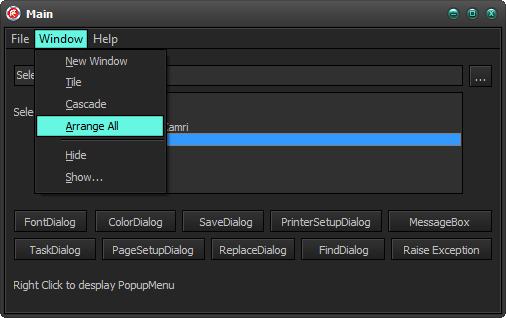
SysMenu with VCL Styles Enabled.

using the Vcl.Styles.SysControls unit
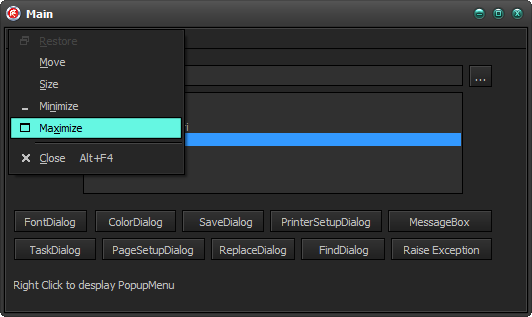
System menu with VCL Styles Enabled.

System menu using the Vcl.Styles.SysControls unit

Open Dialog With VCL Styles enabled

Open Dialog using the Vcl.Styles.SysControls unit

Even the shell menu inside of the dialog is themed



You can activate this functionality in your apps just adding the Vcl.Styles.SysControls unit to your project. Also a new sample project was added to test all the new features.
As always all your comments and suggestions are welcome.
Quick post, I just added support for RAD Studio XE5 to the VCL Styles Utils project, Delphi IDE Theme Editor, WMI Delphi Code Creator and The Delphi Dev. Shell Tools.
This is the continuation of the Getting System information in OSX and iOS using Delphi (XE2, XE3, XE4) Part 1 article.
Inside of the Posix.SysSysctl unit (which is the translation for the sysctl.h file) you can find a set of arrays (CTL_NAMES, CTL_KERN_NAMES, CTL_HW_NAMES, CTL_USER_NAMES, CTL_VM_NAMES) which contains the alias names for the system information elements, so using the items of these arrays you can build the name parameter for the SysCtlByName method.
For example if you want to access the kernel version you can build the alias like so
Name:=PAnsiChar(CTL_NAMES[CTL_KERN].ctl_name+'.'+CTL_KERN_NAMES[KERN_VERSION].ctl_name);//kern.version
And then using the SysCtlByName method
function KernelVersion: AnsiString;
var
  res : Integer;
  len : size_t;
  p, Name: PAnsiChar;
begin
  len := SizeOf(Result);
  Name:=PAnsiChar(CTL_NAMES[CTL_KERN].ctl_name+'.'+CTL_KERN_NAMES[KERN_VERSION].ctl_name);
  res:=SysCtlByName(Name, nil, @len, nil, 0);
   if (len>0) and (res=0)  then
   begin
     GetMem(p, len);
     try
       res:=SysCtlByName(Name, p, @len, nil, 0);
       if res=0 then
        Result:=p;
     finally
       FreeMem(p);
     end;
   end;
end;
Another option is use these definitions for build a set of methods to retrieve all the system info included in these structs.
Try the next sample project.
{$APPTYPE CONSOLE}

{$R *.res}

uses
  System.Classes,
  System.Types,
  Posix.Errno,
  Posix.SysTypes,
  Posix.SysSysctl,
  System.SysUtils;

function GetsysctlIntValue(mib: TIntegerDynArray) : integer;
var
  len : size_t;
  res : integer;
begin
   len := sizeof(Result);
   res:=sysctl(@mib[0], 2, @Result, @len, nil, 0);
   if res<>0 then
    Result:=-1;// RaiseLastOSError;
end;

function GetsysctlInt64Value(mib: TIntegerDynArray) : Int64;
var
  len : size_t;
  res : integer;
begin
   len := sizeof(Result);
   res:=sysctl(@mib[0], 2, @Result, @len, nil, 0);
   if res<>0 then
     Result:=-1; //RaiseLastOSError;
end;

function GetsysctlStrValue(mib: TIntegerDynArray) : AnsiString;
var
  len : size_t;
  p   : PAnsiChar;
  res : integer;
begin
   Result:='';
   res:=sysctl(@mib[0], 2, nil, @len, nil, 0);
   if (len>0) and (res=0)  then
   begin
     GetMem(p, len);
     try
       res:=sysctl(@mib[0], 2, p, @len, nil, 0);
       if res=0 then
        Result:=p;
     finally
       FreeMem(p);
     end;
   end;
end;

procedure  ListKernelValues;
var
  mib : TIntegerDynArray;
  i   : Integer;
begin
 Writeln('High kernel limits');
 Writeln('------------------');
 for i:=0 to KERN_MAXID-1 do
 begin
    mib:=TIntegerDynArray.Create(CTL_KERN, i);
    case CTL_KERN_NAMES[i].ctl_type of
     CTLTYPE_NODE  :  Writeln(Format('%s.%-18s %s',[CTL_NAMES[CTL_KERN].ctl_name, CTL_KERN_NAMES[i].ctl_name, '[node]']));
     CTLTYPE_OPAQUE:  Writeln(Format('%s.%-18s %s',[CTL_NAMES[CTL_KERN].ctl_name, CTL_KERN_NAMES[i].ctl_name, '[structure]']));
     CTLTYPE_INT   :  Writeln(Format('%s.%-18s %d',[CTL_NAMES[CTL_KERN].ctl_name, CTL_KERN_NAMES[i].ctl_name, GetsysctlIntValue(mib)]));
     CTLTYPE_QUAD  :  Writeln(Format('%s.%-18s %d',[CTL_NAMES[CTL_KERN].ctl_name, CTL_KERN_NAMES[i].ctl_name, GetsysctlInt64Value(mib)]));
     CTLTYPE_STRING : Writeln(Format('%s.%-18s %s',[CTL_NAMES[CTL_KERN].ctl_name, CTL_KERN_NAMES[i].ctl_name, GetsysctlStrValue(mib)]));
    end;
 end;
 Writeln;
end;

procedure  ListGenericCPU_IO_Values;
var
  mib : TIntegerDynArray;
  i   : Integer;
begin
 Writeln('Generic CPU, I/O');
 Writeln('-----------------');
 for i:=0 to HW_MAXID-1 do
 begin
    mib:=TIntegerDynArray.Create(CTL_HW, i);
    case CTL_HW_NAMES[i].ctl_type of
     CTLTYPE_NODE  :  Writeln(Format('%s.%-18s %s',[CTL_NAMES[CTL_HW].ctl_name, CTL_HW_NAMES[i].ctl_name, '[node]']));
     CTLTYPE_OPAQUE:  Writeln(Format('%s.%-18s %s',[CTL_NAMES[CTL_HW].ctl_name, CTL_HW_NAMES[i].ctl_name, '[structure]']));
     CTLTYPE_INT   :  Writeln(Format('%s.%-18s %d',[CTL_NAMES[CTL_HW].ctl_name, CTL_HW_NAMES[i].ctl_name, GetsysctlIntValue(mib)]));
     CTLTYPE_QUAD  :  Writeln(Format('%s.%-18s %d',[CTL_NAMES[CTL_HW].ctl_name, CTL_HW_NAMES[i].ctl_name, GetsysctlInt64Value(mib)]));
     CTLTYPE_STRING : Writeln(Format('%s.%-18s %s',[CTL_NAMES[CTL_HW].ctl_name, CTL_HW_NAMES[i].ctl_name, GetsysctlStrValue(mib)]));
    end;
 end;
 Writeln;
end;

procedure  ListUserLevelValues;
var
  mib : TIntegerDynArray;
  i   : Integer;
begin
 mib:=TIntegerDynArray.Create(CTL_USER, 0);
 Writeln('User-level');
 Writeln('----------');
 for i:=0 to USER_MAXID-1 do
 begin
    mib[1]:=i;
    case CTL_USER_NAMES[i].ctl_type of
     CTLTYPE_NODE  :  Writeln(Format('%s.%-18s %s',[CTL_NAMES[CTL_USER].ctl_name, CTL_USER_NAMES[i].ctl_name, '[node]']));
     CTLTYPE_OPAQUE:  Writeln(Format('%s.%-18s %s',[CTL_NAMES[CTL_USER].ctl_name, CTL_USER_NAMES[i].ctl_name, '[structure]']));
     CTLTYPE_INT   :  Writeln(Format('%s.%-18s %d',[CTL_NAMES[CTL_USER].ctl_name, CTL_USER_NAMES[i].ctl_name, GetsysctlIntValue(mib)]));
     CTLTYPE_QUAD  :  Writeln(Format('%s.%-18s %d',[CTL_NAMES[CTL_USER].ctl_name, CTL_USER_NAMES[i].ctl_name, GetsysctlInt64Value(mib)]));
     CTLTYPE_STRING : Writeln(Format('%s.%-18s %s',[CTL_NAMES[CTL_USER].ctl_name, CTL_USER_NAMES[i].ctl_name, GetsysctlStrValue(mib)]));
    end;
 end;
 Writeln;
end;

procedure  ListVMValues;
var
  mib : TIntegerDynArray;
  i   : Integer;
begin
 Writeln('Virtual memory');
 Writeln('-------------');
 for i:=0 to VM_MAXID-1 do
 begin
    mib:=TIntegerDynArray.Create(CTL_VM, i);
    case CTL_VM_NAMES[i].ctl_type of
     CTLTYPE_NODE  :  Writeln(Format('%s.%-18s %s',[CTL_NAMES[CTL_VM].ctl_name, CTL_VM_NAMES[i].ctl_name, '[node]']));
     CTLTYPE_OPAQUE:  Writeln(Format('%s.%-18s %s',[CTL_NAMES[CTL_VM].ctl_name, CTL_VM_NAMES[i].ctl_name, '[structure]']));
     CTLTYPE_INT   :  Writeln(Format('%s.%-18s %d',[CTL_NAMES[CTL_VM].ctl_name, CTL_VM_NAMES[i].ctl_name, GetsysctlIntValue(mib)]));
     CTLTYPE_QUAD  :  Writeln(Format('%s.%-18s %d',[CTL_NAMES[CTL_VM].ctl_name, CTL_VM_NAMES[i].ctl_name, GetsysctlInt64Value(mib)]));
     CTLTYPE_STRING : Writeln(Format('%s.%-18s %s',[CTL_NAMES[CTL_VM].ctl_name, CTL_VM_NAMES[i].ctl_name, GetsysctlStrValue(mib)]));
    end;
 end;
 Writeln;
end;

begin
  try
    ListKernelValues;
    ListGenericCPU_IO_Values;
    ListUserLevelValues;
    ListVMValues;
  except
    on E: Exception do
      Writeln(E.ClassName, ': ', E.Message);
  end;
end.
In the following article you can learn how to use the sysctl, sysctlbyname and sysctlnametomib functions to get system information (kernel values, hardware, networking, file system, machine specific and user related data) under the OSX and iOS systems.
int sysctl(int *name, u_int namelen, void *oldp, size_t *oldlenp, void *newp, size_t newlen);
The sysctl allows you retrieves and set system information, the data returned from the sysctl() function consists of integers (int32, int64), strings(AnsiStrings) and structs (records). this function is defined in the Posix.SysSysctl (SysSysctlAPI.inc) unit
Note : The Posix.SysSysctl unit is a partial translation the sysctl.h file.
function sysctl(name: PInteger; namelen: cardinal; oldp: Pointer; oldlen: Psize_t; newp: Pointer; newlen: size_t): Integer; cdecl; external libc name _PU + 'sysctl';
name : This parameter receive a pointer to a Management Information Base (MIB) style value, which is only a array of integers. Each element of this array must be filled with the values related to the info to read or write.
The number of elements of this array, depends of the data to be obtained or modified, most of times only we need to pass and fill a mib with 2 elements (integer values). The first element indicates the level(location) of the info and the second element indicates the value to retrieve.
These are the possible values for the first element of the mib.
           Name           Value            Description
           CTL_DEBUG      $00000005        Debugging
           CTL_VFS        $00000003        File system
           CTL_HW         $00000006        Generic CPU, I/O
           CTL_KERN       $00000001        High kernel limits
           CTL_MACHDEP    $00000007        Machine dependent
           CTL_NET        $00000004        Networking
           CTL_USER       $00000008        User-level
           CTL_VM         $00000002        Virtual memory
Note: All these values are already defined in the Posix.SysSysctl unit.
So if we want access to the kernel related values we must fill the mib like so
var
  mib : array[0..1] of Integer;
...
...
 mib[0] := CTL_KERN;
The second element value is related to the first level and the possible values are defined in the Posix.SysSysctl unit as well, for example to get the max processes supported by the system we must use the KERN_MAXPROC($00000006) value.
var
  mib : array[0..1] of Integer;
...
...
 mib[0] := CTL_KERN;
 mib[1] := KERN_MAXPROC;
namelen : This parameter is the length of the mib structure.
oldp: Must be filled with a pointer to the buffer to receive. The info which can be a integer, int64, a AnsiString(MarshaledAString) or a record.
oldlen: Indicates the size of the oldp parameter.
newp: This parameter must be filled with a pointer to the buffer to with the info to set up, when you don’t modify the data you must pass a nil value.
newlen: Indicates the size of the newp parameter.
So with all the above info now you can write a function to retrieve the max processes supported, check this sample code which retrieves a integer value.
function MaxProcesses : Integer;
var
  mib : array[0..1] of Integer;
  res : Integer;
  len : size_t;
begin

 mib[0] := CTL_KERN;
 mib[1] := KERN_MAXPROC;

 len := sizeof(Result);
 res:=sysctl(@mib, Length(mib), @Result, @len, nil, 0);
 if res<>0 then
  RaiseLastOSError;
end;
To get a Int64 value the code is very similar, check this sample which get the size of the memory installed on the system using the CTL_HW level and the HW_MEMSIZE value.
function MemSize : Int64;
var
  mib : array[0..1] of Integer;
  res : Integer;
  len : size_t;
begin
 mib[0] := CTL_HW;
 mib[1] := HW_MEMSIZE;

 len := sizeof(Result);
 res := sysctl(@mib, Length(mib), @Result, @len, nil, 0);
 if res<>0 then
  RaiseLastOSError;
end;
If you want retrieve a string value, you must get the length of the value before to allocate the buffer, to do this you must pass a nil value in the oldp parameter like so.
sysctl(@mib, Length(mib), nil, @len, nil, 0)
The next code shows how to get a string(ascii) type using the sysctl function.
function KernelVersion : AnsiString;
var
  mib : array[0..1] of Integer;
  res : Integer;
  len : size_t;
  p   : MarshaledAString;//in XE2 you can use the PAnsiChar type
begin
 mib[0] := CTL_KERN;
 mib[1] := KERN_VERSION;
 //get the length of the buffer
 res := sysctl(@mib, Length(mib), nil, @len, nil, 0);
 if res<>0 then
   RaiseLastOSError;
 //allocates the buffer
 GetMem(p, len);
 try
   res := sysctl(@mib, Length(mib), p, @len, nil, 0);
   if res<>0 then
     RaiseLastOSError;
   Result:=p;
 finally
   FreeMem(p);
 end;
end;
Finally we can use the sysctl function to retrieve complex structures(records) passing a pointer to the record to hold the data.
Try this sample which get the clock rate values from the kernel.
procedure GetClockInfo;
type
 clockinfo = record
	hz      : Integer;
	tick    : Integer;
	tickadj : Integer;
	stathz  : Integer;
	profhz  : Integer;
  end;

(*
struct clockinfo {
	int	hz;	   	/* clock frequency */
	int	tick;		/* micro-seconds per hz tick */
	int	tickadj;/* clock skew rate for adjtime() */
	int	stathz;		/* statistics clock frequency */
	int	profhz;		/* profiling clock frequency */
};
*)

var
  mib : array[0..1] of Integer;
  res : Integer;
  len : size_t;
  clock : clockinfo;
begin
 FillChar(clock, sizeof(clock), 0);
 mib[0] := CTL_KERN;
 mib[1] := KERN_CLOCKRATE;
 len := sizeof(clock);
 res:=sysctl(@mib, Length(mib), @clock, @len, nil, 0);
 if res<>0 then
   RaiseLastOSError;

 Writeln(Format('clock frequency             %d',[clock.hz]));
 Writeln(Format('micro-seconds per hz tick   %d',[clock.tick]));
 Writeln(Format('clock skew rate for adjtime %d',[clock.tickadj]));
 Writeln(Format('statistics clock frequency  %d',[clock.stathz]));
 Writeln(Format('profiling clock frequency   %d',[clock.profhz]));
end;
int sysctlbyname(const char *name, void *oldp, size_t *oldlenp, void *newp, size_t newlen);
The sysctlbyname works in the same way which the sysctl, the only difference is which the values are accessed using a alias string. because that you don’t need pass a mib structure and length to this function.
function sysctlbyname(Name: MarshaledAString; oldp: Pointer; oldlen: Psize_t; newp: Pointer; newlen: size_t): Integer; cdecl; external libc name _PU + 'sysctlbyname';
name: this parameter is the alias for the info to access and is composed by the level splus the string representation of the value to get, because that you don’t need pass a mib structure.
These are the possible values for the first level element
           Name           string
           CTL_DEBUG      debug
           CTL_VFS        vfs
           CTL_HW         hw
           CTL_KERN       kern
           CTL_MACHDEP    machdep
           CTL_NET        net
           CTL_USER       user
           CTL_VM         vm
This is a sample list of some of the values which you can use in the name parameter of the sysctlbyname function.
     Name                            Type
     kern.ostype                     string
     kern.osrelease                  string
     kern.osrevision                 integer
     kern.version                    string
     kern.maxvnodes                  integer
     kern.maxproc                    integer
     kern.maxfiles                   integer
     kern.argmax                     integer
     kern.securelevel                integer
     kern.hostname                   string
     kern.hostid                     integer
     kern.clockrate                  struct
     kern.posix1version              integer
     kern.ngroups                    integer
     kern.job_control                integer
     kern.saved_ids                  integer
     kern.link_max                   integer
     kern.max_canon                  integer
     kern.max_input                  integer
     kern.name_max                   integer
     kern.path_max                   integer
     kern.pipe_buf                   integer
     kern.chown_restricted           integer
     kern.no_trunc                   integer
     kern.vdisable                   integer
     kern.boottime                   struct
     vm.loadavg                      struct
     vm.swapusage                    struct
     machdep.console_device          dev_t
     net.inet.ip.forwarding          integer
     net.inet.ip.redirect            integer
     net.inet.ip.ttl                 integer
     net.inet.icmp.maskrepl          integer
     net.inet.udp.checksum           integer
     hw.machine                      string
     hw.model                        string
     hw.ncpu                         integer
     hw.byteorder                    integer
     hw.physmem                      integer
     hw.usermem                      integer
     hw.memsize                      integer
     hw.pagesize                     integer
     user.cs_path                    string
     user.bc_base_max                integer
     user.bc_dim_max                 integer
     user.bc_scale_max               integer
     user.bc_string_max              integer
     user.coll_weights_max           integer
     user.expr_nest_max              integer
     user.line_max                   integer
     user.re_dup_max                 integer
     user.posix2_version             integer
     user.posix2_c_bind              integer
     user.posix2_c_dev               integer
     user.posix2_char_term           integer
     user.posix2_fort_dev            integer
     user.posix2_fort_run            integer
     user.posix2_localedef           integer
     user.posix2_sw_dev              integer
     user.posix2_upe                 integer
Note : You can get a full list of the supported values running the sysctl -A command from a Terminal.
Finally this code shows how use the SysCtlByName function to retrieve the number of cpus installed.
function NumberOfCPU: Integer;
var
  res : Integer;
  len : size_t;
begin
  len := SizeOf(Result);
  res:=SysCtlByName('hw.ncpu', @Result, @len, nil, 0);
  if res<>0 then
    RaiseLastOSError;
end;
Note : The sysctl function runs in about a third the time as the same request made via the sysctlbyname, so when is possible uses sysctl instead.
int sysctlnametomib(const char *name, int *mibp, size_t *sizep);
The sysctlnametomib function fill a mib structure using a alias a string. this function is intended for use by apps that want to repeatedly use the same variable.
function sysctlnametomib(name: MarshaledAString; mibp: PInteger; sizep: Psize_t): Integer; cdecl; external libc name _PU + 'sysctlnametomib';
name: ASCII representation of the value to retrieve.
mibp: pointer to the mib structure to fill.
sizep: pointer to the length of the mib structure to fill.
var
  mib : array[0..1] of Integer;
  res : Integer;
  len : size_t;
begin
  len := Length(mib);
  sysctlnametomib('hw.physicalcpu', @mib, @len);
  //now the mib structure is filled with the proper values to call the sysctl function.
All the above functions returns a 0 values when the execution was succefull, otherwise an error code is returned, this code can be obtained using the errno (Posix.Errno) or the GetLastError function.
The following errors may be reported (theses values and meanings are defined in the osx/ErrnoTypes.inc file)
     [EFAULT]           The buffer name, oldp, newp, or length pointer oldlenp contains an invalid address.
     [EINVAL]           The name array is less than two or greater than CTL_MAXNAME.
     [EINVAL]           A non-null newp is given and its specified length in newlen is too large or too
                        small.
     [ENOMEM]           The length pointed to by oldlenp is too short to hold the requested value.
     [ENOMEM]           The smaller of either the length pointed to by oldlenp or the estimated size of the
                        returned data exceeds the system limit on locked memory.
     [ENOMEM]           Locking the buffer oldp, or a portion of the buffer if the estimated size of the
                        data to be returned is smaller, would cause the process to exceed its per-process
                        locked memory limit.
     [ENOTDIR]          The name array specifies an intermediate rather than terminal name.
     [EISDIR]           The name array specifies a terminal name, but the actual name is not terminal.
     [ENOENT]           The name array specifies a value that is unknown.
     [EPERM]            An attempt is made to set a read-only value.
     [EPERM]            A process without appropriate privilege attempts to set a value.
This a full sample console app which summarizes this article.
{$APPTYPE CONSOLE}

uses
  //System.Classes,
  //System.Types,
  //Posix.Errno,
  Posix.SysTypes,
  Posix.SysSysctl,
  System.SysUtils;

//https://developer.apple.com/library/mac/#documentation/Darwin/Reference/ManPages/man3/sysctl.3.html
//https://developer.apple.com/library/mac/documentation/Darwin/Reference/ManPages/man8/sysctl.8.html


function NumberOfCPU: Integer;
var
  res : Integer;
  len : size_t;
begin
  len := SizeOf(Result);
  res:=SysCtlByName('hw.ncpu', @Result, @len, nil, 0);
  if res<>0 then
    RaiseLastOSError;
end;


function MaxProcesses : Integer;
var
  mib : array[0..1] of Integer;
  res : Integer;
  len : size_t;
begin

 mib[0] := CTL_KERN;
 mib[1] := KERN_MAXPROC;

 len := sizeof(Result);
 res:=sysctl(@mib, Length(mib), @Result, @len, nil, 0);
 if res<>0 then
  RaiseLastOSError;
end;

function MemSize : Int64;
var
  mib : array[0..1] of Integer;
  res : Integer;
  len : size_t;
begin
 mib[0] := CTL_HW;
 mib[1] := HW_MEMSIZE;

 len := sizeof(Result);
 res := sysctl(@mib, Length(mib), @Result, @len, nil, 0);
 if res<>0 then
  RaiseLastOSError;
end;


function KernelVersion : AnsiString;
var
  mib : array[0..1] of Integer;
  res : Integer;
  len : size_t;
  p   : MarshaledAString;//in XE2 use  PAnsiChar
begin
 mib[0] := CTL_KERN;
 mib[1] := KERN_VERSION;
 res := sysctl(@mib, Length(mib), nil, @len, nil, 0);
 if res<>0 then
   RaiseLastOSError;
 GetMem(p, len);
 try
   res := sysctl(@mib, Length(mib), p, @len, nil, 0);
   if res<>0 then
     RaiseLastOSError;
   Result:=p;
 finally
   FreeMem(p);
 end;
end;


procedure GetClockInfo;
type
 clockinfo = record
	hz      : Integer;
	tick    : Integer;
	tickadj : Integer;
	stathz  : Integer;
	profhz  : Integer;
  end;

(*
struct clockinfo {
	int	hz;	   	/* clock frequency */
	int	tick;		/* micro-seconds per hz tick */
	int	tickadj;/* clock skew rate for adjtime() */
	int	stathz;		/* statistics clock frequency */
	int	profhz;		/* profiling clock frequency */
};
*)

var
  mib : array[0..1] of Integer;
  res : Integer;
  len : size_t;
  clock : clockinfo;
begin
 FillChar(clock, sizeof(clock), 0);
 mib[0] := CTL_KERN;
 mib[1] := KERN_CLOCKRATE;
 len := sizeof(clock);
 res:=sysctl(@mib, Length(mib), @clock, @len, nil, 0);
 if res<>0 then
   RaiseLastOSError;

 Writeln(Format('clock frequency             %d',[clock.hz]));
 Writeln(Format('micro-seconds per hz tick   %d',[clock.tick]));
 Writeln(Format('clock skew rate for adjtime %d',[clock.tickadj]));
 Writeln(Format('statistics clock frequency  %d',[clock.stathz]));
 Writeln(Format('profiling clock frequency   %d',[clock.profhz]));
end;

begin
  try
    Writeln(Format('max processes     %d',[MaxProcesses]));
    Writeln(Format('number of cpus    %d',[NumberOfCPU]));
    Writeln(Format('physical ram size %s',[FormatFloat('#,', MemSize)]));
    Writeln(Format('Kernel Version    %s',[KernelVersion]));
    GetClockInfo;
  except
    on E: Exception do
      Writeln(E.ClassName, ': ', E.Message);
  end;
end.
The TXMLDocument class allow you to manipulate XML files in VCL and FireMonkey Apps, but this class doesn’t implements a direct way to call the XPath related methods (selectNode, selectNodes) , so you must write a set of helper functions to call these methods.
Normally you can write something like so
function selectSingleNode(ADOMDocument: IDOMDocument; const nodePath: WideString): IDOMNode;
var
  LDomNodeSelect : IDomNodeSelect;
begin
  if not Assigned(ADOMDocument) or not Supports(ADOMDocument.documentElement, IDomNodeSelect, LDomNodeSelect) then
   Exit;
  //or just LDomNodeSelect:= (ADOMDocument.documentElement as IDOMNodeSelect);
  Result:=LDomNodeSelect.selectNode(nodePath);
end;
function SelectNodes(ADOMDocument: IDOMDocument; const nodePath: WideString): IDOMNodeList;
var
  LDomNodeSelect : IDomNodeSelect;
begin
  if not Assigned(ADOMDocument) or not Supports(ADOMDocument.documentElement, IDomNodeSelect, LDomNodeSelect) then
   Exit;
  //or just LDomNodeSelect:= (ADOMDocument.documentElement as IDOMNodeSelect);
  Result:=LDomNodeSelect.selectNodes(nodePath);
end;
And use like so.
var
  XmlDoc: IXMLDocument;
  LNode : IDOMNode;
  i : Integer;
begin
  XmlDoc := TXMLDocument.Create(nil);
  XmlDoc.Active := True;
  XmlDoc.Options := XmlDoc.Options + [doNodeAutoIndent];
  XmlDoc.Version := '1.0';
  ...
  ...
  LNode:=selectSingleNode(XmlDoc.DOMDocument,XPathExpr);
The above code will works fine under Windows using the MSXML provider as Default DOM Vendor, but in a FireMonkey Application which must run in OSX and Windows you must set the Default DOM Vendor to ADOM (OpenXML).
DefaultDOMVendor := OpenXML4Factory.Description;
Now if you try to use the above functions (selectSingleNode, SelectNodes) under the ADOM vendor you will get an awfull exception
EOleException Catastrophic failure 8000FFFF
The root of this issue is located in the Tox4DOMNode.selectNode and Tox4DOMNode.selectNodes implementation of these methods, check the next code.
function Tox4DOMNode.selectNode(const nodePath: WideString): IDOMNode;
var
  xpath: TXpathExpression;
  xdomText: TDomText;
begin
  Result := nil;
  if not Assigned(WrapperDocument) or not Assigned(WrapperDocument.WrapperDOMImpl) then
    Exit;

  xpath := WrapperDocument.WrapperDOMImpl.FXpath; //here the xpath is set with a nil value because the FXpath was no initialized
  xpath.ContextNode := NativeNode; //Here the App crash because xpath is nil
The FXpath field is initialized in the Tox4DOMImplementation.InitParserAgent method which is never call at least which you uses the Tox4DOMImplementation.loadFromStream or Tox4DOMImplementation.loadxml methods. So to fix this issue you must call the Tox4DOMImplementation.InitParserAgent function before to call the selectNode and selectNodes methods.
function selectSingleNode(ADOMDocument: IDOMDocument; const nodePath: WideString): IDOMNode;
var
  LDomNodeSelect : IDomNodeSelect;
begin
  if not Assigned(ADOMDocument) or not Supports(ADOMDocument.documentElement, IDomNodeSelect, LDomNodeSelect) then
   Exit;
  //or just LDomNodeSelect:= (ADOMDocument.documentElement as IDOMNodeSelect);
  if (DefaultDOMVendor = OpenXML4Factory.Description) then
    Tox4DOMNode(LDomNodeSelect).WrapperDocument.WrapperDOMImpl.InitParserAgent;
  Result:=LDomNodeSelect.selectNode(nodePath);
end;
function SelectNodes(ADOMDocument: IDOMDocument; const nodePath: WideString): IDOMNodeList;
var
  LDomNodeSelect : IDomNodeSelect;
begin
  if not Assigned(ADOMDocument) or not Supports(ADOMDocument.documentElement, IDomNodeSelect, LDomNodeSelect) then
   Exit;
  //or just LDomNodeSelect:= (ADOMDocument.documentElement as IDOMNodeSelect);
  if (DefaultDOMVendor = OpenXML4Factory.Description) then
    Tox4DOMNode(LDomNodeSelect).WrapperDocument.WrapperDOMImpl.InitParserAgent;
  Result:=LDomNodeSelect.selectNodes(nodePath);
end;
Now with these changes you will able to evaluate XPath expressions in VCL and FireMonkey Apps using the ADOM vendor.
This is a demo console App tested in Windows and OSX (XE2 and XE4)
{$APPTYPE CONSOLE}

uses
  {$IFDEF MSWINDOWS}
  System.Win.ComObj,
  Winapi.ActiveX,
  {$ENDIF}
  System.SysUtils,
  Xml.XMLIntf,
  Xml.adomxmldom,
  Xml.XMLDom,
  Xml.XMLDoc;

function selectSingleNode(ADOMDocument: IDOMDocument; const nodePath: WideString): IDOMNode;
var
  LDomNodeSelect : IDomNodeSelect;
begin
  if not Assigned(ADOMDocument) or not Supports(ADOMDocument.documentElement, IDomNodeSelect, LDomNodeSelect) then
   Exit;
  //or just LDomNodeSelect:= (ADOMDocument.documentElement as IDOMNodeSelect);
  if (DefaultDOMVendor = OpenXML4Factory.Description) then
    Tox4DOMNode(LDomNodeSelect).WrapperDocument.WrapperDOMImpl.InitParserAgent;
  Result:=LDomNodeSelect.selectNode(nodePath);
end;

function SelectNodes(ADOMDocument: IDOMDocument; const nodePath: WideString): IDOMNodeList;
var
  LDomNodeSelect : IDomNodeSelect;
begin
  if not Assigned(ADOMDocument) or not Supports(ADOMDocument.documentElement, IDomNodeSelect, LDomNodeSelect) then
   Exit;
  //or just LDomNodeSelect:= (ADOMDocument.documentElement as IDOMNodeSelect);
  if (DefaultDOMVendor = OpenXML4Factory.Description) then
    Tox4DOMNode(LDomNodeSelect).WrapperDocument.WrapperDOMImpl.InitParserAgent;
  Result:=LDomNodeSelect.selectNodes(nodePath);
end;

procedure  TestXPath;
var
  XmlDoc: IXMLDocument;
  Root, Book, Author, Publisher : IXMLNode;
  LNodeList : IDOMNodeList;
  LNode : IDOMNode;
  i : Integer;
begin
  XmlDoc := TXMLDocument.Create(nil);
  XmlDoc.Active := True;
  XmlDoc.Options := XmlDoc.Options + [doNodeAutoIndent];
  XmlDoc.Version := '1.0';

  Root := XmlDoc.CreateNode('BookStore');
  Root.Attributes['url'] := 'http://www.amazon.com';
  XmlDoc.DocumentElement := Root;

  Book := XmlDoc.CreateNode('Book');
  Book.Attributes['Name'] := 'Steve Jobs';
  Author := XmlDoc.CreateNode('Author');
  Author.Text := 'Walter Isaacson';
  Publisher := XmlDoc.CreateNode('Publisher');
  Publisher.Text := 'Simon Schuster (October 24, 2011)';
  Root.ChildNodes.Add(Book);
  Book.ChildNodes.Add(Author);
  Book.ChildNodes.Add(Publisher);

  Book := XmlDoc.CreateNode('Book');
  Book.Attributes['Name'] := 'Clean Code: A Handbook of Agile Software Craftsmanship';
  Author := XmlDoc.CreateNode('Author');
  Author.Text := 'Robert C. Martin';
  Publisher := XmlDoc.CreateNode('Publisher');
  Publisher.Text := 'Prentice Hall; 1 edition (August 11, 2008)';
  Root.ChildNodes.Add(Book);
  Book.ChildNodes.Add(Author);
  Book.ChildNodes.Add(Publisher);

  Book := XmlDoc.CreateNode('Book');
  Book.Attributes['Name'] := 'Paradox Lost';
  Author := XmlDoc.CreateNode('Author');
  Author.Text := 'Kress, Peter';
  Publisher := XmlDoc.CreateNode('Publisher');
  Publisher.Text := 'Prentice Hall; 1 edition (February 2, 2000)';
  Root.ChildNodes.Add(Book);
  Book.ChildNodes.Add(Author);
  Book.ChildNodes.Add(Publisher);

  Writeln(XmlDoc.XML.Text);

  Writeln('selectSingleNode');
  LNode:=selectSingleNode(XmlDoc.DOMDocument,'/BookStore/Book[2]/Author["Robert C. Martin"]');
  if LNode<>nil then
   Writeln(LNode.firstChild.nodeValue);

  Writeln;

  Writeln('SelectNodes');
  LNodeList:=SelectNodes(XmlDoc.DOMDocument,'//BookStore/Book/Author');
  if LNodeList<>nil then
    for i := 0 to LNodeList.length-1 do
      Writeln(LNodeList[i].firstChild.nodeValue);
end;

begin
 try
    ReportMemoryLeaksOnShutdown:=True;
    DefaultDOMVendor := OpenXML4Factory.Description;
    {$IFDEF MSWINDOWS}CoInitialize(nil);{$ENDIF}
    try
      TestXPath;
    finally
    {$IFDEF MSWINDOWS}CoUninitialize;{$ENDIF}
    end;
 except
    {$IFDEF MSWINDOWS}
    on E:EOleException do
        Writeln(Format('EOleException %s %x', [E.Message,E.ErrorCode]));
    {$ENDIF}
    on E:Exception do
        Writeln(E.Classname, ':', E.Message);
 end;
 Writeln;
 Writeln('Press Enter to exit');
 Readln;
end.

 The Road to Delphi