Delphi – VCL – VCL Styles – UxTheme – WinAPI


11 Comments

WMI Tasks using Delphi – Event Logs

How do I retrieve information about the Security event log?

Use the Win32_NTEventlogFile class.

const
  wbemFlagForwardOnly = $00000020;
var
  FSWbemLocator : OLEVariant;
  FWMIService   : OLEVariant;
  FWbemObjectSet: OLEVariant;
  FWbemObject   : OLEVariant;
  oEnum         : IEnumvariant;
  iValue        : LongWord;
begin;
  FSWbemLocator := CreateOleObject('WbemScripting.SWbemLocator');
  FWMIService   := FSWbemLocator.ConnectServer('localhost', 'root\CIMV2', '', '');
  FWbemObjectSet:= FWMIService.ExecQuery('SELECT MaxFileSize ,NumberOfRecords FROM Win32_NTEventlogFile Where LogFileName="Security"','WQL',wbemFlagForwardOnly);
  oEnum         := IUnknown(FWbemObjectSet._NewEnum) as IEnumVariant;
  while oEnum.Next(1, FWbemObject, iValue) = 0 do
  begin
    Writeln(Format('Max File Size        %d',[Integer(FWbemObject.MaxFileSize)]));
    Writeln(Format('Number Of Records    %d',[Integer(FWbemObject.NumberOfRecords)]));
    Writeln;
    FWbemObject:=Unassigned;
  end;
end;

How do I back up an event log?

Use the Win32_NTEventlogFile class and the BackupEventLog method

const
  wbemFlagForwardOnly = $00000020;
var
  FSWbemLocator : OLEVariant;
  FWMIService   : OLEVariant;
  FWbemObjectSet: OLEVariant;
  FWbemObject   : OLEVariant;
  oEnum         : IEnumvariant;
  iValue        : LongWord;
begin;
  FSWbemLocator := CreateOleObject('WbemScripting.SWbemLocator');
  FWMIService   := FSWbemLocator.ConnectServer('localhost', 'root\CIMV2', '', '');
  FWbemObjectSet:= FWMIService.ExecQuery('SELECT * FROM Win32_NTEventlogFile Where LogFileName="Application"','WQL',wbemFlagForwardOnly);
  oEnum         := IUnknown(FWbemObjectSet._NewEnum) as IEnumVariant;
  if oEnum.Next(1, FWbemObject, iValue) = 0 then
  begin
    FWbemObject.BackupEventLog('c:\logs\backup.evt');
    FWbemObject:=Unassigned;
  end;
end;

How do I back up an event log more than once?

Ensure that the backup file has a unique name before using the Win32_NTEventlogFile and the BackupEventLog method. The operating system does not allow you to overwrite an existing backup file; you must either move the backup file or rename it before you can run the script again.

const
  wbemFlagForwardOnly = $00000020;
var
  FSWbemLocator : OLEVariant;
  FWMIService   : OLEVariant;
  FWbemObjectSet: OLEVariant;
  FWbemObject   : OLEVariant;
  oEnum         : IEnumvariant;
  iValue        : LongWord;
begin;
  FSWbemLocator := CreateOleObject('WbemScripting.SWbemLocator');
  FWMIService   := FSWbemLocator.ConnectServer('localhost', 'root\CIMV2', '', '');
  FWbemObjectSet:= FWMIService.ExecQuery('SELECT * FROM Win32_NTEventlogFile Where LogFileName="Application"','WQL',wbemFlagForwardOnly);
  oEnum         := IUnknown(FWbemObjectSet._NewEnum) as IEnumVariant;
  if oEnum.Next(1, FWbemObject, iValue) = 0 then
  begin
    FWbemObject.BackupEventLog(Format('c:\logs\backup_%s.evt',[FormatDateTime('hhnnsszzz',Now)]));
    FWbemObject.ClearEventLog();
    FWbemObject:=Unassigned;
  end;
end;

How do I determine the number of records in an event log?

Use the Win32_NTEventlogFile class and check the value of the NumberOfRecords property.

const
  wbemFlagForwardOnly = $00000020;
var
  FSWbemLocator : OLEVariant;
  FWMIService   : OLEVariant;
  FWbemObjectSet: OLEVariant;
  FWbemObject   : OLEVariant;
  oEnum         : IEnumvariant;
  iValue        : LongWord;
begin;
  FSWbemLocator := CreateOleObject('WbemScripting.SWbemLocator');
  FWMIService   := FSWbemLocator.ConnectServer('localhost', 'root\CIMV2', '', '');
  FWbemObjectSet:= FWMIService.ExecQuery('SELECT NumberOfRecords FROM Win32_NTEventlogFile Where LogFileName="Security"','WQL',wbemFlagForwardOnly);
  oEnum         := IUnknown(FWbemObjectSet._NewEnum) as IEnumVariant;
  if oEnum.Next(1, FWbemObject, iValue) = 0 then
  begin
    Writeln(Format('Number Of Records    %d',[Integer(FWbemObject.NumberOfRecords)]));
    Writeln;
    FWbemObject:=Unassigned;
  end;
end;

How do I clear my event logs?

Use the Win32_NTEventlogFile class and the ClearEventLog method.

const
  wbemFlagForwardOnly = $00000020;
var
  FSWbemLocator : OLEVariant;
  FWMIService   : OLEVariant;
  FWbemObjectSet: OLEVariant;
  FWbemObject   : OLEVariant;
  oEnum         : IEnumvariant;
  iValue        : LongWord;
begin;
  FSWbemLocator := CreateOleObject('WbemScripting.SWbemLocator');
  FWMIService   := FSWbemLocator.ConnectServer('localhost', 'root\CIMV2', '', '');
  FWbemObjectSet:= FWMIService.ExecQuery('SELECT * FROM Win32_NTEventlogFile Where LogFileName="Application"','WQL',wbemFlagForwardOnly);
  oEnum         := IUnknown(FWbemObjectSet._NewEnum) as IEnumVariant;
  if oEnum.Next(1, FWbemObject, iValue) = 0 then
  begin
    FWbemObject.ClearEventLog();
    FWbemObject:=Unassigned;
  end;
end;

How do I read events from the event logs?

Use the Win32_NTLogEvent class.

const
  wbemFlagForwardOnly = $00000020;
var
  FSWbemLocator : OLEVariant;
  FWMIService   : OLEVariant;
  FWbemObjectSet: OLEVariant;
  FWbemObject   : OLEVariant;
  oEnum         : IEnumvariant;
  iValue        : LongWord;
begin;
  FSWbemLocator := CreateOleObject('WbemScripting.SWbemLocator');
  FWMIService   := FSWbemLocator.ConnectServer('localhost', 'root\CIMV2', '', '');
  FWbemObjectSet:= FWMIService.ExecQuery('SELECT * FROM Win32_NTLogEvent  Where Logfile="System"','WQL',wbemFlagForwardOnly);
  oEnum         := IUnknown(FWbemObjectSet._NewEnum) as IEnumVariant;
  while oEnum.Next(1, FWbemObject, iValue) = 0 do
  begin
    Writeln(Format('Category          %s',[String(FWbemObject.Category)]));
    Writeln(Format('Computer Name     %s',[String(FWbemObject.ComputerName)]));
    Writeln(Format('EventCode         %d',[Integer(FWbemObject.EventCode)]));
    Writeln(Format('Message           %s',[String(FWbemObject.Message)]));
    Writeln(Format('RecordNumber      %d',[Integer(FWbemObject.RecordNumber)]));
    FWbemObject:=Unassigned;
  end;
end;

This post is based in the MSDN entry WMI Tasks: Event Logs


10 Comments

WMI Tasks using Delphi – Disks and File Systems

How do I find out how much disk space each user is currently using on a computer?

If you are using disk quotas, then use the Win32_DiskQuota class and retrieve the values of the User and DiskSpaceUsed properties.

const
  wbemFlagForwardOnly = $00000020;
var
  FSWbemLocator : OLEVariant;
  FWMIService   : OLEVariant;
  FWbemObjectSet: OLEVariant;
  FWbemObject   : OLEVariant;
  oEnum         : IEnumvariant;
  iValue        : LongWord;
begin;
  FSWbemLocator := CreateOleObject('WbemScripting.SWbemLocator');
  FWMIService   := FSWbemLocator.ConnectServer('localhost', 'root\CIMV2', '', '');
  FWbemObjectSet:= FWMIService.ExecQuery('SELECT * FROM Win32_DiskQuota','WQL',wbemFlagForwardOnly);
  oEnum         := IUnknown(FWbemObjectSet._NewEnum) as IEnumVariant;
  while oEnum.Next(1, FWbemObject, iValue) = 0 do
  begin
    Writeln(Format('Disk Space Used    %d',[Integer(FWbemObject.DiskSpaceUsed)]));
    Writeln(Format('Quota Volume       %s',[String(FWbemObject.QuotaVolume)]));
    Writeln(Format('User               %s',[String(FWbemObject.User)]));
    Writeln('');
    FWbemObject:=Unassigned;
  end;
end;

How do I determine when a removable drive has been added to or removed from a computer?

Use a monitoring code that queries the Win32_VolumeChangeEvent class.

    function EventTypeStr(EventType:Integer):string;
    begin
       case EventType of
        1 : Result:='Configuration Changed';
        2 : Result:='Device Arrival';
        3 : Result:='Device Removal';
        4 : Result:='Docking';
       end;
    end;
var
  FSWbemLocator : OLEVariant;
  FWMIService   : OLEVariant;
  FWbemObjectSet: OLEVariant;
  FWbemObject   : OLEVariant;
begin;
  Writeln('Press Ctrl-C to terminate');
  FSWbemLocator := CreateOleObject('WbemScripting.SWbemLocator');
  FWMIService   := FSWbemLocator.ConnectServer('localhost', 'root\CIMV2', '', '');
  FWbemObjectSet:= FWMIService.ExecNotificationQuery('SELECT * FROM Win32_VolumeChangeEvent');
  while true do
  begin
    FWbemObject := FWbemObjectSet.NextEvent;
    if not VarIsClear(FWbemObject) then
    begin
      Writeln(Format('Drive Name   %s',[String(FWbemObject.DriveName)]));
      Writeln(Format('Event Type   %s',[EventTypeStr(FWbemObject.EventType)]));
    end;
    Writeln('');
    FWbemObject:=Unassigned;
  end;
end;

How do I determine if a CD is in a CD-ROM drive?

Use the Win32_CDROMDrive class and the MediaLoaded property.

const
  wbemFlagForwardOnly = $00000020;
var
  FSWbemLocator : OLEVariant;
  FWMIService   : OLEVariant;
  FWbemObjectSet: OLEVariant;
  FWbemObject   : OLEVariant;
  oEnum         : IEnumvariant;
  iValue        : LongWord;
begin;
  FSWbemLocator := CreateOleObject('WbemScripting.SWbemLocator');
  FWMIService   := FSWbemLocator.ConnectServer('localhost', 'root\CIMV2', '', '');
  FWbemObjectSet:= FWMIService.ExecQuery('SELECT * FROM Win32_CDROMDrive','WQL',wbemFlagForwardOnly);
  oEnum         := IUnknown(FWbemObjectSet._NewEnum) as IEnumVariant;
  while oEnum.Next(1, FWbemObject, iValue) = 0 do
  begin
    Writeln(Format('Device ID    %s',[String(FWbemObject.DeviceID)]));
    Writeln(Format('Media Loaded %s',[String(FWbemObject.MediaLoaded)]));
    Writeln('');
    FWbemObject:=Unassigned;
  end;
end;

How do I distinguish between a fixed hard disk and a removable hard disk?

Use the Win32_LogicalDisk class and check the value of the DriveType property.

Value Meaning
0
Unknown
1
No Root Directory
2
Removable Disk
3
Local Disk
4
Network Drive
5
Compact Disc
6
RAM Disk
  function DriveTypeStr(DriveType:integer): string;
  begin
    case DriveType of
      0 : Result:='Unknown';
      1 : Result:='No Root Directory';
      2 : Result:='Removable Disk';
      3 : Result:='Local Disk';
      4 : Result:='Network Drive';
      5 : Result:='CD/DVD Disc';
      6 : Result:='RAM Disk';
    end;
  end;

const
  wbemFlagForwardOnly = $00000020;
var
  FSWbemLocator : OLEVariant;
  FWMIService   : OLEVariant;
  FWbemObjectSet: OLEVariant;
  FWbemObject   : OLEVariant;
  oEnum         : IEnumvariant;
  iValue        : LongWord;
begin;
  FSWbemLocator := CreateOleObject('WbemScripting.SWbemLocator');
  FWMIService   := FSWbemLocator.ConnectServer('localhost', 'root\CIMV2', '', '');
  FWbemObjectSet:= FWMIService.ExecQuery('SELECT * FROM  Win32_LogicalDisk','WQL',wbemFlagForwardOnly);
  oEnum         := IUnknown(FWbemObjectSet._NewEnum) as IEnumVariant;
  while oEnum.Next(1, FWbemObject, iValue) = 0 do
  begin
    Writeln(Format('Device ID    %s',[String(FWbemObject.DeviceID)]));
    Writeln(Format('DriveType    %s',[DriveTypeStr(FWbemObject.DriveType)]));
    Writeln('');
    FWbemObject:=Unassigned;
  end;
end;

How do I determine what file system is in use on a drive?

Use the Win32_LogicalDisk class and the FileSystem property.

const
  wbemFlagForwardOnly = $00000020;
var
  FSWbemLocator : OLEVariant;
  FWMIService   : OLEVariant;
  FWbemObjectSet: OLEVariant;
  FWbemObject   : OLEVariant;
  oEnum         : IEnumvariant;
  iValue        : LongWord;
begin;
  FSWbemLocator := CreateOleObject('WbemScripting.SWbemLocator');
  FWMIService   := FSWbemLocator.ConnectServer('localhost', 'root\CIMV2', '', '');
  FWbemObjectSet:= FWMIService.ExecQuery('SELECT * FROM  Win32_LogicalDisk','WQL',wbemFlagForwardOnly);
  oEnum         := IUnknown(FWbemObjectSet._NewEnum) as IEnumVariant;
  while oEnum.Next(1, FWbemObject, iValue) = 0 do
  begin
    Writeln(Format('Device ID    %s',[String(FWbemObject.DeviceID)]));
    if not VarIsNull(FWbemObject.FileSystem) then
      Writeln(Format('File System  %s',[String(FWbemObject.FileSystem)]));
    Writeln('');
    FWbemObject:=Unassigned;
  end;
end;

How do I determine how much free space is available on a drive?

Use the Win32_LogicalDisk class and the FreeSpace property.

const
  wbemFlagForwardOnly = $00000020;
var
  FSWbemLocator : OLEVariant;
  FWMIService   : OLEVariant;
  FWbemObjectSet: OLEVariant;
  FWbemObject   : OLEVariant;
  oEnum         : IEnumvariant;
  iValue        : LongWord;
begin;
  FSWbemLocator := CreateOleObject('WbemScripting.SWbemLocator');
  FWMIService   := FSWbemLocator.ConnectServer('localhost', 'root\CIMV2', '', '');
  FWbemObjectSet:= FWMIService.ExecQuery('SELECT * FROM  Win32_LogicalDisk','WQL',wbemFlagForwardOnly);
  oEnum         := IUnknown(FWbemObjectSet._NewEnum) as IEnumVariant;
  while oEnum.Next(1, FWbemObject, iValue) = 0 do
  begin
    Writeln(Format('Device ID   %s',[String(FWbemObject.DeviceID)]));
    if not VarIsNull(FWbemObject.FreeSpace) then
      Writeln(Format('Free Space  %d',[Int64(FWbemObject.FreeSpace)]));
    Writeln('');
    FWbemObject:=Unassigned;
  end;
end;

How do I determine the size of a drive?

Use the Win32_LogicalDisk class, and the Size property.

const
  wbemFlagForwardOnly = $00000020;
var
  FSWbemLocator : OLEVariant;
  FWMIService   : OLEVariant;
  FWbemObjectSet: OLEVariant;
  FWbemObject   : OLEVariant;
  oEnum         : IEnumvariant;
  iValue        : LongWord;
begin;
  FSWbemLocator := CreateOleObject('WbemScripting.SWbemLocator');
  FWMIService   := FSWbemLocator.ConnectServer('localhost', 'root\CIMV2', '', '');
  FWbemObjectSet:= FWMIService.ExecQuery('SELECT * FROM  Win32_LogicalDisk','WQL',wbemFlagForwardOnly);
  oEnum         := IUnknown(FWbemObjectSet._NewEnum) as IEnumVariant;
  while oEnum.Next(1, FWbemObject, iValue) = 0 do
  begin
    Writeln(Format('Device ID   %s',[String(FWbemObject.DeviceID)]));
    if not VarIsNull(FWbemObject.Size) then
      Writeln(Format('Disk Size   %d',[Int64(FWbemObject.Size)]));
    Writeln('');
    FWbemObject:=Unassigned;
  end;
end;

How do I find out what drives are mapped on a computer?

Use the Win32_MappedLogicalDisk class.

const
  wbemFlagForwardOnly = $00000020;
var
  FSWbemLocator : OLEVariant;
  FWMIService   : OLEVariant;
  FWbemObjectSet: OLEVariant;
  FWbemObject   : OLEVariant;
  oEnum         : IEnumvariant;
  iValue        : LongWord;
begin;
  FSWbemLocator := CreateOleObject('WbemScripting.SWbemLocator');
  FWMIService   := FSWbemLocator.ConnectServer('localhost', 'root\CIMV2', '', '');
  FWbemObjectSet:= FWMIService.ExecQuery('SELECT * FROM Win32_MappedLogicalDisk','WQL',wbemFlagForwardOnly);
  oEnum         := IUnknown(FWbemObjectSet._NewEnum) as IEnumVariant;
  while oEnum.Next(1, FWbemObject, iValue) = 0 do
  begin
    Writeln(Format('Device ID   %s',[String(FWbemObject.DeviceID)]));
    Writeln(Format('Name        %s',[String(FWbemObject.Name)]));
    Writeln('');
    FWbemObject:=Unassigned;
  end;
end;

How do I defragment a hard disk?

Use the Win32_Volume class and the Defrag method.

const
  wbemFlagForwardOnly = $00000020;
var
  FSWbemLocator : OLEVariant;
  FWMIService   : OLEVariant;
  FWbemObjectSet: OLEVariant;
  FWbemObject   : OLEVariant;
  oEnum         : IEnumvariant;
  iValue        : LongWord;
begin;
  FSWbemLocator := CreateOleObject('WbemScripting.SWbemLocator');
  FWMIService   := FSWbemLocator.ConnectServer('localhost', 'root\CIMV2', '', '');
  FWbemObjectSet:= FWMIService.ExecQuery('SELECT * FROM Win32_Volume Where Name = "F:\\" ','WQL',wbemFlagForwardOnly);
  oEnum         := IUnknown(FWbemObjectSet._NewEnum) as IEnumVariant;
  if oEnum.Next(1, FWbemObject, iValue) = 0 then
  begin
    FWbemObject.Defrag();
    FWbemObject:=Unassigned;
  end;
end;

How do I detect which drive letter is associated with a logical disk partition?


  1. Start with the Win32_DiskDrive class and query for instances of Win32_DiskPartition using the DeviceID property and the Win32_DiskDriveToDiskPartition association class. Now you have a collection of the partitions on the physical drive.
  2. Query for the Win32_LogicalDisk that represents the partition using the Win32_DiskPartition.DeviceID property and Win32_LogicalDiskToPartition association class.
  3. Get the drive letter from the Win32_LogicalDisk.DeviceID.


const
  wbemFlagForwardOnly = $00000020;
var
  FSWbemLocator     : OLEVariant;
  FWMIService       : OLEVariant;
  wmiDiskDrives     : OLEVariant;
  wmiDiskPartitions : OLEVariant;
  wmiLogicalDisks   : OLEVariant;
  wmiDiskDrive      : OLEVariant;
  wmiDiskPartition  : OLEVariant;
  wmiLogicalDisk    : OLEVariant;
  oEnum             : IEnumvariant;
  oEnum2            : IEnumvariant;
  oEnum3            : IEnumvariant;
  iValue            : LongWord;
  DeviceID          : string;
begin;
  FSWbemLocator := CreateOleObject('WbemScripting.SWbemLocator');
  FWMIService   := FSWbemLocator.ConnectServer('localhost', 'root\CIMV2', '', '');
  //Get the physical disk drive
  wmiDiskDrives := FWMIService.ExecQuery('SELECT Caption, DeviceID FROM Win32_DiskDrive','WQL',wbemFlagForwardOnly);
  oEnum         := IUnknown(wmiDiskDrives._NewEnum) as IEnumVariant;
  while oEnum.Next(1, wmiDiskDrive, iValue) = 0 do
  begin
     //Use the disk drive device id to find associated partition
     DeviceID:=StringReplace(String(wmiDiskDrive.DeviceID),'\','\\',[rfReplaceAll]);
     wmiDiskPartitions := FWMIService.ExecQuery('ASSOCIATORS OF {Win32_DiskDrive.DeviceID="'+DeviceID+'"} WHERE AssocClass = Win32_DiskDriveToDiskPartition','WQL',wbemFlagForwardOnly);
     oEnum2          := IUnknown(wmiDiskPartitions._NewEnum) as IEnumVariant;
     while oEnum2.Next(1, wmiDiskPartition, iValue) = 0 do
     begin
        wmiLogicalDisks := FWMIService.ExecQuery('ASSOCIATORS OF {Win32_DiskPartition.DeviceID="'+String(wmiDiskPartition.DeviceID)+'"} WHERE AssocClass = Win32_LogicalDiskToPartition','WQL',wbemFlagForwardOnly);
        oEnum3          := IUnknown(wmiLogicalDisks._NewEnum) as IEnumVariant;
        while oEnum3.Next(1, wmiLogicalDisk, iValue) = 0 do
        begin
          Writeln(Format('Drive letter associated with disk drive  %s %s Partition %s is %s',[String(wmiDiskDrive.Caption),String(wmiDiskDrive.DeviceID),String(wmiDiskPartition.DeviceID),String(wmiLogicalDisk.DeviceID)]));
          wmiLogicalDisk:=Unassigned;
        end;
       wmiDiskPartition:=Unassigned;
     end;
    wmiDiskDrive:=Unassigned;
    Writeln;
  end;
end;

This post is based in the MSDN entry WMI Tasks: Disks and File Systems


Leave a comment

WMI Tasks using Delphi – Desktop Management

How do I determine if a remote computer has booted up in the Safe Mode with Networking state?

Use the Win32_ComputerSystem class and check the value of the BootupState property.

const
  wbemFlagForwardOnly = $00000020;
var
  FSWbemLocator : OLEVariant;
  FWMIService   : OLEVariant;
  FWbemObjectSet: OLEVariant;
  FWbemObject   : OLEVariant;
  oEnum         : IEnumvariant;
  iValue        : LongWord;
begin;
  FSWbemLocator := CreateOleObject('WbemScripting.SWbemLocator');
  FWMIService   := FSWbemLocator.ConnectServer('localhost', 'root\CIMV2', '', '');
  FWbemObjectSet:= FWMIService.ExecQuery('SELECT BootupState FROM Win32_ComputerSystem','WQL',wbemFlagForwardOnly);
  oEnum         := IUnknown(FWbemObjectSet._NewEnum) as IEnumVariant;
  if oEnum.Next(1, FWbemObject, iValue) = 0 then
  begin
    Writeln(Format('BootupState    %s',[String(FWbemObject.BootupState)]));// String
    FWbemObject:=Unassigned;
  end;
end;

How do I determine if a computer screensaver requires a password?

Use the Win32_Desktop class and check the value of the ScreenSaverSecure property.

const
  wbemFlagForwardOnly = $00000020;
var
  FSWbemLocator : OLEVariant;
  FWMIService   : OLEVariant;
  FWbemObjectSet: OLEVariant;
  FWbemObject   : OLEVariant;
  oEnum         : IEnumvariant;
  iValue        : LongWord;
begin;
  FSWbemLocator := CreateOleObject('WbemScripting.SWbemLocator');
  FWMIService   := FSWbemLocator.ConnectServer('localhost', 'root\CIMV2', '', '');
  FWbemObjectSet:= FWMIService.ExecQuery('SELECT ScreenSaverSecure FROM Win32_Desktop','WQL',wbemFlagForwardOnly);
  oEnum         := IUnknown(FWbemObjectSet._NewEnum) as IEnumVariant;
  if oEnum.Next(1, FWbemObject, iValue) = 0 then
  begin
    if not VarIsNull(FWbemObject.ScreenSaverSecure) then
      Writeln(Format('ScreenSaverSecure  %s',[String(FWbemObject.ScreenSaverSecure)]));// Boolean
    FWbemObject:=Unassigned;
  end;
end;

How do I get the screen resolution of a remote computer?

Use the Win32_DesktopMonitor class and check the values of the properties ScreenHeight and ScreenWidth.

const
  wbemFlagForwardOnly = $00000020;
var
  FSWbemLocator : OLEVariant;
  FWMIService   : OLEVariant;
  FWbemObjectSet: OLEVariant;
  FWbemObject   : OLEVariant;
  oEnum         : IEnumvariant;
  iValue        : LongWord;
begin;
  FSWbemLocator := CreateOleObject('WbemScripting.SWbemLocator');
  FWMIService   := FSWbemLocator.ConnectServer('localhost', 'root\CIMV2', '', '');
  FWbemObjectSet:= FWMIService.ExecQuery('SELECT ScreenHeight,ScreenWidth FROM Win32_DesktopMonitor','WQL',wbemFlagForwardOnly);
  oEnum         := IUnknown(FWbemObjectSet._NewEnum) as IEnumVariant;
  if oEnum.Next(1, FWbemObject, iValue) = 0 then
  begin
    Writeln(Format('Resolution  %d x %d',[Integer(FWbemObject.ScreenWidth),Integer(FWbemObject.ScreenHeight)]));
    FWbemObject:=Unassigned;
  end;
end;

How do I determine how long a computer has been running?

Use the Win32_OperatingSystem class and the LastBootUpTime property. Subtract that value from the current time to get the system uptime.

const
  wbemFlagForwardOnly = $00000020;
var
  FSWbemLocator : OLEVariant;
  FWMIService   : OLEVariant;
  FWbemObjectSet: OLEVariant;
  FWbemObject   : OLEVariant;
  oEnum         : IEnumvariant;
  iValue        : LongWord;
  FWbemDateObj  : OleVariant;
  Dt            : TDateTime;
begin;
  FWbemDateObj  := CreateOleObject('WbemScripting.SWbemDateTime');
  FSWbemLocator := CreateOleObject('WbemScripting.SWbemLocator');
  FWMIService   := FSWbemLocator.ConnectServer('localhost', 'root\CIMV2', '', '');
  FWbemObjectSet:= FWMIService.ExecQuery('SELECT LastBootUpTime FROM Win32_OperatingSystem','WQL',wbemFlagForwardOnly);
  oEnum         := IUnknown(FWbemObjectSet._NewEnum) as IEnumVariant;
  if oEnum.Next(1, FWbemObject, iValue) = 0 then
  begin
    FWbemDateObj.Value:=FWbemObject.LastBootUpTime;
    Dt:=Now-FWbemDateObj.GetVarDate;
    Writeln(Format('UpTime %s',[FormatDateTime('hh:nn:ss',dt)]));
    FWbemObject:=Unassigned;
  end;
end;

How do I reboot or shut down a remote computer?

Use the Win32_OperatingSystem class and the Win32Shutdown method. You must include the RemoteShutdown privilege when connecting to WMI. For more information, see Executing Privileged Operations Using C++ and Executing Privileged Operations Using VBScript. Unlike the Shutdown method on Win32_OperatingSystem, the Win32Shutdown method allows you to set flags to control the shutdown behavior.-

function GetObject(const objectName: String): IDispatch;
var
  chEaten: Integer;
  BindCtx: IBindCtx;//for access to a bind context
  Moniker: IMoniker;//Enables you to use a moniker object
begin
  OleCheck(CreateBindCtx(0, bindCtx));
  OleCheck(MkParseDisplayName(BindCtx, StringToOleStr(objectName), chEaten, Moniker));//Converts a string into a moniker that identifies the object named by the string
  OleCheck(Moniker.BindToObject(BindCtx, nil, IDispatch, Result));//Binds to the specified object
end;

procedure  Shutdown;
const
  wbemFlagForwardOnly = $00000020;
var
  FWMIService   : OLEVariant;
  FWbemObjectSet: OLEVariant;
  FWbemObject   : OLEVariant;
  oEnum         : IEnumvariant;
  iValue        : LongWord;
begin;
  FWMIService    := GetObject('winmgmts:{impersonationLevel=impersonate,(Shutdown)}!\\localhost\root\cimv2');
  FWbemObjectSet:= FWMIService.ExecQuery('SELECT * FROM Win32_OperatingSystem','WQL',wbemFlagForwardOnly);
  oEnum         := IUnknown(FWbemObjectSet._NewEnum) as IEnumVariant;
  if oEnum.Next(1, FWbemObject, iValue) = 0 then
     FWbemObject.Win32Shutdown(1);
end;

How do I determine what applications automatically run each time I start Windows?

Use the Win32_StartupCommand class.

const
  wbemFlagForwardOnly = $00000020;
var
  FSWbemLocator : OLEVariant;
  FWMIService   : OLEVariant;
  FWbemObjectSet: OLEVariant;
  FWbemObject   : OLEVariant;
  oEnum         : IEnumvariant;
  iValue        : LongWord;
begin;
  FSWbemLocator := CreateOleObject('WbemScripting.SWbemLocator');
  FWMIService   := FSWbemLocator.ConnectServer('localhost', 'root\CIMV2', '', '');
  FWbemObjectSet:= FWMIService.ExecQuery('SELECT * FROM Win32_StartupCommand','WQL',wbemFlagForwardOnly);
  oEnum         := IUnknown(FWbemObjectSet._NewEnum) as IEnumVariant;
  while oEnum.Next(1, FWbemObject, iValue) = 0 do
  begin
    Writeln(Format('Command     %s',[String(FWbemObject.Command)]));
    Writeln(Format('Description %s',[String(FWbemObject.Description)]));
    Writeln(Format('Location    %s',[String(FWbemObject.Location)]));
    Writeln(Format('Name        %s',[String(FWbemObject.Name)]));
    Writeln(Format('User        %s',[String(FWbemObject.User)]));
    if not VarIsNull(FWbemObject.SettingID) then
      Writeln(Format('SettingID   %s',[String(FWbemObject.SettingID)]));
    FWbemObject:=Unassigned;
  end;
end;

This post is based in the MSDN entry WMI Tasks: Desktop Management


Leave a comment

WMI Tasks using Delphi – Dates and Times

How do I convert WMI dates to standard dates and times?

Use the SWbemDateTime object to convert these to regular dates and times.

const
  wbemFlagForwardOnly = $00000020;
var
  FSWbemLocator : OLEVariant;
  FWMIService   : OLEVariant;
  FWbemObjectSet: OLEVariant;
  FWbemObject   : OLEVariant;
  oEnum         : IEnumvariant;
  iValue        : LongWord;
  FWbemDateObj  : OleVariant;
  Dt            : TDateTime;
begin;
  FWbemDateObj  := CreateOleObject('WbemScripting.SWbemDateTime');

  FSWbemLocator := CreateOleObject('WbemScripting.SWbemLocator');
  FWMIService   := FSWbemLocator.ConnectServer('localhost', 'root\CIMV2', '', '');
  FWbemObjectSet:= FWMIService.ExecQuery('SELECT InstallDate FROM Win32_OperatingSystem','WQL',wbemFlagForwardOnly);
  oEnum         := IUnknown(FWbemObjectSet._NewEnum) as IEnumVariant;
  if oEnum.Next(1, FWbemObject, iValue) = 0 then
  begin
    FWbemDateObj.Value:=FWbemObject.InstallDate;
    Dt:=FWbemDateObj.GetVarDate;
    Writeln(Format('InstallDate %s',[FormatDateTime('dd mmm yyyy',dt)]));
    Writeln('');
    FWbemObject:=Unassigned;
  end;
end;

How do I determine the time currently configured on a computer?

Use the Win32_LocalTime class.

const
  wbemFlagForwardOnly = $00000020;
var
  FSWbemLocator : OLEVariant;
  FWMIService   : OLEVariant;
  FWbemObjectSet: OLEVariant;
  FWbemObject   : OLEVariant;
  oEnum         : IEnumvariant;
  iValue        : LongWord;
begin;
  FSWbemLocator := CreateOleObject('WbemScripting.SWbemLocator');
  FWMIService   := FSWbemLocator.ConnectServer('localhost', 'root\CIMV2', '', '');
  FWbemObjectSet:= FWMIService.ExecQuery('SELECT * FROM Win32_LocalTime','WQL',wbemFlagForwardOnly);
  oEnum         := IUnknown(FWbemObjectSet._NewEnum) as IEnumVariant;
  if oEnum.Next(1, FWbemObject, iValue) = 0 then
  begin
    Writeln(Format('Year          : %d',[Integer(FWbemObject.Year)]));
    Writeln(Format('Month         : %d',[Integer(FWbemObject.Month)]));
    Writeln(Format('Day           : %d',[Integer(FWbemObject.Day)]));
    Writeln(Format('Hour          : %d',[Integer(FWbemObject.Hour)]));
    Writeln(Format('Minute        : %d',[Integer(FWbemObject.Minute)]));
    Writeln(Format('Second        : %d',[Integer(FWbemObject.Second)]));

    Writeln(Format('Day Of Week   : %d',[Integer(FWbemObject.DayOfWeek)]));
    Writeln(Format('Quarter       : %d',[Integer(FWbemObject.Quarter)]));
    Writeln(Format('Week In Month : %d',[Integer(FWbemObject.WeekInMonth )]));
    Writeln('');
    FWbemObject:=Unassigned;
  end;
end;

How do I determine the name of the time zone in which a computer is running?

Use the Win32_TimeZone class and check the value of the Description property.

const
  wbemFlagForwardOnly = $00000020;
var
  FSWbemLocator : OLEVariant;
  FWMIService   : OLEVariant;
  FWbemObjectSet: OLEVariant;
  FWbemObject   : OLEVariant;
  oEnum         : IEnumvariant;
  iValue        : LongWord;
begin;
  FSWbemLocator := CreateOleObject('WbemScripting.SWbemLocator');
  FWMIService   := FSWbemLocator.ConnectServer('localhost', 'root\CIMV2', '', '');
  FWbemObjectSet:= FWMIService.ExecQuery('SELECT * FROM Win32_TimeZone','WQL',wbemFlagForwardOnly);
  oEnum         := IUnknown(FWbemObjectSet._NewEnum) as IEnumVariant;
  if oEnum.Next(1, FWbemObject, iValue) = 0 then
  begin
    Writeln(Format('Description   : %s',[String(FWbemObject.Description)]));
    Writeln(Format('Daylight Name : %s',[String(FWbemObject.DaylightName)]));
    Writeln(Format('Standard Name : %s',[String(FWbemObject.StandardName)]));
    Writeln('');
    FWbemObject:=Unassigned;
  end;
end;

This post is based in the MSDN entry WMI Tasks: Dates and Times


3 Comments

WMI Tasks using Delphi – Computer Software

How do I uninstall software?

If the software was installed using Microsoft Windows Installer (MSI), use the WMI class Win32_Product and the Uninstall method.

const
  wbemFlagForwardOnly = $00000020;
var
  FSWbemLocator : OLEVariant;
  FWMIService   : OLEVariant;
  FWbemObjectSet: OLEVariant;
  FWbemObject   : OLEVariant;
  oEnum         : IEnumvariant;
  iValue        : LongWord;
begin;
  FSWbemLocator := CreateOleObject('WbemScripting.SWbemLocator');
  FWMIService   := FSWbemLocator.ConnectServer('localhost', 'root\cimv2', '', '');
  FWbemObjectSet:= FWMIService.ExecQuery('SELECT * FROM  Win32_Product Where Name="Software Name"','WQL',wbemFlagForwardOnly);
  oEnum         := IUnknown(FWbemObjectSet._NewEnum) as IEnumVariant;
  if oEnum.Next(1, FWbemObject, iValue) = 0 then
  begin
    Writeln(Format('Result %d',[Integer(FWbemObject.Uninstall())]));//if the returned value is 0 the uninstallation was Successful.
    FWbemObject:=Unassigned;
  end;
end;

How do I determine what version of Microsoft Office is installed?

Use the Win32_Product class and check the value of the Version property.
Note : The execution of this class can take time to run, depending of how many software entries exist.

const
  wbemFlagForwardOnly = $00000020;
var
  FSWbemLocator : OLEVariant;
  FWMIService   : OLEVariant;
  FWbemObjectSet: OLEVariant;
  FWbemObject   : OLEVariant;
  oEnum         : IEnumvariant;
  iValue        : LongWord;
begin;
  FSWbemLocator := CreateOleObject('WbemScripting.SWbemLocator');
  FWMIService   := FSWbemLocator.ConnectServer('localhost', 'root\cimv2', '', '');
  FWbemObjectSet:= FWMIService.ExecQuery('SELECT Name,Version FROM  Win32_Product Where Name LIKE "Microsoft Office%"','WQL',wbemFlagForwardOnly);
  oEnum         := IUnknown(FWbemObjectSet._NewEnum) as IEnumVariant;
  while oEnum.Next(1, FWbemObject, iValue) = 0 do
  begin
    Writeln(Format('Name    %s',[String(FWbemObject.Name)]));// String
    Writeln(Format('Version %s',[String(FWbemObject.Version)]));// String
    Writeln('');
    FWbemObject:=Unassigned;
  end;
end;

How I do inventory all the software installed on a computer?

If the software was installed using Microsoft Windows Installer (MSI) use the WMI class Win32_Product.

Note : The execution of this class can take time to run, depending of how many software entries exist.

const
  wbemFlagForwardOnly = $00000020;
var
  FSWbemLocator : OLEVariant;
  FWMIService   : OLEVariant;
  FWbemObjectSet: OLEVariant;
  FWbemObject   : OLEVariant;
  oEnum         : IEnumvariant;
  iValue        : LongWord;
begin;
  FSWbemLocator := CreateOleObject('WbemScripting.SWbemLocator');
  FWMIService   := FSWbemLocator.ConnectServer('localhost', 'root\cimv2', '', '');
  FWbemObjectSet:= FWMIService.ExecQuery('SELECT Name,Version FROM  Win32_Product','WQL',wbemFlagForwardOnly);
  oEnum         := IUnknown(FWbemObjectSet._NewEnum) as IEnumVariant;
  while oEnum.Next(1, FWbemObject, iValue) = 0 do
  begin
    Writeln(Format('Name    %s',[String(FWbemObject.Name)]));// String
    Writeln(Format('Version %s',[String(FWbemObject.Version)]));// String
    Writeln('');
    FWbemObject:=Unassigned;
  end;
end;

This post is based in the MSDN entry WMI Tasks: Computer Software


14 Comments

WMI Tasks using Delphi – Computer Hardware

Determine how much free memory a computer has

Use the class Win32_OperatingSystem and the FreePhysicalMemory property.

const
  wbemFlagForwardOnly = $00000020;
var
  FSWbemLocator : OLEVariant;
  FWMIService   : OLEVariant;
  FWbemObjectSet: OLEVariant;
  FWbemObject   : OLEVariant;
  oEnum         : IEnumvariant;
  iValue        : LongWord;
begin;
  FSWbemLocator := CreateOleObject('WbemScripting.SWbemLocator');
  FWMIService   := FSWbemLocator.ConnectServer('localhost', 'root\cimv2', '', '');
  FWbemObjectSet:= FWMIService.ExecQuery('SELECT FreePhysicalMemory FROM Win32_OperatingSystem','WQL',wbemFlagForwardOnly);
  oEnum         := IUnknown(FWbemObjectSet._NewEnum) as IEnumVariant;
  if oEnum.Next(1, FWbemObject, iValue) = 0 then
  begin
    Writeln(Format('Available Physical Memory %d',[Integer(FWbemObject.FreePhysicalMemory)]));
    FWbemObject:=Unassigned;
  end;
end;

Determine whether a computer has a DVD drive

Use the Win32_CDROMDrive class and check for the acronym DVD in the Name or DeviceID property.

const
  wbemFlagForwardOnly = $00000020;
var
  FSWbemLocator : OLEVariant;
  FWMIService   : OLEVariant;
  FWbemObjectSet: OLEVariant;
  FWbemObject   : OLEVariant;
  oEnum         : IEnumvariant;
  iValue        : LongWord;
begin;
  FSWbemLocator := CreateOleObject('WbemScripting.SWbemLocator');
  FWMIService   := FSWbemLocator.ConnectServer('localhost', 'root\cimv2', '', '');
  FWbemObjectSet:= FWMIService.ExecQuery('SELECT * FROM Win32_CDROMDrive','WQL',wbemFlagForwardOnly);
  oEnum         := IUnknown(FWbemObjectSet._NewEnum) as IEnumVariant;
  while oEnum.Next(1, FWbemObject, iValue) = 0 do
  begin
    Writeln(Format('DeviceID    %s',[FWbemObject.DeviceID]));
    Writeln(Format('Description %s',[FWbemObject.Description]));
    Writeln(Format('Name        %s',[FWbemObject.Name]));
    Writeln('');
    FWbemObject:=Unassigned;
  end;
end;

Determine how much RAM is installed in a computer

Use the Win32_ComputerSystem class and check the value of the TotalPhysicalMemory property.

const
  wbemFlagForwardOnly = $00000020;
var
  FSWbemLocator : OLEVariant;
  FWMIService   : OLEVariant;
  FWbemObjectSet: OLEVariant;
  FWbemObject   : OLEVariant;
  oEnum         : IEnumvariant;
  iValue        : LongWord;
begin;
  FSWbemLocator := CreateOleObject('WbemScripting.SWbemLocator');
  FWMIService   := FSWbemLocator.ConnectServer('localhost', 'root\cimv2', '', '');
  FWbemObjectSet:= FWMIService.ExecQuery('SELECT TotalPhysicalMemory FROM Win32_ComputerSystem','WQL',wbemFlagForwardOnly);
  oEnum         := IUnknown(FWbemObjectSet._NewEnum) as IEnumVariant;
  if oEnum.Next(1, FWbemObject, iValue) = 0 then
  begin
    Writeln(Format('Total Physical Memory %d',[Integer(FWbemObject.TotalPhysicalMemory)]));
    FWbemObject:=Unassigned;
  end;
end;

Determine if a computer has more than one processor

Use the Win32_ComputerSystem class and the property NumberOfProcessors.

const
  wbemFlagForwardOnly = $00000020;
var
  FSWbemLocator : OLEVariant;
  FWMIService   : OLEVariant;
  FWbemObjectSet: OLEVariant;
  FWbemObject   : OLEVariant;
  oEnum         : IEnumvariant;
  iValue        : LongWord;
begin;
  FSWbemLocator := CreateOleObject('WbemScripting.SWbemLocator');
  FWMIService   := FSWbemLocator.ConnectServer('localhost', 'root\cimv2', '', '');
  FWbemObjectSet:= FWMIService.ExecQuery('SELECT NumberOfProcessors FROM Win32_ComputerSystem ','WQL',wbemFlagForwardOnly);
  oEnum         := IUnknown(FWbemObjectSet._NewEnum) as IEnumVariant;
  if oEnum.Next(1, FWbemObject, iValue) = 0 then
  begin
    Writeln(Format('Number Of Processors %d',[Integer(FWbemObject.NumberOfProcessors)]));
    FWbemObject:=Unassigned;
  end;
end;

Determine whether a computer has a PCMCIA slot

Use the Win32_PCMCIAController class.

const
  wbemFlagForwardOnly = $00000020;
var
  FSWbemLocator : OLEVariant;
  FWMIService   : OLEVariant;
  FWbemObjectSet: OLEVariant;
  FWbemObject   : OLEVariant;
  oEnum         : IEnumvariant;
  iValue        : LongWord;
  c             : Integer;
begin;
  FSWbemLocator := CreateOleObject('WbemScripting.SWbemLocator');
  FWMIService   := FSWbemLocator.ConnectServer('localhost', 'root\cimv2', '', '');
  FWbemObjectSet:= FWMIService.ExecQuery('SELECT DeviceID FROM Win32_PCMCIAController','WQL',wbemFlagForwardOnly);
  oEnum         := IUnknown(FWbemObjectSet._NewEnum) as IEnumVariant;
  c:=0;
  while oEnum.Next(1, FWbemObject, iValue) = 0 do
  begin
    inc(c);
    FWbemObject:=Unassigned;
  end;
  Writeln(Format('Number of PCMCIA slots %d',[c]));
end;

Identify devices that are not working (those marked with an exclamation point icon in Device Manager)

Use the Win32_PnPEntity class and use the following clause in your WQL query. WHERE ConfigManagerErrorCode <> 0.

const
  wbemFlagForwardOnly = $00000020;
var
  FSWbemLocator : OLEVariant;
  FWMIService   : OLEVariant;
  FWbemObjectSet: OLEVariant;
  FWbemObject   : OLEVariant;
  oEnum         : IEnumvariant;
  iValue        : LongWord;
begin;
  FSWbemLocator := CreateOleObject('WbemScripting.SWbemLocator');
  FWMIService   := FSWbemLocator.ConnectServer('localhost', 'root\cimv2', '', '');
  FWbemObjectSet:= FWMIService.ExecQuery('SELECT * FROM  Win32_PnPEntity WHERE ConfigManagerErrorCode <> 0','WQL',wbemFlagForwardOnly);
  oEnum         := IUnknown(FWbemObjectSet._NewEnum) as IEnumVariant;
  while oEnum.Next(1, FWbemObject, iValue) = 0 do
  begin
    Writeln(Format('Class GUID %s',[String(FWbemObject.ClassGUID)]));
    Writeln(Format('Description %s',[String(FWbemObject.Description)]));
    Writeln(Format('Device ID %s',[String(FWbemObject.DeviceID)]));
    Writeln(Format('Manufacturer %s',[String(FWbemObject.Manufacturer)]));
    Writeln(Format('Name %s',[String(FWbemObject.Name)]));
    Writeln(Format('PNP Device ID %s',[String(FWbemObject.PNPDeviceID)]));
    Writeln('');
    FWbemObject:=Unassigned;
  end;
end;

Determine the properties of the mouse used on computer

Use the Win32_PointingDevice class. This returns the properties of all pointing devices, not just mouse devices.

const
  wbemFlagForwardOnly = $00000020;
var
  FSWbemLocator : OLEVariant;
  FWMIService   : OLEVariant;
  FWbemObjectSet: OLEVariant;
  FWbemObject   : OLEVariant;
  oEnum         : IEnumvariant;
  iValue        : LongWord;
begin;
  FSWbemLocator := CreateOleObject('WbemScripting.SWbemLocator');
  FWMIService   := FSWbemLocator.ConnectServer('localhost', 'root\cimv2', '', '');
  FWbemObjectSet:= FWMIService.ExecQuery('SELECT * FROM  Win32_PointingDevice','WQL',wbemFlagForwardOnly);
  oEnum         := IUnknown(FWbemObjectSet._NewEnum) as IEnumVariant;
  while oEnum.Next(1, FWbemObject, iValue) = 0 do
  begin
    Writeln(Format('Device ID               %s',[String(FWbemObject.DeviceID)]));
    Writeln(Format('Description             %s',[String(FWbemObject.Description)]));
    Writeln(Format('Manufacturer            %s',[String(FWbemObject.Manufacturer)]));
    Writeln(Format('Device Interface        %s',[String(FWbemObject.DeviceInterface)]));
    Writeln(Format('PNP Device ID           %s',[String(FWbemObject.PNPDeviceID)]));

    if not VarIsNull(FWbemObject.DoubleSpeedThreshold) then
      Writeln(Format('Double Speed Threshold  %d',[Integer(FWbemObject.DoubleSpeedThreshold)]));

    if not VarIsNull(FWbemObject.Resolution) then
      Writeln(Format('Resolution %d',[Integer(FWbemObject.Resolution)]));

    if not VarIsNull(FWbemObject.SampleRate) then
      Writeln(Format('Sample Rate  %d',[Integer(FWbemObject.SampleRate)]));

    if not VarIsNull(FWbemObject.Synch) then
      Writeln(Format('Synch  %d',[Integer(FWbemObject.Synch)]));

    Writeln('');
    FWbemObject:=Unassigned;
  end;
end;

Determine the speed of a processor installed in a computer

Use the Win32_Processor class and check the value of the MaxClockSpeed property.

const
  wbemFlagForwardOnly = $00000020;
var
  FSWbemLocator : OLEVariant;
  FWMIService   : OLEVariant;
  FWbemObjectSet: OLEVariant;
  FWbemObject   : OLEVariant;
  oEnum         : IEnumvariant;
  iValue        : LongWord;
begin;
  FSWbemLocator := CreateOleObject('WbemScripting.SWbemLocator');
  FWMIService   := FSWbemLocator.ConnectServer('localhost', 'root\cimv2', '', '');
  FWbemObjectSet:= FWMIService.ExecQuery('SELECT * FROM  Win32_Processor','WQL',wbemFlagForwardOnly);
  oEnum         := IUnknown(FWbemObjectSet._NewEnum) as IEnumVariant;
  while oEnum.Next(1, FWbemObject, iValue) = 0 do
  begin
    Writeln(Format('Processor Id     %s',[String(FWbemObject.ProcessorId)]));
    Writeln(Format('Max Clock Speed  %d',[Integer(FWbemObject.MaxClockSpeed)]));

    Writeln('');
    FWbemObject:=Unassigned;
  end;
end;

Determine whether a computer is a tower, a mini-tower, a laptop, and so on

Use the Win32_SystemEnclosure class and check the value of the ChassisType property.

Value Meaning
1
Other
2
Unknown
3
Desktop
4
Low Profile Desktop
5
Pizza Box
6
Mini Tower
7
Tower
8
Portable
9
Laptop
10
Notebook
11
Hand Held
12
Docking Station
13
All in One
14
Sub Notebook
15
Space-Saving
16
Lunch Box
17
Main System Chassis
18
Expansion Chassis
19
SubChassis
20
Bus Expansion Chassis
21
Peripheral Chassis
22
Storage Chassis
23
Rack Mount Chassis
24
Sealed-Case PC
const
  wbemFlagForwardOnly = $00000020;
var
  FSWbemLocator : OLEVariant;
  FWMIService   : OLEVariant;
  FWbemObjectSet: OLEVariant;
  FWbemObject   : OLEVariant;
  oEnum         : IEnumvariant;
  iValue        : LongWord;
  i             : integer;
begin;
  FSWbemLocator := CreateOleObject('WbemScripting.SWbemLocator');
  FWMIService   := FSWbemLocator.ConnectServer('localhost', 'root\cimv2', '', '');
  FWbemObjectSet:= FWMIService.ExecQuery('SELECT * FROM  Win32_SystemEnclosure','WQL',wbemFlagForwardOnly);
  oEnum         := IUnknown(FWbemObjectSet._NewEnum) as IEnumVariant;
  if oEnum.Next(1, FWbemObject, iValue) = 0 then
  begin
    for i := VarArrayLowBound(FWbemObject.ChassisTypes, 1) to VarArrayHighBound(FWbemObject.ChassisTypes, 1) do
     Writeln(Format('Chassis Types %d',[Integer(FWbemObject.ChassisTypes[i])]));
    FWbemObject:=Unassigned;
  end;
end;

Get the serial number and asset tag of a computer

Use the Win32_SystemEnclosure class, and the properties SerialNumber and SMBIOSAssetTag.

const
  wbemFlagForwardOnly = $00000020;
var
  FSWbemLocator : OLEVariant;
  FWMIService   : OLEVariant;
  FWbemObjectSet: OLEVariant;
  FWbemObject   : OLEVariant;
  oEnum         : IEnumvariant;
  iValue        : LongWord;
begin;
  FSWbemLocator := CreateOleObject('WbemScripting.SWbemLocator');
  FWMIService   := FSWbemLocator.ConnectServer('localhost', 'root\cimv2', '', '');
  FWbemObjectSet:= FWMIService.ExecQuery('SELECT * FROM  Win32_SystemEnclosure','WQL',wbemFlagForwardOnly);
  oEnum         := IUnknown(FWbemObjectSet._NewEnum) as IEnumVariant;
  if oEnum.Next(1, FWbemObject, iValue) = 0 then
  begin
    if not VarIsNull(FWbemObject.PartNumber) then
      Writeln(Format('Part Number      %s',[String(FWbemObject.PartNumber)]));
    if not VarIsNull(FWbemObject.SerialNumber) then
      Writeln(Format('Serial Number    %s',[String(FWbemObject.SerialNumber)]));
    if not VarIsNull(FWbemObject.SMBIOSAssetTag) then
      Writeln(Format('SMBIOS Asset Tag %s',[String(FWbemObject.SMBIOSAssetTag)]));
    FWbemObject:=Unassigned;
  end;
end;

Determine what kind of device is plugged into a USB port

Use the Win32_USBHub class and check the Description property. This property may have a value such as “Mass Storage Device” or “Printing Support”.

const
  wbemFlagForwardOnly = $00000020;
var
  FSWbemLocator : OLEVariant;
  FWMIService   : OLEVariant;
  FWbemObjectSet: OLEVariant;
  FWbemObject   : OLEVariant;
  oEnum         : IEnumvariant;
  iValue        : LongWord;
begin;
  FSWbemLocator := CreateOleObject('WbemScripting.SWbemLocator');
  FWMIService   := FSWbemLocator.ConnectServer('localhost', 'root\cimv2', '', '');
  FWbemObjectSet:= FWMIService.ExecQuery('SELECT * FROM  Win32_USBHub','WQL',wbemFlagForwardOnly);
  oEnum         := IUnknown(FWbemObjectSet._NewEnum) as IEnumVariant;
  while oEnum.Next(1, FWbemObject, iValue) = 0 do
  begin
    if not VarIsNull(FWbemObject.DeviceID) then
      Writeln(Format('Device ID        %s',[String(FWbemObject.DeviceID)]));
    if not VarIsNull(FWbemObject.PNPDeviceID) then
      Writeln(Format('PNP Device ID    %s',[String(FWbemObject.PNPDeviceID)]));
    if not VarIsNull(FWbemObject.Description) then
      Writeln(Format('Description      %s',[String(FWbemObject.Description)]));

    Writeln;
    FWbemObject:=Unassigned;
  end;
end;

This post is based in the MSDN entry WMI Tasks: Computer Hardware


1 Comment

WMI Tasks using Delphi – Accounts and Domains

Determine the domain in which a computer belongs?

Use the Win32_ComputerSystem class and check the value of the Domain property. You can also use the DNSDomain property in Win32_NetworkAdapterConfiguration.

const
  wbemFlagForwardOnly = $00000020;
var
  FSWbemLocator : OLEVariant;
  FWMIService   : OLEVariant;
  FWbemObjectSet: OLEVariant;
  FWbemObject   : OLEVariant;
  oEnum         : IEnumvariant;
  iValue        : LongWord;
begin;
  FSWbemLocator := CreateOleObject('WbemScripting.SWbemLocator');
  FWMIService   := FSWbemLocator.ConnectServer('localhost', 'root\CIMV2', '', '');
  FWbemObjectSet:= FWMIService.ExecQuery('SELECT Name,Domain FROM Win32_ComputerSystem','WQL',wbemFlagForwardOnly);
  oEnum         := IUnknown(FWbemObjectSet._NewEnum) as IEnumVariant;
  if oEnum.Next(1, FWbemObject, iValue) = 0 then
  begin
    Writeln(Format('Computer Name %s Domain %s',[FWbemObject.Name,FWbemObject.Domain]));
    FWbemObject:=Unassigned;
  end;
end;

Determine whether a computer is a server or a workstation?

Use the Win32_ComputerSystem class and the DomainRole property.

Value Meaning
0 (0x0)
Standalone Workstation
1 (0x1)
Member Workstation
2 (0x2)
Standalone Server
3 (0x3)
Member Server
4 (0x4)
Backup Domain Controller
5 (0x5)
Primary Domain Controller
const
  wbemFlagForwardOnly = $00000020;
var
  FSWbemLocator : OLEVariant;
  FWMIService   : OLEVariant;
  FWbemObjectSet: OLEVariant;
  FWbemObject   : OLEVariant;
  oEnum         : IEnumvariant;
  iValue        : LongWord;
begin;
  FSWbemLocator := CreateOleObject('WbemScripting.SWbemLocator');
  FWMIService   := FSWbemLocator.ConnectServer('localhost', 'root\CIMV2', '', '');
  FWbemObjectSet:= FWMIService.ExecQuery('SELECT DomainRole FROM Win32_ComputerSystem','WQL',wbemFlagForwardOnly);
  oEnum         := IUnknown(FWbemObjectSet._NewEnum) as IEnumVariant;
  if oEnum.Next(1, FWbemObject, iValue) = 0 then
  begin
    case FWbemObject.DomainRole  of
     0: Writeln('Standalone Workstation');
     1: Writeln('Member Workstation');
     2: Writeln('Standalone Server');
     3: Writeln('Member Server');
     4: Writeln('Backup Domain Controller');
     5: Writeln('Primary Domain Controller');
    end;
    FWbemObject:=Unassigned;
  end;
end;

Determine the computer name?

Use the Win32_ComputerSystem class and the Name property. You can also use the DNSHostName property in Win32_NetworkAdapterConfiguration.

const
  wbemFlagForwardOnly = $00000020;
var
  FSWbemLocator : OLEVariant;
  FWMIService   : OLEVariant;
  FWbemObjectSet: OLEVariant;
  FWbemObject   : OLEVariant;
  oEnum         : IEnumvariant;
  iValue        : LongWord;
begin;
  FSWbemLocator := CreateOleObject('WbemScripting.SWbemLocator');
  FWMIService   := FSWbemLocator.ConnectServer('localhost', 'root\CIMV2', '', '');
  FWbemObjectSet:= FWMIService.ExecQuery('SELECT Name FROM Win32_ComputerSystem','WQL',wbemFlagForwardOnly);
  oEnum         := IUnknown(FWbemObjectSet._NewEnum) as IEnumVariant;
  if oEnum.Next(1, FWbemObject, iValue) = 0 then
  begin
    Writeln(Format('Computer Name %s',[FWbemObject.Name]));
    FWbemObject:=Unassigned;
  end;
end;

Find the name of the person currently logged on to a computer?

Use the Win32_ComputerSystem class and the UserName property.

const
  wbemFlagForwardOnly = $00000020;
var
  FSWbemLocator : OLEVariant;
  FWMIService   : OLEVariant;
  FWbemObjectSet: OLEVariant;
  FWbemObject   : OLEVariant;
  oEnum         : IEnumvariant;
  iValue        : LongWord;
begin;
  FSWbemLocator := CreateOleObject('WbemScripting.SWbemLocator');
  FWMIService   := FSWbemLocator.ConnectServer('localhost', 'root\CIMV2', '', '');
  FWbemObjectSet:= FWMIService.ExecQuery('SELECT UserName FROM Win32_ComputerSystem','WQL',wbemFlagForwardOnly);
  oEnum         := IUnknown(FWbemObjectSet._NewEnum) as IEnumVariant;
  if oEnum.Next(1, FWbemObject, iValue) = 0 then
  begin
    Writeln(Format('Current logged user %s',[FWbemObject.UserName]));
    FWbemObject:=Unassigned;
  end;
end;

Rename a computer

Use the Win32_ComputerSystem class, and the Rename method.

const
  wbemFlagForwardOnly = $00000020;
var
  FSWbemLocator : OLEVariant;
  FWMIService   : OLEVariant;
  FWbemObjectSet: OLEVariant;
  FWbemObject   : OLEVariant;
  oEnum         : IEnumvariant;
  iValue        : LongWord;
begin;
  FSWbemLocator := CreateOleObject('WbemScripting.SWbemLocator');
  FWMIService   := FSWbemLocator.ConnectServer('localhost', 'root\CIMV2', '', '');
  FWbemObjectSet:= FWMIService.ExecQuery('SELECT * FROM Win32_ComputerSystem','WQL',wbemFlagForwardOnly);
  oEnum         := IUnknown(FWbemObjectSet._NewEnum) as IEnumVariant;
  if oEnum.Next(1, FWbemObject, iValue) = 0 then
  begin
    FWbemObject.Rename('NewName');
    FWbemObject:=Unassigned;
  end;
end;

Retrieve only local groups using WMI

Use the Win32_Group class and include the following WHERE clause in your WQL query.

Where LocalAccount = True

const
  wbemFlagForwardOnly = $00000020;
var
  FSWbemLocator : OLEVariant;
  FWMIService   : OLEVariant;
  FWbemObjectSet: OLEVariant;
  FWbemObject   : OLEVariant;
  oEnum         : IEnumvariant;
  iValue        : LongWord;
begin;
  FSWbemLocator := CreateOleObject('WbemScripting.SWbemLocator');
  FWMIService   := FSWbemLocator.ConnectServer('localhost', 'root\CIMV2', '', '');
  FWbemObjectSet:= FWMIService.ExecQuery('SELECT * FROM Win32_Group Where LocalAccount = True','WQL',wbemFlagForwardOnly);
  oEnum         := IUnknown(FWbemObjectSet._NewEnum) as IEnumVariant;
  while oEnum.Next(1, FWbemObject, iValue) = 0 do
  begin
    Writeln(Format('Local Account %s - Name %s - SID %s - SID Type %s - Status %s', 
    [FWbemObject.LocalAccount, FWbemObject.Name, FWbemObject.SID, FWbemObject.SIDType, FWbemObject.Status ]));
    FWbemObject:=Unassigned;
  end;
end;

This post is based in the MSDN entry WMI Tasks: Accounts and Domains


10 Comments

All about WiFi Networks and WiFi Adapters using the WMI and Delphi

Some time ago I wrote an article about how list the Wifi networks using Delphi and the Native Wifi API, today I will show you how can you can gain  access  to even more info and stats about the Wifi Adapters and Networks in a local or remote machine using the WMI (Windows Management Instrumentation) and Delphi.

The WMI provides several classes to retrieve information about the WiFi networks and  adapters, which these classes you will able to know for example the list available wifi networks, transmition and reception Wifi Stats, TCP/IP IPV4 and IPv6 settings and so on.

In order to work with the next WMI classes your Wifi Network adapter must install a CIMWiFiProvider which implement these classes.


WiFi Networks Information

Current Wifi NetWork

To get the info (Name, AuthenAlgorithm, SSID) about the current Wifi Network (Profile) connected to the adapter you must use the WiFi_AdapterAssociationInfo class

procedure  GetWiFi_AdapterAssociationInfo;
const
  WbemUser            ='';
  WbemPassword        ='';
  WbemComputer        ='localhost';
  wbemFlagForwardOnly = $00000020;
var
  FSWbemLocator : OLEVariant;
  FWMIService   : OLEVariant;
  FWbemObjectSet: OLEVariant;
  FWbemObject   : OLEVariant;
  oEnum         : IEnumvariant;
  iValue        : LongWord;
begin;
  FSWbemLocator := CreateOleObject('WbemScripting.SWbemLocator');
  FWMIService   := FSWbemLocator.ConnectServer(WbemComputer, 'root\CIMV2', WbemUser, WbemPassword);
  FWbemObjectSet:= FWMIService.ExecQuery('SELECT * FROM WiFi_AdapterAssociationInfo','WQL',wbemFlagForwardOnly);
  oEnum         := IUnknown(FWbemObjectSet._NewEnum) as IEnumVariant;
  while oEnum.Next(1, FWbemObject, iValue) = 0 do
  begin
    Writeln(Format('Associated         %s',[FWbemObject.Associated]));// Boolean
    Writeln(Format('AuthenAlgorithm    %s',[FWbemObject.AuthenAlgorithm]));// String
    Writeln(Format('AuthenEnabled      %s',[FWbemObject.AuthenEnabled]));// Boolean
    Writeln(Format('AuthenMode         %s',[FWbemObject.AuthenMode]));// String
    Writeln(Format('Caption            %s',[FWbemObject.Caption]));// String
    Writeln(Format('Channel            %s',[FWbemObject.Channel]));// String
    Writeln(Format('Description        %s',[FWbemObject.Description]));// String
    Writeln(Format('Encryption         %s',[FWbemObject.Encryption]));// String
    Writeln(Format('OpMode             %s',[FWbemObject.OpMode]));// String
    Writeln(Format('Profile            %s',[FWbemObject.Profile]));// String
    Writeln(Format('Rate               %s',[FWbemObject.Rate]));// String
    Writeln(Format('SettingID          %s',[FWbemObject.SettingID]));// String
    Writeln(Format('SSID               %s',[FWbemObject.SSID]));// String
    FWbemObject:=Unassigned;
  end;
end;

Stats of current Wifi NetWork

To get stats about the current wifi Network connected use the WiFi_AdapterAssocStats

procedure  GetWiFi_AdapterAssocStatsInfo;
const
  WbemUser            ='';
  WbemPassword        ='';
  WbemComputer        ='localhost';
  wbemFlagForwardOnly = $00000020;
var
  FSWbemLocator : OLEVariant;
  FWMIService   : OLEVariant;
  FWbemObjectSet: OLEVariant;
  FWbemObject   : OLEVariant;
  oEnum         : IEnumvariant;
  iValue        : LongWord;
begin;
  FSWbemLocator := CreateOleObject('WbemScripting.SWbemLocator');
  FWMIService   := FSWbemLocator.ConnectServer(WbemComputer, 'root\CIMV2', WbemUser, WbemPassword);
  FWbemObjectSet:= FWMIService.ExecQuery('SELECT * FROM WiFi_AdapterAssocStats','WQL',wbemFlagForwardOnly);
  oEnum         := IUnknown(FWbemObjectSet._NewEnum) as IEnumVariant;
  while oEnum.Next(1, FWbemObject, iValue) = 0 do
  begin
    Writeln(Format('ApDidNotTx              %s',[FWbemObject.ApDidNotTx]));// Uint32
    Writeln(Format('ApMacAddr               %s',[FWbemObject.ApMacAddr]));// String
    Writeln(Format('Caption                 %s',[FWbemObject.Caption]));// String
    Writeln(Format('CrcErrs                 %s',[FWbemObject.CrcErrs]));// Uint32
    Writeln(Format('Description             %s',[FWbemObject.Description]));// String
    Writeln(Format('DroppedByAp             %s',[FWbemObject.DroppedByAp]));// Uint32
    Writeln(Format('LoadBalancing           %s',[FWbemObject.LoadBalancing]));// Uint32
    Writeln(Format('LowRssi                 %s',[FWbemObject.LowRssi]));// Uint32
    Writeln(Format('NumAps                  %s',[FWbemObject.NumAps]));// Uint32
    Writeln(Format('NumAssociations         %s',[FWbemObject.NumAssociations]));// Uint32
    Writeln(Format('NumFullScans            %s',[FWbemObject.NumFullScans]));// Uint32
    Writeln(Format('NumPartialScans         %s',[FWbemObject.NumPartialScans]));// Uint32
    Writeln(Format('PercentMissedBeacons    %s',[FWbemObject.PercentMissedBeacons]));// Uint32
    Writeln(Format('PercentTxErrs           %s',[FWbemObject.PercentTxErrs]));// Uint32
    Writeln(Format('PoorBeaconQuality       %s',[FWbemObject.PoorBeaconQuality]));// Uint32
    Writeln(Format('PoorChannelQuality      %s',[FWbemObject.PoorChannelQuality]));// Uint32
    Writeln(Format('RoamCount               %s',[FWbemObject.RoamCount]));// Uint32
    Writeln(Format('Rssi                    %s',[FWbemObject.Rssi]));// String
    Writeln(Format('RxBeacons               %s',[FWbemObject.RxBeacons]));// Uint32
    Writeln(Format('SettingID               %s',[FWbemObject.SettingID]));// String
    Writeln(Format('TxRetries               %s',[FWbemObject.TxRetries]));// Uint32
    FWbemObject:=Unassigned;
  end;
end;

Signal Stats of current Wifi NetWork

To get the signal information (Quality, Crc Errors, RSSI) about current WiFi Network, use the WiFi_AdapterSignalParameters class.

procedure  GetWiFi_AdapterSignalParametersInfo;
const
  WbemUser            ='';
  WbemPassword        ='';
  WbemComputer        ='localhost';
  wbemFlagForwardOnly = $00000020;
var
  FSWbemLocator : OLEVariant;
  FWMIService   : OLEVariant;
  FWbemObjectSet: OLEVariant;
  FWbemObject   : OLEVariant;
  oEnum         : IEnumvariant;
  iValue        : LongWord;
begin;
  FSWbemLocator := CreateOleObject('WbemScripting.SWbemLocator');
  FWMIService   := FSWbemLocator.ConnectServer(WbemComputer, 'root\CIMV2', WbemUser, WbemPassword);
  FWbemObjectSet:= FWMIService.ExecQuery('SELECT * FROM WiFi_AdapterSignalParameters','WQL',wbemFlagForwardOnly);
  oEnum         := IUnknown(FWbemObjectSet._NewEnum) as IEnumVariant;
  while oEnum.Next(1, FWbemObject, iValue) = 0 do
  begin
    Writeln(Format('Caption                 %s',[FWbemObject.Caption]));// String
    Writeln(Format('CrcErrors               %s',[FWbemObject.CrcErrors]));// Uint32
    Writeln(Format('Description             %s',[FWbemObject.Description]));// String
    Writeln(Format('PercentMissedBeacons    %s',[FWbemObject.PercentMissedBeacons]));// Uint32
    Writeln(Format('PercentTxRetries        %s',[FWbemObject.PercentTxRetries]));// Uint32
    Writeln(Format('RSSI                    %s',[FWbemObject.RSSI]));// String
    Writeln(Format('SettingID               %s',[FWbemObject.SettingID]));// String
    Writeln(Format('SignalQuality           %s',[FWbemObject.SignalQuality]));// String
    FWbemObject:=Unassigned;
  end;
end;

List the cached WiFi networks

To get the list of the cached wifi network availables (result of the last network scan) use the WiFi_AdapterCachedScanList class.


procedure  GetWiFi_AdapterCachedScanListInfo;
const
  WbemUser            ='';
  WbemPassword        ='';
  WbemComputer        ='localhost';
  wbemFlagForwardOnly = $00000020;
var
  FSWbemLocator : OLEVariant;
  FWMIService   : OLEVariant;
  FWbemObjectSet: OLEVariant;
  FWbemObject   : OLEVariant;
  oEnum         : IEnumvariant;
  iValue        : LongWord;
begin;
  FSWbemLocator := CreateOleObject('WbemScripting.SWbemLocator');
  FWMIService   := FSWbemLocator.ConnectServer(WbemComputer, 'root\CIMV2', WbemUser, WbemPassword);
  FWbemObjectSet:= FWMIService.ExecQuery('SELECT * FROM WiFi_AdapterCachedScanList','WQL',wbemFlagForwardOnly);
  oEnum         := IUnknown(FWbemObjectSet._NewEnum) as IEnumVariant;
  while oEnum.Next(1, FWbemObject, iValue) = 0 do
  begin
    Writeln(Format('AuthLevel                   %s',[FWbemObject.AuthLevel]));// String
    Writeln(Format('Band                        %s',[FWbemObject.Band]));// String
    Writeln(Format('Caption                     %s',[FWbemObject.Caption]));// String
    Writeln(Format('ChannelID                   %s',[FWbemObject.ChannelID]));// Uint32
    Writeln(Format('Description                 %s',[FWbemObject.Description]));// String
    Writeln(Format('Encrypted                   %s',[FWbemObject.Encrypted]));// Boolean
    Writeln(Format('MacAddress                  %s',[FWbemObject.MacAddress]));// String
    Writeln(Format('MulticastEncryptionLevel    %s',[FWbemObject.MulticastEncryptionLevel]));// String
    Writeln(Format('NetworkName                 %s',[FWbemObject.NetworkName]));// String
    Writeln(Format('OperationMode               %s',[FWbemObject.OperationMode]));// String
    Writeln(Format('RSSI                        %s',[FWbemObject.RSSI]));// String
    Writeln(Format('SettingID                   %s',[FWbemObject.SettingID]));// String
    Writeln(Format('Stealth                     %s',[FWbemObject.Stealth]));// Boolean
    Writeln(Format('UnicastEncryptionLevel      %s',[FWbemObject.UnicastEncryptionLevel]));// String
    FWbemObject:=Unassigned;
  end;
end;

List the available WiFi networks

Using the WiFi_AvailableNetwork class you can scan and get the list of the current wifi network availables.

procedure  GetWiFi_AvailableNetworkInfo;
const
  WbemUser            ='';
  WbemPassword        ='';
  WbemComputer        ='localhost';
  wbemFlagForwardOnly = $00000020;
var
  FSWbemLocator : OLEVariant;
  FWMIService   : OLEVariant;
  FWbemObjectSet: OLEVariant;
  FWbemObject   : OLEVariant;
  oEnum         : IEnumvariant;
  iValue        : LongWord;
begin;
  FSWbemLocator := CreateOleObject('WbemScripting.SWbemLocator');
  FWMIService   := FSWbemLocator.ConnectServer(WbemComputer, 'root\CIMV2', WbemUser, WbemPassword);
  FWbemObjectSet:= FWMIService.ExecQuery('SELECT * FROM WiFi_AvailableNetwork','WQL',wbemFlagForwardOnly);
  oEnum         := IUnknown(FWbemObjectSet._NewEnum) as IEnumVariant;
  while oEnum.Next(1, FWbemObject, iValue) = 0 do
  begin
    Writeln(Format('AuthLevel                   %s',[FWbemObject.AuthLevel]));// String
    Writeln(Format('Band                        %s',[FWbemObject.Band]));// String
    Writeln(Format('Caption                     %s',[FWbemObject.Caption]));// String
    Writeln(Format('ChannelID                   %s',[FWbemObject.ChannelID]));// Uint32
    Writeln(Format('Description                 %s',[FWbemObject.Description]));// String
    Writeln(Format('Encrypted                   %s',[FWbemObject.Encrypted]));// Boolean
    Writeln(Format('MacAddress                  %s',[FWbemObject.MacAddress]));// String
    Writeln(Format('MulticastEncryptionLevel    %s',[FWbemObject.MulticastEncryptionLevel]));// String
    Writeln(Format('NetworkName                 %s',[FWbemObject.NetworkName]));// String
    Writeln(Format('OperationMode               %s',[FWbemObject.OperationMode]));// String
    Writeln(Format('RSSI                        %s',[FWbemObject.RSSI]));// String
    Writeln(Format('SettingID                   %s',[FWbemObject.SettingID]));// String
    Writeln(Format('Stealth                     %s',[FWbemObject.Stealth]));// Boolean
    Writeln(Format('UnicastEncryptionLevel      %s',[FWbemObject.UnicastEncryptionLevel]));// String
    FWbemObject:=Unassigned;
  end;
end;

List all the Stored WiFi networks profiles

If you want list all the stored WiFi networks profiles use the WiFi_PreferredProfile class.

procedure  GetWiFi_PreferredProfileInfo;
const
  WbemUser            ='';
  WbemPassword        ='';
  WbemComputer        ='localhost';
  wbemFlagForwardOnly = $00000020;
var
  FSWbemLocator : OLEVariant;
  FWMIService   : OLEVariant;
  FWbemObjectSet: OLEVariant;
  FWbemObject   : OLEVariant;
  oEnum         : IEnumvariant;
  iValue        : LongWord;
begin;
  FSWbemLocator := CreateOleObject('WbemScripting.SWbemLocator');
  FWMIService   := FSWbemLocator.ConnectServer(WbemComputer, 'root\CIMV2', WbemUser, WbemPassword);
  FWbemObjectSet:= FWMIService.ExecQuery('SELECT * FROM WiFi_PreferredProfile','WQL',wbemFlagForwardOnly);
  oEnum         := IUnknown(FWbemObjectSet._NewEnum) as IEnumVariant;
  while oEnum.Next(1, FWbemObject, iValue) = 0 do
  begin
    Writeln(Format('Authentication    %s',[FWbemObject.Authentication]));// String
    Writeln(Format('Caption           %s',[FWbemObject.Caption]));// String
    Writeln(Format('Description       %s',[FWbemObject.Description]));// String
    Writeln(Format('Encryption        %s',[FWbemObject.Encryption]));// String
    Writeln(Format('MandatoryAp       %s',[FWbemObject.MandatoryAp]));// String
    Writeln(Format('Name              %s',[FWbemObject.Name]));// String
    Writeln(Format('OperationMode     %s',[FWbemObject.OperationMode]));// String
    Writeln(Format('SettingID         %s',[FWbemObject.SettingID]));// String
    Writeln(Format('SSID              %s',[FWbemObject.SSID]));// String
    Writeln(Format('Stealth           %s',[FWbemObject.Stealth]));// Boolean
    Writeln(Format('Type              %s',[FWbemObject.Type]));// String
    FWbemObject:=Unassigned;
  end;
end;

WiFi Adapters Information

Listing the Wifi Network Adapters

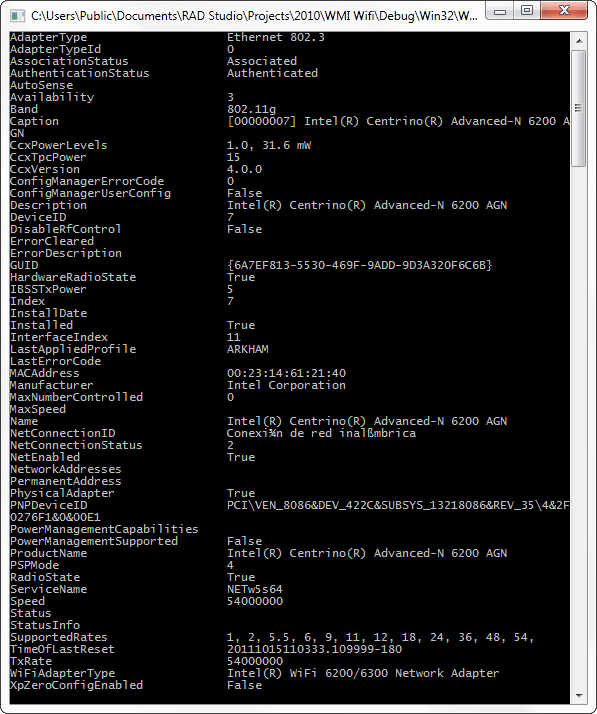
The WiFi_NetworkAdapter class give you access to the main information related to the WiFi network adpaters.

procedure  GetWiFi_NetworkAdapterInfo;
const
  WbemUser            ='';
  WbemPassword        ='';
  WbemComputer        ='localhost';
  wbemFlagForwardOnly = $00000020;
var
  FSWbemLocator : OLEVariant;
  FWMIService   : OLEVariant;
  FWbemObjectSet: OLEVariant;
  FWbemObject   : OLEVariant;
  oEnum         : IEnumvariant;
  iValue        : LongWord;
begin;
  FSWbemLocator := CreateOleObject('WbemScripting.SWbemLocator');
  FWMIService   := FSWbemLocator.ConnectServer(WbemComputer, 'root\CIMV2', WbemUser, WbemPassword);
  FWbemObjectSet:= FWMIService.ExecQuery('SELECT * FROM WiFi_NetworkAdapter','WQL',wbemFlagForwardOnly);
  oEnum         := IUnknown(FWbemObjectSet._NewEnum) as IEnumVariant;
  while oEnum.Next(1, FWbemObject, iValue) = 0 do
  begin
    Writeln(Format('AdapterType                    %s',[FWbemObject.AdapterType]));// String
    Writeln(Format('AdapterTypeId                  %s',[FWbemObject.AdapterTypeId]));// Uint16
    Writeln(Format('AssociationStatus              %s',[FWbemObject.AssociationStatus]));// String
    Writeln(Format('AuthenticationStatus           %s',[FWbemObject.AuthenticationStatus]));// String
    Writeln(Format('AutoSense                      %s',[FWbemObject.AutoSense]));// Boolean
    Writeln(Format('Availability                   %s',[FWbemObject.Availability]));// Uint16
    Writeln(Format('Band                           %s',[FWbemObject.Band]));// String
    Writeln(Format('Caption                        %s',[FWbemObject.Caption]));// String
    Writeln(Format('CcxPowerLevels                 %s',[FWbemObject.CcxPowerLevels]));// String
    Writeln(Format('CcxTpcPower                    %s',[FWbemObject.CcxTpcPower]));// String
    Writeln(Format('CcxVersion                     %s',[FWbemObject.CcxVersion]));// String
    Writeln(Format('ConfigManagerErrorCode         %s',[FWbemObject.ConfigManagerErrorCode]));// Uint32
    Writeln(Format('ConfigManagerUserConfig        %s',[FWbemObject.ConfigManagerUserConfig]));// Boolean
    Writeln(Format('Description                    %s',[FWbemObject.Description]));// String
    Writeln(Format('DeviceID                       %s',[FWbemObject.DeviceID]));// String
    Writeln(Format('DisableRfControl               %s',[FWbemObject.DisableRfControl]));// Boolean
    Writeln(Format('ErrorCleared                   %s',[FWbemObject.ErrorCleared]));// Boolean
    Writeln(Format('ErrorDescription               %s',[FWbemObject.ErrorDescription]));// String
    Writeln(Format('GUID                           %s',[FWbemObject.GUID]));// String
    Writeln(Format('HardwareRadioState             %s',[FWbemObject.HardwareRadioState]));// Boolean
    Writeln(Format('IBSSTxPower                    %s',[FWbemObject.IBSSTxPower]));// Uint16
    Writeln(Format('Index                          %s',[FWbemObject.Index]));// Uint32
    Writeln(Format('InstallDate                    %s',[FWbemObject.InstallDate]));// Datetime
    Writeln(Format('Installed                      %s',[FWbemObject.Installed]));// Boolean
    Writeln(Format('InterfaceIndex                 %s',[FWbemObject.InterfaceIndex]));// Uint32
    Writeln(Format('LastAppliedProfile             %s',[FWbemObject.LastAppliedProfile]));// String
    Writeln(Format('LastErrorCode                  %s',[FWbemObject.LastErrorCode]));// Uint32
    Writeln(Format('MACAddress                     %s',[FWbemObject.MACAddress]));// String
    Writeln(Format('Manufacturer                   %s',[FWbemObject.Manufacturer]));// String
    Writeln(Format('MaxNumberControlled            %s',[FWbemObject.MaxNumberControlled]));// Uint32
    Writeln(Format('MaxSpeed                       %s',[FWbemObject.MaxSpeed]));// Uint64
    Writeln(Format('Name                           %s',[FWbemObject.Name]));// String
    Writeln(Format('NetConnectionID                %s',[FWbemObject.NetConnectionID]));// String
    Writeln(Format('NetConnectionStatus            %s',[FWbemObject.NetConnectionStatus]));// Uint16
    Writeln(Format('NetEnabled                     %s',[FWbemObject.NetEnabled]));// Boolean
    Writeln(Format('NetworkAddresses               %s',[FWbemObject.NetworkAddresses]));// String
    Writeln(Format('PermanentAddress               %s',[FWbemObject.PermanentAddress]));// String
    Writeln(Format('PhysicalAdapter                %s',[FWbemObject.PhysicalAdapter]));// Boolean
    Writeln(Format('PNPDeviceID                    %s',[FWbemObject.PNPDeviceID]));// String
    Writeln(Format('PowerManagementCapabilities    %s',[FWbemObject.PowerManagementCapabilities]));// Uint16
    Writeln(Format('PowerManagementSupported       %s',[FWbemObject.PowerManagementSupported]));// Boolean
    Writeln(Format('ProductName                    %s',[FWbemObject.ProductName]));// String
    Writeln(Format('PSPMode                        %s',[FWbemObject.PSPMode]));// Uint16
    Writeln(Format('RadioState                     %s',[FWbemObject.RadioState]));// Boolean
    Writeln(Format('ServiceName                    %s',[FWbemObject.ServiceName]));// String
    Writeln(Format('Speed                          %s',[FWbemObject.Speed]));// Uint64
    Writeln(Format('Status                         %s',[FWbemObject.Status]));// String
    Writeln(Format('StatusInfo                     %s',[FWbemObject.StatusInfo]));// Uint16
    Writeln(Format('SupportedRates                 %s',[FWbemObject.SupportedRates]));// String
    Writeln(Format('TimeOfLastReset                %s',[FWbemObject.TimeOfLastReset]));// Datetime
    Writeln(Format('TxRate                         %s',[FWbemObject.TxRate]));// String
    Writeln(Format('WiFiAdapterType                %s',[FWbemObject.WiFiAdapterType]));// String
    Writeln(Format('XpZeroConfigEnabled            %s',[FWbemObject.XpZeroConfigEnabled]));// Boolean
    FWbemObject:=Unassigned;
  end;
end;
Get the version info about the Wifi Adapter

The WiFi_AdapterVersion class let you get the Driver and Firmware information about the WiFi Adapters.

procedure  GetWiFi_AdapterVersionInfo;
const
  WbemUser            ='';
  WbemPassword        ='';
  WbemComputer        ='localhost';
  wbemFlagForwardOnly = $00000020;
var
  FSWbemLocator : OLEVariant;
  FWMIService   : OLEVariant;
  FWbemObjectSet: OLEVariant;
  FWbemObject   : OLEVariant;
  oEnum         : IEnumvariant;
  iValue        : LongWord;
begin;
  FSWbemLocator := CreateOleObject('WbemScripting.SWbemLocator');
  FWMIService   := FSWbemLocator.ConnectServer(WbemComputer, 'root\CIMV2', WbemUser, WbemPassword);
  FWbemObjectSet:= FWMIService.ExecQuery('SELECT * FROM WiFi_AdapterVersion','WQL',wbemFlagForwardOnly);
  oEnum         := IUnknown(FWbemObjectSet._NewEnum) as IEnumVariant;
  while oEnum.Next(1, FWbemObject, iValue) = 0 do
  begin
    Writeln(Format('Caption         %s',[FWbemObject.Caption]));// String
    Writeln(Format('Description     %s',[FWbemObject.Description]));// String
    Writeln(Format('Driver          %s',[FWbemObject.Driver]));// String
    Writeln(Format('EEPROM          %s',[FWbemObject.EEPROM]));// String
    Writeln(Format('Firmware11a     %s',[FWbemObject.Firmware11a]));// String
    Writeln(Format('Firmware11b     %s',[FWbemObject.Firmware11b]));// String
    Writeln(Format('Firmware11g     %s',[FWbemObject.Firmware11g]));// String
    Writeln(Format('Microcode11a    %s',[FWbemObject.Microcode11a]));// String
    Writeln(Format('Microcode11b    %s',[FWbemObject.Microcode11b]));// String
    Writeln(Format('Microcode11g    %s',[FWbemObject.Microcode11g]));// String
    Writeln(Format('SettingID       %s',[FWbemObject.SettingID]));// String
    FWbemObject:=Unassigned;
  end;
end;

Get Mac Address and Internal information about the Adapter

Use the WiFi_AdapterDevice class if you want get the Mac Address and internal info about the adapter.

procedure  GetWiFi_AdapterDeviceInfo;
const
  WbemUser            ='';
  WbemPassword        ='';
  WbemComputer        ='localhost';
  wbemFlagForwardOnly = $00000020;
var
  FSWbemLocator : OLEVariant;
  FWMIService   : OLEVariant;
  FWbemObjectSet: OLEVariant;
  FWbemObject   : OLEVariant;
  oEnum         : IEnumvariant;
  iValue        : LongWord;
begin;
  FSWbemLocator := CreateOleObject('WbemScripting.SWbemLocator');
  FWMIService   := FSWbemLocator.ConnectServer(WbemComputer, 'root\CIMV2', WbemUser, WbemPassword);
  FWbemObjectSet:= FWMIService.ExecQuery('SELECT * FROM WiFi_AdapterDevice','WQL',wbemFlagForwardOnly);
  oEnum         := IUnknown(FWbemObjectSet._NewEnum) as IEnumVariant;
  while oEnum.Next(1, FWbemObject, iValue) = 0 do
  begin
    Writeln(Format('Caption              %s',[FWbemObject.Caption]));// String
    Writeln(Format('CardType             %s',[FWbemObject.CardType]));// String
    Writeln(Format('Description          %s',[FWbemObject.Description]));// String
    Writeln(Format('DeviceID             %s',[FWbemObject.DeviceID]));// String
    Writeln(Format('HardwareID           %s',[FWbemObject.HardwareID]));// String
    Writeln(Format('MacAddress           %s',[FWbemObject.MacAddress]));// String
    Writeln(Format('RevisionID           %s',[FWbemObject.RevisionID]));// String
    Writeln(Format('SettingID            %s',[FWbemObject.SettingID]));// String
    Writeln(Format('SubsystemID          %s',[FWbemObject.SubsystemID]));// String
    Writeln(Format('SubSystemVendorID    %s',[FWbemObject.SubSystemVendorID]));// String
    Writeln(Format('VendorID             %s',[FWbemObject.VendorID]));// String
    FWbemObject:=Unassigned;
  end;
end;

Get memory and I/O Address settings of the Adapter

To get the memory address, memory size and others items related to the internal settings of the adapter use the WiFi_AdapterConfigSettings class.

procedure  GetWiFi_AdapterConfigSettingsInfo;
const
  WbemUser            ='';
  WbemPassword        ='';
  WbemComputer        ='localhost';
  wbemFlagForwardOnly = $00000020;
var
  FSWbemLocator : OLEVariant;
  FWMIService   : OLEVariant;
  FWbemObjectSet: OLEVariant;
  FWbemObject   : OLEVariant;
  oEnum         : IEnumvariant;
  iValue        : LongWord;
begin;
  FSWbemLocator := CreateOleObject('WbemScripting.SWbemLocator');
  FWMIService   := FSWbemLocator.ConnectServer(WbemComputer, 'root\CIMV2', WbemUser, WbemPassword);
  FWbemObjectSet:= FWMIService.ExecQuery('SELECT * FROM WiFi_AdapterConfigSettings','WQL',wbemFlagForwardOnly);
  oEnum         := IUnknown(FWbemObjectSet._NewEnum) as IEnumVariant;
  while oEnum.Next(1, FWbemObject, iValue) = 0 do
  begin
    Writeln(Format('AddressingMode            %s',[FWbemObject.AddressingMode]));// String
    Writeln(Format('AttributeMemoryAddress    %s',[FWbemObject.AttributeMemoryAddress]));// String
    Writeln(Format('AttriuteMemorySize        %s',[FWbemObject.AttriuteMemorySize]));// String
    Writeln(Format('Caption                   %s',[FWbemObject.Caption]));// String
    Writeln(Format('ControllerIOAddress       %s',[FWbemObject.ControllerIOAddress]));// String
    Writeln(Format('Description               %s',[FWbemObject.Description]));// String
    Writeln(Format('InterruptNumber           %s',[FWbemObject.InterruptNumber]));// String
    Writeln(Format('IOAddress                 %s',[FWbemObject.IOAddress]));// String
    Writeln(Format('MemoryAddress             %s',[FWbemObject.MemoryAddress]));// String
    Writeln(Format('MemorySize                %s',[FWbemObject.MemorySize]));// String
    Writeln(Format('PacketFilterMask          %s',[FWbemObject.PacketFilterMask]));// String
    Writeln(Format('SettingID                 %s',[FWbemObject.SettingID]));// String
    Writeln(Format('SocketNumber              %s',[FWbemObject.SocketNumber]));// String
    FWbemObject:=Unassigned;
  end;
end;

TcpIp Settings IPv4

To get the WiFi Adapter TcpIp (IPv4) Settings use the WiFi_AdapterTcpIpSettings class

procedure  GetWiFi_AdapterTcpIpSettingsInfo;
const
  WbemUser            ='';
  WbemPassword        ='';
  WbemComputer        ='localhost';
  wbemFlagForwardOnly = $00000020;
var
  FSWbemLocator : OLEVariant;
  FWMIService   : OLEVariant;
  FWbemObjectSet: OLEVariant;
  FWbemObject   : OLEVariant;
  oEnum         : IEnumvariant;
  iValue        : LongWord;
begin;
  FSWbemLocator := CreateOleObject('WbemScripting.SWbemLocator');
  FWMIService   := FSWbemLocator.ConnectServer(WbemComputer, 'root\CIMV2', WbemUser, WbemPassword);
  FWbemObjectSet:= FWMIService.ExecQuery('SELECT * FROM WiFi_AdapterTcpIpSettings','WQL',wbemFlagForwardOnly);
  oEnum         := IUnknown(FWbemObjectSet._NewEnum) as IEnumVariant;
  while oEnum.Next(1, FWbemObject, iValue) = 0 do
  begin
    Writeln(Format('Caption           %s',[FWbemObject.Caption]));// String
    Writeln(Format('DefaultGateway    %s',[FWbemObject.DefaultGateway]));// String
    Writeln(Format('Description       %s',[FWbemObject.Description]));// String
    Writeln(Format('DHCP_IP           %s',[FWbemObject.DHCP_IP]));// Boolean
    Writeln(Format('DHCP_WINS         %s',[FWbemObject.DHCP_WINS]));// Boolean
    Writeln(Format('DhcpServer        %s',[FWbemObject.DhcpServer]));// String
    Writeln(Format('DhcpSubnetMask    %s',[FWbemObject.DhcpSubnetMask]));// String
    Writeln(Format('DNS               %s',[FWbemObject.DNS]));// Boolean
    Writeln(Format('DNSPrim           %s',[FWbemObject.DNSPrim]));// String
    Writeln(Format('DNSSec            %s',[FWbemObject.DNSSec]));// String
    Writeln(Format('Domain            %s',[FWbemObject.Domain]));// String
    Writeln(Format('IPAddress         %s',[FWbemObject.IPAddress]));// String
    Writeln(Format('ScopeID           %s',[FWbemObject.ScopeID]));// String
    Writeln(Format('SettingID         %s',[FWbemObject.SettingID]));// String
    Writeln(Format('WINSPrim          %s',[FWbemObject.WINSPrim]));// String
    Writeln(Format('WINSSec           %s',[FWbemObject.WINSSec]));// String
    FWbemObject:=Unassigned;
  end;
end;
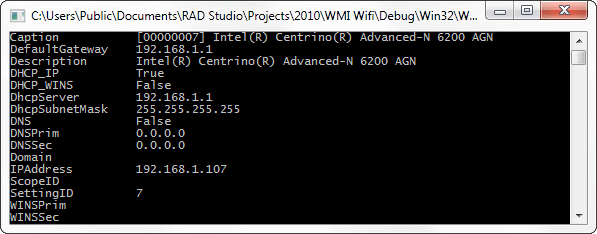
TcpIp Settings IPv6

To get the WiFi Adapter TcpIp (IPv6) Settings use the WiFi_AdapterTcpIpv6Settings class

procedure  GetWiFi_AdapterTcpIpv6SettingsInfo;
const
  WbemUser            ='';
  WbemPassword        ='';
  WbemComputer        ='localhost';
  wbemFlagForwardOnly = $00000020;
var
  FSWbemLocator : OLEVariant;
  FWMIService   : OLEVariant;
  FWbemObjectSet: OLEVariant;
  FWbemObject   : OLEVariant;
  oEnum         : IEnumvariant;
  iValue        : LongWord;
begin;
  FSWbemLocator := CreateOleObject('WbemScripting.SWbemLocator');
  FWMIService   := FSWbemLocator.ConnectServer(WbemComputer, 'root\CIMV2', WbemUser, WbemPassword);
  FWbemObjectSet:= FWMIService.ExecQuery('SELECT * FROM WiFi_AdapterTcpIpv6Settings','WQL',wbemFlagForwardOnly);
  oEnum         := IUnknown(FWbemObjectSet._NewEnum) as IEnumVariant;
  while oEnum.Next(1, FWbemObject, iValue) = 0 do
  begin
    Writeln(Format('Caption           %s',[FWbemObject.Caption]));// String
    Writeln(Format('DefaultGateway    %s',[FWbemObject.DefaultGateway]));// String
    Writeln(Format('Description       %s',[FWbemObject.Description]));// String
    Writeln(Format('DHCP_IP           %s',[FWbemObject.DHCP_IP]));// Boolean
    Writeln(Format('DHCP_WINS         %s',[FWbemObject.DHCP_WINS]));// Boolean
    Writeln(Format('DhcpServer        %s',[FWbemObject.DhcpServer]));// String
    Writeln(Format('DhcpSubnetMask    %s',[FWbemObject.DhcpSubnetMask]));// String
    Writeln(Format('DNS               %s',[FWbemObject.DNS]));// Boolean
    Writeln(Format('DNSPrim           %s',[FWbemObject.DNSPrim]));// String
    Writeln(Format('DNSSec            %s',[FWbemObject.DNSSec]));// String
    Writeln(Format('Domain            %s',[FWbemObject.Domain]));// String
    Writeln(Format('IPAddress         %s',[FWbemObject.IPAddress]));// String
    Writeln(Format('ScopeID           %s',[FWbemObject.ScopeID]));// String
    Writeln(Format('SettingID         %s',[FWbemObject.SettingID]));// String
    Writeln(Format('WINSPrim          %s',[FWbemObject.WINSPrim]));// String
    Writeln(Format('WINSSec           %s',[FWbemObject.WINSSec]));// String
    FWbemObject:=Unassigned;
  end;
end;

Global Adpater stats

To get the global stats about the adapter like use the WiFi_AdapterTxRxStats class.

procedure  GetWiFi_AdapterTxRxStatsInfo;
const
  WbemUser            ='';
  WbemPassword        ='';
  WbemComputer        ='localhost';
  wbemFlagForwardOnly = $00000020;
var
  FSWbemLocator : OLEVariant;
  FWMIService   : OLEVariant;
  FWbemObjectSet: OLEVariant;
  FWbemObject   : OLEVariant;
  oEnum         : IEnumvariant;
  iValue        : LongWord;
begin;
  FSWbemLocator := CreateOleObject('WbemScripting.SWbemLocator');
  FWMIService   := FSWbemLocator.ConnectServer(WbemComputer, 'root\CIMV2', WbemUser, WbemPassword);
  FWbemObjectSet:= FWMIService.ExecQuery('SELECT * FROM WiFi_AdapterTxRxStats','WQL',wbemFlagForwardOnly);
  oEnum         := IUnknown(FWbemObjectSet._NewEnum) as IEnumVariant;
  while oEnum.Next(1, FWbemObject, iValue) = 0 do
  begin
    Writeln(Format('Caption                              %s',[FWbemObject.Caption]));// String
    Writeln(Format('Description                          %s',[FWbemObject.Description]));// String
    //Writeln(Format('Rates                                %s',[FWbemObject.Rates]));//array of String
    Writeln(Format('RxDirectPackets                      %s',[FWbemObject.RxDirectPackets]));// String
    //Writeln(Format('RxDirectPacketsRate                  %s',[FWbemObject.RxDirectPacketsRate]));// array of String
    Writeln(Format('RxHighThroughputDirectPackets        %s',[FWbemObject.RxHighThroughputDirectPackets]));// String
    //Writeln(Format('RxHighThroughputDirectPacketsRate    %s',[FWbemObject.RxHighThroughputDirectPacketsRate]));// array of String
    Writeln(Format('RxNonDirectPackets                   %s',[FWbemObject.RxNonDirectPackets]));// String
    //Writeln(Format('RxNonDirectPacketsRate               %s',[FWbemObject.RxNonDirectPacketsRate]));// array of String
    Writeln(Format('RxTotalBytes                         %s',[FWbemObject.RxTotalBytes]));// String
    Writeln(Format('RxTotalPackets                       %s',[FWbemObject.RxTotalPackets]));// String
    Writeln(Format('SettingID                            %s',[FWbemObject.SettingID]));// String
    Writeln(Format('TxDirectPackets                      %s',[FWbemObject.TxDirectPackets]));// String
    //Writeln(Format('TxDirectPacketsRate                  %s',[FWbemObject.TxDirectPacketsRate]));// array of String
    Writeln(Format('TxHighThroughputDirectPackets        %s',[FWbemObject.TxHighThroughputDirectPackets]));// String
    //Writeln(Format('TxHighThroughputDirectPacketsRate    %s',[FWbemObject.TxHighThroughputDirectPacketsRate]));// array of String
    Writeln(Format('TxNonDirectPackets                   %s',[FWbemObject.TxNonDirectPackets]));// String
    //Writeln(Format('TxNonDirectPacketsRate               %s',[FWbemObject.TxNonDirectPacketsRate]));// array of String
    Writeln(Format('TxTotalBytes                         %s',[FWbemObject.TxTotalBytes]));// String
    Writeln(Format('TxTotalPackets                       %s',[FWbemObject.TxTotalPackets]));// String
    FWbemObject:=Unassigned;
  end;
end;

Check the source code of the console application with all the snippets included of this article on Github


10 Comments

Exploring Delphi XE2 – Tweaking the FireMonkey Styles

Maybe you’ve seen   articles about how use the FireMonkey Styles, and how you can set almost every aspect of a visual control, today I will go a step  forward to show how you can adjust the HSL (Hue, Saturation, and Lightness) values or a particular RGB component of the colors that belongs to a FireMonkey style.

Introduction

Fortunately the format of the styles used by FireMonkey is stored in a human readable format very similar to our old dfm format (Delphi forms), this allows us to understand how FireMonkey store, read and use these styles and of course make cool stuff with this.

Now look the next piece of a FireMonkey style and pays attention to the highlighted values

  object TRectangle
    StyleName = 'backgroundstyle'
    Position.Point = '(396,476)'
    Width = 50.000000000000000000
    Height = 50.000000000000000000
    HitTest = False
    DesignVisible = False
    Fill.Color = xFF505050
    Stroke.Kind = bkNone
  end
  object TRectangle
    StyleName = 'panelstyle'
    Position.Point = '(396,476)'
    Width = 50.000000000000000000
    Height = 50.000000000000000000
    HitTest = False
    DesignVisible = False
    Fill.Color = xFF404040
    Stroke.Kind = bkNone
    XRadius = 3.000000000000000000
    YRadius = 3.000000000000000000
  end
  object TCalloutRectangle
    StyleName = 'calloutpanelstyle'
    Position.Point = '(396,476)'
    Width = 50.000000000000000000
    Height = 50.000000000000000000
    HitTest = False
    DesignVisible = False
    Fill.Color = xFF404040
    Stroke.Kind = bkNone
    XRadius = 3.000000000000000000
    YRadius = 3.000000000000000000
    CalloutWidth = 23.000000000000000000
    CalloutLength = 11.000000000000000000
  end
      object TText
        StyleName = 'text'
        Position.Point = '(15,-8)'
        Locked = True
        Width = 50.000000000000000000
        Height = 17.000000000000000000
        ClipParent = True
        HitTest = False
        AutoSize = True
        Fill.Color = claWhite
        Text = 'Groupbox'
        WordWrap = False
      end

As you can see the colors of the FireMonkey style elements are stored in a hexadecimal format or using the name of the predefined FireMonkey colors , and these are the values ​​we need to modify.

The FireMonkey styles can be embedded in the resource property of a TStyleBook component or in a .Style file. In order to modify these values we need to parse the style and locate all entries which represent a TAlphaColor.

Parsing a FireMonkey Style

The first thing that jumps out is that the root component of is a TLayout object and the style format only defines a tree of objects. So the general idea is iterate over all the TAlphaColor properties, modify the colors and then write back to the TStyleBook.Resource property the modified TLayout.

So the first idea is, Hey I can load this tree of objects in a TLayout and then using the RTTI and a recursive function I can set all the properties which are of the type TAlphaColor.

So you will write something like this to create the TLayout object

 Stream:=TStringStream.Create;
 try
   s:=FStyleBook.Resource.Text;
   Stream.WriteString(s);
   Stream.Position:=0;
   FLayout:=TLayout(CreateObjectFromStream(nil,Stream));
 finally
  Stream.Free;
 end;

And now you will write a nice recursive function using the RTTI to set all the Colors of all the children objects. you will check which works ok (the colors are modified as you want) and then you will write the modified Style to the TLayout.Resource property. But stop we can’t use this method to do this task because the properties stored in FireMonkey Style is just a subset of all the properties of each object let me explain :

This is a TText object

  TText = class(TShape)
   //only showing the published properties.
  published
    property AutoSize: Boolean read FAutoSize write SetAutoSize default False;
    property Fill;
    property Font: TFont read FFont write SetFont;
    property HorzTextAlign: TTextAlign read FHorzTextAlign write SetHorzTextAlign
      default TTextAlign.taCenter;
    property VertTextAlign: TTextAlign read FVertTextAlign write SetVertTextAlign
      default TTextAlign.taCenter;
    property Text: string read FText write SetText;
    property Stretch: Boolean read FStretch write SetStretch default False;
    property WordWrap: Boolean read FWordWrap write SetWordWrap default True;
  end;

And this is how a TText object is stored in a FireMonkey Style

    object TText
      StyleName = 'text'
      Align = alClient
      Locked = True
      Width = 49.000000000000000000
      Height = 20.000000000000000000
      HitTest = False
      Fill.Color = xFFE0E0E0
      Text = 'label'
    end

As you can see if you use the RTTI way to set the new color values and then write the object back you will passing all the properties to the object and finally you will create a giant modified
FireMonkey style which will slow down our application. So what is the solution? well just parse the text of the style manually and determine using a simple algorithm if the entry (line) to process is a TAlphaColor or not.

In this point you have many options, you can use a regular expression, or create an array with the name of all possible entries to process like Fill.Color, Color, Stroke.Color and so on, and all this just to process a line like Fill.Color = xFFE0E0E0. But I choose more simple option, just dividing a line in 2 components called Name and Value.

Let me show you with a piece of code.

First define a structure to hold the data of the style to modify.

 TFMStyleLine=record
  Index   : Integer;
 IsColor : Boolean;
  Name    : string;
  Value   : string;
 Color : TAlphaColor;
 end;

 FLines : TList<TFMStyleLine>;

and then write a procedure to parse the FireMonkey Style


//this function determine if a particular line of the resource property is a AlphaColor
function PropIsColor(const Name, Value: string): Boolean;
begin
 Result:=(CompareText(Name,'Color')=0) or (Pos('.Color',Name)>0) or (StartsText('cla',Value)) or (Length(Value)=9) and (Value[1]='x'));
end;

//Fill a generic list with the lines which have a color property
procedure FillList;
var
  i : integer;
  ALine : TFMStyleLine;
  p : integer;
begin
  FLines.Clear;
  for i := 0 to FStyleBook.Resource.Count-1 do
  begin
    ALine.IsColor:=False;
    ALine.Name:='';
    ALine.Value:='';
    ALine.Color:=claNull;
    //Determine if the line has a = sign
    p:=Pos('=',FStyleBook.Resource[i]);
     if p>0 then
     begin
       //get the name of the property
       ALine.Name :=Trim(Copy(FStyleBook.Resource[i],1,p-1));
       //get the value of the property
       ALine.Value:=Trim(Copy(FStyleBook.Resource[i],p+1));
       //check if is the line has a color
       ALine.IsColor:=PropIsColor(ALine.Name, ALine.Value);
       if ALine.IsColor then
       begin
         //store the index of the line from the resource to modify
         ALine.Index:=i;
         ALine.Color :=StringToAlphaColor(ALine.Value);
         //add the record to the collection
         FLines.Add(ALine);
       end;
     end;
  end;
end;

As you can see the logic is very simple (sure can be improved) and works.

Making the changes

In this point we have a list with all the colors to modify, so we can to start applying the operations over the colors to change the HSL and RGB components.

//this procedure modify the RGB components of the colors stored in the generics list, adding a delta value (1..255) for each component (R, G, B)
procedure ChangeRGB(dR, dG, dB: Byte);
var
  i : Integer;
  v : TFMStyleLine;
begin
  for i := 0 to FLines.Count-1 do
   //only modify the lines which contains a Color <>  claNull
   if FLines[i].IsColor and (FLines[i].Color<>claNull) then
    begin
      v:=FLines[i];
      TAlphaColorRec(v.Color).R:=TAlphaColorRec(v.Color).R+dR;
      TAlphaColorRec(v.Color).G:=TAlphaColorRec(v.Color).G+dG;
      TAlphaColorRec(v.Color).B:=TAlphaColorRec(v.Color).B+dB;
      if v.Color<>FMod[i].Color then
        FMod[i]:=v;
    end;
end;

//this procedure modify the HSL values from the colors stored in generic list
procedure ChangeHSL(dH, dS, dL: Single);
var
  i : Integer;
  v : TFMStyleLine;
begin
  for i := 0 to FLines.Count-1 do
   //only modify the lines which contains a Color <>  claNull
   if FLines[i].IsColor and (FLines[i].Color<>claNull) then
    begin
      v:=FLines[i];
      v.Color:=(FMX.Types.ChangeHSL(v.Color,dH,dS,dL));
      if v.Color<>FMod[i].Color then
        FMod[i]:=v;
    end;
end;

And now an example of how use this code. check the next form which has the Blend style (included with Delphi XE)

Now executing this code for the HSL transformation

Var
 Eq : TStyleEqualizer;
begin
 Eq:= TStyleEqualizer.Create;
 try
  Eq.StyleBook:=StyleBook1;
  Eq.ChangeHSL(130/360,5/100,0);
  Eq.Refresh;
 finally
  Eq.Free;
 end;
end;

we have this result

Now executing this code for the RGB transformation

Var
 Eq : TStyleEqualizer;
begin
 Eq:= TStyleEqualizer.Create;
 try
  Eq.StyleBook:=StyleBook1;
  Eq.ChangeRGB(50,0,0);
  Eq.Refresh;
 finally
  Eq.Free;
 end;
end;

The Application

Finally I wrote an application that uses the functions described above to modify in runtime any FireMonkey Style and let you save the changes creating a new style in just a few clicks.

Check this video to see the application in action

Check the source code on Github.