 Some time ago I wrote an article about how list the Wifi networks using Delphi and the Native Wifi API, today I will show you how can you can gain access to even more info and stats about the Wifi Adapters and Networks in a local or remote machine using the WMI (Windows Management Instrumentation) and Delphi.
The WMI provides several classes to retrieve information about the WiFi networks and adapters, which these classes you will able to know for example the list available wifi networks, transmition and reception Wifi Stats, TCP/IP IPV4 and IPv6 settings and so on.
In order to work with the next WMI classes your Wifi Network adapter must install a CIMWiFiProvider which implement these classes.
WiFi Networks Information
Current Wifi NetWork
To get the info (Name, AuthenAlgorithm, SSID) about the current Wifi Network (Profile) connected to the adapter you must use the WiFi_AdapterAssociationInfo class
[sourcecode language=”delphi” wraplines=”false”]
procedure GetWiFi_AdapterAssociationInfo;
const
WbemUser =”;
WbemPassword =”;
WbemComputer =’localhost’;
wbemFlagForwardOnly = $00000020;
var
FSWbemLocator : OLEVariant;
FWMIService : OLEVariant;
FWbemObjectSet: OLEVariant;
FWbemObject : OLEVariant;
oEnum : IEnumvariant;
iValue : LongWord;
begin;
FSWbemLocator := CreateOleObject(‘WbemScripting.SWbemLocator’);
FWMIService := FSWbemLocator.ConnectServer(WbemComputer, ‘root\CIMV2’, WbemUser, WbemPassword);
FWbemObjectSet:= FWMIService.ExecQuery(‘SELECT * FROM WiFi_AdapterAssociationInfo’,’WQL’,wbemFlagForwardOnly);
oEnum := IUnknown(FWbemObjectSet._NewEnum) as IEnumVariant;
while oEnum.Next(1, FWbemObject, iValue) = 0 do
begin
Writeln(Format(‘Associated %s’,[FWbemObject.Associated]));// Boolean
Writeln(Format(‘AuthenAlgorithm %s’,[FWbemObject.AuthenAlgorithm]));// String
Writeln(Format(‘AuthenEnabled %s’,[FWbemObject.AuthenEnabled]));// Boolean
Writeln(Format(‘AuthenMode %s’,[FWbemObject.AuthenMode]));// String
Writeln(Format(‘Caption %s’,[FWbemObject.Caption]));// String
Writeln(Format(‘Channel %s’,[FWbemObject.Channel]));// String
Writeln(Format(‘Description %s’,[FWbemObject.Description]));// String
Writeln(Format(‘Encryption %s’,[FWbemObject.Encryption]));// String
Writeln(Format(‘OpMode %s’,[FWbemObject.OpMode]));// String
Writeln(Format(‘Profile %s’,[FWbemObject.Profile]));// String
Writeln(Format(‘Rate %s’,[FWbemObject.Rate]));// String
Writeln(Format(‘SettingID %s’,[FWbemObject.SettingID]));// String
Writeln(Format(‘SSID %s’,[FWbemObject.SSID]));// String
FWbemObject:=Unassigned;
end;
end;
[/sourcecode]
Stats of current Wifi NetWork
To get stats about the current wifi Network connected use the WiFi_AdapterAssocStats
[sourcecode language=”delphi” wraplines=”false”]
procedure GetWiFi_AdapterAssocStatsInfo;
const
WbemUser =”;
WbemPassword =”;
WbemComputer =’localhost’;
wbemFlagForwardOnly = $00000020;
var
FSWbemLocator : OLEVariant;
FWMIService : OLEVariant;
FWbemObjectSet: OLEVariant;
FWbemObject : OLEVariant;
oEnum : IEnumvariant;
iValue : LongWord;
begin;
FSWbemLocator := CreateOleObject(‘WbemScripting.SWbemLocator’);
FWMIService := FSWbemLocator.ConnectServer(WbemComputer, ‘root\CIMV2’, WbemUser, WbemPassword);
FWbemObjectSet:= FWMIService.ExecQuery(‘SELECT * FROM WiFi_AdapterAssocStats’,’WQL’,wbemFlagForwardOnly);
oEnum := IUnknown(FWbemObjectSet._NewEnum) as IEnumVariant;
while oEnum.Next(1, FWbemObject, iValue) = 0 do
begin
Writeln(Format(‘ApDidNotTx %s’,[FWbemObject.ApDidNotTx]));// Uint32
Writeln(Format(‘ApMacAddr %s’,[FWbemObject.ApMacAddr]));// String
Writeln(Format(‘Caption %s’,[FWbemObject.Caption]));// String
Writeln(Format(‘CrcErrs %s’,[FWbemObject.CrcErrs]));// Uint32
Writeln(Format(‘Description %s’,[FWbemObject.Description]));// String
Writeln(Format(‘DroppedByAp %s’,[FWbemObject.DroppedByAp]));// Uint32
Writeln(Format(‘LoadBalancing %s’,[FWbemObject.LoadBalancing]));// Uint32
Writeln(Format(‘LowRssi %s’,[FWbemObject.LowRssi]));// Uint32
Writeln(Format(‘NumAps %s’,[FWbemObject.NumAps]));// Uint32
Writeln(Format(‘NumAssociations %s’,[FWbemObject.NumAssociations]));// Uint32
Writeln(Format(‘NumFullScans %s’,[FWbemObject.NumFullScans]));// Uint32
Writeln(Format(‘NumPartialScans %s’,[FWbemObject.NumPartialScans]));// Uint32
Writeln(Format(‘PercentMissedBeacons %s’,[FWbemObject.PercentMissedBeacons]));// Uint32
Writeln(Format(‘PercentTxErrs %s’,[FWbemObject.PercentTxErrs]));// Uint32
Writeln(Format(‘PoorBeaconQuality %s’,[FWbemObject.PoorBeaconQuality]));// Uint32
Writeln(Format(‘PoorChannelQuality %s’,[FWbemObject.PoorChannelQuality]));// Uint32
Writeln(Format(‘RoamCount %s’,[FWbemObject.RoamCount]));// Uint32
Writeln(Format(‘Rssi %s’,[FWbemObject.Rssi]));// String
Writeln(Format(‘RxBeacons %s’,[FWbemObject.RxBeacons]));// Uint32
Writeln(Format(‘SettingID %s’,[FWbemObject.SettingID]));// String
Writeln(Format(‘TxRetries %s’,[FWbemObject.TxRetries]));// Uint32
FWbemObject:=Unassigned;
end;
end;
[/sourcecode]
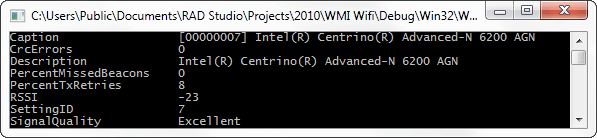
Signal Stats of current Wifi NetWork
To get the signal information (Quality, Crc Errors, RSSI) about current WiFi Network, use the WiFi_AdapterSignalParameters class.
[sourcecode language=”delphi” wraplines=”false”]
procedure GetWiFi_AdapterSignalParametersInfo;
const
WbemUser =”;
WbemPassword =”;
WbemComputer =’localhost’;
wbemFlagForwardOnly = $00000020;
var
FSWbemLocator : OLEVariant;
FWMIService : OLEVariant;
FWbemObjectSet: OLEVariant;
FWbemObject : OLEVariant;
oEnum : IEnumvariant;
iValue : LongWord;
begin;
FSWbemLocator := CreateOleObject(‘WbemScripting.SWbemLocator’);
FWMIService := FSWbemLocator.ConnectServer(WbemComputer, ‘root\CIMV2’, WbemUser, WbemPassword);
FWbemObjectSet:= FWMIService.ExecQuery(‘SELECT * FROM WiFi_AdapterSignalParameters’,’WQL’,wbemFlagForwardOnly);
oEnum := IUnknown(FWbemObjectSet._NewEnum) as IEnumVariant;
while oEnum.Next(1, FWbemObject, iValue) = 0 do
begin
Writeln(Format(‘Caption %s’,[FWbemObject.Caption]));// String
Writeln(Format(‘CrcErrors %s’,[FWbemObject.CrcErrors]));// Uint32
Writeln(Format(‘Description %s’,[FWbemObject.Description]));// String
Writeln(Format(‘PercentMissedBeacons %s’,[FWbemObject.PercentMissedBeacons]));// Uint32
Writeln(Format(‘PercentTxRetries %s’,[FWbemObject.PercentTxRetries]));// Uint32
Writeln(Format(‘RSSI %s’,[FWbemObject.RSSI]));// String
Writeln(Format(‘SettingID %s’,[FWbemObject.SettingID]));// String
Writeln(Format(‘SignalQuality %s’,[FWbemObject.SignalQuality]));// String
FWbemObject:=Unassigned;
end;
end;
[/sourcecode]
List the cached WiFi networks
To get the list of the cached wifi network availables (result of the last network scan) use the WiFi_AdapterCachedScanList class.
[sourcecode language=”delphi” wraplines=”false”]
procedure GetWiFi_AdapterCachedScanListInfo;
const
WbemUser =”;
WbemPassword =”;
WbemComputer =’localhost’;
wbemFlagForwardOnly = $00000020;
var
FSWbemLocator : OLEVariant;
FWMIService : OLEVariant;
FWbemObjectSet: OLEVariant;
FWbemObject : OLEVariant;
oEnum : IEnumvariant;
iValue : LongWord;
begin;
FSWbemLocator := CreateOleObject(‘WbemScripting.SWbemLocator’);
FWMIService := FSWbemLocator.ConnectServer(WbemComputer, ‘root\CIMV2’, WbemUser, WbemPassword);
FWbemObjectSet:= FWMIService.ExecQuery(‘SELECT * FROM WiFi_AdapterCachedScanList’,’WQL’,wbemFlagForwardOnly);
oEnum := IUnknown(FWbemObjectSet._NewEnum) as IEnumVariant;
while oEnum.Next(1, FWbemObject, iValue) = 0 do
begin
Writeln(Format(‘AuthLevel %s’,[FWbemObject.AuthLevel]));// String
Writeln(Format(‘Band %s’,[FWbemObject.Band]));// String
Writeln(Format(‘Caption %s’,[FWbemObject.Caption]));// String
Writeln(Format(‘ChannelID %s’,[FWbemObject.ChannelID]));// Uint32
Writeln(Format(‘Description %s’,[FWbemObject.Description]));// String
Writeln(Format(‘Encrypted %s’,[FWbemObject.Encrypted]));// Boolean
Writeln(Format(‘MacAddress %s’,[FWbemObject.MacAddress]));// String
Writeln(Format(‘MulticastEncryptionLevel %s’,[FWbemObject.MulticastEncryptionLevel]));// String
Writeln(Format(‘NetworkName %s’,[FWbemObject.NetworkName]));// String
Writeln(Format(‘OperationMode %s’,[FWbemObject.OperationMode]));// String
Writeln(Format(‘RSSI %s’,[FWbemObject.RSSI]));// String
Writeln(Format(‘SettingID %s’,[FWbemObject.SettingID]));// String
Writeln(Format(‘Stealth %s’,[FWbemObject.Stealth]));// Boolean
Writeln(Format(‘UnicastEncryptionLevel %s’,[FWbemObject.UnicastEncryptionLevel]));// String
FWbemObject:=Unassigned;
end;
end;
[/sourcecode]
List the available WiFi networks
Using the WiFi_AvailableNetwork class you can scan and get the list of the current wifi network availables.
[sourcecode language=”delphi” wraplines=”false”]
procedure GetWiFi_AvailableNetworkInfo;
const
WbemUser =”;
WbemPassword =”;
WbemComputer =’localhost’;
wbemFlagForwardOnly = $00000020;
var
FSWbemLocator : OLEVariant;
FWMIService : OLEVariant;
FWbemObjectSet: OLEVariant;
FWbemObject : OLEVariant;
oEnum : IEnumvariant;
iValue : LongWord;
begin;
FSWbemLocator := CreateOleObject(‘WbemScripting.SWbemLocator’);
FWMIService := FSWbemLocator.ConnectServer(WbemComputer, ‘root\CIMV2’, WbemUser, WbemPassword);
FWbemObjectSet:= FWMIService.ExecQuery(‘SELECT * FROM WiFi_AvailableNetwork’,’WQL’,wbemFlagForwardOnly);
oEnum := IUnknown(FWbemObjectSet._NewEnum) as IEnumVariant;
while oEnum.Next(1, FWbemObject, iValue) = 0 do
begin
Writeln(Format(‘AuthLevel %s’,[FWbemObject.AuthLevel]));// String
Writeln(Format(‘Band %s’,[FWbemObject.Band]));// String
Writeln(Format(‘Caption %s’,[FWbemObject.Caption]));// String
Writeln(Format(‘ChannelID %s’,[FWbemObject.ChannelID]));// Uint32
Writeln(Format(‘Description %s’,[FWbemObject.Description]));// String
Writeln(Format(‘Encrypted %s’,[FWbemObject.Encrypted]));// Boolean
Writeln(Format(‘MacAddress %s’,[FWbemObject.MacAddress]));// String
Writeln(Format(‘MulticastEncryptionLevel %s’,[FWbemObject.MulticastEncryptionLevel]));// String
Writeln(Format(‘NetworkName %s’,[FWbemObject.NetworkName]));// String
Writeln(Format(‘OperationMode %s’,[FWbemObject.OperationMode]));// String
Writeln(Format(‘RSSI %s’,[FWbemObject.RSSI]));// String
Writeln(Format(‘SettingID %s’,[FWbemObject.SettingID]));// String
Writeln(Format(‘Stealth %s’,[FWbemObject.Stealth]));// Boolean
Writeln(Format(‘UnicastEncryptionLevel %s’,[FWbemObject.UnicastEncryptionLevel]));// String
FWbemObject:=Unassigned;
end;
end;
[/sourcecode]
List all the Stored WiFi networks profiles
If you want list all the stored WiFi networks profiles use the WiFi_PreferredProfile class.
[sourcecode language=”delphi” wraplines=”false”]
procedure GetWiFi_PreferredProfileInfo;
const
WbemUser =”;
WbemPassword =”;
WbemComputer =’localhost’;
wbemFlagForwardOnly = $00000020;
var
FSWbemLocator : OLEVariant;
FWMIService : OLEVariant;
FWbemObjectSet: OLEVariant;
FWbemObject : OLEVariant;
oEnum : IEnumvariant;
iValue : LongWord;
begin;
FSWbemLocator := CreateOleObject(‘WbemScripting.SWbemLocator’);
FWMIService := FSWbemLocator.ConnectServer(WbemComputer, ‘root\CIMV2’, WbemUser, WbemPassword);
FWbemObjectSet:= FWMIService.ExecQuery(‘SELECT * FROM WiFi_PreferredProfile’,’WQL’,wbemFlagForwardOnly);
oEnum := IUnknown(FWbemObjectSet._NewEnum) as IEnumVariant;
while oEnum.Next(1, FWbemObject, iValue) = 0 do
begin
Writeln(Format(‘Authentication %s’,[FWbemObject.Authentication]));// String
Writeln(Format(‘Caption %s’,[FWbemObject.Caption]));// String
Writeln(Format(‘Description %s’,[FWbemObject.Description]));// String
Writeln(Format(‘Encryption %s’,[FWbemObject.Encryption]));// String
Writeln(Format(‘MandatoryAp %s’,[FWbemObject.MandatoryAp]));// String
Writeln(Format(‘Name %s’,[FWbemObject.Name]));// String
Writeln(Format(‘OperationMode %s’,[FWbemObject.OperationMode]));// String
Writeln(Format(‘SettingID %s’,[FWbemObject.SettingID]));// String
Writeln(Format(‘SSID %s’,[FWbemObject.SSID]));// String
Writeln(Format(‘Stealth %s’,[FWbemObject.Stealth]));// Boolean
Writeln(Format(‘Type %s’,[FWbemObject.Type]));// String
FWbemObject:=Unassigned;
end;
end;
[/sourcecode]
WiFi Adapters Information
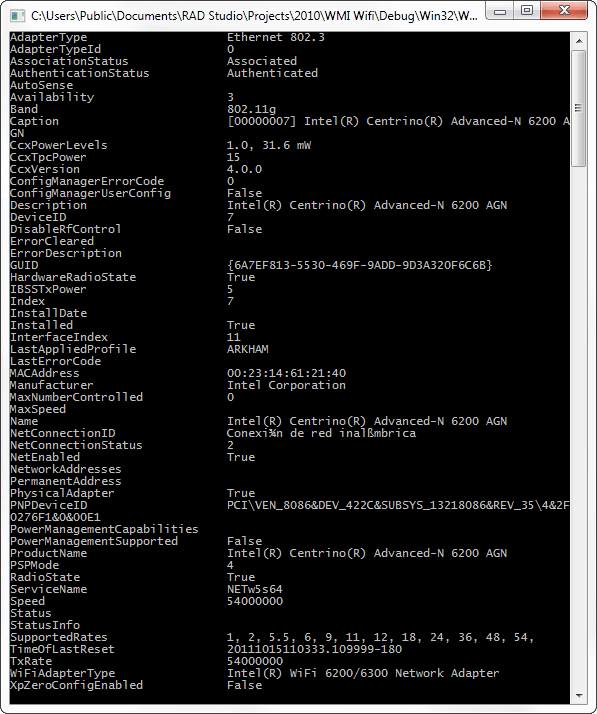
Listing the Wifi Network Adapters
The WiFi_NetworkAdapter class give you access to the main information related to the WiFi network adpaters.
[sourcecode language=”delphi” wraplines=”false”]
procedure GetWiFi_NetworkAdapterInfo;
const
WbemUser =”;
WbemPassword =”;
WbemComputer =’localhost’;
wbemFlagForwardOnly = $00000020;
var
FSWbemLocator : OLEVariant;
FWMIService : OLEVariant;
FWbemObjectSet: OLEVariant;
FWbemObject : OLEVariant;
oEnum : IEnumvariant;
iValue : LongWord;
begin;
FSWbemLocator := CreateOleObject(‘WbemScripting.SWbemLocator’);
FWMIService := FSWbemLocator.ConnectServer(WbemComputer, ‘root\CIMV2’, WbemUser, WbemPassword);
FWbemObjectSet:= FWMIService.ExecQuery(‘SELECT * FROM WiFi_NetworkAdapter’,’WQL’,wbemFlagForwardOnly);
oEnum := IUnknown(FWbemObjectSet._NewEnum) as IEnumVariant;
while oEnum.Next(1, FWbemObject, iValue) = 0 do
begin
Writeln(Format(‘AdapterType %s’,[FWbemObject.AdapterType]));// String
Writeln(Format(‘AdapterTypeId %s’,[FWbemObject.AdapterTypeId]));// Uint16
Writeln(Format(‘AssociationStatus %s’,[FWbemObject.AssociationStatus]));// String
Writeln(Format(‘AuthenticationStatus %s’,[FWbemObject.AuthenticationStatus]));// String
Writeln(Format(‘AutoSense %s’,[FWbemObject.AutoSense]));// Boolean
Writeln(Format(‘Availability %s’,[FWbemObject.Availability]));// Uint16
Writeln(Format(‘Band %s’,[FWbemObject.Band]));// String
Writeln(Format(‘Caption %s’,[FWbemObject.Caption]));// String
Writeln(Format(‘CcxPowerLevels %s’,[FWbemObject.CcxPowerLevels]));// String
Writeln(Format(‘CcxTpcPower %s’,[FWbemObject.CcxTpcPower]));// String
Writeln(Format(‘CcxVersion %s’,[FWbemObject.CcxVersion]));// String
Writeln(Format(‘ConfigManagerErrorCode %s’,[FWbemObject.ConfigManagerErrorCode]));// Uint32
Writeln(Format(‘ConfigManagerUserConfig %s’,[FWbemObject.ConfigManagerUserConfig]));// Boolean
Writeln(Format(‘Description %s’,[FWbemObject.Description]));// String
Writeln(Format(‘DeviceID %s’,[FWbemObject.DeviceID]));// String
Writeln(Format(‘DisableRfControl %s’,[FWbemObject.DisableRfControl]));// Boolean
Writeln(Format(‘ErrorCleared %s’,[FWbemObject.ErrorCleared]));// Boolean
Writeln(Format(‘ErrorDescription %s’,[FWbemObject.ErrorDescription]));// String
Writeln(Format(‘GUID %s’,[FWbemObject.GUID]));// String
Writeln(Format(‘HardwareRadioState %s’,[FWbemObject.HardwareRadioState]));// Boolean
Writeln(Format(‘IBSSTxPower %s’,[FWbemObject.IBSSTxPower]));// Uint16
Writeln(Format(‘Index %s’,[FWbemObject.Index]));// Uint32
Writeln(Format(‘InstallDate %s’,[FWbemObject.InstallDate]));// Datetime
Writeln(Format(‘Installed %s’,[FWbemObject.Installed]));// Boolean
Writeln(Format(‘InterfaceIndex %s’,[FWbemObject.InterfaceIndex]));// Uint32
Writeln(Format(‘LastAppliedProfile %s’,[FWbemObject.LastAppliedProfile]));// String
Writeln(Format(‘LastErrorCode %s’,[FWbemObject.LastErrorCode]));// Uint32
Writeln(Format(‘MACAddress %s’,[FWbemObject.MACAddress]));// String
Writeln(Format(‘Manufacturer %s’,[FWbemObject.Manufacturer]));// String
Writeln(Format(‘MaxNumberControlled %s’,[FWbemObject.MaxNumberControlled]));// Uint32
Writeln(Format(‘MaxSpeed %s’,[FWbemObject.MaxSpeed]));// Uint64
Writeln(Format(‘Name %s’,[FWbemObject.Name]));// String
Writeln(Format(‘NetConnectionID %s’,[FWbemObject.NetConnectionID]));// String
Writeln(Format(‘NetConnectionStatus %s’,[FWbemObject.NetConnectionStatus]));// Uint16
Writeln(Format(‘NetEnabled %s’,[FWbemObject.NetEnabled]));// Boolean
Writeln(Format(‘NetworkAddresses %s’,[FWbemObject.NetworkAddresses]));// String
Writeln(Format(‘PermanentAddress %s’,[FWbemObject.PermanentAddress]));// String
Writeln(Format(‘PhysicalAdapter %s’,[FWbemObject.PhysicalAdapter]));// Boolean
Writeln(Format(‘PNPDeviceID %s’,[FWbemObject.PNPDeviceID]));// String
Writeln(Format(‘PowerManagementCapabilities %s’,[FWbemObject.PowerManagementCapabilities]));// Uint16
Writeln(Format(‘PowerManagementSupported %s’,[FWbemObject.PowerManagementSupported]));// Boolean
Writeln(Format(‘ProductName %s’,[FWbemObject.ProductName]));// String
Writeln(Format(‘PSPMode %s’,[FWbemObject.PSPMode]));// Uint16
Writeln(Format(‘RadioState %s’,[FWbemObject.RadioState]));// Boolean
Writeln(Format(‘ServiceName %s’,[FWbemObject.ServiceName]));// String
Writeln(Format(‘Speed %s’,[FWbemObject.Speed]));// Uint64
Writeln(Format(‘Status %s’,[FWbemObject.Status]));// String
Writeln(Format(‘StatusInfo %s’,[FWbemObject.StatusInfo]));// Uint16
Writeln(Format(‘SupportedRates %s’,[FWbemObject.SupportedRates]));// String
Writeln(Format(‘TimeOfLastReset %s’,[FWbemObject.TimeOfLastReset]));// Datetime
Writeln(Format(‘TxRate %s’,[FWbemObject.TxRate]));// String
Writeln(Format(‘WiFiAdapterType %s’,[FWbemObject.WiFiAdapterType]));// String
Writeln(Format(‘XpZeroConfigEnabled %s’,[FWbemObject.XpZeroConfigEnabled]));// Boolean
FWbemObject:=Unassigned;
end;
end;
[/sourcecode]
Get the version info about the Wifi Adapter
The WiFi_AdapterVersion class let you get the Driver and Firmware information about the WiFi Adapters.
[sourcecode language=”delphi” wraplines=”false”]
procedure GetWiFi_AdapterVersionInfo;
const
WbemUser =”;
WbemPassword =”;
WbemComputer =’localhost’;
wbemFlagForwardOnly = $00000020;
var
FSWbemLocator : OLEVariant;
FWMIService : OLEVariant;
FWbemObjectSet: OLEVariant;
FWbemObject : OLEVariant;
oEnum : IEnumvariant;
iValue : LongWord;
begin;
FSWbemLocator := CreateOleObject(‘WbemScripting.SWbemLocator’);
FWMIService := FSWbemLocator.ConnectServer(WbemComputer, ‘root\CIMV2’, WbemUser, WbemPassword);
FWbemObjectSet:= FWMIService.ExecQuery(‘SELECT * FROM WiFi_AdapterVersion’,’WQL’,wbemFlagForwardOnly);
oEnum := IUnknown(FWbemObjectSet._NewEnum) as IEnumVariant;
while oEnum.Next(1, FWbemObject, iValue) = 0 do
begin
Writeln(Format(‘Caption %s’,[FWbemObject.Caption]));// String
Writeln(Format(‘Description %s’,[FWbemObject.Description]));// String
Writeln(Format(‘Driver %s’,[FWbemObject.Driver]));// String
Writeln(Format(‘EEPROM %s’,[FWbemObject.EEPROM]));// String
Writeln(Format(‘Firmware11a %s’,[FWbemObject.Firmware11a]));// String
Writeln(Format(‘Firmware11b %s’,[FWbemObject.Firmware11b]));// String
Writeln(Format(‘Firmware11g %s’,[FWbemObject.Firmware11g]));// String
Writeln(Format(‘Microcode11a %s’,[FWbemObject.Microcode11a]));// String
Writeln(Format(‘Microcode11b %s’,[FWbemObject.Microcode11b]));// String
Writeln(Format(‘Microcode11g %s’,[FWbemObject.Microcode11g]));// String
Writeln(Format(‘SettingID %s’,[FWbemObject.SettingID]));// String
FWbemObject:=Unassigned;
end;
end;
[/sourcecode]
Get Mac Address and Internal information about the Adapter
Use the WiFi_AdapterDevice class if you want get the Mac Address and internal info about the adapter.
[sourcecode language=”delphi” wraplines=”false”]
procedure GetWiFi_AdapterDeviceInfo;
const
WbemUser =”;
WbemPassword =”;
WbemComputer =’localhost’;
wbemFlagForwardOnly = $00000020;
var
FSWbemLocator : OLEVariant;
FWMIService : OLEVariant;
FWbemObjectSet: OLEVariant;
FWbemObject : OLEVariant;
oEnum : IEnumvariant;
iValue : LongWord;
begin;
FSWbemLocator := CreateOleObject(‘WbemScripting.SWbemLocator’);
FWMIService := FSWbemLocator.ConnectServer(WbemComputer, ‘root\CIMV2’, WbemUser, WbemPassword);
FWbemObjectSet:= FWMIService.ExecQuery(‘SELECT * FROM WiFi_AdapterDevice’,’WQL’,wbemFlagForwardOnly);
oEnum := IUnknown(FWbemObjectSet._NewEnum) as IEnumVariant;
while oEnum.Next(1, FWbemObject, iValue) = 0 do
begin
Writeln(Format(‘Caption %s’,[FWbemObject.Caption]));// String
Writeln(Format(‘CardType %s’,[FWbemObject.CardType]));// String
Writeln(Format(‘Description %s’,[FWbemObject.Description]));// String
Writeln(Format(‘DeviceID %s’,[FWbemObject.DeviceID]));// String
Writeln(Format(‘HardwareID %s’,[FWbemObject.HardwareID]));// String
Writeln(Format(‘MacAddress %s’,[FWbemObject.MacAddress]));// String
Writeln(Format(‘RevisionID %s’,[FWbemObject.RevisionID]));// String
Writeln(Format(‘SettingID %s’,[FWbemObject.SettingID]));// String
Writeln(Format(‘SubsystemID %s’,[FWbemObject.SubsystemID]));// String
Writeln(Format(‘SubSystemVendorID %s’,[FWbemObject.SubSystemVendorID]));// String
Writeln(Format(‘VendorID %s’,[FWbemObject.VendorID]));// String
FWbemObject:=Unassigned;
end;
end;
[/sourcecode]
Get memory and I/O Address settings of the Adapter
To get the memory address, memory size and others items related to the internal settings of the adapter use the WiFi_AdapterConfigSettings class.
[sourcecode language=”delphi” wraplines=”false”]
procedure GetWiFi_AdapterConfigSettingsInfo;
const
WbemUser =”;
WbemPassword =”;
WbemComputer =’localhost’;
wbemFlagForwardOnly = $00000020;
var
FSWbemLocator : OLEVariant;
FWMIService : OLEVariant;
FWbemObjectSet: OLEVariant;
FWbemObject : OLEVariant;
oEnum : IEnumvariant;
iValue : LongWord;
begin;
FSWbemLocator := CreateOleObject(‘WbemScripting.SWbemLocator’);
FWMIService := FSWbemLocator.ConnectServer(WbemComputer, ‘root\CIMV2’, WbemUser, WbemPassword);
FWbemObjectSet:= FWMIService.ExecQuery(‘SELECT * FROM WiFi_AdapterConfigSettings’,’WQL’,wbemFlagForwardOnly);
oEnum := IUnknown(FWbemObjectSet._NewEnum) as IEnumVariant;
while oEnum.Next(1, FWbemObject, iValue) = 0 do
begin
Writeln(Format(‘AddressingMode %s’,[FWbemObject.AddressingMode]));// String
Writeln(Format(‘AttributeMemoryAddress %s’,[FWbemObject.AttributeMemoryAddress]));// String
Writeln(Format(‘AttriuteMemorySize %s’,[FWbemObject.AttriuteMemorySize]));// String
Writeln(Format(‘Caption %s’,[FWbemObject.Caption]));// String
Writeln(Format(‘ControllerIOAddress %s’,[FWbemObject.ControllerIOAddress]));// String
Writeln(Format(‘Description %s’,[FWbemObject.Description]));// String
Writeln(Format(‘InterruptNumber %s’,[FWbemObject.InterruptNumber]));// String
Writeln(Format(‘IOAddress %s’,[FWbemObject.IOAddress]));// String
Writeln(Format(‘MemoryAddress %s’,[FWbemObject.MemoryAddress]));// String
Writeln(Format(‘MemorySize %s’,[FWbemObject.MemorySize]));// String
Writeln(Format(‘PacketFilterMask %s’,[FWbemObject.PacketFilterMask]));// String
Writeln(Format(‘SettingID %s’,[FWbemObject.SettingID]));// String
Writeln(Format(‘SocketNumber %s’,[FWbemObject.SocketNumber]));// String
FWbemObject:=Unassigned;
end;
end;
[/sourcecode]
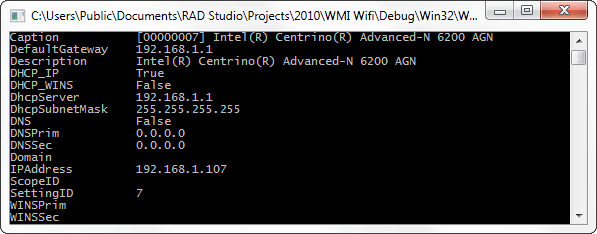
TcpIp Settings IPv4
To get the WiFi Adapter TcpIp (IPv4) Settings use the WiFi_AdapterTcpIpSettings class
[sourcecode language=”delphi” wraplines=”false”]
procedure GetWiFi_AdapterTcpIpSettingsInfo;
const
WbemUser =”;
WbemPassword =”;
WbemComputer =’localhost’;
wbemFlagForwardOnly = $00000020;
var
FSWbemLocator : OLEVariant;
FWMIService : OLEVariant;
FWbemObjectSet: OLEVariant;
FWbemObject : OLEVariant;
oEnum : IEnumvariant;
iValue : LongWord;
begin;
FSWbemLocator := CreateOleObject(‘WbemScripting.SWbemLocator’);
FWMIService := FSWbemLocator.ConnectServer(WbemComputer, ‘root\CIMV2’, WbemUser, WbemPassword);
FWbemObjectSet:= FWMIService.ExecQuery(‘SELECT * FROM WiFi_AdapterTcpIpSettings’,’WQL’,wbemFlagForwardOnly);
oEnum := IUnknown(FWbemObjectSet._NewEnum) as IEnumVariant;
while oEnum.Next(1, FWbemObject, iValue) = 0 do
begin
Writeln(Format(‘Caption %s’,[FWbemObject.Caption]));// String
Writeln(Format(‘DefaultGateway %s’,[FWbemObject.DefaultGateway]));// String
Writeln(Format(‘Description %s’,[FWbemObject.Description]));// String
Writeln(Format(‘DHCP_IP %s’,[FWbemObject.DHCP_IP]));// Boolean
Writeln(Format(‘DHCP_WINS %s’,[FWbemObject.DHCP_WINS]));// Boolean
Writeln(Format(‘DhcpServer %s’,[FWbemObject.DhcpServer]));// String
Writeln(Format(‘DhcpSubnetMask %s’,[FWbemObject.DhcpSubnetMask]));// String
Writeln(Format(‘DNS %s’,[FWbemObject.DNS]));// Boolean
Writeln(Format(‘DNSPrim %s’,[FWbemObject.DNSPrim]));// String
Writeln(Format(‘DNSSec %s’,[FWbemObject.DNSSec]));// String
Writeln(Format(‘Domain %s’,[FWbemObject.Domain]));// String
Writeln(Format(‘IPAddress %s’,[FWbemObject.IPAddress]));// String
Writeln(Format(‘ScopeID %s’,[FWbemObject.ScopeID]));// String
Writeln(Format(‘SettingID %s’,[FWbemObject.SettingID]));// String
Writeln(Format(‘WINSPrim %s’,[FWbemObject.WINSPrim]));// String
Writeln(Format(‘WINSSec %s’,[FWbemObject.WINSSec]));// String
FWbemObject:=Unassigned;
end;
end;
[/sourcecode]
TcpIp Settings IPv6
To get the WiFi Adapter TcpIp (IPv6) Settings use the WiFi_AdapterTcpIpv6Settings class
[sourcecode language=”delphi” wraplines=”false”]
procedure GetWiFi_AdapterTcpIpv6SettingsInfo;
const
WbemUser =”;
WbemPassword =”;
WbemComputer =’localhost’;
wbemFlagForwardOnly = $00000020;
var
FSWbemLocator : OLEVariant;
FWMIService : OLEVariant;
FWbemObjectSet: OLEVariant;
FWbemObject : OLEVariant;
oEnum : IEnumvariant;
iValue : LongWord;
begin;
FSWbemLocator := CreateOleObject(‘WbemScripting.SWbemLocator’);
FWMIService := FSWbemLocator.ConnectServer(WbemComputer, ‘root\CIMV2’, WbemUser, WbemPassword);
FWbemObjectSet:= FWMIService.ExecQuery(‘SELECT * FROM WiFi_AdapterTcpIpv6Settings’,’WQL’,wbemFlagForwardOnly);
oEnum := IUnknown(FWbemObjectSet._NewEnum) as IEnumVariant;
while oEnum.Next(1, FWbemObject, iValue) = 0 do
begin
Writeln(Format(‘Caption %s’,[FWbemObject.Caption]));// String
Writeln(Format(‘DefaultGateway %s’,[FWbemObject.DefaultGateway]));// String
Writeln(Format(‘Description %s’,[FWbemObject.Description]));// String
Writeln(Format(‘DHCP_IP %s’,[FWbemObject.DHCP_IP]));// Boolean
Writeln(Format(‘DHCP_WINS %s’,[FWbemObject.DHCP_WINS]));// Boolean
Writeln(Format(‘DhcpServer %s’,[FWbemObject.DhcpServer]));// String
Writeln(Format(‘DhcpSubnetMask %s’,[FWbemObject.DhcpSubnetMask]));// String
Writeln(Format(‘DNS %s’,[FWbemObject.DNS]));// Boolean
Writeln(Format(‘DNSPrim %s’,[FWbemObject.DNSPrim]));// String
Writeln(Format(‘DNSSec %s’,[FWbemObject.DNSSec]));// String
Writeln(Format(‘Domain %s’,[FWbemObject.Domain]));// String
Writeln(Format(‘IPAddress %s’,[FWbemObject.IPAddress]));// String
Writeln(Format(‘ScopeID %s’,[FWbemObject.ScopeID]));// String
Writeln(Format(‘SettingID %s’,[FWbemObject.SettingID]));// String
Writeln(Format(‘WINSPrim %s’,[FWbemObject.WINSPrim]));// String
Writeln(Format(‘WINSSec %s’,[FWbemObject.WINSSec]));// String
FWbemObject:=Unassigned;
end;
end;
[/sourcecode]
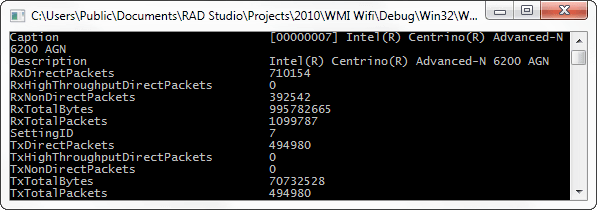
Global Adpater stats
To get the global stats about the adapter like use the WiFi_AdapterTxRxStats class.
[sourcecode language=”delphi” wraplines=”false”]
procedure GetWiFi_AdapterTxRxStatsInfo;
const
WbemUser =”;
WbemPassword =”;
WbemComputer =’localhost’;
wbemFlagForwardOnly = $00000020;
var
FSWbemLocator : OLEVariant;
FWMIService : OLEVariant;
FWbemObjectSet: OLEVariant;
FWbemObject : OLEVariant;
oEnum : IEnumvariant;
iValue : LongWord;
begin;
FSWbemLocator := CreateOleObject(‘WbemScripting.SWbemLocator’);
FWMIService := FSWbemLocator.ConnectServer(WbemComputer, ‘root\CIMV2’, WbemUser, WbemPassword);
FWbemObjectSet:= FWMIService.ExecQuery(‘SELECT * FROM WiFi_AdapterTxRxStats’,’WQL’,wbemFlagForwardOnly);
oEnum := IUnknown(FWbemObjectSet._NewEnum) as IEnumVariant;
while oEnum.Next(1, FWbemObject, iValue) = 0 do
begin
Writeln(Format(‘Caption %s’,[FWbemObject.Caption]));// String
Writeln(Format(‘Description %s’,[FWbemObject.Description]));// String
//Writeln(Format(‘Rates %s’,[FWbemObject.Rates]));//array of String
Writeln(Format(‘RxDirectPackets %s’,[FWbemObject.RxDirectPackets]));// String
//Writeln(Format(‘RxDirectPacketsRate %s’,[FWbemObject.RxDirectPacketsRate]));// array of String
Writeln(Format(‘RxHighThroughputDirectPackets %s’,[FWbemObject.RxHighThroughputDirectPackets]));// String
//Writeln(Format(‘RxHighThroughputDirectPacketsRate %s’,[FWbemObject.RxHighThroughputDirectPacketsRate]));// array of String
Writeln(Format(‘RxNonDirectPackets %s’,[FWbemObject.RxNonDirectPackets]));// String
//Writeln(Format(‘RxNonDirectPacketsRate %s’,[FWbemObject.RxNonDirectPacketsRate]));// array of String
Writeln(Format(‘RxTotalBytes %s’,[FWbemObject.RxTotalBytes]));// String
Writeln(Format(‘RxTotalPackets %s’,[FWbemObject.RxTotalPackets]));// String
Writeln(Format(‘SettingID %s’,[FWbemObject.SettingID]));// String
Writeln(Format(‘TxDirectPackets %s’,[FWbemObject.TxDirectPackets]));// String
//Writeln(Format(‘TxDirectPacketsRate %s’,[FWbemObject.TxDirectPacketsRate]));// array of String
Writeln(Format(‘TxHighThroughputDirectPackets %s’,[FWbemObject.TxHighThroughputDirectPackets]));// String
//Writeln(Format(‘TxHighThroughputDirectPacketsRate %s’,[FWbemObject.TxHighThroughputDirectPacketsRate]));// array of String
Writeln(Format(‘TxNonDirectPackets %s’,[FWbemObject.TxNonDirectPackets]));// String
//Writeln(Format(‘TxNonDirectPacketsRate %s’,[FWbemObject.TxNonDirectPacketsRate]));// array of String
Writeln(Format(‘TxTotalBytes %s’,[FWbemObject.TxTotalBytes]));// String
Writeln(Format(‘TxTotalPackets %s’,[FWbemObject.TxTotalPackets]));// String
FWbemObject:=Unassigned;
end;
end;
[/sourcecode]