The Road to Delphi

Delphi – Free Pascal – Oxygene


8 Comments

DIC now supports VCL Styles

I just released a major update to the Delphi IDE Colorizer adding VCL Styles support. So now you can style the non client area of the floating forms of the IDE and also use the elements of the VCL Styles on the RAD Studio IDE.

The next image shows how the VCL Styles are enabled on the wizard and which elements can you choose, for example you can select only style the forms with the VCL Styles and use the current theme settings for draw the controls and menus.

2014_07_07_23_00_55_Delphi_IDE_Colorizer_Settings

Check the full list of features on this page.

Check the next Video which show how the new feature works.


50 Comments

Delphi IDE Colorizer – Open Beta

A few months ago I started to work on a new project called Delphi IDE Colorizer. In the past weeks a beta version was tested for a dozen of Delphi developers on a closed beta. Now it’s time to move forward and a open beta version of the plugin is available. Check the next images and videos which provide a description of the Wizard.

Introduction

The Delphi IDE Colorizer (DIC) is a Wizard which allows to customize the look and feel of the workspace of the RAD Studio IDE.

Some of the features of the plugin are

  • DIC is compatible with RAD Studio XE, XE2, XE3, XE4, XE5, X6.
  • Transparent menus
  • Allow to change the icons, set the colors, and gradient direction of the title bar of the docked windows
  • Set the colors, and gradient direction of the toolbars.
  • Improve the drawing of the disabled icons used in menus and toolbars
  • Compatible with CnWizards and GExperts
  • Replace the icons used in the gutter and the debugger.
  • Includes 90+ themes.

Download

Before to download please read the FAQ of the plugin.
For download the wizard check the page of the project.

Check the next sample images
DeepskyBlue_default_layout

YellowGreen_debug_layout_assembly

DIC_Transparent_Menus

DIC_VCLStyles_Menus


13 Comments

VCL Styles Utils, Embarcadero Agreement and Delphi XE6

Embarcadero Agreement

As probably you know, a small part of the VCL Styles utils project was licensed to Embarcadero, via a non-exclusive proprietary license. This means which they can use, modify and distribute the code as part of the VCL, but the Copyright and the Open Source version of the project still belong us. So you can continue using this library in all the Delphi versions supported (XE2-XE6).

Delphi XE6

The VCL Styles utils was updated to support and avoid conflicts with Delphi XE6. Check the next image which show the Open Dialog styled using the New XE6 style Table Dark

Tabla_Dark_Open

Since now the main difference is that you can use the menu style hook which is included as part of the Delphi XE6 VCL Styles, or continue using the menu hook of the library, this is described in the Vcl.Styles.Utils.Menus unit.

{$DEFINE UseVCLStyleUtilsMenu}
{$IF CompilerVersion >= 27} // Use the XE6 menu syshooks by default
  {$UNDEF UseVCLStyleUtilsMenu} // comment this line if you want to use the VCL Styles Utils Menus Hooks instead
{$IFEND}

About the Styled Dialogs

Using the library is the only way to style the system dialogs, currently we support all the Common Dialog Box Types (Color, Find, Font, Open, Page Setup, Print, Replace, Save As).

Check the Common Dialogs styled using the Premium VCL Style Jet.
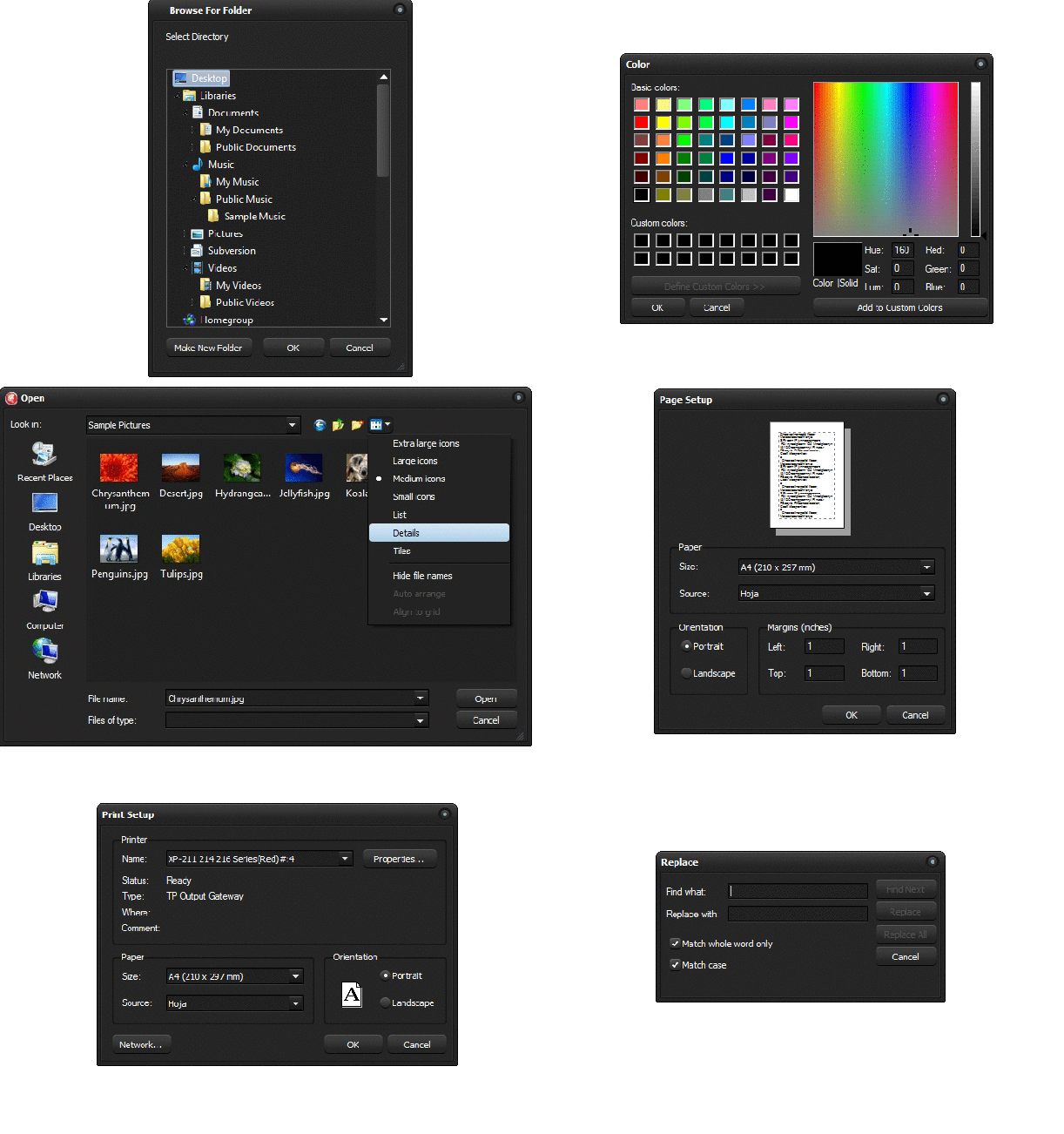
Jet

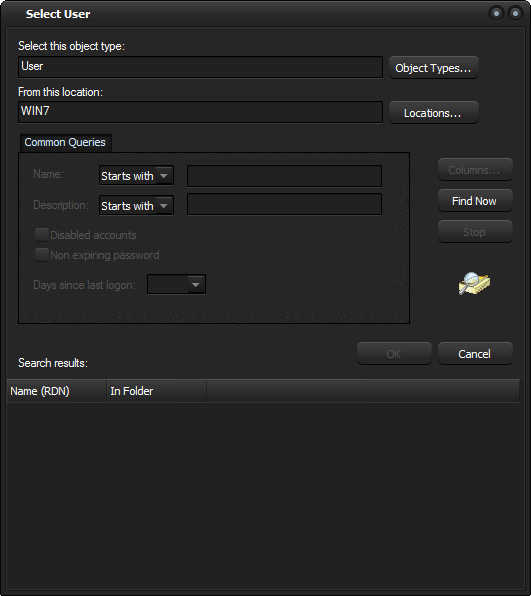
But not just the Common dialogs are styled, in fact any dialog (#32770 Class) which uses the windows common controls is supported (of course if the dialog had a owner draw control this cannot be styled). For an example take a look to the next images.

Prompt DataSource Dialog

output_sWoRA1

Select User Dialog

ObjectSelect_4

Note: Some dialogs cannot be styled, because uses the undocumented DirectUIHWND control, these include the new (introduced in windows Vista) Open and Save As dialog and the Task Dialogs

Rodrigo.


49 Comments

VCL Styles for Inno Setup

Introduction

As part of the VCL Styles Utils project, I made a plugin (dll) to skin the installers created by Inno setup. The current size of the plugin is about 1.6 mb, but when is included (and compressed) in the script only add ~490 Kb to the final installer.

output_qkRcra

How to use it

In order to use the plugin you must follow these steps

  1. Add the VclStylesinno.dll file to your inno setup script and the VCL Style file to use.
  2. Import the function LoadVCLStyleW for Unicode versions of Inno setup or the LoadVCLStyleA method for the Ansi version
  3. Import the function UnLoadVCLStyles
  4. In the InitializeSetup function extract the style to use and call the LoadVCLStyle method passing the name of the style file
  5. Finally in the DeinitializeSetup function call the UnLoadVCLStyles method.

Check the next sample script

[Files]
Source: ..\VclStylesinno.dll; DestDir: {app}; Flags: dontcopy
Source: ..\Styles\Amakrits.vsf; DestDir: {app}; Flags: dontcopy

[Code]
// Import the LoadVCLStyle function from VclStylesInno.DLL
procedure LoadVCLStyle(VClStyleFile: String); external 'LoadVCLStyleW@files:VclStylesInno.dll stdcall';
// Import the UnLoadVCLStyles function from VclStylesInno.DLL
procedure UnLoadVCLStyles; external 'UnLoadVCLStyles@files:VclStylesInno.dll stdcall';

function InitializeSetup(): Boolean;
begin
  ExtractTemporaryFile('Amakrits.vsf');
  LoadVCLStyle(ExpandConstant('{tmp}\Amakrits.vsf'));
  Result := True;
end;

procedure DeinitializeSetup();
begin
  UnLoadVCLStyles;
end;

TODO

  • Add support for TFolderTreeView and TStartMenuFolderTreeView components
  • Add support for themed controls in the TNewCheckBoxList component
  • Add support for the npbstMarquee style in the TNewProgressBar component

Source code and Installer

The source code and installer is available on Github.

As always all your comments and feedback is welcome.


5 Comments

Delphi Dev. Shell Tools – New features 3

Features added to the new version of the Delphi Dev. Shell Tools.

  • Full refactoring of the code related to drawing the items bitmaps and icons, now only 32 bpp bmp (Windows 8/7/Vista) and 32-bit with alpha channel icons (Windows XP) are used.
  • Added support for Delphi XE5. Now you can build your Delphi Android projects with a single click without open the Delphi IDE.

dproj_menu_new

  • Added feature to extended the Shell extension with custom scripts (.bat). This new option allows create a script and associate a set of extensions.

This is a preview of the window to register the scripts.

Custom_Tools

You can setup the Sub-Menu (Group) where the new option will be displayed, the label and image for the menu entry, the extensions associated, set an option to run the script as Administrator and use a small set of macros.

The tool includes as set of predefined scripts for FPC and Delphi which you can use as example to register you own most used Apps.

FPC & Lazarus

  • h2pas is a small command-line utility that can be used to translate C header files to pascal units. The Free Pascal team uses it to make import units for important C libraries such as GTK or MySQL.
  • ppdep is a small utility that scans a program or unit and creates a depend file that can be used for inclusion by make. It understands conditional symbols and interdependency of units.
  • ptop is a configurable source formatter. It pretty-prints your pascal code, much like indent does for C code.
  • ppudump dumps the contents of a unit in human-readable format. It understands older versions of units and gracefully handles unknown (future) versions.

For more info check the Tools that come with Free Pascal page.

Delphi

For more info check the RAD Studio Command-Line Utilities page

External Tools

  • Regsvr32, This command-line tool registers .dll and ocx files as command components in the registry.


17 Comments

Delphi Dev. Shell Tools – New features 2

I just added a set of new features to the Delphi Dev. Shell Tools

Settings options, Checksum calculation (CRC32, MD4, MD5, SHA1, SHA256, SHA384, SHA512), ,menu customization, copy the content of the selected file to the clipboard, enable/disable check for updates, support for more file extensions (.lpr, .lfm, .proj).

Check the next images.

Support for add custom extensions in some tasks

New option to show in the main menu or a sub menu the available tasks

Checksum calculation CRC32, MD4, MD5, SHA1, SHA256, SHA384, SHA512