I just added support for Delphi XE7 to the <a href="https://github.com/rruz/delphi-dev-shell-tools project.
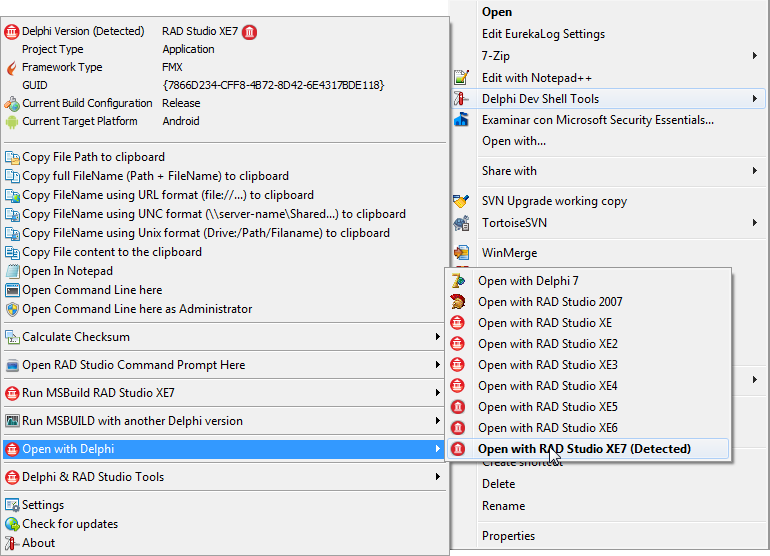

I just added support for Delphi XE7 to the <a href="https://github.com/rruz/delphi-dev-shell-tools project.
I just added support for RAD Studio XE7 and Appmethod 1.15 to the Delphi IDE Theme Editor.

I’m very pleased to introduce a very cool new feature to the VCL Styles Utils project. This is the support for controls in the Non Client Area of the forms through the TNCControls component.
Check the next form with the Auric Vcl Style applied.

Now the same form but with a set of NC Buttons in the title bar.

To use in your forms you only need to add the Vcl.Styles.NC and Vcl.Styles.FormStyleHooks units to your project and create a TNCControls component in each form where do you want use the NC Controls.
Check the next sample code
procedure TForm1.FormCreate(Sender: TObject);
begin
 NCControls:=TNCControls.Create(Self);
 //Add a NC Button
 NCControls.List.Add(TNCButton.Create(NCControls));
 //Set the style of the button
 NCControls.List[0].Style := nsSplitButton;
 //Set the style of the image
 NCControls.List[0].ImageStyle := isGrayHot;
 //Set the image list
 NCControls.List[0].Images := ImageList1;
 NCControls.List[0].ImageIndex := 3;
 //Set the bounds
 NCControls.List[0].BoundsRect := Rect(30,5,100,25);
 NCControls.List[0].Caption := 'Menu';
 //Assign the menu and events.
 NCControls.List[0].DropDownMenu:= PopupMenu1;
 NCControls.List[0].OnClick := ButtonNCClick;
end;
And this is the result


Exist 4 kind of buttons which you can choose.

Also you can use a custom Vcl Style to draw the controls.

Try the sample application from the project repository.
Also you can download a compiled demo from here.
Remember report any bug o made your suggestions via the issue page of the project.
Typically we use a combobox or listbox to allow to the final user select and appy a VCL Style, Today I will show you a new way using the system menu of the form.
First you need to use the GetSystemMenu WinApi function to get a handle to the system menu of the form. Then using the AppendMenu or the InsertMenuItem methods you can customize the system menu, from here you must store the identifier of the new menu item added and finally process the WM_SYSCOMMAND message to launch an action.
Check the next commented code
uses
  System.Rtti,
  System.Classes,
  System.Generics.Collections,
  WinApi.Windows,
  WinApi.Messages,
  Vcl.Themes,
  Vcl.Styles,
  Vcl.Forms;

type
  TMethodInfo=class;

  TProcCallback = reference to procedure(Info : TMethodInfo);
  TMethodInfo=class
   Value1 : TValue;
   Value2 : TValue;
   Method : TProcCallback;
  end;
  TVclStylesSystemMenu=class(TComponent)
  strict private
    FVCLStylesMenu : HMenu;
    FOrgWndProc: TWndMethod;
    FForm : TForm;
    FMethodsDict : TObjectDictionary<NativeUInt, TMethodInfo>;
    procedure CreateMenus;
    procedure DeleteMenus;
    procedure CreateMenuStyles;
    procedure WndProc(var Message: TMessage);
  public
    constructor Create(AOwner: TForm); reintroduce;
    destructor Destroy; override;
  end;

implementation

uses
  Vcl.Controls,
  System.SysUtils;

const
 VCLStylesMenu=WM_USER + 666;

//Add a new Menu Item
function InsertMenuHelper(hMenu: HMENU; uPosition: UINT; uIDNewItem: UINT_PTR; lpNewItem, IconName: LPCWSTR) : BOOL;
var
  LMenuItem : TMenuItemInfo;
begin
  ZeroMemory(@LMenuItem, SizeOf(TMenuItemInfo));
  LMenuItem.cbSize := SizeOf(TMenuItemInfo);
  LMenuItem.fMask  := MIIM_FTYPE or MIIM_ID or MIIM_BITMAP or MIIM_STRING;
  LMenuItem.fType  := MFT_STRING;
  LMenuItem.wID    := uIDNewItem;
  LMenuItem.dwTypeData := lpNewItem;
  Result:=InsertMenuItem(hMenu, uPosition, True, LMenuItem);
end;

//Add a new separator
procedure AddMenuSeparatorHelper(hMenu : HMENU; var MenuIndex : Integer);
var
  LMenuInfo    : TMenuItemInfo;
  Buffer       : array [0..79] of char;
begin
  ZeroMemory(@LMenuInfo, SizeOf(TMenuItemInfo));
  LMenuInfo.cbSize := sizeof(LMenuInfo);
  LMenuInfo.fMask  := MIIM_TYPE;
  LMenuInfo.dwTypeData := Buffer;
  LMenuInfo.cch := SizeOf(Buffer);
  if GetMenuItemInfo(hMenu, MenuIndex-1, True, LMenuInfo) then
  begin
    if (LMenuInfo.fType and MFT_SEPARATOR) = MFT_SEPARATOR then
    else
    begin
      InsertMenu(hMenu, MenuIndex, MF_BYPOSITION or MF_SEPARATOR, 0, nil);
      inc(MenuIndex);
    end;
  end;
end;

{ TVclStylesSystemMenu }

constructor TVclStylesSystemMenu.Create(AOwner: TForm);
begin
  inherited Create(AOwner);
  //Get an instance to the form
  FForm:=AOwner;
  //Init the collection to store the menu ids and callbacks
  FMethodsDict:=TObjectDictionary<NativeUInt, TMethodInfo>.Create([doOwnsValues]);
  //store the original WndProc
  FOrgWndProc := FForm.WindowProc;
  //replace the WndProc of the form
  FForm.WindowProc := WndProc;
  //Modify the system menu
  CreateMenus;
end;

destructor TVclStylesSystemMenu.Destroy;
begin
  DeleteMenus;
  FForm.WindowProc := FOrgWndProc;
  FMethodsDict.Free;
  inherited;
end;

procedure TVclStylesSystemMenu.CreateMenus;
begin
  CreateMenuStyles;
end;

procedure TVclStylesSystemMenu.DeleteMenus;
begin
   if IsMenu(FVCLStylesMenu) then
   while GetMenuItemCount(FVCLStylesMenu)>0 do
     DeleteMenu(FVCLStylesMenu, 0, MF_BYPOSITION);

   FMethodsDict.Clear;
end;

procedure TVclStylesSystemMenu.CreateMenuStyles;
var
 LSysMenu : HMenu;
 LMenuItem: TMenuItemInfo;
 s : string;
 uIDNewItem, LSubMenuIndex : Integer;
 LMethodInfo : TMethodInfo;
begin
  LSysMenu := GetSystemMenu(FForm.Handle, False);

  LSubMenuIndex:=GetMenuItemCount(LSysMenu);
  AddMenuSeparatorHelper(LSysMenu,  LSubMenuIndex);

  FVCLStylesMenu   := CreatePopupMenu();
  s:='VCL Styles';

  uIDNewItem := VCLStylesMenu;
  ZeroMemory(@LMenuItem, SizeOf(TMenuItemInfo));
  LMenuItem.cbSize := SizeOf(TMenuItemInfo);
  LMenuItem.fMask  := MIIM_SUBMENU or MIIM_FTYPE or  MIIM_ID or MIIM_BITMAP or MIIM_STRING;
  LMenuItem.fType  := MFT_STRING;
  LMenuItem.wID    := VCLStylesMenu;
  LMenuItem.hSubMenu := FVCLStylesMenu;
  LMenuItem.dwTypeData := PWideChar(s);
  LMenuItem.cch := Length(s);
  //Add the new menu item to the system menu
  InsertMenuItem(LSysMenu, GetMenuItemCount(LSysMenu), True, LMenuItem);
  inc(uIDNewItem);
  LSubMenuIndex:=0;

  //Iterate over the registered styles and create a new menu entry for each style
  for s in TStyleManager.StyleNames do
  begin
    InsertMenuHelper(FVCLStylesMenu, LSubMenuIndex, uIDNewItem,  PChar(s), nil);
    if SameText(TStyleManager.ActiveStyle.Name, s) then
      CheckMenuItem(FVCLStylesMenu, LSubMenuIndex, MF_BYPOSITION or MF_CHECKED);
    inc(LSubMenuIndex);
    inc(uIDNewItem);
    LMethodInfo:=TMethodInfo.Create;
    LMethodInfo.Value1:=s;
    //set the method to execute when the item is clicked
    LMethodInfo.Method:=procedure(Info : TMethodInfo)
                        begin
                          TStyleManager.SetStyle(Info.Value1.AsString);
                        end;
    //register the menu id and the callback function.
    FMethodsDict.Add(uIDNewItem-1, LMethodInfo);
  end;
end;

procedure TVclStylesSystemMenu.WndProc(var Message: TMessage);
var
  LVerb : NativeUInt;
begin
  case Message.Msg of
    //Detect when the window handle is recreated
    CM_RECREATEWND: begin
                      DeleteMenus;
                      FOrgWndProc(Message);
                      CreateMenus;
                    end;
    //Track the system menu calls
    WM_SYSCOMMAND : begin
                     if FMethodsDict.ContainsKey(TWMSysCommand(Message).CmdType) then
                     begin
                      LVerb:=TWMSysCommand(Message).CmdType;
                      FMethodsDict.Items[LVerb].Method(FMethodsDict.Items[LVerb]);
                     end
                     else
                      FOrgWndProc(Message);
                    end
  else
    FOrgWndProc(Message);
  end;
end;

end.
And this the result


To use this class, only you need create an new instance passing a reference to the form.
procedure TForm1.FormCreate(Sender: TObject);
begin
  TVclStylesSystemMenu.Create(Self);
end;
You can check the full source code here.
I just detect a conflict with the AVG Antivirus 2014 Shell extension . This cause which the Delphi Dev. Shell Tools menu is not show. To fix this issue you must disable and enable the AVG Antivirus Shell extension.
Please follow the next steps to fix.

I just uploaded a new release of the VCL Styles Utils project improving the support for ListViews and TreeView controls. When you uses a TListView setting the CheckBoxes property to True and with the VCL Styles enabled the control will look like so

As you can see the Checkboxes is using the Windows native look and feel, this is because the OS draw these controls directly and not the VCL. Some time ago I show a workaround for this owner-drawing the TListView, unfortunately this implies modify the source code for each TListView in the project which means a lot of work in some scenarios. But now with this new addition to the VCL Styles Utils only adding the VCL.Styles.Hooks unit to your project the checkbox control is properly drawn using the current active VCL Style.
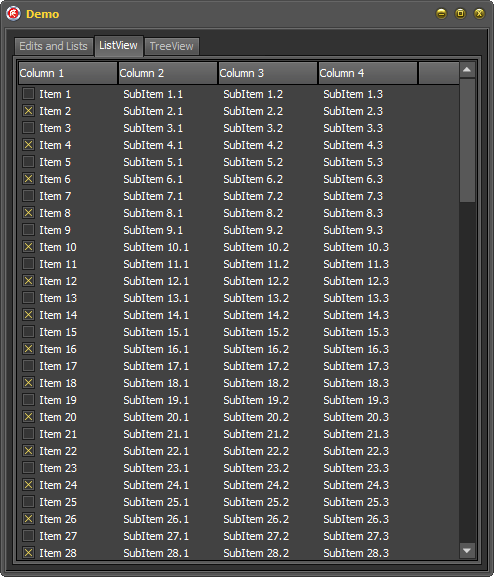
The same improvement goes for the TTreeview controls, by default the opened and closed glyphs are draw using the native look and feel

And now using the VCL.Styles.Hooks unit

Remember which this unit also include a fix for the system colors when the VCL Styles are enabled as is show on this article.
Without Vcl.Styles.Hooks

With Vcl.Styles.Hooks
Note : The VCL.Styles.Hooks unit works hooking the UxTheme dll, this means which using this unit on your project will cause which all the calls to the DrawThemeBackground and DrawThemeBackgroundEx methods with the BP_RADIOBUTTON, BP_CHECKBOX, TVP_GLYPH, TVP_HOTGLYPH parts will be affected.
I just released a major update to the Delphi IDE Colorizer adding VCL Styles support. So now you can style the non client area of the floating forms of the IDE and also use the elements of the VCL Styles on the RAD Studio IDE.
The next image shows how the VCL Styles are enabled on the wizard and which elements can you choose, for example you can select only style the forms with the VCL Styles and use the current theme settings for draw the controls and menus.

Check the full list of features on this page.
Check the next Video which show how the new feature works.
I just updated the Delphi IDE Theme Editor and the Delphi IDE Colorizer to support Appmethod 1.14
Check out the next screenshots


A few months ago I started to work on a new project called Delphi IDE Colorizer. In the past weeks a beta version was tested for a dozen of Delphi developers on a closed beta. Now it’s time to move forward and a open beta version of the plugin is available. Check the next images and videos which provide a description of the Wizard.
The Delphi IDE Colorizer (DIC) is a Wizard which allows to customize the look and feel of the workspace of the RAD Studio IDE.
Some of the features of the plugin are


Before to download please read the FAQ of the plugin.
For download the wizard check the page of the project.
Check the next sample images


This is the first of a series of articles about how use the Delphi Detours Library . On this entry I will show you how you can patch the title bar of the dock windows used by the RAD Studio IDE (or a VCL application).
The Delphi IDE uses the Vcl.CaptionedDockTree.TDockCaptionDrawer class to draw the title bar of the docked forms. Unfortunately the look and feel of the docked forms doesn’t looks very nice.

So if we want create new and nice title bar we must patch this class, specifically the DrawDockCaption method.
This is the definition of the TDockCaptionDrawer class.
  TDockCaptionDrawer = class(TObject)
  private
    FDockCaptionOrientation: TDockCaptionOrientation;
    FDockCaptionPinButton: TDockCaptionPinButton;
    function GetCloseRect(const CaptionRect: TRect): TRect;
    function GetPinRect(const CaptionRect: TRect): TRect;
    function CalcButtonSize(const CaptionRect: TRect): Integer;
  protected
    property DockCaptionOrientation: TDockCaptionOrientation read FDockCaptionOrientation;
  public
    procedure DrawDockCaption(const Canvas: TCanvas;
      CaptionRect: TRect; State: TParentFormState); virtual;
    function DockCaptionHitTest(const CaptionRect: TRect;
      const MousePos: TPoint): TDockCaptionHitTest; virtual;
    constructor Create(DockCaptionOrientation: TDockCaptionOrientation); virtual;
    property DockCaptionPinButton: TDockCaptionPinButton read FDockCaptionPinButton write FDockCaptionPinButton;
  end;
The first step is create a new Delphi package in order to load the module inside of the Delphi IDE. Then we must define a trampoline with the same signature of the method to patch.
The method DrawDockCaption looks like so
procedure DrawDockCaption(const Canvas: TCanvas; CaptionRect: TRect; State: TParentFormState); virtual;
And the trampoline definition
type
 TDockCaptionDrawerClass = class(TDockCaptionDrawer);
var
  Trampoline_TDockCaptionDrawer_DrawDockCaption      : function (Self : TDockCaptionDrawerClass;const Canvas: TCanvas; CaptionRect: TRect; State: TParentFormState): TDockCaptionHitTest =nil;
You can note which the first parameter (Self : TDockCaptionDrawerClass) of the trampoline definition include a reference to the object where is contained the original method, you can use a simple TObject as well but is better use the original class, on this case I’m using cracker class to access the protected members inside of the new patched method.
After of define the trampoline , we need create the new function which be draw the caption bar, the signature of this method must be match with the trampoline.
function CustomDrawDockCaption(Self : TDockCaptionDrawerClass;const Canvas: TCanvas; CaptionRect: TRect; State: TParentFormState): TDockCaptionHitTest;
The next step is patch the address of the original method. This is done using the InterceptCreate function of the DDetours unit. This function takes two parameters which are the address of the method to patch and the address of the new method, as result the function returns a pointer to the original function.
Trampoline_TDockCaptionDrawer_DrawDockCaption := InterceptCreate(@TDockCaptionDrawer.DrawDockCaption, @CustomDrawDockCaption);
Remember which you need restore the original address of the patched method (usually when the application is closed or the module is unloaded) this is done using the InterceptRemove function passing the trampoline variable.
  if Assigned(Trampoline_TDockCaptionDrawer_DrawDockCaption) then
    InterceptRemove(@Trampoline_TDockCaptionDrawer_DrawDockCaption);
Now check the implementation of the new drawing method
function CustomDrawDockCaption(Self : TDockCaptionDrawerClass;const Canvas: TCanvas; CaptionRect: TRect; State: TParentFormState): TDockCaptionHitTest;

  procedure DrawIcon;
  var
    FormBitmap: TBitmap;
    DestBitmap: TBitmap;
    ImageSize: Integer;
    X, Y: Integer;
  begin
    if (State.Icon <> nil) and (State.Icon.HandleAllocated) then
    begin
      if Self.DockCaptionOrientation = dcoHorizontal then
      begin
        ImageSize := CaptionRect.Bottom - CaptionRect.Top - 3;
        X := CaptionRect.Left;
        Y := CaptionRect.Top + 2;
      end
      else
      begin
        ImageSize := CaptionRect.Right - CaptionRect.Left - 3;
        X := CaptionRect.Left + 1;
        Y := CaptionRect.Top;
      end;

      FormBitmap := nil;
      DestBitmap := TBitmap.Create;
      try
        FormBitmap := TBitmap.Create;
        DestBitmap.Width :=  ImageSize;
        DestBitmap.Height := ImageSize;
        DestBitmap.Canvas.Brush.Color := clFuchsia;
        DestBitmap.Canvas.FillRect(Rect(0, 0, DestBitmap.Width, DestBitmap.Height));
        FormBitmap.Width := State.Icon.Width;
        FormBitmap.Height := State.Icon.Height;
        FormBitmap.Canvas.Draw(0, 0, State.Icon);
        ScaleImage(FormBitmap, DestBitmap, DestBitmap.Width / FormBitmap.Width);

        DestBitmap.TransparentColor := DestBitmap.Canvas.Pixels[0, DestBitmap.Height - 1];
        DestBitmap.Transparent := True;

        Canvas.Draw(X, Y, DestBitmap);
      finally
        FormBitmap.Free;
        DestBitmap.Free;
      end;

      if Self.DockCaptionOrientation = dcoHorizontal then
        CaptionRect.Left := CaptionRect.Left + 6 + ImageSize
      else
        CaptionRect.Top := CaptionRect.Top + 6 + ImageSize;
    end;
  end;

  function CalcButtonSize(const CaptionRect: TRect): Integer;
  const
    cButtonBuffer = 8;
  begin
    if Self.DockCaptionOrientation = dcoHorizontal then
      Result := CaptionRect.Bottom - CaptionRect.Top - cButtonBuffer
    else
      Result := CaptionRect.Right - CaptionRect.Left - cButtonBuffer;
  end;

  function GetCloseRect(const CaptionRect: TRect): TRect;
  const
    cSideBuffer = 4;
  var
    CloseSize: Integer;
  begin
    CloseSize := CalcButtonSize(CaptionRect);
    if Self.DockCaptionOrientation = dcoHorizontal then
    begin
      Result.Left := CaptionRect.Right - CloseSize - cSideBuffer;
      Result.Top := CaptionRect.Top + ((CaptionRect.Bottom - CaptionRect.Top) - CloseSize) div 2;
    end
    else
    begin
      Result.Left := CaptionRect.Left + ((CaptionRect.Right - CaptionRect.Left) - CloseSize) div 2;
      Result.Top := CaptionRect.Top + 2 * cSideBuffer;
    end;
    Result.Right := Result.Left + CloseSize;
    Result.Bottom := Result.Top + CloseSize;
  end;

  function GetPinRect(const CaptionRect: TRect): TRect;
  const
    cSideBuffer = 4;
  var
    PinSize: Integer;
  begin
    PinSize := CalcButtonSize(CaptionRect);
    if Self.DockCaptionOrientation = dcoHorizontal then
    begin
      Result.Left := CaptionRect.Right - 2*PinSize - 2*cSideBuffer;
      Result.Top := CaptionRect.Top + ((CaptionRect.Bottom - CaptionRect.Top) - PinSize) div 2;
    end
    else
    begin
      Result.Left := CaptionRect.Left + ((CaptionRect.Right - CaptionRect.Left) - PinSize) div 2;
      Result.Top := CaptionRect.Top + 2*cSideBuffer + 2*PinSize;
    end;
    Result.Right := Result.Left + PinSize + 2;
    Result.Bottom := Result.Top + PinSize;
  end;

var
  ShouldDrawClose: Boolean;
  CloseRect, PinRect: TRect;
  LPngImage : TPngImage;
  LStartColor, LEndColor : TColor;
begin
  Canvas.Font.Color :=  DockerFontColor;
   //check the orientation of the dock caption
  if Self.DockCaptionOrientation = dcoHorizontal then
  begin
    Canvas.Pen.Width := 1;
    //set the color for the border of the caption bar
    Canvas.Pen.Color := DockerBorderColor;

    CaptionRect.Top := CaptionRect.Top + 1;
    //set the colors for the captin bar background
    if State.Focused then
    begin
      LStartColor := DockerStartEnabledColor;
      LEndColor   := DockerEndEnabledColor;
    end
    else
    begin
      LStartColor := DockerStartDisabledColor;
      LEndColor   := DockerEndDisabledColor;
    end;

    //draw the caption bar using a gradient
    GradientFillCanvas(Canvas, LStartColor, LEndColor, Rect(CaptionRect.Left + 1, CaptionRect.Top + 1, CaptionRect.Right, CaptionRect.Bottom), gdVertical);

    //draw the border of the caption bar
    Canvas.Pen.Color := DockerBorderColor;
    with CaptionRect do
      Canvas.Polyline([Point(Left + 2, Top), Point(Right - 2, Top), Point(Right, Top + 2),
        Point(Right, Bottom - 2), Point(Right - 2, Bottom), Point(Left + 2, Bottom), Point(Left, Bottom - 2), Point(Left, Top + 2), Point(Left + 3, Top)]);

    //draw the pin buttton
    CloseRect := GetCloseRect(CaptionRect);

    if Self.DockCaptionPinButton <> dcpbNone then
    begin
      PinRect := GetPinRect(CaptionRect);

      LPngImage:=TPNGImage.Create;
      try
        if Self.DockCaptionPinButton = dcpbUp then
         LPngImage.LoadFromResourceName(HInstance, 'pin_dock_left')
        else
         LPngImage.LoadFromResourceName(HInstance, 'pin_dock');

        Canvas.Draw(PinRect.Left, PinRect.Top, LPngImage);
      finally
        LPngImage.free;
      end;

      CaptionRect.Right := PinRect.Right - 2;
    end
    else
      CaptionRect.Right := CloseRect.Right - 2;

    CaptionRect.Left := CaptionRect.Left + 6;
    DrawIcon;
    ShouldDrawClose := CloseRect.Left >= CaptionRect.Left;

  end
  else
  begin
    Canvas.MoveTo(CaptionRect.Left + 1, CaptionRect.Top + 1);
    Canvas.LineTo(CaptionRect.Right - 1, CaptionRect.Top + 1);

    if State.Focused then
    begin
      LStartColor := DockerStartEnabledColor;
      LEndColor   := DockerEndEnabledColor;
    end
    else
    begin
      LStartColor := DockerStartDisabledColor;
      LEndColor   := DockerEndDisabledColor;
    end;

    GradientFillCanvas(Canvas, LStartColor, LEndColor,Rect(CaptionRect.Left, CaptionRect.Top + 2, CaptionRect.Right, CaptionRect.Bottom), gdVertical);

    Canvas.Pen.Color := DockerBorderColor;
    Canvas.MoveTo(CaptionRect.Left + 1, CaptionRect.Bottom);
    Canvas.LineTo(CaptionRect.Right - 1, CaptionRect.Bottom);

    Canvas.Font.Orientation := 900;
    CloseRect := GetCloseRect(CaptionRect);

    if Self.DockCaptionPinButton <> dcpbNone then
    begin
      PinRect := GetPinRect(CaptionRect);
      LPngImage:=TPNGImage.Create;
      try
        if Self.DockCaptionPinButton = dcpbUp then
         LPngImage.LoadFromResourceName(HInstance, 'pin_dock_left')
        else
         LPngImage.LoadFromResourceName(HInstance, 'pin_dock');

        Canvas.Draw(PinRect.Left, PinRect.Top, LPngImage);
      finally
        LPngImage.free;
      end;
      CaptionRect.Top := PinRect.Bottom + 2;
    end
    else
      CaptionRect.Top := CloseRect.Bottom + 2;

    ShouldDrawClose   := CaptionRect.Top < CaptionRect.Bottom;
    CaptionRect.Right := CaptionRect.Left + (CaptionRect.Bottom - CaptionRect.Top - 2);
    CaptionRect.Top   := CaptionRect.Top + Canvas.TextWidth(State.Caption) + 2;

    if CaptionRect.Top > CaptionRect.Bottom then
      CaptionRect.Top := CaptionRect.Bottom;
  end;

  Canvas.Brush.Style := bsClear;
  //draw the text of the caption bar
  if State.Caption <> '' then
  begin
    if State.Focused then
      Canvas.Font.Style := Canvas.Font.Style + [fsBold]
    else
      Canvas.Font.Style := Canvas.Font.Style - [fsBold];

   if ShouldDrawClose then
     CaptionRect.Right := CaptionRect.Right - (CloseRect.Right - CloseRect.Left) - 4;

    Canvas.TextRect(CaptionRect, State.Caption,  [tfEndEllipsis, tfVerticalCenter, tfSingleLine]);
  end;

  //draw the close buttton
  if ShouldDrawClose then
  begin
    LPngImage:=TPNGImage.Create;
    try
      LPngImage.LoadFromResourceName(HInstance, 'close_dock');
      Canvas.Draw(CloseRect.Left, CloseRect.Top, LPngImage);
    finally
      LPngImage.free;
    end;
  end;

  Exit(0);
end;
Now if we install the package on the Delphi IDE the result will be like so

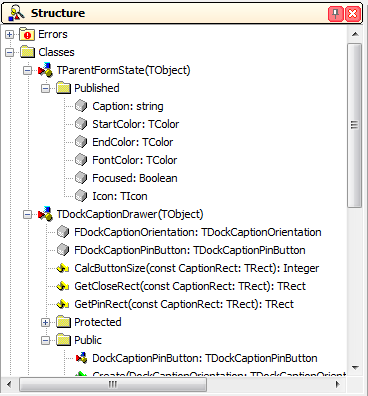
If you try the above code in Delphi XE6, the captions will remain with the default IDE Theme. This is because Delphi XE6 introduces a new drawer for the IDE dock forms, this is implemented in the ModernTheme200.bpl package. So in order to make this patch works on XE6 we must patch the DrawDockCaption of this package.
First you must retrieve the signature of the method to patch and then get the address of that method. check the next code.
const
  sModernThemeDrawDockCaption = '@Moderntheme@TModernDockCaptionDrawer@DrawDockCaption$qqrxp20Vcl@Graphics@TCanvasrx18System@Types@TRectrx38Vcl@Captioneddocktree@TParentFormState';

{$IF CompilerVersion>=27}
  ModernThemeModule := LoadLibrary('ModernTheme200.bpl');
  if ModernThemeModule<>0 then
  begin
   pModernThemeDrawDockCaption := GetProcAddress(ModernThemeModule, PChar(sModernThemeDrawDockCaption));
   if Assigned(pModernThemeDrawDockCaption) then
     Trampoline_ModernDockCaptionDrawer_DrawDockCaption:= InterceptCreate(pModernThemeDrawDockCaption, @CustomDrawDockCaption);
  end;
{$ENDIF}
Finally this is the full implementation of the new title bar for the docked forms.
uses
 Types,
 Windows,
 Graphics,
 CaptionedDockTree,
 PngImage,
 GraphUtil,
 Forms,
 DDetours;

{$R Dockimages.RES}

type
 TDockCaptionDrawerClass = class(TDockCaptionDrawer);
var
  Trampoline_TDockCaptionDrawer_DrawDockCaption      : function (Self : TDockCaptionDrawerClass;const Canvas: TCanvas; CaptionRect: TRect; State: TParentFormState): TDockCaptionHitTest =nil;
  {$IF CompilerVersion>=27}
  Trampoline_ModernDockCaptionDrawer_DrawDockCaption : function (Self : TDockCaptionDrawerClass;const Canvas: TCanvas; CaptionRect: TRect; State: TParentFormState): TDockCaptionHitTest =nil;
  {$ENDIF}
  DockerFontColor          : TColor = clBlack;
  DockerBorderColor        : TColor = clBlack;
  DockerStartEnabledColor  : TColor = clWebIvory;
  DockerEndEnabledColor    : TColor = clWebPapayaWhip;
  DockerStartDisabledColor : TColor = clSilver;
  DockerEndDisabledColor   : TColor = clSilver;

{$IF CompilerVersion>=27}
  ModernThemeModule           : HMODULE;
  pModernThemeDrawDockCaption : Pointer;
{$ENDIF}

function CustomDrawDockCaption(Self : TDockCaptionDrawerClass;const Canvas: TCanvas; CaptionRect: TRect; State: TParentFormState): TDockCaptionHitTest;

  procedure DrawIcon;
  var
    FormBitmap: TBitmap;
    DestBitmap: TBitmap;
    ImageSize: Integer;
    X, Y: Integer;
  begin
    if (State.Icon <> nil) and (State.Icon.HandleAllocated) then
    begin
      if Self.DockCaptionOrientation = dcoHorizontal then
      begin
        ImageSize := CaptionRect.Bottom - CaptionRect.Top - 3;
        X := CaptionRect.Left;
        Y := CaptionRect.Top + 2;
      end
      else
      begin
        ImageSize := CaptionRect.Right - CaptionRect.Left - 3;
        X := CaptionRect.Left + 1;
        Y := CaptionRect.Top;
      end;

      FormBitmap := nil;
      DestBitmap := TBitmap.Create;
      try
        FormBitmap := TBitmap.Create;
        DestBitmap.Width :=  ImageSize;
        DestBitmap.Height := ImageSize;
        DestBitmap.Canvas.Brush.Color := clFuchsia;
        DestBitmap.Canvas.FillRect(Rect(0, 0, DestBitmap.Width, DestBitmap.Height));
        FormBitmap.Width := State.Icon.Width;
        FormBitmap.Height := State.Icon.Height;
        FormBitmap.Canvas.Draw(0, 0, State.Icon);
        ScaleImage(FormBitmap, DestBitmap, DestBitmap.Width / FormBitmap.Width);

        DestBitmap.TransparentColor := DestBitmap.Canvas.Pixels[0, DestBitmap.Height - 1];
        DestBitmap.Transparent := True;

        Canvas.Draw(X, Y, DestBitmap);
      finally
        FormBitmap.Free;
        DestBitmap.Free;
      end;

      if Self.DockCaptionOrientation = dcoHorizontal then
        CaptionRect.Left := CaptionRect.Left + 6 + ImageSize
      else
        CaptionRect.Top := CaptionRect.Top + 6 + ImageSize;
    end;
  end;

  function CalcButtonSize(const CaptionRect: TRect): Integer;
  const
    cButtonBuffer = 8;
  begin
    if Self.DockCaptionOrientation = dcoHorizontal then
      Result := CaptionRect.Bottom - CaptionRect.Top - cButtonBuffer
    else
      Result := CaptionRect.Right - CaptionRect.Left - cButtonBuffer;
  end;

  function GetCloseRect(const CaptionRect: TRect): TRect;
  const
    cSideBuffer = 4;
  var
    CloseSize: Integer;
  begin
    CloseSize := CalcButtonSize(CaptionRect);
    if Self.DockCaptionOrientation = dcoHorizontal then
    begin
      Result.Left := CaptionRect.Right - CloseSize - cSideBuffer;
      Result.Top := CaptionRect.Top + ((CaptionRect.Bottom - CaptionRect.Top) - CloseSize) div 2;
    end
    else
    begin
      Result.Left := CaptionRect.Left + ((CaptionRect.Right - CaptionRect.Left) - CloseSize) div 2;
      Result.Top := CaptionRect.Top + 2 * cSideBuffer;
    end;
    Result.Right := Result.Left + CloseSize;
    Result.Bottom := Result.Top + CloseSize;
  end;

  function GetPinRect(const CaptionRect: TRect): TRect;
  const
    cSideBuffer = 4;
  var
    PinSize: Integer;
  begin
    PinSize := CalcButtonSize(CaptionRect);
    if Self.DockCaptionOrientation = dcoHorizontal then
    begin
      Result.Left := CaptionRect.Right - 2*PinSize - 2*cSideBuffer;
      Result.Top := CaptionRect.Top + ((CaptionRect.Bottom - CaptionRect.Top) - PinSize) div 2;
    end
    else
    begin
      Result.Left := CaptionRect.Left + ((CaptionRect.Right - CaptionRect.Left) - PinSize) div 2;
      Result.Top := CaptionRect.Top + 2*cSideBuffer + 2*PinSize;
    end;
    Result.Right := Result.Left + PinSize + 2;
    Result.Bottom := Result.Top + PinSize;
  end;

var
  ShouldDrawClose: Boolean;
  CloseRect, PinRect: TRect;
  LPngImage : TPngImage;
  LStartColor, LEndColor : TColor;
begin
  Canvas.Font.Color :=  DockerFontColor;
   //check the orientation of the dock caption
  if Self.DockCaptionOrientation = dcoHorizontal then
  begin
    Canvas.Pen.Width := 1;
    //set the color for the border of the caption bar
    Canvas.Pen.Color := DockerBorderColor;

    CaptionRect.Top := CaptionRect.Top + 1;
    //set the colors for the captin bar background
    if State.Focused then
    begin
      LStartColor := DockerStartEnabledColor;
      LEndColor   := DockerEndEnabledColor;
    end
    else
    begin
      LStartColor := DockerStartDisabledColor;
      LEndColor   := DockerEndDisabledColor;
    end;

    //draw the caption bar using a gradient
    GradientFillCanvas(Canvas, LStartColor, LEndColor, Rect(CaptionRect.Left + 1, CaptionRect.Top + 1, CaptionRect.Right, CaptionRect.Bottom), gdVertical);

    //draw the border of the caption bar
    Canvas.Pen.Color := DockerBorderColor;
    with CaptionRect do
      Canvas.Polyline([Point(Left + 2, Top), Point(Right - 2, Top), Point(Right, Top + 2),
        Point(Right, Bottom - 2), Point(Right - 2, Bottom), Point(Left + 2, Bottom), Point(Left, Bottom - 2), Point(Left, Top + 2), Point(Left + 3, Top)]);

    //draw the pin buttton
    CloseRect := GetCloseRect(CaptionRect);

    if Self.DockCaptionPinButton <> dcpbNone then
    begin
      PinRect := GetPinRect(CaptionRect);

      LPngImage:=TPNGImage.Create;
      try
        if Self.DockCaptionPinButton = dcpbUp then
         LPngImage.LoadFromResourceName(HInstance, 'pin_dock_left')
        else
         LPngImage.LoadFromResourceName(HInstance, 'pin_dock');

        Canvas.Draw(PinRect.Left, PinRect.Top, LPngImage);
      finally
        LPngImage.free;
      end;

      CaptionRect.Right := PinRect.Right - 2;
    end
    else
      CaptionRect.Right := CloseRect.Right - 2;

    CaptionRect.Left := CaptionRect.Left + 6;
    DrawIcon;
    ShouldDrawClose := CloseRect.Left >= CaptionRect.Left;

  end
  else
  begin
    Canvas.MoveTo(CaptionRect.Left + 1, CaptionRect.Top + 1);
    Canvas.LineTo(CaptionRect.Right - 1, CaptionRect.Top + 1);

    if State.Focused then
    begin
      LStartColor := DockerStartEnabledColor;
      LEndColor   := DockerEndEnabledColor;
    end
    else
    begin
      LStartColor := DockerStartDisabledColor;
      LEndColor   := DockerEndDisabledColor;
    end;

    GradientFillCanvas(Canvas, LStartColor, LEndColor,Rect(CaptionRect.Left, CaptionRect.Top + 2, CaptionRect.Right, CaptionRect.Bottom), gdVertical);

    Canvas.Pen.Color := DockerBorderColor;
    Canvas.MoveTo(CaptionRect.Left + 1, CaptionRect.Bottom);
    Canvas.LineTo(CaptionRect.Right - 1, CaptionRect.Bottom);

    Canvas.Font.Orientation := 900;
    CloseRect := GetCloseRect(CaptionRect);

    if Self.DockCaptionPinButton <> dcpbNone then
    begin
      PinRect := GetPinRect(CaptionRect);
      LPngImage:=TPNGImage.Create;
      try
        if Self.DockCaptionPinButton = dcpbUp then
         LPngImage.LoadFromResourceName(HInstance, 'pin_dock_left')
        else
         LPngImage.LoadFromResourceName(HInstance, 'pin_dock');

        Canvas.Draw(PinRect.Left, PinRect.Top, LPngImage);
      finally
        LPngImage.free;
      end;
      CaptionRect.Top := PinRect.Bottom + 2;
    end
    else
      CaptionRect.Top := CloseRect.Bottom + 2;

    ShouldDrawClose   := CaptionRect.Top < CaptionRect.Bottom;
    CaptionRect.Right := CaptionRect.Left + (CaptionRect.Bottom - CaptionRect.Top - 2);
    CaptionRect.Top   := CaptionRect.Top + Canvas.TextWidth(State.Caption) + 2;

    if CaptionRect.Top > CaptionRect.Bottom then
      CaptionRect.Top := CaptionRect.Bottom;
  end;

  Canvas.Brush.Style := bsClear;
  //draw the text of the caption bar
  if State.Caption <> '' then
  begin
    if State.Focused then
      Canvas.Font.Style := Canvas.Font.Style + [fsBold]
    else
      Canvas.Font.Style := Canvas.Font.Style - [fsBold];

   if ShouldDrawClose then
     CaptionRect.Right := CaptionRect.Right - (CloseRect.Right - CloseRect.Left) - 4;

    Canvas.TextRect(CaptionRect, State.Caption,  [tfEndEllipsis, tfVerticalCenter, tfSingleLine]);
  end;

  //draw the close buttton
  if ShouldDrawClose then
  begin
    LPngImage:=TPNGImage.Create;
    try
      LPngImage.LoadFromResourceName(HInstance, 'close_dock');
      Canvas.Draw(CloseRect.Left, CloseRect.Top, LPngImage);
    finally
      LPngImage.free;
    end;
  end;

  Exit(0);
end;


{$IF CompilerVersion>=27}
const
  sModernThemeDrawDockCaption = '@Moderntheme@TModernDockCaptionDrawer@DrawDockCaption$qqrxp20Vcl@Graphics@TCanvasrx18System@Types@TRectrx38Vcl@Captioneddocktree@TParentFormState';
{$ENDIF}

procedure RefreshForms;
var
  i : Integer;
begin
   for i := 0 to Screen.FormCount-1 do
    Screen.Forms[i].Invalidate;
end;

initialization
  Trampoline_TDockCaptionDrawer_DrawDockCaption  := InterceptCreate(@TDockCaptionDrawer.DrawDockCaption,   @CustomDrawDockCaption);
{$IF CompilerVersion>=27}
  ModernThemeModule := LoadLibrary('ModernTheme200.bpl');
  if ModernThemeModule<>0 then
  begin
   pModernThemeDrawDockCaption := GetProcAddress(ModernThemeModule, PChar(sModernThemeDrawDockCaption));
   if Assigned(pModernThemeDrawDockCaption) then
     Trampoline_ModernDockCaptionDrawer_DrawDockCaption:= InterceptCreate(pModernThemeDrawDockCaption, @CustomDrawDockCaption);
  end;
{$ENDIF}
  RefreshForms();
finalization
  if Assigned(Trampoline_TDockCaptionDrawer_DrawDockCaption) then
    InterceptRemove(@Trampoline_TDockCaptionDrawer_DrawDockCaption);
{$IF CompilerVersion>=27}
  if Assigned(Trampoline_ModernDockCaptionDrawer_DrawDockCaption) then
    InterceptRemove(@Trampoline_ModernDockCaptionDrawer_DrawDockCaption);
{$ENDIF}
  RefreshForms();

end.
You can download the full source code of this package from the project page.
 The Road to Delphi