The WMI (Windows Management Instrumentation) is mainly know but retrieve hardware and software information using WQL sentences like Select * from Win32_Printer, but the WMI has much more of that. one of the more exciting features is the capability of inform about any particular change in the system using a Event.
Maybe in the past, in delphi forums you are see questions like : How Can I Be Notified When a Process Begins/Ends? How Can I Determine When a Removable Drive Gets Connected/Disconnected? or even How Can I Be Notified Any Time a Network Cable Gets Unplugged? . All that questions and more can answered using the WMI events.
Today I will show you, how you can do cool things with the WMI events like
Types of Wmi Events
Before to work with the WMI Events we need a brief introduction. exists two types of WMI events intrinsic events and extrinsic events.
Intrinsic Events
An intrinsic event is an event that occurs in response to a change in the WMI data model (the data model or repository is the location where all the WMI information is stored). Each intrinsic event class represents a specific type of change and occurs when WMI or a provider creates, deletes, or modifies a namespace, class, or class instance. For example, if you attach a new printer to the system, you are modifying the Win32_Printer class adding a new instance (record) to the data model, this action will be reflected by the __InstanceCreationEvent event.
This is the list of the WMI Intrinsic Events
| __ClassCreationEvent |
Notifies a consumer when a class is created. |
| __ClassDeletionEvent |
Notifies a consumer when a class is deleted. |
| __ClassModificationEvent |
Notifies a consumer when a class is modified. |
| __InstanceCreationEvent |
Notifies a consumer when a class instance is created. |
| __InstanceOperationEvent |
Notifies a consumer when any instance event occurs, such as creation, deletion, or modification of the instance. You can use this class in queries to get all types events associated with an instance. |
| __InstanceDeletionEvent |
Notifies a consumer when an instance is deleted. |
| __InstanceModificationEvent |
Notifies a consumer when an instance is modified. |
| __NamespaceCreationEvent |
Notifies a consumer when a namespace is created. |
| __NamespaceDeletionEvent |
Notifies a consumer when a namespace is deleted. |
| __NamespaceModificationEvent |
Notifies a consumer when a namespace is modified. |
| __ConsumerFailureEvent |
Notifies a consumer when some other event is dropped due to a failure on the part of an event consumer. |
| __EventDroppedEvent |
Notifies a consumer when some other event is dropped instead of being delivered to the requesting event consumer. |
| __EventQueueOverflowEvent |
Notifies a consumer when an event is dropped as a result of a delivery queue overflow. |
| __MethodInvocationEvent |
Notifies a consumer when a method call event occurs. |
Al least which you are writing a WMI provider or something like that, you will use only the events related to the Instance class like the
the WQL syntax to make a Event Query is
EVENT-WQL = "SELECT"  "FROM" /

OPTIONAL-WITHIN = ["WITHIN" ]
INTERVAL = 1*MODULOREAL
EVENT-WHERE = ["WHERE" ]

EVENT-EXPR = ( ( "ISA"  ) /
               )
              ["GROUP WITHIN"
                    ( ["BY" [ DOT] ]
                      ["HAVING" ]] )
INSTANCE-STATE = "TARGETINSTANCE" / "PREVIOUSINSTANCE"
Now check this simple WQL sentence.
Select * From __InstanceCreationEvent Within 1 Where TargetInstance ISA "Win32_LogicalDisk"
In this sentence you are querying for the __InstanceCreationEvent Wmi event occurred in the Win32_LogicalDisk class or in simple words “Tell me when a new instance (record) is added to the Win32_LogicalDisk class”, so this will happen when you insert a new drive in your system.
Notes:
The WITHIN keyword is used to specify the polling interval for the events. A polling interval is the interval that WMI uses as the maximum amount of time that can pass before notification of an event must be delivered.
The TargetInstance is used to reference to the instance of the event class to monitor. Note that we did not use “=” operator . The only valid comparison operator when referecing TargetInstance is the keyword “ISA”.
Now with this query using the __InstanceDeletionEvent you will be notified when the record is removed from the wmi repository, in this particular case this event will be raised when a logical disk is removed from the system.
Select * From __InstanceDeletionEvent Within 1 Where TargetInstance ISA "Win32_LogicalDisk"
You can also detect changes over the instance. in this case you will need write a sentence (using the __InstanceModificationEvent event) like so
Select * From __InstanceModificationEvent Within 1 Where TargetInstance ISA "Win32_LogicalDisk"
this event will be raised when occurs a change in the logical disk instance, for example when the Label of the disk is changed.
Extrinsic Events
The extrinsic events represent events that do not directly link to standard WMI model and are implemented for a particular WMI provider. this events are designed to do specific tasks over a particular provider. examples of this events are
The WQL sentence to access these events is even simpler then the necessary to access the Intrinsic events.
check this sample, in this case using the Win32_ProcessStartTrace class we are monitoring when a new process called notepad.exe is started.
Select * From Win32_ProcessStartTrace Where processName="notepad.exe"
Now to check when the process called notepad.exe is stopped.
Select * From Win32_ProcessStopTrace Where processName="notepad.exe"
Receiving a WMI Event
You can receive the WMI events in two modes semisynchronous or asynchronous. The SWbemServices.ExecNotificationQuery method receive the events in a semisynchronous way y for asynchronous execution you must use the SWbemServices.ExecNotificationQueryAsync method.
semisynchronous
In order to use the SWbemServices.ExecNotificationQuery method you must follow these steps
- Create a instance to the WMI service
- Connect to the WMI service
- Execute the event in sync mode
- Start a loop to receive the events
- Receive the event using the SWbemEventSource.NextEvent Method
- Check for error code returned and compare with the wbemErrTimedOut ($80043001) value
- process the received event
Note : the next samples use late binding to access the wmi.
Check this console application to receive the intrinsic event __InstanceCreationEvent over the Win32_Process class
{$APPTYPE CONSOLE}

uses
  Windows,
  SysUtils,
  ActiveX,
  ComObj,
  Variants;

//detect when a key was pressed in the console window
function KeyPressed:boolean;
var
lpNumberOfEvents     : DWORD;
lpBuffer             : _INPUT_RECORD;
lpNumberOfEventsRead : DWORD;
nStdHandle           : THandle;
begin
  Result:=false;
  nStdHandle := GetStdHandle(STD_INPUT_HANDLE);
  lpNumberOfEvents:=0;
  GetNumberOfConsoleInputEvents(nStdHandle,lpNumberOfEvents);
  if lpNumberOfEvents<> 0 then
  begin
    PeekConsoleInput(nStdHandle,lpBuffer,1,lpNumberOfEventsRead);
    if lpNumberOfEventsRead <> 0 then
    begin
      if lpBuffer.EventType = KEY_EVENT then
      begin
        if lpBuffer.Event.KeyEvent.bKeyDown then
          Result:=true
        else
          FlushConsoleInputBuffer(nStdHandle);
      end
      else
      FlushConsoleInputBuffer(nStdHandle);
    end;
  end;
end;

Procedure  Monitor_Async_Win32_Process;
const
  WbemUser            ='';
  WbemPassword        ='';
  WbemComputer        ='localhost';
  wbemFlagForwardOnly = $00000020;
  wbemErrTimedout     = $80043001;
var
  FSWbemLocator : OLEVariant;
  FWMIService   : OLEVariant;
  FWbemObjectSet: OLEVariant;
  FEventResult  : OLEVariant;
begin
  //Create the WMI Scripting Instance
  FSWbemLocator := CreateOleObject('WbemScripting.SWbemLocator');
  //Connect to the WMI service
  FWMIService   := FSWbemLocator.ConnectServer(WbemComputer, 'root\CIMV2', WbemUser, WbemPassword);
  //Execute the event in sync way
  FWbemObjectSet:= FWMIService.ExecNotificationQuery('Select * from __InstanceCreationEvent Within 1 Where TargetInstance ISA "Win32_Process"');
  while not KeyPressed do
  begin
    try
     //receive the event , wai until 100 milliseconds.
     FEventResult := FWbemObjectSet.NextEvent(100);
    except
     on E:EOleException do
     //Check for the timeout and ignore
     if EOleException(E).ErrorCode=HRESULT(wbemErrTimedout) then
       FEventResult:=Null
     else
     raise;
    end;

    //process the received event info
    if not VarIsNull(FEventResult) then
    begin
      Writeln(Format('Caption   %s',[FEventResult.TargetInstance.Caption]));
      Writeln(Format('ProcessId %s',[FEventResult.TargetInstance.ProcessId]));
      Writeln('');
    end;

    //clear the olevariant variable
    FEventResult:=Unassigned;
  end;
end;

var
  Success  : HResult;
begin
 try
    Writeln('Press any key to exit');
    Success:=CoInitialize(nil);
    try
      Monitor_Async_Win32_Process;
    finally
      case Success of
        S_OK, S_FALSE: CoUninitialize;
      end;
    end;
 except
    on E:Exception do
        Writeln(E.Classname, ':', E.Message);
 end;
 Readln;
end.
Ok now i want your attention in this part of the code
    //process the received event info
    if not VarIsNull(FEventResult) then
    begin
      Writeln(Format('Caption   %s',[FEventResult.TargetInstance.Caption]));
      Writeln(Format('ProcessId %s',[FEventResult.TargetInstance.ProcessId]));
      Writeln('');
    end;
There you are accessing the properties returned by the SWbemEventSource.NextEvent Method, the main property is the TargetInstance which point to the class used in the WQL sentence (in this case the Win32_Process). so you can retrieve any property or method exposed by this class.
Check this sample which monitor when the notepad.exe process is started and then kill the process inmediatly.
Procedure  Monitor_Async_Win32_Process;
const
  WbemUser            ='';
  WbemPassword        ='';
  WbemComputer        ='localhost';
  wbemFlagForwardOnly = $00000020;
  wbemErrTimedout     = $80043001;
var
  FSWbemLocator : OLEVariant;
  FWMIService   : OLEVariant;
  FWbemObjectSet: OLEVariant;
  FEventResult  : OLEVariant;
begin
  FSWbemLocator := CreateOleObject('WbemScripting.SWbemLocator');
  FWMIService   := FSWbemLocator.ConnectServer(WbemComputer, 'root\CIMV2', WbemUser, WbemPassword);
  //monitor only the notepad.exe processes
  FWbemObjectSet:= FWMIService.ExecNotificationQuery('Select * from __InstanceCreationEvent Within 1 Where TargetInstance ISA "Win32_Process" and TargetInstance.Caption="notepad.exe"');
  while not KeyPressed do
  begin
    try
     //receive the event , wai until 100 milliseconds.
     FEventResult := FWbemObjectSet.NextEvent(100);
    except
     on E:EOleException do
     //Check for the timeout and ignore
     if EOleException(E).ErrorCode=HRESULT(wbemErrTimedout) then
       FEventResult:=Null
     else
     raise;
    end;

    //process the received event info
    if not VarIsNull(FEventResult) then
    begin
      Writeln(Format('Caption   %s',[FEventResult.TargetInstance.Caption]));
      Writeln(Format('ProcessId %s',[FEventResult.TargetInstance.ProcessId]));
      Writeln('Killing the Process ');
      FEventResult.TargetInstance.Terminate(0);
    end;

    //clear the olevariant variable
    FEventResult:=Unassigned;
  end;
end;
Ok all this works fine, but in real world applications in very few cases you use a console application to do this kind of task. so to use the SWbemServices.ExecNotificationQuery method from a VCL application you can encapsulate the logic inside a Thread and using a Windows Message or callback function you can inform to the main thread which the event arrives.
See the next code which declare a thread called TWmiSyncEventThread to receive the WMI events.
unit uWmiEventThread;

interface

uses
 Classes;

type
   TProcWmiEventThreadeCallBack = procedure(const AObject: OleVariant) of object;
   TWmiSyncEventThread    = class(TThread)
   private
     Success      : HResult;
     FSWbemLocator: OleVariant;
     FWMIService  : OleVariant;
     FEventSource : OleVariant;
     FWbemObject  : OleVariant;
     FCallBack    : TProcWmiEventThreadeCallBack;
     FWQL         : string;
     FServer      : string;
     FUser        : string;
     FPassword    : string;
     FNameSpace   : string;
     TimeoutMs    : Integer;
     procedure RunCallBack;
   public
     Constructor Create(CallBack : TProcWmiEventThreadeCallBack;const Server,User,PassWord,NameSpace,WQL:string;iTimeoutMs : Integer); overload;
     destructor Destroy; override;
     procedure Execute; override;
   end;

implementation

uses
 SysUtils,
 ComObj,
 Variants,
 ActiveX;

constructor TWmiSyncEventThread.Create(CallBack : TProcWmiEventThreadeCallBack;const Server,User,PassWord,NameSpace,WQL:string;iTimeoutMs : Integer);
begin
  inherited Create(False);
  FreeOnTerminate := True;
  FCallBack       := CallBack;
  FWQL            := WQL;
  FServer         := Server;
  FUser           := User;
  FPassword       := PassWord;
  FNameSpace      := NameSpace;
  TimeoutMs       := iTimeoutMs;
end;

destructor TWmiSyncEventThread.Destroy;
begin
  FSWbemLocator:=Unassigned;
  FWMIService  :=Unassigned;
  FEventSource :=Unassigned;
  FWbemObject  :=Unassigned;
  inherited;
end;

procedure TWmiSyncEventThread.Execute;
const
  wbemErrTimedout     = $80043001;
//  wbemFlagForwardOnly = $00000020;
begin
  Success := CoInitialize(nil); //CoInitializeEx(nil, COINIT_MULTITHREADED);
  try
    FSWbemLocator := CreateOleObject('WbemScripting.SWbemLocator');
    FWMIService   := FSWbemLocator.ConnectServer(FServer, FNameSpace, FUser, FPassword);
    //FEventSource  := FWMIService.ExecNotificationQuery(FWQL,WideString('WQL'), wbemFlagForwardOnly, null);
    FEventSource  := FWMIService.ExecNotificationQuery(FWQL);
    while not Terminated do
    begin
      try
       FWbemObject := FEventSource.NextEvent(TimeoutMs); //set the max time to wait (ms)
      except
       on E:EOleException do
       if EOleException(E).ErrorCode=HRESULT(wbemErrTimedout) then //Check for the timeout exception   and ignore if exist
        FWbemObject:=Null
       else
       raise;
      end;

      if FindVarData(FWbemObject)^.VType <> varNull then
        Synchronize(RunCallBack);

      FWbemObject:=Unassigned;
    end;
  finally
    case Success of
      S_OK, S_FALSE: CoUninitialize;
    end;
  end;
end;

procedure TWmiSyncEventThread.RunCallBack;
begin
  FCallBack(FWbemObject);
end;

end.
And to use from your own code only you must declare a call back function to receive the result of the event.
  TForm1 = class(TForm)
  private
    WmiThread   : TWmiSyncEventThread;
    procedure  Log(const AObject: OleVariant);
  public
  end;
To begin to receive the event
    WmiThread:=TWmiSyncEventThread.Create(
      Log,
      '.',
      '',
      '',
      'root\CIMV2',
      'Select * From __InstanceCreationEvent Within 1 Where TargetInstance ISA "Win32_Process"',
      100);
and the Log function
procedure TForm1.Log(const AObject: OleVariant);
begin
 //do your stuff here
 Memo1.Lines.Add(AObject.TargetInstance.Caption);
end;
finally to stop and free the resources you must call WmiThread.Terminate;
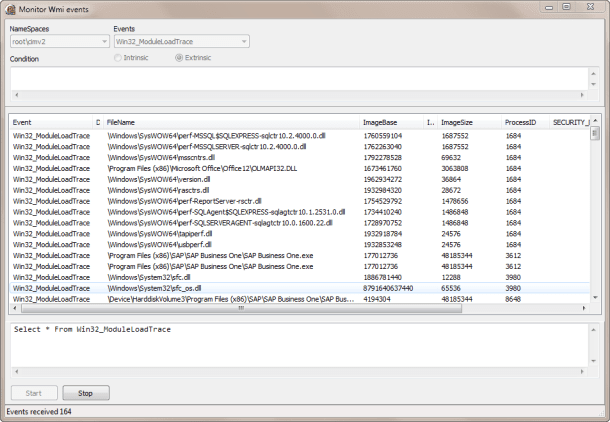
If you wanna play more with this thread check this sample application with source code included.
asynchronous
In order to use the SWbemServices.ExecNotificationQueryAsync method you must follow these steps
- Create an instance to the WMI service
- Create an instance to the WMI sink
- Assign the event handler for the sink
- Connect to the WMI service
- Execute the event in async mode
- Receive and process the event using the event handler
Note : the next samples uses the WbemScripting_TLB unit to access the wmi.
Using the WbemScripting_TLB unit (wrapper generated by dephi) for execute the ExecNotificationQueryAsync method is the more affordable way.
Check this short snippet to initializate the WMI service and start to wait for the event in asynchronous mode.
type
TFrmMain = class(TForm)
private
FSink     : TSWbemSink;
FLocator  : ISWbemLocator;
FServices : ISWbemServices;
public
procedure EventReceived(ASender: TObject; const objWbemObject: ISWbemObject; const objWbemAsyncContext: ISWbemNamedValueSet);
end;

procedure TFrmMain.ButtonRunClick(Sender: TObject);
const
 WQL = 'SELECT * FROM __InstanceCreationEvent WITHIN 1 WHERE TargetInstance ISA "Win32_Process"';
begin
  FLocator  := CoSWbemLocator.Create;
  //Connect to the WMI service
  FServices := FLocator.ConnectServer('.', 'root\cimv2', '','', '', '', wbemConnectFlagUseMaxWait, nil);
  //create the sink instance
  FSink     := TSWbemSink.Create(self);
  //assign the event handler
  FSink.OnObjectReady := EventReceived;
  //Run the ExecNotificationQueryAsync
  FServices.ExecNotificationQueryAsync(FSink.DefaultInterface,WQL,'WQL', 0, nil, nil);
end;

//The event handler
procedure TFrmMain.EventReceived(ASender: TObject; const objWbemObject: ISWbemObject;  const objWbemAsyncContext: ISWbemNamedValueSet);
var
  PropVal: OLEVariant;
begin
  PropVal := objWbemObject;
  Memo1.Lines.Add(Format('Caption   : %s ',[PropVal.TargetInstance.Caption]));
  Memo1.Lines.Add(Format('ProcessID : %s ',[PropVal.TargetInstance.ProcessID]));
end;
the same rules applied for the above code about access the properties of the TargetInstance when you uses Intrinsic events. download the sample application with source code from here.
Check this list of samples querys to do specific tasks
Determine when a Removable Drive Gets Connected
using the intrinsic event __InstanceCreationEvent and the Win32_LogicalDisk class located in the root\cimv2 namespace
Select * From __InstanceCreationEvent Within 1 Where TargetInstance ISA 'Win32_LogicalDisk' AND TargetInstance.DriveType=2
using the intrinsic event __InstanceCreationEvent and the Win32_Volume class located in the root\cimv2 namespace
Select * From __InstanceCreationEvent Within 1 Where TargetInstance ISA 'Win32_Volume' AND TargetInstance.DriveType=2
Determine when a Removable Drive Gets Disconnected
using the intrinsic event __InstanceDeletionEvent and the Win32_LogicalDisk class located in the root\cimv2 namespace
Select * From __InstanceDeletionEvent Within 1 Where TargetInstance ISA 'Win32_LogicalDisk' AND TargetInstance.DriveType=2
using the intrinsic event __InstanceDeletionEvent and the Win32_Volume class located in the root\cimv2 namespace
Select * From __InstanceDeletionEvent Within 1 Where TargetInstance ISA 'Win32_Volume' AND TargetInstance.DriveType=2
Detect when a Process start
using the intrinsic event __InstanceCreationEvent and the Win32_Process class located in the root\cimv2 namespace
Select * From __InstanceCreationEvent Within 1 Where TargetInstance ISA 'Win32_Process'
using the extrinsic event Win32_ProcessStartTrace located in the root\cimv2 namespace
Select * From Win32_ProcessStartTrace
Detect when a Process is finished
using the intrinsic event __InstanceDeletionEvent and the Win32_Process class located in the root\cimv2 namespace
Select * From __InstanceDeletionEvent Within 1 Where TargetInstance ISA 'Win32_Process'
using the extrinsic event Win32_ProcessStopTrace located in the root\cimv2 namespace
Select * From Win32_ProcessStopTrace
Detect when a Thread start
using the intrinsic event __InstanceCreationEvent and the Win32_Thread class located in the root\cimv2 namespace
Select * From __InstanceCreationEvent Within 1 Where TargetInstance ISA 'Win32_Thread'
using the extrinsic event Win32_ThreadStartTrace located in the root\cimv2 namespace
Select * From Win32_ThreadStartTrace
Detect when a Thread is finished
using the intrinsic event __InstanceDeletionEvent and the Win32_Thread class located in the root\cimv2 namespace
Select * From __InstanceDeletionEvent Within 1 Where TargetInstance ISA 'Win32_Thread'
using the extrinsic event Win32_ThreadStopTrace located in the root\cimv2 namespace
Select * From Win32_ThreadStopTrace
Detect when a network connection has been lost
using the extrinsic event MSNdis_StatusMediaDisconnect located in the root\wmi namespace
Select * From MSNdis_StatusMediaDisconnect
Detect when a Dll is loaded for an application
using the extrinsic event Win32_ModuleLoadTrace located in the root\cimv2 namespace
Select * From Win32_ModuleLoadTrace
If you want learn more about the WMI events try these articles.




 The Road to Delphi