
Have you noticed how some compressors like winrar ® or winzip ® can create self-extracting files. Today we will see how we can generate these files using the ZLib unit wich is included with delphi.
The logic goes like this
1) Create a exe which the capacity of decompress a resource, this project is responsible for extract the compressed data, which was previously stored as a resource inside of self.
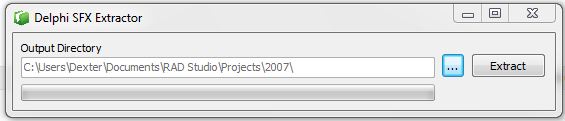
This is the code to extract the data stored inside of the resource
procedure Extract;
var
  DeCompressStream : TDeCompressionStream;
  ResourceStream   : TResourceStream;
  DestFileStream   : TFileStream;
  FileNameDest     : String;
  RecSFX           : TRecSFX;
begin

  if FindResource(0, 'SFXDATA', RT_RCDATA)=0 then //find the compressed data
  begin
    Application.MessageBox('Sorry i am empty','Warning',MB_OK+MB_ICONWARNING);
    Exit;
  end
  else
  if FindResource(0, 'SFXREC', RT_RCDATA)=0 then //find the header data
  begin
    Application.MessageBox('Sorry i dont have header data','Warning',MB_OK+MB_ICONWARNING);
    Exit;
  end;

 try
    ResourceStream:= TResourceStream.Create(0,'SFXREC',RT_RCDATA); //read the header stored in the resorce named SFXREC
    try
        ResourceStream.Position:=0;
        Move(ResourceStream.Memory^,RecSFX,SizeOf(RecSFX));
        ProgressBarSfx.Max:=RecSFX.Size;
    finally
      ResourceStream.Free;
    end;

    ResourceStream:= TResourceStream.Create(0,'SFXDATA',RT_RCDATA); //read the compressed data stores in the SFXDATA resource
    try
      ProgressBarSfx.Max:=ResourceStream.Size;
      FileNameDest   := EditPath.Text+ChangeFileExt(ExtractFileName(ParamStr(0)),'');
      DestFileStream := TFileStream.Create(FileNameDest,fmCreate); //create the file to uncompress the data
      try
        DeCompressStream:=TDeCompressionStream.Create(ResourceStream);
        DeCompressStream.OnProgress:=DoProgress; //assign the OnProgress event to see the progress
        try
           DestFileStream.CopyFrom(DeCompressStream,RecSFX.Size); //decompress the data
        finally
          DeCompressStream.Free;
        end;
      finally
        DestFileStream.Free;
      end;
    finally
      ResourceStream.Free;
    end;
 except on e : exception do
   Application.MessageBox(PAnsiChar(e.Message),'Error',MB_OK+MB_ICONERROR);
 end;
end;
2) Transform this project in a resource and attach this resource to the second project, using the BRCC32.exe tool
create a file called Stub.rc with this content
STUB RT_RCDATA "SfxExtractor.exe"
now compile the rc file
BRCC32.exe Stub.rc
3) include the generated Stub.res file in the second project
{$R Stub.res}
4) Now the second project select a file to compress

5) Extract the STUB resource and then create a new exe file
var
  StubStream: TResourceStream;
begin
  StubStream := TResourceStream.Create( HInstance, 'STUB', 'RT_RCDATA');
  try
     DeleteFile(FSfxFileName);
     StubStream.SaveToFile(FSfxFileName);
  finally
    StubStream.Free;
  end;
  Result:=FileExists(FSfxFileName);
end;
6) Compress the selected file using the TCompressionStream class and add two resources to the New STUB exe,
one resource store the header info (Original filename, size) and the another store the compressed data.
check the code wich compress the data in a resource and create the two resources in the STUB exe.
procedure CreateSFX;
var
  SrcFileStream   : TFileStream;
  CompressedStream: TMemoryStream;
  hDestRes        : THANDLE;
  Compressor      : TCompressionStream;
  RecSFX          : TRecSFX;
begin
  SrcFileStream      := TFileStream.Create(FSrcFileName,fmOpenRead or fmShareDenyNone); //open the file to compress
  ProgressBarSfx.Max := SrcFileStream.Size;
 try
  try
    CompressedStream:= TMemoryStream.Create;
    try
      Compressor:=TCompressionStream.Create(GetCompressionLevel,CompressedStream); //create the stream to compress the data
      try
        Compressor.OnProgress:=DoProgress;
        Compressor.CopyFrom(SrcFileStream,0);
      finally
        Compressor.Free;
      end;
        //Write the header
        FillChar(RecSFX,SizeOf(RecSFX),#0);
        RecSFX.Size:=SrcFileStream.Size;
        Move(ExtractFileName(FSrcFileName)[1],RecSFX.Name,Length(ExtractFileName(FSrcFileName)));

        hDestRes:= BeginUpdateResource(PAnsiChar(FSfxFileName), False);
        if hDestRes <> 0 then
          if UpdateResource(hDestRes, RT_RCDATA,'SFXREC',0,@RecSFX,SizeOf(RecSFX)) then //create the resource in the exe with the header info
             if EndUpdateResource(hDestRes,FALSE) then
             else
             RaiseLastOSError
          else
          RaiseLastOSError
        else
        RaiseLastOSError;

        hDestRes:= BeginUpdateResource(PAnsiChar(FSfxFileName), False);
        if hDestRes <> 0 then
          if UpdateResource(hDestRes, RT_RCDATA,'SFXDATA',0,CompressedStream.Memory,CompressedStream.Size) then //create the resource in the exe with the compressed data
            if EndUpdateResource(hDestRes,FALSE) then //if all is ok show the summary info
            begin
               LabelInfo.Caption:=
               Format('SFX Created %sOriginal Size %s %sCompressed Size %s Ratio %n %%',[#13,FormatFloat('#,',SrcFileStream.Size),#13,FormatFloat('#,',CompressedStream.Size),CompressedStream.Size*100/SrcFileStream.Size]);
               ProgressBarSfx.Position:=ProgressBarSfx.Max;
               ButtonCreateSFX.Enabled:=False;
            end
            else
            RaiseLastOSError
          else
          RaiseLastOSError
        else
        RaiseLastOSError;
    finally
      CompressedStream.Free;
    end;
  finally
    SrcFileStream.Free;
  end;
 except on e : exception do
   Application.MessageBox(PAnsiChar(e.Message),'Error',MB_OK+MB_ICONERROR);
 end;
end;
You can add many features like password, checksum validation, encryption and others to the STUB Application. just keep in mind final file size of the STUB.
Finally when you run the second application (Project CreateSFX) and select a file the aplication will create a SFX file.
Project SfxExtractor
{$SetPEFlags 1}  //  remove relocation table

unit MainSFX;

interface

uses
  Windows, Messages, SysUtils, Classes, Graphics, Controls, Forms,
  Dialogs, StdCtrls, ComCtrls;

type
  TFrmMain = class(TForm)
    ButtonSelDir: TButton;
    EditPath: TEdit;
    ButtonExtract: TButton;
    ProgressBarSfx: TProgressBar;
    Label1: TLabel;
    procedure ButtonSelDirClick(Sender: TObject);
    procedure FormCreate(Sender: TObject);
    procedure ButtonExtractClick(Sender: TObject);
  private
    procedure Extract;
    procedure DoProgress(Sender: TObject);
  public
  end;

var
  FrmMain: TFrmMain;

implementation
{$R *.dfm}

uses
ShlObj,
ZLib,
Common;

function SelectFolderCallbackProc(hwnd: HWND; uMsg: UINT; lParam: LPARAM; lpData: LPARAM): Integer; stdcall;
begin
  if (uMsg = BFFM_INITIALIZED) then
    SendMessage(hwnd, BFFM_SETSELECTION, 1, lpData);
  Result := 0;
end;

function SelectFolder(hwndOwner: HWND;const Caption: string; var InitFolder: string): Boolean;
var
  ItemIDList: PItemIDList;
  idlRoot   : PItemIDList;
  Path      : PAnsiChar;
  BrowseInfo: TBrowseInfo;
begin
  Result := False;
  Path := StrAlloc(MAX_PATH);
  SHGetSpecialFolderLocation(hwndOwner, CSIDL_DRIVES, idlRoot);
  with BrowseInfo do
  begin
    hwndOwner := GetActiveWindow;
    pidlRoot  := idlRoot;
    SHGetSpecialFolderLocation(hwndOwner, CSIDL_DRIVES, idlRoot);
    pszDisplayName := StrAlloc(MAX_PATH);
    lpszTitle := PAnsiChar(Caption);
    lpfn      := @SelectFolderCallbackProc;
    lParam    := LongInt(PAnsiChar(InitFolder));
    ulFlags   := BIF_RETURNONLYFSDIRS OR BIF_USENEWUI;
  end;

  ItemIDList := SHBrowseForFolder(BrowseInfo);
  if (ItemIDList <> nil) then
    if SHGetPathFromIDList(ItemIDList, Path) then
    begin
      InitFolder := Path;
      Result    := True;
    end;
end;

procedure TFrmMain.Extract;
var
  DeCompressStream : TDeCompressionStream;
  ResourceStream   : TResourceStream;
  DestFileStream   : TFileStream;
  FileNameDest     : String;
  RecSFX           : TRecSFX;
begin

  if FindResource(0, 'SFXDATA', RT_RCDATA)=0 then
  begin
    Application.MessageBox('Sorry i am empty','Warning',MB_OK+MB_ICONWARNING);
    Exit;
  end
  else
  if FindResource(0, 'SFXREC', RT_RCDATA)=0 then
  begin
    Application.MessageBox('Sorry i dont have header data','Warning',MB_OK+MB_ICONWARNING);
    Exit;
  end;

 try
    ResourceStream:= TResourceStream.Create(0,'SFXREC',RT_RCDATA);
    try
        ResourceStream.Position:=0;
        Move(ResourceStream.Memory^,RecSFX,SizeOf(RecSFX));
        ProgressBarSfx.Max:=RecSFX.Size;
    finally
      ResourceStream.Free;
    end;

    ResourceStream:= TResourceStream.Create(0,'SFXDATA',RT_RCDATA);
    try
      ProgressBarSfx.Max:=ResourceStream.Size;
      FileNameDest   := EditPath.Text+ChangeFileExt(ExtractFileName(ParamStr(0)),'');
      DestFileStream := TFileStream.Create(FileNameDest,fmCreate);
      try
        DeCompressStream:=TDeCompressionStream.Create(ResourceStream);
        DeCompressStream.OnProgress:=DoProgress;
        try
           DestFileStream.CopyFrom(DeCompressStream,RecSFX.Size);
        finally
          DeCompressStream.Free;
        end;
      finally
        DestFileStream.Free;
      end;
    finally
      ResourceStream.Free;
    end;
 except on e : exception do
   Application.MessageBox(PAnsiChar(e.Message),'Error',MB_OK+MB_ICONERROR);
 end;
end;

procedure TFrmMain.ButtonExtractClick(Sender: TObject);
begin
  Extract;
end;

procedure TFrmMain.ButtonSelDirClick(Sender: TObject);
var
  Path: String;
begin
  Path:=EditPath.Text;
   if SelectFolder(Handle,'Select the output directory',Path) then
    EditPath.Text:=IncludeTrailingPathDelimiter(Path);
end;

procedure TFrmMain.DoProgress(Sender: TObject);
begin
   ProgressBarSfx.Position:=TCustomZLibStream(Sender).Position;
end;

procedure TFrmMain.FormCreate(Sender: TObject);
begin
  EditPath.Text:=IncludeTrailingPathDelimiter(ExtractFilePath(ParamStr(0)));
end;

end.
Project CreateSFX
unit MainCreateSFX;

interface

uses
  Windows, Messages, SysUtils, Variants, Classes, Graphics, Controls, Forms,
  Dialogs, StdCtrls, ComCtrls, ExtCtrls, ZLib;

type
  TFrmCreateSFX = class(TForm)
    ButtonCreateSFX: TButton;
    OpenDialog1: TOpenDialog;
    EditFile: TEdit;
    ButtonSelect: TButton;
    ProgressBarSfx: TProgressBar;
    LabelInfo: TLabel;
    Label1: TLabel;
    RadioButton1: TRadioButton;
    RadioButton2: TRadioButton;
    RadioButton3: TRadioButton;
    RadioButton4: TRadioButton;
    procedure ButtonCreateSFXClick(Sender: TObject);
    procedure ButtonSelectClick(Sender: TObject);
    procedure FormCreate(Sender: TObject);
  private
    FSrcFileName   : string;
    FSfxFileName   : string;
    function  CreateStub:Boolean;
    function  GetCompressionLevel: TCompressionLevel;
    procedure CreateSFX;
    procedure DoProgress(Sender: TObject);
  end;

var
  FrmCreateSFX: TFrmCreateSFX;

implementation

uses Common;

{$R *.dfm}
{$R Stub.res}

procedure TFrmCreateSFX.ButtonCreateSFXClick(Sender: TObject);
begin
  if CreateStub then
   CreateSFX;
end;

procedure TFrmCreateSFX.ButtonSelectClick(Sender: TObject);
begin
   if OpenDialog1.Execute(Handle) then
   begin
     EditFile.Text:=OpenDialog1.FileName;
     FSrcFileName:=OpenDialog1.FileName;
     FSfxFileName:=ExtractFilePath(ParamStr(0))+ExtractFileName(EditFile.Text)+'.exe';
     ButtonCreateSFX.Enabled:=True;
     ButtonSelect.Enabled:=False;
   end;
end;

procedure TFrmCreateSFX.CreateSFX;
var
  SrcFileStream   : TFileStream;
  CompressedStream: TMemoryStream;
  hDestRes        : THANDLE;
  Compressor      : TCompressionStream;
  RecSFX          : TRecSFX;
begin
  SrcFileStream      := TFileStream.Create(FSrcFileName,fmOpenRead or fmShareDenyNone);
  ProgressBarSfx.Max := SrcFileStream.Size;
 try
  try
    CompressedStream:= TMemoryStream.Create;
    try
      Compressor:=TCompressionStream.Create(GetCompressionLevel,CompressedStream);
      try
        Compressor.OnProgress:=DoProgress;
        Compressor.CopyFrom(SrcFileStream,0);
      finally
        Compressor.Free;
      end;

        FillChar(RecSFX,SizeOf(RecSFX),#0);
        RecSFX.Size:=SrcFileStream.Size;
        Move(ExtractFileName(FSrcFileName)[1],RecSFX.Name,Length(ExtractFileName(FSrcFileName)));

        hDestRes:= BeginUpdateResource(PAnsiChar(FSfxFileName), False);
        if hDestRes <> 0 then
          if UpdateResource(hDestRes, RT_RCDATA,'SFXREC',0,@RecSFX,SizeOf(RecSFX)) then
             if EndUpdateResource(hDestRes,FALSE) then
             else
             RaiseLastOSError
          else
          RaiseLastOSError
        else
        RaiseLastOSError;

        hDestRes:= BeginUpdateResource(PAnsiChar(FSfxFileName), False);
        if hDestRes <> 0 then
          if UpdateResource(hDestRes, RT_RCDATA,'SFXDATA',0,CompressedStream.Memory,CompressedStream.Size) then
            if EndUpdateResource(hDestRes,FALSE) then
            begin
               LabelInfo.Caption:=
               Format('SFX Created %sOriginal Size %s %sCompressed Size %s Ratio %n %%',[#13,FormatFloat('#,',SrcFileStream.Size),#13,FormatFloat('#,',CompressedStream.Size),CompressedStream.Size*100/SrcFileStream.Size]);
               ProgressBarSfx.Position:=ProgressBarSfx.Max;
               ButtonCreateSFX.Enabled:=False;
            end
            else
            RaiseLastOSError
          else
          RaiseLastOSError
        else
        RaiseLastOSError;
    finally
      CompressedStream.Free;
    end;
  finally
    SrcFileStream.Free;
  end;
 except on e : exception do
   Application.MessageBox(PAnsiChar(e.Message),'Error',MB_OK+MB_ICONERROR);
 end;
end;

function TFrmCreateSFX.CreateStub:Boolean;
var
  StubStream: TResourceStream;
begin
  StubStream := TResourceStream.Create( HInstance, 'STUB', 'RT_RCDATA');
  try
     DeleteFile(FSfxFileName);
     StubStream.SaveToFile(FSfxFileName);
  finally
    StubStream.Free;
  end;
  Result:=FileExists(FSfxFileName);
end;

procedure TFrmCreateSFX.DoProgress(Sender: TObject);
begin
   ProgressBarSfx.Position:=TCustomZLibStream(Sender).Position;
   LabelInfo.Caption:=Format('Compressed %s bytes %n %%',[FormatFloat('#,',TCustomZLibStream(Sender).Position),100*TCustomZLibStream(Sender).Position/ProgressBarSfx.Max]);
   LabelInfo.Update;
end;

procedure TFrmCreateSFX.FormCreate(Sender: TObject);
begin
   LabelInfo.Caption:='';
end;

function TFrmCreateSFX.GetCompressionLevel: TCompressionLevel;
var
 i : Integer;
begin
  Result:=clMax;
    for i:= 0 to ComponentCount - 1 do
     if Components[i].ClassType = TRadioButton then
      if TRadioButton(Components[i]).Checked then
       Result:=TCompressionLevel(TRadioButton(Components[i]).Tag);
end;

end.
Notes:
* You can improve the final results if your rewrite the stub application using a library like KOL or avoid the use of the VCL using the WINAPI, to reduce the final exe size.
* These samples applications are for educational purposes only and not pretend be an alternative to another professional tools to generate a SFX file.
* The concept discussed in this entry can help you to build compressed and encrypted files using your own logic.
Check the full sourcecode on Github

 The Road to Delphi
November 25, 2010 at 3:38 am
If you don’t want to use resources (which must be created at compile time), but append a .ZIP archive to the SFX exe, see http://synopse.info/forum/viewtopic.php?pid=232#p232
With our LVCL units (i.e. Light VCL replacements) together with the PasZip unit, you can create a whole SFX exe which is less than 30 KB, with a form and labels and buttons… and without using UPX (which is to be avoided).
November 25, 2010 at 8:14 am
Thanks for you recommendation, can be a good option to create a small SFX file if you want use third party libraries.
November 25, 2010 at 9:43 am
@Rogrigo – Indeed: it needs more configuration of your project. And the LVCL is far from perfect. It’s tested up to Delphi 2007 only.
Your article is very good. And, IMHO it’s a good idea to put the source inside the text. Much faster to get an idea. Source code is easier to understand than plain English, when it is well designed.
November 25, 2010 at 4:50 am
very good article, however a better practice(my opinion) is to attach the file(s) at the end of the executable…
November 25, 2010 at 8:18 am
Dorin, thanks for your comments, about your opinion is valid but remember wich this sample show a way to use resources and the zlib unit to create a sfx file. Exist many more methods to create a SFX file this is just another way ;)
November 25, 2010 at 10:30 pm
Please note that you can adjust / add / remove resources in a PE file (exe/dll) after compilation. See BeginUpdateResource, UpdateResource and EndUpdateResource in MSDN. I use it to alter some resources after compilation (using Open Tools API) like embedding the mapfile into the executable.
November 25, 2010 at 10:36 pm
Ritsaert, that’s exactly what the application CreateSFX does, adds the compressed resource and the header resource to the stub file using the function UpdateResource. check the code of the Project CreateSFX.
February 14, 2011 at 8:49 am
Great article. The code works great and it’s exactly what I needed. If you’re ever in Romania, you’ve got a beer from me :)
February 14, 2011 at 11:59 am
Oh, and I have a question, is it possible to add another row to the CreateSFX exe file that will allow me to write a string (URL) in the Stub?
I’m asking this because I want the installer to be able to open an URL when the installation finished, but the URL will be different for different installations.
So the end result is this, after the installation is complete, the stub reads a string from itself which is an URL and it will open it.
If it can be done, can you please tell me how? Thanks.