The Road to Delphi

Delphi – Free Pascal – Oxygene


1 Comment

Blaise Pascal Magazine #8 is available now

A new edition of Blaise Pascal Magazine is available


  • Delphi 2010 – what a feeling! – Bob Swart page 7 –  Gestures could be the new ’must’ in our computers future
  • Counters – David Dirkse page 11 – Learning counting again, – could wel be a hobby…
  • Virus in Delphi? – Nick Hodges page 14 – Nick explains how to get rid of the virus and block it.
  • Dezign for databases – Marco Roessen page 16 – A fantastic alternative for its expensive competitors, and it’s even cheaper.
  • Changing the looks of T-Field – Henk Schreij page 18 – Diving deeper into the possibility’s
  • Using Free Pascal and Lazarus to create applications for OSX – Jeremy North page 20 – Working on the Mac is hot
  • Writing Delphi Components II: Custom Properties  and Windows Controls – Marco Cantù page 22 – In the new Delphi versions it looks all different.
  • My Top Five Delphi 2010
  • New Features – Pawel Glowacki page 24 – Except for guestures ther is a lot of news…
  • Fast Graphic deformation by using Scanlines – Peter Bijlsma page 28
  • Control your own image or blow it up! Berlusconi on the edge
  • Wide Information Bus (Introduction) – Fikret Hasovic page 33 –   What is it and what the use for it?
  • Freehand Drawing (Introduction) – David Dirkse page 36 – shows how to create your own paint program


2 Comments

Detect Aero Glass using Delphi

To detect if Aero Glass is enabled we must use the DwmIsCompositionEnabled function.

See this example

program DetectAeroDelphi;
{$APPTYPE CONSOLE}
//Author Rodrigo Ruz 2009-10-26
uses
  Windows,
  SysUtils;

function  ISAeroEnabled: Boolean;
type
  _DwmIsCompositionEnabledFunc = function(var IsEnabled: Boolean): HRESULT; stdcall;
var
  Flag                       : Boolean;
  DllHandle                  : THandle;
  OsVersion                  : TOSVersionInfo;
  DwmIsCompositionEnabledFunc: _DwmIsCompositionEnabledFunc;
begin
  Result:=False;
  ZeroMemory(@OsVersion, SizeOf(OsVersion));
  OsVersion.dwOSVersionInfoSize := SizeOf(TOSVERSIONINFO);

  if ((GetVersionEx(OsVersion)) and (OsVersion.dwPlatformId = VER_PLATFORM_WIN32_NT) and (OsVersion.dwMajorVersion >= 6)) then //is Vista or Win7?
  begin
    DllHandle := LoadLibrary('dwmapi.dll');
    try
      if DllHandle <> 0 then
      begin
        @DwmIsCompositionEnabledFunc := GetProcAddress(DllHandle, 'DwmIsCompositionEnabled');
        if (@DwmIsCompositionEnabledFunc <> nil) then
        begin
          if DwmIsCompositionEnabledFunc(Flag)= S_OK then
           Result:=Flag;
        end;
      end;
    finally
      if DllHandle <> 0 then
        FreeLibrary(DllHandle);
    end;
  end;
end;

begin
  try
    if ISAeroEnabled then
     Writeln('Aero Glass enabled')
    else
     Writeln('Aero Glass disabled');
  except
    on E:Exception do
      Writeln(E.Classname, ': ', E.Message);
  end;
    Readln;
end.


2 Comments

Glass effect in a Delphi Console Application

Using the DwmEnableBlurBehindWindow and  GetConsoleWindow functions , we  can  apply a nice glass effect to our console applications.

Check this sample application

program ConsoleGlassDelphi;
//Author  : Rodrigo Ruz 2009-10-26
{$APPTYPE CONSOLE}

uses
  Windows,
  SysUtils;

type
  DWM_BLURBEHIND = record
    dwFlags                 : DWORD;
    fEnable                 : BOOL;
    hRgnBlur                : HRGN;
    fTransitionOnMaximized  : BOOL;
  end;

//function to enable the glass effect
function DwmEnableBlurBehindWindow(hWnd : HWND; const pBlurBehind : DWM_BLURBEHIND) : HRESULT; stdcall; external  'dwmapi.dll' name 'DwmEnableBlurBehindWindow';
//get the handle of the console window
function GetConsoleWindow: HWND; stdcall; external kernel32 name 'GetConsoleWindow';

function DWM_EnableBlurBehind(hwnd : HWND; AEnable: Boolean; hRgnBlur : HRGN = 0; ATransitionOnMaximized: Boolean = False; AFlags: Cardinal = 1): HRESULT;
var
  pBlurBehind : DWM_BLURBEHIND;
begin
  pBlurBehind.dwFlags:=AFlags;
  pBlurBehind.fEnable:=AEnable;
  pBlurBehind.hRgnBlur:=hRgnBlur;
  pBlurBehind.fTransitionOnMaximized:=ATransitionOnMaximized;
  Result:=DwmEnableBlurBehindWindow(hwnd, pBlurBehind);
end;

begin
  try
    DWM_EnableBlurBehind(GetConsoleWindow(), True);
    Writeln('See my glass effect');
    Writeln('Go Delphi Go');
    Readln;
  except
    on E:Exception do
      Writeln(E.Classname, ': ', E.Message);
  end;
end.

And this is the result
glass console


Leave a comment

The official Delphi 2010 Survey

Help  to improve Delphi answering this survey.

All,

First, I want to thank you for all of your support in the past, present, and
future. Below is the link to the 2010 Delphi survey, this is conducted by
Embarcadero and the Product Management for the Delphi product. The
responses are extremely important to us and help to shape the vision and
future of the product.

I know the survey is long, very LONG! But again, the information we get
from the answers you give are needed more than ever.

Please pass this survey on to anybody you think would be interested in
filling it out.

Again, thanks!

Mike

Mike Rozlog
Product Manager – Delphi


Leave a comment

Embarcadero launch Windows 7 Developer Center

If you are interested in resources for building Windows 7 aplications Embarcadero has launched the Windows 7 Developer Center.

More resources for Delphi 2010  and Windows 7

  • RAD Studio 2010 – Gestures and Multi-Touch
  • RAD Studio 2010 -Touch & Gestures Part 1
  • RAD Studio 2010 -Touch & Gestures Part 2
  • Touch Hardware
  • RAD Studio 2010 – Touch Keyboard

  • Leave a comment

    Compilation of resources for migrate to Delphi 2009/2010 Unicode

    There are many resources available that you can read and that you will assist in the migration from a old Delphi version to Delphi 2009/2010 (Unicode).


    3 Comments

    Bits manipulation functions using Delphi

    Here I leave these useful functions for manipulating bits using Delphi.

    //get if a particular bit is 1
    function Get_a_Bit(const aValue: Cardinal; const Bit: Byte): Boolean;
    begin
      Result := (aValue and (1 shl Bit)) <> 0;
    end;
    
    //set a particular bit as 1
    function Set_a_Bit(const aValue: Cardinal; const Bit: Byte): Cardinal;
    begin
      Result := aValue or (1 shl Bit);
    end;
    
    //set a particular bit as 0
    function Clear_a_Bit(const aValue: Cardinal; const Bit: Byte): Cardinal;
    begin
      Result := aValue and not (1 shl Bit);
    end;
    
    //Enable o disable a bit
    function Enable_a_Bit(const aValue: Cardinal; const Bit: Byte; const Flag: Boolean): Cardinal;
    begin
      Result := (aValue or (1 shl Bit)) xor (Integer(not Flag) shl Bit);
    end;


    25 Comments

    Detecting Wifi Networks Using Delphi and Native Wifi API

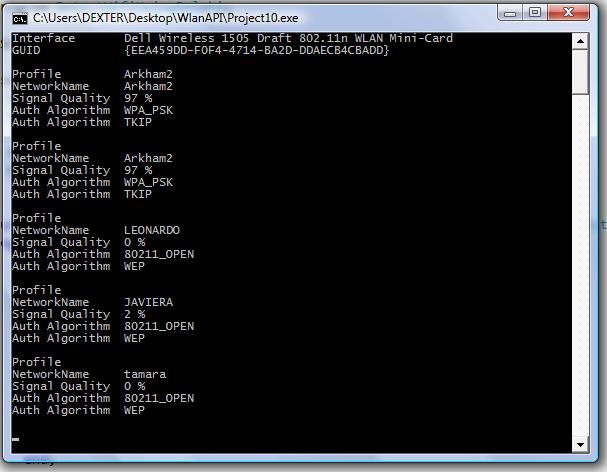
    Today we will use the Native Wifi API and Delphi to enumerate all Wifi Networks availables. In this link you can find a translation of the headers.
    I wrote this code using these headers. Tested in Delphi 2007 and Windows Vista.

    Try this link for a fixed and updated version of the Native Wifi Delphi headers.

    {$APPTYPE CONSOLE}
    
    uses
      Windows,
      SysUtils,
      nduWlanAPI   in 'nduWlanAPI.pas',
      nduWlanTypes in 'nduWlanTypes.pas';
    
    function DOT11_AUTH_ALGORITHM_To_String( Dummy :Tndu_DOT11_AUTH_ALGORITHM):AnsiString;
    begin
        Result:='';
        case Dummy of
            DOT11_AUTH_ALGO_80211_OPEN          : Result:= '80211_OPEN';
            DOT11_AUTH_ALGO_80211_SHARED_KEY    : Result:= '80211_SHARED_KEY';
            DOT11_AUTH_ALGO_WPA                 : Result:= 'WPA';
            DOT11_AUTH_ALGO_WPA_PSK             : Result:= 'WPA_PSK';
            DOT11_AUTH_ALGO_WPA_NONE            : Result:= 'WPA_NONE';
            DOT11_AUTH_ALGO_RSNA                : Result:= 'RSNA';
            DOT11_AUTH_ALGO_RSNA_PSK            : Result:= 'RSNA_PSK';
            DOT11_AUTH_ALGO_IHV_START           : Result:= 'IHV_START';
            DOT11_AUTH_ALGO_IHV_END             : Result:= 'IHV_END';
        end;
    end;
    
    function DOT11_CIPHER_ALGORITHM_To_String( Dummy :Tndu_DOT11_CIPHER_ALGORITHM):AnsiString;
    begin
        Result:='';
        case Dummy of
      	DOT11_CIPHER_ALGO_NONE      : Result:= 'NONE';
        DOT11_CIPHER_ALGO_WEP40     : Result:= 'WEP40';
        DOT11_CIPHER_ALGO_TKIP      : Result:= 'TKIP';
        DOT11_CIPHER_ALGO_CCMP      : Result:= 'CCMP';
        DOT11_CIPHER_ALGO_WEP104    : Result:= 'WEP104';
        DOT11_CIPHER_ALGO_WPA_USE_GROUP : Result:= 'WPA_USE_GROUP OR RSN_USE_GROUP';
        //DOT11_CIPHER_ALGO_RSN_USE_GROUP : Result:= 'RSN_USE_GROUP';
        DOT11_CIPHER_ALGO_WEP           : Result:= 'WEP';
        DOT11_CIPHER_ALGO_IHV_START     : Result:= 'IHV_START';
        DOT11_CIPHER_ALGO_IHV_END       : Result:= 'IHV_END';
        end;
    end;
    
    procedure Scan();
    const
    WLAN_AVAILABLE_NETWORK_INCLUDE_ALL_ADHOC_PROFILES =$00000001;
    var
      hClient              : THandle;
      dwVersion            : DWORD;
      ResultInt            : DWORD;
      pInterface           : Pndu_WLAN_INTERFACE_INFO_LIST;
      i                    : Integer;
      j                    : Integer;
      pAvailableNetworkList: Pndu_WLAN_AVAILABLE_NETWORK_LIST;
      pInterfaceGuid       : PGUID;
      SDummy               : AnsiString;
    begin
      ResultInt:=WlanOpenHandle(1, nil, @dwVersion, @hClient);
       try
        if  ResultInt<> ERROR_SUCCESS then
        begin
           WriteLn('Error Open CLient'+IntToStr(ResultInt));
           Exit;
        end;
    
        ResultInt:=WlanEnumInterfaces(hClient, nil, @pInterface);
        if  ResultInt<> ERROR_SUCCESS then
        begin
           WriteLn('Error Enum Interfaces '+IntToStr(ResultInt));
           exit;
        end;
    
        for i := 0 to pInterface^.dwNumberOfItems - 1 do
        begin
         Writeln('Interface       ' + pInterface^.InterfaceInfo[i].strInterfaceDescription);
         WriteLn('GUID            ' + GUIDToString(pInterface^.InterfaceInfo[i].InterfaceGuid));
         Writeln('');
         pInterfaceGuid:= @pInterface^.InterfaceInfo[pInterface^.dwIndex].InterfaceGuid;
    
            ResultInt:=WlanGetAvailableNetworkList(hClient,pInterfaceGuid,WLAN_AVAILABLE_NETWORK_INCLUDE_ALL_ADHOC_PROFILES,nil,pAvailableNetworkList);
            if  ResultInt<> ERROR_SUCCESS then
            begin
               WriteLn('Error WlanGetAvailableNetworkList '+IntToStr(ResultInt));
               Exit;
            end;
    
              for j := 0 to pAvailableNetworkList^.dwNumberOfItems - 1 do
              Begin
                 WriteLn(Format('Profile         %s',[WideCharToString(pAvailableNetworkList^.Network[j].strProfileName)]));
                 SDummy:=PAnsiChar(@pAvailableNetworkList^.Network[j].dot11Ssid.ucSSID);
                 WriteLn(Format('NetworkName     %s',[SDummy]));
                 WriteLn(Format('Signal Quality  %d ',[pAvailableNetworkList^.Network[j].wlanSignalQuality])+'%');
                 //SDummy := GetEnumName(TypeInfo(Tndu_DOT11_AUTH_ALGORITHM),integer(pAvailableNetworkList^.Network[j].dot11DefaultAuthAlgorithm)) ;
                 SDummy:=DOT11_AUTH_ALGORITHM_To_String(pAvailableNetworkList^.Network[j].dot11DefaultAuthAlgorithm);
                 WriteLn(Format('Auth Algorithm  %s ',[SDummy]));
                 SDummy:=DOT11_CIPHER_ALGORITHM_To_String(pAvailableNetworkList^.Network[j].dot11DefaultCipherAlgorithm);
                 WriteLn(Format('Auth Algorithm  %s ',[SDummy]));
                 Writeln('');
              End;
        end;
       finally
        WlanCloseHandle(hClient, nil);
       end;
    end;
    begin
      try
        Scan();
        Readln;
      except
        on E:Exception do
          Writeln(E.Classname, ': ', E.Message);
      end;
    end.
    
    ScanWifi Image

    ScanWifi Image


    3 Comments

    The Return of TurboPower.

    Nick Hodges has posted on his blog which is the new project Administrator (tpfsadmin) of the TurboPower Components. This is great news, hopefully the components are updated to the latest versions of Delphi.

    Here is the complete list of project TurboPower

    TurboPower Async Professional
    Async Professional is a comprehensive communications toolkit for Borland Delphi, C++Builder, & ActiveX environments. It provides direct access to serial ports, TAPI, and the Microsoft Speech API. It supports faxing, terminal emulation, VOIP, & more.

    TurboPower Orpheus
    Orpheus is an award-winning UI toolkit for Borland Delphi & C++Builder. It contains over 120 components covering everything from data entry to calendars and clocks. Other noteworthy components include an Object Inspector, LookOut bar, & report views.

    TurboPower FlashFiler
    FlashFiler is a client-server database for Borland Delphi & C++Builder. It features a component-based architecture & the server engine can be embedded in your applications. FlashFiler is easy to configure, performs well, & includes SQL support.

    TurboPower Internet Professional
    Internet Professional is a set of VCL components providing Internet connectivity for Borland Delphi & C++Builder. iPRO includes POP3, SMTP, NNTP, FTP, HTTP, Instant Messaging, & HTML viewer components, as well as components for low-level socket access.

    TurboPower Abbrevia
    Abbrevia is a compression toolkit for Embarcadero Delphi, C++Builder, & Kylix. It supports PKZIP 4, Microsoft CAB, TAR, & gzip formats & the creation of self-extracting archives. It includes visual components that simplify the manipulation of ZIP files.

    TurboPower SysTools
    SysTools is a library of utility routines & classes for Borland Delphi, C++Builder, & environments that support COM. It includes 1-D & 2-D bar codes, sorting, money routines, logging, high-precision math, a run-time math expression analyzer, & much more.

    TurboPower LockBox
    LockBox is a cross-platform toolkit for data encryption. It contains routines & components for use with Borland Delphi, C++Builder, & Kylix. It provides support for Blowfish, RSA, MD5, SHA-1, DES, triple- DES, Rijndael, & digital signing of messages.

    TurboPower OnGuard
    OnGuard is a library to create demo versions of your Borland Delphi & C++Builder applications. Create demo versions that are time-limited, feature-limited, limited to a certain number of uses, or limited to a certain # of concurrent network users.

    TurboPower Essentials
    Essentials contains 13 native VCL controls for Borland Delphi & C++Builder. The controls include drop-down calendars & calculators, roll-up dialogs, 3-D labels, tiled backgrounds, scrolling messages, menu buttons, and more.

    TurboPower OfficePartner
    OfficePartner is the easy way to integrate your projects with Microsoft Office, the worlds leading business productivity software. With OfficePartner you can access COM services in Microsoft Office with easy to use VCL components.

    TurboPower Visual PlanIt
    Visual PlanIt is a set of synchronized, data-aware components for adding time, task, & contact management capabilities to applications written in Borland Delphi & C++Builder. Get that Outlook look & feel without the hassle.

    TurboPower ShellShock
    ShellShock provides a set of components that let you customize applications with the functionality available in the Windows Shell & Windows Explorer, all without writing code. The components are written in native VCL for Borland Delphi & C++Builder.

    TurboPower B-Tree Filer
    B-Tree Filer is a fast library of file-based database routines for Borland Turbo Pascal & Delphi. B-Tree Filer supports stand-alone programs or those running on Microsoft-compatible networks including Novell Netware.

    TurboPower XML Partner
    XMLPartner helps add the power of XML to Borland Delphi, C++ Builder, and Kylix projects through native, easy to use VCL and CLX components. These powerful components simplify the process of creating, modifying, and parsing XML data documents.

    TurboPower Async Professional CLX
    Async Professional CLX is a comprehensive communications toolkit for Borland Kylix. It provides direct access to serial ports, and supports terminal emulation, file transfer protocols, & much more.

    TurboPower String Resource Manager
    The TurboPower String Resource Manger is a tool for building string resource libraries in Borland Delphi. It prevents string resource clashes and simplifies the translation of the string resources.

    TurboPower SysTools for Kylix
    SysTools for Kylix is a library of utility routines & algorithms for Borland Kylix. Among other things, it supports 1-Dimensional bar codes, date time and string routines, sorting, a regular expression engine, & a run-time math expression analyzer.

    TurboPower OnGuard CLX
    A port of TurboPower OnGuard to CLX and Linux platform.

    TurboPower Object Professional
    Object Professional is a library of over 2000 methods and procedures for writing sophisticated DOS text mode applications with Turbo Pascal 5.5, 6.0, 7.0, or Borland Pascal 7.

    Bye.