
Two missing parts of the standard VCL Styles is the lack of the capacity to theme the popup menus and the standard Windows dialogs. I started to work a year ago in the dialogs area, but due to my limited time I was not able to finish that. But a few months ago I receive a very interesting mail from Mahdi Safsafi (SMP3) that show me his own work on this topic. So we decided merge the code of his project and the VCL Styles Utils. So finally the VCL Styles Utils project was updated to support standard dialogs, popup and system menus.
How it works?
The key is using a WH_CBT Hook, detecting the HCBT_CREATEWND and HCBT_DESTROYWND codes and then checking if the class of the window is #32770 (the class for a dialog box.) or the #32768 (the class for a popupmenu) from here you can replace the window procedure (WndProc) using the SetWindowLongPtr function with the GWL_WNDPROC index. Now we have the control of the messages sent by the windows dialogs and menus and we can iterate over the child controls and replace the window procedure again using the GWL_WNDPROC index. Finally depending of the class of the control (button, syslistview32, Combobox and so on) a Wrapper class (like the VCL does) is created to handle the messages related to the paint of the control.
Check the next source code which install the hook and process the Win32 controls
unit Vcl.Styles.SysControls;

interface

implementation

uses
  Winapi.Windows,
  System.Generics.Collections,
  System.SysUtils,
  Vcl.Controls,
  Vcl.Dialogs,
  Vcl.Styles,
  Vcl.Themes,
  Vcl.Styles.PopupWnd,
  Vcl.Styles.EditWnd,
  Vcl.Styles.StaticWnd,
  Vcl.Styles.ThemedDialog,
  Vcl.Styles.ToolbarWindow32Wnd,
  Vcl.Styles.SysListView32Wnd,
  Vcl.Styles.ButtonWnd,
  Vcl.Styles.UnknownControlWnd,
  Vcl.Styles.ControlWnd,
  Vcl.Styles.ComboBoxWnd,
  Vcl.Styles.ToolTipsWnd;

type
  TThemedSysControls = class
  private
  class var
    FBalloonHint: TBalloonHint;
    FPreviousSysBtn: Integer;
    FPreviousHandle: THandle;
    FHook: HHook;
  protected
    class function HookActionCallBack(Code: Integer; wParam: wParam;
      lParam: lParam): LRESULT; stdcall; static;
    procedure InstallHook;
    procedure RemoveHook;
  public
    constructor Create; overload;
    destructor Destroy; override;
  end;

var
  MenuItemInfoArray: array of TMenuItemInfo;
  TooltipsWndList: TObjectDictionary<HWND, TooltipsWnd>;
  PopupWndList: TObjectDictionary<HWND, TPopupWnd>;
  StaticWndList: TObjectDictionary<HWND, TStaticWnd>;
  DialogWndList: TObjectDictionary<HWND, TDialogWnd>;
  EditWndList: TObjectDictionary<HWND, TEditWnd>;
  ComboBoxWndList: TObjectDictionary<HWND, TComboBoxWnd>;
  UnknownControlList: TObjectDictionary<HWND, TUnknownControlWnd>;
  ToolbarWindow32WndList : TObjectDictionary<HWND, TToolbarWindow32Wnd>;
  SysListView32WndList : TObjectDictionary<HWND, TSysListView32Wnd>;
  BtnWndArrayList : TObjectDictionary<HWND, TButtonWnd>;
  ThemedSysControls: TThemedSysControls;

{ TThemedSysControls }

constructor TThemedSysControls.Create;
begin
  inherited;
  FBalloonHint := TBalloonHint.Create(nil);
  FBalloonHint.Style := bhsStandard;
  FBalloonHint.Delay := 1500;
  FBalloonHint.HideAfter := 3000;
  FPreviousHandle := 0;
  FHook := 0;
  InstallHook;
  PopupWndList:= TObjectDictionary<HWND, TPopupWnd>.Create([doOwnsValues]);
  TooltipsWndList:= TObjectDictionary<HWND, TooltipsWnd>.Create([doOwnsValues]);
  StaticWndList:= TObjectDictionary<HWND, TStaticWnd>.Create([doOwnsValues]);
  DialogWndList:= TObjectDictionary<HWND,TDialogWnd>.Create([doOwnsValues]);
  EditWndList:= TObjectDictionary<HWND, TEditWnd>.Create([doOwnsValues]);
  ComboBoxWndList:= TObjectDictionary<HWND, TComboBoxWnd>.Create([doOwnsValues]);
  UnknownControlList:= TObjectDictionary<HWND, TUnknownControlWnd>.Create([doOwnsValues]);
  ToolbarWindow32WndList:= TObjectDictionary<HWND, TToolbarWindow32Wnd>.Create([doOwnsValues]);
  SysListView32WndList := TObjectDictionary<HWND, TSysListView32Wnd>.Create([doOwnsValues]);
  BtnWndArrayList := TObjectDictionary<HWND, TButtonWnd>.Create([doOwnsValues]);
end;

destructor TThemedSysControls.Destroy;
begin
  RemoveHook;

  PopupWndList.Free;
  TooltipsWndList.Free;
  StaticWndList.Free;
  DialogWndList.Free;
  EditWndList.Free;
  ComboBoxWndList.Free;
  UnknownControlList.Free;
  ToolbarWindow32WndList.Free;
  SysListView32WndList.Free;
  BtnWndArrayList.Free;

  FBalloonHint.Free;
  inherited;
end;

class function TThemedSysControls.HookActionCallBack(Code: Integer;
  wParam: wParam; lParam: lParam): LRESULT;
var
  Msg: TMOUSEHOOKSTRUCT;
  C: array [0 .. 256] of Char;

  procedure HideSysToolTip;
  var
    hSysToolTip: THandle;
  begin
    For hSysToolTip := 65550 To 65600 do
      begin
        If IsWindowVisible(hSysToolTip) then
          begin
            GetClassName(hSysToolTip, C, 256);
            ShowWindow(hSysToolTip, SW_HIDE);
          end;
      end;
  end;

  procedure ShowToolTip(HintTitle: String);
  begin
    HideSysToolTip;
    if FPreviousSysBtn <> Integer(Msg.wHitTestCode) then
      begin
        FBalloonHint.HideHint;
        FBalloonHint.Title := HintTitle;
        FPreviousSysBtn := Msg.wHitTestCode;
        FBalloonHint.ShowHint(Msg.pt);
      end;
  end;

var
  CBTSturct: TCBTCreateWnd;
  sClassName : string;
begin
    if (StyleServices.Enabled) and not (StyleServices.IsSystemStyle) then
    begin
      if Code = HCBT_SYSCOMMAND then
        begin
          FBalloonHint.HideHint;
          FPreviousSysBtn := 0;
        end
      else
      if Code = HCBT_DESTROYWND then
      begin
        sClassName := GetWindowClassName(wParam);
          if sClassName = '#32768' then
          {PopupMenu}
          begin
            if PopupWndList.ContainsKey(wParam) then
              PopupWndList.Remove(wParam);
            //OutputDebugString(PChar('remove PopupWndList count '+IntToStr(PopupWndList.Count)));
          end
          else
          if sClassName = '#32770' then
          {Dialog}
          begin
            if DialogWndList.ContainsKey(wParam) then
              DialogWndList.Remove(wParam);
            //OutputDebugString(PChar('remove DialogWndList count '+IntToStr(DialogWndList.Count)));
          end
          else
          if sClassName = 'Button' then
          {Button}
          begin
            if BtnWndArrayList.ContainsKey(wParam) then
              BtnWndArrayList.Remove(wParam);
            //OutputDebugString(PChar('remove BtnWndArrayList count '+IntToStr(BtnWndArrayList.Count)));
          end
          else
          if (sClassName = 'ScrollBar') or (sClassName = 'ReBarWindow32') {or (sClassName = 'ToolbarWindow32')} then
          begin
            if UnknownControlList.ContainsKey(wParam) then
              UnknownControlList.Remove(wParam);
          end
          else
          if sClassName = 'SysListView32' then
          begin
            if SysListView32WndList.ContainsKey(wParam) then
              SysListView32WndList.Remove(wParam);
          end
          else
          if sClassName = 'ToolbarWindow32' then
          begin
            if ToolbarWindow32WndList.ContainsKey(wParam) then
              ToolbarWindow32WndList.Remove(wParam);
          end
          else
          if sClassName = 'Edit' then
          begin
            if EditWndList.ContainsKey(wParam) then
              EditWndList.Remove(wParam);
          end
          else
          if sClassName = 'Static' then
          begin
            if StaticWndList.ContainsKey(wParam) then
              StaticWndList.Remove(wParam);
          end
          else
          if sClassName = 'ComboBox' then
          begin
            if ComboBoxWndList.ContainsKey(wParam) then
              ComboBoxWndList.Remove(wParam);
          end
          else
          if sClassName = 'tooltips_class32' then
          begin
            if TooltipsWndList.ContainsKey(wParam) then
              TooltipsWndList.Remove(wParam);
          end
      end
      else
      if Code = HCBT_CREATEWND then
        begin
          CBTSturct := PCBTCreateWnd(lParam)^;
          sClassName := GetWindowClassName(wParam);
          //PopupMenu
          if Integer(CBTSturct.lpcs.lpszClass) = 32768 then
              PopupWndList.Add(wParam, TPopupWnd.Create(wParam))
          else
          //Dialog
          if Integer(CBTSturct.lpcs.lpszClass) = 32770 then
            begin
              if (CBTSturct.lpcs.cx <> 0) and (CBTSturct.lpcs.cy <> 0) then
                DialogWndList.Add(wParam, TDialogWnd.Create(wParam))
            end
          else
          if sClassName = 'Button' then
              BtnWndArrayList.Add(wParam, TButtonWnd.Create(wParam))
          else
          if (sClassName = 'ScrollBar') or (sClassName = 'ReBarWindow32') {or (sClassName = 'ToolbarWindow32')} then
              UnknownControlList.Add(wParam, TUnknownControlWnd.Create(wParam))
          else
          if sClassName = 'SysListView32' then
              SysListView32WndList.Add(wParam, TSysListView32Wnd.Create(wParam))
          else
          if sClassName = 'ToolbarWindow32' then
            begin
              if not UseLatestCommonDialogs then
                ToolbarWindow32WndList.Add(wParam, TToolbarWindow32Wnd.Create(wParam));
            end
          else
          if sClassName = 'Edit' then
              EditWndList.Add(wParam, TEditWnd.Create(wParam))
          else
          if sClassName = 'Static' then
            begin
              { This condition can solve the Edit animated cursor : see ColorDialog !! }
              if (CBTSturct.lpcs.Style and SS_ICON <> SS_ICON) and
                (CBTSturct.lpcs.Style and SS_BITMAP <> SS_BITMAP) and
                (CBTSturct.lpcs.Style and SS_GRAYRECT <> SS_GRAYRECT) and
                (CBTSturct.lpcs.Style and SS_GRAYFRAME <> SS_GRAYFRAME) then
                  StaticWndList.Add(wParam, TStaticWnd.Create(wParam));
            end
          else
          if sClassName = 'ComboBox' then
            ComboBoxWndList.Add(wParam, TComboBoxWnd.Create(wParam))
          else
          if sClassName = 'tooltips_class32' then
            TooltipsWndList.Add(wParam, TooltipsWnd.Create(wParam))
        end
    end;
  Result := CallNextHookEx(FHook, Code, wParam, lParam);
end;

procedure TThemedSysControls.InstallHook;
begin
  FHook := SetWindowsHookEx(WH_CBT, @TThemedSysControls.HookActionCallBack, 0, GetCurrentThreadId);
end;

procedure TThemedSysControls.RemoveHook;
begin
  if FHook <> 0 then
    UnhookWindowsHookEx(FHook);
end;

initialization

  ThemedSysControls:=nil;
  if StyleServices.Available then
    ThemedSysControls := TThemedSysControls.Create;

finalization

if Assigned(ThemedSysControls) then
    ThemedSysControls.Free;


end.
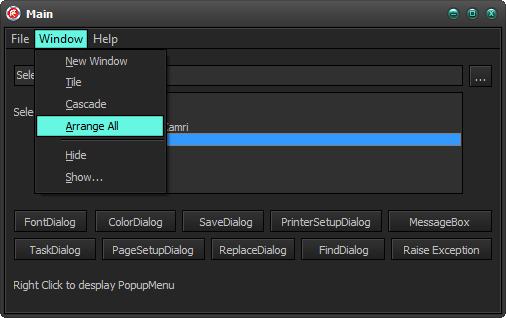
Menus
Standard TMainMenu with VCL Styles Enabled.

using the Vcl.Styles.SysControls unit
SysMenu with VCL Styles Enabled.

using the Vcl.Styles.SysControls unit
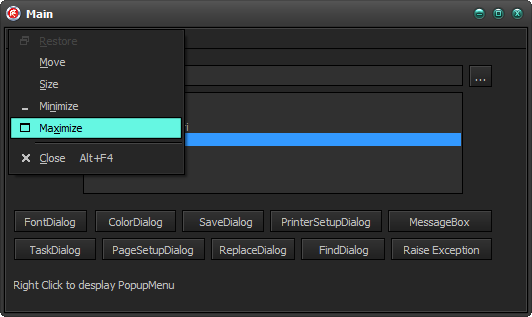
System menu with VCL Styles Enabled.

System menu using the Vcl.Styles.SysControls unit

Dialogs
Open Dialog With VCL Styles enabled

Open Dialog using the Vcl.Styles.SysControls unit

Even the shell menu inside of the dialog is themed

Others Dialogs


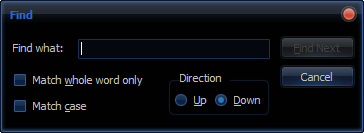
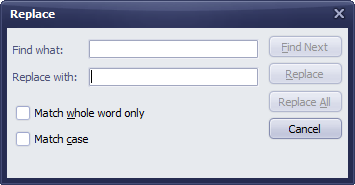
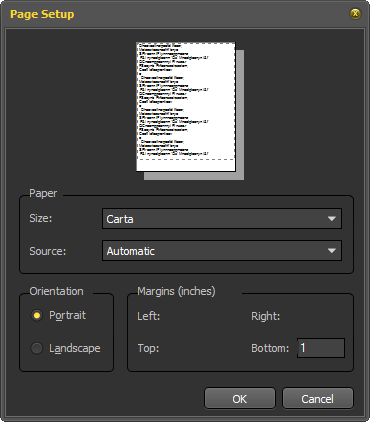

You can activate this functionality in your apps just adding the Vcl.Styles.SysControls unit to your project. Also a new sample project was added to test all the new features.
As always all your comments and suggestions are welcome.

 The Road to Delphi
November 11, 2013 at 3:30 pm
Best Project of the Year! Why is EMBA not able to fix simplest bugs?
Pingback: The VCL Styles Utils Project now supports dialo...
November 12, 2013 at 4:12 am
Beatyfull work!
Just one question: since Embarcadero seems not interested in correcting certain errors, is it possible in some way to patch VCL to solve the bug in TMainMenu and TPopUpMenu that they doesn’t respect the Screen.MainMenu.Font.Size property? Last year I opend a issue in QC but they don’t solve it yet. I just patched by myself Vcl.PlatformVclStylesActnCtrls.pas to get this working on TActionMainMenuBar because it suffers the same problem.
November 12, 2013 at 10:12 am
Thanks, for the TActionMainMenuBar and TPopupActionBar I wrote this post. Now For the TMainMenu you must modify the style hook related to this control located inside of the TFormStyleHook and for the TPopupMenu you can request this in the issue page of the project.
November 13, 2013 at 5:13 am
Rodrigo I read your post for TActionMainMenuBar and I’m using this solution but I have to say that it doesn’t work if use a font.size bigger than 16 (for example 24) because the size of the single menu elements it seems not correctly recalculated. If you use a small font size you cann’t see this issue.
November 13, 2013 at 10:52 am
Davide, The code of that article is part of the VCL Styles Utils project, so you can report the issue using the issue page of the project http://code.google.com/p/vcl-styles-utils/issues/list
November 13, 2013 at 11:10 am
I’ve already done it but the issue was closed as wontfix (see issue 3). I tried to fix it by myself but the result is not perfect.
November 13, 2013 at 6:56 am
How can I modify the style hook for TMainMenu? Thanks
December 27, 2013 at 10:57 am
The TMainMenu Style hook is included (as a strict private class) in the TFormStyleHook, so in order to edit such style hook, you must modify the TFormStyleHook as well. The easy way is copy the TFormStyleHook class to a new unit and then made the changes.
November 12, 2013 at 6:05 am
Kudos for excellent work! Well done, Rodrigo!
Thanks a lot!
November 12, 2013 at 6:08 am
And of course, a big Thank you to Mahdi!
November 12, 2013 at 10:01 am
Thanks.
November 12, 2013 at 12:30 pm
Fantastic stuff!
November 12, 2013 at 1:24 pm
Thanks
November 13, 2013 at 4:06 am
Great thanks for the work!
But i have a problem. The TMenuItem property Break is still not working. I was trying this in the sample project and the popup menu isn’t displayed properly. Am i doing something wrong or is this still an not implemented feature?
November 13, 2013 at 10:50 am
You can report this issue using the issue page of the project http://code.google.com/p/vcl-styles-utils/issues/list
November 13, 2013 at 4:08 pm
Hi Rodrigo,
I have added all your units to the .dpr uses section. The app is themed now, but the menus and printer dialog are stil in Windows classic. What is wrong here? Is the order important?
November 13, 2013 at 4:13 pm
Check the sample application of the repository to see how it works. http://code.google.com/p/vcl-styles-utils/source/browse/#svn%2Ftrunk%2FVcl%20SysControls%20Demo
November 13, 2013 at 4:45 pm
I found the problem. It is working in Windows XP/7, but not on W2k. A customer app still needs W2k.
November 13, 2013 at 9:16 pm
The “Look In” label was left aligned instead of right aligned inside the Open dialog box.
November 13, 2013 at 9:22 pm
Please report this issue using the issue page of the project http://code.google.com/p/vcl-styles-utils/issues/list
November 17, 2013 at 11:33 am
I am just bluffed by your work!
Skinning the system dialogs is something I try to tackle for years now. I was missing the talent of you both…
Is it possible to toggle the skinning of system dialogs at runtime?
November 18, 2013 at 11:10 am
Thanks, for the moment the only way to disable apply the VCL Styles in the dialogs is using the Windows Style. Maybe in the future we will add this option, So you can request this feature using the issue page of the project http://code.google.com/p/vcl-styles-utils/issues/list
November 22, 2013 at 10:14 am
I’m without words, except: “I’m without words!!!”
December 2, 2013 at 5:04 pm
Amazing. Thanks very much Rodrigo!
January 12, 2014 at 5:11 am
Where can I download all units at once? This seems a nice project!
January 12, 2014 at 1:09 pm
You can get the instructions to checkout the source of the project from here http://code.google.com/p/vcl-styles-utils/source/checkout
January 12, 2014 at 4:29 pm
Well I cut and pasted them all… Could not find a hint :)
January 14, 2014 at 8:29 pm
You must install a subversion client like TortoiseSVN and then follow the instructions to checkout the source of the project from here http://code.google.com/p/vcl-styles-utils/source/checkout
August 23, 2014 at 3:29 am
Very nice, thank you Rodrigo!
September 15, 2014 at 3:14 pm
{ Add Vcl Styles to system menu }
TVclStylesSystemMenu.Create(Self);
This adds styles in an unsorted list. Please add a optional parameter TVclStylesSystemMenu.Create(Self, True), where the last parameter loads in styles in alphabetically sorted order.