The Road to Delphi

Delphi – Free Pascal – Oxygene


2 Comments

Detect Aero Glass using Delphi

To detect if Aero Glass is enabled we must use the DwmIsCompositionEnabled function.

See this example

program DetectAeroDelphi;
{$APPTYPE CONSOLE}
//Author Rodrigo Ruz 2009-10-26
uses
  Windows,
  SysUtils;

function  ISAeroEnabled: Boolean;
type
  _DwmIsCompositionEnabledFunc = function(var IsEnabled: Boolean): HRESULT; stdcall;
var
  Flag                       : Boolean;
  DllHandle                  : THandle;
  OsVersion                  : TOSVersionInfo;
  DwmIsCompositionEnabledFunc: _DwmIsCompositionEnabledFunc;
begin
  Result:=False;
  ZeroMemory(@OsVersion, SizeOf(OsVersion));
  OsVersion.dwOSVersionInfoSize := SizeOf(TOSVERSIONINFO);

  if ((GetVersionEx(OsVersion)) and (OsVersion.dwPlatformId = VER_PLATFORM_WIN32_NT) and (OsVersion.dwMajorVersion >= 6)) then //is Vista or Win7?
  begin
    DllHandle := LoadLibrary('dwmapi.dll');
    try
      if DllHandle <> 0 then
      begin
        @DwmIsCompositionEnabledFunc := GetProcAddress(DllHandle, 'DwmIsCompositionEnabled');
        if (@DwmIsCompositionEnabledFunc <> nil) then
        begin
          if DwmIsCompositionEnabledFunc(Flag)= S_OK then
           Result:=Flag;
        end;
      end;
    finally
      if DllHandle <> 0 then
        FreeLibrary(DllHandle);
    end;
  end;
end;

begin
  try
    if ISAeroEnabled then
     Writeln('Aero Glass enabled')
    else
     Writeln('Aero Glass disabled');
  except
    on E:Exception do
      Writeln(E.Classname, ': ', E.Message);
  end;
    Readln;
end.


2 Comments

Glass effect in a Delphi Console Application

Using the DwmEnableBlurBehindWindow and  GetConsoleWindow functions , we  can  apply a nice glass effect to our console applications.

Check this sample application

program ConsoleGlassDelphi;
//Author  : Rodrigo Ruz 2009-10-26
{$APPTYPE CONSOLE}

uses
  Windows,
  SysUtils;

type
  DWM_BLURBEHIND = record
    dwFlags                 : DWORD;
    fEnable                 : BOOL;
    hRgnBlur                : HRGN;
    fTransitionOnMaximized  : BOOL;
  end;

//function to enable the glass effect
function DwmEnableBlurBehindWindow(hWnd : HWND; const pBlurBehind : DWM_BLURBEHIND) : HRESULT; stdcall; external  'dwmapi.dll' name 'DwmEnableBlurBehindWindow';
//get the handle of the console window
function GetConsoleWindow: HWND; stdcall; external kernel32 name 'GetConsoleWindow';

function DWM_EnableBlurBehind(hwnd : HWND; AEnable: Boolean; hRgnBlur : HRGN = 0; ATransitionOnMaximized: Boolean = False; AFlags: Cardinal = 1): HRESULT;
var
  pBlurBehind : DWM_BLURBEHIND;
begin
  pBlurBehind.dwFlags:=AFlags;
  pBlurBehind.fEnable:=AEnable;
  pBlurBehind.hRgnBlur:=hRgnBlur;
  pBlurBehind.fTransitionOnMaximized:=ATransitionOnMaximized;
  Result:=DwmEnableBlurBehindWindow(hwnd, pBlurBehind);
end;

begin
  try
    DWM_EnableBlurBehind(GetConsoleWindow(), True);
    Writeln('See my glass effect');
    Writeln('Go Delphi Go');
    Readln;
  except
    on E:Exception do
      Writeln(E.Classname, ': ', E.Message);
  end;
end.
And this is the result
glass console


Leave a comment

The official Delphi 2010 Survey

Help  to improve Delphi answering this survey.

All,

First, I want to thank you for all of your support in the past, present, and
future. Below is the link to the 2010 Delphi survey, this is conducted by
Embarcadero and the Product Management for the Delphi product. The
responses are extremely important to us and help to shape the vision and
future of the product.

I know the survey is long, very LONG! But again, the information we get
from the answers you give are needed more than ever.

Please pass this survey on to anybody you think would be interested in
filling it out.

Again, thanks!

Mike

Mike Rozlog
Product Manager – Delphi


Leave a comment

Compilation of resources for migrate to Delphi 2009/2010 Unicode

There are many resources available that you can read and that you will assist in the migration from a old Delphi version to Delphi 2009/2010 (Unicode).


3 Comments

Bits manipulation functions using Delphi

Here I leave these useful functions for manipulating bits using Delphi.

//get if a particular bit is 1
function Get_a_Bit(const aValue: Cardinal; const Bit: Byte): Boolean;
begin
  Result := (aValue and (1 shl Bit)) <> 0;
end;

//set a particular bit as 1
function Set_a_Bit(const aValue: Cardinal; const Bit: Byte): Cardinal;
begin
  Result := aValue or (1 shl Bit);
end;

//set a particular bit as 0
function Clear_a_Bit(const aValue: Cardinal; const Bit: Byte): Cardinal;
begin
  Result := aValue and not (1 shl Bit);
end;

//Enable o disable a bit
function Enable_a_Bit(const aValue: Cardinal; const Bit: Byte; const Flag: Boolean): Cardinal;
begin
  Result := (aValue or (1 shl Bit)) xor (Integer(not Flag) shl Bit);
end;


25 Comments

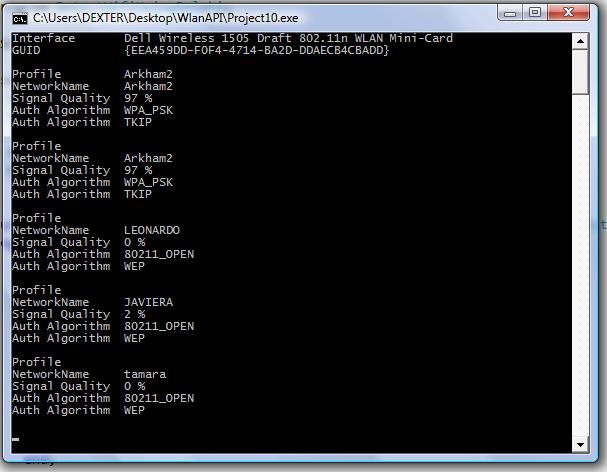
Detecting Wifi Networks Using Delphi and Native Wifi API

Today we will use the Native Wifi API and Delphi to enumerate all Wifi Networks availables. In this link you can find a translation of the headers.
I wrote this code using these headers. Tested in Delphi 2007 and Windows Vista.

Try this link for a fixed and updated version of the Native Wifi Delphi headers.

{$APPTYPE CONSOLE}

uses
  Windows,
  SysUtils,
  nduWlanAPI   in 'nduWlanAPI.pas',
  nduWlanTypes in 'nduWlanTypes.pas';

function DOT11_AUTH_ALGORITHM_To_String( Dummy :Tndu_DOT11_AUTH_ALGORITHM):AnsiString;
begin
    Result:='';
    case Dummy of
        DOT11_AUTH_ALGO_80211_OPEN          : Result:= '80211_OPEN';
        DOT11_AUTH_ALGO_80211_SHARED_KEY    : Result:= '80211_SHARED_KEY';
        DOT11_AUTH_ALGO_WPA                 : Result:= 'WPA';
        DOT11_AUTH_ALGO_WPA_PSK             : Result:= 'WPA_PSK';
        DOT11_AUTH_ALGO_WPA_NONE            : Result:= 'WPA_NONE';
        DOT11_AUTH_ALGO_RSNA                : Result:= 'RSNA';
        DOT11_AUTH_ALGO_RSNA_PSK            : Result:= 'RSNA_PSK';
        DOT11_AUTH_ALGO_IHV_START           : Result:= 'IHV_START';
        DOT11_AUTH_ALGO_IHV_END             : Result:= 'IHV_END';
    end;
end;

function DOT11_CIPHER_ALGORITHM_To_String( Dummy :Tndu_DOT11_CIPHER_ALGORITHM):AnsiString;
begin
    Result:='';
    case Dummy of
  	DOT11_CIPHER_ALGO_NONE      : Result:= 'NONE';
    DOT11_CIPHER_ALGO_WEP40     : Result:= 'WEP40';
    DOT11_CIPHER_ALGO_TKIP      : Result:= 'TKIP';
    DOT11_CIPHER_ALGO_CCMP      : Result:= 'CCMP';
    DOT11_CIPHER_ALGO_WEP104    : Result:= 'WEP104';
    DOT11_CIPHER_ALGO_WPA_USE_GROUP : Result:= 'WPA_USE_GROUP OR RSN_USE_GROUP';
    //DOT11_CIPHER_ALGO_RSN_USE_GROUP : Result:= 'RSN_USE_GROUP';
    DOT11_CIPHER_ALGO_WEP           : Result:= 'WEP';
    DOT11_CIPHER_ALGO_IHV_START     : Result:= 'IHV_START';
    DOT11_CIPHER_ALGO_IHV_END       : Result:= 'IHV_END';
    end;
end;

procedure Scan();
const
WLAN_AVAILABLE_NETWORK_INCLUDE_ALL_ADHOC_PROFILES =$00000001;
var
  hClient              : THandle;
  dwVersion            : DWORD;
  ResultInt            : DWORD;
  pInterface           : Pndu_WLAN_INTERFACE_INFO_LIST;
  i                    : Integer;
  j                    : Integer;
  pAvailableNetworkList: Pndu_WLAN_AVAILABLE_NETWORK_LIST;
  pInterfaceGuid       : PGUID;
  SDummy               : AnsiString;
begin
  ResultInt:=WlanOpenHandle(1, nil, @dwVersion, @hClient);
   try
    if  ResultInt<> ERROR_SUCCESS then
    begin
       WriteLn('Error Open CLient'+IntToStr(ResultInt));
       Exit;
    end;

    ResultInt:=WlanEnumInterfaces(hClient, nil, @pInterface);
    if  ResultInt<> ERROR_SUCCESS then
    begin
       WriteLn('Error Enum Interfaces '+IntToStr(ResultInt));
       exit;
    end;

    for i := 0 to pInterface^.dwNumberOfItems - 1 do
    begin
     Writeln('Interface       ' + pInterface^.InterfaceInfo[i].strInterfaceDescription);
     WriteLn('GUID            ' + GUIDToString(pInterface^.InterfaceInfo[i].InterfaceGuid));
     Writeln('');
     pInterfaceGuid:= @pInterface^.InterfaceInfo[pInterface^.dwIndex].InterfaceGuid;

        ResultInt:=WlanGetAvailableNetworkList(hClient,pInterfaceGuid,WLAN_AVAILABLE_NETWORK_INCLUDE_ALL_ADHOC_PROFILES,nil,pAvailableNetworkList);
        if  ResultInt<> ERROR_SUCCESS then
        begin
           WriteLn('Error WlanGetAvailableNetworkList '+IntToStr(ResultInt));
           Exit;
        end;

          for j := 0 to pAvailableNetworkList^.dwNumberOfItems - 1 do
          Begin
             WriteLn(Format('Profile         %s',[WideCharToString(pAvailableNetworkList^.Network[j].strProfileName)]));
             SDummy:=PAnsiChar(@pAvailableNetworkList^.Network[j].dot11Ssid.ucSSID);
             WriteLn(Format('NetworkName     %s',[SDummy]));
             WriteLn(Format('Signal Quality  %d ',[pAvailableNetworkList^.Network[j].wlanSignalQuality])+'%');
             //SDummy := GetEnumName(TypeInfo(Tndu_DOT11_AUTH_ALGORITHM),integer(pAvailableNetworkList^.Network[j].dot11DefaultAuthAlgorithm)) ;
             SDummy:=DOT11_AUTH_ALGORITHM_To_String(pAvailableNetworkList^.Network[j].dot11DefaultAuthAlgorithm);
             WriteLn(Format('Auth Algorithm  %s ',[SDummy]));
             SDummy:=DOT11_CIPHER_ALGORITHM_To_String(pAvailableNetworkList^.Network[j].dot11DefaultCipherAlgorithm);
             WriteLn(Format('Auth Algorithm  %s ',[SDummy]));
             Writeln('');
          End;
    end;
   finally
    WlanCloseHandle(hClient, nil);
   end;
end;
begin
  try
    Scan();
    Readln;
  except
    on E:Exception do
      Writeln(E.Classname, ': ', E.Message);
  end;
end.
ScanWifi Image

ScanWifi Image


2 Comments

Getting the parent process filename of a PID, using Delphi.

The next code shows how get the parent process filename of a PID, using Delphi.

uses
  Psapi,
  Windows,
  tlhelp32,
  SysUtils;

function GetParentProcessFileName(PID : DWORD): String;
var                               
  HandleSnapShot      : THandle;
  EntryParentProc     : TProcessEntry32;
  HandleParentProc    : THandle;
  ParentPID           : DWORD;
  ParentProcessFound  : Boolean;
  ParentProcPath      : PChar;
begin
  ParentProcessFound := False;
  HandleSnapShot     := CreateToolhelp32Snapshot(TH32CS_SNAPPROCESS, 0);
  GetMem(ParentProcPath, MAX_PATH);
  try
    if HandleSnapShot <> INVALID_HANDLE_VALUE then
    begin
      EntryParentProc.dwSize := SizeOf(EntryParentProc);
      if Process32First(HandleSnapShot, EntryParentProc) then
      begin
        repeat
          if EntryParentProc.th32ProcessID = PID then
          begin
            ParentPID  := EntryParentProc.th32ParentProcessID;
            HandleParentProc  := OpenProcess(PROCESS_QUERY_INFORMATION or PROCESS_VM_READ, False, ParentPID);
            ParentProcessFound:= HandleParentProc <> 0;
            if ParentProcessFound then
            begin
                GetModuleFileNameEx(HandleParentProc, 0, PChar(ParentProcPath), MAX_PATH);
                ParentProcPath := PChar(ParentProcPath);
                CloseHandle(HandleParentProc);
            end;
            break;
          end;
        until not Process32Next(HandleSnapShot, EntryParentProc);
      end;
      CloseHandle(HandleSnapShot);
    end;

    if ParentProcessFound then
      Result := ParentProcPath
    else
      Result := '';
  finally
      FreeMem(ParentProcPath);
  end;
end;


Leave a comment

Update 1 for RAD Studio 2010

Embarcadero has just released Update #1 for the Delphi 2010 and C++Builder 2010 personalities of RAD Studio 2010.

RAD Studio 2010 Update 1 includes the following fixes:

  • The product now works properly with All-Access licenses.
  • Several important licensing-related fixes are included that resolve issues with network licensing and ensure that any future updates will work properly.


Leave a comment

Using Delphi, how to check if two Bitmaps are the same?

In response to this question I wrote this code.

function IsSameBitmapUsingScanLine(Bitmap1, Bitmap2: TBitmap): Boolean;
var
 i           : Integer;
 ScanBytes   : Integer;
begin
  Result:= (Bitmap1<>nil) and (Bitmap2<>nil);
  if not Result then exit;
  Result:=(bitmap1.Width=bitmap2.Width) and (bitmap1.Height=bitmap2.Height) and (bitmap1.PixelFormat=bitmap2.PixelFormat) ;

  if not Result then exit;

  ScanBytes := Abs(Integer(Bitmap1.Scanline[1]) - Integer(Bitmap1.Scanline[0]));
  for i:=0 to Bitmap1.Height-1 do
  begin
    Result:=CompareMem(Bitmap1.ScanLine[i],Bitmap2.ScanLine[i],ScanBytes);
    if not Result then exit;
  end;

end;