The Road to Delphi

Delphi – Free Pascal – Oxygene


7 Comments

Using the Google Maps API V3 from Delphi – Part II Styled Maps

The Google maps API v3 offers a new functionality called Styled Maps. this feature let’s you personalize your maps and stand out from the crowd.

On this sample I wrote this small javascript function, to load a new style from an array of styles defined in the webpage.

 function SetMapSkin(nameskin)
 {
 var styledMapOptions = { name: "Skin"};
 var TheMapType = new google.maps.StyledMapType(styles[nameskin], styledMapOptions);
  map.mapTypes.set("skin", TheMapType);
  map.setMapTypeId("skin");
 }
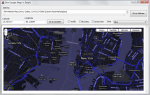

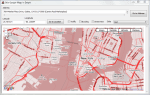
This slideshow requires JavaScript.

For create a new Map Style you can use the Google Maps API Styled Map Wizard

unit fMain;

interface

uses
  Windows, Messages, SysUtils, Variants, Classes, Graphics, Controls, Forms,
  Dialogs, OleCtrls, SHDocVw, StdCtrls, ExtCtrls, XPMan, ComCtrls,MSHTML;

type
  TfrmMain = class(TForm)
    WebBrowser1: TWebBrowser;
    LabelAddress: TLabel;
    PanelHeader: TPanel;
    ButtonGotoLocation: TButton;
    XPManifest1: TXPManifest;
    MemoAddress: TMemo;
    ButtonGotoAddress: TButton;
    LabelLatitude: TLabel;
    LabelLongitude: TLabel;
    Longitude: TEdit;
    Latitude: TEdit;
    CheckBoxTraffic: TCheckBox;
    CheckBoxBicycling: TCheckBox;
    CheckBoxStreeView: TCheckBox;
    ComboBoxSkins: TComboBox;
    Label1: TLabel;
    procedure FormCreate(Sender: TObject);
    procedure ButtonGotoAddressClick(Sender: TObject);
    procedure ButtonGotoLocationClick(Sender: TObject);
    procedure CheckBoxTrafficClick(Sender: TObject);
    procedure CheckBoxBicyclingClick(Sender: TObject);
    procedure CheckBoxStreeViewClick(Sender: TObject);
    procedure ComboBoxSkinsChange(Sender: TObject);
  private
    { Private declarations }
    HTMLWindow2: IHTMLWindow2;
  public
    { Public declarations }
  end;

var
  frmMain: TfrmMain;

implementation

uses
   ActiveX;

{$R *.dfm}

const
HTMLStr: String =
'<html> '+
'<head> '+
'<meta name="viewport" content="initial-scale=1.0, user-scalable=yes" /> '+
'<script type="text/javascript" src="http://maps.google.com/maps/api/js?sensor=true"></script> '+
'<script type="text/javascript"> '+
''+
''+
'  var geocoder; '+
'  var map;  '+
'  var trafficLayer;'+
'  var bikeLayer;'+

'var styles = {' +//define the styles in an array in JSON format
  '''Red'': [' + //set the name of the Style
    '{' +
      'featureType: ''all'',' +
      'stylers: [{hue: ''#ff0000''}]' +
    '}' +
  '],' +
  '''Green'': [' +
    '{' +
      'featureType: ''all'',' +
      'stylers: [{hue: ''#00ff00''}]' +
    '}' +
  '],' +
  '''Countries'': [' +
    '{' +
      'featureType: ''all'',' +
      'stylers: [' +
        '{visibility: ''off''}' +
      ']' +
    '},' +
    '{' +
      'featureType: ''water'',' +
      'stylers: [' +
        '{visibility: ''on''},' +
        '{lightness: -100 }' +
      ']' +
    '}' +
  '],' +
  '''Night'': [' +
    '{' +
      'featureType: ''all'',' +
      'rules: [{invert_lightness: ''true''}]' +
    '}        ' +
  '],' +
  '''Blue'': [' +
    '{' +
      'featureType: ''all'',' +
      'stylers: [' +
        '{hue: ''#0000b0''},' +
        '{invert_lightness: ''true''},' +
        '{saturation: -30}' +
      ']' +
    '}' +
  '],' +
  '''Greyscale'': [' +
    '{              ' +
      'featureType: ''all'',' +
      'stylers: [' +
        '{saturation: -100},' +
        '{gamma: 0.50}' +
      ']' +
    '}' +
  '],' +
  '''No roads'': [' +
    '{' +
      'featureType: ''road'',' +
      'stylers: [' +
        '{visibility: ''off''}' +
      ']' +
    '}' +
  '],' +
  '''Mixed'': [' +
    '{' +
      'featureType: ''landscape'',' +
      'stylers: [{hue: ''#00dd00''}]' +
    '}, {' +
      'featureType: ''road'',' +
      'stylers: [{hue: ''#dd0000''}]' +
    '}, {' +
      'featureType: ''water'',' +
      'stylers: [{hue: ''#000040''}]' +
    '}, {' +
      'featureType: ''poi.park'',' +
      'stylers: [{visibility: ''off''}]' +
    '}, {' +
      'featureType: ''road.arterial'',' +
      'stylers: [{hue: ''#ffff00''}]' +
    '}, {' +
      'featureType: ''road.local'',' +
      'stylers: [{visibility: ''off''}]' +
    '}            ' +
  '],' +
  '''Chilled'': [' +
    '{' +
      'featureType: ''road'',' +
      'elementType: ''geometry'',' +
      'stylers: [{''visibility'': ''simplified''}]' +
    '}, {' +
      'featureType: ''road.arterial'',' +
      'stylers: [' +
       '{hue: 149},' +
       '{saturation: -78},' +
       '{lightness: 0}' +
      ']' +
    '}, {' +
      'featureType: ''road.highway'',' +
      'stylers: [' +
        '{hue: -31},' +
        '{saturation: -40},' +
        '{lightness: 2.8}' +
      ']' +
    '}, {' +
      'featureType: ''poi'',' +
      'elementType: ''label'',' +
      'stylers: [{''visibility'': ''off''}]' +
    '}, {' +
      'featureType: ''landscape'',' +
      'stylers: [' +
        '{hue: 163},' +
        '{saturation: -26},' +
        '{lightness: -1.1}' +
      ']' +
    '}, {' +
      'featureType: ''transit'',' +
      'stylers: [{''visibility'': ''off''}]' +
    '}, {' +
      'featureType: ''water'',' +
        'stylers: [' +
        '{hue: 3},' +
        '{saturation: -24.24},' +
        '{lightness: -38.57}' +
      ']' +
    '}' +
  ']' +
'};'   +

''+
''+
'  function initialize() { '+
'    geocoder = new google.maps.Geocoder();'+
'    var latlng = new google.maps.LatLng(40.714776,-74.019213); '+
'    var myOptions = { '+
'      zoom: 13, '+
'      center: latlng, '+
//'      mapTypeId: google.maps.MapTypeId.ROADMAP '+
'      mapTypeIds: [google.maps.MapTypeId.ROADMAP, "skin"] '+
'    }; '+
'    map = new google.maps.Map(document.getElementById("map_canvas"), myOptions); '+
'    trafficLayer = new google.maps.TrafficLayer();'+
'    bikeLayer = new google.maps.BicyclingLayer();'+
'    var styledMapOptions = { name: "Skin" };'+
'    var TheMapType = new google.maps.StyledMapType(styles["Red"], styledMapOptions);'+
'    map.mapTypes.set("skin", TheMapType);'+
'    map.setMapTypeId("skin"); '+
'  } '+
''+
''+

'  function SetMapSkin(nameskin) {'+ //change the skin(style) of the map using the name of the style.
'  var styledMapOptions = { name: "Skin"};'+
//'  for (var s in styles) {'+
//'    if (s==nameskin) {'+
//'    var TheMapType = new google.maps.StyledMapType(styles[s], styledMapOptions);'+
'    var TheMapType = new google.maps.StyledMapType(styles[nameskin], styledMapOptions);'+
'    map.mapTypes.set("skin", TheMapType);'+
'    map.setMapTypeId("skin"); '+
//'    }'+
//'  };'+

'}'+

'  function codeAddress(address) { '+
'    if (geocoder) {'+
'      geocoder.geocode( { address: address}, function(results, status) { '+
'        if (status == google.maps.GeocoderStatus.OK) {'+
'          map.setCenter(results[0].geometry.location);'+
'          var marker = new google.maps.Marker({'+
'              map: map,'+
'              position: results[0].geometry.location'+
'          });'+
'        } else {'+
'          alert("Geocode was not successful for the following reason: " + status);'+
'        }'+
'      });'+
'    }'+
'  }'+
''+
''+
'  function GotoLatLng(Lat, Lang) { '+
'   var latlng = new google.maps.LatLng(Lat,Lang);'+
'   map.setCenter(latlng);'+
'   var marker = new google.maps.Marker({'+
'      position: latlng,map: map,title:Lat+","+Lang'+
'  });'+
'  }'+
''+
''+
'  function TrafficOn()   { trafficLayer.setMap(map); }'+
''+
'  function TrafficOff()  { trafficLayer.setMap(null); }'+
''+''+
'  function BicyclingOn() { bikeLayer.setMap(map); }'+
''+
'  function BicyclingOff(){ bikeLayer.setMap(null);}'+
''+
'  function StreetViewOn() { map.set("streetViewControl", true); }'+
''+
'  function StreetViewOff() { map.set("streetViewControl", false); }'+
''+
''+'</script> '+
'</head> '+
'<body onload="initialize()"> '+
'
<div id="map_canvas" style="width:100%; height:100%"></div>

 '+
'</body> '+
'</html> ';

procedure TfrmMain.FormCreate(Sender: TObject);
var
  aStream     : TMemoryStream;
begin
   WebBrowser1.Navigate('about:blank');
    if Assigned(WebBrowser1.Document) then
    begin
      aStream := TMemoryStream.Create;
      try
         aStream.WriteBuffer(Pointer(HTMLStr)^, Length(HTMLStr));
         aStream.Seek(0, soFromBeginning);
         (WebBrowser1.Document as IPersistStreamInit).Load(TStreamAdapter.Create(aStream));
      finally
         aStream.Free;
      end;
      HTMLWindow2 := (WebBrowser1.Document as IHTMLDocument2).parentWindow;
    end;
end;

procedure TfrmMain.ButtonGotoLocationClick(Sender: TObject);
begin
   HTMLWindow2.execScript(Format('GotoLatLng(%s,%s)',[Latitude.Text,Longitude.Text]), 'JavaScript');
end;

procedure TfrmMain.ButtonGotoAddressClick(Sender: TObject);
var
   address    : string;
begin
   address := MemoAddress.Lines.Text;
   address := StringReplace(StringReplace(Trim(address), #13, ' ', [rfReplaceAll]), #10, ' ', [rfReplaceAll]);
   HTMLWindow2.execScript(Format('codeAddress(%s)',[QuotedStr(address)]), 'JavaScript');
end;

procedure TfrmMain.CheckBoxStreeViewClick(Sender: TObject);
begin
    if CheckBoxStreeView.Checked then
     HTMLWindow2.execScript('StreetViewOn()', 'JavaScript')
    else
     HTMLWindow2.execScript('StreetViewOff()', 'JavaScript');

end;

procedure TfrmMain.CheckBoxBicyclingClick(Sender: TObject);
begin
    if CheckBoxBicycling.Checked then
     HTMLWindow2.execScript('BicyclingOn()', 'JavaScript')
    else
     HTMLWindow2.execScript('BicyclingOff()', 'JavaScript');
 end;

procedure TfrmMain.CheckBoxTrafficClick(Sender: TObject);
begin
    if CheckBoxTraffic.Checked then
     HTMLWindow2.execScript('TrafficOn()', 'JavaScript')
    else
     HTMLWindow2.execScript('TrafficOff()', 'JavaScript');
 end;

procedure TfrmMain.ComboBoxSkinsChange(Sender: TObject); //When the content from the combobox changes call the function SetMapSkin
begin
  HTMLWindow2.execScript(Format('SetMapSkin(%s)',[QuotedStr(ComboBoxSkins.Text)]), 'JavaScript');
end;

end.

Check out the full source code of this article on Github.


91 Comments

Using the Google Maps API V3 from Delphi – Part I Basic functionality

The Google Maps Javascript API Version 2 has been officially deprecated, so it’s time to update to the new version 3, this post shows how you can use the new Google maps V3 API from Delphi.

in this sample application you can use the traffic layer , Bicycling layer and the street View Control to activate the panorama view.

for additional info about the Google maps api v3 you can check these links.

Check the next full commented sample application written in Delphi 2007, the source code is available on Github

unit fMain;

interface 

uses
  Windows, Messages, SysUtils, Variants, Classes, Graphics, Controls, Forms,
  Dialogs, OleCtrls, SHDocVw, StdCtrls, ExtCtrls, XPMan, ComCtrls,MSHTML;

type
  TfrmMain = class(TForm)
    WebBrowser1: TWebBrowser;
    LabelAddress: TLabel;
    PanelHeader: TPanel;
    ButtonGotoLocation: TButton;
    XPManifest1: TXPManifest;
    MemoAddress: TMemo;
    ButtonGotoAddress: TButton;
    LabelLatitude: TLabel;
    LabelLongitude: TLabel;
    Longitude: TEdit;
    Latitude: TEdit;
    CheckBoxTraffic: TCheckBox;
    CheckBoxBicycling: TCheckBox;
    CheckBoxStreeView: TCheckBox;
    procedure FormCreate(Sender: TObject);
    procedure ButtonGotoAddressClick(Sender: TObject);
    procedure ButtonGotoLocationClick(Sender: TObject);
    procedure CheckBoxTrafficClick(Sender: TObject);
    procedure CheckBoxBicyclingClick(Sender: TObject);
    procedure CheckBoxStreeViewClick(Sender: TObject);
  private
    { Private declarations }
    HTMLWindow2: IHTMLWindow2;
  public
    { Public declarations }
  end;

var
  frmMain: TfrmMain;

implementation

uses
   ActiveX;

{$R *.dfm}

const
HTMLStr: String = //i put The code for the web page page wich load the google maps in a string const, you can use an external html file too or embed the page in a resource and then load in a stream
'<html> '+
'<head> '+
'<meta name="viewport" content="initial-scale=1.0, user-scalable=yes" /> '+
'<script type="text/javascript" src="http://maps.google.com/maps/api/js?sensor=true"></script> '+
'<script type="text/javascript"> '+
''+
''+//Declare the globals vars to be used in the javascript functions
'  var geocoder; '+
'  var map;  '+
'  var trafficLayer;'+
'  var bikeLayer;'+
''+
''+
'  function initialize() { '+
'    geocoder = new google.maps.Geocoder();'+
'    var latlng = new google.maps.LatLng(40.714776,-74.019213); '+ //Set the initial coordinates for the map
'    var myOptions = { '+
'      zoom: 13, '+
'      center: latlng, '+
'      mapTypeId: google.maps.MapTypeId.ROADMAP '+ //Set the default type map
'    }; '+
'    map = new google.maps.Map(document.getElementById("map_canvas"), myOptions); '+
'    trafficLayer = new google.maps.TrafficLayer();'+ //Create the traffic Layer instance
'    bikeLayer = new google.maps.BicyclingLayer();'+ //Create the Bicycling Layer instance
'  } '+
''+
''+
'  function codeAddress(address) { '+ //function to translate an address to coordinates and put and marker.
'    if (geocoder) {'+
'      geocoder.geocode( { address: address}, function(results, status) { '+
'        if (status == google.maps.GeocoderStatus.OK) {'+
'          map.setCenter(results[0].geometry.location);'+
'          var marker = new google.maps.Marker({'+
'              map: map,'+
'              position: results[0].geometry.location'+
'          });'+
'        } else {'+
'          alert("Geocode was not successful for the following reason: " + status);'+
'        }'+
'      });'+
'    }'+
'  }'+
''+
''+
'  function GotoLatLng(Lat, Lang) { '+ //Set the map in the coordinates and put a marker
'   var latlng = new google.maps.LatLng(Lat,Lang);'+
'   map.setCenter(latlng);'+
'   var marker = new google.maps.Marker({'+
'      position: latlng, '+
'      map: map,'+
'      title:Lat+","+Lang'+
'  });'+
'  }'+
''+
''+
'  function TrafficOn()   { trafficLayer.setMap(map); }'+ //Activate the Traffic layer
''+
'  function TrafficOff()  { trafficLayer.setMap(null); }'+
''+''+
'  function BicyclingOn() { bikeLayer.setMap(map); }'+//Activate the Bicycling layer
''+
'  function BicyclingOff(){ bikeLayer.setMap(null);}'+
''+
'  function StreetViewOn() { map.set("streetViewControl", true); }'+//Activate the streeview control
''+
'  function StreetViewOff() { map.set("streetViewControl", false); }'+
''+
''+'</script> '+
'</head> '+
'<body onload="initialize()"> '+
'  <div id="map_canvas" style="width:100%; height:100%"></div> '+
'</body> '+
'</html> ';

procedure TfrmMain.FormCreate(Sender: TObject);
var
  aStream     : TMemoryStream;
begin
   WebBrowser1.Navigate('about:blank'); //Set the location to an empty page
    if Assigned(WebBrowser1.Document) then
    begin
      aStream := TMemoryStream.Create; //create a TStem to load the Page from the string
      try
         aStream.WriteBuffer(Pointer(HTMLStr)^, Length(HTMLStr)); //Copy the string to the stream
         //aStream.Write(HTMLStr[1], Length(HTMLStr));
         aStream.Seek(0, soFromBeginning);
         (WebBrowser1.Document as IPersistStreamInit).Load(TStreamAdapter.Create(aStream));//Load the page from the stream
      finally
         aStream.Free;
      end;
      HTMLWindow2 := (WebBrowser1.Document as IHTMLDocument2).parentWindow; //Set the instance of the parentWindow to call the javascripts functions
    end;
end;

procedure TfrmMain.ButtonGotoLocationClick(Sender: TObject);
begin
   HTMLWindow2.execScript(Format('GotoLatLng(%s,%s)',[Latitude.Text,Longitude.Text]), 'JavaScript');//Call the function GotoLatLng to go the coordinates
end;

procedure TfrmMain.ButtonGotoAddressClick(Sender: TObject);
var
   address    : string;
begin
   address := MemoAddress.Lines.Text;
   address := StringReplace(StringReplace(Trim(address), #13, ' ', [rfReplaceAll]), #10, ' ', [rfReplaceAll]);
   HTMLWindow2.execScript(Format('codeAddress(%s)',[QuotedStr(address)]), 'JavaScript');//Call the function codeAddress to go the address
end;

procedure TfrmMain.CheckBoxStreeViewClick(Sender: TObject);
begin
    if CheckBoxStreeView.Checked then
     HTMLWindow2.execScript('StreetViewOn()', 'JavaScript') //Activate the Street View option
    else
     HTMLWindow2.execScript('StreetViewOff()', 'JavaScript');//Deactivate the Street View option

end;

procedure TfrmMain.CheckBoxBicyclingClick(Sender: TObject);
begin
    if CheckBoxBicycling.Checked then
     HTMLWindow2.execScript('BicyclingOn()', 'JavaScript')//Activate the Bicycling View option
    else
     HTMLWindow2.execScript('BicyclingOff()', 'JavaScript');//Deactivate the Bicycling View option
 end;

procedure TfrmMain.CheckBoxTrafficClick(Sender: TObject);
begin
    if CheckBoxTraffic.Checked then
     HTMLWindow2.execScript('TrafficOn()', 'JavaScript')//Activate the Traffic View option
    else
     HTMLWindow2.execScript('TrafficOff()', 'JavaScript');//Deactivate the Traffic View option
 end;

end.


5 Comments

Returning multiple datasets with ADO and Delphi

Maybe when you’ve used the SQL Server Management studio ‘ve noticed that you can run multiple queries at once.

SQL Managemnt Studio , Multiple=ADO supports this feature, and you can include it in your applications. the key is to use the function NextRecordset and then assign it to any TCustomADODataSet descendent.

see this simple example.


program MultiDataSetsADO;

{$APPTYPE CONSOLE}

uses
  ActiveX,
  ADODB,
  SysUtils;

const
//the connection string
StrConnection='Provider=SQLOLEDB.1;Password=%s;Persist Security Info=True;User ID=%s;Initial Catalog=%s;Application Name=MyApp;' +
              'Data Source=%s;Use method for Prepare=1;Auto Translate=True;Packet Size=4096;Use Encryption for Data=False;Tag with column collation when possible=False';

var
AdoConnection : TADOConnection;

procedure SetupConnection;//Open a connection
begin
  Writeln('Connecting to SQL Server');
  AdoConnection:=TADOConnection.Create(nil);
  AdoConnection.LoginPrompt:=False;//dont ask for the login parameters
  AdoConnection.ConnectionString:=Format(StrConnection,['pass','user','DataBase','Server']);
  AdoConnection.Connected:=True; //open the connection
  Writeln('Connected');
end;

procedure CloseConnection;//Close an open connection
begin
  Writeln('Closing connection to Sql Server');
  if AdoConnection.Connected then
  AdoConnection.Close;
  AdoConnection.Free;
  Writeln('Connection closed');
end;

Procedure RunMutilplesQuerysatOnce(SqlQuerys : array of string);
var
  AdoDataSet      : TADODataSet;
  AdoDataSetChild : TADODataSet;
  i               : integer;
  j               : integer;
  RecCount        : OleVariant;
begin
   AdoDataSet:=TADODataSet.Create(nil);
   try
    AdoDataSet.Connection :=AdoConnection;//set the connection
    AdoDataSet.CommandType:=cmdText;
    AdoDataSet.LockType   :=ltReadOnly;
    for i:=Low(SqlQuerys)  to High(SqlQuerys) do
    AdoDataSet.CommandText:=AdoDataSet.CommandText+SqlQuerys[i]+' '; //assign the querys
    AdoDataSet.Open;//Execute all the querys at once.

    for i:=Low(SqlQuerys)  to High(SqlQuerys) do
    begin
        AdoDataSetChild:=TADODataSet.Create(nil);//Create a Dummy dataset to fetch the data
        try
           Writeln('Loading Dataset #'+IntToStr(i+1));
            if i=0 then
            AdoDataSetChild.Recordset:=AdoDataSet.Recordset //Assign the first dataset returned
            else
            AdoDataSetChild.Recordset:=AdoDataSet.Recordset.NextRecordset(RecCount); //Assign the next dataset  in the buffer

            for j:=0 to AdoDataSetChild.FieldCount-1 do
            Write(format('%-15s',[AdoDataSetChild.Fields[j].FieldName])); //Show the fields names
            Writeln;
            while not AdoDataSetChild.eof do
            begin
                //do your stuff here
                for j:=0 to AdoDataSetChild.FieldCount-1 do
                Write(format('%-15s',[AdoDataSetChild.Fields[j].asString])); // Show the data
                Writeln;

              AdoDataSetChild.Next;
            end;
        finally
        AdoDataSetChild.Free;
        end;
   end;
   finally
   AdoDataSet.Free;
   end;
end;

begin
  CoInitialize(nil); // call CoInitialize()
  try
       Writeln('Init');
       try
         SetupConnection;
         RunMutilplesQuerysatOnce(
         [
         'select top 10 transnum,transtype,ItemCode from oinm',
         'select top 10 CardCode,CardType,Country from ocrd',
         'select top 10 ItemCode,ItemType,ManBtchNum,OnHand,OnOrder from oitm']
         );

         CloseConnection; //close the connection
       except
         on E : Exception do
           Writeln(E.Classname, ': ', E.Message);
       end;
      Readln;
  finally
   CoUnInitialize; // free memory
  end;
end.

if you run the Sql Profiler you can check wich all the querys are executed at once

and the final result is

console dataset

Console Output

program MultiDataSetsADO;

{$APPTYPE CONSOLE}

uses
ActiveX,
ADODB,
SysUtils;

const
//the connection string
StrConnection=’Provider=SQLOLEDB.1;Password=%s;Persist Security Info=True;User ID=%s;Initial Catalog=%s;Application Name=MyApp;’ +
‘Data Source=%s;Use method for Prepare=1;Auto Translate=True;Packet Size=4096;Use Encryption for Data=False;Tag with column collation when possible=False’;

var
AdoConnection : TADOConnection;

procedure SetupConnection;//Open a connection
begin
Writeln(‘Connecting to SQL Server’);
AdoConnection:=TADOConnection.Create(nil);
AdoConnection.LoginPrompt:=False;//dont ask for the login parameters
AdoConnection.ConnectionString:=Format(StrConnection,[‘us8j329′,’sa’,’CMMSDEMO_ORICA’,’localhost’]);
AdoConnection.Connected:=True; //open the connection
Writeln(‘Connected’);
end;

procedure CloseConnection;//Close an open connection
begin
Writeln(‘Closing connection to Sql Server’);
if AdoConnection.Connected then
AdoConnection.Close;
AdoConnection.Free;
Writeln(‘Connection closed’);
end;

Procedure RunMutilplesQuerysatOnce(SqlQuerys : array of string);
var
AdoDataSet      : TADODataSet;
AdoDataSetChild : TADODataSet;
i               : integer;
j               : integer;
RecCount        : OleVariant;
begin
AdoDataSet:=TADODataSet.Create(nil);
try
AdoDataSet.Connection :=AdoConnection;
AdoDataSet.CommandType:=cmdText;
AdoDataSet.LockType   :=ltReadOnly;
for i:=Low(SqlQuerys)  to High(SqlQuerys) do
AdoDataSet.CommandText:=AdoDataSet.CommandText+SqlQuerys[i]+’ ‘;
AdoDataSet.Open;

for i:=Low(SqlQuerys)  to High(SqlQuerys) do
begin
AdoDataSetChild:=TADODataSet.Create(nil);
try
Writeln(‘Loading Dataset #’+IntToStr(i+1));
if i=0 then
AdoDataSetChild.Recordset:=AdoDataSet.Recordset
else
AdoDataSetChild.Recordset:=AdoDataSet.Recordset.NextRecordset(RecCount);

for j:=0 to AdoDataSetChild.FieldCount-1 do
Write(format(‘%-15s’,[AdoDataSetChild.Fields[j].FieldName]));
Writeln;
while not AdoDataSetChild.eof do
begin
for j:=0 to AdoDataSetChild.FieldCount-1 do
Write(format(‘%-15s’,[AdoDataSetChild.Fields[j].asString]));
Writeln;

AdoDataSetChild.Next;
end;
finally
AdoDataSetChild.Free;
end;
end;
finally
AdoDataSet.Free;
end;
end;

begin
CoInitialize(nil); // call CoInitialize()
try
Writeln(‘Init’);
try
SetupConnection;
RunMutilplesQuerysatOnce(
[
‘select top 10 transnum,transtype,ItemCode from oinm’,
‘select top 10 CardCode,CardType,Country from ocrd’,
‘select top 10 ItemCode,ItemType,ManBtchNum,OnHand,OnOrder from oitm’]
);

CloseConnection; //close the connection
except
on E : Exception do
Writeln(E.Classname, ‘: ‘, E.Message);
end;
Readln;
finally
CoUnInitialize; // free memory
end;
end.


4 Comments

Enumerating the restore points using WMI and Delphi

To Enumerate the restore points you can use the SystemRestore WMI Class

This class exposes five properties

  • Description : The description to be displayed so the user can easily identify a restore point
  • RestorePointType : The type of restore point.
  • EventType : The type of event.
  • SequenceNumber : The sequence number of the restore point.
  • CreationTime : The time at which the state change occurred.

Check this sample application

//Author Rodrigo Ruz 14/04/2010.
{$APPTYPE CONSOLE}

uses
  SysUtils
  ,ActiveX
  ,ComObj
  ,Variants;

function RestorePointTypeToStr(RestorePointType:Integer):string;
begin
     case  RestorePointType of
      0  : Result:='APPLICATION_INSTALL';
      1  : Result:='APPLICATION_UNINSTALL';
      13 : Result:='CANCELLED_OPERATION';
      10 : Result:='DEVICE_DRIVER_INSTALL';
      12 : Result:='MODIFY_SETTINGS'
      else
      Result:='Unknow';
     end;
end;

function EventTypeToStr(EventType:integer) : string;
begin
     case  EventType of
      102  : Result:='BEGIN_NESTED_SYSTEM_CHANGE';
      100  : Result:='BEGIN_SYSTEM_CHANGE';
      103  : Result:='END_NESTED_SYSTEM_CHANGE';
      101  : Result:='END_SYSTEM_CHANGE'
      else
      Result:='Unknow';
     end;
end;

function WMITimeToStr(WMITime:string) : string; //convert to dd/mm/yyyy hh:mm:ss
begin
    //20020710113047.000000420-000 example    source http://technet.microsoft.com/en-us/library/ee156576.aspx
    result:=Format('%s/%s/%s %s:%s:%s',[copy(WMITime,7,2),copy(WMITime,5,2),copy(WMITime,1,4),copy(WMITime,9,2),copy(WMITime,11,2),copy(WMITime,13,2)]);
end;

procedure GetRestorePoints;
var
  oSWbemLocator : OLEVariant;
  objWMIService : OLEVariant;
  colItems      : OLEVariant;
  colItem       : OLEVariant;
  oEnum         : IEnumvariant;
  iValue        : LongWord;
begin
  oSWbemLocator := CreateOleObject('WbemScripting.SWbemLocator');
  objWMIService := oSWbemLocator.ConnectServer('localhost', 'root\default', '', '');
  colItems      := objWMIService.ExecQuery('SELECT * FROM SystemRestore','WQL',0);
  oEnum         := IUnknown(colItems._NewEnum) as IEnumVariant;
  while oEnum.Next(1, colItem, iValue) = 0 do
  begin
      WriteLn(Format('%s %-15s',['Description',colItem.Description]));
      WriteLn(Format('%s %-15s',['RestorePointType',RestorePointTypeToStr(colItem.RestorePointType)]));
      WriteLn(Format('%s %-15s',['EventType',EventTypeToStr(colItem.EventType)]));
      WriteLn(Format('%s %-15s',['SequenceNumber',colItem.SequenceNumber]));
      WriteLn(Format('%s %-15s',['CreationTime',WMITimeToStr(colItem.CreationTime)]));
      Writeln;
      colItem:=Unassigned;
  end;
end;

begin
 try
    CoInitialize(nil);
    try
      GetRestorePoints;
    finally
      CoUninitialize;
    end;
 except
    on E:Exception do
        Writeln(E.Classname, ': ', E.Message);       
  end;
  Readln;
end.


17 Comments

Build your own profiler using ADO

You can construct your own SQL profiler for yours apps wich use ADO, the TAdoConnection Object has two events TADOConnection.OnWillExecute and TADOConnection.OnExecuteComplete to accomplish this task.

TWillExecuteEvent = procedure (const Connection: TADOConnection; var CommandText: WideString; var CursorType: TCursorType; var LockType: TADOLockType; var CommandType: TCommandType; var ExecuteOptions: TExecuteOptions; var EventStatus: TEventStatus; const Command: _Command; const Recordset: _Recordset) of object;
TExecuteCompleteEvent = procedure (const Connection: TADOConnection; RecordsAffected: Integer; const Error: Error; var EventStatus: TEventStatus; const Command: _Command; const Recordset: _Recordset) of object;

1) Create a New Form with a TListview and a TMemo (in this example i am use a TSynEdit for format the SQL Command)

2) Create a public procedure in your form called AddLog

procedure AddLog(const Command,CommandType,Status,CursorType,LockType:String;RecordsAffected:Integer);

and implement the procedure like this

procedure TFrmLogSql.AddLog(const Command,CommandType,Status,CursorType,LockType:String;RecordsAffected:Integer);
var
  item : TListItem;
begin
    ListViewSQL.Items.BeginUpdate;
  try
    item:=ListViewSQL.Items.Add;
    item.Caption:=FormatDateTime('DD/MM/YYYY HH:NN:SS.ZZZ',Now);
    item.SubItems.Add(CommandType);
    item.SubItems.Add(Command);
    item.SubItems.Add(Status);
    item.SubItems.Add(IntToStr(RecordsAffected));
    item.SubItems.Add(CursorType);
    item.SubItems.Add(LockType);
  finally
    ListViewSQL.Items.EndUpdate;
  end;
  ListViewSQL.Items.Item[ListViewSQL.Items.Count-1].MakeVisible(false); //Scroll to the last line
end;

3) Assign the OnChange Event of the TListView

procedure TFrmLogSql.ListViewSQLChange(Sender: TObject; Item: TListItem;
  Change: TItemChange);
begin
    if ListViewSQL.Selected<>nil then
    SynEdit1.Lines.Text:=ListViewSQL.Selected.SubItems[1];
end;

4) Assign the events OnWillExecute and OnExecuteComplete for you AdoConnection object.

uses
  TypInfo;

procedure TDataModule1.ADOConnection1WillExecute(
  Connection: TADOConnection; var CommandText: WideString;
  var CursorType: TCursorType; var LockType: TADOLockType;
  var CommandType: TCommandType; var ExecuteOptions: TExecuteOptions;
  var EventStatus: TEventStatus; const Command: _Command;
  const Recordset: _Recordset);
begin
   FrmLogSql.AddLog(
   CommandText,
   'Before '+GetEnumName(TypeInfo(TCommandType),Integer(CommandType)),
   GetEnumName(TypeInfo(TEventStatus),Integer(EventStatus)),
   GetEnumName(TypeInfo(TCursorType),Integer(CursorType)),
   GetEnumName(TypeInfo(TADOLockType),Integer(LockType)),
   0);
end;

procedure TDataModule1.ADOConnection1ExecuteComplete(
  Connection: TADOConnection; RecordsAffected: Integer; const Error: ADODB.Error;
  var EventStatus: TEventStatus; const Command: _Command;
  const Recordset: _Recordset);
begin
  FrmLogSql.AddLog(
  Command.CommandText,
  'After '+GetEnumName(TypeInfo(TCommandType),Integer(Command.CommandType)),
  GetEnumName(TypeInfo(TEventStatus),Integer(EventStatus)),
  GetEnumName(TypeInfo(TCursorType),Integer(Recordset.CursorType)),
  GetEnumName(TypeInfo(TADOLockType),Integer(Recordset.LockType)),
  RecordsAffected);
end;

5) and the final result


9 Comments

Checking if a TCP port is Open using Delphi and Winsocks

Many times we need to know if a TCP port is open or not, here I leave a function to perform this task using winsock.

Code tested in Delphi 7, 2007 and 2010.


uses
  Winsock;

function PortTCP_IsOpen(dwPort : Word; ipAddressStr:AnsiString) : boolean;
var
  client : sockaddr_in;
  sock   : Integer;

  ret    : Integer;
  wsdata : WSAData;
begin
 Result:=False;
 ret := WSAStartup($0002, wsdata); //initiates use of the Winsock DLL
  if ret<>0 then exit;
  try
    client.sin_family      := AF_INET;  //Set the protocol to use , in this case (IPv4)
    client.sin_port        := htons(dwPort); //convert to TCP/IP network byte order (big-endian)
    client.sin_addr.s_addr := inet_addr(PAnsiChar(ipAddressStr));  //convert to IN_ADDR  structure
    sock  :=socket(AF_INET, SOCK_STREAM, 0);    //creates a socket
    Result:=connect(sock,client,SizeOf(client))=0;  //establishes a connection to a specified socket
  finally
  WSACleanup;
  end;
end;

see this sample of usage

begin
 if PortTCP_IsOpen(3306,'127.0.0.1') then 
  DoMyStuff();
end;


Leave a comment

Delphi compiler magic functions and procedures

If you look in System.pas, you won’t find a High() or Low()  function that is declared anything like what you would expect.  These functions and procedures are called compiler “magic” functions.

This list enumerate the intrinsic routines exposed by the System unit. These intrinsic routines are actually handled by the compiler rather then the run-time library.

Original list http://docwiki.embarcadero.com/RADStudio/en/Delphi_Intrinsic_Routines

System.Abs Returns an absolute value.
System.Addr Returns a pointer to a specified object.
System.Append Prepares an existing file for adding text to the end.
System.Assert Tests whether a Boolean expression is true.
System.Assigned Tests for a nil (unassigned) pointer or procedural variable.
System.Assign Associates the name of an external file with a file variable.
System.AssignFile Associates the name of an external file with a file variable.
System.BlockRead Reads one or more records from an open file into a variable.
System.BlockWrite Writes one or more records from a variable to an open file.
System.Break Causes the flow of control to exit a for, while, or repeat statement.
System.Chr Returns the character for a specified ASCII value.
System.Close Terminates the association between a file variable and an external file.
System.CloseFile Terminates the association between file variable and an external disk file.
System.Concat Concatenates two or more strings into one.
System.Continue Allows the flow of control to proceed to the next iteration of for, while, or repeat statements.
System.Copy Returns a substring of a string or a segment of a dynamic array.
System.Dec Decrements a variable by 1 or N.
System.Default Returns the default value for generic type.
System.Delete Removes a substring from a string.
System.Dispose Releases memory allocated for a dynamic variable.
System.Eof Tests whether the file position is at the end of a file.
System.Eoln Tests whether the file pointer is at the end of a line.
System.Erase Deletes an external file.
System.Exclude Removes an element from a Delphi set.
System.Exit Exits from the current procedure.
System.FilePos Returns the current file position.
System.FileSize Returns the number of records in a file.
System.FillChar Fills contiguous bytes with a specified value.
System.Finalize Uninitializes a dynamically allocated variable.
System.Flush Empties the buffer of a text file opened for output.
System.FreeMem FreeMem frees a memory block.
System.GetMem GetMem allocates a memory block.
System.Halt Initiates abnormal termination of a program.
System.Hi Returns the high-order byte of X as an unsigned value.
System.High Returns the highest value in the range of an argument.
System.Inc Increments an ordinal value by one or N.
System.Include Adds an element to a Delphi set.
System.Initialize Initializes a dynamically allocated variable.
System.Insert Inserts a substring into a string beginning at a specified point.
System.Length Returns the number of characters in a string or elements in an array.
System.Lo Returns the low order Byte of argument X.
System.Low Returns the lowest value in a range.
System.New Creates a new dynamic variable and sets P to point to it.
System.Odd Returns true if argument is an odd number.
System.Pi Returns 3.1415926535897932385.
System.Pred Returns the predecessor of the argument.
System.Ptr Converts a specified address to a pointer.
System.Read Read reads data from a file.
System.ReadLn Reads a line of text from a file.
System.ReallocMem ReallocMem reallocates a memory block.
System.Rename Changes the name of an external file.
System.Reset Opens an existing file.
System.Rewrite Creates a new file and opens it.
System.Round Returns the value of X rounded to the nearest whole number.
System.RunError Stops execution and generates a runtime error.
System.Seek Moves the current position of a file to a specified component.
System.SeekEof Returns the end-of-file status of a file, ignoring whitespace.
System.SeekEoln Returns the end-of-line status of a file, ignoring whitespace.
System.SetLength Sets the length of a string or dynamic-array variable.
System.SetString Sets the contents and length of the given string.
System.SizeOf Returns the number of bytes occupied by a variable or type.
System.Slice Returns a sub-section of an array.
System.Sqr Returns the square of a number.
System.Str Formats a string and returns it to a variable.
System.Succ Returns the successor of an argument.
System.Swap Exchanges high order byte with the low order byte of an integer or word.
System.Trunc Truncates a real number to an integer.
System.TypeHandle Returns the RTTI information for a given type.
System.TypeInfo Returns the RTTI information for a given type.
System.TypeOf Deprecated routine.
System.Val Converts a string to a numeric representation.
System.VarCast Converts a variant to specified type.
System.VarCopy Copies a Variant to another Variant.
System.Write Writes to either a typed file or a text file
System.WriteLn Writes to a text file and adds an end-of-line marker.


Leave a comment

Unofficial RAD Studio 2007 Debugger Fix for Windows 7 published

An Unofficial RAD Studio 2007 Debugger Fix for Windows 7 has been published.

The primary problem being fixed is a debugger assert that usually occurs when terminating a process being debugged on a 64-bit version of Windows 7.

The text of the assert is:
Assertion failure: “(!”SetThreadContext failed”)”
This version also fixes a few minor problems when debugging on Windows 7.

you can download this patch from this site