
The NSWorkspace class provides a set of methods and properties which allow open and manipulate files, applications and others useful tasks. One of these properties can be used to list the running applications. The property is runningApplications , this will return an array of NSRunningApplication elements representing the running applications. Unfortunately the definition of this interface (NSRunningApplication) in the Macapi.AppKit is incomplete.
[sourcecode language=”delphi” wraplines=”false”]
NSRunningApplication = interface(NSObject)
[‘{96F4D9CA-0732-4557-BA1F-177958903B8F}’]
function activateWithOptions(options: NSApplicationActivationOptions): Boolean; cdecl;
function activationPolicy: NSApplicationActivationPolicy; cdecl;
function executableArchitecture: NSInteger; cdecl;
function forceTerminate: Boolean; cdecl;
function hide: Boolean; cdecl;
function isActive: Boolean; cdecl;
function isFinishedLaunching: Boolean; cdecl;
function isHidden: Boolean; cdecl;
function isTerminated: Boolean; cdecl;
function processIdentifier: Integer; cdecl;
function terminate: Boolean; cdecl;
function unhide: Boolean; cdecl;
end;
[/sourcecode]
As you can see in the above definition there is not a property to retrieve the application name or path. So the first task in order to retrieve the list of the running applications is add the missing properties like so.
[sourcecode language=”delphi” wraplines=”false”]
NSRunningApplicationEx = interface(NSObject)
[‘{96F4D9CA-0732-4557-BA1F-177958903B8F}’]
function activateWithOptions(options: NSApplicationActivationOptions): Boolean; cdecl;
function activationPolicy: NSApplicationActivationPolicy; cdecl;
function executableArchitecture: NSInteger; cdecl;
function forceTerminate: Boolean; cdecl;
function hide: Boolean; cdecl;
function isActive: Boolean; cdecl;
function isFinishedLaunching: Boolean; cdecl;
function isHidden: Boolean; cdecl;
function isTerminated: Boolean; cdecl;
function processIdentifier: Integer; cdecl;
function terminate: Boolean; cdecl;
function unhide: Boolean; cdecl;
//Added functions(properties)
//Indicates the URL to the application’s executable.
function executableURL : NSURL; cdecl;//@property (readonly) NSURL *executableURL;
//Indicates the name of the application. This is dependent on the current localization of the referenced app, and is suitable for presentation to the user.
function localizedName : NSString; cdecl;//@property (readonly) NSString *localizedName;
//Indicates the URL to the application’s bundle, or nil if the application does not have a bundle.
function bundleURL : NSURL; cdecl;//@property (readonly) NSURL *bundleURL;
//Indicates the CFBundleIdentifier of the application, or nil if the application does not have an Info.plist.
function bundleIdentifier : NSString; cdecl;//@property (readonly) NSString *bundleIdentifier;
//Indicates the date when the application was launched. This property is not available for all applications. Specifically, it is not available for applications that were launched without going through LaunchServices. */
function launchDate : NSDate;cdecl;//@property (readonly) NSDate *launchDate;
//Returns the icon of the application.
function icon : NSImage;cdecl;//@property (readonly) NSImage *icon;
end;
TNSRunningApplicationEx = class(TOCGenericImport<NSRunningApplicationClass, NSRunningApplicationEx>) end;
[/sourcecode]
Now using a TStringGrid we can list all the user applications running
[sourcecode language=”delphi” wraplines=”false”]
var
LWorkSpace : NSWorkspace;
LApp : NSRunningApplicationEx;
LFormatter : NSDateFormatter;
i : integer;
LArray : NSArray;
begin
LWorkSpace:=TNSWorkspace.create;//or TNsWorkspace.Wrap(TNsWorkSpace.OCClass.sharedWorkspace);
LArray:=LWorkSpace.runningApplications;
//NSDateFormatter Class Reference
//https://developer.apple.com/library/mac/#documentation/Cocoa/Reference/Foundation/Classes/NSDateFormatter_Class/Reference/Reference.html
TNSDateFormatter.OCClass.setDefaultFormatterBehavior(NSDateFormatterBehavior10_4);
LFormatter:=TNSDateFormatter.Create;
LFormatter.setDateFormat(NSSTR(‘HH:mm:ss YYYY/MM/dd’));
if LArray<>nil then
begin
StringGrid1.RowCount:=LArray.count;
for i := 0 to LArray.count-1 do
begin
LApp:= TNSRunningApplicationEx.Wrap(LArray.objectAtIndex(i));
StringGrid1.Cells[0,i]:=LApp.processIdentifier.ToString();
if LApp.launchDate<>nil then
StringGrid1.Cells[1,i]:=string(LFormatter.stringFromDate(LApp.launchDate).UTF8String);
StringGrid1.Cells[2,i]:=string(LApp.localizedName.UTF8String);
StringGrid1.Cells[3,i]:=string(LApp.executableURL.path.UTF8String);
if LApp.bundleIdentifier<>nil then
StringGrid1.Cells[4,i]:=string(LApp.bundleIdentifier.UTF8String);
if LApp.bundleURL<>nil then
StringGrid1.Cells[5,i]:=string(LApp.bundleURL.path.UTF8String);
case LApp.executableArchitecture of
NSBundleExecutableArchitectureI386 : StringGrid1.Cells[6,i]:=’I386′;
NSBundleExecutableArchitecturePPC : StringGrid1.Cells[6,i]:=’PPC’;
NSBundleExecutableArchitecturePPC64 : StringGrid1.Cells[6,i]:=’PPC64′;
NSBundleExecutableArchitectureX86_64: StringGrid1.Cells[6,i]:=’X86_64′;
end;
end;
end;
end;
[/sourcecode]
And this is the final result.
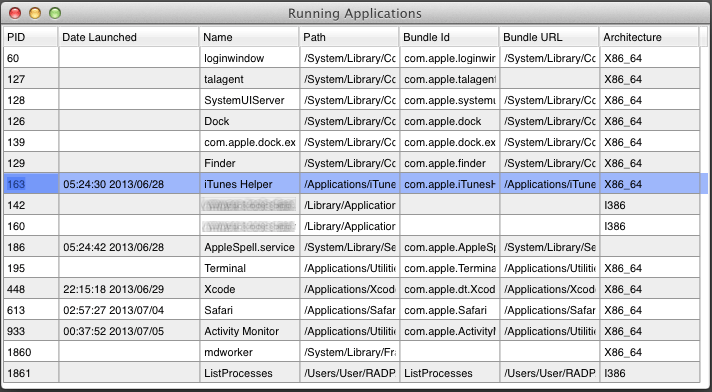
Note : The runningApplications property only list the user applications and does not provide information about every process on the system. In order to access to all the process you can use the sysctl function with the CTL_KERN, KERN_PROC, KERN_PROC_ALL values.
Download the sample Firemonkey project from Github.


