The Road to Delphi

Delphi – Free Pascal – Oxygene


2 Comments

Detect Aero Glass using Delphi

To detect if Aero Glass is enabled we must use the DwmIsCompositionEnabled function.

See this example

program DetectAeroDelphi;
{$APPTYPE CONSOLE}
//Author Rodrigo Ruz 2009-10-26
uses
  Windows,
  SysUtils;

function  ISAeroEnabled: Boolean;
type
  _DwmIsCompositionEnabledFunc = function(var IsEnabled: Boolean): HRESULT; stdcall;
var
  Flag                       : Boolean;
  DllHandle                  : THandle;
  OsVersion                  : TOSVersionInfo;
  DwmIsCompositionEnabledFunc: _DwmIsCompositionEnabledFunc;
begin
  Result:=False;
  ZeroMemory(@OsVersion, SizeOf(OsVersion));
  OsVersion.dwOSVersionInfoSize := SizeOf(TOSVERSIONINFO);

  if ((GetVersionEx(OsVersion)) and (OsVersion.dwPlatformId = VER_PLATFORM_WIN32_NT) and (OsVersion.dwMajorVersion >= 6)) then //is Vista or Win7?
  begin
    DllHandle := LoadLibrary('dwmapi.dll');
    try
      if DllHandle <> 0 then
      begin
        @DwmIsCompositionEnabledFunc := GetProcAddress(DllHandle, 'DwmIsCompositionEnabled');
        if (@DwmIsCompositionEnabledFunc <> nil) then
        begin
          if DwmIsCompositionEnabledFunc(Flag)= S_OK then
           Result:=Flag;
        end;
      end;
    finally
      if DllHandle <> 0 then
        FreeLibrary(DllHandle);
    end;
  end;
end;

begin
  try
    if ISAeroEnabled then
     Writeln('Aero Glass enabled')
    else
     Writeln('Aero Glass disabled');
  except
    on E:Exception do
      Writeln(E.Classname, ': ', E.Message);
  end;
    Readln;
end.


2 Comments

Glass effect in a Delphi Console Application

Using the DwmEnableBlurBehindWindow and  GetConsoleWindow functions , we  can  apply a nice glass effect to our console applications.

Check this sample application

program ConsoleGlassDelphi;
//Author  : Rodrigo Ruz 2009-10-26
{$APPTYPE CONSOLE}

uses
  Windows,
  SysUtils;

type
  DWM_BLURBEHIND = record
    dwFlags                 : DWORD;
    fEnable                 : BOOL;
    hRgnBlur                : HRGN;
    fTransitionOnMaximized  : BOOL;
  end;

//function to enable the glass effect
function DwmEnableBlurBehindWindow(hWnd : HWND; const pBlurBehind : DWM_BLURBEHIND) : HRESULT; stdcall; external  'dwmapi.dll' name 'DwmEnableBlurBehindWindow';
//get the handle of the console window
function GetConsoleWindow: HWND; stdcall; external kernel32 name 'GetConsoleWindow';

function DWM_EnableBlurBehind(hwnd : HWND; AEnable: Boolean; hRgnBlur : HRGN = 0; ATransitionOnMaximized: Boolean = False; AFlags: Cardinal = 1): HRESULT;
var
  pBlurBehind : DWM_BLURBEHIND;
begin
  pBlurBehind.dwFlags:=AFlags;
  pBlurBehind.fEnable:=AEnable;
  pBlurBehind.hRgnBlur:=hRgnBlur;
  pBlurBehind.fTransitionOnMaximized:=ATransitionOnMaximized;
  Result:=DwmEnableBlurBehindWindow(hwnd, pBlurBehind);
end;

begin
  try
    DWM_EnableBlurBehind(GetConsoleWindow(), True);
    Writeln('See my glass effect');
    Writeln('Go Delphi Go');
    Readln;
  except
    on E:Exception do
      Writeln(E.Classname, ': ', E.Message);
  end;
end.

And this is the result
glass console


Leave a comment

The official Delphi 2010 Survey

Help  to improve Delphi answering this survey.

All,

First, I want to thank you for all of your support in the past, present, and
future. Below is the link to the 2010 Delphi survey, this is conducted by
Embarcadero and the Product Management for the Delphi product. The
responses are extremely important to us and help to shape the vision and
future of the product.

I know the survey is long, very LONG! But again, the information we get
from the answers you give are needed more than ever.

Please pass this survey on to anybody you think would be interested in
filling it out.

Again, thanks!

Mike

Mike Rozlog
Product Manager – Delphi


Leave a comment

Embarcadero launch Windows 7 Developer Center

If you are interested in resources for building Windows 7 aplications Embarcadero has launched the Windows 7 Developer Center.

More resources for Delphi 2010  and Windows 7

  • RAD Studio 2010 – Gestures and Multi-Touch
  • RAD Studio 2010 -Touch & Gestures Part 1
  • RAD Studio 2010 -Touch & Gestures Part 2
  • Touch Hardware
  • RAD Studio 2010 – Touch Keyboard

  • Leave a comment

    Compilation of resources for migrate to Delphi 2009/2010 Unicode

    There are many resources available that you can read and that you will assist in the migration from a old Delphi version to Delphi 2009/2010 (Unicode).


    3 Comments

    Bits manipulation functions using Delphi

    Here I leave these useful functions for manipulating bits using Delphi.

    //get if a particular bit is 1
    function Get_a_Bit(const aValue: Cardinal; const Bit: Byte): Boolean;
    begin
      Result := (aValue and (1 shl Bit)) <> 0;
    end;
    
    //set a particular bit as 1
    function Set_a_Bit(const aValue: Cardinal; const Bit: Byte): Cardinal;
    begin
      Result := aValue or (1 shl Bit);
    end;
    
    //set a particular bit as 0
    function Clear_a_Bit(const aValue: Cardinal; const Bit: Byte): Cardinal;
    begin
      Result := aValue and not (1 shl Bit);
    end;
    
    //Enable o disable a bit
    function Enable_a_Bit(const aValue: Cardinal; const Bit: Byte; const Flag: Boolean): Cardinal;
    begin
      Result := (aValue or (1 shl Bit)) xor (Integer(not Flag) shl Bit);
    end;


    1 Comment

    Access Point detection using Delphi Prism and ManagedWifi.

    Detect  the AP availables using the Native Wifi API library is really simple. to do this we need to use GetNetworkBssList function which is a wrapper for the function WlanGetNetworkBssList.

    This source code uses the Managed Wifi API, The library uses the Native Wifi API, available since Windows Vista and Windows XP SP2 (in a limited fashion, and only after applying a hotfix provided in KB article 918997). Older versions of Windows are not supported.
    Before running the code you need to download the library from this location. Build the project “ManagedWifi.csproj” and then add the reference to the source code listed below.

    namespace DelphiPrismAPWifidetection;
    //Author : Rodrigo Ruz. 2009-10-15
    //Shine Your crazy Diamond.
    
    interface
    
    uses
    NativeWifi,//You must add the reference to the library ManagedWifi.dll
    System.Text;
    
    type
      ConsoleApp = class
      private
        class method GetStringForSSID(ssid : Wlan.Dot11Ssid ) : string;
        class method FrequencyToChannel(freq:Longint) : Integer;
      public
        class method Main;
      end;
    
    implementation
    
    class method ConsoleApp.FrequencyToChannel(freq:Longint) : Integer;
    var
    tmpval1,tmpval2 : Longint;
    begin
      tmpval1 := (freq mod 2412000) div 1000;
      tmpval2 := tmpval1 div 5;
      Result  := tmpval2 + 1;
    end;
    
    class method ConsoleApp.GetStringForSSID(ssid : Wlan.Dot11Ssid ) : string;
    begin
        Result:= Encoding.ASCII.GetString( ssid.SSID, 0, Int32( ssid.SSIDLength) );
    end;
    
    class method ConsoleApp.Main;
    begin
    var client : WlanClient  := new WlanClient();
        for each  wlanIface in client.Interfaces  do
        begin
        Console.WriteLine( "┌---------------------------------------------------------------¬");
        Console.WriteLine( "|{0,-15}  {1,-45} |",'Interface', wlanIface.InterfaceDescription);
        Console.WriteLine( "├---------------------------------------------------------------┤");
        Console.WriteLine( "|{0,-15}  {1,-45} |",'GUID', wlanIface.InterfaceGuid);
        Console.WriteLine( "|{0,-15}  {1,-45} |",'Name', wlanIface.InterfaceName);
        Console.WriteLine( "|{0,-15}  {1,-45} |",'State', wlanIface.InterfaceState.ToString());
        Console.WriteLine( "└---------------------------------------------------------------┘");
    
        var BssList  : Array of  Wlan.WlanBssEntry:= wlanIface.GetNetworkBssList();
        for each  BssItem in BssList  do
        begin
        // for more info goto http://msdn.microsoft.com/en-us/library/ms706735%28VS.85%29.aspx
        Console.WriteLine( "┌---------------------------------------------------------------¬");
        Console.WriteLine( "|Network SSID          {0,-40} |", GetStringForSSID(BssItem.dot11Ssid));
        Console.WriteLine( "├---------------------------------------------------------------┤");
        Console.WriteLine( "| Channel Freq. (Khz)  {0,-40} |", BssItem.chCenterFrequency.ToString());
        Console.WriteLine( "| Channel              {0,-40} |", FrequencyToChannel(BssItem.chCenterFrequency).ToString());
        Console.WriteLine( "| Rssi (dBm)           {0,-40} |", BssItem.rssi.ToString());
        Console.WriteLine( "| LinkQuality (%)      {0,-40} |", BssItem.linkQuality.ToString());
        Console.WriteLine( "| MAC                  {0,-40} |", BitConverter.ToString(BssItem.dot11Bssid));
        Console.WriteLine( "| dot11PhyType         {0,-40} |", BssItem.dot11BssPhyType.ToString());
        Console.WriteLine( "| network type         {0,-40} |", BssItem.dot11BssType.ToString());
        Console.WriteLine( "└---------------------------------------------------------------┘");
        end;
    end;
    
    Console.ReadLine();
    end;
    
    end.


    2 Comments

    Determine Genuine Windows Installation using C#

    To Determine a genuine Windows installation, you must use the SLIsGenuineLocal function (Checks whether the specified application is a genuine Windows installation), which is part of the Software Licensing API.

    The Software Licensing API (SLAPI) can be used to determine a genuine Microsoft Windows installation, install and log an asset management license, and retrieve information about the licensing policy of a software component.

    //Author : Rodrigo Ruz. 2009-10-12
    using System;
    using System.Collections.Generic;
    using System.Text;
    using System.Runtime.InteropServices;
    
    namespace DetermineWindowsOriginal
    {
      using SLID = Guid; //SLID id declarated as typedef GUID SLID; in slpublic.h
      class Program
      {
        public enum SL_GENUINE_STATE
        {
          SL_GEN_STATE_IS_GENUINE = 0,
          SL_GEN_STATE_INVALID_LICENSE = 1,
          SL_GEN_STATE_TAMPERED = 2,
          SL_GEN_STATE_LAST = 3
        }
        [DllImportAttribute("Slwga.dll", EntryPoint = "SLIsGenuineLocal", CharSet = CharSet.None, ExactSpelling = false, SetLastError = false, PreserveSig = true, CallingConvention = CallingConvention.Winapi, BestFitMapping = false, ThrowOnUnmappableChar = false)]
        [PreserveSigAttribute()]
        internal static extern uint SLIsGenuineLocal(ref SLID slid, [In, Out] ref SL_GENUINE_STATE genuineState, IntPtr val3);
        public static bool IsGenuineWindows()
        {
          bool _IsGenuineWindows = false;
          Guid ApplicationID = new Guid("55c92734-d682-4d71-983e-d6ec3f16059f"); //Application ID GUID http://technet.microsoft.com/en-us/library/dd772270.aspx
          SLID windowsSlid = (Guid)ApplicationID;
          try
          {
            SL_GENUINE_STATE genuineState = SL_GENUINE_STATE.SL_GEN_STATE_LAST;
            uint ResultInt = SLIsGenuineLocal(ref windowsSlid, ref genuineState, IntPtr.Zero);
            if (ResultInt == 0)
            {
              _IsGenuineWindows = (genuineState == SL_GENUINE_STATE.SL_GEN_STATE_IS_GENUINE);
            }
            else
            {
              Console.WriteLine("Error getting information {0}", ResultInt.ToString());
            }
          }
          catch (Exception ex)
          {
            Console.WriteLine(ex.Message);
          }
          return _IsGenuineWindows;
        }
    
        static void Main(string[] args)
        {
          if (Environment.OSVersion.Version.Major >= 6) //Version 6 can be Windows Vista, Windows Server 2008, or Windows 7
          {
            if (IsGenuineWindows())
            {
              Console.WriteLine("Original Windows");
            }
            else
            {
              Console.WriteLine("Not Original Windows");
            }
          }
          else
          {
            Console.WriteLine("OS Not supported");
          }
          Console.ReadLine();
        }
      }
    }


    25 Comments

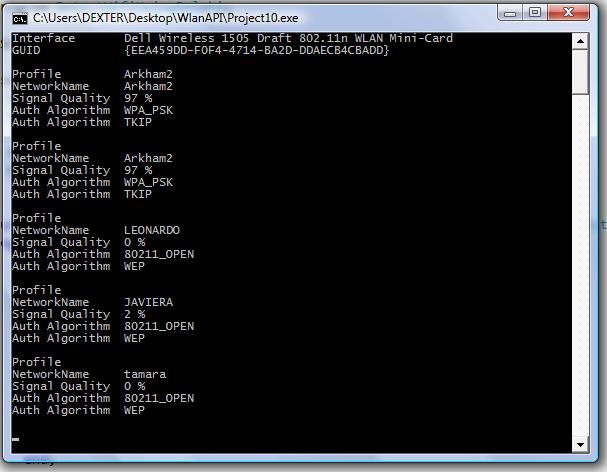
    Detecting Wifi Networks Using Delphi and Native Wifi API

    Today we will use the Native Wifi API and Delphi to enumerate all Wifi Networks availables. In this link you can find a translation of the headers.
    I wrote this code using these headers. Tested in Delphi 2007 and Windows Vista.

    Try this link for a fixed and updated version of the Native Wifi Delphi headers.

    {$APPTYPE CONSOLE}
    
    uses
      Windows,
      SysUtils,
      nduWlanAPI   in 'nduWlanAPI.pas',
      nduWlanTypes in 'nduWlanTypes.pas';
    
    function DOT11_AUTH_ALGORITHM_To_String( Dummy :Tndu_DOT11_AUTH_ALGORITHM):AnsiString;
    begin
        Result:='';
        case Dummy of
            DOT11_AUTH_ALGO_80211_OPEN          : Result:= '80211_OPEN';
            DOT11_AUTH_ALGO_80211_SHARED_KEY    : Result:= '80211_SHARED_KEY';
            DOT11_AUTH_ALGO_WPA                 : Result:= 'WPA';
            DOT11_AUTH_ALGO_WPA_PSK             : Result:= 'WPA_PSK';
            DOT11_AUTH_ALGO_WPA_NONE            : Result:= 'WPA_NONE';
            DOT11_AUTH_ALGO_RSNA                : Result:= 'RSNA';
            DOT11_AUTH_ALGO_RSNA_PSK            : Result:= 'RSNA_PSK';
            DOT11_AUTH_ALGO_IHV_START           : Result:= 'IHV_START';
            DOT11_AUTH_ALGO_IHV_END             : Result:= 'IHV_END';
        end;
    end;
    
    function DOT11_CIPHER_ALGORITHM_To_String( Dummy :Tndu_DOT11_CIPHER_ALGORITHM):AnsiString;
    begin
        Result:='';
        case Dummy of
      	DOT11_CIPHER_ALGO_NONE      : Result:= 'NONE';
        DOT11_CIPHER_ALGO_WEP40     : Result:= 'WEP40';
        DOT11_CIPHER_ALGO_TKIP      : Result:= 'TKIP';
        DOT11_CIPHER_ALGO_CCMP      : Result:= 'CCMP';
        DOT11_CIPHER_ALGO_WEP104    : Result:= 'WEP104';
        DOT11_CIPHER_ALGO_WPA_USE_GROUP : Result:= 'WPA_USE_GROUP OR RSN_USE_GROUP';
        //DOT11_CIPHER_ALGO_RSN_USE_GROUP : Result:= 'RSN_USE_GROUP';
        DOT11_CIPHER_ALGO_WEP           : Result:= 'WEP';
        DOT11_CIPHER_ALGO_IHV_START     : Result:= 'IHV_START';
        DOT11_CIPHER_ALGO_IHV_END       : Result:= 'IHV_END';
        end;
    end;
    
    procedure Scan();
    const
    WLAN_AVAILABLE_NETWORK_INCLUDE_ALL_ADHOC_PROFILES =$00000001;
    var
      hClient              : THandle;
      dwVersion            : DWORD;
      ResultInt            : DWORD;
      pInterface           : Pndu_WLAN_INTERFACE_INFO_LIST;
      i                    : Integer;
      j                    : Integer;
      pAvailableNetworkList: Pndu_WLAN_AVAILABLE_NETWORK_LIST;
      pInterfaceGuid       : PGUID;
      SDummy               : AnsiString;
    begin
      ResultInt:=WlanOpenHandle(1, nil, @dwVersion, @hClient);
       try
        if  ResultInt<> ERROR_SUCCESS then
        begin
           WriteLn('Error Open CLient'+IntToStr(ResultInt));
           Exit;
        end;
    
        ResultInt:=WlanEnumInterfaces(hClient, nil, @pInterface);
        if  ResultInt<> ERROR_SUCCESS then
        begin
           WriteLn('Error Enum Interfaces '+IntToStr(ResultInt));
           exit;
        end;
    
        for i := 0 to pInterface^.dwNumberOfItems - 1 do
        begin
         Writeln('Interface       ' + pInterface^.InterfaceInfo[i].strInterfaceDescription);
         WriteLn('GUID            ' + GUIDToString(pInterface^.InterfaceInfo[i].InterfaceGuid));
         Writeln('');
         pInterfaceGuid:= @pInterface^.InterfaceInfo[pInterface^.dwIndex].InterfaceGuid;
    
            ResultInt:=WlanGetAvailableNetworkList(hClient,pInterfaceGuid,WLAN_AVAILABLE_NETWORK_INCLUDE_ALL_ADHOC_PROFILES,nil,pAvailableNetworkList);
            if  ResultInt<> ERROR_SUCCESS then
            begin
               WriteLn('Error WlanGetAvailableNetworkList '+IntToStr(ResultInt));
               Exit;
            end;
    
              for j := 0 to pAvailableNetworkList^.dwNumberOfItems - 1 do
              Begin
                 WriteLn(Format('Profile         %s',[WideCharToString(pAvailableNetworkList^.Network[j].strProfileName)]));
                 SDummy:=PAnsiChar(@pAvailableNetworkList^.Network[j].dot11Ssid.ucSSID);
                 WriteLn(Format('NetworkName     %s',[SDummy]));
                 WriteLn(Format('Signal Quality  %d ',[pAvailableNetworkList^.Network[j].wlanSignalQuality])+'%');
                 //SDummy := GetEnumName(TypeInfo(Tndu_DOT11_AUTH_ALGORITHM),integer(pAvailableNetworkList^.Network[j].dot11DefaultAuthAlgorithm)) ;
                 SDummy:=DOT11_AUTH_ALGORITHM_To_String(pAvailableNetworkList^.Network[j].dot11DefaultAuthAlgorithm);
                 WriteLn(Format('Auth Algorithm  %s ',[SDummy]));
                 SDummy:=DOT11_CIPHER_ALGORITHM_To_String(pAvailableNetworkList^.Network[j].dot11DefaultCipherAlgorithm);
                 WriteLn(Format('Auth Algorithm  %s ',[SDummy]));
                 Writeln('');
              End;
        end;
       finally
        WlanCloseHandle(hClient, nil);
       end;
    end;
    begin
      try
        Scan();
        Readln;
      except
        on E:Exception do
          Writeln(E.Classname, ': ', E.Message);
      end;
    end.
    
    ScanWifi Image

    ScanWifi Image


    Leave a comment

    Using ParamStr in Delphi Prism

    .Net does not include the ParamStr Function (The ParamStr function returns one of the parameters from the command line used to invoke the current program), but can be easily implemented, here is an example :

    class method TMyClass.ParamStr(Index: Integer): String;
    var
      MyAssembly: System.Reflection.Assembly;
      Params    : array of string;
    begin
      if Index = 0 then
      begin
        MyAssembly:= System.Reflection.Assembly.GetEntryAssembly;
        if Assigned(MyAssembly) then
          Result := MyAssembly.Location
        else
          Result := System.Diagnostics.Process.GetCurrentProcess.MainModule.FileName;
      end
      else
      begin
        Params := System.Environment.GetCommandLineArgs;
        if Index > Length(Params) - 1 then
          Result := ''
        else
          Result := Params[Index];
      end;
    end;