The Road to Delphi

Delphi – Free Pascal – Oxygene


4 Comments

Fun with Delphi RTTI – Dump a TRttiType

Here ‘s a sample code of how you can dump the declaration of a TRttiType using the Rtti.

Supports classes, records and interfaces.

Delphi

//Author  Rodrigo Ruz V. 2010-10-10
uses
  Rtti,
  TypInfo,
  Classes,
  Generics.Collections,
  SysUtils;

function  DumpTypeDefinition(ATypeInfo: Pointer;OnlyDeclarated:Boolean=False) : string;

  //add and format a field
  procedure AddField(List:TStrings;lField : TRttiField);
  begin
     if Assigned(lField.FieldType) then
      List.Add((Format('   %-20s:%s;',[lField.Name,lField.FieldType.Name])))
     else
      List.Add((Format('   %-20s:%s;',[lField.Name,'Unknow'])));
  end;

  //add and format a method
  procedure AddMethod(List:TStrings;lMethod : TRttiMethod);
  begin
     List.Add((Format('   %s;',[lMethod.ToString])));
  end;

  //add and format a Property
  procedure AddProperty(List:TStrings;lProperty : TRttiProperty);
  begin
     List.Add((Format('   %s;',[lProperty.ToString])));
  end;

const
 sType          = 'type';
 sIndent        = '  ';
 ArrVisibility  : Array[TMemberVisibility] of string = ('private','protected','public','published');//Helper array for Visibility
var
  ctx       : TRttiContext;
  lType     : TRttiType;
  lMethod   : TRttiMethod;
  lProperty : TRttiProperty;
  lField    : TRttiField;
  Definition: TObjectDictionary<string, TStrings>;
  i         : TMemberVisibility;
begin
   Result:='No Rtti Information';
   ctx       := TRttiContext.Create;
   Definition:= TObjectDictionary<string, TStrings>.Create([doOwnsValues]);
   try

     if not Assigned(ATypeInfo) then exit;
     lType:=ctx.GetType(ATypeInfo);
     if not Assigned(lType) then exit;

     Definition.Add(sType,TStringList.Create);
     Definition.Items[sType].Add('type');

     //Initialize the buffers to hold the data
     for i:=Low(TMemberVisibility) to High(TMemberVisibility) do
     begin
      Definition.Add(ArrVisibility[i]  ,TStringList.Create);
      Definition.Items[ArrVisibility[i]].Add(sIndent+ArrVisibility[i]);
     end;

     case lType.TypeKind of
       tkUnknown    : ;
       tkInteger    : ;
       tkChar       : ;
       tkEnumeration: ;
       tkFloat      : ;
       tkString     : ;
       tkSet        : ;
       tkClass      :
                     begin
                       //get the main definition
                       if Assigned(lType.BaseType) then
                        Definition.Items[sType].Add(Format('%s%s=class(%s)',[sIndent,lType.Name,lType.BaseType.Name]))
                       else
                        Definition.Items[sType].Add(Format('%s%s=class',[sIndent,lType.Name]));
                     end;
       tkMethod     : ;
       tkWChar      : ;
       tkLString    : ;
       tkWString    : ;
       tkVariant    : ;
       tkArray      : ;
       tkRecord     : begin
                       //get the main definition
                        Definition.Items[sType].Add(Format('%s%s=record',[sIndent,lType.Name]));
                      end;

       tkInterface  :
                     begin
                       //get the main definition
                       if Assigned(lType.BaseType) then
                        Definition.Items[sType].Add(Format('%s%s=Interface(%s)',[sIndent,lType.Name,lType.BaseType.Name]))
                       else
                        Definition.Items[sType].Add(Format('%s%s=Interface',[sIndent,lType.Name]));

                     end;
       tkInt64      : ;
       tkDynArray   : ;
       tkUString    : ;
       tkClassRef   : ;
       tkPointer    : ;
       tkProcedure  : ;
     end;

       //add the fields
       if OnlyDeclarated then
         for lField in lType.GetDeclaredFields do
           AddField(Definition.Items[ArrVisibility[lField.Visibility]],lField)
       else
         for lField in lType.GetFields do
           AddField(Definition.Items[ArrVisibility[lField.Visibility]],lField);

       //add the methods
       if OnlyDeclarated then
         for lMethod in lType.GetDeclaredMethods do
           AddMethod(Definition.Items[ArrVisibility[lMethod.Visibility]],lMethod)
       else
         for lMethod in lType.GetMethods do
           AddMethod(Definition.Items[ArrVisibility[lMethod.Visibility]],lMethod);

       //add the Properties
       if OnlyDeclarated then
         for lProperty in lType.GetDeclaredProperties do
           AddProperty(Definition.Items[ArrVisibility[lProperty.Visibility]],lProperty)
       else
         for lProperty in lType.GetProperties do
           AddProperty(Definition.Items[ArrVisibility[lProperty.Visibility]],lProperty);

     for i:=Low(TMemberVisibility) to High(TMemberVisibility) do
      if Definition.Items[ArrVisibility[i]].Count>1 then
       Definition.Items[sType].AddStrings(Definition.Items[ArrVisibility[i]]);

     Definition.Items[sType].Add(sIndent+'end;');
     Result:=Definition.Items[sType].Text;
   finally
    Definition.free;
    ctx.free;
   end;
end;

Use in this way

//to dump a Class
DumpTypeDefinition(TypeInfo(TStringList));
//or
DumpTypeDefinition(TStringList.ClassInfo);

OutPut

the output is this

type
  TStringList=class(TStrings)
  private
   FList               : PStringItemList ;
   FCount              :Integer;
   FCapacity           :Integer;
   FSorted             :Boolean;
   FDuplicates         :TDuplicates;
   FCaseSensitive      :Boolean;
   FOnChange           :TNotifyEvent;
   FOnChanging         :TNotifyEvent;
   FOwnsObject         :Boolean;
   FEncoding           :TEncoding;
   FDefined            :TStringsDefined;
   FDefaultEncoding    :TEncoding;
   FDelimiter          :Char;
   FLineBreak          :string;
   FQuoteChar          :Char;
   FNameValueSeparator :Char;
   FStrictDelimiter    :Boolean;
   FUpdateCount        :Integer;
   FAdapter            :IStringsAdapter;
   FWriteBOM           :Boolean;
  public
   constructor Create;
   constructor Create(OwnsObjects: Boolean);
   class destructor Destroy;
   function Add(const S: string): Integer;
   function AddObject(const S: string; AObject: TObject): Integer;
   procedure Assign(Source: TPersistent);
   procedure Clear;
   procedure Delete(Index: Integer);
   procedure Exchange(Index1: Integer; Index2: Integer);
   function Find(const S: string; var Index: Integer): Boolean;
   function IndexOf(const S: string): Integer;
   procedure Insert(Index: Integer; const S: string);
   procedure InsertObject(Index: Integer; const S: string; AObject: TObject);
   procedure Sort;
   procedure CustomSort(Compare: TStringListSortCompare);
   constructor Create;
   class destructor Destroy;
   function Add(const S: string): Integer;
   function AddObject(const S: string; AObject: TObject): Integer;
   procedure Append(const S: string);
   procedure AddStrings(Strings: TStrings);
   procedure AddStrings(const Strings: TArray);
   procedure AddStrings(const Strings: TArray; const Objects: TAr
ray);
   procedure Assign(Source: TPersistent);
   procedure BeginUpdate;
   procedure Clear;
   procedure Delete(Index: Integer);
   procedure EndUpdate;
   function Equals(Strings: TStrings): Boolean;
   procedure Exchange(Index1: Integer; Index2: Integer);
   function GetEnumerator: TStringsEnumerator;
   function GetText: PWideChar;
   function IndexOf(const S: string): Integer;
   function IndexOfName(const Name: string): Integer;
   function IndexOfObject(AObject: TObject): Integer;
   procedure Insert(Index: Integer; const S: string);
   procedure InsertObject(Index: Integer; const S: string; AObject: TObject);
   procedure LoadFromFile(const FileName: string);
   procedure LoadFromFile(const FileName: string; Encoding: TEncoding);
   procedure LoadFromStream(Stream: TStream);
   procedure LoadFromStream(Stream: TStream; Encoding: TEncoding);
   procedure Move(CurIndex: Integer; NewIndex: Integer);
   procedure SaveToFile(const FileName: string);
   procedure SaveToFile(const FileName: string; Encoding: TEncoding);
   procedure SaveToStream(Stream: TStream);
   procedure SaveToStream(Stream: TStream; Encoding: TEncoding);
   procedure SetText(Text: PWideChar);
   function ToStringArray: TArray;
   function ToObjectArray: TArray;
   class destructor Destroy;
   procedure Assign(Source: TPersistent);
   function GetNamePath: string;
   constructor Create;
   procedure Free;
   class function InitInstance(Instance: Pointer): TObject;
   procedure CleanupInstance;
   function ClassType: TClass;
   class function ClassName: string;
   class function ClassNameIs(const Name: string): Boolean;
   class function ClassParent: TClass;
   class function ClassInfo: Pointer;
   class function InstanceSize: Integer;
   class function InheritsFrom(AClass: TClass): Boolean;
   class function MethodAddress(const Name: ShortString): Pointer;
   class function MethodAddress(const Name: string): Pointer;
   class function MethodName(Address: Pointer): string;
   function FieldAddress(const Name: ShortString): Pointer;
   function FieldAddress(const Name: string): Pointer;
   function GetInterface(const IID: TGUID; out Obj): Boolean;
   class function GetInterfaceEntry(const IID: TGUID): PInterfaceEntry;
   class function GetInterfaceTable: PInterfaceTable;
   class function UnitName: string;
   function Equals(Obj: TObject): Boolean;
   function GetHashCode: Integer;
   function ToString: string;
   function SafeCallException(ExceptObject: TObject; ExceptAddr: Pointer): HRESU
LT;
   procedure AfterConstruction;
   procedure BeforeDestruction;
   procedure Dispatch(var Message);
   procedure DefaultHandler(var Message);
   class function NewInstance: TObject;
   procedure FreeInstance;
   class destructor Destroy;
   property Duplicates: TDuplicates;
   property Sorted: Boolean;
   property CaseSensitive: Boolean;
   property OnChange: TNotifyEvent;
   property OnChanging: TNotifyEvent;
   property OwnsObjects: Boolean;
   property Capacity: Integer;
   property CommaText: string;
   property Count: Integer;
   property DefaultEncoding: TEncoding;
   property Delimiter: Char;
   property DelimitedText: string;
   property Encoding: TEncoding;
   property LineBreak: string;
   property QuoteChar: Char;
   property NameValueSeparator: Char;
   property StrictDelimiter: Boolean;
   property Text: string;
   property StringsAdapter: IStringsAdapter;
   property WriteBOM: Boolean;
  end;
//to dump a Class with only the declarateds fields, methods and properties
DumpTypeDefinition(TypeInfo(TStringList),True);
//or
DumpTypeDefinition(TStringList.ClassInfo,True);

the output

type
  TStringList=class(TStrings)
  private
   FList               : PStringItemList;
   FCount              :Integer;
   FCapacity           :Integer;
   FSorted             :Boolean;
   FDuplicates         :TDuplicates;
   FCaseSensitive      :Boolean;
   FOnChange           :TNotifyEvent;
   FOnChanging         :TNotifyEvent;
   FOwnsObject         :Boolean;
  public
   constructor Create;
   constructor Create(OwnsObjects: Boolean);
   class destructor Destroy;
   function Add(const S: string): Integer;
   function AddObject(const S: string; AObject: TObject): Integer;
   procedure Assign(Source: TPersistent);
   procedure Clear;
   procedure Delete(Index: Integer);
   procedure Exchange(Index1: Integer; Index2: Integer);
   function Find(const S: string; var Index: Integer): Boolean;
   function IndexOf(const S: string): Integer;
   procedure Insert(Index: Integer; const S: string);
   procedure InsertObject(Index: Integer; const S: string; AObject: TObject);
   procedure Sort;
   procedure CustomSort(Compare: TStringListSortCompare);
   property Duplicates: TDuplicates;
   property Sorted: Boolean;
   property CaseSensitive: Boolean;
   property OnChange: TNotifyEvent;
   property OnChanging: TNotifyEvent;
   property OwnsObjects: Boolean;
  end;
//to dump a record
DumpTypeDefinition(TypeInfo(TSysLocale));

the output look like this

type
  TSysLocale=record
  public
   DefaultLCID         :Integer;
   PriLangID           :Integer;
   SubLangID           :Integer;
   FarEast             :Boolean;
   MiddleEast          :Boolean;
  end;
//finally to dump an interface
DumpTypeDefinition(TypeInfo(IInterfaceList));


Leave a comment

Fun with Delphi RTTI – Building a Unit Dependency Tree

You can build a unit dependency tree, wich shows the direct dependency for each unit in your project using the New Rtti.

Here a short description of the algorithm used in this code.

  • For each Type(TRttiType) in the list do the following
  • check if the basetype exist in the same unit else add the unit to the list.
  • for each public field in the current type check if exist in the same unit else add the unit to the list.
  • for each method in the current type with an valid ReturnType check if exist in the same unit else add the unit to the list.
  • for each property in the current type check if exist in the same unit else add the unit to the list.

Limitations:

  • Only show direct dependency of the units (example if Unit A depends on Unit B and Unit B depends on UnitC, the tree will show wich the Unit A depends on only of Unit B)
  • Only supports Types with Rtti info.
  • Due to Rtti Limitations only supports public fields (TRttiField).
uses
Rtti,
Generics.Collections,
TypInfo;

procedure FillTreeUnits(TreeViewUnits:TTreeView);
var
  ctx      : TRttiContext;
  TypeList : TArray<TRttiType>;
  lType    : TRttiType;
  lMethod  : TRttiMethod;
  lProperty: TRttiProperty;
  lField   : TRttiField;
  Node     : TTreeNode;
  UnitName : string;
  RefUnit  : string;
  UnitsDict: TObjectDictionary<String, TStringList>;
  UnitList : TStringList;

      function GetUnitName(lType: TRttiType): string;
      begin
        {
        if lType.IsInstance then
        Result:=lType.UnitName
        else
        }
        Result := StringReplace(lType.QualifiedName, '.' + lType.Name, '',[rfReplaceAll]);
      end;

      //Check if exist the Unit in the Dictionary and if has a Unit Children in the associated list
      procedure CheckAndAdd(UnitName,RefUnit:string);
      begin
            if UnitName<>RefUnit then
             if not UnitsDict.ContainsKey(UnitName) then
             begin
               UnitList:=TStringList.Create;
               UnitList.Add(RefUnit);
               UnitsDict.Add(UnitName,UnitList);
             end
             else
             begin
               UnitList:=UnitsDict.Items[UnitName];
               if UnitList.IndexOf(RefUnit)<0 then
               UnitList.Add(RefUnit);
             end;
      end;

begin
  ctx       := TRttiContext.Create;
  UnitsDict := TObjectDictionary<String, TStringList>.Create([doOwnsValues]);
  TreeViewUnits.Items.BeginUpdate;
  try
    TreeViewUnits.Items.Clear;
    TypeList:= ctx.GetTypes;

      //Fill a Dictionary with all the units and the dependencies
      for lType in TypeList do
      begin
             //Search references to another units in the BaseType
             UnitName:=GetUnitName(lType);
             if Assigned(lType.BaseType) then
                CheckAndAdd(UnitName,GetUnitName(lType.BaseType));

             //Search references to another units in the public fields (due to RTTI limitations only works with public fields)
             for lField in lType.GetDeclaredFields do
             if Assigned(lField.FieldType) and (lField.FieldType.IsPublicType) then
                CheckAndAdd(UnitName,GetUnitName(lField.FieldType));

             //Search references to another units in the properties
             for lProperty in lType.GetDeclaredProperties do
             if Assigned(lProperty.PropertyType) then
                CheckAndAdd(UnitName,GetUnitName(lProperty.PropertyType));

             //Search references to another units in functions with ExtendedInfo (HasExtendedInfo=True)
             for lMethod in lType.GetDeclaredMethods do
             if (lMethod.HasExtendedInfo) and (lMethod.MethodKind in [mkFunction,mkClassFunction]) then
                CheckAndAdd(UnitName,GetUnitName(lMethod.ReturnType));
        end;

       //finally fill the treeview
       for UnitName in UnitsDict.Keys do
       begin
          UnitList:=UnitsDict.Items[UnitName];
          Node    :=TreeViewUnits.Items.Add(nil,UnitName);
           for RefUnit in UnitList do
             TreeViewUnits.Items.AddChild(Node,RefUnit);
       end;

  finally
    UnitsDict.Destroy;
    ctx.Free;
    TreeViewUnits.Items.EndUpdate;
  end;
end;

Finally the output for the source code


3 Comments

Fun with Delphi RTTI – Building a TreeView with all your classes

Do you remember the great posters  that came with older versions of delphi?

Now you can build your own tree of classes using the new rtti, here I leave the source code

uses
Rtti;

procedure FillTreeClasses(TreeViewClasses:TTreeView);

        //function to get the node wich match with the TRttiType
        function FindTRttiType(lType:TRttiType):TTreeNode;
        var
          i        : integer;
          Node     : TTreeNode;
        begin
           Result:=nil;
             for i:=0 to TreeViewClasses.Items.Count-1 do
             begin
                Node:=TreeViewClasses.Items.Item[i];
                if Assigned(Node.Data) then
                 if lType=TRttiType(Node.Data) then
                 begin
                  Result:=Node;
                  exit;
                 end;
             end;
        end;

        //function to get the node wich not match with the BaseType of the Parent
        function FindFirstTRttiTypeOrphan:TTreeNode;
        var
          i        : integer;
          Node     : TTreeNode;
          lType    : TRttiType;
        begin
           Result:=nil;
             for i:=0 to TreeViewClasses.Items.Count-1 do
             begin
                 Node :=TreeViewClasses.Items[i];
                 lType:=TRttiType(Node.Data);

                if not Assigned(lType.BaseType) then Continue;

                if lType.BaseType<>TRttiType(Node.Parent.Data) then
                begin
                   Result:=Node;
                   break;
                 end;
             end;
        end;

var
  ctx      : TRttiContext;
  TypeList : TArray<TRttiType>;
  lType    : TRttiType;
  PNode    : TTreeNode;
  Node     : TTreeNode;
begin
  ctx := TRttiContext.Create;
  TreeViewClasses.Items.BeginUpdate;
  try
    TreeViewClasses.Items.Clear;

      //Add Root, TObject
      lType:=ctx.GetType(TObject);
      Node:=TreeViewClasses.Items.AddObject(nil,lType.Name,lType);

      //Fill the tree with all the classes
      TypeList:= ctx.GetTypes;
      for lType in TypeList do
        if lType.IsInstance then
        begin
             if Assigned(lType.BaseType) then
             TreeViewClasses.Items.AddChildObject(Node,lType.Name,lType);
        end;

      //Sort the classes
      Repeat
         Node:=FindFirstTRttiTypeOrphan;
         if Node=nil then break;
         //get the location of the node containing the BaseType
         PNode:=FindTRttiType(TRttiType(Node.Data).BaseType);
         //Move the node to the new location
         Node.MoveTo(PNode,naAddChild);
      Until 1<>1;

  finally
    TreeViewClasses.Items.EndUpdate;
    ctx.Free;
  end;
end;

When you run this code the output will look like this


17 Comments

Fun with Delphi RTTI – Rtti Explorer Lite

Just for fun, I wrote an application (unit) to inspect the types (With RTTI info) used on my projects developed using Delphi 2010 and Delphi XE.

This project has these features

  • A hierarchical view of all types   With Rtti info, tha data is showed  following this structure Package->Unit->Type->Fields (Methods, properties, fields)
  • Show rtti information about any Rtti element
  • Search a particular Rtti Element
  • A hierarchical view of all existing classes in your project

Check the Screenshots

This slideshow requires JavaScript.

If you want use this unit in your own projects (Delphi 2010 or Delphi XE), simply add the unit MainRttiExpl to your project and run the procedure ShowRttiLiteExplorer

The source code is available in Github and the demo app is here.

Links updated, now using Dropbox ;).


6 Comments

Using Google maps (Static Maps) without TWebBrowser

Commonly we use the TWebBrowser component to access Google maps, but there is another option, using the Google Static Map service.

The Google Static Map service allows you get an static image from a location without requiring JavaScript or any dynamic page loading. The Google Static Map service creates your map based on URL parameters sent through a standard HTTP request.

So the code to interact with this service is fairly easy. all we need is an TIdHTTP and a TImage component.

First we need to set the TIdHTTP property UserAgent (the UserAgent is what a browser uses to identify itself to the HTTP server
) to an valid Agent, if you use the default value Mozilla/3.0 (compatible; Indy Library) you will get a awful message like this HTTP 1.1/ 403 Forbidden. so we can change this value to Mozilla/3.0 or to another valid agent.

then we need build the url to request the image from an location. a valid URL look like this

http://maps.google.com/maps/api/staticmap?center=40.714728,-73.998672&zoom=12&size=400x400&sensor=false

You can see the full syntax for build a valid URL on this page.

Now using the TIdHTTP component, we send the request and get the image

var
  StreamData :TMemoryStream;
  JPEGImage  : TJPEGImage;
begin
  EditURL.Text:=buildUrl;//build the url with the params
  StreamData := TMemoryStream.Create;
  JPEGImage  := TJPEGImage.Create;
  try
    try
     idhttp1.Get(EditURL.Text, StreamData); //Send the request and get the image
     StreamData.Seek(0,soFromBeginning);
     JPEGImage.LoadFromStream(StreamData);//load the image in a Stream
     ImageMap.Picture.Assign(JPEGImage);//Load the image
    Except On E : Exception Do
     MessageDlg('Exception: '+E.Message,mtError, [mbOK], 0);
    End;
  finally
    StreamData.free;
    JPEGImage.Free;
  end;
end;

finally a very important note from google

Use of the Google Static Maps API is subject to a query limit of 1000 unique (different) image requests per viewer per day. Since this restriction is a quota per viewer, most developers should not need to worry about exceeding their quota. However, note that we enforce an additional request rate limit to prevent abuse of the service. Requests of identical images, in general, do not count towards this limit beyond the original request.

If a user exceeds the limit as proscribed above, the following image will be displayed indicating that the quota has been exceeded:

This limit is enforced to prevent abuse and/or repurposing of the Static Maps API, and this limit may be changed in the future without notice. If you exceed the 24-hour limit or otherwise abuse the service, the Static Maps API may stop working for you temporarily. If you continue to exceed this limit, your access to the Static Maps API may be blocked.

Static Map URLs are restricted to 2048 characters in size. In practice, you will probably not have need for URLs longer than this, unless you produce complicated maps with a high number of markers and paths. Note, however, that certain characters may be URL-encoded by browsers and/or services before sending them off to the Static Map service, resulting in increased character usage.

…Note that static maps may only be displayed within browser content; use of static maps outside of the browser is not allowed. (Google Maps API Premier users are waived of this requirement.)

check the source code for educational use only (do you need a API Premier account to  use the Static maps ouside of an browser), you can download the full project from this location.

unit UnitMain;

interface

uses
  Windows, Messages, SysUtils, Variants, Classes, Graphics, Controls, Forms,
  Dialogs, IdBaseComponent, IdComponent, IdTCPConnection, IdTCPClient, IdHTTP,
  StdCtrls, ExtCtrls, XPMan, ComCtrls;

type
  TFormMain = class(TForm)
    ImageMap: TImage;
    IdHTTP10: TIdHTTP;
    XPManifest1: TXPManifest;
    ScrollBoxMap: TScrollBox;
    Panel1: TPanel;
    EditURL: TEdit;
    ButtonGet: TButton;
    CheckBoxRealTime: TCheckBox;
    Panel2: TPanel;
    Panel3: TPanel;
    EditWidth: TEdit;
    UpDown3: TUpDown;
    UpDown2: TUpDown;
    UpDown1: TUpDown;
    ComboBoxMapType: TComboBox;
    EditZoom: TEdit;
    ComboBoxFormat: TComboBox;
    EditHeight: TEdit;
    EditLongitude: TEdit;
    EditLatitude: TEdit;
    Label7: TLabel;
    Label6: TLabel;
    Label5: TLabel;
    Label4: TLabel;
    Label3: TLabel;
    Label2: TLabel;
    Label1: TLabel;
    CheckBoxMarker: TCheckBox;
    ProgressBar1: TProgressBar;
    IdHTTP1: TIdHTTP;
    procedure ButtonGetClick(Sender: TObject);
    procedure EditZoomChange(Sender: TObject);
    procedure ComboBoxMapTypeChange(Sender: TObject);
    procedure FormCreate(Sender: TObject);
    procedure ImageMapMouseDown(Sender: TObject; Button: TMouseButton;
      Shift: TShiftState; X, Y: Integer);
    procedure ImageMapMouseMove(Sender: TObject; Shift: TShiftState; X,
      Y: Integer);
    procedure IdHTTP10WorkBegin(ASender: TObject; AWorkMode: TWorkMode;
      AWorkCountMax: Integer);
    procedure IdHTTP10Work(ASender: TObject; AWorkMode: TWorkMode;
      AWorkCount: Integer);
    procedure IdHTTP10WorkEnd(ASender: TObject; AWorkMode: TWorkMode);
  private
    { Private declarations }
    SX: Integer;
    SY: Integer;
    LX: Integer;
    LY: Integer;
    function  buildUrl:string;
    procedure GetMapImage;
  public
    { Public declarations }
  end;

var
  FormMain: TFormMain;

implementation

uses
jpeg; //this project only supports jpg, you can add addtional units to support gif and png

{$R *.dfm}

const
UrlPrefix='http://maps.google.com/maps/api/staticmap?';

function TFormMain.buildUrl: string; //build the url based in the user input
begin
  Result:=UrlPrefix+'center='+EditLatitude.Text+','+EditLongitude.Text+'&zoom='+EditZoom.Text+'&size='+EditWidth.Text+'x'+EditHeight.Text+'&maptype='+ComboBoxMapType.Text+'&sensor=false&format='+ComboBoxFormat.Text;
  if CheckBoxMarker.Checked then
  Result:=Result+'&markers=color:blue|'+EditLatitude.Text+','+EditLongitude.Text;
end;

procedure TFormMain.ButtonGetClick(Sender: TObject);
begin
 GetMapImage;
end;

procedure TFormMain.ComboBoxMapTypeChange(Sender: TObject);
begin
 if CheckBoxRealTime.Checked then
 GetMapImage;
end;

procedure TFormMain.EditZoomChange(Sender: TObject);
begin
 if CheckBoxRealTime.Checked then
 GetMapImage;
end;

procedure TFormMain.FormCreate(Sender: TObject);
begin
 ScrollBoxMap.DoubleBuffered := True; //avoid the flicker when the pan effect is activated
end;

procedure TFormMain.GetMapImage; //Get the image from the Google Service
var
  StreamData : TMemoryStream;
  JPEGImage  : TJPEGImage;
begin
  EditURL.Text:=buildUrl;
  StreamData := TMemoryStream.Create;
  JPEGImage  := TJPEGImage.Create;
  try
    try
     idhttp1.Get(EditURL.Text, StreamData);
     StreamData.Seek(0,soFromBeginning);

     ImageMap.Top := 0;
     ImageMap.Left := 0;
     JPEGImage.LoadFromStream(StreamData);
     LX := (ImageMap.Width - ScrollBoxMap.ClientWidth) * -1;
     LY := (ImageMap.Height - ScrollBoxMap.ClientHeight) * -1;

     ImageMap.Picture.Assign(JPEGImage);
    Except On E : Exception Do
     MessageDlg('Exception: '+E.Message,mtError, [mbOK], 0);
    End;
  finally
    StreamData.free;
    JPEGImage.Free;
  end;
end;

procedure TFormMain.IdHTTP10Work(ASender: TObject; AWorkMode: TWorkMode;
  AWorkCount: Integer);
begin
  ProgressBar1.Position := AWorkCount;
end;

procedure TFormMain.IdHTTP10WorkBegin(ASender: TObject; AWorkMode: TWorkMode;
  AWorkCountMax: Integer);
begin
  ProgressBar1.Position := 0;
  ProgressBar1.Max      := IdHTTP1.Response.ContentLength;
end;

procedure TFormMain.IdHTTP10WorkEnd(ASender: TObject; AWorkMode: TWorkMode);
begin
  //ProgressBar1.Position := 0;
end;

procedure TFormMain.ImageMapMouseDown(Sender: TObject; Button: TMouseButton;
  Shift: TShiftState; X, Y: Integer);
begin
   SX := X;
   SY := Y;
end;

procedure TFormMain.ImageMapMouseMove(Sender: TObject; Shift: TShiftState; X, Y: Integer); //Allow pannig over the image
var NX: Integer;
    NY: Integer;
begin
    if not (ssLeft in Shift) then   Exit;
    NX := ImageMap.Left + X - SX;
    NY := ImageMap.Top + Y - SY;

    if (NX < 0) and (NX > LX) then  ImageMap.Left := NX;
    if (NY < 0) and (NY > LY) then  ImageMap.Top := NY;
end;

end.


7 Comments

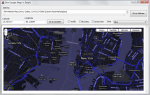
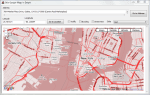
Using the Google Maps API V3 from Delphi – Part II Styled Maps

The Google maps API v3 offers a new functionality called Styled Maps. this feature let’s you personalize your maps and stand out from the crowd.

On this sample I wrote this small javascript function, to load a new style from an array of styles defined in the webpage.

 function SetMapSkin(nameskin)
 {
 var styledMapOptions = { name: "Skin"};
 var TheMapType = new google.maps.StyledMapType(styles[nameskin], styledMapOptions);
  map.mapTypes.set("skin", TheMapType);
  map.setMapTypeId("skin");
 }


This slideshow requires JavaScript.

For create a new Map Style you can use the Google Maps API Styled Map Wizard

unit fMain;

interface

uses
  Windows, Messages, SysUtils, Variants, Classes, Graphics, Controls, Forms,
  Dialogs, OleCtrls, SHDocVw, StdCtrls, ExtCtrls, XPMan, ComCtrls,MSHTML;

type
  TfrmMain = class(TForm)
    WebBrowser1: TWebBrowser;
    LabelAddress: TLabel;
    PanelHeader: TPanel;
    ButtonGotoLocation: TButton;
    XPManifest1: TXPManifest;
    MemoAddress: TMemo;
    ButtonGotoAddress: TButton;
    LabelLatitude: TLabel;
    LabelLongitude: TLabel;
    Longitude: TEdit;
    Latitude: TEdit;
    CheckBoxTraffic: TCheckBox;
    CheckBoxBicycling: TCheckBox;
    CheckBoxStreeView: TCheckBox;
    ComboBoxSkins: TComboBox;
    Label1: TLabel;
    procedure FormCreate(Sender: TObject);
    procedure ButtonGotoAddressClick(Sender: TObject);
    procedure ButtonGotoLocationClick(Sender: TObject);
    procedure CheckBoxTrafficClick(Sender: TObject);
    procedure CheckBoxBicyclingClick(Sender: TObject);
    procedure CheckBoxStreeViewClick(Sender: TObject);
    procedure ComboBoxSkinsChange(Sender: TObject);
  private
    { Private declarations }
    HTMLWindow2: IHTMLWindow2;
  public
    { Public declarations }
  end;

var
  frmMain: TfrmMain;

implementation

uses
   ActiveX;

{$R *.dfm}

const
HTMLStr: String =
'<html> '+
'<head> '+
'<meta name="viewport" content="initial-scale=1.0, user-scalable=yes" /> '+
'<script type="text/javascript" src="http://maps.google.com/maps/api/js?sensor=true"></script> '+
'<script type="text/javascript"> '+
''+
''+
'  var geocoder; '+
'  var map;  '+
'  var trafficLayer;'+
'  var bikeLayer;'+

'var styles = {' +//define the styles in an array in JSON format
  '''Red'': [' + //set the name of the Style
    '{' +
      'featureType: ''all'',' +
      'stylers: [{hue: ''#ff0000''}]' +
    '}' +
  '],' +
  '''Green'': [' +
    '{' +
      'featureType: ''all'',' +
      'stylers: [{hue: ''#00ff00''}]' +
    '}' +
  '],' +
  '''Countries'': [' +
    '{' +
      'featureType: ''all'',' +
      'stylers: [' +
        '{visibility: ''off''}' +
      ']' +
    '},' +
    '{' +
      'featureType: ''water'',' +
      'stylers: [' +
        '{visibility: ''on''},' +
        '{lightness: -100 }' +
      ']' +
    '}' +
  '],' +
  '''Night'': [' +
    '{' +
      'featureType: ''all'',' +
      'rules: [{invert_lightness: ''true''}]' +
    '}        ' +
  '],' +
  '''Blue'': [' +
    '{' +
      'featureType: ''all'',' +
      'stylers: [' +
        '{hue: ''#0000b0''},' +
        '{invert_lightness: ''true''},' +
        '{saturation: -30}' +
      ']' +
    '}' +
  '],' +
  '''Greyscale'': [' +
    '{              ' +
      'featureType: ''all'',' +
      'stylers: [' +
        '{saturation: -100},' +
        '{gamma: 0.50}' +
      ']' +
    '}' +
  '],' +
  '''No roads'': [' +
    '{' +
      'featureType: ''road'',' +
      'stylers: [' +
        '{visibility: ''off''}' +
      ']' +
    '}' +
  '],' +
  '''Mixed'': [' +
    '{' +
      'featureType: ''landscape'',' +
      'stylers: [{hue: ''#00dd00''}]' +
    '}, {' +
      'featureType: ''road'',' +
      'stylers: [{hue: ''#dd0000''}]' +
    '}, {' +
      'featureType: ''water'',' +
      'stylers: [{hue: ''#000040''}]' +
    '}, {' +
      'featureType: ''poi.park'',' +
      'stylers: [{visibility: ''off''}]' +
    '}, {' +
      'featureType: ''road.arterial'',' +
      'stylers: [{hue: ''#ffff00''}]' +
    '}, {' +
      'featureType: ''road.local'',' +
      'stylers: [{visibility: ''off''}]' +
    '}            ' +
  '],' +
  '''Chilled'': [' +
    '{' +
      'featureType: ''road'',' +
      'elementType: ''geometry'',' +
      'stylers: [{''visibility'': ''simplified''}]' +
    '}, {' +
      'featureType: ''road.arterial'',' +
      'stylers: [' +
       '{hue: 149},' +
       '{saturation: -78},' +
       '{lightness: 0}' +
      ']' +
    '}, {' +
      'featureType: ''road.highway'',' +
      'stylers: [' +
        '{hue: -31},' +
        '{saturation: -40},' +
        '{lightness: 2.8}' +
      ']' +
    '}, {' +
      'featureType: ''poi'',' +
      'elementType: ''label'',' +
      'stylers: [{''visibility'': ''off''}]' +
    '}, {' +
      'featureType: ''landscape'',' +
      'stylers: [' +
        '{hue: 163},' +
        '{saturation: -26},' +
        '{lightness: -1.1}' +
      ']' +
    '}, {' +
      'featureType: ''transit'',' +
      'stylers: [{''visibility'': ''off''}]' +
    '}, {' +
      'featureType: ''water'',' +
        'stylers: [' +
        '{hue: 3},' +
        '{saturation: -24.24},' +
        '{lightness: -38.57}' +
      ']' +
    '}' +
  ']' +
'};'   +

''+
''+
'  function initialize() { '+
'    geocoder = new google.maps.Geocoder();'+
'    var latlng = new google.maps.LatLng(40.714776,-74.019213); '+
'    var myOptions = { '+
'      zoom: 13, '+
'      center: latlng, '+
//'      mapTypeId: google.maps.MapTypeId.ROADMAP '+
'      mapTypeIds: [google.maps.MapTypeId.ROADMAP, "skin"] '+
'    }; '+
'    map = new google.maps.Map(document.getElementById("map_canvas"), myOptions); '+
'    trafficLayer = new google.maps.TrafficLayer();'+
'    bikeLayer = new google.maps.BicyclingLayer();'+
'    var styledMapOptions = { name: "Skin" };'+
'    var TheMapType = new google.maps.StyledMapType(styles["Red"], styledMapOptions);'+
'    map.mapTypes.set("skin", TheMapType);'+
'    map.setMapTypeId("skin"); '+
'  } '+
''+
''+

'  function SetMapSkin(nameskin) {'+ //change the skin(style) of the map using the name of the style.
'  var styledMapOptions = { name: "Skin"};'+
//'  for (var s in styles) {'+
//'    if (s==nameskin) {'+
//'    var TheMapType = new google.maps.StyledMapType(styles[s], styledMapOptions);'+
'    var TheMapType = new google.maps.StyledMapType(styles[nameskin], styledMapOptions);'+
'    map.mapTypes.set("skin", TheMapType);'+
'    map.setMapTypeId("skin"); '+
//'    }'+
//'  };'+

'}'+

'  function codeAddress(address) { '+
'    if (geocoder) {'+
'      geocoder.geocode( { address: address}, function(results, status) { '+
'        if (status == google.maps.GeocoderStatus.OK) {'+
'          map.setCenter(results[0].geometry.location);'+
'          var marker = new google.maps.Marker({'+
'              map: map,'+
'              position: results[0].geometry.location'+
'          });'+
'        } else {'+
'          alert("Geocode was not successful for the following reason: " + status);'+
'        }'+
'      });'+
'    }'+
'  }'+
''+
''+
'  function GotoLatLng(Lat, Lang) { '+
'   var latlng = new google.maps.LatLng(Lat,Lang);'+
'   map.setCenter(latlng);'+
'   var marker = new google.maps.Marker({'+
'      position: latlng,map: map,title:Lat+","+Lang'+
'  });'+
'  }'+
''+
''+
'  function TrafficOn()   { trafficLayer.setMap(map); }'+
''+
'  function TrafficOff()  { trafficLayer.setMap(null); }'+
''+''+
'  function BicyclingOn() { bikeLayer.setMap(map); }'+
''+
'  function BicyclingOff(){ bikeLayer.setMap(null);}'+
''+
'  function StreetViewOn() { map.set("streetViewControl", true); }'+
''+
'  function StreetViewOff() { map.set("streetViewControl", false); }'+
''+
''+'</script> '+
'</head> '+
'<body onload="initialize()"> '+
'
<div id="map_canvas" style="width:100%; height:100%"></div>

 '+
'</body> '+
'</html> ';

procedure TfrmMain.FormCreate(Sender: TObject);
var
  aStream     : TMemoryStream;
begin
   WebBrowser1.Navigate('about:blank');
    if Assigned(WebBrowser1.Document) then
    begin
      aStream := TMemoryStream.Create;
      try
         aStream.WriteBuffer(Pointer(HTMLStr)^, Length(HTMLStr));
         aStream.Seek(0, soFromBeginning);
         (WebBrowser1.Document as IPersistStreamInit).Load(TStreamAdapter.Create(aStream));
      finally
         aStream.Free;
      end;
      HTMLWindow2 := (WebBrowser1.Document as IHTMLDocument2).parentWindow;
    end;
end;

procedure TfrmMain.ButtonGotoLocationClick(Sender: TObject);
begin
   HTMLWindow2.execScript(Format('GotoLatLng(%s,%s)',[Latitude.Text,Longitude.Text]), 'JavaScript');
end;

procedure TfrmMain.ButtonGotoAddressClick(Sender: TObject);
var
   address    : string;
begin
   address := MemoAddress.Lines.Text;
   address := StringReplace(StringReplace(Trim(address), #13, ' ', [rfReplaceAll]), #10, ' ', [rfReplaceAll]);
   HTMLWindow2.execScript(Format('codeAddress(%s)',[QuotedStr(address)]), 'JavaScript');
end;

procedure TfrmMain.CheckBoxStreeViewClick(Sender: TObject);
begin
    if CheckBoxStreeView.Checked then
     HTMLWindow2.execScript('StreetViewOn()', 'JavaScript')
    else
     HTMLWindow2.execScript('StreetViewOff()', 'JavaScript');

end;

procedure TfrmMain.CheckBoxBicyclingClick(Sender: TObject);
begin
    if CheckBoxBicycling.Checked then
     HTMLWindow2.execScript('BicyclingOn()', 'JavaScript')
    else
     HTMLWindow2.execScript('BicyclingOff()', 'JavaScript');
 end;

procedure TfrmMain.CheckBoxTrafficClick(Sender: TObject);
begin
    if CheckBoxTraffic.Checked then
     HTMLWindow2.execScript('TrafficOn()', 'JavaScript')
    else
     HTMLWindow2.execScript('TrafficOff()', 'JavaScript');
 end;

procedure TfrmMain.ComboBoxSkinsChange(Sender: TObject); //When the content from the combobox changes call the function SetMapSkin
begin
  HTMLWindow2.execScript(Format('SetMapSkin(%s)',[QuotedStr(ComboBoxSkins.Text)]), 'JavaScript');
end;

end.

Check out the full source code of this article on Github.


91 Comments

Using the Google Maps API V3 from Delphi – Part I Basic functionality

The Google Maps Javascript API Version 2 has been officially deprecated, so it’s time to update to the new version 3, this post shows how you can use the new Google maps V3 API from Delphi.

in this sample application you can use the traffic layer , Bicycling layer and the street View Control to activate the panorama view.

for additional info about the Google maps api v3 you can check these links.

Check the next full commented sample application written in Delphi 2007, the source code is available on Github

unit fMain;

interface 

uses
  Windows, Messages, SysUtils, Variants, Classes, Graphics, Controls, Forms,
  Dialogs, OleCtrls, SHDocVw, StdCtrls, ExtCtrls, XPMan, ComCtrls,MSHTML;

type
  TfrmMain = class(TForm)
    WebBrowser1: TWebBrowser;
    LabelAddress: TLabel;
    PanelHeader: TPanel;
    ButtonGotoLocation: TButton;
    XPManifest1: TXPManifest;
    MemoAddress: TMemo;
    ButtonGotoAddress: TButton;
    LabelLatitude: TLabel;
    LabelLongitude: TLabel;
    Longitude: TEdit;
    Latitude: TEdit;
    CheckBoxTraffic: TCheckBox;
    CheckBoxBicycling: TCheckBox;
    CheckBoxStreeView: TCheckBox;
    procedure FormCreate(Sender: TObject);
    procedure ButtonGotoAddressClick(Sender: TObject);
    procedure ButtonGotoLocationClick(Sender: TObject);
    procedure CheckBoxTrafficClick(Sender: TObject);
    procedure CheckBoxBicyclingClick(Sender: TObject);
    procedure CheckBoxStreeViewClick(Sender: TObject);
  private
    { Private declarations }
    HTMLWindow2: IHTMLWindow2;
  public
    { Public declarations }
  end;

var
  frmMain: TfrmMain;

implementation

uses
   ActiveX;

{$R *.dfm}

const
HTMLStr: String = //i put The code for the web page page wich load the google maps in a string const, you can use an external html file too or embed the page in a resource and then load in a stream
'<html> '+
'<head> '+
'<meta name="viewport" content="initial-scale=1.0, user-scalable=yes" /> '+
'<script type="text/javascript" src="http://maps.google.com/maps/api/js?sensor=true"></script> '+
'<script type="text/javascript"> '+
''+
''+//Declare the globals vars to be used in the javascript functions
'  var geocoder; '+
'  var map;  '+
'  var trafficLayer;'+
'  var bikeLayer;'+
''+
''+
'  function initialize() { '+
'    geocoder = new google.maps.Geocoder();'+
'    var latlng = new google.maps.LatLng(40.714776,-74.019213); '+ //Set the initial coordinates for the map
'    var myOptions = { '+
'      zoom: 13, '+
'      center: latlng, '+
'      mapTypeId: google.maps.MapTypeId.ROADMAP '+ //Set the default type map
'    }; '+
'    map = new google.maps.Map(document.getElementById("map_canvas"), myOptions); '+
'    trafficLayer = new google.maps.TrafficLayer();'+ //Create the traffic Layer instance
'    bikeLayer = new google.maps.BicyclingLayer();'+ //Create the Bicycling Layer instance
'  } '+
''+
''+
'  function codeAddress(address) { '+ //function to translate an address to coordinates and put and marker.
'    if (geocoder) {'+
'      geocoder.geocode( { address: address}, function(results, status) { '+
'        if (status == google.maps.GeocoderStatus.OK) {'+
'          map.setCenter(results[0].geometry.location);'+
'          var marker = new google.maps.Marker({'+
'              map: map,'+
'              position: results[0].geometry.location'+
'          });'+
'        } else {'+
'          alert("Geocode was not successful for the following reason: " + status);'+
'        }'+
'      });'+
'    }'+
'  }'+
''+
''+
'  function GotoLatLng(Lat, Lang) { '+ //Set the map in the coordinates and put a marker
'   var latlng = new google.maps.LatLng(Lat,Lang);'+
'   map.setCenter(latlng);'+
'   var marker = new google.maps.Marker({'+
'      position: latlng, '+
'      map: map,'+
'      title:Lat+","+Lang'+
'  });'+
'  }'+
''+
''+
'  function TrafficOn()   { trafficLayer.setMap(map); }'+ //Activate the Traffic layer
''+
'  function TrafficOff()  { trafficLayer.setMap(null); }'+
''+''+
'  function BicyclingOn() { bikeLayer.setMap(map); }'+//Activate the Bicycling layer
''+
'  function BicyclingOff(){ bikeLayer.setMap(null);}'+
''+
'  function StreetViewOn() { map.set("streetViewControl", true); }'+//Activate the streeview control
''+
'  function StreetViewOff() { map.set("streetViewControl", false); }'+
''+
''+'</script> '+
'</head> '+
'<body onload="initialize()"> '+
'  <div id="map_canvas" style="width:100%; height:100%"></div> '+
'</body> '+
'</html> ';

procedure TfrmMain.FormCreate(Sender: TObject);
var
  aStream     : TMemoryStream;
begin
   WebBrowser1.Navigate('about:blank'); //Set the location to an empty page
    if Assigned(WebBrowser1.Document) then
    begin
      aStream := TMemoryStream.Create; //create a TStem to load the Page from the string
      try
         aStream.WriteBuffer(Pointer(HTMLStr)^, Length(HTMLStr)); //Copy the string to the stream
         //aStream.Write(HTMLStr[1], Length(HTMLStr));
         aStream.Seek(0, soFromBeginning);
         (WebBrowser1.Document as IPersistStreamInit).Load(TStreamAdapter.Create(aStream));//Load the page from the stream
      finally
         aStream.Free;
      end;
      HTMLWindow2 := (WebBrowser1.Document as IHTMLDocument2).parentWindow; //Set the instance of the parentWindow to call the javascripts functions
    end;
end;

procedure TfrmMain.ButtonGotoLocationClick(Sender: TObject);
begin
   HTMLWindow2.execScript(Format('GotoLatLng(%s,%s)',[Latitude.Text,Longitude.Text]), 'JavaScript');//Call the function GotoLatLng to go the coordinates
end;

procedure TfrmMain.ButtonGotoAddressClick(Sender: TObject);
var
   address    : string;
begin
   address := MemoAddress.Lines.Text;
   address := StringReplace(StringReplace(Trim(address), #13, ' ', [rfReplaceAll]), #10, ' ', [rfReplaceAll]);
   HTMLWindow2.execScript(Format('codeAddress(%s)',[QuotedStr(address)]), 'JavaScript');//Call the function codeAddress to go the address
end;

procedure TfrmMain.CheckBoxStreeViewClick(Sender: TObject);
begin
    if CheckBoxStreeView.Checked then
     HTMLWindow2.execScript('StreetViewOn()', 'JavaScript') //Activate the Street View option
    else
     HTMLWindow2.execScript('StreetViewOff()', 'JavaScript');//Deactivate the Street View option

end;

procedure TfrmMain.CheckBoxBicyclingClick(Sender: TObject);
begin
    if CheckBoxBicycling.Checked then
     HTMLWindow2.execScript('BicyclingOn()', 'JavaScript')//Activate the Bicycling View option
    else
     HTMLWindow2.execScript('BicyclingOff()', 'JavaScript');//Deactivate the Bicycling View option
 end;

procedure TfrmMain.CheckBoxTrafficClick(Sender: TObject);
begin
    if CheckBoxTraffic.Checked then
     HTMLWindow2.execScript('TrafficOn()', 'JavaScript')//Activate the Traffic View option
    else
     HTMLWindow2.execScript('TrafficOff()', 'JavaScript');//Deactivate the Traffic View option
 end;

end.


5 Comments

Returning multiple datasets with ADO and Delphi

Maybe when you’ve used the SQL Server Management studio ‘ve noticed that you can run multiple queries at once.

SQL Managemnt Studio , Multiple=ADO supports this feature, and you can include it in your applications. the key is to use the function NextRecordset and then assign it to any TCustomADODataSet descendent.

see this simple example.


program MultiDataSetsADO;

{$APPTYPE CONSOLE}

uses
  ActiveX,
  ADODB,
  SysUtils;

const
//the connection string
StrConnection='Provider=SQLOLEDB.1;Password=%s;Persist Security Info=True;User ID=%s;Initial Catalog=%s;Application Name=MyApp;' +
              'Data Source=%s;Use method for Prepare=1;Auto Translate=True;Packet Size=4096;Use Encryption for Data=False;Tag with column collation when possible=False';

var
AdoConnection : TADOConnection;

procedure SetupConnection;//Open a connection
begin
  Writeln('Connecting to SQL Server');
  AdoConnection:=TADOConnection.Create(nil);
  AdoConnection.LoginPrompt:=False;//dont ask for the login parameters
  AdoConnection.ConnectionString:=Format(StrConnection,['pass','user','DataBase','Server']);
  AdoConnection.Connected:=True; //open the connection
  Writeln('Connected');
end;

procedure CloseConnection;//Close an open connection
begin
  Writeln('Closing connection to Sql Server');
  if AdoConnection.Connected then
  AdoConnection.Close;
  AdoConnection.Free;
  Writeln('Connection closed');
end;

Procedure RunMutilplesQuerysatOnce(SqlQuerys : array of string);
var
  AdoDataSet      : TADODataSet;
  AdoDataSetChild : TADODataSet;
  i               : integer;
  j               : integer;
  RecCount        : OleVariant;
begin
   AdoDataSet:=TADODataSet.Create(nil);
   try
    AdoDataSet.Connection :=AdoConnection;//set the connection
    AdoDataSet.CommandType:=cmdText;
    AdoDataSet.LockType   :=ltReadOnly;
    for i:=Low(SqlQuerys)  to High(SqlQuerys) do
    AdoDataSet.CommandText:=AdoDataSet.CommandText+SqlQuerys[i]+' '; //assign the querys
    AdoDataSet.Open;//Execute all the querys at once.

    for i:=Low(SqlQuerys)  to High(SqlQuerys) do
    begin
        AdoDataSetChild:=TADODataSet.Create(nil);//Create a Dummy dataset to fetch the data
        try
           Writeln('Loading Dataset #'+IntToStr(i+1));
            if i=0 then
            AdoDataSetChild.Recordset:=AdoDataSet.Recordset //Assign the first dataset returned
            else
            AdoDataSetChild.Recordset:=AdoDataSet.Recordset.NextRecordset(RecCount); //Assign the next dataset  in the buffer

            for j:=0 to AdoDataSetChild.FieldCount-1 do
            Write(format('%-15s',[AdoDataSetChild.Fields[j].FieldName])); //Show the fields names
            Writeln;
            while not AdoDataSetChild.eof do
            begin
                //do your stuff here
                for j:=0 to AdoDataSetChild.FieldCount-1 do
                Write(format('%-15s',[AdoDataSetChild.Fields[j].asString])); // Show the data
                Writeln;

              AdoDataSetChild.Next;
            end;
        finally
        AdoDataSetChild.Free;
        end;
   end;
   finally
   AdoDataSet.Free;
   end;
end;

begin
  CoInitialize(nil); // call CoInitialize()
  try
       Writeln('Init');
       try
         SetupConnection;
         RunMutilplesQuerysatOnce(
         [
         'select top 10 transnum,transtype,ItemCode from oinm',
         'select top 10 CardCode,CardType,Country from ocrd',
         'select top 10 ItemCode,ItemType,ManBtchNum,OnHand,OnOrder from oitm']
         );

         CloseConnection; //close the connection
       except
         on E : Exception do
           Writeln(E.Classname, ': ', E.Message);
       end;
      Readln;
  finally
   CoUnInitialize; // free memory
  end;
end.

if you run the Sql Profiler you can check wich all the querys are executed at once

and the final result is

console dataset

Console Output

program MultiDataSetsADO;

{$APPTYPE CONSOLE}

uses
ActiveX,
ADODB,
SysUtils;

const
//the connection string
StrConnection=’Provider=SQLOLEDB.1;Password=%s;Persist Security Info=True;User ID=%s;Initial Catalog=%s;Application Name=MyApp;’ +
‘Data Source=%s;Use method for Prepare=1;Auto Translate=True;Packet Size=4096;Use Encryption for Data=False;Tag with column collation when possible=False’;

var
AdoConnection : TADOConnection;

procedure SetupConnection;//Open a connection
begin
Writeln(‘Connecting to SQL Server’);
AdoConnection:=TADOConnection.Create(nil);
AdoConnection.LoginPrompt:=False;//dont ask for the login parameters
AdoConnection.ConnectionString:=Format(StrConnection,[‘us8j329′,’sa’,’CMMSDEMO_ORICA’,’localhost’]);
AdoConnection.Connected:=True; //open the connection
Writeln(‘Connected’);
end;

procedure CloseConnection;//Close an open connection
begin
Writeln(‘Closing connection to Sql Server’);
if AdoConnection.Connected then
AdoConnection.Close;
AdoConnection.Free;
Writeln(‘Connection closed’);
end;

Procedure RunMutilplesQuerysatOnce(SqlQuerys : array of string);
var
AdoDataSet      : TADODataSet;
AdoDataSetChild : TADODataSet;
i               : integer;
j               : integer;
RecCount        : OleVariant;
begin
AdoDataSet:=TADODataSet.Create(nil);
try
AdoDataSet.Connection :=AdoConnection;
AdoDataSet.CommandType:=cmdText;
AdoDataSet.LockType   :=ltReadOnly;
for i:=Low(SqlQuerys)  to High(SqlQuerys) do
AdoDataSet.CommandText:=AdoDataSet.CommandText+SqlQuerys[i]+’ ‘;
AdoDataSet.Open;

for i:=Low(SqlQuerys)  to High(SqlQuerys) do
begin
AdoDataSetChild:=TADODataSet.Create(nil);
try
Writeln(‘Loading Dataset #’+IntToStr(i+1));
if i=0 then
AdoDataSetChild.Recordset:=AdoDataSet.Recordset
else
AdoDataSetChild.Recordset:=AdoDataSet.Recordset.NextRecordset(RecCount);

for j:=0 to AdoDataSetChild.FieldCount-1 do
Write(format(‘%-15s’,[AdoDataSetChild.Fields[j].FieldName]));
Writeln;
while not AdoDataSetChild.eof do
begin
for j:=0 to AdoDataSetChild.FieldCount-1 do
Write(format(‘%-15s’,[AdoDataSetChild.Fields[j].asString]));
Writeln;

AdoDataSetChild.Next;
end;
finally
AdoDataSetChild.Free;
end;
end;
finally
AdoDataSet.Free;
end;
end;

begin
CoInitialize(nil); // call CoInitialize()
try
Writeln(‘Init’);
try
SetupConnection;
RunMutilplesQuerysatOnce(
[
‘select top 10 transnum,transtype,ItemCode from oinm’,
‘select top 10 CardCode,CardType,Country from ocrd’,
‘select top 10 ItemCode,ItemType,ManBtchNum,OnHand,OnOrder from oitm’]
);

CloseConnection; //close the connection
except
on E : Exception do
Writeln(E.Classname, ‘: ‘, E.Message);
end;
Readln;
finally
CoUnInitialize; // free memory
end;
end.


4 Comments

Enumerating the restore points using WMI and Delphi

To Enumerate the restore points you can use the SystemRestore WMI Class

This class exposes five properties

  • Description : The description to be displayed so the user can easily identify a restore point
  • RestorePointType : The type of restore point.
  • EventType : The type of event.
  • SequenceNumber : The sequence number of the restore point.
  • CreationTime : The time at which the state change occurred.

Check this sample application

//Author Rodrigo Ruz 14/04/2010.
{$APPTYPE CONSOLE}

uses
  SysUtils
  ,ActiveX
  ,ComObj
  ,Variants;

function RestorePointTypeToStr(RestorePointType:Integer):string;
begin
     case  RestorePointType of
      0  : Result:='APPLICATION_INSTALL';
      1  : Result:='APPLICATION_UNINSTALL';
      13 : Result:='CANCELLED_OPERATION';
      10 : Result:='DEVICE_DRIVER_INSTALL';
      12 : Result:='MODIFY_SETTINGS'
      else
      Result:='Unknow';
     end;
end;

function EventTypeToStr(EventType:integer) : string;
begin
     case  EventType of
      102  : Result:='BEGIN_NESTED_SYSTEM_CHANGE';
      100  : Result:='BEGIN_SYSTEM_CHANGE';
      103  : Result:='END_NESTED_SYSTEM_CHANGE';
      101  : Result:='END_SYSTEM_CHANGE'
      else
      Result:='Unknow';
     end;
end;

function WMITimeToStr(WMITime:string) : string; //convert to dd/mm/yyyy hh:mm:ss
begin
    //20020710113047.000000420-000 example    source http://technet.microsoft.com/en-us/library/ee156576.aspx
    result:=Format('%s/%s/%s %s:%s:%s',[copy(WMITime,7,2),copy(WMITime,5,2),copy(WMITime,1,4),copy(WMITime,9,2),copy(WMITime,11,2),copy(WMITime,13,2)]);
end;

procedure GetRestorePoints;
var
  oSWbemLocator : OLEVariant;
  objWMIService : OLEVariant;
  colItems      : OLEVariant;
  colItem       : OLEVariant;
  oEnum         : IEnumvariant;
  iValue        : LongWord;
begin
  oSWbemLocator := CreateOleObject('WbemScripting.SWbemLocator');
  objWMIService := oSWbemLocator.ConnectServer('localhost', 'root\default', '', '');
  colItems      := objWMIService.ExecQuery('SELECT * FROM SystemRestore','WQL',0);
  oEnum         := IUnknown(colItems._NewEnum) as IEnumVariant;
  while oEnum.Next(1, colItem, iValue) = 0 do
  begin
      WriteLn(Format('%s %-15s',['Description',colItem.Description]));
      WriteLn(Format('%s %-15s',['RestorePointType',RestorePointTypeToStr(colItem.RestorePointType)]));
      WriteLn(Format('%s %-15s',['EventType',EventTypeToStr(colItem.EventType)]));
      WriteLn(Format('%s %-15s',['SequenceNumber',colItem.SequenceNumber]));
      WriteLn(Format('%s %-15s',['CreationTime',WMITimeToStr(colItem.CreationTime)]));
      Writeln;
      colItem:=Unassigned;
  end;
end;

begin
 try
    CoInitialize(nil);
    try
      GetRestorePoints;
    finally
      CoUninitialize;
    end;
 except
    on E:Exception do
        Writeln(E.Classname, ': ', E.Message);       
  end;
  Readln;
end.


17 Comments

Build your own profiler using ADO

You can construct your own SQL profiler for yours apps wich use ADO, the TAdoConnection Object has two events TADOConnection.OnWillExecute and TADOConnection.OnExecuteComplete to accomplish this task.

TWillExecuteEvent = procedure (const Connection: TADOConnection; var CommandText: WideString; var CursorType: TCursorType; var LockType: TADOLockType; var CommandType: TCommandType; var ExecuteOptions: TExecuteOptions; var EventStatus: TEventStatus; const Command: _Command; const Recordset: _Recordset) of object;
TExecuteCompleteEvent = procedure (const Connection: TADOConnection; RecordsAffected: Integer; const Error: Error; var EventStatus: TEventStatus; const Command: _Command; const Recordset: _Recordset) of object;

1) Create a New Form with a TListview and a TMemo (in this example i am use a TSynEdit for format the SQL Command)

2) Create a public procedure in your form called AddLog

procedure AddLog(const Command,CommandType,Status,CursorType,LockType:String;RecordsAffected:Integer);

and implement the procedure like this

procedure TFrmLogSql.AddLog(const Command,CommandType,Status,CursorType,LockType:String;RecordsAffected:Integer);
var
  item : TListItem;
begin
    ListViewSQL.Items.BeginUpdate;
  try
    item:=ListViewSQL.Items.Add;
    item.Caption:=FormatDateTime('DD/MM/YYYY HH:NN:SS.ZZZ',Now);
    item.SubItems.Add(CommandType);
    item.SubItems.Add(Command);
    item.SubItems.Add(Status);
    item.SubItems.Add(IntToStr(RecordsAffected));
    item.SubItems.Add(CursorType);
    item.SubItems.Add(LockType);
  finally
    ListViewSQL.Items.EndUpdate;
  end;
  ListViewSQL.Items.Item[ListViewSQL.Items.Count-1].MakeVisible(false); //Scroll to the last line
end;

3) Assign the OnChange Event of the TListView

procedure TFrmLogSql.ListViewSQLChange(Sender: TObject; Item: TListItem;
  Change: TItemChange);
begin
    if ListViewSQL.Selected<>nil then
    SynEdit1.Lines.Text:=ListViewSQL.Selected.SubItems[1];
end;

4) Assign the events OnWillExecute and OnExecuteComplete for you AdoConnection object.

uses
  TypInfo;

procedure TDataModule1.ADOConnection1WillExecute(
  Connection: TADOConnection; var CommandText: WideString;
  var CursorType: TCursorType; var LockType: TADOLockType;
  var CommandType: TCommandType; var ExecuteOptions: TExecuteOptions;
  var EventStatus: TEventStatus; const Command: _Command;
  const Recordset: _Recordset);
begin
   FrmLogSql.AddLog(
   CommandText,
   'Before '+GetEnumName(TypeInfo(TCommandType),Integer(CommandType)),
   GetEnumName(TypeInfo(TEventStatus),Integer(EventStatus)),
   GetEnumName(TypeInfo(TCursorType),Integer(CursorType)),
   GetEnumName(TypeInfo(TADOLockType),Integer(LockType)),
   0);
end;

procedure TDataModule1.ADOConnection1ExecuteComplete(
  Connection: TADOConnection; RecordsAffected: Integer; const Error: ADODB.Error;
  var EventStatus: TEventStatus; const Command: _Command;
  const Recordset: _Recordset);
begin
  FrmLogSql.AddLog(
  Command.CommandText,
  'After '+GetEnumName(TypeInfo(TCommandType),Integer(Command.CommandType)),
  GetEnumName(TypeInfo(TEventStatus),Integer(EventStatus)),
  GetEnumName(TypeInfo(TCursorType),Integer(Recordset.CursorType)),
  GetEnumName(TypeInfo(TADOLockType),Integer(Recordset.LockType)),
  RecordsAffected);
end;

5) and the final result